Supermarket Simulator


《超市模拟器》1.2.3版本更新内容 1.本次更新带来了多项修复与改进,旨在提升您的游戏体验。 2.《超市模拟器》修复公告 1. 修复了地板和油漆盒缺失的问题 2. 修复了移除自动售货机后顾客无法看到其正确位置的问题 3. 修复了加载存档后冰淇淋摊重置的问题 4. 修复了加载存档后第六个补货员消失的问题 5. 修复了因DX12渲染器错误导致游戏崩溃的问题 6. 增加了额外的许可证检查,以正确初始化DLC许可证 7. 修复了在某些情况下与箱子交互后加载存档时箱子可能消失的问题


《超市模拟器》更新内容 1. 修复了使用游戏手柄时的若干用户界面问题。 2. 修复了自动售货机屏幕上未显示正确已收款金额的问题。 3. 修复了自动售货机位置在地图和小地图上显示不正确的问题。 4. 修复了由于存档文件中NPC ID错误导致NPC可能消失的问题。 5. 修复了冰淇淋DLC许可证检查的问题。 6. 修复了DLC退款后其许可证可能引发问题的问题。 7. 修复了存档文件中垃圾和污渍未被清除,导致加载后重新出现的问题。《超市模拟器》更新内容 1. 修复了污垢可能在商店边界外生成的问题。 2. 修复了顾客动画无法正常运行的问题。 接下来的计划: 我们已经调查了更多问题,并发现许多漏洞(飞行的箱子、加载过程中随机生成的空箱子以及货架上出现错误商品)是由补货逻辑缺陷导致的。 因此,我们决定完全重写补货系统,以提高性能和可靠性。这需要一些时间,但将解决当前的许多问题。 不过,这并不意味着在此之前不会有更新! 在修复《超市模拟器》中的所有漏洞之前,我们将发布频繁(可能每周甚至更频繁)的补丁。根据大家对烘焙工坊DLC中面包师NPC的反馈,我们正在就他的烘焙习惯与他进行严肃“讨论”。他已同意改进,会变得更乐于助人,希望能少烤些百吉饼。大家很快就能见到一个更棒的面包师了。 请注意,部分问题是由模组导致的。模组可能会以与游戏更新冲突的方式修改存档文件。由于模组并非官方支持,因此目前可能无法解决由模组引发的问题。 感谢大家的耐心与支持。 期待尽快在没有bug的《超市模拟器》中与大家见面!
Hola, este es un tutorial de como tener bastante dinero, tiendas al máximo y trabajadores apenas empezar, este truco funcionará y lo mejor es que no son ni 5 minutos, y si funciona te invito a apoyarme. Con estos pasos podrás obtener el Platino o el 100% del Juego If you didnt understand spanish, go to the other secction for your idiom, and i splain you Español 1. Windows + R / Colocar Ejecutar en el buscador de Windows 2. Escribirás el siguiente comando appdata y entras a la carpeta LocalLow 3. Entras a la Carpeta NoktaGames, luego Supermarket Simulator 4. Van a salir varios archivos con fechas, recomiendo guardar la partida antes de hacer todo esto 5. Seleccionar el último archivo ( eso se ve en el nombre ) por ejemplo 25-08-2024 13-31-22, siempre el último archivo creado, copia y pega este archivo en tu escritorio u otra carpeta etc, por si cometes algún error. 5. Puedes buscarlo bajando o colocar F3 y buscar cada comando. 6. Entra al archivo de la carpeta ( el de respaldo no obviamente xd ), y vas a bajar a la parte que dice Money, en el que editarás solo los números, por ejemplo Money: 23.99885, edita los números sin borrar comas y puntos. 7. Ahora que lo cambiaste irás a Files o Archivo y guardas. 8. Para saber como subir los niveles de las otras cosas como por ejemplo el Storage, tendrás que bajar a donde sale Storage, modificar el Purchases y en vez de false colocar true, sin borrar la coma que sale y subir el nivel a 99. 9. Para los empleados tienes que modificar el cashiersdata y colocar tal cual en el [1,2,3,4 10. Lo mismo para RestockersData, colocar en el [1,2,3,4 11. Para el Nivel de tienda tendrás que buscar CurrentStoreLevel y colocar 99 (sin borrar la coma que ya estaba). 12. Para Finalizar dale a Files o Archivo y guardar e inicia el juego, si te falla es porque borraste alguna coma o punto. Eso es todo gracias, espero sirva de algo y les ayude mucho, se agradece cualquier apoyo. :) English 1. Windows + R / Place Run in Windows Finder 2. You will write the following command appdata and enter the LocalLow folder 3. Go to the NoktaGames Folder, then Supermarket Simulator 4. Several files with dates will appear, I recommend saving the game before doing all this 5. Select the last file (that is seen in the name) for example 08-25-2024 13-31-22, always the last file created, copy and paste this file on your desktop or another folder, etc., in case you make any mistake. mistake. 5. You can search for it by going down or placing F3 and search for each command. 6. Enter the file in the folder (the backup one, not obviously xd), and you will go down to the part that says Money, in which you will edit only the numbers, for example Money: 23.99885, edit the numbers without deleting commas and periods . 7. Now that you have changed it, you will go to Files or Archive and save. 8. To know how to raise the levels of other things such as Storage, you will have to go down to where Storage appears, modify the Purchases and instead of false put true, without deleting the comma that appears and raise the level to 99. 9. For employees you have to modify the cashiersdata and place it as is in [1,2,3,4 10. Same for RestockersData, place in [1,2,3,4 11. For the Store Level you will have to search for CurrentStoreLevel and enter 99 (without deleting the comma that was already there). 12. To finish, click Files or File and save and start the game. If it fails, it is because you deleted a comma or period. That's all, thank you, I hope it is of some use and helps you a lot, any support is appreciated. :) French 1. Windows + R / Placer l'exécution dans le Finder Windows 2. Vous écrirez la commande suivante appdata et entrerez dans le dossier LocalLow 3. Accédez au dossier NoktaGames, puis à Supermarket Simulator 4. Plusieurs fichiers avec des dates apparaîtront, je recommande de sauvegarder le jeu avant de faire tout cela 5. Sélectionnez le dernier fichier (qui apparaît dans le nom) par exemple 25-08-2024 13-31-22, toujours le dernier fichier créé, copiez et collez ce fichier sur votre bureau ou dans un autre dossier, etc., au cas où vous faites une erreur. erreur. 5. Vous pouvez le rechercher en descendant ou en plaçant F3 et rechercher chaque commande. 6. Entrez le fichier dans le dossier (celui de sauvegarde, pas évidemment xd), et vous descendrez jusqu'à la partie qui dit Money, dans laquelle vous éditerez uniquement les chiffres, par exemple Money : 23.99885, éditez les numéros sans supprimer virgules et points. 7. Maintenant que vous l'avez modifié, vous allez accéder à Fichiers ou Archiver et enregistrer. 8. Pour savoir comment augmenter les niveaux d'autres choses comme le Stockage, vous devrez descendre là où le Stockage apparaît, modifier les Achats et au lieu de faux mettre vrai, sans supprimer la virgule qui apparaît et augmenter le niveau à 99. 9. Pour les employés vous devez modifier les données des caissiers et les placer telles quelles dans [1,2,3,4 10. Idem pour RestockersData, placer dans [1,2,3,4 11. Pour le niveau magasin, vous devrez rechercher CurrentStoreLevel et saisir 99 (sans supprimer la virgule qui s'y trouvait déjà). 12. Pour terminer, cliquez sur Fichiers ou Fichier, enregistrez et démarrez le jeu. Si cela échoue, c'est parce que vous avez supprimé une virgule ou un point. C'est tout, merci, j'espère que cela vous sera utile et vous aidera beaucoup, tout soutien est apprécié. :)

最佳定价策略/使用10美分(一角硬币)的价格指南 此策略能使加价率稳定接近(目标低于)7%,几乎总是取最高的10美分单位。验证方法:用【售价】除以【市场价格】,结果即为加价百分比。 此外,如需更改价格,只需点击货架上的标签,且商品必须在货架上才能改价。 10美分定价指南 目标是使加价率接近略低于7%。 - 对于1美元左右的商品,向上取整到最近的10美分。 例如:市场价格1.42美元→售价1.50美元(加价5.63%)。不要再加10美分(1.60美元=12.68%加价)。 - 若商品已取整且价格高于1.4美元,则加10美分。 例如:市场价格1.50美元→售价1.60美元(加价6.67%)。 - 对于2美元左右的商品,取整到最近的10美分后再加10美分。 例如:市场价格2.68美元→2.70美元→售价2.80美元(加价4.48% 加价)不要再加一分钱(2.9 = 8.21% 加价) - 对于 3 美元及以上,向下取整到最近的十分位 每 3 美元减少 0.10 美分,最多到 27 美元/9 次 (如果是 3 美元、6 美元或 9 - 30 美元则跳过),如果市场美分低于 0.60 美分则减少 0.10 美分 加上美元部分的 10%(每美元 + 0.10 美分)例如:市场价格 5.68 -> 5.60 -> 5.50 -> 5.50 -> 6.00 价格 = 5.63% 加价,不要再加一分钱(6.10 = 7.39% 加价) 解释:[市场价格 -> 向下取整 -> 由于市场价格不低于 x.60,保持不变 -> 每美元加 1 角(5 美元)。 如果在以下范围内则加 0.10 美分: (比最低价格每高 0.10 美分就加 0.10 美分)例如:最低价格是 40.84,所以如果价格在 40.94 - 40.99 之间,额外加 1 角。) 5.99 6.92 - 0.99 7.95 - 0.99 8.98 - 0.99 9.90 - 0.99 10.93 - 0.99 11.96 - 0.99 12.9 - 0.99 13.93 - 0.99 14.95 - 0.99 15.90 - 0.99 16.92 - 0.99 17.95 - 0.99 18.88 - 0.99 19.90 - 0.99 20.93-0.99 21.87-0.99 22.89-0.99 23.93-0.99 24.86-0.99 25.89-0.99 26.92-0.99 27.85-0.99 28.88-0.99 29.90-0.99 30.84-0.99 31.87-0.99 32.90-0.99 33.83-0.99 34.86-0.99 35.88-0.99 36.82-0.99 37.85-0.99 38.87-0.99 39.80-0.99 40.84-0.99 出现“未按预期运行”的情况: 市场价格5.60→5.60→5.50→5.50→6(7.14%加价率,过高) 市场价格2.05→2.1→2.2(7.31%加价率,过高) 市场价格17.00→17.00→16.50→16.50→18.20(7.05%加价率,过高) 市场价格14.00→14.00→13.60→13.60→15.00(7.14%加价率,过高) 市场价格11.00→11.00→10.70→10.70→11.80(7.27%加价率,过高) 我注意到有几款价格在30美元以上,目前还不确定如何持续修复这些问题。(我相信还有更多内容,如果你发现任何遗漏请告诉我,我正努力让这份指南尽可能保持一致!对于那些觉得这太“数学化”的人,我深表歉意,我原本试图只用简单的加法来解释,但在计算过程中还是变得复杂了。)

《超市模拟器》新手入门指南 开始你的冒险 1. 跟随教程:教程会教你游戏的基础知识,比如库存管理、上架商品和收银。 2. 慢慢来:不要急于求成。从一家小商店开始,随着你赚钱逐渐扩大规模。(避免贷款) 3. 不要气馁:刚开始犯错是很正常的。从错误中学习,不断改进。 管理你的商店 1. 确保有充足的商品库存:如果顾客找不到他们想要的东西,他们会不满意。合理规划货架布局:这样能让顾客轻松找到所需商品,也会在补货等环节为你提供很大帮助。 制定有竞争力的价格:既不能定价过高,又要保证盈利。(比市场价低30美分通常效果不错) 雇佣员工:你无法独自完成所有工作。雇佣员工来协助管理店铺。 赚钱建议 推出促销商品:这能吸引顾客并增加产品销量。 投资店铺:升级设备并扩大销售面积。满足顾客需求:如果顾客满意,他们会再次光顾你的商店。 解锁物品的建议: 尽管很诱人,但不要让员工包办所有工作,有些物品需要你亲自为一定数量的顾客结账后才能解锁。 有时,只需库存中有足够的物资即可,例如储备室的储物货架。 你可以在电脑的【管理】栏目中查看进度。 遵循这些建议,你将顺利成为零售大亨! 别忘了享受游戏乐趣!《超市模拟器》首先是一款游戏。花时间享受体验,尽情发挥你的创造力。良好开端 《超市模拟器》新手入门指南 开始你的冒险 跟随教程:教程将教你游戏的基础知识,例如库存管理、上架商品和收银。 慢慢来:不要着急。从一家小商店开始,随着你赚钱逐渐扩大规模。(避免贷款) 不要气馁:刚开始犯错是正常的。从错误中学习,不断改进。 管理你的商店 确保有充足的商品库存:如果顾客找不到他们想要的东西,他们会不满意。合理规划货架布局:这样能让顾客轻松找到所需商品,也会在补货等环节为你提供很大帮助。 制定有竞争力的价格:既不能定价过高,又要保证盈利。(比市场价低30美分通常效果不错) 雇佣员工:你无法独自完成所有工作。雇佣员工来协助你管理店铺。 赚钱建议 推出促销商品:这能吸引顾客并增加产品销量。 投资你的店铺:升级设备并扩大销售面积。满足顾客的需求:如果顾客满意,他们会再次光顾你的商店。 解锁物品的建议 尽管很诱人,但不要让员工包办所有工作,有些物品需要你亲自为一定数量的顾客结账后才能解锁。 有时,只需库存中有足够的物资即可,例如为你的仓库配备储物货架。 你可以在电脑的【管理】栏目中查看进度。 遵循这些建议,你将顺利成为零售大亨! 别忘了享受游戏的乐趣!《超市模拟器》首先是一款游戏。花时间享受游戏体验,尽情发挥你的创造力吧。
超市初期可能会有帮助的事项! 仓库升级 仓库是店铺的实用设施。你可以将物品存放在货架上,这样能让店铺保持整洁! 仓库中只能放置货架和箱子!(也包括处于箱子模式的家具) 此外,货架中不能放入家具箱。 一个货架有8个箱子放置位。根据箱子尺寸的不同,每个放置位可容纳的箱子数量如下: 27/6/2/2/1/1个箱子 当将仓库升级到【区域3】后,你将解锁可自由往返店铺与仓库的门!这会让补货速度大幅提升,仓库的实用性也会显著增强。 需要注意:购买仓库后,货物仍会送到店外,因此如果你想使用仓库,需要手动将物品搬到仓库中。如果你想省钱以后再购买仓库,可以像使用仓库一样把物品存放在街道上,但无法保证物品会一直留在那里(很多人说物品会保留,但有时会出现bug)。 顾客 顾客付款后会抱怨没有找到某些东西,查看货架上的物品时也会抱怨价格。所以时不时查看顾客的抱怨有助于改善店铺! 如果顾客找不到商品或觉得价格太高,他们仍然会四处看看其他商品(除非这是他们唯一想买的东西)。唯一的缺点是店铺的经营进度会变慢,但不会完全停止。 因此,当你购买新的经营许可证后,接下来几天不一定要把所有商品都摆上货架! 在当前游戏版本中,收银台排队时间过长不会有惩罚。顾客会等待收银台有空位,期间他们会待在原地或随机移动到某个位置等候。 箱子不会与顾客发生碰撞,所以你可以随意放置它们! 商店等级越高,前来光顾的顾客就越多! 提示与信息 补货时的配送费用如下: 1-3件商品 -> 2欧元 4-6件商品 -> 4欧元 7-10件商品 -> 8欧元 因此,按3件、6件或10件为一组购买商品可以最大程度节省配送费用。 经过测试(并参考评论反馈),关于商品定价有以下发现: 市场价+6%=几乎无顾客抱怨。 市场价+10%=少数顾客抱怨。 所以如果愿意,商品可以按高于市场价0-10%的价格出售! 这只是增加利润的一种方法。评论区里还有其他一些方法,如果你想了解其他人的做法,一定要去看看! 贷款是加速获取下一次升级或所需物品的好方法,但要注意还款时间。 如果你决定提前偿还贷款,请注意还款标签页。即使你已经提前还款,还款项仍然会显示需要支付!这可能会导致贷款总成本更高。 如果你想让收银工作更轻松:将商品价格(向上或向下取整)调整为0.05欧元的整数倍!这样你就不需要经常数硬币,刷卡支付也会快一点。 如果想让收银更快,可以四舍五入到最接近的0.1欧元。 在收银时,用现金支付可能会多找钱,所以要小心!绿色仅表示数量足够,但也可能过多! 购买补货时:箱子不会从装载区消失,只会堆叠。这样你可以购买大量物品,购买后再一起移动! 早晨开始时时间不会流逝,所以你可以从容地进行补货和购买物品,然后再开门营业! 游戏有时会提示你是否有商品未定价。但这个提示很容易被忽略,所以记得给新商品立即定价! 如果你追求视觉上的完美,那么几乎可以肯定需要不时地调整商品位置!(获得新商品的销售许可后,需要移动其他商品来为新商品腾出空间) 大型物品(如卫生纸、土豆……它们会占用大量货架/冰柜空间,所以要准备好为一种物品放置多个,以免人们抱怨物品缺失! 电脑桌是可移动的,所以如果需要,你可以把它移到其他地方。 如果你还没注意到,这里有个小提示:箱子可以再次关闭(默认按键:C)。如果你不确定箱子是否为空,这会很有帮助,顶部的图标会显示里面是否有东西! 将箱子扔进垃圾桶时要小心。如果箱子里还有物品,不会有警告提示! 如果你想节省额外的物品箱子存放空间,冰箱顶部可以放置箱子!有时只是很难放上去。
注意:这并非正当手段,它涉及修改存档文件。这是快速获取大量金钱和提升等级的方法。 如何快速获取金钱 注意:这并非正当手段,它涉及修改存档文件。 打开《超市模拟器》,按ESC键,然后保存,接着退出到主菜单。从主菜单退出游戏。 同时按下Windows键和R键(或按下Windows键并输入“运行”),然后输入%appdata%并按回车键,这将打开文件资源管理器。点击顶部“漫游”旁边的“应用程序数据”。打开名为locallow的文件夹。找到Nokta Games并打开该文件夹。打开Supermarket Simulator文件夹,然后打开(最好使用记事本)每个文件,直到找到一个脚本文件(首先看到的应该是},但不确定每个存档是否不同)。确保使用最新的脚本,然后向下滚动找到“money”,只修改数字,不要改动其他内容。打开游戏,检查是否获得了现金,若是,则恭喜你成功了;若否,请在此指南下回复,我会回复并尝试提供帮助。(确保保存记事本) 快速升级方法: 按照刷钱指南操作,直到需要修改金额的步骤。 向下滚动找到“current store level”,将数字改为你想要的等级。你也可以谨慎修改下方的其他内容,但需注意可能导致存档损坏。完成编辑后务必保存更改,然后打开游戏检查等级是否符合预期,若未成功,请重试本指南。如果你需要帮助,请回复,我会尽力解答。
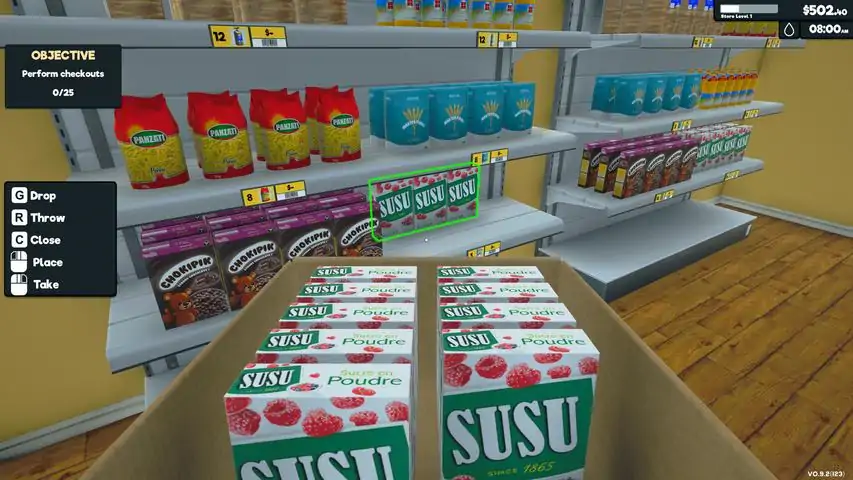
I was able to get all the items marked down, what display they go to, and how many come in a box. I know if this helps me, it will help others too. {Spellings may be off a little as the game writing can be very small.} Item | Display {Quantity} Store Level 1 Choklplk Cereal | Shelf {12} Ron's Sliced Bread | Shelf {12} Kraftung Flour | Shelf {8} Lesleds Oil | Shelf {12} Panzoti Pasta | Shelf {8} Susu Sugar Powdered | Shelf {12} Store Level 3 Acotte Bottled Water | Fridge {16} Comte Cheese | Fridge {9} Narvolo Dark Roast | Fridge {8} Bio Eggs- 8 Pack | Fridge {12} Bourlait Milk | Fridge {16} TeaPalace Tea Black | Shelf {20} Store Level 6 PB's Peanut Butter | Shelf {12} Farine Flour | Shelf {8} Tuplges Olive Oil | Shelf {12} Elo Pasta Spaghetti | Shelf {8} Lustupocru Rice Basmati | Shelf {10} Labolaine Salt | Shelf {16} Store Level 9 Bio Juice Orange Juice | Fridge {16} Cola Soda | Fridge {24} Zap Soda | Fridge {12} Bio Juice Apple Juice | Fridge {16} Labol Milk - 6 Pack | Shelf {6} Turko Soda | Fridge {24} Store Level 9 Bon Papa Cake | Shelf {15} Pepites Cake | Shelf {18} Bonbek Candy | Shelf {12} Crispy Chiby Cereal | Shelf {12} Chocotte Chocolate Bar | Shelf {12} Frugen Yoghurt | Fridge {30} Store Level 12 Jaja Vevel Bleach | Shelf {8} Touprop Cleaner | Shelf {12} Cleandish Dishwasher Tablet | Shelf {12} Savion Hand Soap | Shelf {12} Kaya Shampoo | Shelf {12} Poudou Toiletpaper | Shelf {4} Store Level 12 Don Bernardo Cheese Mozerella | Fridge {9} Don Bernardo Cheese Parmesean | Fridge {9} Hone Honey | Shelf {12} Stark Tuna | Fridge {16} Bio Eggs- 4 pack | Fridge {12} Pablo Sugar Powdered | Shelf {12} Store Level 13 Paysans Butter | Fridge {24} Honey Bee Cereal | Shelf {12} Mwef Chicken | Freezer{4} Vandam's French Fries | Freezer{12} DeNiro Pizza Mixed | Freezer{32} Miam Potato Bag | Shelf {4} Store Level 16 Mimolette Cheese | Fridge {9} Narvolo Coffee Light Roast | Shelf {8} Monteuq Bottle Water | Fridge {16} Bio Eggs- 12 Pack | Fridge {12} Lustupocru Pasta Elbows | Shelf {8} Susu Sugar Brown | Shelf {12} TeaPalace Tea Green | Shelf {48} Store Level 16 Ronpoint Moussaka| Fridge {24} NordicHarbor Salmon | Fridge {20} Pryplat Scallop Gratin | Fridge {24} Bosara Steak | Fridge {16} Ulego Sushi Large | Fridge {8} Ulego Sushi Small | Fridge {16} Bosara Veal Chop | Fridge {16} Store Level 25 Hothot Hot Sauce | Shelf {12} Kekette Ketchup | Shelf {12} Yoyo Mayonnaise | Shelf {12} Sans Crab Stick | Freezer{24} MaxiCane Icecream chocolate | Freezer{23} ChezzyPizz Pizza Chedder | Freezer{32} Store Level 30 Fess Beer Blonde Ale - 6 Pack | Shelf {9} Fess Beer Blonde Ale - Keg | Shelf {6} Fess Beer Blonde Ale | Fridge {15} Teachow Beer Lager | Fridge {15} Covidos Chips | Shelf {16} Bibi Houmus | Fridge {16} Eay Vodka | Shelf {12} Store Level 30 Chipos Chips | Shelf {16} Sublett's Flour | Shelf {8} Puray Mashed Potatoes | Shelf {12} Afyon Pepper | Shelf {16} Elo Rice | Shelf {10} Ron's Sandwich Bread | Shelf {8} Boully Sugar Powdered | Shelf {12} Store Level 42 WC Boeff Bleach | Shelf {6} Kilemol Cleaner | Shelf {12} Boum Dishwasher Tablet | Shelf {12} Yamo Cleaner | Shelf {12} Sapu Dish Soap Durlan | Shelf {12} Bidet Toiletpaper | Shelf {4} Store Level 42 Pryplot Galette Ham&Cheese | Fridge {24} Bovora Ground Beef | Fridge {16} RonPoint Ham Pastry | Fridge {24} B&K Ham | Fridge {20} Ronpoint Lasagna | Fridge {24} Sapora Proscuito | Fridge {20} Bodara Chicken Leg | Fridge {16} Store Level 42 Narvalo Coffee Medium Roast| Shelf {8} JusTsistu Soda | Fridge {24} Koujelma Soda | Fridge {24} Pulp Soda | Fridge {24} Roplco Soda | Fridge {24} Daron Sugar Light Brown | Shelf {12} Store Level 56 MrBean GreenBeans | Freezer{12} MaxiCone Icecream Vanilla | Freezer{24} Bonbek Ice Cream | Freezer{24} Bigtony Pizza | Freezer{32} Spok Potato Pops | Freezer{12} Ego Veggie Mix | Freezer{12} Store Level 56 BK Beer Blonde Ale | Fridge {15} Teachew Beer Lager - 6 pack | Shelf {9} Teachew Beer Lager - Keg| Shelf {6} Magnat Vodka | Shelf {12} Grand Marnier Whiskey | Shelf {12} Cheban Wine | Shelf {12} Store Level 56 Parillo Pasta Penne| Shelf {8} Uncle Tony's Rice | Shelf {10} Daron Sugar Cane | Shelf {12} Madone Toghurt | Fridge {30} Eros Cheese Parmesean | Fridge {9} Gruyere Cheese | Fridge {9} Etron Clotted Cream | Fridge {16} Store Level 70 Wesh Cleaner | Shelf {12} Cemagik Dishwasher Tablet | Shelf {8} Mouss Dish Soap Lemon | Shelf {12} Souplesse Fabrice Softener | Shelf {12} Store Level 70 Abe Book | Shelf {8} Colors Book | Shelf {8} Donnine Book | Shelf {8} Electromagnetic Field Book | Shelf {8} I won't Share Book | Shelf {8} Mother and Child Book | Shelf {8} Store Level 70 Le Triangle Cleaner | Shelf {12} Milaoumiam Cat Food | Shelf {12} Patpat Cat Food| Shelf {12} PatPat Dog Food | Shelf {12} Store Level 81 Gerbe Cake | Shelf {15} Marbre Cake | Shelf {18} Vin's Chips | Shelf {16} Potatartine Chocolate Spread | Shelf {12} Cola Soda Can - 6 Pack | Shelf {24} Zap Soda Can - 6 Pack | Shelf {24} Fort-Lacs Bottled Water | Fridge {16} Store Level 81 Toudou Fabric Softener | Shelf {12} Compact Paper Towel | Shelf {4} Petus Toiletpaper | Shelf {4} Signoulous Toothpaste | Shelf {16} Store Level 81 Krok Book | Shelf {8} Once Upon a Time Book| Shelf {8} Piticha Book | Shelf {8} The Surprise Book | Shelf {8} Vintage Story Book | Shelf {8} Wombat Book | Shelf {8} Store Level 81 Prairie Cake | Shelf {18} St Michmich Cake | Shelf {15} Denarme Chocolate Bar | Shelf {12} Boudain Chocolate Powder | Shelf {8} Daron Sugar| Shelf {12} Yowp Yoghurt | Fridge {30} Store Level 90 BK Beer Blonde Ale - 6 Pack | Shelf {9} Dehl Beer Blonde Ale- Keg | Shelf {6} Jack Sublett Whiskey | Shelf {12} Heng Wine | Shelf {12} Japanese whiskey | Shelf {12} Poulleux Wine | Shelf {12} Product Licences