换一换
换一换 


《反恐精英:起源》移动技巧指南 本指南介绍《反恐精英:起源》中的所有移动技巧,涵盖从搭人梯到像素行走等内容。其中有些技巧已为部分玩家所熟知,但也有不少不为大众了解。本指南不会详细讲解每种技巧的操作方法,而是尝试教授基础内容。我并非所有技巧的专家,但自认掌握的知识足够进行基础教学。 开发者控制台 即使你不是移动高手,开发者控制台也非常实用。它用于输入命令,以启用或更改游戏内的部分设置,这些设置无法通过选项菜单进行调整。阅读本指南时,开发者控制台会频繁出现,因此请务必启用它。 启用控制台的方法: 选项 > 键盘 > 高级 > 启用开发者控制台(~) 之后,你可以按 ~ 键来切换控制台。 我建议启用以下命令: net_graph 1 - 显示帧率、tick率、lerp等信息。 cl_showpos 1 - 显示速度和角度。 启用这些命令会对你有很大帮助,但我建议不要过于关注速度计数器,因为它会分散你正常游戏的注意力。你只需在预 Strafing 时查看一下即可。 ---------基础部分----------- 空中 Strafing [注意:内容较长] 这可能是你能学到的最重要的机制之一。如果你想学习连跳、滑行以及所有与移动相关的技巧,就必须学会空中 Strafing。那么什么是空中转向呢?简而言之,空中转向是一种能让你在空中移动到目标位置的技巧。如果操作得当,你还能借此获得少量速度提升。 还需要注意的是,服务器中有一种名为【sv_airaccelerate】的控制台指令,该指令用于限制你在空中的转向幅度。其默认值为10,这个数值下你能进行相当不错的移动。如果你想了解当前服务器的空中加速度(AA)数值,可以在开发者控制台中输入该指令并按下回车键,控制台就会显示出空中加速度的具体数值。(此方法适用于所有类似的控制台指令,例如【sv_enablebunnyhopping】【sv_enableboosting】等) 那么我们该如何进行空中转向呢?简单来说,首先要获得一些速度,所以按住W键向前移动。你可能知道一个小技巧:跳跃时会保留所有速度,所以起跳后即使松开W键,你仍会保持之前的速度继续前进。因此,按住W键后起跳,接下来该怎么做呢?起跳后应该松开W键,因为对于刚开始学习基础跳跃的新手来说,按住W键是不好的习惯。等你有足够经验后就会发现,按住W键会让你感觉像在开车时漂移一样。 松开W键后,你需要按住一个方向键来控制移动方向。例如,如果你想在空中向右转,就按住D键;如果想向左转,就按住A键。不过这还没完!你还需要在按住该按键的同时,朝着想要移动的方向滑动鼠标。**只要你在移动鼠标,就一直按住按键。如果停止移动鼠标,就松开按键。** 另一个重要技巧是,不要害怕横向移动。刚接触这类移动操作的玩家通常喜欢快速甩动鼠标,而不是平稳滑动。如果操作得当,甩动鼠标也能奏效,但对于新手来说,采用更易上手的方法总是更好的,之后再回过头尝试那些你被告知暂时不要做的复杂操作。 简而言之,你在空中向左或向右移动的步骤如下: 1. 通过向前行走获得速度 2. 跳跃,然后松开W键,这样在进行空中横向移动时就不会漂移 3.当你朝着目标方向移动鼠标时,按住你的平移键。 4. 向左移动鼠标时按住A键,向右移动鼠标时按住D键。 需要学习的内容很多,但没关系!如果你进入私人游戏独自练习一小会儿空中平移,就能形成每次都能做到的肌肉记忆!这对《反恐精英:起源》中所有与移动相关的操作都非常重要!一旦你成功做到一次,就永远不会忘记空中平移了,它真的很难忘记 :D
蹲跳 蹲跳是非常广为人知的技巧。它能提供额外高度,帮助你登上物体。通常情况下,蹲跳都是适用的。蹲跳就像听起来那么简单:起跳后在空中按住蹲键,这样能跳得更高。记住,要在空中按住蹲键,而不是起跳前。落地前记得松开蹲键。 空中蹲伏能让你跳得更高的原因是:蹲伏会缩小你的碰撞箱,从而使你“变轻”,因为你的质量是基于碰撞箱大小计算的。是不是很巧妙?碰撞箱是你与游戏中其他物体互动的基础。比如当你撞到墙并停下时,就是你的碰撞箱与墙发生了相互作用。每次滞空时,按住蹲键通常是最佳选择,因为这能让你跳得更远更高。不过在进行连跳时,我建议不要这样做。 连跳 连跳是起源引擎移动系统的标志性技巧之一。你可能在一些精彩的击杀集锦中见过玩家在旧版起源引擎游戏中进行连跳。但需要说明的是,在《反恐精英:起源》34版本之后,那种极限连跳已经无法实现了。 但这并不意味着连跳变得毫无用处。通过正确的空中转向,连跳仍然能为你带来速度提升。而且连跳获得的速度对所有武器都有效!只要连跳技巧得当,你持刀奔跑的速度和持AWP时是一样的。这非常酷!一些服务器中会使用一个控制台命令来启用连跳,该命令会解除角色的速度上限。这个命令名为【sv_enablebunnyhopping】,其检查方式与检查AA值相同。 说到控制台,有一个非常著名的命令对于稳定进行连跳至关重要。你可以在选项菜单中进行相关设置,但这会覆盖你其他的跳跃键;而通过控制台,你可以添加两个键位绑定,且它们的作用相同。因此,我们将使用控制台来设置鼠标滚轮跳跃。 绑定命令如下: bind mwheeldown +jump bind mwheelup +jump 正如你可能猜到的,当你向下或向上滚动鼠标滚轮时,角色就会跳跃。需要提醒的是,你并非必须同时使用这两个命令才能生效,但同时设置也没有坏处。现在你已经设置好了按键绑定,接下来需要在落地前滚动鼠标滚轮,这样可以保持你的速度。这主要需要练习和把握时机,但相信我,在《反恐精英:起源》中你可以稳定做到这一点,这是个很棒的优势。记住要在落地前滚动,而不是在地面上滚动。 练习时,如果你还是空中转向的新手,就不要尝试空中转向,否则会损失速度,而且你也无法判断连跳是否做得正确。先把时机掌握好,做到不损失速度,等熟练之后再尝试加入空中转向。【提醒:连跳并不能让你获得速度,而是用来保持速度!】 另一个可能需要考虑的问题是:“我的空格键明明好好的,为什么要把跳跃键改到鼠标滚轮上?”滚轮的作用是在每帧中缓冲+跳跃指令,从而提高成功跳跃的几率。因为即使是熟练的连跳玩家,用空格键也很难连续完成5次以上的跳跃(除非使用脚本,这是作弊行为!)。 服务器的tickrate(每秒帧率)越高,成功跳跃的几率也越大!你可以在网络状态图(net_graph)最右侧的四个数字中查看服务器的tickrate,它位于中间两个数字之间。 总结一下,空中转向(air strafing)用于获得速度,而连跳(bhopping)用于维持速度。因此,你需要在连跳的同时左右空中转向来前进,通过空中转向带来的动量逐渐提升速度。 哦对了,正如空中转向部分所述,在空中不要按住W键。
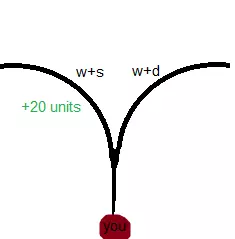
冲浪 冲浪是一种在斜坡上滑行的玩法。说实话,我并不是冲浪专家,所以不会过多讲解技巧,只提供一些基础知识。通常在《反恐精英:起源》的原版服务器中不会有冲浪模式,它一般作为独立的游戏模式存在。专门的冲浪服务器通常会将空中加速(sv_airaccelerate)参数设置为100或更高。 冲浪时,玩家面对的通常是有1到2个陡峭侧面的斜坡。根据斜坡相对于你的位置,你需要向斜坡方向进行平移。也就是说,如果斜坡在你的左侧,你就要按住A键;如果在右侧,就按住D键。这很容易理解吧?不过,这只是让你保持在斜坡上的方法,还不是真正的滑行技巧。如果你想把它骑得像个专业人士,就必须明白在加速时鼠标移动至关重要。尤其是将鼠标移向斜坡以获得高度!兔子跳也是如此,垂直鼠标移动无关紧要。当你跳上斜坡时,要瞄准脊柱,也就是斜坡两侧交汇的中间位置。然后当你在空中越过脊柱并下落时,向一侧进行空中转向,然后骑上去! 骑行时,不要只是按住按键,你得沿着曲线形路径移动,以便在斜坡上获得速度。在斜坡上获得最快速度的最优路径被称为【最速降线】,其形状如下:
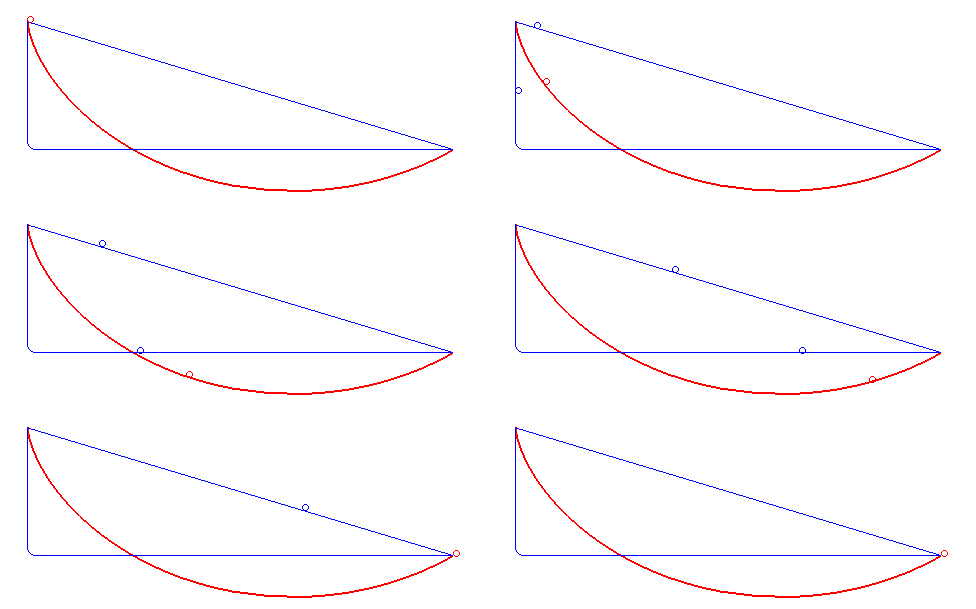
红色曲线是你在进行冲浪时应有的轨迹。 另一件需要了解的是如何离开冲浪斜坡。人们主要使用两种方法:按住平移键直到掉落,或者向上轻甩鼠标以飞向更高的天空。轻甩鼠标就像它听起来那样——你将鼠标向斜坡方向轻甩。记住,只要还在斜坡上,你就要一直按住保持在斜坡上的按键,除非你已经离开斜坡。一切都取决于你的鼠标移动。 学习冲浪的最佳方法是观察他人。在大多数冲浪服务器上,你可以观看该服务器中地图世界纪录保持者的回放。你可以看到他们如何瞄准鼠标,并尝试学习他们的冲浪方式。要做到这一点,你可以打开聊天框,输入【!replay】然后发送。之后应该会弹出一个菜单,你可以通过导航来查看回放。 对于刚接触移动操作的新手来说,冲浪(Surfing)相当复杂,但我建议你先学习一些最基本的操作,比如空中转向(air strafing),然后再学习冲浪。需要提醒的是,这只适用于高空中加速(high air accel)的情况,并且仅在冲浪游戏模式(surf gamemode)中使用。在默认游戏模式的一些练习地图(scrim maps)中,有斜坡的地方也可以用到冲浪,但总的来说,如果你不太擅长冲浪,也没什么大问题。 鲨鱼式移动(Sharking) 鲨鱼式移动是指通过在水中上下弹跳来保持速度。方法?按住空格键。就是这样!没有太多地图有可以让你在上面游泳的水域,所以这招大多没什么用,但仍然是个很酷的技巧。它可以在几次弹跳中保持你的速度,但最终还是会慢下来。耐力重置 耐力重置是指通过按下蹲键(与CTAPPING不同)来立即恢复耐力。例如,当你跳跃后尝试行走,并希望更快地积累速度时,按下蹲键即可将耐力重置为默认状态。就是这样!这是一个非常基础的机制,任何人都能使用。适用于所有会影响速度积累的情况(如手榴弹、子弹、坠落伤害等)。 快速爬梯 快速爬梯是一种在梯子上通过按住两个方向键并向上瞄准来快速移动的方法。具体操作是:将视角完全向上或完全向下以获得最大爬梯速度(400速度值),同时按住能让你贴紧梯子的方向键。例如,当你完全向上看时,按住W + A/D,就能明显感受到速度的大幅提升。如果你想快速向下爬梯子,只需按相反的键并保持相同角度。例如,如果你按住W+D快速向上爬梯子,那么按住S+A即可快速向下爬。快速爬梯也是梯子转向的基础操作! 简而言之,按住W和任何能让你靠向梯子的键,同时向上瞄准;如果你想向下看,就按住S和任何能让你靠向梯子的键。 ---------进阶----------- 预转向 预转向,有些人也称为地面转向,是指在地面上通过缓慢左右移动鼠标,并按住W和与鼠标移动方向相同的转向键,以半圆形轨迹移动来获得速度。记住要平滑且缓慢地操作。如果操作得当,这可以额外获得约20单位的速度,这对跳跃有很大帮助。这也是完成长跳的方法!想在《反恐精英:全球攻势》的核子危机地图上跳上特定位置吗?这就是方法!
Its wise to prestrafe with a scout, pistol, nade, or a knife as those weapons are the fastest. As why prestrafe with a awp when you'll go faster walking with a knife normally. Prestrafing works on all servers regardless of air acceleration. So if you can't gain velocity while air strafing due to no AA you can always prestrafe and maintain your speed with bhopping off of that pre-established speed. Not a lot to say but its a neat and useful trick with very little depth to it really. Its basically just : slowly move mouse left or right hold down w and the strafe key your moving your mouse in couple extra units you can lj with!! Wall Strafing Wall-Strafing is not really a useful technique in the Source engine compared to the GoldSrc engine like with Half-Life, Team Fortress, etc. But it works the same way. If you're moving backwards, hold "S"; if you're moving forwards, hold "W" + the strafe key that pushes you into the wall. If it's on your left, hold W+A; if it's on your right, hold W+D. Doing this right will get you an extra 20 units. Is this practical? Not really, but it's cool and doesn't seem to be spoken about much in the CS:S community. Use your cl_showpos 1 to track your speed and play with your angles and how you look away from the wall if you want to do this. Jump Bug A jump bug is a technique for players to not gain fall damage and jump at a higher height while hitting a bunny hop. This technique isn't very useful in normal play but can be used for certain skill jumps. Cool, but how do I land a jump bug? For you to hit a jump bug you gotta jump, hold crouch, then while crouching mid air, right when your about to land let go of your crouch key and jump. If you want you can also tap it at when your about to fall then jump. Jump Bugs are usually used for skill jumps, pixel surf setups, and long jumps. Most Jump bugs require setups and are very inconsistent. NEED MORE INFORMATION ON JUMPBUGS Long Jump Long jumping is a technique to jump.. long. wow So the techniques to get a good LJ is : 1. Have good pre 2. Have good strafes 3. Have good edge 4. Crouch at the end of your jump 5. Use stat plugins Having a good prestrafe would be around 270-276 which can reliably lead to a 250-257 LJ with good strafing. Good edge just makes it so that you can make your jump because if your edge is horrendous you will mostly like fail the jump. Good strafing would include minimum overlap and no dead time. Overlapping is when your keys a and d keys get pressed at the same time by accident. Dead time is when you aren't pressing any keys at all. Those are the main factors of good long jumping that you should learn if you wanna make some distance. Another way of tracking your long jumping progress is through stating your jumps on custom servers. I'd highly recommend kawaiiclan.com as they're servers are pretty good for kz and have a great plugin. The main way to improve at long jumping is just a bunch of practice and stating. You can enable stats by typing "!lj" in chat, and then when you long jump you can check your console to see your inputs and what to improve on! :D --------Gimmicky---------- Rounding rounding yourself into a wall. Is a technique for closing the gap between the wall and the .03 invisible barrier. You should probably enable cl_showpos 1 for you to under stand how this works. So basically you jump and spam your strafing keys while holding w so you move as close as you possibly can into the wall. AKA AD AD SPAM Then you keep doing that until the last digits of your "pos:" in your showpos are .00 when one of the 3 numbers have a .00 ending in them you are as close to the wall as you possible can. After that you should be successfully rounded onto the wall! Now you can use this technique to pixel surf, pixel walk, and everything your heart desires! Pixel Surfing Pixel surfing is a technique where you glide along where two walls meet. Information on pixel surfs are scarce and most the stuff I found (measurements, theories, etc...) were all self discovered. So if any of it is wrong please correct me! D: Pixel surfs work because your height/peak of your jump connects with how high the wireframe is of the ground. So the measurements for pixel surfs are : 64 units = LJ bind or ctap 56 units = idk mab mini jump 16 units = jb or 4 hop 40 units = bhop 32 units = just crouch jump 52 units = jb Lj = Long jump bind Ctap = Crouch tap Jb = Jumpbug bhop = take a guess These pixel surfs measurements only work on 100 tick For pixel surfs its always good to have pre-established speed as it will work more reliably. When your using a lj/ctap ps at the peak of your jump id recommend flicking yourself into the ps by wallstrafing. Like in this clip! NEED MORE INFORMATION ON PIXELSURFS, OR IF YOU KNOW ANYTHING ABOUT PIXEL SURFS PLEASE GET IN CONTACT !!! Pixel Walking Pixel walking is basically standing on a slope. yeah that's it.. So slopes are just a big triangle right? So were just walking on the spine of a slope to keep it simple. What advantage does this give? A pretty good one depending on the map.
The thing with pixel walking most mappers simply align the slope with the wall. This allows us to walk on it. Remember me talking about rounding onto walls? Its the same thing to pixel walk. First your gonna wanna find the slope you wanna pixel walk on. Jump at the wall behind the slope then a d a d spam. If done correctly you should be standing on it! If it doesn't work then the slope is inside the wall or the slope is to high for you to jump on it. Edge Bug A edge bug is a technique where you slide off a the very edge of any surface. There are no limits of what you can edge bug off of. Upon a successful edge bug you will slide off the surface maintaining your speed, adding your vertical speed to your horizontal speed, and taking no fall damage if your falling down from a high surface. If you want to hit an edge bug you gotta land on the very edge of the surface. Then the server will interpolate your play position and just slide you off. The way to get to the very edge of the surface you are trying to edge bug on changes depending on what it is. The best way to hit an edge bug is by using crouch to make you lighter mid air letting you go farther to slide off the edge and the most important thing is good air strafing. Another thing to mention is when your at the position to where you will hit a edge bug, you can let go off all your keys and you will still slide off. Practice Practice Practice, Then eventually you should get a feel for it. :) NOTE : The higher the tickrate the harder it is to hit an edgebug. The lower the tickrate the easier it is to hit an edgebug. Wall Bug A wall bug is where you get stuck on an angled wall by rounding your self into it, leading you to be stuck midair while hugging the wall. For example the way to do so is hug the wall jump hold any key that pushes you into the wall (For example if your looking at the wall hold w if your looking away hold s) while your pushing your self into the wall, strafe left and right to round yourself into it and hold crouch or shift to stay stuck. As long as your pushing yourself into the wall you should stay attached to it. Also note that the way the wall is angled is very important! Some angles are harder to wall bug on are some are easier. There's a lot of different wall bug variations which are different for every map which I can't explain with certainty, but the tf2 jump community can :D Heres a video showing all the different type of movement tech involving wallbugs by ixam. Wall bugs work on every map as long as there is an angled wall. ----Co-op movement------- For the next section of movement is called "boosting" There are usually prefixes added to it depending on what type of boost it is. Boosts are where 2 players get each other in positions/areas that you cannot get to by yourself. When boosting there are usually two terms used to describe both of the people involved in the boost. booster - the person giving the other person a boost. flyer - The person being boosted. There are certain boosts that require sv_enableboosts 1 Most crazy ones need this command to be enabled but all of them usually don't need it although when its on it has a better effect. Run Boost Run Boosting is a technique that is used to gain speed and to have an unexpected peak on your opponent. To make a run boost happen the booster must stand still looking in a certain direction while looking slightly up to see the flyers feet. The flyer must jump on top of the booster while looking in the same direction as him and jump once. When the flyer lands from jumping on his head then both parties can start to walk forward. Both the flyer and the booster must be at the same speed for it to be done successfully. A pistol, grenade, knife etc should work fine. After walking in a straight line for a while the flyer will jump having noticeable more speed and distance than a normal jump. You can chain bhops off of this or just use this technique to surprise an awper holding an angle. Another thing to note is that there is a delay due to us being on the internet and not having a perfect reaction speed. To compensate for this as the flyer I would recommend waiting a milisec when you land then to began to walk forward so you'll be lined up with the booster. One last thing to note is that there are certain positions the booster can do to ensure a good run boost. For example the best way I've found to do a run boost is to go to the backside of the booster's bounding box. Flash Boost Oh boy where to begin. To begin both parties participating in a flash boost need to play a part. If 1 messes up it will not work. Well what's a flash boost? A flash boost is a way to boost a player into the sky by throwing a grenade at his feet to send them flying. Any grenade works for flash boosting despite the name. An HE, Smoke, Flash will work just fine. NOTE the server will require sv_enableboost 1 for flash boosting to work. So lets start with the flyer as his role is WAY easier than the booster. For the flyer there are a few simple rules to follow. 1. Make sure you crouch jump when jumping over. 2. Jump OVER the booster. NOT on top of him but over him. 3. Jump in a straight line. Makes the boosters job way easier to predict you. 4. Don't bait out the booster. Even on accident its quite annoying. This includes walking forwards then stopping abruptly to just walk back. Sounds dumb but trust me it makes things more consistent. 5. Oh yeah did I mention to JUMP OVER the booster??? yeah pretty important :D You might have noticed I said to jump over the booster. It's pretty important and leads to 99% of all flash boosts to happen. I'd recommend practicing on a private server with the person you want to flash boost with. As jumping over them does require you to learn the timing as the hit box is a lil' big to those not used to it. For the booster your gonna wanna be crouching or standing depending on the positioning of the flyer. For example if the flyer is above you, your going to stand. If you are both on the same level you are going to crouch. Once your in your position pull the pin on your grenade and try and flick the grenade at the flyers feet. A useful tip to remember is, the higher you aim the higher the flyer goes. The lower you aim the faster the flyer goes. Hitting a good flash boost is all about angles. This takes a lot of practice and dedication but once you nail it down you can gain a massive advantage. Another technique you might not know about is that if the flyer is above you there is a way to gain MASSIVE amounts of speed and height. How? Run throwing! Make sure you line yourself up to hit the flyer. While he jumps down at you your gonna want to walk forward throw then jump. It's a good idea to wait till the booster is as close to you as possible when falling. If you payed attention and done all these steps you should be flying in the sky :D Jump Boost A jump boost is where you bhop on the boosters head to gain a lot of height. This requires sv_enableboost 1 if you want some crazy height. You can reach certain spots without it but you wont go as high with it enabled. The steps to do a jump boost is your gonna want to be standing on the boosters head. Then your both gonna start bunny hopping while on top of each other. If done right the flyer should be flung into the sky. This can take a while and it's mostly luck. You can increase your chances by bhopping amongst a wall and spamming a d a d while holding w. To note by bunnyhopping I mean just jumping. You do not have to strafe left and right on top the persons head. It's just scrolls. So. Get on persons head. Both start bhopping in place. If against a wall do some a d a d spam while holding w for better chances to get a high jump boost. If done right and your hitting your hops you should get some height in the sky. :D NOTE : As a booster if you want your fly'er to get massive height you can do only 1 jump. Although its gimmicky and RNG and bunnyhopping is a bit more reliable. If your partner has perfect scroll's it can work just fine. Hostage Boost A hostage boost is a way to gain massive amounts of speed via jumping off hostages as a counter-terrorist. This technique needs sv_enableboost 1 and it does not work with it being set to 0. Although technically not a "boost" this is the proper name for it. If you think about it though, the hostage is sorta of boosting you so it kinda is ! The best way to Hostage boost is by getting your hostage stuck in a corner or an area where they are stationary. Then when on top of them you can press e on them to make them follow you for extra speed. (Making them follow you isn't necessary for the boost to work) Then after all of that you shift walk them in the opposite direction of where you want them to boost you. So for example if you want them to boost you forward you would hold shift, move backwards a little bit, then let go of shift, walk forwards then jump! The reason you hold shift is to not be flung off instantly by just walking on there head. You can get out of bounds on both cs_compound, cs_militia using this method ! Ladder Boost A ladder boost is a boosting technique involving a run boost, an edge bug, and a ladder strafe. Something to note is that YOU DO NOT NEED SV_ENABLEBOOST 1. So to begin we need to a map with ladders (OMG!) and a way to gain speed. This technically requires only 2 people. Although 3 is recommended. Why 3? We need lots of speed and a runboost is a very good way to gain said speed and doesn't require any special commands for a runboost to do so. We're gonna wanna get a runboost than we gotta try and edge bug off the person on the ladder. For the person on the ladder your going to ladder strafe upwards upon the flyer being above you. If done correctly you should be sent flying into the sky. NEED MORE INFORMATION ON LADDER BOOSTS Ground boost A Ground boost is where a booster bounces a grenade and the flyer bhops off the grenade leading them to fly upwards. You need sv_enableboost 1 for this to work. As a booster the best way for you to throw the grenade for the max height of the fly'er is to jump throw SLIGHTLY looking down, if you look entirely down your flashbang becomes insanely slow. You can flash bounce at the same ground level but flashbouncing is mostly used for getting two people up to an area without getting a third person. So for example 1 person can flash boost someone in a certain spot higher then them and the person who got boosted can throw a flash down at them so they both can be up in the same area. They're very hard to do mostly because of timing and bhop RNG. I'd recommend to get a good timing is to do a count down in vc. 3 2 1 THROW! Or what ever works for you and your partner. Get creative with your techniques and spots :D! ------------Binds------------- How to set up an autoexec file An auto exec file is something that executes commands upon start up of your game. This is good for alias's configs etc. First things first find your CS:S directory by : Right click on source in steam. Click Properties Click installed files Click on 'browse...' Good job you found your CS:S directory! Now we gotta go into our 'cstrike' folder then into our cfg folder. Awesome now this is where our autoexec.cfg file will go. First things first copy and paste any .cfg file you find in your config folder. Then rename the file you copied and pasted then rename it to 'autoexec'. So your autoexec directory should be : Counter-Strike Source cstrike cfg autoexec.cfg. Open your cfg folder with whatever notepad program you have and clear everything in the file. ctrl a + ctrl x. Then after that you can put any commands you want make sure they're lined out and not put together. like : "sv_subscribetoseve 1 mp_visitquakecsdotnet 1 echo thanks for loading!" Now your auto exec file is set up and we can copy and paste binds into it :D Jump Bug COPY AND PASTE ALL OF THIS EXACTLY HOW IT IS IN UR CFG! //Jumpbug Bind alias +jb "+duck" alias -jb "-duck; +jump 1; -jump 1" //scroll up you jump bug ez bind mwheelup +jb //Toggles Mwheelup between +jump and +jb when you press 0 bind 0 "toggle1" alias toggle0 "unbind mwheelup;bind mwheelup +jb;bind 0 toggle1;play ui/hint" alias toggle1 "unbind mwheelup;bind mwheelup +jump;bind 0 toggle0;play ui/buttonclick" Long Jump Bind COPY AND PASTE ALL OF THIS EXACTLY HOW IT IS IN UR CFG! //when you press c you lj alias +lj "+duck; +jump" alias -lj "-duck; -jump" bind c +lj ---------The end!----------- Thanks for reading my guide! If I missed anything or you have any questions leave a comment and I'll answer them accordingly!! If you want to get better at movement in general I highly recommend KZ[kawaiiclan.com]! One of the best movement tools to improve drastically. Theres a bunch of commands like !lj !gap and !style which will help you learn from your mistakes and become a better strafer. Make sure to visit https://quakecs.net if you enjoyed the guide ! Peace out I hope this helps you on your adventures:D -Update 12/07/24 Added a flashbounce section Added a stamina reset section (forgot all about adding it lol) -Update 12/22/24 Corrected flashbounce to groundboost "Thx to twitch.tv/highfallentv" "twitch.tv /highfallentv : Flash bounce is called a Ground boost coming from a trikz player :P" -Update 12/23/24 Added a wall bug section Added a fast ladder section NOTE : there are other things I know off and want to add but don't have enough info on them or can't explain good enough. For example ladder strafing lol. I bet there's many things that slipped my mind while writing this or simply do not know of. If you notice anything missing, PLEASE put it in the comments ty ^_^ -Update 12/26/24 Fixed some grammar mistakes (Thanks to iso921!) Also corrected some wrong infromation on jumpbugs. (Jump Bugs aren't higher then crouch jumps they're higher than bhop jumps... Lol) -Update 2/12/25 Forgot to add hostage boosting xP, Its here now under the boosting section enjoy! Renamed "Flash Boosting" to "Flash Boost" because I thought it looked cleaner with out the 'ing' Going to update the pixel surf section later due to new discoveries. HTTPS:/ /QUAKECS.COM <3<3<3<3