Journey

Journey

Journey

欢迎来到Journey社区! 
关注
28帖子·1新帖
游戏详情
全部
官方资讯
攻略创作
组队交友
问题反馈

本指南旨在解释游戏中的一个重要机制。 键盘操作: 按下W键 已更改设置的键盘操作: 打开菜单 查看“移动”选项旁显示的按键 关闭菜单 按下这些按键 总结: 希望本指南对您有所帮助。

--
--
2
--

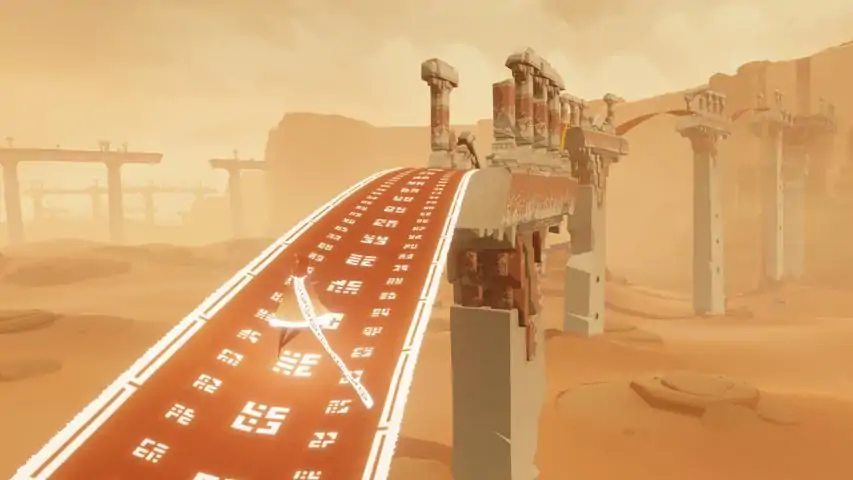
一份关于如何以红袍角色单人获取成就Threshold的指南视频。你可以在首次游玩时尝试,正如你所见,我使用的是基础等级的法袍。 方法如下: 本指南将展示具体步骤!同时也包含断桥关卡的简要流程,包括三个符号。如果你不小心激活了桥梁的最后一个旗帜,可返回标题界面并继续游戏以重新尝试!建议尝试落在旗帜顶部,以避免完全激活它。

--
--

步骤1:按下W键 如何行走

--
--
--
--

飞得更远、更快、更高,并尝试一些有趣的技巧吧。 简介 你已经对游戏进行了全面探索,在不断发现新事物的过程中度过了愉快的时光,或许已经游玩了5到10遍。现在,你可能想尝试以更快、更华丽的方式在游戏中穿梭。也许你听说过那些酷炫的飞行技巧,想要开始体验那种高空自由翱翔的感觉。但如果你对人们常提到的“控制器操作”感到困惑也没关系——这份指南专为键盘鼠标玩家打造,将带你了解飞行的基础知识、一些简单技巧以及更高级的操作。 需要说明的是,我所描述的内容大多存在不同变化形式和例外情况。其中大部分内容源自《风之旅人》社区,为了方便你在《风之旅人》维基上进一步探索,我沿用了社区中的相关术语。我的知识得益于他们,若有任何错误,皆由我个人负责。不过我注意到,Steam 上有玩家对键鼠用户能否实现某些操作技巧存在疑问,所以尽管我自己也是个新手,还是特意制作了这份指南,并附上自己的视频来展示我的一般操作水平。我会尽量从键鼠操作的角度进行讲解。 不必认为必须掌握这些技巧才能享受游戏,但如果你想尝试,不要灰心,尽情翱翔吧! ### 操作控制 - 飞行:鼠标左键或空格键 - 鸣叫:鼠标右键或左 Ctrl 键 - 冥想:回车键 - 屏保模式:P 键 ### 基础知识 或者说,对本指南后续内容有帮助的一些信息 ### 我将使用的术语 - 旅人(Wayfarer):指玩家自己。 - 充能(Charge):当你的围巾能量充满时。**助推**:当你的冲力将你带至空中,无需使用飞行按钮时触发。 **基础动作说明** **俯冲**:当你头朝下向下滑翔时,即为俯冲。在空中按住前进键并将镜头向下倾斜,即可轻松进入俯冲状态。此姿势下的移动速度比直立时更快,你可以通过呼啸声判断是否处于俯冲状态。这是许多高难度动作的基础。 **蓄力**:指不按住飞行按钮,而是以稳定节奏“点按”该按钮。通常建议使用这种方式,因为它能让你的围巾持续更久,这在双人飞行(详见额外内容)时尤其有用。但在某些情况下,比如需要持续充能时,长按飞行按钮会更为合适。键盘平滑转向:可怜的键盘玩家,你可能只有四个方向键,但通过组合相邻按键形成对角线,你可以获得8个可能的方向。要实现平滑转向,需按连续顺序按下按键和组合键(例如使用WASD键顺时针转身:W - WD - D - DS - S)。通常这无需特别留意,操作相当直观,而且大多数时候优先使用鼠标转动视角,除非是非常特定的技巧。 禅意跳跃 或者说,如何在意想不到的地方冥想。 原理: 利用屏幕保护模式,该模式会让你摆出冥想姿势。如果你长时间不移动,就会看到屏幕保护程序,但你也可以立即调用它。如果你自己调出(屏幕保护程序)并在它启动前迅速操作,就能以极具创意的方式进行冥想。

How to do it: Press "P" to enter screensaver mode. Right as the screen fades to black, press the "Fly" button. Then press P again to exit screensaver mode and see the glory of your meditative state. Tips: It all comes down to timing your "Fly" for the right moment, so it might take a few tries to get it. Faceplant Or, how to give the ground a full-body hug. Or make others think there's a dead body. Or let other white robes know you've got some skill. To show how overcome you are that you've met someone. The possibilities for self-expression are endless! How it works: You make your Wayfarer stumble so much that they fall. How to do it: Walk forward, and don't let go of that Forward key. Spin your camera fast. Profit Tips: There's other ways of faceplanting, but the version I'm covering only works if you have control over the camera, so you can't do it this way when the game has a fixed camera angle. You can trip over your own scarf if it's in the way; somehow this makes you less likely to fall on your face. If you can't get your camera to turn fast enough, try turning up the sensitivity on your mouse. Dive Boost Or, the fancy way to travel. Go farther, faster, and higher. We're getting into the complicated stuff now. How it works: Diving increases your momentum, especially if you are actively flying. If you gain enough speed in a short time, at the end of the dive your momentum lifts you without even having to flap your wings. With a successful boost you regain the height you lost during the dive and then some. How to do it: Get to a high point. If it's not quite high enough but you've got enough scarf, you can lift yourself higher with one or two flaps before the next step. Angle your camera down and keep it there. Press and hold your Forward key. With the combo of camera down and moving forward, you should now be diving headfirst, and you'll soon hear the whooshing sound if you're doing it right. Press the "Fly" button to flap your wings. Don't hold it down, pump it in a steady rhythm, about one pump per second. Pump about three times. You can get away with two if you're already moving fast, and you can pump more for as long as you have scarf. Now stop pumping and raise your camera to the sky. If successful, you'll boost into the air. Tips: The longer the scarf, the more you can build your momentum for a good boost. Getting too close to the ground will interfere with your camera, lifting it. Companions and certain terrain will also interfere with the camera. Practice from a good height so you get less interference. The rhythm you use to pump Fly, how many times you pump it, and the angle you're at will create variations in the speed and boost. You'll get a better feel for the variations as you go. Dropshoot Or, speeding along the ground like you're still in the air. And then returning to the air at the end of it anyway because nothing can hold you down for long. How it works: With the right dive position and camera angle, you can trick the game into thinking you're still capable of flight even though you're scraping along the floor. This will let you build a lot of speed. If you're a white robe - and this move is a white robe favorite - you'll recharge as you touch the ground, which will keep you speeding for as long as you can maintain contact. Then turn towards the sky and watch yourself soar upwards through your own momentum. How to do it: Get to a moderately high point. It doesn't need to be too high, only enough that you can get into a dive position with the right camera angle. If you need to you can lift yourself higher with one or two flaps before the next step. Angle the camera down. Press and hold your Forward key as you drop off the high point. With the combo of camera down and moving forward, you should now be diving headfirst. Head towards that ground! Immediately on contact with the ground, hold down the Fly button. Don't pump it, hold it. Count the flaps of your robe to keep track of your time. You should flap at least two or three times. Then turn to the sky in one of two ways: Turn your camera towards the sky and then stop flying. OR, keep your camera completely still and stop flying and then use the direction keys to turn towards the camera. Note the difference in order - if you use your camera to boost, you'll boost better with a bit of flying to get you moving in the right direction. If you use your direction keys to boost, you'll need to stop flying first so your flying doesn't move you too much in the wrong direction. If successful, you'll lift into the sky higher than you started. Tips: Your timing as you hit the ground and start flying has to be just right. Too soon or too late and you won't be able to maintain contact and keep up your speed/charge. If you're having trouble with it, deliberately try to be too soon and then too late so you can get a better feel for how far off you are. Then gradually correct back to the right timing. The longer you can maintain contact with the ground while flying, the more you can build momentum and boost higher. At first, maintain contact with the ground for just three flaps. You can try staying in contact longer after you experience successful boosts. You'll maintain the momentum you had before contact with the ground. If you just started but your camera is getting out of control or you start lifting off and you need to abort, go ahead and abort and your previous momentum might at least bring you back to the height you started with. You'll maintain the momentum you had before contact with the ground. So if you dive towards the ground with extra flying as if you were dive boosting, and then dropshoot successfully, you'll add more height to the final boost. Wiggling the camera back and forth - or just turning it in a circle - will help keep the camera angled down. If using the direction keys to start your boost, you'll need a smooth turn as described in the basics section. This is a favorite for traversing the pink desert but I found it easier to practice on a flat surface. Start out with whatever feels easiest so you can grasp the mechanics before upping the challenge. Charge Boost Or, using weird glitches at very specific places to boost yourself to ludicrous heights. How it works: There are walls at very specific points that will let you continuously dive at them. If you're in just the right spot to hug the corner where the wall meets the ground, you can keep diving AND get charge for your scarf if you're a white robe. If you do this for long enough, you'll build an incredible amount of momentum, which you can then turn around and use to reach never-before-seen heights. approaching a charge boost point in the pink desert exiting a charge boost point (the video didn't capture the keystrokes correctly, don't trust it) How to do it: Identify a charge boost point. My video only demonstrates one, because it has a runway and that was the easiest for me to practice on. You can find more on the Journey wiki. Dive at the corner where the wall and ground meet. You'll need to hold down your Forward key and keep your camera angled down, and keep it that way similar to the previous moves. Hold down Fly as soon as you reach the corner. You'll know you're successful if you don't get pushed away from the wall and you see your scarf flickering as it continuously charges, allowing you to keep flapping forever. Maintain the downwards camera angle, forward key, and flying for as much as 25 to 30 seconds. Your Wayfarer will flap about once per second to help you keep count. Then keeping the camera angled down and still, let go of fly and use the direction keys to smoothly turn towards the camera. If successful, you will hit the sky with your boost. You've reached the pinnacle now. Tips: Works best as a white robe, red robes can dive but they'll need something to help them recharge their scarf. You don't need to approach the charge boost point in any particular way, you just need to dive at it correctly when you get there. The journey wiki says you don't get further boost if you stay longer than 25 to 30 seconds at the charge boost point. I'm gonna take their word on that. You're using the direction keys on this one, so, you'll need a smooth turn as described in the basics. Camera angle is important here again. Wiggling it back and forth might help keep it angled down. Don't hold down the fly button until after you've made contact with the charge boost point. Extras And lastly Extra stuff you can try out Midair flyer charge: If you're flying and chirp as you move towards flyers (those bits of cloth that gather in packs and will recharge your scarf when you Chirp at them), you can get recharged and stay in the air longer. The timing can be tricky, but it's a fun way to try flying forever! Tandem Flying: When you and a companion chirp to recharge each others' scarves as you fly, so you can stay in the air. Tandem Coasting/Hovering: You and your companion can recharge each others' scarves simply by being close to each other. If you're enough in sync in the air, this lets you glide or hover without chirping. So they say, I can't explain well what I've never done. Boost combos: You can combine the dive boost, midair flyer charge, charge boost, dropshoot, etc, any number of ways. It depends on the terrain and what you're comfortable with. A word on etiquette: As other guides say, be a good companion. If you're playing for the company and they're not fancy flyers themselves, stay with them and let them experience the game at their own pace. You can disconnect if you leave people too far behind, or prevent them from exploring if they're always rushing to catch up with you.

--
--
--
--
--
--

我在网上没找到相关指南,所以就来分享一下! 操作步骤: 1. 按住W键直到角色开始向前走 2. 保持按住W键的同时: - 尽可能快地旋转视角 - 尽可能快地反复按A键和D键 这样应该就能让角色脸着地了!如果遇到困难,确保在执行第二步前,你的角色已经以行走速度向前移动。

--
--

在冲击需要遇到10名不同玩家的【Wonder】成就时,如果玩家人数很少,你会感到相当困难。 查阅游戏维基后发现了一些信息,可能对想要“快速”解锁该成就的人有所帮助: “如果你是首次游玩,你无法遇到白袍玩家,因为他们更有经验,可能会干扰你在《风之旅人》中的初次体验。但如果你不穿白袍,而是穿着红袍,就有机会与初次游玩的玩家一同旅行。” 维基的同伴页面包含许多小信息,但这是对想要完成成就的人最有用的一条。白色长袍会授予完成Transcendence成就的玩家。你可以在沉没之城的章节选择界面更换长袍,在那里你还能查看已收集的符号概览。 总之,若想不花费10小时寻找他人就能获得【WONDER】,只需脱下白色长袍。

--
--
--
--
9
--

《风之旅人》完整无解说通关视频。已收集所有符号。最高画质设置,1440p。第一章:序章

第二章 桥梁 第三章 沙漠 第四章 下坡 第五章 沉没之城 第六章 神殿 第七章 山脉 | 终章

--
--

本指南将展示如何在《风之旅人》中获得白袍/白裙/白斗篷。获取长袍

指南 白袍是一个秘密物品,你需要在获得【Transcendence】成就后才能获取,该成就要求收集游戏中隐藏的所有围巾升级。你可以通过多次通关来获得【Transcendence】成就(无需在同一轮游戏中找到所有围巾)。 获得【Transcendence】成就后,通过“章节选择”回到游戏开始处。从区域中央向右看,你会看到地面上伸出几块大布。走向它们并直接走进去。等待布料变红后再走出来。你的斗篷现在将变为白色,初始围巾也会更长。与红色围巾不同,白色围巾在你跳跃落地后会自动恢复围巾能量。你的围巾能量消耗速度也比正常情况下更慢。如果需要,你也可以走进几块大布中换回红色斗篷。等待它们变成白色即可。在获得成就后,你可以在【章节选择】区域随时随意切换红白斗篷。

致谢 希望本指南能帮到你! 【旅程】粉丝维基页面

6
--
1
--
--
--
2
--
--
--

修复《风之旅人》PC版音乐问题,该版本音乐相较于PS版存在损坏:文件同步严重错乱、乐器缺失(竖琴、中提琴)、音频间隙等。 修复内容如下: 1. 修改了多个ogg音频文件,使音乐循环能够无缝播放和重复,乐器也终于实现同步。大多数情况下,循环现在会从开头开始播放。 2. 消除了ogg文件中的许多音频间隙,并确保避免因音频频谱剪切不当导致循环重复时出现高音咔嗒声 artifacts。 3. 若安装相应文件,现在可以听到伙伴音轨(竖琴、中提琴)(详见“伙伴音乐”段落)。 4. 更多变更详情请参见下载页面上分享的《详细变更.txt》文件。这个视频会让你了解到前后的音效对比(如果你还没玩过《风之旅人》就不要看!)

关于《星露谷物语》最新音频修复的制作细节及其效果: 伙伴音乐 伙伴音乐主要由额外的竖琴和中提琴音轨组成,叠加在默认音轨之上(部分区域还包含其他乐器)。 通常情况下,游戏会根据是否与其他玩家联机来切换伙伴音轨的开关状态。 目前PC版中该功能存在问题,完全无法听到多人游戏音乐!(这是一个bug,不过【粉色沙漠】关卡是例外,即使单人游戏时也能听到一点中提琴声……)多人游戏文件是存在的,但游戏就是无法读取……而在原版PlayStation版本中该功能运行正常。为解决此问题,我将同伴音轨与同时播放的对应单人音轨进行了合并。因此,若你安装了同伴文件,即使在游戏中独自游玩,也会一直播放同伴音乐! 感谢Abhi提出通过这种方式编辑音频文件的想法! 值得一提的是,游戏中的部分场景,多人音轨并非特定对应某一首单人音轨,而是设计为在不同单人音轨上叠加播放(这些单人音轨原本不会同时出现)。有时,当新音轨出现时,同伴音乐会停止播放,而主单人音轨则继续播放……通过合并文件无法有效复现此问题,因此已对哪些音轨是否与伙伴音乐合并做出了一些选择。 感谢Yupa帮助我了解了一些多人游戏场景。 更新内容 最新更新v1.2.1:添加了天堂音乐修复(Apotheosis)。 v1.1:同步了从章节选择到雪地关卡的所有音频文件,并将它们合并为伙伴音乐。 如何安装? 下载单人或伙伴音频文件。你也可以下载天堂关卡修复补丁(Apotheosis),其中包含10分钟或1小时循环的音频文件(文件较大)。 打开你的Steam“Streams”文件夹,路径为:Steam steamapps common Journey Data Sounds Streams。 打开下载的压缩包,全选所有ogg文件(按Ctrl + A全选),然后左键点击并将它们拖到游戏的“Streams”目录中。选择覆盖文件。 独奏和同伴音乐文件可以相互覆盖,以便在独奏音乐和同伴音乐之间切换!选择你喜欢的那个(我个人肯定不会再用独奏音乐了^^)。 享受游戏! 如何恢复默认音频文件? 你可以在覆盖文件之前,将游戏Streams目录中包含的原始ogg文件进行备份。或者直接让Steam验证游戏文件完整性以重新下载: 右键点击Steam启动器中的游戏→属性→本地文件→验证游戏文件的完整性。 尚未解决的问题 过渡突兀。例如,在“粉色沙漠”关卡的后半段或“雪地”关卡中,第一个循环在与新循环重叠几秒后突然停止,这种情况时有发生。游戏本应在许多循环中添加淡入或淡出效果,但并非每次都能做到(或效果不佳),而我仅通过编辑音频文件无法改善这一问题。不同步的过渡(例如天堂场景中的“神化”音乐,情况非常复杂:当音乐曲目本应在特定小节线处开始播放时,在PC端却无法正常播放,而是根据玩家触发音乐的时间点开始) 玩家呼喊(啁啾声)和混响:此问题未修复啁啾声和音频混响,这些在PlayStation版本中表现正常,但在PC版本中存在问题(啁啾声听起来不够丰富,且相当刺耳) 伙伴音乐修复在当前状态下并非完美解决方案

--
--
1
--