Unnamed Space Idle


《未命名太空放置》新手玩家指南
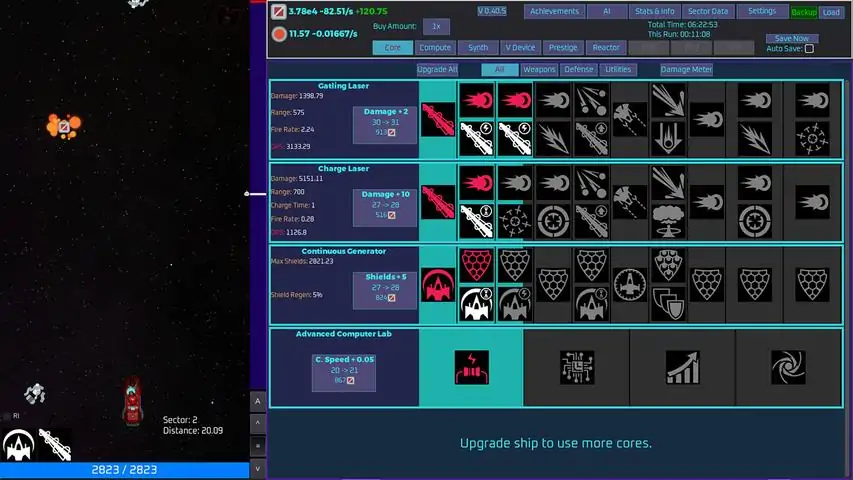
A guide to most things in Unnamed Space Idle (USI) Notes This guide will contain some spoilers for the game, so I recommend getting to at least sector 21 and unlocking warp drive before looking at this. Also, this only goes up until crew , so don't expect anything advanced. Most of the time, if you want something in USI, FOCUS ON IT! updates: added a section for crew updated V shard section Core This is the very first feature you unlock in USI. Most of the time, if you unlock a 2.0, 3.0 etc. you should switch over to that. Also, core is not allowed in some challenges. Core milestones for weapons/shields are 10 until the final two milestones, which are 15. Utility milestones are 20. Compute The second feature you unlock, compute is one of the most basic features in the game. Buying the AI upgrades for optimization is highly recommended. The first base 2 upgrade unlocks the advanced version for compute, boosting the level caps for the basic compute. All the tings that can boost compute is the compute utility, reactor, V device, some modules, bases, warp drive and crew. Synth Synth is the third feature you unlock, allowing you to craft items to then create modules that can be equipped to boost various stats. T1 modules are capped at level 50, while T2-T3 are capped at level 60, then T4-T13 are capped at level 75. (according to my knowledge). Upon reaching maximum level, the material will be infinite, meaning you will never have to craft it ever again. If you need to focus on synth, you eventually unlock a synth utility that boosts synth speed, synth output, etc. Also, there are many shards in the v-device that boost synth speed. Every synth level, you get synth points, which can be used to buy upgrades. If you need all the synth slots, there's one in the synth points upgrades, one in material research, and one in the warp drive upgrade tree. Modules I recommend are damage, shields, VP generation, VP generation max, salvage gain, compute speed and void matter gain. All modules slots can be unlocked through synth points. V Device The V Device can boost various aspects of the game. As you progress through the game, more slots will appear. If you need to focus on a specific feature, like synth, put in shards that boost synth. The V device doesn't offer much, but it can be a big help if you need to boost something. If you need to know where a specific shard is located, go to the "Sector Data" tab to the right, and all sectors you have unlocked will be shown. Click on a sector and hover over one of the enemies, and you should see a V Device shard. The V Device tab itself also shows where shards you haven't discovered are at. Eventually you will unlock shard links. You can use these to link two shards together, giving both of the shards the boosts in both areas. For example, let's say you have a compute shard in the pink slot and a battle shard in the red slot. If you linked them together, the compute shard would give boosts as if it were both in the pink and red slots. Same goes for the battle shard. Prestige Prestige is the fifth feature in USI, allowing you to reset most of your things for new weapons, shields, utilities, etc. You can also unlock brand new ship types that can hold more weapons and shields and utilities. In order to reset, you must reach a specific sector. The USI wiki is very helpful as it can tell you how to pass specific sectors. Reactor The reactor uses void matter to produce void power that can be used to boost other features. You eventually unlock power boost levels, that you can increase with your void power. There are modules like the void power generation module that boosts the void power generation. Research Research boosts countless areas of the game. You get faster research speed as you progress through sectors. Material research eventually gives you a second synth slot, which I recommend you get as soon as possible.You can also focus on specific research types, multiplying the speed by 9. Bases Bases are the eighth feature you unlock. Bases allows you to place various buildings that produces material. Battle components boost many different features, including: Damage and shields Compute speed Synth speed Warp Essence gainedBases also have many upgrades, some completely changing gameplay. For example, Base 3 allows you to link shard slots in the V device. Challenges Challenges, once completed, give boosts to the feature corresponding with the challenge. For example, Synth Purity boosts synth. Most challenges disable core upgrades. The Base Carry challenge majorly reduces the cost for building upgrades, so if your focusing on bases, do this challenge. Warp Drive Warp Drive lets you complete warps at a certain difficulty, giving you warp essence and warp multiplier once completed. The upgrade tree uses said warp essence for many upgrades, including another synth slot. Warp Drive is a very helpful feature, so make sure to focus on it a little more than other features. Crew Crew is a helpful mechanic that can boost almost all of the stats in-game. To start gaining levels click on one of the bars to the right of the pyramid of upgrades. Start with the top one and then after you get the top one to around level thirty progress to the bottom. This isn't required but is helpful to earn rank points, which can be used to boost stats. Eventually you can retire one of your crew members to gain mastery. Once you get 500 of them, you can turn them into mastery points to buy very useful upgrades, ranging from more shard links to simply more module slots for synth. These are hard to earn, though, so spend them wisely. AI Points and Codes AI points are gained upon completing achievements or redeeming codes. AI points can be used to buy many upgrades, including: Auto Merge Smart Craft 1-4 Research Auto Select Compute Optimize Button Compute Auto Optimize Auto Warp Core Auto Upgrade Increased Offline Max Module Pinning Auto Advance Auto Navigate Shard Stats Total DisplayEverything listed above is highly recommended. Below is a list of currently active codes that give AI points and time warps: secret whywastherenotalaunchcode NOW (only works if you have the first 3 bases unlocked) registerbonusyo (100 AI Points) retrofix (1 Extra Retrofit) Achievements Achievements give AI points, and some even give boosts and ship designs. The basic achievements are easy to get (mostly), but the secret ones are more difficult. Here's how to get all of them: Enter secret code on the settings screen: Go to settings, and type "secret" in the code bar. Base(ic) Green: change all of Base 1 to green/building materials. Messed up the setup: Prestige twice in 60 seconds. Who would try to cheat an achievement?: once above Sector 5, retrofit back into the Corvette. Three base word: Once you've unlocked Base 3, enter "NOW' in the code bar. Utterly fail at a warp: Close a warp with 0 essence. Perform an octocharge: Overcharge a warp 8 times. Current year acumen: Get your Acumen level to the current year. (you need to unlock crew for this) In total, all these achievements give: 347 AI points Green ship design a fading sense of accomplishment (lol) By the time you get all of these, you should have unlocked most achievements and crew. And here's a link to the wiki: spaceidle.game-vault.net/wiki/Achievements
首先,进入【合成】菜单,开始制造合金直至50级,以获得无限合金。接着,开始制造无限电路、聚焦器和助推器(均需达到50级)。然后,进入【模块】子菜单,将以下模块升级至10级: - 攻击效率 - 防御效率 - salvage回收效率 此时,你的属性将提升至: - 伤害:×11 - 最大护盾:×11 - salvage数量倍率:×11 什么是模块? 制造并强化模块和配方,以多种方式提升你的飞船战力。合成模块提供灵活性和自定义选项,可让你微调飞船性能。
这是一份关于USI各种机制的指南。包含详细的技巧和策略,也包括挑战相关内容。


《未命名太空放置》俄语指南 祝您在宇宙探索中一切顺利!
本指南旨在解释船员系统的一个特殊机制,以及如何以最佳方式分配你的等级点数。 本指南面向已解锁船员功能的玩家,且可能要到你开始获得大量船员等级点数时才会有参考价值。


点击“安装”按钮 等待 然后点击“开始游戏”按钮 游玩游戏


未命名太空放置 Wiki 包含了更多游戏信息,且会定期更新内容。 社区制作的 USI Game Vault Wiki 汇集了游戏的所有相关信息,任何人都可以参与贡献。该 Wiki 迁移了大部分来自 Fandom 的内容,并添加了许多原创内容。目前,它几乎涵盖了游戏的所有信息,尤其是舰队内容之前的部分。 指南方面,有集中整合的 USI 文字指南,方便玩家了解游戏、攻克难关或进行理论构建与极致优化。还有来自 YouTube 的 USI 视频指南,适合偏好视觉视频形式的玩家。 此外,还有 USI 舰船与基地建造相关内容。net将帮助你在困难区域中导航,找到良好的刷取配置,完成挑战并优化基地刷取设置。 核心玩法内容 核心及终局内容信息现已成为Game Vault USI Wiki的一部分。我们提供了大部分游戏内容供你了解。 舰队与星系 新的舰队内容已添加到维基中,解释了最新补丁中引入的所有新机制。 此外还有星系指南,如果你在星系内容中遇到困难,它将提供帮助。 任何人都可以贡献

这是一份关于如何击败【69区域】后的【The Wall】的(相当详尽的)指南,以及一些通用的游戏玩法技巧。 如果你在到达69区域之前看到这里,请注意其中包含大量剧透!


游戏中的隐藏成就 在设置界面输入秘密代码 进入屏幕顶部的设置-基本部分 找到下方带有文本框的【输入代码】 输入secret并点击验证代码 基础绿色 清理13号区域后,你将解锁基地。解锁第一个基地的所有网格区块,并用【材料】方块(绿色的那些)填满它们。 在设置中失败。 在【声望】选项卡中,你可以重置声望来更改飞船的武器和护盾,在60秒内执行两次此操作。 在【声望】选项卡中,你可以升级飞船以更改其武器和护盾。当你到达第5扇区及以上时,返回你拥有的第一艘初始飞船。 说明:一旦你使用除第一艘飞船外的任何飞船通过第5扇区后,进入【声望】选项卡并找到那里的升级功能。选择第一艘飞船,然后点击【升级】按钮对其进行升级。基地的秘密代码(在设置选项卡中输入) 当你清理完39号区域,解锁3号基地后 找到下方带有文本框的“输入代码” 输入now并点击验证代码 传送完全失败 当你清理完21号区域,解锁“传送”选项卡后,等待传送核心充能完毕,然后在某个任务中打开传送 接着以0单位精华关闭传送完成八次过载 在【曲速】选项卡中,你需要拥有8个及以上的曲速核心,且所有核心都必须完全充满。 然后开始任务并按下充能按钮8次。 你可以通过使用合成点数和【曲速】中的【升级】选项卡来解锁更多核心。 年度洞察力 通过清理第50扇区解锁船员后 获得当前年度(2024年)的总最大洞察力。指南结束