SurrounDead


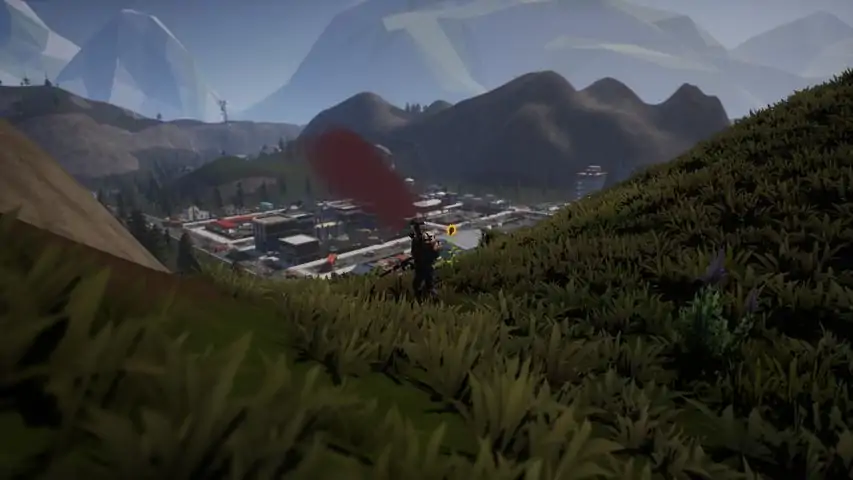
I have greatly improved the graphics in a few points: Grass, foliage and ground cutter no longer pop up. Fixed popping trees and bushes. Improved sky colors and cloud resolution optimized. Improved shadows, improved screen space reflections, optimized color in general. Ui scale adjusted (75%) and can be scaled to a different size as desired. Performance and lighting optimized and improved. Grass dynamic shadows disabled, better optics and performance. Grass smoother lod transition. Optimized fog density. Lod expanded and optimized for many details. Post process effects like motion blur, grain, chromatic aberration disabled. Faster Texture streaming. I have tested the performance and it should run very well on all current 3-series gpus, I have no fps drops. Go to the folder as follows: C:Users/Name/AppData/Local/SorrounDead/Saved/Config/Windows/Engine and add the following below (copy and drag) : [SystemSettings] r.Streaming.Boost=1 r.FastVRam.EyeAdaptation=1 r.bForceCPUAccessToGPUSkinVerts=1 r.ViewDistance=5 r.ViewDistanceScale=5 r.MaxAnisotropy=16 r.LandscapeLODDistributionScale=3 r.LandscapeLOD0DistributionScale=3 r.StaticMeshLODDistanceScale=0.01 grass.CullDistanceScale=4 grass.DisableDynamicShadows=1 foliage.LODDistanceScale=5 foliage.forcelod=2 foliage.ditheredLOD=0 foliage.MinimumScreenSize=0.00000001 foliage.MaxOcclusionQueriesPerComponent=128 foliage.MinInstancesPerOcclusionQuery=65536 grass.DensityScale=1.0 foliage.DensityScale=1.0 r.HLOD=1 r.HLOD.DistanceScale=2.0 r.HLOD.MaximumLevel=1 r.Emitter.FastPoolEnable=1 r.EmitterSpawnRateScale=2.0 r.MipMapLODBias=0 r.MaxQualityMode=1 r.DetailMode=2 r.MaterialQualityLevel=1 r.SkeletalMeshLODBias=-3 r.SkeletalMeshLODRadiusScale=0.01 r.LandscapeLODBias=-3 r.TessellationAdaptivePixelsPerTriangle=128 r.Water.WaterMesh.TessFactorBias=12 r.Fog=1 r.FogDensity=0.02 r.FogStartDistance=6 r.VolumetricFog.GridDivisor=30 r.VolumetricFog.GridPixelSize=8 r.VolumetricFog.GridSizeZ=64 r.VolumetricFog.Jitter=1 r.VolumetricFog.InjectShadowedLightsSeparately=1 r.VolumetricFog.InverseSquaredLightDistanceBiasScale=1.000000 r.VolumetricFog.LightFunctionSupersampleScale=2.000000 r.VolumetricCloud.HighQualityAerialPerspective=1 r.VolumetricRenderTarget=1 r.TranslucencyVolumeBlur=0 r.TranslucentLightingVolume=1 r.TrueSkyQuality=1 r.SkyLightingQuality=1 r.LightFunctionQuality=1 r.LightShaftQuality=1 r.LightMaxDrawDistanceScale=3 r.VolumetricCloud=1 r.VolumetricCloud.SkyAO=1 r.VolumetricCloud.SkyAO.Filtering=1 r.VolumetricCloud.ShadowMap=1 r.VolumetricCloud.ShadowMap.MaxResolution=2048 r.VolumetricCloud.SkyAO.MaxResolution=2048 r.VolumetricRenderTarget.Mode=1 r.SkylightIntensityMultiplier=0.4 r.SkyAtmosphere=1 r.SupportSkyAtmosphere=1 r.SkyAtmosphere.LUT32=1 r.SkyAtmosphere.FastSkyLUT=0 r.SkyAtmosphere.MultiScatteringLUT.HighQuality=1 r.SkyAtmosphere.AerialPerspectiveLUT.FastApplyOnOpaque=0 r.SkyAtmosphere.TransmittanceLUT.UseSmallFormat=0 r.SkyAtmosphere.AerialPerspectiveLUT.Depth=96 r.SkyAtmosphere.AerialPerspectiveLUT.DepthResolution=16.0 r.SkyAtmosphere.SampleCountMin=64.0 r.SkyAtmosphere.SampleCountMax=128.0 r.SkyAtmosphere.DistanceToSampleCountMax=128 r.ShadowQuality=5 r.Shadow.CacheWholeSceneShadows=1 r.Shadow.WholeSceneShadowCacheMb=500 r.Shadow.FilterMethod=0 r.Shadow.PointLightDepthBias=0.050000 r.Shadow.RadiusThreshold=0.01 r.Shadow.DistanceScale=3.0 r.Shadow.MaxNumFarShadowCascades=12 r.Shadow.CSM.MaxCascades=12 r.Shadow.TexelsPerPixel=16 r.Shadow.CSMDepthBias=20 r.Shadow.MinPreShadowResolution=4096 r.Shadow.MinResolution=4096 r.Shadow.MaxCSMResolution=4096 r.Shadow.MaxResolution=4096 r.Shadow.SpotLightTransitionScale=4096 r.Shadow.CSM.TransitionScale=2.0 r.Shadow.PreShadowResolutionFactor=1.0 r.CapsuleShadows=1 r.CapsuleMaxDirectOcclusionDistance=800.000000 r.CapsuleMaxIndirectOcclusionDistance=600.000000 r.CapsuleShadowsFullResolution=1 r.DistanceFieldShadowing=1 r.Shadow.PerObject=1 r.ContactShadows=1 r.AllowLandscapeShadows=1 r.Shadow.AllowForegroundShadows=1 r.AmbientOcclusionLevels=2 r.AmbientOcclusionMaxQuality=100 r.DistanceFieldAO=1 r.DFShadowQuality=3 r.DFFullResolution=1 r.HLOD.ForceDisableCastDynamicShadow=1 r.Shadow.FadeResolution=0 r.HighQualityLightMaps=1 r.LensFlareQuality=3 r.ParticleLightQuality=2 r.RefractionQuality=3 r.SSR.Quality=4 r.SSR.MaxRoughness=1 r.SSS.Scale=1 r.SSS.SampleSet=2 r.SSGI.Quality=4 r.DefaultFeature.AntiAliasing=2 r.PostProcessAAQuality=6 r.ScreenPercentage=100 r.TemporalAASamples=32 r.TemporalAACurrentFrameWeight=0.12 r.TemporalAAFilterSize=1.0 r.TemporalAACatmullRom=1 r.TemporalAAPauseCorrect=1 r.BloomQuality=3 r.EyeAdaptationQuality=3 r.Color.Mid=0.35 r.SceneColorFormat=4 r.TonemapperGamma=2.2 r.Tonemapper.Quality=3 r.TonemapperFilm=1 r.Tonemapper.Sharpen=0.33 r.FastBlurThreshold=0 r.MotionBlurQuality=0 r.MotionBlurQuality=0 r.MotionBlur.Amount=0 r.MotionBlurSeparable=0 r.DepthOfFieldQuality=0 r.DepthOfField.FarBlur=0 r.DefaultFeature.MotionBlur=0 r.SceneColorFringe.Max=0 r.SceneColorFringeQuality=0 r.MotionBlur.Max=0 r.Tonemapper.GrainQuantization=0 [/script/engine.localplayer] AspectRatioAxisConstraint=AspectRatio_MaintainYFOV [/script/engine.userinterfacesettings] ApplicationScale=0.75 If you don't see the appData folder, you have to activate advanced folder options: show all in the windows settings. Have fun with the new graphics. New Graphics Look:


This will help you on hitting spots all the way to current game and allows you to be VERY WELL EQUIPPED! This Will help! Hi all I wanted to make this for all the newer players and veterans alike. I have made about 30+ games and have well over 200 hours in less then a month and I have found the best METAs for speed runs, Carry for Bags, and all the fun stuff in between. I have played all the modes and have made the game the easiest it can be and the hardest it can be. I have successfully beat all modes and I can safely say that my methods can and will help your gameplay from start to finish. For starters I would like to state this game can and will change while the game goes through its development. This said I will update my methods as the game changes and takes its course. 1st: Once you spawn you will need to head to Ellwood as fast as possible. While doing this you will need to get more familiar with your surrounding leading along the way for some good starter loot. Reason being is because the starter spawns are all located NW on the current main map and is close to Ellwood every single time you spawn. 2nd: Once you are at Ellwood you can do 1 of 2 things.. 1- You can either make a starter base in the bottom left of Ellwood with the empty floor building surrounded by fences. This can help you if you are learning the map and places so that you can place down storage to start building up loot and building anything else that you see fit. 2- You can start looting in Ellwood to get your stuff needed to get ready for place 2 that we are heading to next! 3rd: We are heading SE to FOB Alpha for some Ammo, Meds, and Upgrades. Reason being is because you have looted Ellwood and by now have your first Rad Mask to help you push through our first Rad Zone. Once you have made it here there are some cars you can stand on top of shot a gun once to pull in all zeds. Once they are pulled in you can kill them anyway you see fit but its normally best to get them in a small spot and throw 1 moly for easy EXP and you keep all your ammo. Clear out the loot then we head to the next spot! 4th: Head West to Patient Zero Location aka the unmarked Rad Location. If you are looking at the map from FOB Alpha it will be the small little square right below Ellwood. This will give you more upgrades if any, Ammo, Meds, and Extras. Don't forget there are Rad Zeds here so if you have a moly and or some ammo its always best. Collect all loot then we go to next location. 5th: Now we just head a bit West and we will hit an unmarked Supermarket. There are plenty of zeds here for exp and a good amount of starter loot. Clear this get the loots then we head to next location. 6th: Pretty much now we are ready for either Creek or FOB BRAVO pending on which key cards you were able to obtain. Careful though because now you will meet your first mini bosses. If you were lucky enough to get 2 Private Bunker cards then you just hit a huge easy W for maybe a Legendary item and or more upgrades. Private Bunker from Supermarket is located NW in the bottom side and a bit left of the backwards C mountain that surrounds the unmarked construction site. If you didn't get the 2 Private Bunker keys don't worry about it we will instead head to either Creek or FOB Bravo pending on which 2 you have ready to go. Creek Prison is located South of the Supermarket and FOB Bravo is located SE. Pending on which ones you did if not all 3 you now have more loots and are even more ready for the next place we are heading too! 7th: Now we go to Redacted Airfield which is located South of the map and looks like a huge rectangle. Here you will get so much loot and exp. There a few mini bosses here and just take your time clearing this if you have not done this location before. After clearing this we will go to to our next location! 8th: We are heading to Classified its unmarked but if look at your map from Redacted Airfield to the West there is a circle in the mountain. This is Classified location with zeds and 4 turrets outside with 2 cameras. If you destroy the 2 cameras (which the 1st one is located front right of bunker and the 2nd one is located at the door going into the main bunker) then the turret will not shot you. After going inside just be a bit careful for you will have Human AI and they are very easy to kill but a bit aggressive. Just aim for the head and shot, don't choke on your aim, take your time, and push forward. This is best done with a suppressed gun so all the Human AI doesn't try to come to one location. This can cause issues like unwanted Human AI getting stuck in the walls. If said such Human AI gets stuck in the wall just use nads, molys, and or take your time and shot whatever body part is able to be shot. Take your time in here and learn the lay out. After you clear and loot we will now go to the final location. 9th: Time for Observatory! This can be done at any point in the game but after all the loot you have obtained at this point it will make things just so much easier to clear this place. From Classified head North to the mountain left of the unmarked construction site. The top right of this mountain is the location of Observatory! You can see the little place on map if you look! I will let you have fun learning and looting that :D just note there are a good amount of Human AI here :D This here is the best starter for runs and yes you can skip steps but this is for a easy speed clear for any new and or old players. As far as looting goes I have my METAs on bag space and all that too but right now this is more important. Folks need to have a good roadmap for a better experience because it can open their eyes to other ideas and or runs :D We are a community so we are here to help folks and be helped! I will make more guides but this here is something I just wanted to put together.


Want to know which backpacks there are, which is largest or which is most space efficient? Which vehicle is best for your mobile storage or best for squashing zombies? This guide tries to gather it all. Stats are all collected by playing the game, so it might not be complete, but I'll try to update as soon as new information is available. Backpacks Backpacks for in the Backpack slot NameStorageSizeRatio*NoteVersionSchool Backpack203x32.22v1.7.0Dry Bag243x32.67v1.7.0Military Backpack383x43.16Rarev1.7.0Small Survival Backpack343x42.83v1.7.0Alpine Backpack444x52.20v1.7.0Hiking Backpack variant 1464x52.30v1.7.0Hiking Backpack variant 2474x52.35v1.7.0Alice Backpack544x43.38v1.7.0Coyote Backpack605x52.40Rarev1.7.0Duffle Bag406x32.22v1.7.0Laboratory Backpack655x62.16Rarev1.7.0Large Black Military Backpack665x62.20Rarev1.7.0Large Coyote Backpack766x62.11Rarev1.7.0 * Ratio of a backpack is the amount of storage slots you get per backpack size slot. E.g. A School Backpack gives you 20 slots, but it's size is 9 slots (3x3). So 20 / 9 = 2.22 storage slots per size slot. Which would make the Alice Backpack the most efficient backpack in the game. Clothing Clothing with Storage slots NameSlotStorageAmmo SlotsNoteVersionMilitary Plate CarrierArmor3x2 (6)2x 2x2 (8)Rarev1.7.0Spec Ops Plate CarrierArmor5x2 (10)2x 2x2 (8)Rarev1.7.0Black Ops Plate CarrierArmor5x2 (10)2x 2x2 (8)Rarev1.7.0Hunting VestArmor2x 3x4 (24)v1.7.0Rider JacketTorso2x 2x2 (8)v1.7.0Puffy CoatTorso2x 2x2 (8)v1.7.0Paramedic JacketTorso2x 2x2 (8)v1.7.0Wanderer JacketTorso2x 3x2 (12)v1.7.0Riot Police JacketTorso2x 3x3 (18)v1.7.0Oil Rig JacketTorso2x 3x3 (18)v1.7.0Military JacketTorso2x 3x3 (18)v1.5.0Black Ops JacketTorso2x 3x3 (18)v1.7.0Winter CoatTorso2x 3x3 (18)v1.7.0Cargo PantsLegs2x 2x2 (8)v1.7.0SkirtLegs2x 2x2 (8)v1.7.0Padded JeansLegs2x 2x2 (8)v1.7.0Police PantsLegs2x 2x2 (8)v1.7.0Paramedic PantsLegs2x 2x2 (8)v1.7.0Wanderer PantsLegs2x 2x2 (8)v1.7.0Oil Rig PantsLegs2x 3x2 (12)v1.7.0Riot PantsLegs2x 3x2 (12)v1.7.0Black Ops PantsLegs2x 3x2 (12)v1.7.0Military PantsLegs2x 3x2 (12)v1.7.0 Containers Containers for in the Container slot NameCapacitySizeRatioNoteVersionWallet4x3 (12)1x112.00Accepts only Currency/Keycardsv1.7.0Ammo Tin6x5 (30)2x27.50Accepts only Ammo/Weapon attachmentsv1.7.0Briefcase7x5 (35)2x28.75Accepts only Currency/Keycardsv1.7.0Lunchbox6x4 (24)2x112.0Accepts only Consumablesv1.7.0Medical Bag6x7 (42)2x210.50Accepts only Medical Itemsv1.7.0Military Secure Container6x3 (18)2x24.50v1.7.0Secure Container5x2 (10)2x22.50v1.7.0Small Toolbox6x3 (18)2x19.00Accepts only Crafting Itemsv1.7.0Large Toolbox7x5 (35)2x28.75Accepts only Crafting Itemsv1.7.0Weapons Case10x4 (40)3x26.67Accepts only Weaponsv1.7.0 Placeable Storage Storage you can place around the world. NameCapacitySizeNoteVersionTent (Dome)8x7 (56)3x2v1.7.0Tent (Triangle)10x5 (50)3x2v1.7.0Storage Crate (Flat)10x5 (50)2x1v1.7.0Storage Crate (Square)6x6 (36)2x2v1.7.0Storage Crate (Square)7x7 (49)2x2v1.7.0Storage Crate (Rectangle)8x6 (42)2x2v1.7.0Ammo Crate10x8 (80)2x2Accepts only Ammo/Weapon Attachmentsv1.7.0Military Crate10x6 (60)2x2v1.7.0Fridge6x10 (60)2x3Accepts only Consumablesv1.7.0Gun Locker8x8 (64)2x3Accepts only Guns/Attachmentsv1.7.0Safe4x4 (16)2x2Accepts only Moneyv1.7.0Dresser7x4 (28)2x2v1.7.0Military Supply Crates10x14 (140)3x3v1.7.0Clothing Cupboard10x15 (150)2x3Accepts only Clothing/Backpacksv1.7.0Shipping Container10x20 (200)6x3v1.7.0 Vehicles Stats of Vehicles. NameHitpointsFuel TankTrunk SizeMax SpeedVersion4x4 Jeep10012508x8 (64)45 Mphv1.7.0Ambulance10012509x9 (81)38 Mphv1.7.0Big Rig150150010x12 (120)42 Mphv1.7.0Buggy10010008x6 (48)42 Mphv1.7.0Charger10010007x6 (42)57 Mphv1.7.0Damaged Sedan10010007x6 (42)48 Mphv1.7.0Golf Cart755005x4 (20)29 Mphv1.7.0Military Humvee125150010x8 (80)39 Mphv1.7.0Pickup Truck10010008x8 (64)36 Mphv1.7.0RV100125010x8 (80)40 Mphv1.7.0SUV10010008x8 (64)39 Mphv1.7.0Swat Van225150010x12 (120)45 Mphv1.7.0Truck15015008x12 (96)42 Mphv1.7.0Utility Truck12512508x8 (64)36 Mphv1.7.0Utility Truck (Flatbed)17515008x8 (64)42 Mphv1.7.0Utility Truck (Modified)175150010x12 (120)28 Mphv1.7.0


这是我从网站截取的一张截图,自己留用;发布在这里是希望其他人也能觉得有用。所有功劳归于制作这张图的原网站人员,你们太棒了! 地图? 这是我从网站截取的一张截图,自己留用;发布在这里是希望其他人也能觉得有用。所有功劳归于原网站的制作人员,你们太棒了! 地图!