
Steam Deck家庭共享支持手柄

--

+关注

--

热度

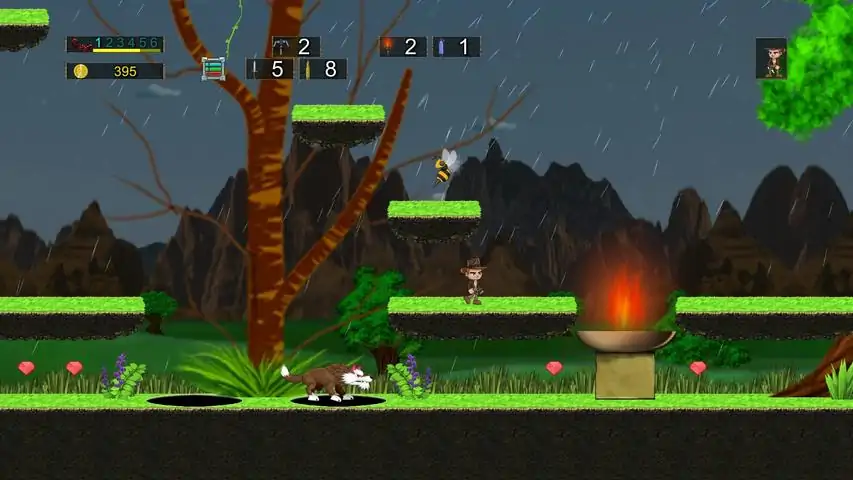
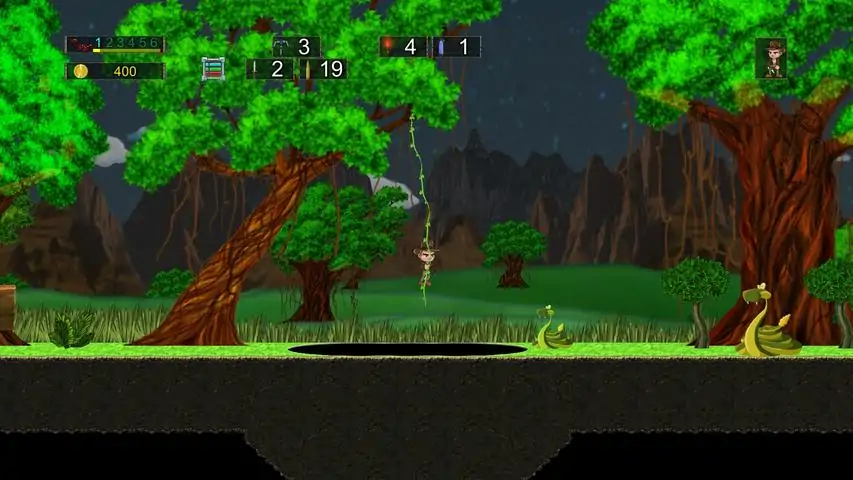
Search for the lost treasure of the infamous "Jaxton Max". Your quest for fortune and glory will not be easy however. This adventure is full of baddies aimed at stopping you dead in your tracks. Use knives to dig through walls, bullets to battle the baddies, grappling hooks to jump over long distances, oxygen tanks to breath under water and torches to see what lurks underground. Collect keys to get past locked doors and to open treasure chests. Avoid the quicksand, tar pits, spikes, fire pits, thumpers and other traps along the way. Few ever return from their expeditions into the deep jungles. So, if you are brave enough, the "Jungles of Maxtheria" awaits!- Explore the jungles, water, underground and above looking for treasure and keys.- Collect the treasures to gain gold coins. use the market to buy and sell inventory items that you will need such as torches, bullets, knives, bullets, grappling hooks and oxygen tanks.- Find keys to open doors and treasure chests.- Use the signs for relevant information.- Use the torches underground to see.- Use the oxygen tanks for breath under the water.- Use the grappling hooks to jump over far to reach places.- Climb up and down the vines.- Avoid the traps, tar pits, sand traps and other obstacles along the way. - Avoid the baddies or use the bullets/knives to thwart them off.- Find the lost treasure.- Multiple Language Support: English, Espanola, Francais or Deutsche.- Start a new game or load the previous saved game.- Choose to play as any of the four characters: "Hot Spot" Harvey, his cousin Roxy Roks, Junior or Missy.- Play the standard game with baddies or, if needed, choose to play with less baddies.- The UI Layout at the top of the screen can be changed depending on your input device: Joystick, Keyboard or user configurable.- Choose to play on a touchscreen device by turning on the touchscreen overlay.- Full help section with instructions and controller diagrams.- First Time Training: Go through a step-by-step quick start guide to learn all that you will need to know to play.- Input Settings allows you to remap the keys/buttons to whatever you want.- Ability to delete the 'Player Prefs' area which deletes all of the saved information.- Ability to independently change the volume controls for the sound effects and the music.- If you choose to turn on the touch screen, then you have the ability to pick one of many onscreen layouts (left and right handed).- Six huge stages to explore with many hours of enjoyment. Checkpoints after most of the doors to pick up later where you left off.- Many different types of baddies with dozens of AI variations.- Huge soundtrack with many different cuts.- A dozen layer of side-scrolling parallax action.- Time of Day: The game goes from day-to-night-to-day.- Time of Year: Different times of the year it will either be clear skies, raining, thunderstorms or snowing (using a percentage calculation).- 1920 x 1080 (2K HD) native resolution. Note: The game always starts off in black so it can do a nice fade up from black into the main menu. However, the very first time playing the game, it may stay on black for a while before the main menu pops up. Don't panic! This is the game engine figuring out how your system is set up (screen resolution, graphics card, etc.). The next time you run the game, the time in black should be real fast. If you like the old school Atari VCS 2600 games, such as Activision's Pitfall, then you will love Jungles of Maxtheria. This is updated and improved for your gaming pleasure.
游戏圈
共2条帖子
星霜
2026-03-19 22:01:04 · 发布在 「Jungles of Maxtheria」
JOM - 第一阶段(从开始到蓝色大门)
第一张区域的广角视图。展示了从第一关开始到蓝色门的所有内容。不同的物品采用颜色编码。 JOM - 第一关地图(从开始到蓝色门) 地图
羽羽斩
2026-03-18 22:00:17 · 发布在 「Jungles of Maxtheria」
《马克西亚丛林》快速开始说明
《Jungles of Maxtheria》控制器设置说明(摇杆、触摸屏及鼠标/键盘) JOM - 菜单控制器支持 ///////////////////////////////////////////////////////////////////////////////////////////////////////////////////////// 菜单控制器支持 ================================= 键盘 - 按【上箭头】或【下箭头】键可上下移动光标,也可左右移动(取决于屏幕布局)。 - 按【回车键】(Return键)可选择光标旁的按钮。 鼠标 - 将指针移至按钮上方并左键点击即可选择该按钮。触摸屏 - (与鼠标操作相同,只是改为触摸操作) 游戏手柄控制器(Windows 10/Xbox、Linux及MacOS) - 按方向键上或方向键下,可根据屏幕布局上下左右移动光标。 - 按A键选择对应按钮。在Windows 10系统中为【Button 0】,其他系统可能有所不同。 - 使用方向键而非双摇杆来移动光标。 - 可能需要切换标有类似【Mode】的按钮,该按钮用于在方向键和双摇杆输入之间切换。 - 在Windows/Xbox控制器上,可能需要将输入设置(通常在控制器底部)更改为【Xinput】而非【Direct Input】。2005年及之后的大多数游戏都使用【X】设置。如果您未使用Windows 10系统,可能需要将其设置为“D”。 ///////////////////////////////////////////////////////////////////////////////////////////////////////////////////////// 游戏手柄支持 ================================ 键盘(未进行用户重映射的标准设置) - 按【上箭头】【下箭头】【左箭头】或【右箭头】键,可使玩家向上/向下/向左/向右移动。 - 按【空格键】进行跳跃和游泳。 - 按【空格键】可激活或关闭告示牌(您的角色必须站在告示牌前方的地面上)。 - 按【P】键暂停游戏,调出菜单。 - 按【O】键可使用作弊码来帮助寻找钥匙,屏幕上会出现指示方向的箭头。- 按下字母数字键“1”使用小刀。 - 按下字母数字键“2”使用子弹。 - 按下字母数字键“3”使用手电筒(地下场景)。 - 按下字母数字键“4”使用氧气(水下场景)。 - 按下字母数字键“5”使用抓钩。鼠标 - 你可以使用鼠标执行一些快速操作,而无需打开暂停菜单。 - 将鼠标指针移至屏幕上三分之一区域。当指针悬停在按钮上时,按钮会高亮显示。左键点击鼠标即可选择该按钮。部分按钮位于用户界面图形上方,其他按钮则在图形之间或下方。移动鼠标指针即可找到这些按钮。 - 【音频开启】- 开启音频(音效和音乐)。位于屏幕左上角的关卡数字1-2-3-4-5-6栏上方。 - 【音频关闭】- 关闭音频(音效和音乐)。位于屏幕左上角的金币数量栏上方。 - 【小刀】、【子弹】、【火把】、【氧气瓶】、【抓钩】和【暂停】- 购买1个对应物品。按钮位于各自图标的顶部(屏幕顶部中央)。 - 【覆盖层切换】:位于按键栏左侧,无图标(屏幕顶部中央)。 - 【切换覆盖层】:位于【覆盖层切换】正下方,按键栏左下角,无图标(屏幕顶部中央)。 - 【按键作弊切换】:位于按键栏顶部(屏幕右上角)。 - 【生命值】:购买1点角色生命值,位于角色图标顶部(屏幕右上角)。 触屏操作 - (与鼠标操作相同,仅需用触摸代替) - 触屏覆盖层可在开始菜单、设置菜单(从开始菜单进入)、暂停菜单(游戏中)或通过快捷操作进行开关切换。 - 【覆盖层切换】:位于按键栏左侧。它没有图标(屏幕顶部中央)。 - 【切换覆盖层】——该选项位于按键栏左下角的【覆盖层切换】正下方。它没有图标(屏幕顶部中央)。游戏手柄控制器(Windows 10/Xbox及Linux系统)(未进行用户重映射的标准设置) - (按钮0)- 按下【A键】进行跳跃/游泳/开启或关闭告示牌。角色必须站在地面上且位于告示牌前方。 - (按钮1)- 按下【B键】使用子弹。 - (按钮2)- 按下【X键】使用小刀。 - (按钮3)- 按下【Y键】使用抓钩。 - (按钮4)- 按下【左肩键】使用火把。 - (按钮5)- 按下【右肩键】使用氧气。 - (按钮6)- 按下【返回键】暂停游戏,调出菜单。 - (按钮7)- 按下【开始键】可使用作弊功能,该功能会帮助寻找钥匙,屏幕上会出现指示方向的箭头。- (方向键)- 按下【方向键上】【方向键下】【方向键左】或【方向键右】来向上/向下/向左/向右移动。对应轴(左右)6和轴7(上下)。 - (模式键)- 按下【模式键】可在两个摇杆按键和方向键之间切换(该按键可能有其他名称)。设置为方向键。游戏手柄控制器(MacOS系统)(若用户未重新映射按键,则为标准设置) - (按钮16)- 按下【A】键可跳跃/游泳/开关告示牌。角色必须站在告示牌前方的地面上。 - (按钮17)- 按下【B】键使用子弹。 - (按钮18)- 按下【X】键使用小刀。 - (按钮19)- 按下【Y】键使用抓钩。 - (按钮13)- 按下【左肩键】使用火把。 - (按钮14)- 按下【右肩键】使用氧气。 - (按钮10)- 按下【返回键】暂停游戏,调出菜单。 - (按钮9)- 按下【开始键】可触发寻找钥匙的作弊功能,会出现箭头指示方向。- (方向键)- 按下【方向键上】【方向键下】【方向键左】或【方向键右】来向上/向下/向左/向右移动。对应轴(左右)6和轴7(上下)。 - (模式键)- 按下【模式键】可在两个摇杆按键和方向键之间切换(该按键可能有其他名称)。设置为方向键。/////////////////////////////////////////////////////////////////////////////////////////////////////////////////////////

下载233乐园APP

专心推荐好游戏

关于我们 · 联系我们 · 隐私政策 · 营业执照

侵权投诉 · 开发者中心 · 用户协议 · 免责声明

不良信息举报中心

纠纷处理及不良内容举报电话:

4006600910 (工作时间: 9:00-12:30,14:00-18:00)

北京市朝阳区启阳路4号院2号楼15层1803室

本公司产品适合10周岁以上玩家使用 未成年人家长监护

首页 / Jungles of Maxtheria

抵制不良游戏 拒绝盗版游戏

注意自我保护 谨防受骗上当

适度游戏益脑 沉迷游戏伤身

合理安排时间 享受健康生活

京ICP备18003564号-3

经营许可证编号:京B2-20181741

京公网安备:11010502052873

Copyright © 2026 233leyuan.com All Rights Reserved

北京龙威互动科技有限公司版权所有

热门游戏: 我的世界 | 三角洲行动 | 原神 | 王者荣耀 | 超自然行动组 | 蛋仔派对 | 和平精英 | 火影忍者 | 二重螺旋 | 英雄联盟 | 梦幻西游 | 明日方舟 | 斗罗大陆 | 光遇 | 鸣潮 | 无畏契约 | 模拟山羊3 | 樱花校园模拟器