Steam Deck家庭共享

--

+关注

--

热度

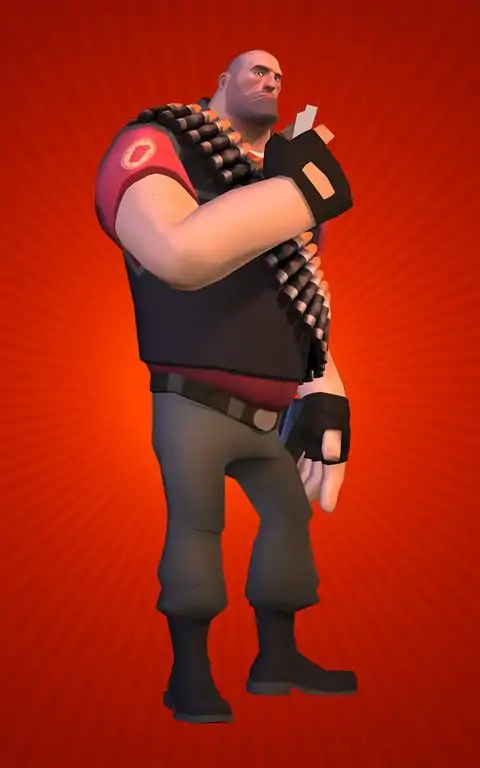
***Not Compatible with Mac OS 10.8.x and above***Prepare for a different kind of poker night in a very different kind of club. In Poker Night at the Inventory, you'll deal with Penny Arcade's clever, cunning Tycho, Team Fortress 2's hulking Heavy, Homestar Runner's self-proclaimed "awesome icon" Strong Bad and the hyperkinetic "rabbity-thing" from Sam & Max. These characters come together in ways some never thought possible, in a setting few would have predicted. Unlock new TF2 items by beating The Heavy, Max, Tycho, or Strong Bad at high stakes games of poker. The Enthusiast's Timepiece: Tycho's favorite timepiece (equippable by the Spy)License to Maim: Max's Badge (equippable by all classes)The Lugermorph: A second chance at Max's personal armament (equippable by the Scout and the Engineer) The Iron Curtain: The Heavy's first love (equippable by the Heavy, obviously) Dangeresque, Too?: Strong Bad's styling glasses (equippable by the Demoman)
游戏圈
共6条帖子
虚拟存在
2026-04-03 07:00:36 · 发布在 「Poker Night at the Inventory」
如何获胜
如何赢得游戏 想要获胜吗?那你得这么做:每次都全押。我不是在开玩笑。我本来想故意输,好更快获得军团要塞2的掉落物品,但结果却赢了两场锦标赛。(我五分钟前刚试过。) 如果你用我的方法,输赢概率基本是五五开。除非我后院的三叶草全是四叶的。
羽羽斩
2026-03-31 19:00:19 · 发布在 「Poker Night at the Inventory」
《牌局之夜》:如何获得Straight Flush成就
如何轻松获取该成就:视频如何操作及脚本 如何轻松获取该成就: 如果你想尝试自动完成此过程,操作如下: 以窗口模式启动游戏(800x600最佳)并开始锦标赛。 在设置中,将对话设置为最少。 如果你尚未从其他玩家处收集所有游戏物品,可能需要先完成收集。当前脚本无法处理这些物品。在为获取物品进行游戏后,会出现一个需要点击关闭的对话框。 安装AutoHotkey 将以下脚本保存到文件“poker”。在您的桌面上创建“poker.ahk”文件 复制以下所有内容: ; 此脚本将持续运行《牌局之夜》 SetDefaultMouseSpeed,0 WinWaitActive 《牌局之夜》 Run() ; 若要随时停止应用程序,只需按Escape键 Escape::ExitApp ; 无限期运行整个应用程序 Run() { while true { ClickCall() SkipDialogue() DealNewGame() Sleep,500 } } ClickCall() { Click,182,520 } SkipDialogue() { Click, right, 182, 520 } DealNewGame() { Click,495,540 } ahk”文件加载脚本,然后切换回游戏。脚本应会自动开始运行。随时按“退出”键可退出脚本。让程序保持运行状态,即可在你观看、睡觉或慢跑时持续玩扑克并获取Straight Flush成就(或其他任意成就)。最初由pokerdan99发布,感谢他。我对脚本进行了修改,以便你能更快获得该成就。扑克最后……
想当糕手
2026-04-02 16:00:02 · 发布在 「Poker Night at the Inventory」
【修复指南】如何解决《牌局之夜》在Telltale标志后出现黑屏的问题
如果你正在寻找解决办法,这里就是答案。 问题在于游戏无法读取位于文档/Telltale Games文件夹内的游戏存档文件。 修复方法如下: 1. 按下Win + R键,输入以下路径之一: C: Users %USERNAME% Documents Telltale Games Poker Night at the Inventory 或 C: Users %USERNAME% OneDrive Documents Telltale Games Poker Night at the Inventory 2. 删除该文件夹中的存档文件(默认文件名为pnati_save.save)。 之后游戏应该就能正常启动了。祝你游戏愉快!

下载233乐园APP

专心推荐好游戏

关于我们 · 联系我们 · 隐私政策 · 营业执照

侵权投诉 · 开发者中心 · 用户协议 · 免责声明

不良信息举报中心

纠纷处理及不良内容举报电话:

4006600910 (工作时间: 9:00-12:30,14:00-18:00)

北京市朝阳区启阳路4号院2号楼15层1803室

本公司产品适合10周岁以上玩家使用 未成年人家长监护

首页 / Poker Night at the Inventory

抵制不良游戏 拒绝盗版游戏

注意自我保护 谨防受骗上当

适度游戏益脑 沉迷游戏伤身

合理安排时间 享受健康生活

京ICP备18003564号-3

经营许可证编号:京B2-20181741

京公网安备:11010502052873

Copyright © 2026 233leyuan.com All Rights Reserved

北京龙威互动科技有限公司版权所有

热门游戏: 我的世界 | 三角洲行动 | 原神 | 王者荣耀 | 超自然行动组 | 蛋仔派对 | 和平精英 | 火影忍者 | 二重螺旋 | 英雄联盟 | 梦幻西游 | 明日方舟 | 斗罗大陆 | 光遇 | 鸣潮 | 无畏契约 | 模拟山羊3 | 樱花校园模拟器