Steam Deck创意工坊

--

+关注

--

热度

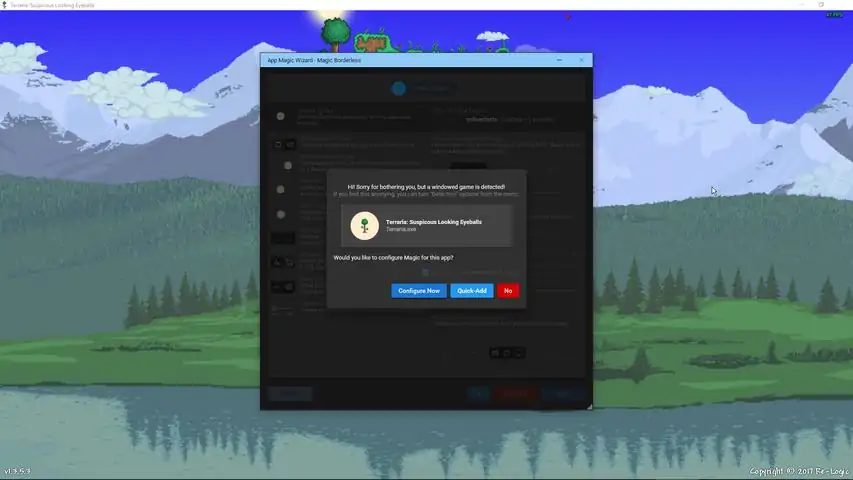
Experience the responsive windowed gaming ON FULLSCREEN SIZE without the ugly borders!Magic Borderless is an application to help gamers play games on fullscreen windowed without the ugly borders. Windowed mode gaming lets gamers instantly switch to other windows in the same computer while they are dead (because they suck) or waiting on loading screens, without having to see Windows go ape nuts when alt-tabbing. Some games even crash when alt-tabbed, but Magic Borderless is here to prevent that as well!The app tries to help you be as lazy as possible and do the work for you as much as possible... for free*! *(Well, after you pay for the app.)Extra helpful features are also added to assist gamers when it comes to managing windows on their monitors, such as Ninja Mode where it allows you to hide and mute a window for... um, science! Automatic Game DetectionWhen you run your game on windowed or fullscreen mode, Magic Borderless can detect it without you ever have to manually add them every time. If this feature is enabled, it will ask you if you wish to apply the borderless magic. When the magic is applied for the first time, all you have to do is set your game to run on windowed mode once. Magic Borderless will take care of the rest automatically every time the game launches. You can also set to apply default configurations to all detected games without ever asking you!Improved Borderless AlgorithmThere are different ways to make a window borderless, but all of them often has trouble resizing window properly or suffer from graphical errors. Magic Borderless has improved code to combat these issues for you and will work on even more games! It has the highest compatibility list of all borderless software available!Customizable Additional MagicBesides making your favorite games borderless, you can also set the game to run on a specific window size or simply maximize to your monitor's resolution. If you wish to keep your Taskbar up, you can also toggle it to make sure the window does not hide the
游戏圈
共2条帖子
爱心小蛋糕
2026-04-01 01:00:29 · 发布在 「Magic Borderless」
Magic Borderless非官方日语化
### 《Magic Borderless》创意工坊支持版发布公告 今后将仅通过创意工坊进行更新。 ■概要 本次更新仅对手动翻译内容进行了调整,翻译质量请大家见谅。 若发现存在误译之处,欢迎联系我们进行修正。 已获得官方关于日语化mod发布的许可(2019/2/15)。 经向开发方咨询,其计划支持创意工坊,待支持后将迁移至该平台。 ■常见问题 问:必须通过Steam启动吗? 答:可通过以下方法无需Steam也能以日语启动: 1. 在创意工坊订阅上述日语化mod 2. 先通过Steam启动Magic Borderless并选择日语 3.Magic Borderless菜单中Steam→Steamworks无效 4.直接启动Steam steamapps common Magic Borderless文件夹内的MagicBorderless.exe ■联系方式 WiNCHaN
爱心小蛋糕
2026-04-01 16:00:09 · 发布在 「Magic Borderless」
禁用Steamworks(功能正常)
如何通过回退版本来禁用Steamworks。 什么是Steamworks 禁用Steamworks后,你将不会看到如图所示的【正在游玩】状态。过去曾有一项功能允许禁用此选项,但该功能现已被移除。因此我们需要回退到该版本。 下载 为了实现此操作,你需要下载一些程序。 你需要下载Depot Downloader,这个程序能让你获取不包含Steamworks的版本! 下载后,将其放入一个文件夹并解压压缩文件。 接下来,你需要NET Core,这是Depot Downloader运行所必需的程序! 只需下载这些程序的最新版本或推荐版本即可。 获取之前的版本 打开包含“DepotDownloader.dll”的文件夹,在地址栏中输入cmd.exe并按回车键,操作如下所示。现在将以下命令复制粘贴到命令提示符中 dotnet Depotdownloader.dll -app 1022230 -depot 1022231 -manifest 5087044270132808649 -username *你的Steam用户名* -password *你的Steam密码* 如果你开启了双重认证,需要在下一行输入验证码。 完成后会创建一个包含旧版本的新文件夹。只需打开此文件夹中的MagicBorderless.exe即可。 现在转到Steam选项卡,启用【禁用Steamworks】恭喜你,现在无需使用Steamworks即可使用魔法无边框! 视频 如需额外帮助,本视频将为你讲解操作方法。你只需记住使用以下代码:dotnet Depotdownloader.dll -app 1022230 -depot 1022231 -manifest 5087044270132808649 -username *你的Steam用户名* -password *你的Steam密码*

下载233乐园APP

专心推荐好游戏

关于我们 · 联系我们 · 隐私政策 · 营业执照

侵权投诉 · 开发者中心 · 用户协议 · 免责声明

不良信息举报中心

纠纷处理及不良内容举报电话:

4006600910 (工作时间: 9:00-12:30,14:00-18:00)

北京市朝阳区启阳路4号院2号楼15层1803室

本公司产品适合10周岁以上玩家使用 未成年人家长监护

首页 / Magic Borderless

抵制不良游戏 拒绝盗版游戏

注意自我保护 谨防受骗上当

适度游戏益脑 沉迷游戏伤身

合理安排时间 享受健康生活

京ICP备18003564号-3

经营许可证编号:京B2-20181741

京公网安备:11010502052873

Copyright © 2026 233leyuan.com All Rights Reserved

北京龙威互动科技有限公司版权所有

热门游戏: 我的世界 | 三角洲行动 | 原神 | 王者荣耀 | 超自然行动组 | 蛋仔派对 | 和平精英 | 火影忍者 | 二重螺旋 | 英雄联盟 | 梦幻西游 | 明日方舟 | 斗罗大陆 | 光遇 | 鸣潮 | 无畏契约 | 模拟山羊3 | 樱花校园模拟器