Belle II in Virtual Reality

--

+关注

--

热度

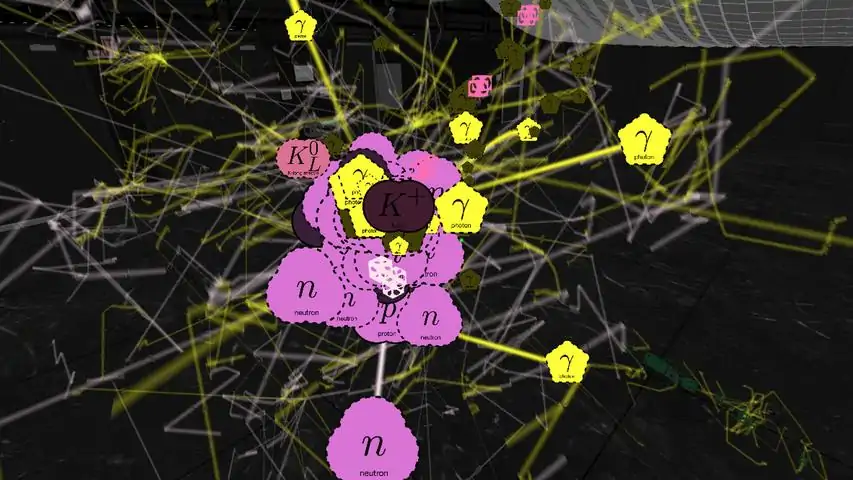
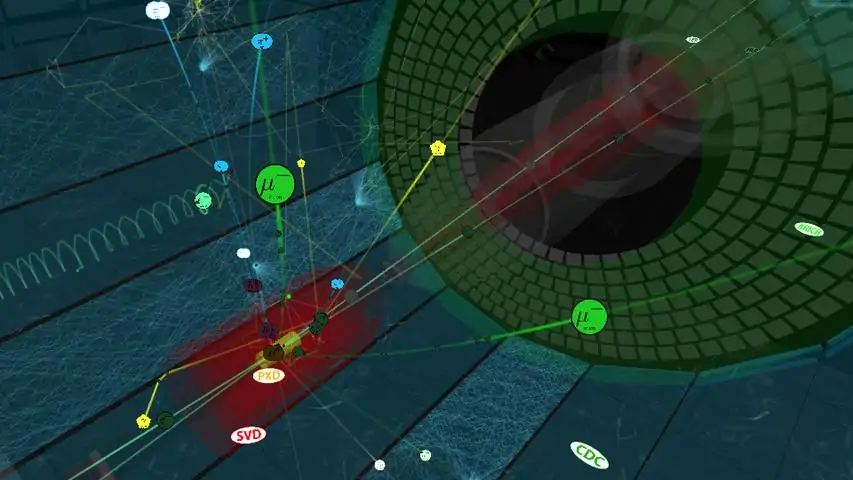
This virtual reality model of the Belle II experiment at the KEK laboratory in Japan shows the marvels of the subatomic world, where matter and antimatter collide at nearly the speed of light, converting energy to matter and back again according to Einstein’s famous formula E = m c squared, all in the blink of an eye. Watch and control the simulation of each collision event in which an electron and its antimatter counterpart collide and morph into other forms of subatomic matter that move through the Belle II apparatus. There are three variants of the Windows app: for the Oculus Rift, the HTC Vive, and the computer screen. The Mac OSX and Linux apps display on the computer screen. Please see pages 1-4 of the quick-reference guide for the hand-controller joystick and button mappings for your controller (Xbox controller, Oculus Touch, or Vive) or for your computer's keyboard/mouse. When you start the app, you see the true-scale Belle II apparatus (relocated from Japan into the CUBE at Virginia Tech). The exterior container fades away, exposing the active detector elements inside. The first electron-positron-collision event is loaded and then animated for its 100-nanosecond duration, showing the detailed trajectories of the incoming particles along the two beam lines and of the by-products from the collision of one electron with one positron. At the end of this collision history, the particle sprites and trails are erased so that you see only the hits recorded by the active detector elements in the "snapshot" of the collision event. Beam-line particle bunches pass through each other every 4 nanoseconds but only a few of these bunch crossings result in a collision; the colliding particles are highlighted in the animation. The beam-line particle bunches circulate in the vacuum beam lines of the 3-kilometer-circumference SuperKEKB accelerator; only the short section nearest the Belle II apparatus is shown in this app. With your controllers, you may move horizontally and vertically to enter the detector's interior and rotate your viewpoint. By turning your head, you may view the detector and the collision by-products from different orientations. You may rewind and fast-forward through the history timeline of each collision event, pause/resume, and slow down or speed up the animation rate. You may zoom in or out with your controllers if you enable this feature in the in-game menu (guide page 6). Gazing at one of the particle sprites, you may select it to expose a panel of detailed information about the particle (guide page 5). Check the SAVE box to copy this information to the virtual panel on one wall. Gazing at the rows on this wall, you may select among them to display the sum of the kinematic quantities in the bottom row. Check the FOCUS box on the sprite's info panel to highlight only the generational chain of daughters from this parent, temporarily hiding all other particle sprites and trajectories. In this state, bring up a similar information panel to UNFOCUS the generational chain and re-display all of the sprites and trajectories. With your controllers, toggle the display of the in-game menu or reposition it in front of you. Choose among three sub-menus (guide page 6) to control aspects of the event animation. The event-history timeline is always visible at the bottom of the menu: with your gaze and selection, you may scrub through this timeline and change the animation rate. In the TRANSFORM sub-menu, you may reposition yourself and scale the size of the detector (nominally at the true scale of 1:1); you may also enable the use of the controller hot-keys for menu-free zooming. In the DETECTOR sub-menu, you may change the visibility of parts of the Belle II apparatus (the active parts record the event snapshots, the passive parts provide the supporting structure). In the PARTICLES sub-menu, you control the visibility of some or all of the particle sprites and the sprite size; gazing at the entries in the event list, you may select among the available collision events (guide page 7). You may edit the event sequence or add new event histories by following the instructions on guide page 8. Enjoy your explorations of the subatomic world with the Belle II detector!

下载233乐园APP

专心推荐好游戏

关于我们 · 联系我们 · 隐私政策 · 营业执照

侵权投诉 · 开发者中心 · 用户协议 · 免责声明

不良信息举报中心

纠纷处理及不良内容举报电话:

4006600910 (工作时间: 9:00-12:30,14:00-18:00)

北京市朝阳区启阳路4号院2号楼15层1803室

本公司产品适合10周岁以上玩家使用 未成年人家长监护

首页 / Belle II in Virtual Reality

抵制不良游戏 拒绝盗版游戏

注意自我保护 谨防受骗上当

适度游戏益脑 沉迷游戏伤身

合理安排时间 享受健康生活

京ICP备18003564号-3

经营许可证编号:京B2-20181741

京公网安备:11010502052873

Copyright © 2025 233leyuan.com All Rights Reserved

北京龙威互动科技有限公司版权所有

热门游戏: 我的世界 | 三角洲行动 | 原神 | 王者荣耀 | 超自然行动组 | 蛋仔派对 | 和平精英 | 火影忍者 | 二重螺旋 | 英雄联盟 | 梦幻西游 | 明日方舟 | 斗罗大陆 | 光遇 | 鸣潮 | 无畏契约 | 模拟山羊3 | 樱花校园模拟器

下载233乐园APP

专心推荐好游戏

关于我们 · 联系我们 · 隐私政策 · 营业执照

侵权投诉 · 开发者中心 · 用户协议 · 免责声明

不良信息举报中心

纠纷处理及不良内容举报电话:

4006600910 (工作时间: 9:00-12:30,14:00-18:00)

北京市朝阳区启阳路4号院2号楼15层1803室

本公司产品适合10周岁以上玩家使用 未成年人家长监护

首页 / Belle II in Virtual Reality

抵制不良游戏 拒绝盗版游戏

注意自我保护 谨防受骗上当

适度游戏益脑 沉迷游戏伤身

合理安排时间 享受健康生活

京ICP备18003564号-3

经营许可证编号:京B2-20181741

京公网安备:11010502052873

Copyright © 2025 233leyuan.com All Rights Reserved

北京龙威互动科技有限公司版权所有

热门游戏: 我的世界 | 三角洲行动 | 原神 | 王者荣耀 | 超自然行动组 | 蛋仔派对 | 和平精英 | 火影忍者 | 二重螺旋 | 英雄联盟 | 梦幻西游 | 明日方舟 | 斗罗大陆 | 光遇 | 鸣潮 | 无畏契约 | 模拟山羊3 | 樱花校园模拟器