
Steam Deck抢先体验家庭共享云存档创意工坊在线合作

--

+关注

--

热度

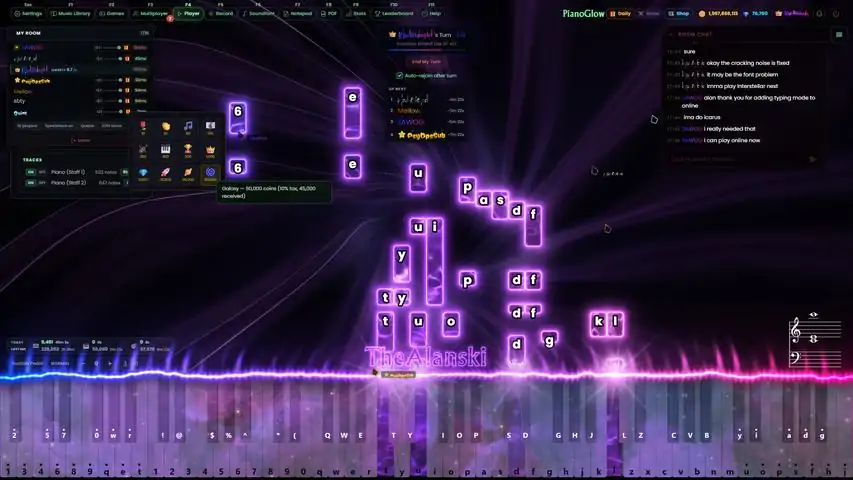
PianoGlow is a multi-purpose Piano application:Multiplayer - play and listen to others around the globe! Queue-based multiplayer mode to take turns playing piano! Global chatroom!Works with both MIDI piano and QWERTY keyboard - that's right, play with your laptop/computer keyboard!Ear training & note reading game
游戏圈
共3条帖子
两全
2026-03-20 19:00:45 · 发布在 「PianoGlow 」
PianoGlow: Official FAQ Scroll down for the list of common questions and links to other guides. For the latest version of the FAQ, please refer to www.PianoGlow.com/faq ❓ Need Help, Found a Bug, or Have an Idea? For the latest version of the FAQ, please visit www.PianoGlow.com/faq Join the Discord at https://discord.gg/NYAqGq3Zxs for quick help and to provide feedback! Alternatively, email support@pianoglow.com 🎼 Where To Find Sheets for Songs to Play on QWERTY? PianoGlow works with both QWERTY computer keyboard and a real digital piano. QWERTY sheet library: http://vp-sheets.arijan.dev/ In PianoGlow, press the F10 keyboard shortcut to directly search this music library from within the app. Alternatively, search "Virtual Piano Sheets" on Google along with the song name. Virtual piano keyboard layouts (QWERTY) are compatible across many virtual piano apps, including PianoGlow. 🎓 How Do I Learn to Play? This depends if you want to learn the real piano or with the QWERTY computer keyboard: 🎹 Real Piano: Use PianoGlow's game modes such as Ear Training or Sheet Training (keyboard shortcut: F5). These are intended to supplement learning material (and not replace it). ⌨️ QWERTY: Scroll down to the bottom of the FAQ for the guides! 🎹 How Do I Connect My Piano to PianoGlow? PianoGlow supports both computer keyboard and a digital piano. For digital pianos, use a printer cable (USB-B) to connect the MIDI piano to your PC. You can also load or record MIDI files in PianoGlow. 🌄 How Do I Set a Custom Video Background? Navigate to Settings > Theme > Upload Background (Video or Image). You can upload your own videos or images. To download YouTube videos for backgrounds, use tools like https://cobalt.tools/. 📲 Can I Play on My Tablet or Mobile? Yes, via the Steam Link mobile app, you can stream PianoGlow from your PC to your phone/tablet (iOS, Android). Note: MIDI instruments must still be connected directly to your computer. 🎶 Where Can I Find Custom SoundFonts? Custom SoundFonts (.sf2 files) can be downloaded from: https://www.zanderjaz.com/downloads/soundfonts/ https://musical-artifacts.com/After downloading them, upload the sf2 files to the PianoGlow app! 📚 Other Guides I Should Read? https://pianoglow.com/ List of PianoGlow guides are linked on the homepage to get started with learning piano and using the application. QWERTY Guide: Written by noakopiano@ who is an expert QWERTY player with years of experience, a guide on how to play using the QWERTY keyboard introducing techniques and finger placement etc. Video-editing guide:[pianoglow.com] How to render visuals from PianoGlow and create performance videos, perfect for TikTok or Instagram reels.
纳加加
2026-03-20 16:00:40 · 发布在 「PianoGlow 」
This guide offers a structured introduction to Virtual Piano—covering QWERTY technique, music theory, and tips to improve your playing experience. Introduction to Virtual Piano****************** IntroductionThe concept is simple: each key on a standard QWERTY keyboard corresponds to a piano note. Lowercase letters and numbers correspond to the white keys, while uppercase letters and numbers correspond to the black keys. (Note: PianoGlow offers options to select different keybinds if you're using keyboard layouts such as AZERTY or QWERTZ.) How To Start Playing & Find Sheet MusicThroughout this guide, you’ll learn the fundamentals of QWERTY piano, which will help you read and play QWERTY sheet music more effectively. Before exploring the sheet index below, I highly recommend reading through the full guide to gain a solid understanding of how Virtual Piano works. Main QWERTY Sheet Index[vp-sheets.arijan.dev] (credits to arijan for this amazing site) Most sheets have the difficulty labeled, so be sure to play at your current level. Hand Positioning****************************(Hand Positioning may vary based on your keyboard layout or preference.) Sustain PedalThe sustain pedal allows notes to continue sounding after the keys are released. It is controlled by pressing the spacebar. It’s recommended to invert the sustain pedal (if not already inverted), so you don't need to hold down the spacebar for sustained notes. TransposingTransposing changes the key you’re playing in (e.g., C major, A minor), allowing you to play both white and black notes together. For example, If you're playing a piece originally written in B Major (which has 5 black keys), transposing it to C Major (which has no black keys) will make it significantly easier to play on a QWERTY keyboard. How To Play Black Keys / Shifted NotesBy default (no transpose), holding Shift + any of these QWERTY keys: [1 2 4 5 6 8 9 q w e t y i o p s d g h j l z c v b]will play the black key according to this image:**********************************************************Additionally, holding Shift + any key that does not have a corresponding black note will play the corresponding white note (i.e. Shift + 0 = q or Shift + r = t). How To Play ChordsChords are shown as notes joined by [ ]. (Arpeggiated form is { }.) For example, "[qetu]" is a chord. In order to play it, you must press "q", "e", "t", and "u" at the same time. It is up to you to find the most comfortable fingering when playing chords (refer to hand positioning for general reference). If a chord is too large or difficult to press all at once, you can arpeggiate the chord (meaning to play the notes one after another in quick succession). Another way of simplifying chords is skipping notes in the middle of a chord. How To Play Uppercase and Lowercase / Shifted and Unshifted Notes SimultaneouslyOne of the most frequently asked questions about Virtual Piano is whether it's possible to play uppercase (shifted) and lowercase (unshifted) notes at the same time. The answer is simple — it’s not directly possible (unless you configure custom keybinds or use transposition). However, it is possible to simulate this by pressing the notes in rapid succession. For example, [uO] should be played by pressing "u" first, then "O" as fast as possible. How To Play Notes In The 88-Key Octave RangeFor intermediate - advanced players, it is recommended to use the CTRL key which gives the ability to play 88-key octave notes. Simply hold CTRL then select one of the CTRL key notes. The layout for CTRL key notes goes as follows: First Octave: [ CTRL + 1 2 3 4 5 6 7 8 9 0 q w e r t ]***************************** Last Octave: [ CTRL + y u i o p a s d f g h j ]***************************** Basic Theory The basic formatting of sheets goes as follows: Lowercase letters = Normal notes. Uppercase letters = Shift notes. [ ] = Chord, play the notes together. { } = Press keys in rapid succession (usually arpeggiated chords). If the CTRL note is at the end of a chord or a single note, the only separator is the colon ( : ). (The : and ' symbols separate CTRL notes from the regular notes so you don't get confused.) Image exclusive format: Underlined ( _ ) notes = CTRL note. TimingGreen = hold the note/chord for a bit before playing the next. Orange = play the note/chord relatively quickly then move to the next. Red = play the note/chord very quickly then move to the next. The image above shows how timing is represented using both text and color. The text-formatted timing (i.e. ( - ) or ( .... ) is generally used in all text-based sheets. The color-formatted timing (i.e. green → orange → red) is used in image-based sheets. Extras MIDI ConverterVery helpful tool that lets you convert MIDI files into QWERTY sheets. MIDI Converter[arijanj.github.io](credits to arijan for this site as well) Virtual Piano SitesA few other websites/games that utilize the QWERTY piano can be found here. (Note: not all virtual piano apps utilize the same features PianoGlow does.) Virtual Piano[virtualpiano.net] Multiplayer Orchestra[multiplayer-orchestra.com] Visual Piano Studios on Roblox[www.roblox.com] Piano Rooms on Roblox[www.roblox.com] Pianoverse[pianoverse.io] Conclusion PianoGlow / Virtual piano provides a unique and accessible approach to musical expression. This guide is intended as a foundation — whether you're just starting out or already experienced, I hope you found this guide helpful. Thank you for taking the time to read.

下载233乐园APP

专心推荐好游戏

关于我们 · 联系我们 · 隐私政策 · 营业执照

侵权投诉 · 开发者中心 · 用户协议 · 免责声明

不良信息举报中心

纠纷处理及不良内容举报电话:

4006600910 (工作时间: 9:00-12:30,14:00-18:00)

北京市朝阳区启阳路4号院2号楼15层1803室

本公司产品适合10周岁以上玩家使用 未成年人家长监护

首页 / PianoGlow

抵制不良游戏 拒绝盗版游戏

注意自我保护 谨防受骗上当

适度游戏益脑 沉迷游戏伤身

合理安排时间 享受健康生活

京ICP备18003564号-3

经营许可证编号:京B2-20181741

京公网安备:11010502052873

Copyright © 2026 233leyuan.com All Rights Reserved

北京龙威互动科技有限公司版权所有

热门游戏: 我的世界 | 三角洲行动 | 原神 | 王者荣耀 | 超自然行动组 | 蛋仔派对 | 和平精英 | 火影忍者 | 二重螺旋 | 英雄联盟 | 梦幻西游 | 明日方舟 | 斗罗大陆 | 光遇 | 鸣潮 | 无畏契约 | 模拟山羊3 | 樱花校园模拟器