换一换
换一换 




我发现有不少人在询问这个问题,所以觉得有必要写一篇指南。为了方便新用户理解,我会尽量写得简单明了,同时也会兼顾那些希望自定义设置的高级用户,让指南具有足够的灵活性。 日循环结构(基础版)
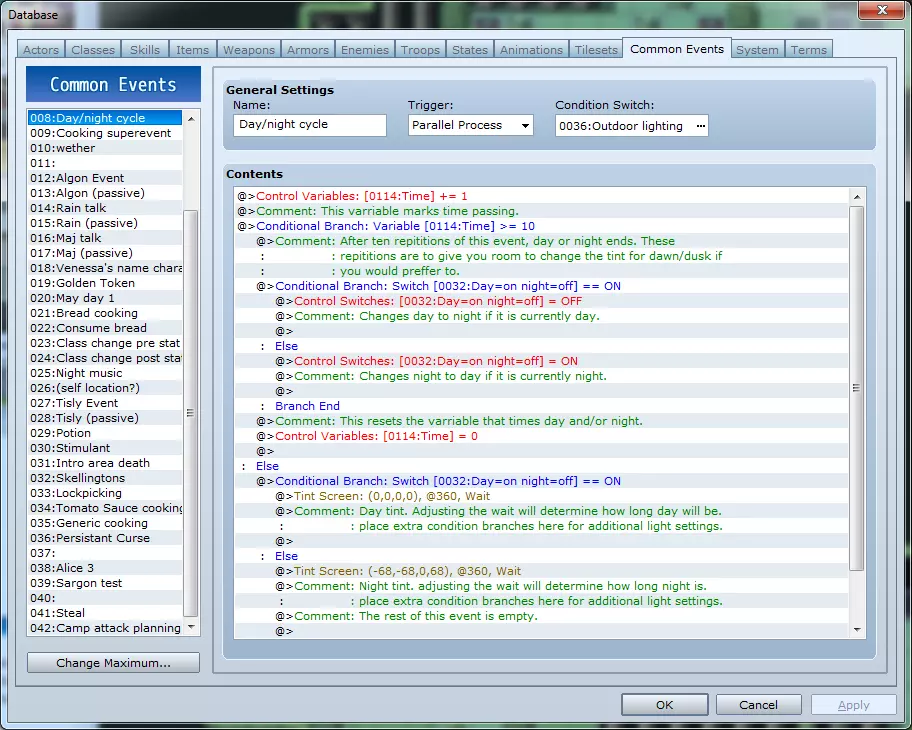
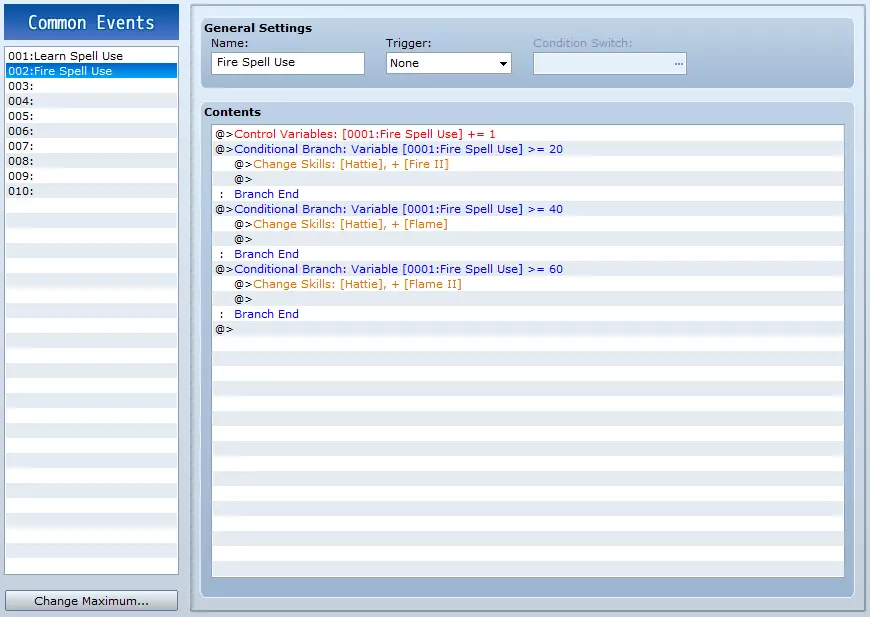
初始设置 你需要两个开关、两个变量和一个公共事件。为了便于跟踪,我会列出我在游戏中对它们的命名,但你当然也可以随意命名: 公共事件:光照 变量:时间 变量:时间速率(可选) 开关:户外光照 开关:昼夜 公共事件是运行昼夜循环的事件。 第一个变量用于追踪时间流逝。 第二个变量可通过增加来加快昼夜循环速度,或通过减少来减慢速度。 第一个开关是事件运行所需的条件。 第二个开关用于标记当前是白天还是夜晚,开启状态代表白天。 你可以在使用“更改开关”或“更改变量”命令时为开关和变量命名。请注意,若未进行更改,此系统在游戏开始时默认处于夜晚模式。 设置事件步骤: 1. 变量[时间] +1 这用于追踪自上次白天或夜晚结束后事件循环的次数。 接下来的设置会更复杂: 2. 条件分支:变量[时间] >= 10 (确保勾选“设置条件不满足时的处理”。) 这是事件在切换日夜前重复的次数。设置此数值是为了给你留出空间插入额外的光照设置,例如黎明、日出、日落、黄昏等(为避免混淆,这里是“大于或等于10”)。 3. 在该条件分支内添加:设置变量[时间] == 0 这会重置计时器。 4. 现在需要以切换开关状态的方式来改变日夜切换开关(即开启或关闭日夜切换开关)。条件分支:若昼夜=开启 创建此条件分支时,请勾选“设置条件不满足时的处理”选项。这将为条件分支添加“否则”条件。在条件分支的第一部分内添加: 开关“昼夜”关闭 并在“否则”下方添加: 开关“昼夜”开启 到目前为止,事件应如下所示: 变量“时间”+1 条件分支:变量[时间]>=10 条件分支:若昼夜=开启 开关“昼夜”关闭 否则 开关“昼夜”开启 结束分支 否则: 结束分支 此部分将实现昼夜交替切换。只有当自上次昼夜循环变化以来,此事件已重复发生十次(因为它位于“时间>=10”的条件分支内),才会执行该切换。 到目前为止,我们尚未涉及实际的光照设置。现在是时候解决这个问题了。在最后一个“else”下方添加: 条件分支:切换:[昼夜] == 开启 再次勾选“条件不满足时设置处理”。 在此条件分支内,视为白天正在进行。在此处放置任何与白天相关的色调。例如,你可以添加一个“条件分支:变量时间 == 0”,并在其中设置玫瑰色色调以表示日出。 不过,对于一天中的大部分时间,使用单一色调即可; 屏幕色调:(0,0,0,0) @ 360 帧,等待 你可以根据需要更改帧长度等参数。在设置色调事件时勾选“等待完成”将创建时间延迟。在此处包含某种等待对于此事件的设计至关重要。这里是调整白天持续时长的地方,每次等待代表白天时长的1/10(根据第一个条件分支)。如果你觉得夜晚不应与白天持续同样时长,可以单独调整夜晚。 在else条件下,夜晚正在进行,因此需将主色调调整为预设的“夜晚”设置或自定义的夜晚设置。 屏幕色调:(-68,-68,0,+68) @ 360帧,等待。 调整等待时间或添加额外等待来调整夜晚时长的1/10。 至此,事件已完成。你只需开启“日夜循环”,它就能完美运行。不过,我会更详细地介绍一些其他可用于管理此事件的操作。启用和禁用户外照明: 在我给出的示例中,有一个开关可以在进入建筑物内时关闭,以表示地图不受外界光线影响。这主要用于玩家处于建筑物或地牢内的场景。 禁用地图区域照明的方法: 1. 创建一个事件,将其设置为并行处理。 2. 关闭“户外光线”开关。 3. 调整屏幕色调:0/0/0/0(或所需亮度等级)。 4. 删除事件(事件将停止运行,直到你下次进入该地图)。

要在某个区域启用照明: 切换“室外灯光”开关至开启状态 清除事件。

These events can be easily copy-pasted across many maps and be incorperated into other common passive events, such as ones that disable weather when indoors. Added mechanic to adjust rate of time passing. Some users may wish for their daycycle to pause or slow when in town or perhaps accelerate while the player is resting/camping, ect, to show time passing. Here's how to adjust the daycycle's speed: create "rate of passing" varriable if you have not done so as yet. rather than "varriable [time] + 1" use: varriable [time] += varriable [rate of time passing]. Be mindfull that this might skip some of your additional lighting settings depending on how you have it set up. Do not add a line to change the rate of time varriable in this event; Have external events set the rate of time varriable higher to increce the speed of day/night or set it lower to decrece the speed of day/night as needed. If you decrece it into the negitive your daycycle may pause longer than intended. with a base of 360 frames delay for each tint and the time condition set to: if varriable "rate of time" equals: 1: 1 minute per cycle 2: 30 seconds per cycle 3: 24 seconds per cycle 4: 18 seconds per cycle 5-9: 12 seconds per cycle 10+: 6 second per cycle (constantly shifting between day and night) Setting it to zero will pause the daycycle (so time will be frozen by default until rate of time is changed to a number other than zero). Pros: can adjust daycycle speed or freeze daycycle anytime, anywhere with external events in a global and far-reaching way. cons: if you set above +1 this may skip transitional tints you may have added, such as sunrise and sunset, ect. You will need to take more care when setting up any additional tints. Make it mean something! Don't forget to have NPCS and any visable event-driven monsters respond to your day/night cycle. Some NPCS may be asleep at certin times of day, and muggers and nocternal monsters, such as bats, may emerge at night that otherwise would have not existed. Some quests may require either day or night and some dialog may trigger at night between player characters. It's not enough to just impliment day/night for show! Make it affect your world in meaningful ways! note: if a quest event requires a spesific time of day, be kind and give the player time powers / a "wait x hours" mechanic so they won't get fed up with waiting. The old "day/night" spell from Dragon Warrior 4 comes to mind. Bonus: Working clock There won't be an animation or a picture This is not developed well enough to work in tandem with my day/night cycle but can create a clock that can automaticaly adjust the text as you look at it. Pieces: Varriable 1) hour Varriable 2) minnute Varriable 3): second Varriable 4) Day (ect) one common event "world time" one local event "clock" one switch "alwaysON" Common event: world time (paralell process) Requires switch: "AlwaysON" to run. (keeps track of the "world time.") Wait 60 frames Change varriable [second] += 1 # can potentialy be based on [rate of time] varriable. Condition branch: [second] >= 60 # If sixty (or more) seconds have passed change varriable [second] -= 60 # "subtract 60 from varriable second" Change varriable [minnute] +=1 # Tells the event that a minnute has passed end # "end condition branch" condition branch: varriable [minnute] => 60 # if 60 or more minnutes have passed Change varriable [minnute] -= 60 Change varriable [hour] += 1 end condition branch: Varriable [hour] => 24 Change varriable [hour] -= 24 Change varriable [day] +1 #you can keep going to add month, year, and anything else you might decide can be a benifit to your game. You may also wish to advance time after an inn stay, ect, or to reset the hour to when the player would likely get up. I believe there is a calendering script available on workshop as well. Clock event (main event) Loop: Condition branch: Button [C] is being pressed # "C" is the "accept" button by default on keyboard. it's "z" or "space" or "enter." Pressing this will #end the loop but the loop will not end unless / until "C" is pressed. break loop end branch important note: It is the conditon branch that ends, NOT the loop! The loop covers the rest of the event. Condition branch: Varriable [minutes] < 10 # "are minutes less than ten?" * Text: >The time is v[3]:0 v[2] and v[1] second(s). ^ # This is what the text should look like. The unsightly " v[?]" will display as numbers in-game. "/^" is the command that allows it to not wait for player imput so this event can change the displayed time without waiting for player imput. " >" allows the text to be displayed instantly; without this command, the text would be constantly moving from left to right as the loop resets the text, which just looks bad. " >" must be placed at the beginning of each line of text, and can be canceled with a " <" mid-line. #The full list of these commands can be seen by mousing over any text window or scrolling text you are currently editing. Now, in the else case of the same condition branch: else: text: >The time is v[3]: v[2] and v[1] second(s). ^ end branch # * the only reason for this condition branch as opposed to just using the text found in the "else" # case is that if you don't insert the "0" before minutes manualy you are left with (for example) # "1:2 and 30 seconds" instead of "1:02 and 30 seconds" whenever the minutes are less than 10. # replace v[3] with the number of your hour varriable, v[2] with your minnute varriable and v[1] # with your second varriable. # A reminder: the " > " at the beginning tells the text to instantly display which is critical to avoid a # "flickering" visual effect as the text scrolls constantly left to right. #The ^ at the end of the text tells the event not to wait for any input at all. This plus the loop #allows it to instantly refresh when the time changes and without any player imput. end loop # And that should be a working, globally consistant clock event. If you would like to add a picture to represent the clock, you can. I am not sure, but it might even be plausable to animate it this way using a massive swarm of condition branches to determine what angle the hands should be at. I wouldn't bother with that, though, myself. Now, without comments: Loop: Condition branch: Button [C] is being pressed break loop end branch Condition branch: Varriable [minutes] < 10 Text: >The time is v[3]:0 v[2] and v[1] second(s). ^ else: text: >The time is v[3]: v[2] and v[1] second(s). ^ end branch end loop How to have a clock slightly different than the world time: Local event: clock change Varriable: Minute -= 1 change Varriable: Hour += 2 changeVarriable: second +=4 #manualy adjust the varriables at the start of the event. Call common event "clock" Loop: Condition branch: Button [C] is being pressed break loop end Condition branch: Varriable [minutes] < 10 # "are minutes less than ten?" * Text: >The time is v[3]:0 v[2] and v[1] second(s). ^ else: text: >The time is v[3]: v[2] and v[1] second(s). ^ end branch #be sure to change the time varriables back to how they were when leaving. change Varriable: Minute += 1 change Varriable: Hour += 2 changeVarriable: second -=4 end loop The clock text has a tendency to flicker when switching from "below nine text" to "above nine text" for seconds and minutes. I don't know how to fix that. Reducing performance cost (degraded version) This is a quick note; while parelell proccesses are really handy it's easy to find 1,000 things you want to do with them with the obvious problem that they're a bit of a performance sink. While performance is not as critical in an old-school turn-based RPG as in modern action-based games like shooters, it still hurts the experience quite a bit if the game slows down and starts looking choppy and it completely breaks any trappings of immersion. So, if you want time to move foreward without the tax on performance, here's one way you can do it with a less profound drain. Keep the common event's basic strucure. Set the common event's trigger to "none" Have your self-erasing or transfer events call world lighting. There is one slight "bug" with this relating to saving the game. If you save and load under this version time will proggress +1 past where it was when you saved it because the map event will have un-erased itself. What this will do, in practice, is advance time slightly for you whenever you change from map to map. This is a downgrade from the constantly running version but it should help cut performance costs. Tweeks may be needed to the amount of times the event needs to repeat before changing to the next tint to accomidate for significantly less frequent number of repeats.