换一换
换一换 


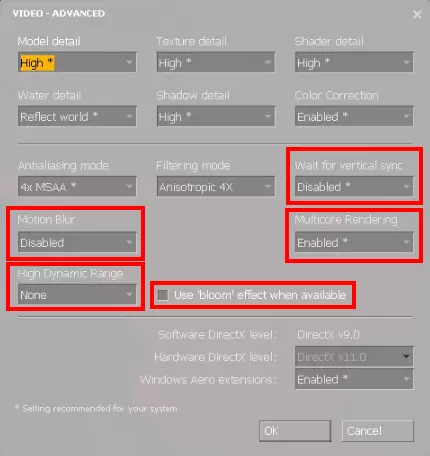
This guide includes information about almost everything you need to know about Day of Defeat: Source. Beginners and experts will find something useful here. The Guide descripes how to configure your game properly, including sensitivity, graphics and other stuff like HUDs and config files. There are also gameplay tips included and how to play properly. One section descripes the competitive play and you can also find a link collection of community pages and other stuff in this guide. Table of contents Before getting started: Hardware and equipment Mouse, pad, sensitivity Better visuals due to improved video settings Enabling in-game console and launch-options Config and netcode settings HUD Crosshair and useful scripts Gameplay Class overview (rifle, support, etc.) Playing style - becoming a better player Clanwars Clanwars Leagues (ESL especially) Misc Commuinty websites in Europe Custom files for DoD:S Custom maps Day of Defeat Fragmovies on Youtube About the author Latest update: 14.07.2013 Links may not work anymore or lead to different content! Rate, favorite and share this guide if you like it! Computer setup and equipment + sensitivity Before getting started, you should set up your computer properly. This is basically the same for every FPS game, so i will just provide the most important general information. Mouse settings The mouse is the most important thing to look at when playing shooter games. There are just a few things to look at: Chosing your mouse Unlike advertising tells you, it is not necessary to have the highest dpi, fanciest colours or most mouse buttons. It shouldn't be a ball mouse, so optical or laser is the way to go. In my opinion, you don't need a higher dpi range than ~400 - 2000. Adjustable polling rate is a plus, 500 or 1000 Hz do a good job. Addition thumb buttons are also a nice feature. Feeling comfortable with the handling is the most important thing. One point to look at might be something called "prediction" or "angle snapping", basically something build in to smoothen your mouse movement. It mostly is personal preference, but if you are interested in further information, you can find lots of details on the internet. Many mice in a price range from lets say 25-60 € fullfill these requirements! Mousepad Using a mousepad makes your movement smoother and more constant. There are mousepads made of cloth, plastic, metal or glas available, but the most good players prefer cloth. The size is depending on your mouse sentivitiy, a bigger pad gives you more room to turn around and stuff. I've noticed that having a thicker pad (>=4mm) can provide a better feeling, if the surface isn't 100% plain. Good pads are priced between 10-30 €. Mouse sensitivity Most important thing here is: sensitivity is personal preference, but there are still some things to say: disabling enhanched pointer precision / mouse acceleration is preferred by most gamers. more room to aim on a large mousepad (40cm wide e.g.) means more accuracy than moving your mouse in an area which is as large as a stamp. A slower sensitivity also means that it is more difficult to turn around ingame. So find a sensitivity you feel comfortable with. There are good players using low, med and high sensitivity, so don't worry about that! Find a sensitivity and get used to it - and keep it the same to become better! Acceleration To disable in-game mouse acceleration, you can put the following commands in the DoD:S launch options. (If you don't know how to edit the launch options, take a look at the "graphics and config settings" paragraph - "Enabling the in-game console") -noforcemaccel -noforcemparms -noforcemspd Another method: putting m_rawinput 1 in your config. DoD:S uses the raw input data from your mouse, bypassing drivers etc. Should be the easiest and best method. Another possibility might be using the MarkC Mouse Fix for Win XP, Vista, 7 and 8[donewmouseaccel.blogspot.de]. For more information check the link. Keyboard No special requirements, you can e.g. use WASD, arrow keys, numpad or any other combination to play. Just use what you are used to and feeling comfortable with. Sound / Headset There are stereo and surround headset / speaker settings available in DoD:S. Use what you like, I'm using a Creative Titanium Soundcard with a stereo headset and prefer it over 5.1 surround USB headsets e.g., but thats personal preference. Graphics and config settings Video settings Your video settings should be optimized for good stable fps and help you spottting the enemys. To check your fps (frames per second), use the net_graph 1 command (type it into the console). Good fps are stable 100+. Options - Video - Advanced: The most settings depend on your system and your visual preference, but you should definatley set the following: Motion Blur - disabled High dynamic range - none Wait for vertical sync - disabled Use "blooom" effects when available - unchecked These settings will allow you to see enemys more easily. Multicore rendering should be enabled on CPUs with more than one core to gain more fps. These are my video settings:
你还应该调整亮度等级:较高的亮度(伽马值)能让你更容易在黑暗区域发现敌人(见下方对比)。 选项 - 视频 - 调整亮度等级: 将其调至最左侧,使其显示为1.6。
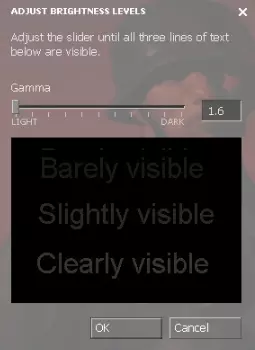
游戏内最高与最低伽马值对比:(左侧1.6,右侧2.6)
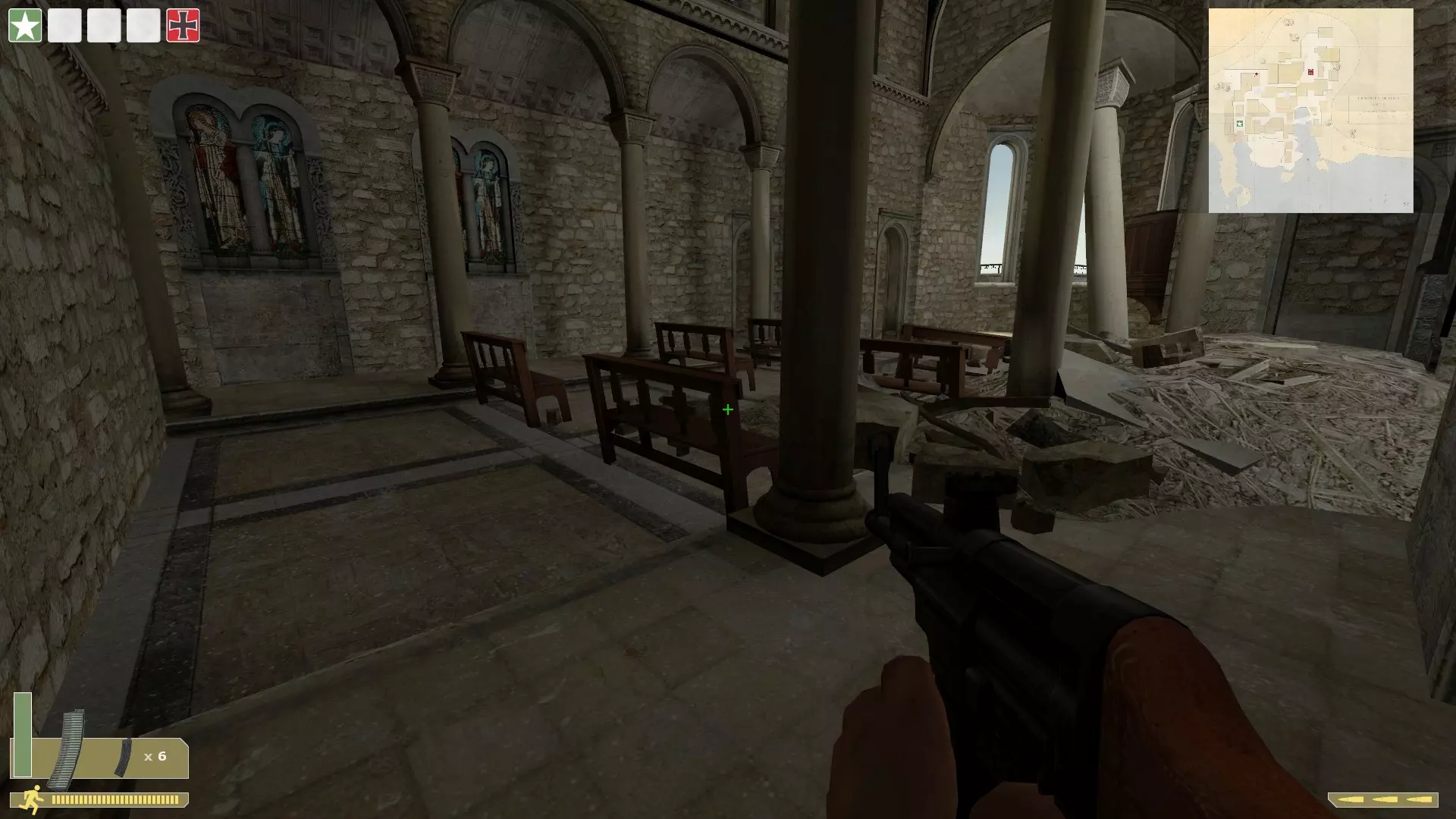
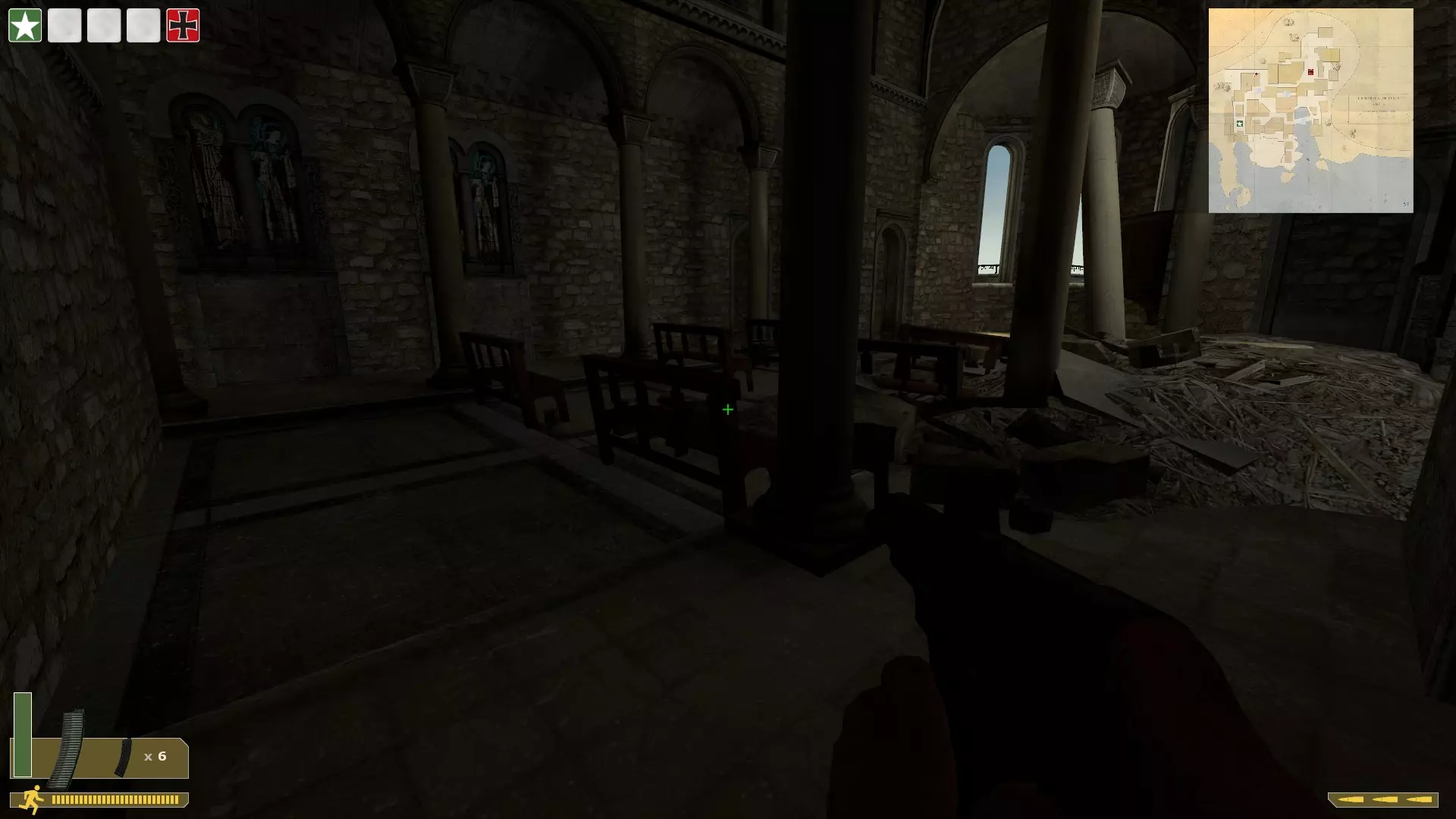
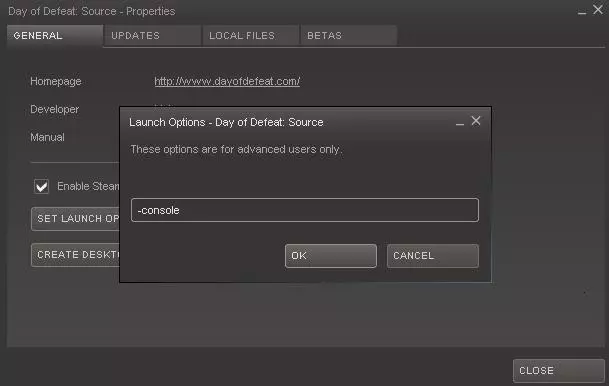
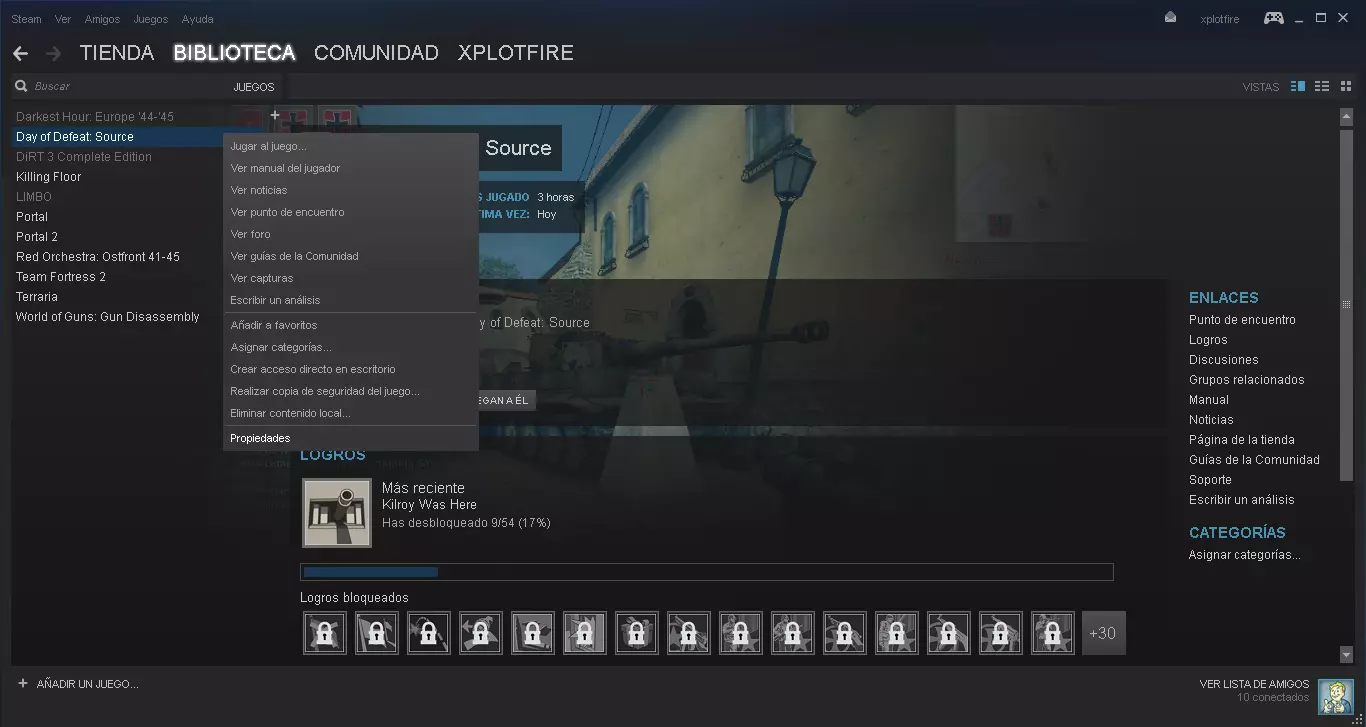
如你所见,暗角变得更亮了,你能更容易发现隐藏的对手。 启用游戏控制台: 在Steam中,依次进行以下操作:库 - 右键点击【胜利之日:起源】,选择属性 - 点击设置启动选项,并输入 -console,点击确定。现在启动游戏时你应该能看到控制台了。 你还可以添加以下命令:-novid,用于跳过启动时的Valve视频。
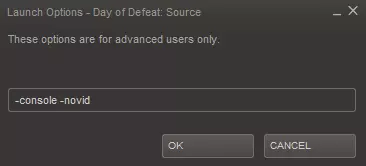
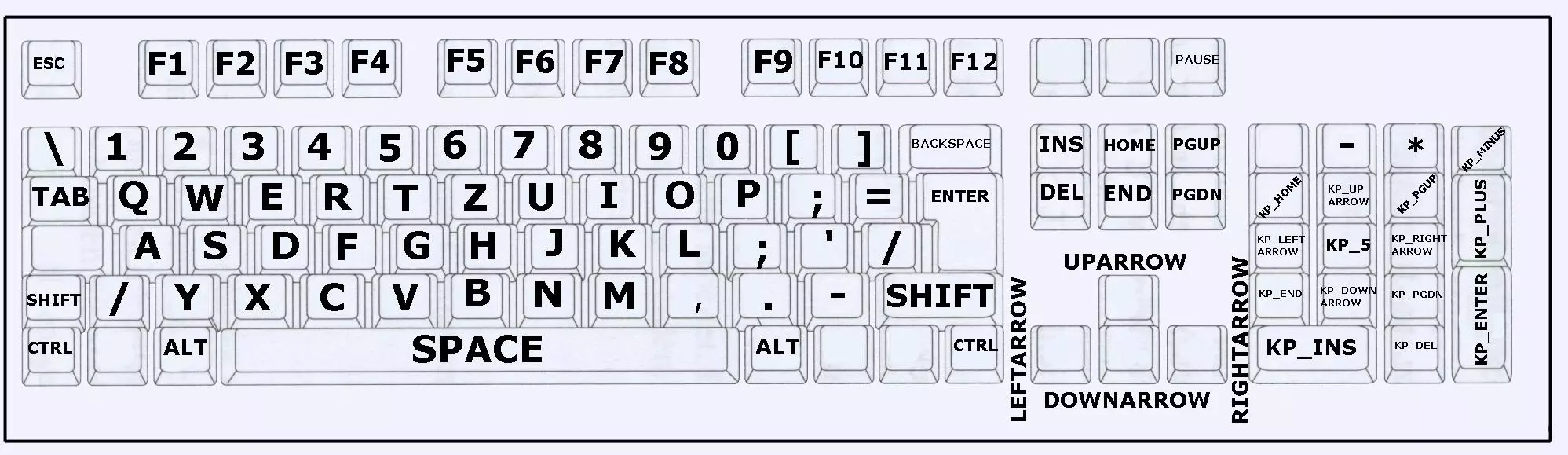
其他一些实用命令如下: -refresh x,其中x是你想要的刷新率,例如“-refresh 120”代表120Hz。 -w x,像素宽度。 -h x,像素高度。 例如:-w 1920 -h 1080可将分辨率设置为全高清。 -noforcemaccel -noforcemparms -noforcemspd,用于禁用鼠标加速,详见上文。 配置 配置文件用于保存你所有的游戏内设置。网上有许多相关指南和更详细的信息,因此这里仅提供一些基本建议。与默认设置相比,这些建议仍能显著改善你的游戏体验。 你的配置文件位于:Steam SteamApps common Day of Defeat Source dod cfg (过时路径:Steampipe更新前的旧版本:Steam SteamApps yoursteamaccount day of defeat source dod cfg) 在这里你可以找到一些配置文件,包括config。配置文件及其他一些文件。你可以用写字板或编辑器打开它们。添加新设置最简单的方法是创建一个新文件:autoexec.cfg。将以下命令放入此文件中! 如何恢复默认配置: 1. 禁用《胜利之日:起源》的云同步功能。 2. 删除《胜利之日:起源》配置文件夹中的所有配置文件。 3. 删除Steam用户数据中名为Day of Defeat:Source的文件夹(应用ID 300)。 4. 启动游戏,配置应恢复为默认设置。 网络代码: 这些设置将最大程度改善你的游戏体验,调整 hitbox 和模型。 rate "30000" 或更高,最大值为1000000。cl_cmdrate "66" cl_updaterate "66" cl_interp_ratio "1" cl_interp "0" 禁用烦人的声音 以下指令将阻止游戏播放胜利音乐、成就音效以及支配/复仇音效。 dod_playachievementsound "0" dod_playrivalrysounds "0" dod_playwinmusic "0" 禁用电影颗粒效果 禁用这些效果有助于你在死亡视角中发现敌人,以便下次进攻时将其击杀。 cl_enabledeatheffects 0 mat_filmgrain "0" 按键绑定 按键绑定格式如下: 例如:bind "mouse1" "+attack" bind "按键" "指令" 你可以在config.cfg文件中找到它们,并在配置文件中添加/编辑指令。 以下是Source引擎游戏的按键名称概览:
HUD和准星 HUD 默认HUD的字体和图片非常大,会遮挡视线。如果两个名字很长的玩家互相击杀,使用默认HUD时,死亡提示可能会大到出现在准星上方! 你可以获取很多《胜利之日:起源》的自定义内容。 你绝对应该安装一个自定义HUD,Insane HUD v10是个不错的选择,它带有引导设置文件。你可以根据自己的喜好进行配置。 【更新:请确保下载最新版本的Insane HUD,以提供与《胜利之日:起源》当前版本的最佳兼容性】 你可以看到我的HUD带有小图标和小条形图:
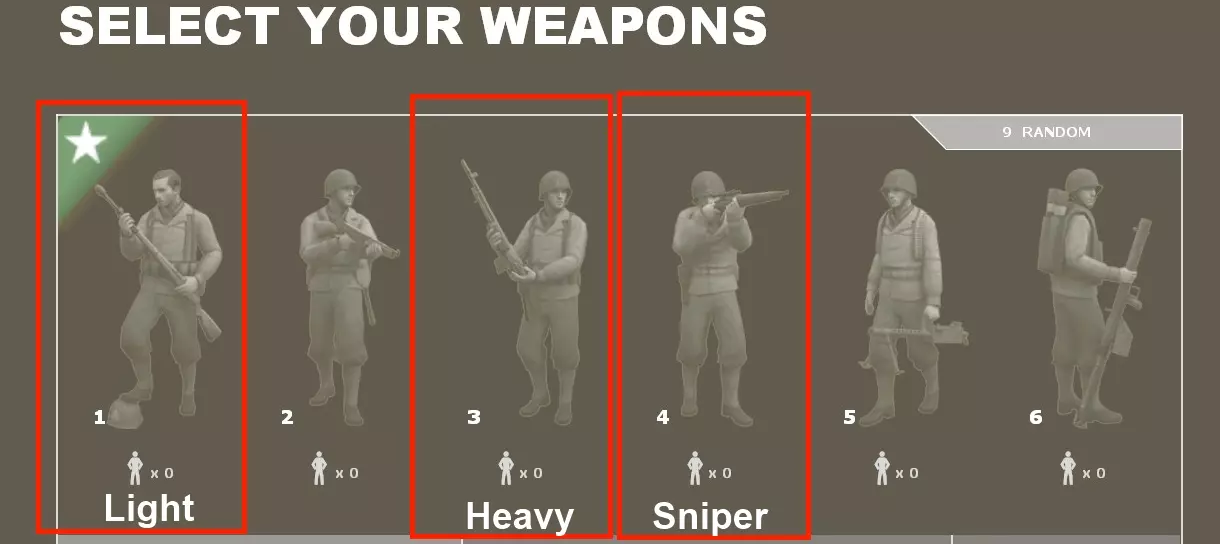
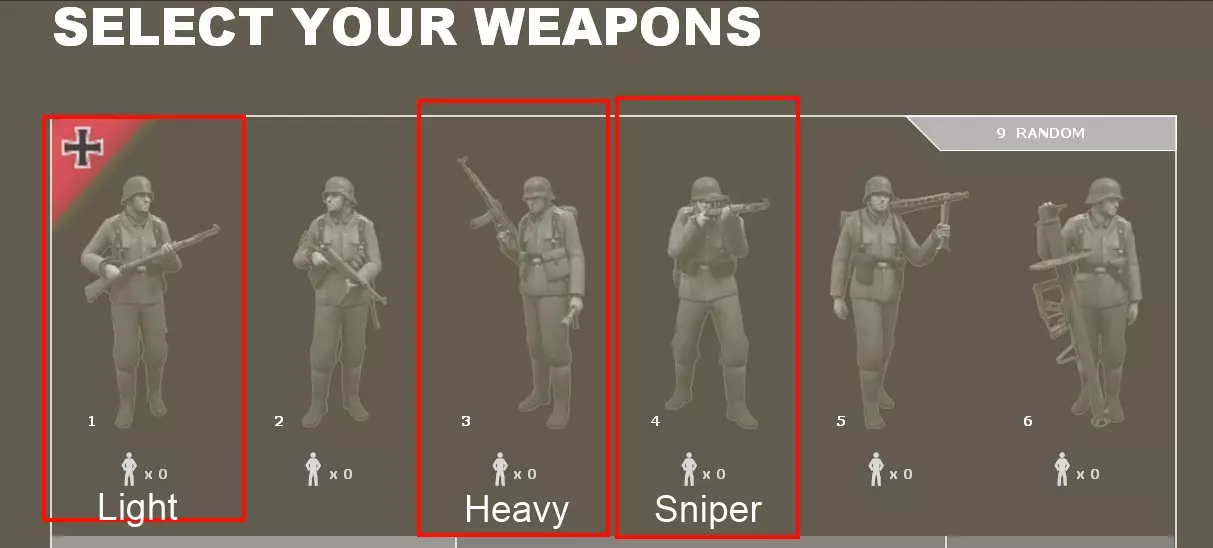
Crosshair Crosshair change script I wrote some scripts to easily change your crosshair ingame. Put this in your autoexec.cfg file. By pressing "F8", your crosshair will change to another typ. This script includes some crosshairs i like, you can easily edit it, if you want to have another crosshair. bind "F8" "xhair1" //Plus alias "xhair1" "cl_crosshair_file crosshair7;cl_Crosshair_scale 20;cl_crosshair_red 0;cl_crosshair_green 255;cl_crosshair_blue 0;cl_crosshair_alpha 999;cl_dynamic_crosshair 0; bind F8 xhair2" //Dot alias "xhair2" "cl_crosshair_file crosshair5;cl_Crosshair_scale 14;cl_crosshair_red 255;cl_crosshair_green 0;cl_crosshair_blue 0;cl_crosshair_alpha 999;cl_dynamic_crosshair 0; bind F8 xhair3" //Standard X-Hair alias "xhair3" "cl_crosshair_file crosshair1;cl_Crosshair_scale 23;cl_crosshair_red 0;cl_crosshair_green 255;cl_crosshair_blue 0;cl_crosshair_alpha 999;cl_dynamic_crosshair 0; bind F8 xhair4" //Default X-Hair without dot in the middle alias "xhair4" "cl_crosshair_file crosshair6;cl_Crosshair_scale 25;cl_crosshair_red 0;cl_crosshair_green 255;cl_crosshair_blue 0;cl_crosshair_alpha 999;cl_dynamic_crosshair 0; bind F8 xhair5" //circle alias "xhair5" "cl_crosshair_file crosshair3;cl_Crosshair_scale 17;cl_crosshair_red 0;cl_crosshair_green 255;cl_crosshair_blue 0;cl_crosshair_alpha 999;cl_dynamic_crosshair 0; bind F8 xhair6" //X alias "xhair6" "cl_crosshair_file crosshair4;cl_Crosshair_scale 32;cl_crosshair_red 0;cl_crosshair_green 255;cl_crosshair_blue 0;cl_crosshair_alpha 999;cl_dynamic_crosshair 0; bind F8 xhair1"If you want to have it on another key, you need to replace the "F8" with the desired key, "k" for example. Changing crosshair color This script cycles through different crosshair colors by pressing "F9" without changing anything else. Put it into your autoexec.cfg file to use it. bind "F9" "rot" alias "rot" "cl_crosshair_red 255; cl_crosshair_green 0; cl_crosshair_blue 0; bind F9 gruen" alias "gruen" "cl_crosshair_red 0; cl_crosshair_green 255; cl_crosshair_blue 0; bind F9 blau" alias "blau" "cl_crosshair_red 0; cl_crosshair_green 0; cl_crosshair_blue 255; bind F9 hellblau" alias "hellblau" "cl_crosshair_red 0; cl_crosshair_green 255; cl_crosshair_blue 255; bind F9 weiss" alias "weiss" "cl_crosshair_red 255; cl_crosshair_green 255; cl_crosshair_blue 255; bind F9 lila" alias "lila" "cl_crosshair_red 255; cl_crosshair_green 0; cl_crosshair_blue 255; bind F9 schwarz" alias "schwarz" "cl_crosshair_red 0; cl_crosshair_green 0; cl_crosshair_blue 0; bind F9 rot" If you want to have it on another key, you need to replace the "F9" with the desired key, "k" for example. Custom maps There are many community made custom maps available. Normally DoD:S automatically downloads a map when joining a public server, if you don't have it already. If you are looking for new maps or want to download one, you can have a look at http://www.dodmap.com/ for example. In competitive play, some custom maps are heavily used - and you can find them on many public servers. Some of these good maps are: dod_harrington dod_lennon dod_catania_rc2 dod_santos_b3 dod_vallente_rc3 dod_coire_rc3 dod_diversion_b4 dod_salerno dod_fuel_ctf_b2 dod_solitude_match Class overview (rifle, support, etc.) What class should I play There are sixclasses available in DoD:S, but you should focus on three of these to become a good player, because the other 3 classes are not really skill-dependend. In competitive play, these classes are mainly used: Light = the rifleman (M1 Garand, K98) Heavy = the support (BAR, STG44) Sniper = the sniper (Springfield, K98 scoped)You should focus on of these weapons to become a good player. The MG class might be helpful sometimes, but in general it doesn't require much skill to lay down and press the fire button if an opponent shows up. The assault class, also called "medium" (MP40, Thompson) has a very random wide spray, making it impossible to kill good players on farer distance. Rocket has an acceptable secondary weapon, but the ammo is quite low, the primary weapons projectile needs time to travel. A good light, heavy or sniper will almost always be superior to a medium or mg, because of their high accuracy combined with a high mobility. Play the three classes listed above and maybe decide for the one you like the most. Being able to play more classes might be helpful sometimes. Focus on these classes:
如何正确游玩 游玩风格——成为更优秀的玩家 要想擅长某件事,你需要反复不断地去做。在《胜利之日:起源》中也是如此,你玩得越多,水平就会越高。 玩《胜利之日:起源》并不完全是为了在回合结束时获得漂亮的数据。阻止敌人夺取两面旗帜、守住重要据点或完全占领(夺取最后一面旗帜以得分)要重要得多。 在公共服务器上,你通常会遇到三种类型的玩家: 蹲点玩家 这类玩家会蹲守、等待、卧倒或躲在窗户或狭窄通道里,不怎么移动。他们主要瞄准一个点,当对手进入其视线时就开枪。如果你这样玩,可能死亡次数不会太多,但也成不了优秀的玩家。只是按住鼠标左键射击而不进行真正的瞄准,并不会提升你的瞄准能力;一味等待而不移动,也无法让你掌握时机和移动技巧——这些都是成为高手真正需要的能力。 冲锋型玩家 冲锋型玩家几乎与蹲守型玩家完全相反。他们会主动冲向对手,试图消灭尽可能多的敌人并夺取旗帜。 聪明的玩家——正确的道路 如果你真的想成为一名优秀的玩家,就需要融合这些游戏风格。聪明地游戏!思考你应该做什么。是贸然冲锋然后阵亡?还是稍微蹲守一会儿,等到队友赶来,再从你占据的有利位置一起推进?你需要找到合适的时机。通过不断游戏来积累经验。经验丰富的玩家能够判断敌人的位置、他们可能出现的地方以及他们可能采取的行动。蹲点太久并不能提升你的瞄准水平。无脑向前冲只会让你送命。优秀的玩家可以保持极具侵略性的打法,同时比蹲点玩家淘汰更多敌人。蹲点在等待敌人时确实能带来优势,但冲锋也可能打对手一个措手不及,两者都非常有用,关键在于在合适的时机运用。如果你频繁阵亡,就要反思经常发生的情况,思考问题出在哪里,并调整你的游戏风格!要聪明作战! 战队赛 游戏模式 在战队赛中,通常每支队伍会派出3名轻型兵、2名重型兵和1名狙击手。这意味着你的队伍至少需要6名玩家。 常见的游戏模式是4局15分钟制。每支队伍选择一张地图,分别以轴心国和同盟国阵营各进行15分钟比赛。然后在另一张地图上以同样的方式进行比赛。获胜队伍为获得最多满帽的队伍。若两队满帽数量相同,则拥有更多计时点的队伍获胜。其他游戏模式包括2x20或三局两胜制(bo3),但这些模式主要用于ESL等联赛。

有一些可供玩家与其他玩家竞争的联赛,在欧洲,ESL是最重要的一个。ESL的欧洲分部:ESL.eu dods分部。ESL也有国家分部,例如德国分部。只需查看页面了解更多信息。ESL提供夜间杯赛、冬季、夏季和秋季杯赛/联赛以及一些其他特别赛事,如德国足球甲级联赛。还有1对1和6对6的排名赛可供选择。在北美,你可以尝试相关平台。自定义地图也用于竞技比赛,有关更多信息,请查看【自定义地图】!其他社区网站欧洲zpgaming.eu - 英语dodszene.de - 德语dodfrance.com - 法语dayofdefeat。俄语 - russian dodsource.co.uk - 英语 dods-spain.com - 西班牙语 美国 thecompetitive.net - 英语 自定义内容 HUD、皮肤等 dodbits.com - 英语 自定义地图 dodmap.com - 德语/英语 YouTube视频 - 精彩集锦 精彩集锦、每周高光等 关于作者 霍根 国籍:德国 2005年开始玩《胜利之日》1.3版本 2006年初开始玩《胜利之日:起源》 玩家职业:重型(支援) 2008年起担任《胜利之日:起源》德国国家队队员,2011年任队长