换一换
换一换 




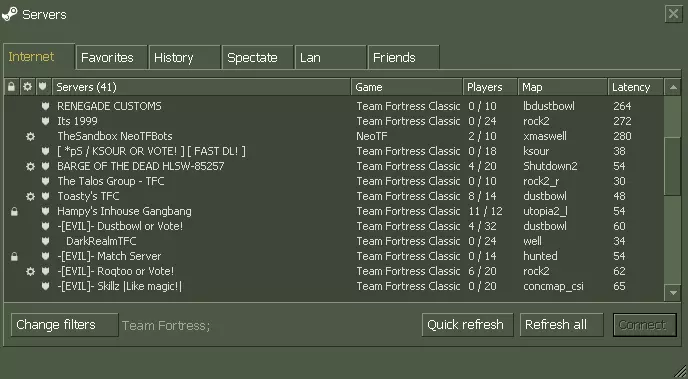
Comprehensive overview for getting into Team Fortress Classic. Includes settings, class overviews, skill and technique demonstrations, community resources, video guides, and more. Requests welcome! Introduction [this guide is currently a work in progress - suggestions are welcome!] Hello! Somehow you've found my notes on this game from 1999. If you have a question I hope the answer can be found below - if not, please leave a comment or message me on Steam and I'll see what I can do! I'm writing this guide more than two decades after I started playing Team Fortress Classic because this game (like many others of its era) has a lot of little quirks, a pretty incredible learning curve, and a nearly overwhelming amount of depth and variety. This guide is intended to be a general resource, but my main goal is to answer the question: "How can I play TFC?" If you're looking for the answer to more difficult questions like "how can I get good at TFC?" then please let me know when you find the answer, I want to know too! But to get you started here's an excellent resource put together by nuki and various collaborators: https://sites.google.com/view/nlc-tfc How to play TFC Due to the age of the game there are a couple quirks which may make getting started more complicated than simply launching the game and jumping into a server. In case you're having issues, here are some common solutions. Troubleshooting If the game launches to a black screen, try using the old OpenGL renderer by adding -nofbo to the launch options. Disable HD models in Options Video. This will prevent error messages when attempting to connect to servers. Are you experiencing some other issue that's preventing you from playing? Please post it in the comments!SettingsWhile the defaults are technically fine to start with, it's probably worth opening Options from the main menu and looking at each tab to ensure things are configured the way you like. Here's a couple I think are noteworthy: Options Multiplayer Advanced: Switch weapons immediately: Enabled (so you don't have to click an extra time to change weapons) Options Mouse: Raw Mouse Input: Enabled (this is crucial for being able to bhop accurately, more on that later) Options Video: Enabled HD models if available: Disabled (this causes issues, just turn it off)You may want to adjust the controls to suit your preferences; it'll be important to be able to easily press and hold either of the two grenade keys, discarding bags and throwing flags can be crucial in some situations, and you may want to consider adding jump to mousewheel up or down for bhop (more on that later). [TODO: talk about configs, binds, aliases?] Okay enough of all that, let's start playing already! Technically you don't need other people (or even an internet connection) to play TFC, you could set up a local offline game using FoxBot [citation needed], but odds are you're wanting to play either on a public server or in a structured/organized game. Public ServersThe public server experience is often chaotic and unorganized. Players of all skill levels will be investing varying amounts of effort, with everyone doing their own thing (which may or may not include trying to capture or defend a flag). Class synergies and team play may be an afterthought. You may spend a frustrating round trying to capture the enemy flag by yourself while the rest of your team hangs out in your base and the enemy team runs exclusively snipers, heavies, and engineers - or you may join forces with a passionate and helpful teammate(s), shift the tides of battle and have an incredible experience. Joining a public server is easy: just select Find Servers from the main menu, adjust any filters as desired, and join a server. Due to the age of this game there's probably only going to be a handful of servers that actually have players in them - you're certainly welcome to jump into an empty server and see if anyone else joins you, but to get you started here are some popular options as of this writing: OldSchool TFC (45.32.203.198:27035) - mostly ADL maps (attack/defend) which is different than the more traditional CTF (capture the flag) style but works great in a public server because the teams have clearly defined roles. -[EVIL]-BattleZone (66.151.244.170:27015) - regular CTF style pub, with a couple plugins to give a more 'classic' feel -X- BotServer (23.227.200.203:27015) - bots vs humans Twisted Dustbowl (142.54.164.26:27015) - dustbowl was the first big ADL map, so if you enjoy ADL but aren't ready for OST server this is a good option Drippy's 2fort (172.93.101.194:27015) - one of the more popular pubs, but has some arbitrary restrictions and aims for a very specific style of TFC that does not align with the 'competitive' meta Squishy's Batcave (68.232.160.177:27015) - skill maps server (more on this later)Servers may have passwords, may be empty, may have bots, may be running lots of crazy plugins that turn TFC into a whole different game (I personally do not enjoy NeoTF, but to each their own!), but hopefully this gets you started. If all else fails, grab a friend or 3 and join an empty one and start playing! If no servers show up at all there's probably something wrong and/or you may be on Linux. If you're looking for a more organized/competitive experience, or just want to try a different flavor of TFC, you may be interested in pickups or matches. Pickup GamesIn a pickup game each player will be choosing a class and a position and pursuing specific goals in collaboration with their team. In contrast with pub play where individual score/performance may be the main (or only) objective, the primary focus of a pickup game is the success of your team as a whole. Pickup games are generally organized in Discord these days, and are typically 4v4 (although options may include anything from 2v2 to a full 8v8 game). 4v4 pickups are Offense vs Defense over 2 rounds, so teams are picked in Discord, everyone joins the server and team A play offense (usually on Blue) while team B plays defense (on Red) for one 15 minute round, then teams swap sides and another 15 minute round is played. The most popular Discord servers for TFC pickups as of this writing are: Coach's Office (https://discord.gg/2AuUCZYnKv) - primarily plays 4v4, averages 12+ games per day, can start as early as noon eastern but generally gets at least a few games in during the evening Outhouse (https://discord.gg/fbqqpt8n8e) - more of a social hangout but occasionally plays tfc, more likely to play non-4v4 games if possible Inhouse (invite only, I think) - games usually start around midnight eastern, generally much more competitive (mostly TFC veterans)If you're interested in playing pickup games one of the best ways to get started is just to join a discord server and ask to spectate a game. Most players will be happy to help you get started. League MatchesIf you like the organized structure of pickups but want to play with the same people more regularly, work on your chemistry and develop strategies as a team, and compete with other teams to see how you stack up in the rankings, check out one of the currently active TFC leagues! 4GL (https://discord.gg/cCzZFZR) - 4v4 Offense vs Defense league TBL (https://discord.gg/dEVjx6Y) - Beer LeagueAlthough the active player base today is a tiny fraction of what it once was, league TFC is still the epitome of the ideal Team Fortress Classic experience. Skill MapsCertain aspects of TFC have taken on a life of their own - players and mapmakers have built entire communities around things like rocket jumping, conc jumping, ramp sliding, and more. If you enjoy certain mechanics of the game this stuff may open up a whole new world for you, totally separate from the traditional flag-based CTF/ADL competitions. Other than Squishy's (or another public skill maps server) I honestly don't know what the best way is to get into this unique and nuanced side of TFC. Any input for this section would be welcome! How to Configure TFC: Graphics TFC is an old game but we can make use of modern display features like high resolutions and adaptive sync to make it look a little nicer. Since it uses an old (and apparently poorly optimized) version of OpenGL, there are a couple of tricks to ensure the game runs smoothly. TFC has various mechanics that are affected by your fps. In general, higher fps is better, but there are a couple problems that start to occur (or become more common) at higher fps, and depending on your monitor and resolution some fps values may be more likely to cause tearing - unless you use vsync, more on that later. In general you'll probably want to set fps_max to a value somewhere between 110 and 250. Values lower than 100 will put you at a mechanical disadvantage. The chances of getting stuck while rampsliding gradually increase as fps increases - it's pretty uncommon to get stuck at 150 fps, intermittent at 240 fps, and quite common at 300+ fps. If you never slide up ramps, set your fps as high as you want :) By default, TFC will try to run at 72 fps and will not allow you use fps_max values higher than 100 until you enable fps_override 1. This is a fast-paced game and we want to be able to move quickly and smoothly, so enter fps_override 1 in your console, and keep reading to figure out what fps_max should be for your hardware. fps_max, G-Sync / FreeSync, and you First, let's open the NVIDIA Control Panel to check the setting for Vertical Sync in the Manage 3D Settings menu:
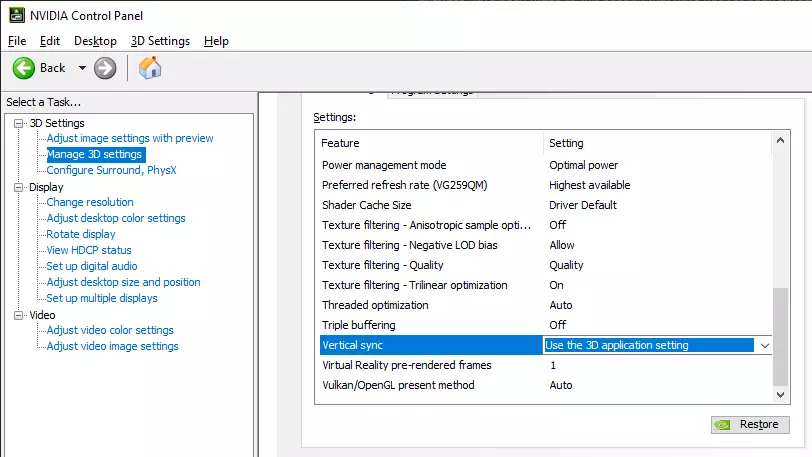
我个人建议将垂直同步设置为【使用3D应用程序设置】——这样你就可以通过游戏内设置(gl_vsync)来启用或禁用垂直同步。如果这里设置为开启或关闭,那么在游戏中更改gl_vsync将不会有任何效果,垂直同步状态将始终以这里显示的为准。 当你在NVIDIA控制面板中时,还可以检查你的分辨率和刷新率(无需更改,只需记下数值即可)。
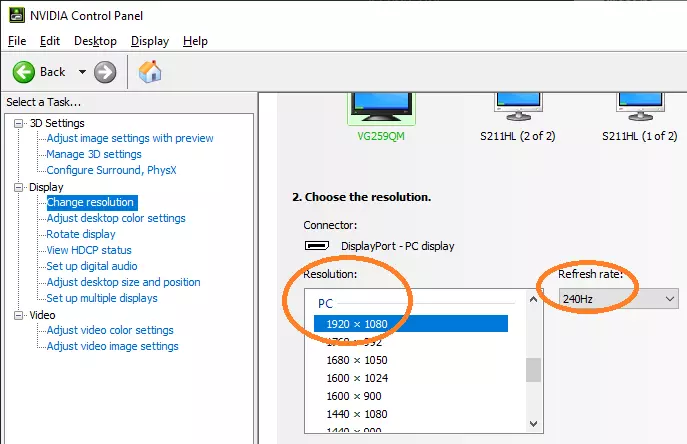
你也可以在Windows的显示设置和高级显示设置中检查这些设置。
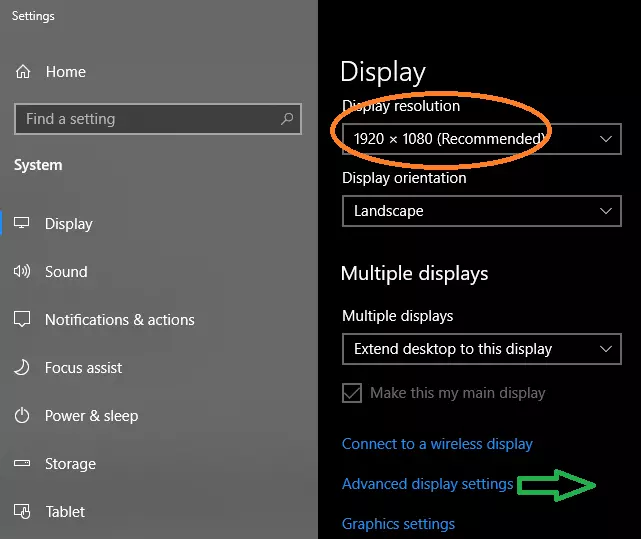
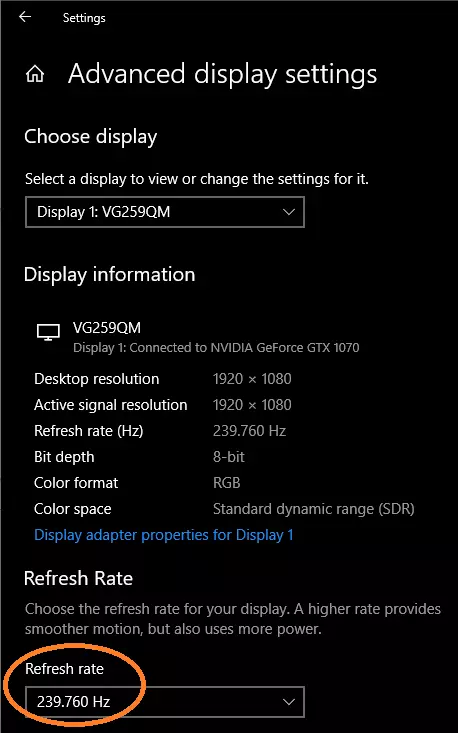
分辨率实际上只是个人偏好——我建议将《军团要塞经典版》的分辨率设置为与桌面分辨率相同,但如果桌面分辨率高于1920x1080,部分文字可能会小到难以看清,因此1920x1080或许是个更好的起点。 接下来的步骤取决于你的显示器刷新率: 75Hz或更低:110Hz以下的显示器实际上无法很好地利用垂直同步。 将gl_vsync设为0(或在NVIDIA控制面板中禁用垂直同步),并将fps_max设置为你感觉和看起来最舒适的值——你可能会注意到一种“画面撕裂”的视觉效果,在某些帧率值下会更明显,因此尝试提高或降低fps_max,直到画面撕裂可以接受为止。 我建议从fps_max 239开始尝试。5(游戏会向上取整半帧),然后逐渐降低,直到找到你满意的值——或者从119.5开始逐渐增加,直到感觉舒适为止。 120-144Hz:在这个范围内,开启垂直同步(vsync)可能有帮助,也可能没有。 如果你没有注意到明显的“画面撕裂”视觉效果,可以将gl_vsync设为0,并将fps_max设置为你感觉最佳的数值(例如在120Hz下,你可以尝试将max_fps设为119.5,或者115,或者如果感觉不对的话再略低一些)。 或者,你可以将gl_vsync设为1,并将fps_max设置为比你的刷新率低约5(参见下方的画面撕裂/调整部分)。 我个人推荐将gl_vsync设为0,不过这是因为我没有注意到画面撕裂,或者说不介意画面撕裂。如果你的眼神比我好(很可能确实如此),可以尝试将gl_vsync设置为1,但务必使用PresentMon等延迟测量工具,确保垂直同步不会增加不必要的渲染延迟(详见下方的画面撕裂/优化部分)。 240Hz或更高刷新率:恭喜,你的显示器刷新率比《军团要塞经典版》处理指令的速度还要快! 将gl_vsync设为1,并将fps_max设置为比刷新率低约5的值——详见下方的画面撕裂/优化部分,以找到能最大限度减少额外延迟的帧率值。 画面撕裂/优化 如果你不确定画面撕裂是什么样子,可以启动《军团要塞经典版》并进入2fort地图,前往带有金属纹理的斜坡房间,直视地面并前后移动。
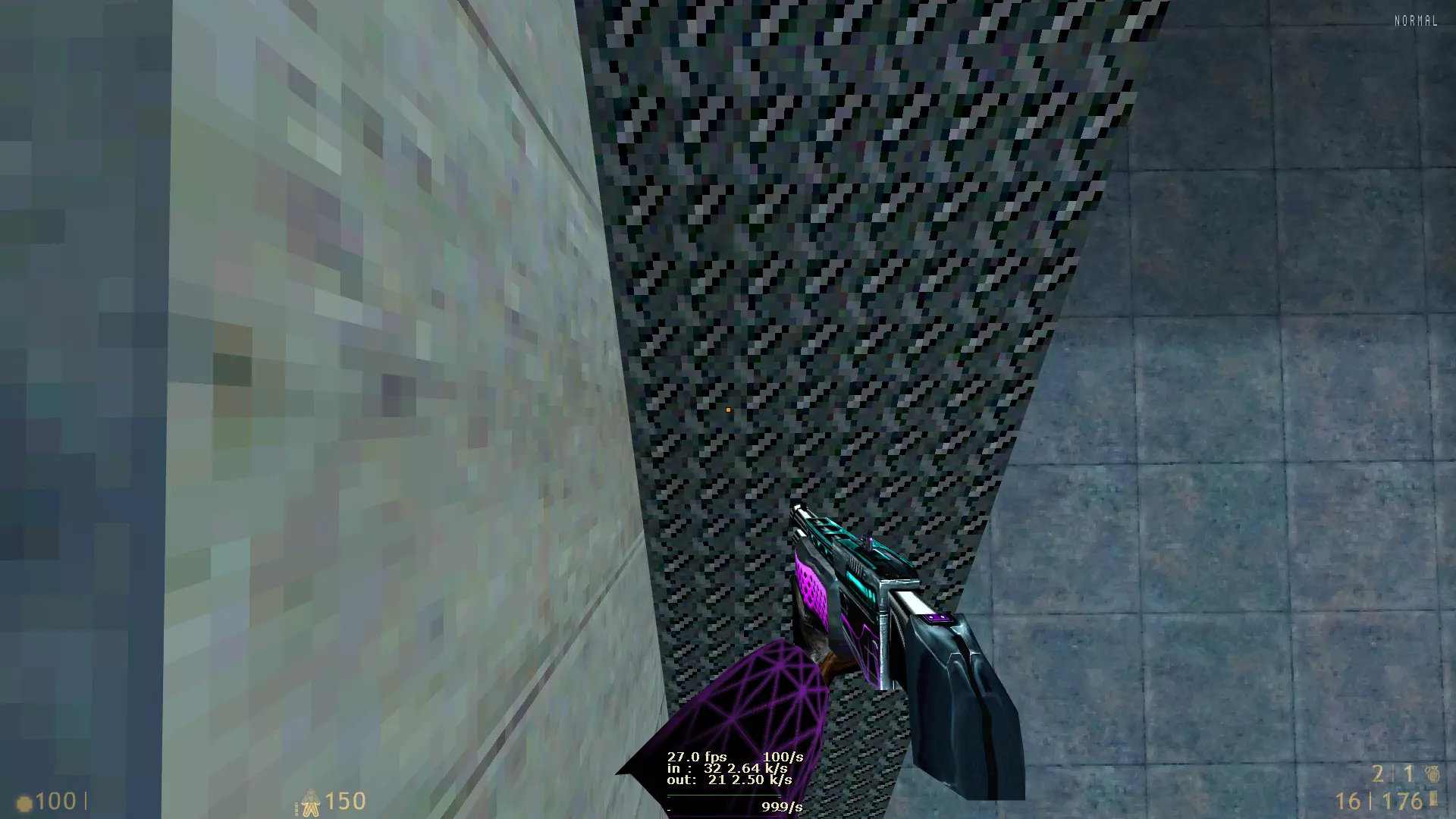
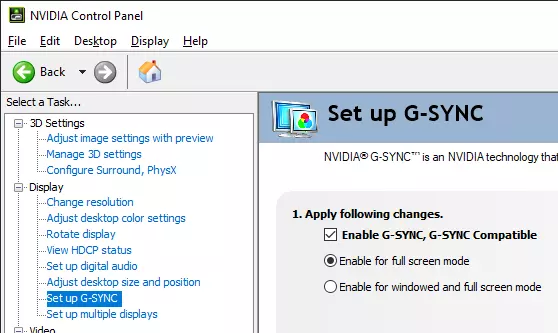
移动画面时,你应该会看到一排水平像素与其他像素看起来不太一样(它可能出现在屏幕的不同位置,并且/或者上下移动)。这就是【画面撕裂】效果。 如果你完全没有看到画面撕裂,可能已经启用了垂直同步。请仔细检查你的NVIDIA控制面板(NVCP)3D设置中垂直同步的设置,并确保gl_vsync设为0。 如果你看到画面撕裂,但几乎不明显,并且/或者没有到需要修复的程度,那就没问题了!去玩游戏吧。 如果你看到画面撕裂并想要修复,请继续阅读: 首先,启用自适应同步,并确保在NVIDIA控制面板(NVCP)中启用了G-SYNC。
接下来你需要一个像PresentMon这样的工具来测量延迟变化。有一个控制台版本可以在相关平台获取,不过我更喜欢图形界面版本。 将PresentMon配置为显示显卡渲染延迟和显卡显示延迟,然后启动《军团要塞经典版》,并在gl_vsync设为0的情况下检查数值。结果应该类似这样(具体延迟可能因电脑配置不同而有所差异,大约在0.4或0.5毫秒左右)。
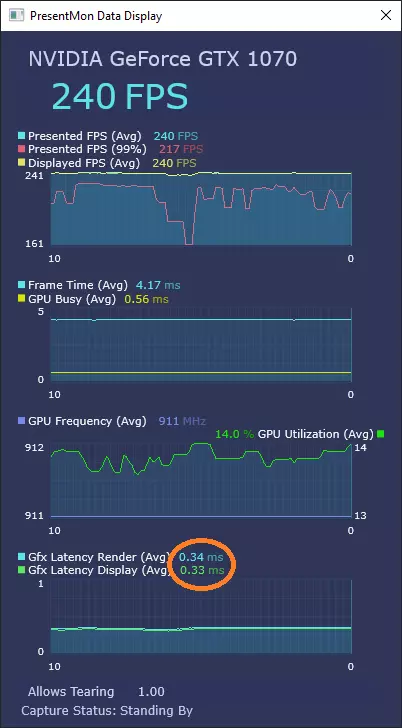
Set fps_max to your refresh rate minus 3 (for example at 240Hz, try fps_max 237) and check the Latency numbers in PresentMon. If the Latency is significantly higher than with gl_vsync disabled, change fps_max to a lower number (perhaps refresh rate minus 5, or minus 10) and try again. Note that the Latency values may be subjective, and consistency may be more relevant than the exact number (for example a steady 2 ms value may feel smoother than a value that fluctuates between 0.5 and 1.5). Personally I like to aim for latency values below 1 ms, but I need to use 200 fps on my 240Hz monitor to achieve that. Meanwhile, at least one of the best players in the game plays with 3-5 ms latency by setting their fps to 117 on a 120Hz monitor..Once you've identified the fps value that works for you, I recommend setting fps_max in your autoexec.cfg or userconfig.cfg to make sure it stays that way. Enjoy smooth, responsive, and tear-free TFC! Classes I don't think it's useful to go into the specific details of each class in this guide, right? That information is all available ingame or elsewhere on the internet. What I think might be useful to have here is some info about whether each class is generally considered Strong, Average, or Weak in terms of their ability to perform a particular role in a given game type (pub, pug, adl). Here's a table that aims to briefly approximate that sort of info: Class Pub OrganizedADL General Scout Offense: Average (situationally useful; squishy but very fast) Defense: Weak (rarely more useful than other classes, caltrop/conc attackers) Offense: Strong (situational but potentially gamechanging on some maps; relies on speed, mobility, and stealth) Defense: N/A Offense: ? Defense: ? Keys to success: conc jump, bhop, mind games, SPEED! Sniper Offense: Average (tough to handle multiple opponents in their base) Defense: Strong (great damage output, vulnerable to fast attackers and counter-snipers) Offense: Weak (extremely situational and map dependent) Defense: Average (highly map dependent, rarely better than alternative classes) Offense: Average (situational target elimination, counter sniping) Defense: Strong (runner/jumper control, target elimination) Keys to success: aim. Soldier Offense: Strong (mobile, great damage output, durable) Defense: Strong (great area control, mobile) Offense: Weak (good damage output, some mobility but too slow, situational) Defense: Strong (core front line and choke point defender) Offense: Strong (great mobility, very mobile, can jump) Defense: Strong (good damage output, mobile) Keys to success: prediction, game sense. Demoman Offense: Strong (mobile, great damage output, area control) Defense: Strong (great area control, somewhat squishy) Offense: Weak (average speed and good damage but generally too squishy and spammy) Defense: Strong (excellent flag defense, somewhat squishy) Offense: Average (mobile, jump support, too squishy for direct conflict) Defense: Strong (excellent point/flag defender) Keys to success: reflexes, timing. Medic Offense: Strong (fast, mobile, regenerates health, decent damage output) Defense: Average (squishy, relies on grenades) Offense: Strong (fast, mobile, good damage output) Defense: N/A Offense: ? Defense: ? Keys to success: balancing damage and mobility. HWGuy Offense: Average (great damage output and durability but too slow to move flags) Defense: Strong (very durable, great damage output) Offense: N/A Defense: Strong (excellent damage output, durable) Offense: ? Defense: ? Keys to success: aim, tracking, fatness Pyro Offense: Average (decent speed, some mobility, moderate damage, moderate durability) Defense: Weak (some area control but not enough damage output) Offense: N/A Defense: N/A Offense: ? Defense: ? Keys to success: switching to a different class :( Spy Offense: Strong (thrives in chaos, good damage) Defense: Weak (some area control but not enough damage output) Offense: Average (situational, good target elimination) Defense: N/A Offense: ? Defense: ? Keys to success: mind games, timing, game sense. Engineer Offense: Average (potentially strong with teleporters, but very squishy) Defense: Strong (squishy but SG acts as 2nd defender) Offense: Weak (extremely situational) Defense: Strong (SG has excellent damage output, point defense + roaming, support) Offense: ? Defense: ? Keys to success: balancing building, support, and combat. Skills [TODO: put stuff in here.] Bhop Conc jumpingWeapon jumpingMisc- Rampslide - Sharking - Chopping - Down-trimp Maps [TODO: add some basic guides for common maps - typical defense setups, offense routes, maybe gameplay footage?] Resources [TODO: add links for relevant discord servers, sites like mrclan for customizations, sites like tfcresources for scripts/configs, sites like the tfc map archive for maps, relevant twitch/youtube channels, site with list of console commands, maybe include some scripts here also?] Discord serversThe Catacombs https://discord.gg/2CDwcgk This is probably the most central location to start looking for anything TFC-related - check out the #directory channel for links to other communities and resources. Old School TFC https://discord.gg/WCBBMSF Home of the OST public server, hosts regular ADL pickups, great group of folks. Lots of resources available, and plenty of smart people around if you have questions. Outhouse http://www.discord.gg/outhouse Hosts CTF pickups, a 1v1 ladder, and plays various other games. Team Fortress PUGs https://discord.gg/dVsdggHuZX Maps Customizations Scripts/configs Streamers Mapping Other