换一换
换一换 


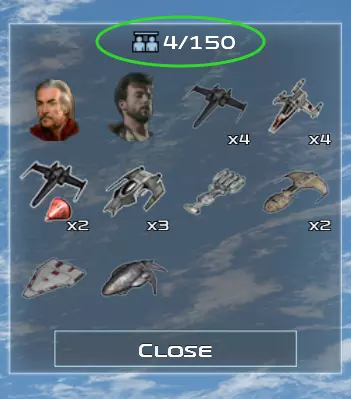
以下是如何在短短几分钟内快速制作1信用1秒(1C1S)或无限单位上限子模组的方法。 制作自己的无限单位上限和/或1C1S子模组 1. 下载你想要修改的模组以及1信用1秒核心文件 2. 导航至《星球大战:帝国战争》创意工坊文件夹,路径为C: Program Files (x86) Steam steamapps workshop content 32470 3. 打开你想要修改的模组对应的文件夹。该文件夹名称即为Steam创意工坊ID。例如,索龙的复仇模组对应的ID是1125571106 4. 打开Data XML Units文件夹,根据模组情况,可能还需要打开包含升级、英雄或其他单位的更多文件夹 5. 将这些文件复制到另一个具有相同文件结构的文件夹中,该文件夹将作为你的内容文件夹我所说的相同结构,是指使用相同的文件夹名称,并将文件放入与源模组名称完全相同的文件夹中。 6. 打开所有包含单位、英雄、升级、建筑和其他可建造物的XML文件,使用查找和替换功能修改指定变量。(确保查找和替换设置为正则表达式,且未勾选“.”匹配换行符选项)
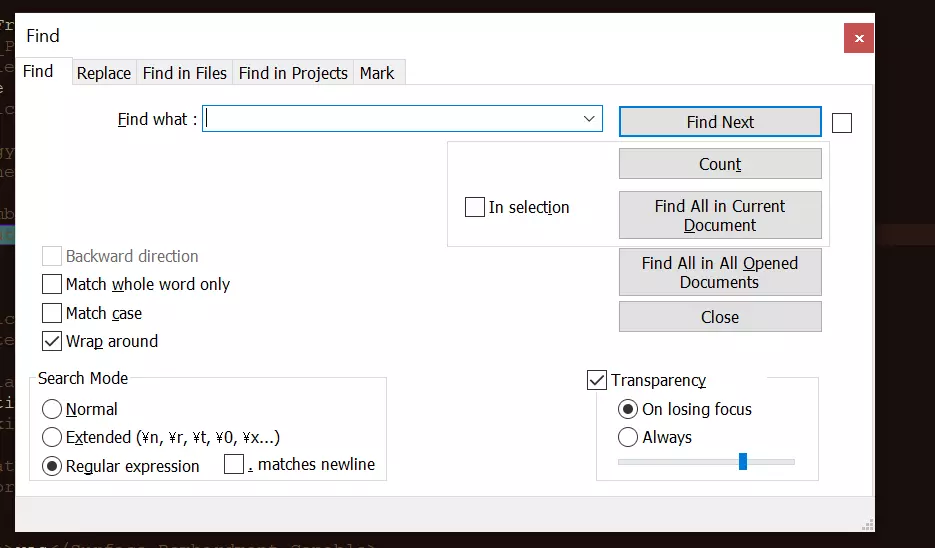
1C1S Variables All at OnceFind: (<Tactical_Build_Time_Seconds> s*[^0].*</Tactical_Build_Time_Seconds>)|(<Tactical_Build_Cost_Multiplayer> s*[^0].*</Tactical_Build_Cost_Multiplayer>)|(<Build_Cost_Credits> s*[^0].*</Build_Cost_Credits>)|(<Build_Time_Seconds> s*[^0].*</Build_Time_Seconds>)|(<Tactical_Build_Cost_Campaign> s*[^0].*</Tactical_Build_Cost_Campaign>)|(<Absolute_Income_Modifier>-.*</Absolute_Income_Modifier>) Replace: (?1<Tactical_Build_Time_Seconds>1</Tactical_Build_Time_Seconds>)(?2<Tactical_Build_Cost_Multiplayer>1</Tactical_Build_Cost_Multiplayer>)(?3<Build_Cost_Credits>1</Build_Cost_Credits>)(?4<Build_Time_Seconds>1</Build_Time_Seconds>)(?5<Tactical_Build_Cost_Campaign>1</Tactical_Build_Cost_Campaign>)(?6<Absolute_Income_Modifier>0</Absolute_Income_Modifier>) Individual VariablesFind: <Tactical_Build_Time_Seconds> s*[^0].*</Tactical_Build_Time_Seconds> Replace: <Tactical_Build_Time_Seconds>1</Tactical_Build_Time_Seconds> Find: <Tactical_Build_Cost_Multiplayer> s*[^0].*</Tactical_Build_Cost_Multiplayer> Replace: <Tactical_Build_Cost_Multiplayer>1</Tactical_Build_Cost_Multiplayer> Find: <Build_Cost_Credits> s*[^0].*</Build_Cost_Credits> Replace: <Build_Cost_Credits>1</Build_Cost_Credits> Find: <Build_Time_Seconds> s*[^0].*</Build_Time_Seconds> Replace: <Build_Time_Seconds>1</Build_Time_Seconds> Find: <Tactical_Build_Cost_Campaign> s*[^0].*</Tactical_Build_Cost_Campaign> Replace: <Tactical_Build_Cost_Campaign>1</Tactical_Build_Cost_Campaign> Infinite Unit Cap Variables All at OnceFind: (<Population_Value>.*</Population_Value>)|(<Space_Override_Population_Value>.*</Space_Override_Population_Value>) Replace: (?1<Population_Value>0</Population_Value>)(?2<Space_Override_Population_Value>0</Space_Override_Population_Value>) Individual VariablesFind: <Population_Value>.*</Population_Value> Replace: <Population_Value>0</Population_Value> Find: <Space_Override_Population_Value>.*</Space_Override_Population_Value> Replace: <Space_Override_Population_Value>0</Space_Override_Population_Value> Upkeep If you wish to remove building upkeep, use this as well. (Thanks to CometRed06S for finding this one) Find: <Absolute_Income_Modifier>-.*</Absolute_Income_Modifier> Replace: <Absolute_Income_Modifier>0</Absolute_Income_Modifier> 1C1S and Infinite Unit Cap Combined Find: (<Tactical_Build_Time_Seconds> s*[^0].*</Tactical_Build_Time_Seconds>)|(<Tactical_Build_Cost_Multiplayer> s*[^0].*</Tactical_Build_Cost_Multiplayer>)|(<Build_Cost_Credits> s*[^0].*</Build_Cost_Credits>)|(<Build_Time_Seconds> s*[^0].*</Build_Time_Seconds>)|(<Tactical_Build_Cost_Campaign> s*[^0].*</Tactical_Build_Cost_Campaign>)|(<Absolute_Income_Modifier>-.*</Absolute_Income_Modifier>)|(<Population_Value>.*</Population_Value>)|(<Space_Override_Population_Value>.*</Space_Override_Population_Value>) Replace: (?1<Tactical_Build_Time_Seconds>1</Tactical_Build_Time_Seconds>)(?2<Tactical_Build_Cost_Multiplayer>1</Tactical_Build_Cost_Multiplayer>)(?3<Build_Cost_Credits>1</Build_Cost_Credits>)(?4<Build_Time_Seconds>1</Build_Time_Seconds>)(?5<Tactical_Build_Cost_Campaign>1</Tactical_Build_Cost_Campaign>)(?6<Absolute_Income_Modifier>0</Absolute_Income_Modifier>)(?7<Population_Value>0</Population_Value>)(?8<Space_Override_Population_Value>0</Space_Override_Population_Value>) EAWX (FOTR and TR) Crew Requirements In Scripts Library eawx-mod-fotr gameobjects or Scripts Library eawx-mod-icw gameobjects Find: Ship_Crew_Requirement = [0-9]+ Replace: Ship_Crew_Requirement = 0 Tips If it isn't working, go to your steamapps/workshop/content/32470 folder and check to see if the file for your mod is the same as the one you uploaded, as it may not immediately update. You can also try checking you file structure to make sure it matches that of the original mod. Then, check your json file and make sure that it is formatted correctly, by comparing it that of a working mod. Give your content folder the same name as your mod's workshop ID. Tag your submod with "Unit Cap" and/or "1C1S" when uploading it. To make the mod player only, make a separate version of your submod for each faction by modifying only the files/units belonging to a single faction. If there are multiple factions that use the same variant of a unit or upgrade, try creating an identical variant of the ship (examine the original Thrawn's Revenge files for an example of how this is done) and replace all references to the original with the new ship in faction specific lists (ie. <Tactical_Buildable_Objects_Multiplayer> in Skirmish_starbases.xml), and add it to lists which are not different between factions (ie. <Bombardment_Required_Orbital_Ships> in Factions.xml). Don't forget to include a modinfo.json file If anyone figures out how to fix the stability issues when running 1C1S and infinite unit cap combined, please let me know. Links Notepad++ https://notepad-plus-plus.org/ EAW Workshop Uploader https://www.petroglyphgames.com/eawmodtool/ Low effort video if you need it. https://youtu.be/BH2v7QKlDyE