换一换
换一换 


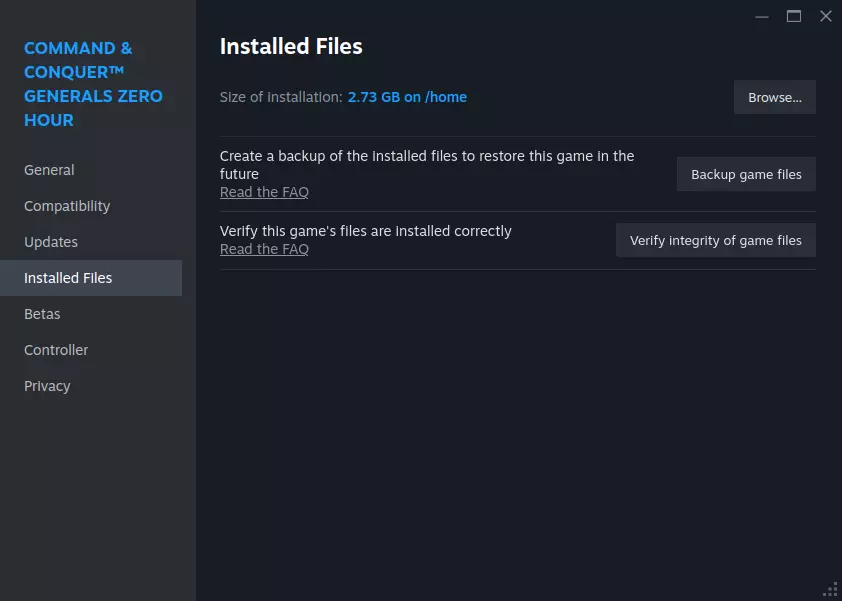
This guide shows you how to scroll with the arrow keys from the keyboard again. Intro - Full fix without need of external resources If you can't use the keyboard arrow keys to scroll, you'll need a custom CommandMap file. There are various of them available for download on the Internet, but they are often offline. In fact, you can easily create them yourself. I'll show you how to place a custom CommandMap so that you can scroll with the arrow keys. 1.) Go to your game directory, e.g. C: Program Files Steam steamapps common Command & Conquer Generals - Zero Hour To find your game directory, you can simply right-click on the game in Steam, then select properties and navigate to the installed files. 2.) In the game directory, open the [Data] folder and then the folder with the language in which you are playing the game, e.g. [English] or [German]. 3.) Here you right-click once on a free area in the folder and go to [New] and then [Text Document]. You then rename this file to CommandMap.ini It is important to also overwrite the .txt at the end. The file is then called CommandMap.ini and NOT CommandMap.ini.txt 4.) Now simply open this file with a double click in Notepad. Then copy the following complete text into it and save the document (had to split it in three parts in cause of the length - just copy all of them after another). ; Command.ini - Part 1 ;////////////////////////////////////////////////////////////////////////////// ;FILE: CommandMap.ini (DEFAULT) //////////////////////////////////////////////////// ;////////////////////////////////////////////////////////////////////////////// CommandMap SAVE_VIEW1 Key = KEY_F1 Transition = DOWN Modifiers = CTRL UseableIn = GAME Category = INTERFACE Description = GUI:SaveView1Description DisplayName = GUI:SaveView1 End CommandMap SAVE_VIEW2 Key = KEY_F2 Transition = DOWN Modifiers = CTRL UseableIn = GAME Category = INTERFACE Description = GUI:SaveView2Description DisplayName = GUI:SaveView2 End CommandMap SAVE_VIEW3 Key = KEY_F3 Transition = DOWN Modifiers = CTRL UseableIn = GAME Category = INTERFACE Description = GUI:SaveView3Description DisplayName = GUI:SaveView3 End CommandMap SAVE_VIEW4 Key = KEY_F4 Transition = DOWN Modifiers = CTRL UseableIn = GAME Category = INTERFACE Description = GUI:SaveView4Description DisplayName = GUI:SaveView4 End CommandMap SAVE_VIEW5 Key = KEY_F5 Transition = DOWN Modifiers = CTRL UseableIn = GAME Category = INTERFACE Description = GUI:SaveView5Description DisplayName = GUI:SaveView5 End CommandMap SAVE_VIEW6 Key = KEY_F6 Transition = DOWN Modifiers = CTRL UseableIn = GAME Category = INTERFACE Description = GUI:SaveView6Description DisplayName = GUI:SaveView6 End CommandMap SAVE_VIEW7 Key = KEY_F7 Transition = DOWN Modifiers = CTRL UseableIn = GAME Category = INTERFACE Description = GUI:SaveView7Description DisplayName = GUI:SaveView7 End CommandMap SAVE_VIEW8 Key = KEY_F8 Transition = DOWN Modifiers = CTRL UseableIn = GAME Category = INTERFACE Description = GUI:SaveView8Description DisplayName = GUI:SaveView8 End CommandMap VIEW_VIEW1 Key = KEY_F1 Transition = DOWN Modifiers = NONE UseableIn = GAME Category = INTERFACE Description = GUI:ViewView1Description DisplayName = GUI:ViewView1 End CommandMap VIEW_VIEW2 Key = KEY_F2 Transition = DOWN Modifiers = NONE UseableIn = GAME Category = INTERFACE Description = GUI:ViewView2Description DisplayName = GUI:ViewView2 End CommandMap VIEW_VIEW3 Key = KEY_F3 Transition = DOWN Modifiers = NONE UseableIn = GAME Category = INTERFACE Description = GUI:ViewView3Description DisplayName = GUI:ViewView3 End CommandMap VIEW_VIEW4 Key = KEY_F4 Transition = DOWN Modifiers = NONE UseableIn = GAME Category = INTERFACE Description = GUI:ViewView4Description DisplayName = GUI:ViewView4 End CommandMap VIEW_VIEW5 Key = KEY_F5 Transition = DOWN Modifiers = NONE UseableIn = GAME Category = INTERFACE Description = GUI:ViewView5Description DisplayName = GUI:ViewView5 End CommandMap VIEW_VIEW6 Key = KEY_F6 Transition = DOWN Modifiers = NONE UseableIn = GAME Category = INTERFACE Description = GUI:ViewView6Description DisplayName = GUI:ViewView6 End CommandMap VIEW_VIEW7 Key = KEY_F7 Transition = DOWN Modifiers = NONE UseableIn = GAME Category = INTERFACE Description = GUI:ViewView7Description DisplayName = GUI:ViewView7 End CommandMap VIEW_VIEW8 Key = KEY_F8 Transition = DOWN Modifiers = NONE UseableIn = GAME Category = INTERFACE Description = GUI:ViewView8Description DisplayName = GUI:ViewView8 End CommandMap CREATE_TEAM0 Key = KEY_0 Transition = DOWN Modifiers = CTRL UseableIn = GAME Category = TEAM Description = GUI:CreateTeam0Description DisplayName = GUI:CreateTeam0 End CommandMap CREATE_TEAM1 Key = KEY_1 Transition = DOWN Modifiers = CTRL UseableIn = GAME Category = TEAM Description = GUI:CreateTeam1Description DisplayName = GUI:CreateTeam1 End CommandMap CREATE_TEAM2 Key = KEY_2 Transition = DOWN Modifiers = CTRL UseableIn = GAME Category = TEAM Description = GUI:CreateTeam2Description DisplayName = GUI:CreateTeam2 End CommandMap CREATE_TEAM3 Key = KEY_3 Transition = DOWN Modifiers = CTRL UseableIn = GAME Category = TEAM Description = GUI:CreateTeam3Description DisplayName = GUI:CreateTeam3 End CommandMap CREATE_TEAM4 Key = KEY_4 Transition = DOWN Modifiers = CTRL UseableIn = GAME Category = TEAM Description = GUI:CreateTeam4Description DisplayName = GUI:CreateTeam4 End CommandMap CREATE_TEAM5 Key = KEY_5 Transition = DOWN Modifiers = CTRL UseableIn = GAME Category = TEAM Description = GUI:CreateTeam5Description DisplayName = GUI:CreateTeam5 End CommandMap CREATE_TEAM6 Key = KEY_6 Transition = DOWN Modifiers = CTRL UseableIn = GAME Category = TEAM Description = GUI:CreateTeam6Description DisplayName = GUI:CreateTeam6 End CommandMap CREATE_TEAM7 Key = KEY_7 Transition = DOWN Modifiers = CTRL UseableIn = GAME Category = TEAM Description = GUI:CreateTeam7Description DisplayName = GUI:CreateTeam7 End CommandMap CREATE_TEAM8 Key = KEY_8 Transition = DOWN Modifiers = CTRL UseableIn = GAME Category = TEAM Description = GUI:CreateTeam8Description DisplayName = GUI:CreateTeam8 End CommandMap CREATE_TEAM9 Key = KEY_9 Transition = DOWN Modifiers = CTRL UseableIn = GAME Category = TEAM Description = GUI:CreateTeam9Description DisplayName = GUI:CreateTeam9 End CommandMap SELECT_TEAM0 Key = KEY_0 Transition = DOWN Modifiers = NONE UseableIn = GAME Category = TEAM Description = GUI:SelectTeam0Description DisplayName = GUI:SelectTeam0 End CommandMap SELECT_TEAM1 Key = KEY_1 Transition = DOWN Modifiers = NONE UseableIn = GAME Category = TEAM Description = GUI:SelectTeam1Description DisplayName = GUI:SelectTeam1 End CommandMap SELECT_TEAM2 Key = KEY_2 Transition = DOWN Modifiers = NONE UseableIn = GAME Category = TEAM Description = GUI:SelectTeam2Description DisplayName = GUI:SelectTeam2 End CommandMap SELECT_TEAM3 Key = KEY_3 Transition = DOWN Modifiers = NONE UseableIn = GAME Category = TEAM Description = GUI:SelectTeam3Description DisplayName = GUI:SelectTeam3 End CommandMap SELECT_TEAM4 Key = KEY_4 Transition = DOWN Modifiers = NONE UseableIn = GAME Category = TEAM Description = GUI:SelectTeam4Description DisplayName = GUI:SelectTeam4 End CommandMap SELECT_TEAM5 Key = KEY_5 Transition = DOWN Modifiers = NONE UseableIn = GAME Category = TEAM Description = GUI:SelectTeam5Description DisplayName = GUI:SelectTeam5 End CommandMap SELECT_TEAM6 Key = KEY_6 Transition = DOWN Modifiers = NONE UseableIn = GAME Category = TEAM Description = GUI:SelectTeam6Description DisplayName = GUI:SelectTeam6 End CommandMap SELECT_TEAM7 Key = KEY_7 Transition = DOWN Modifiers = NONE UseableIn = GAME Category = TEAM Description = GUI:SelectTeam7Description DisplayName = GUI:SelectTeam7 End CommandMap SELECT_TEAM8 Key = KEY_8 Transition = DOWN Modifiers = NONE UseableIn = GAME Category = TEAM Description = GUI:SelectTeam8Description DisplayName = GUI:SelectTeam8 End CommandMap SELECT_TEAM9 Key = KEY_9 Transition = DOWN Modifiers = NONE UseableIn = GAME Category = TEAM Description = GUI:SelectTeam9Description DisplayName = GUI:SelectTeam9 End CommandMap ADD_TEAM0 Key = KEY_0 Transition = DOWN Modifiers = SHIFT UseableIn = GAME Category = TEAM Description = GUI:AddTeam0Description DisplayName = GUI:AddTeam0 End CommandMap ADD_TEAM1 Key = KEY_1 Transition = DOWN Modifiers = SHIFT UseableIn = GAME Category = TEAM Description = GUI:AddTeam1Description DisplayName = GUI:AddTeam1 End CommandMap ADD_TEAM2 Key = KEY_2 Transition = DOWN Modifiers = SHIFT UseableIn = GAME Category = TEAM Description = GUI:AddTeam2Description DisplayName = GUI:AddTeam2 End CommandMap ADD_TEAM3 Key = KEY_3 Transition = DOWN Modifiers = SHIFT UseableIn = GAME Category = TEAM Description = GUI:AddTeam3Description DisplayName = GUI:AddTeam3 End ; Command.ini - Part 2 CommandMap ADD_TEAM4 Key = KEY_4 Transition = DOWN Modifiers = SHIFT UseableIn = GAME Category = TEAM Description = GUI:AddTeam4Description DisplayName = GUI:AddTeam4 End CommandMap ADD_TEAM5 Key = KEY_5 Transition = DOWN Modifiers = SHIFT UseableIn = GAME Category = TEAM Description = GUI:AddTeam5Description DisplayName = GUI:AddTeam5 End CommandMap ADD_TEAM6 Key = KEY_6 Transition = DOWN Modifiers = SHIFT UseableIn = GAME Category = TEAM Description = GUI:AddTeam6Description DisplayName = GUI:AddTeam6 End CommandMap ADD_TEAM7 Key = KEY_7 Transition = DOWN Modifiers = SHIFT UseableIn = GAME Category = TEAM Description = GUI:AddTeam7Description DisplayName = GUI:AddTeam7 End CommandMap ADD_TEAM8 Key = KEY_8 Transition = DOWN Modifiers = SHIFT UseableIn = GAME Category = TEAM Description = GUI:AddTeam8Description DisplayName = GUI:AddTeam8 End CommandMap ADD_TEAM9 Key = KEY_9 Transition = DOWN Modifiers = SHIFT UseableIn = GAME Category = TEAM Description = GUI:AddTeam9Description DisplayName = GUI:AddTeam9 End CommandMap VIEW_TEAM0 Key = KEY_0 Transition = DOWN Modifiers = ALT UseableIn = GAME Category = TEAM Description GUI:ViewTeam0Description DisplayName = GUI:ViewTeam0 End CommandMap VIEW_TEAM1 Key = KEY_1 Transition = DOWN Modifiers = ALT UseableIn = GAME Category = TEAM Description GUI:ViewTeam1Description DisplayName = GUI:ViewTeam1 End CommandMap VIEW_TEAM2 Key = KEY_2 Transition = DOWN Modifiers = ALT UseableIn = GAME Category = TEAM Description GUI:ViewTeam2Description DisplayName = GUI:ViewTeam2 End CommandMap VIEW_TEAM3 Key = KEY_3 Transition = DOWN Modifiers = ALT UseableIn = GAME Category = TEAM Description GUI:ViewTeam3Description DisplayName = GUI:ViewTeam3 End CommandMap VIEW_TEAM4 Key = KEY_4 Transition = DOWN Modifiers = ALT UseableIn = GAME Category = TEAM Description GUI:ViewTeam4Description DisplayName = GUI:ViewTeam4 End CommandMap VIEW_TEAM5 Key = KEY_5 Transition = DOWN Modifiers = ALT UseableIn = GAME Category = TEAM Description GUI:ViewTeam5Description DisplayName = GUI:ViewTeam5 End CommandMap VIEW_TEAM6 Key = KEY_6 Transition = DOWN Modifiers = ALT UseableIn = GAME Category = TEAM Description GUI:ViewTeam6Description DisplayName = GUI:ViewTeam6 End CommandMap VIEW_TEAM7 Key = KEY_7 Transition = DOWN Modifiers = ALT UseableIn = GAME Category = TEAM Description GUI:ViewTeam7Description DisplayName = GUI:ViewTeam7 End CommandMap VIEW_TEAM8 Key = KEY_8 Transition = DOWN Modifiers = ALT UseableIn = GAME Category = TEAM Description GUI:ViewTeam8Description DisplayName = GUI:ViewTeam8 End CommandMap VIEW_TEAM9 Key = KEY_9 Transition = DOWN Modifiers = ALT UseableIn = GAME Category = TEAM Description GUI:ViewTeam9Description DisplayName = GUI:ViewTeam9 End ; DoubleDown does not work properly. ; Select_Matching_Units will take care of both cases CommandMap SELECT_MATCHING_UNITS Key = KEY_E Transition = DOWN Modifiers = NONE UseableIn = GAME Category = SELECTION Description = GUI:TypeSelectDescription DisplayName = GUI:TypeSelect End CommandMap SELECT_NEXT_UNIT Key = KEY_RIGHT Transition = DOWN Modifiers = CTRL UseableIn = GAME Category = SELECTION Description = GUI:SelectNextUnitDescription DisplayName = GUI:SelectNextUnit End CommandMap SELECT_PREV_UNIT Key = KEY_LEFT Transition = DOWN Modifiers = CTRL UseableIn = GAME Category = SELECTION Description = GUI:SelectPrevUnitDescription DisplayName = GUI:SelectPrevUnit End CommandMap SELECT_NEXT_WORKER Key = KEY_UP Transition = DOWN Modifiers = CTRL UseableIn = GAME Category = SELECTION Description = GUI:SelectNextUnitDescription DisplayName = GUI:SelectNextUnit End CommandMap SELECT_PREV_WORKER Key = KEY_DOWN Transition = DOWN Modifiers = CTRL UseableIn = GAME Category = SELECTION Description = GUI:SelectPrevUnitDescription DisplayName = GUI:SelectPrevUnit End CommandMap SELECT_HERO Key = KEY_H Transition = DOWN Modifiers = CTRL UseableIn = GAME Category = SELECTION Description = GUI:SelectHeroDescription DisplayName = GUI:SelectHero End CommandMap VIEW_COMMAND_CENTER Key = KEY_H Transition = DOWN Modifiers = NONE UseableIn = GAME Category = SELECTION Description = GUI:CenterBaseDescription DisplayName = GUI:CenterBase End CommandMap VIEW_LAST_RADAR_EVENT Key = KEY_SPACE Transition = DOWN Modifiers = NONE UseableIn = GAME Category = INTERFACE Description = GUI:GoToRadarEventDescription DisplayName = GUI:GoToRadarEvent End CommandMap SELECT_ALL Key = KEY_Q Transition = DOWN Modifiers = NONE UseableIn = GAME Category = SELECTION Description = GUI:SelectAllDescription DisplayName = GUI:SelectAll END CommandMap SCATTER Key = KEY_X Transition = DOWN Modifiers = NONE UseableIn = GAME Category = CONTROL Description = GUI:ScatterDescription DisplayName = GUI:SCATTER End CommandMap STOP Key = KEY_S Transition = DOWN Modifiers = NONE UseableIn = GAME Category = CONTROL Description = GUI:StopObjectDescription DisplayName = GUI:StopObject End ;CommandMap DEPLOY ; Key = KEY_D ; Transition = DOWN ; Modifiers = NONE ; UseableIn = GAME ; Category = CONTROL ; Description = GUI:DeployDescription ; DisplayName = GUI:Deploy ;End CommandMap CREATE_FORMATION Key = KEY_F Transition = DOWN Modifiers = CTRL UseableIn = GAME Category = CONTROL Description = GUI:CreateFormationDescription DisplayName = GUI:CreateFormation End ;CommandMap FOLLOW ; Key = KEY_F ; Transition = DOWN ; Modifiers = NONE ; UseableIn = GAME ; Category = CONTROL ; Description = GUI:FollowDescription ; DisplayName = GUI:Follow ;End ; no more diplomacy screen, so we can't chat to specific players ;CommandMap CHAT_PLAYERS ; Key = KEY_BACKSLASH ; Transition = DOWN ; Modifiers = NONE ; UseableIn = GAME ;End CommandMap CHAT_ALLIES Key = KEY_BACKSPACE Transition = DOWN Modifiers = NONE UseableIn = GAME End CommandMap CHAT_EVERYONE Key = KEY_ENTER Transition = DOWN Modifiers = NONE UseableIn = GAME End CommandMap DIPLOMACY Key = KEY_TAB Transition = DOWN Modifiers = NONE UseableIn = GAME End CommandMap PLACE_BEACON Key = KEY_B Transition = DOWN Modifiers = CTRL UseableIn = GAME End CommandMap DELETE_BEACON Key = KEY_DEL Transition = DOWN Modifiers = NONE UseableIn = GAME End CommandMap OPTIONS Key = KEY_ESC Transition = DOWN Modifiers = NONE UseableIn = GAME Category = INTERFACE Description = GUI:OptionsDescription DisplayName = GUI:Options End ;CommandMap TOGGLE_LOWER_DETAILS ; Key = KEY_TICK ; Transition = DOWN ; Modifiers = NONE ; UseableIn = GAME ; Category = MISC ;End CommandMap TOGGLE_CONTROL_BAR Key = KEY_F9 Transition = DOWN Modifiers = NONE UseableIn = GAME Category = INTERFACE Description = GUI:ToggleControlBarDescription DisplayName = GUI:ToggleControlBar End ;CommandMap BEGIN_PATH_BUILD ; Key = KEY_Z ; Transition = DOWN ; Modifiers = NONE ; UseableIn = GAME ;End ;CommandMap END_PATH_BUILD ; Key = KEY_Z ; Transition = UP ; Modifiers = NONE ; UseableIn = GAME ;End CommandMap BEGIN_FORCEATTACK Key = KEY_NONE Transition = DOWN Modifiers = CTRL UseableIn = GAME End ; Command.ini - Part 3 CommandMap END_FORCEATTACK Key = KEY_NONE Transition = UP Modifiers = CTRL UseableIn = GAME End ; Force Move has been commented out because we are going to remove it entirely ; from the Command map. It will live in the UI only. However, I suspect that ; it will be back soon, under a different guise, so I don't wanna just remove ; it. - jkmcd 10/09 ; ;CommandMap BEGIN_FORCEMOVE ; Key = KEY_NONE ; Transition = DOWN ; Modifiers = ALT ; UseableIn = GAME ;End ; ;CommandMap END_FORCEMOVE ; Key = KEY_NONE ; Transition = UP ; Modifiers = ALT ; UseableIn = GAME ;End ;------------------------------------------------------------------------------ CommandMap BEGIN_WAYPOINTS Key = KEY_NONE Transition = DOWN Modifiers = ALT UseableIn = GAME End CommandMap END_WAYPOINTS Key = KEY_NONE Transition = UP Modifiers = ALT UseableIn = GAME End CommandMap BEGIN_PREFER_SELECTION Key = KEY_NONE Transition = DOWN Modifiers = SHIFT UseableIn = GAME End CommandMap END_PREFER_SELECTION Key = KEY_NONE Transition = UP Modifiers = SHIFT UseableIn = GAME End ; This is commented out because its not available in the multiplayer test we're releasing. ;CommandMap LOD_DECREASE ; Key = KEY_MINUS ; Transition = DOWN ; Modifiers = NONE ; UseableIn = GAME ;END ;CommandMap LOD_INCREASE ; Key = KEY_EQUAL ; Transition = DOWN ; Modifiers = NONE ; UseableIn = GAME ;END CommandMap TAKE_SCREENSHOT Key = KEY_F12 Transition = Down Modifiers = NONE UseableIn = GAME SHELL Category = INTERFACE Description = GUI:ScreenshotCaptureDescription DisplayName = GUI:ScreenshotCapture End CommandMap ALL_CHEER Key = KEY_C Transition = Down Modifiers = CTRL UseableIn = GAME Category = CONTROL Description = GUI:CheerDescription DisplayName = GUI:Cheer End CommandMap BEGIN_CAMERA_ROTATE_LEFT Key = KEY_KP4 Transition = DOWN Modifiers = NONE UseableIn = GAME End CommandMap END_CAMERA_ROTATE_LEFT Key = KEY_KP4 Transition = UP Modifiers = NONE UseableIn = GAME End CommandMap BEGIN_CAMERA_ROTATE_RIGHT Key = KEY_KP6 Transition = DOWN Modifiers = NONE UseableIn = GAME End CommandMap END_CAMERA_ROTATE_RIGHT Key = KEY_KP6 Transition = UP Modifiers = NONE UseableIn = GAME End CommandMap BEGIN_CAMERA_ZOOM_IN Key = KEY_KP8 Transition = DOWN Modifiers = NONE UseableIn = GAME End CommandMap END_CAMERA_ZOOM_IN Key = KEY_KP8 Transition = UP Modifiers = NONE UseableIn = GAME End CommandMap BEGIN_CAMERA_ZOOM_OUT Key = KEY_KP2 Transition = DOWN Modifiers = NONE UseableIn = GAME End CommandMap END_CAMERA_ZOOM_OUT Key = KEY_KP2 Transition = UP Modifiers = NONE UseableIn = GAME End CommandMap CAMERA_RESET Key = KEY_KP5 Transition = DOWN Modifiers = NONE UseableIn = GAME End CommandMap TOGGLE_CAMERA_TRACKING_DRAWABLE Key = KEY_T Transition = DOWN Modifiers = SHIFT_ALT_CTRL UseableIn = GAME End CommandMap TOGGLE_FAST_FORWARD_REPLAY Key = KEY_F Transition = DOWN Modifiers = NONE UseableIn = GAME End Finished That's it. Start the game and scrolling with the arrow keys works.
已修复:使用键盘方向键滚动的问题

2026-02-18 04:00:20
发布在《命令与征服:将军零点》
转载

导读
本文为《命令与征服:将军绝命时刻》玩家提供了修复键盘方向键滚动问题的方法,无需外部资源,只需自行创建CommandMap.ini文件并按步骤放置到对应游戏目录,即可恢复方向键滚动功能。

评论
共0条评论

最新更新
- 《命令与征服:将军 绝命时刻》调整内容 — 修复补丁及将军单位修复技巧,确保良好游戏体验 首先 欢迎阅读《命令与征服:将军 绝命时刻》优化指南 欢迎阅读《命令与征服:将军 绝命时刻》指南,这是一款传奇的战…
- 如何激活游戏本体的西班牙语语音 — 与传统重命名并替换扩展包音频文件的方法不同,此方法的优势在于能够保留未被本地化的扩展包音频。 更新:已修改说明(不再需要使用Final BIG Editor提取…
- 如何安装《命令与征服:将军 绝命时刻》的模组管理器 — 前提 在本指南中,我将向你展示如何安装命令与征服将军零点行动的模组管理器,以及如何使用它们轻松安装模组。 方法: 首先确保你运行过一次游戏。 现在前往相关网站下…
- 如何获取更多单人地图 — 将军,您好。 您是否厌倦了激烈的多人游戏? 您是否喜欢原版战役任务,但它们对您来说已不再具有挑战性? 您是否想在游戏中获得全新体验? 我这里有个好方法。 简介 …
- 《命令与征服:将军 绝命时刻》捷克语 — 请使用《命令与征服:将军 绝命时刻》的捷克语版本,作为一名优秀的指挥官体验完善民主的乐趣。安装指南:需下载1.03-1.04版本的安装程序。
- 如何为《命令与征服:将军》和《命令与征服:将军零点行动》设置自定义缩放级别 — 简单指南:如何通过编辑游戏文件修改相机最大/最小缩放级别 如何在《命令与征服:将军》及《命令与征服:将军:零点行动》中修改缩放级别(相机高度) 《命令与征服:将…
- 安装指南 - 《命令与征服:将军》冲击波1.201[Steam版,无需GenLauncher] — 以下是为《命令与征服:将军零点行动》Steam版安装C&C - Shockwave模组并使其能从Steam库中运行的指南,无需使用GenLauncher。 本人…
- 新操作系统(WIN 11)的初始时刻以及100%未删减版本 — 首先建议你们获取Gen Patcher,当然你们需要先安装《命令与征服:将军》,不用担心,Gen Patcher是100%无病毒的,并且有相关使用指南。 我们中…
- 《命令与征服:将军 绝命时刻》- 错误与帧率下降修复方法 — 最终,这两款游戏都已登陆Steam,但显然它们存在诸多问题。 问题1:“你遇到了一个严重错误!...” 问题2:不支持宽屏 问题3:战役模式中出现帧率下降 问题…
- 该内容包含不适当词汇,已删除。 — This guide will: 1.) Provide the Retarded Mod 2.) Show how to install and uninst…