Draw & Guess - 你画我猜


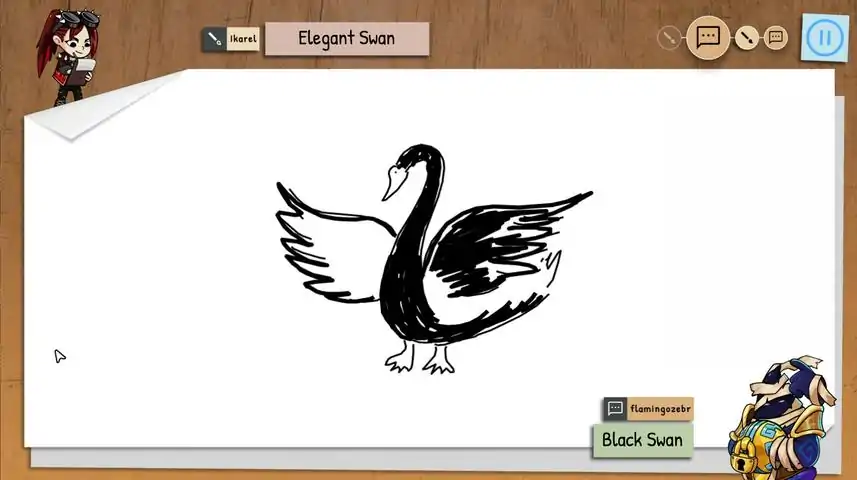
This is a basic guide on how to play Draw & Guess - with some rule suggestions from the developers. How to host a game (updated) When hosting a game, you have two options: 1. Host a private game. 2. Host a public game. For 1., simply start Draw and Guess, select the language you want to play in, then click Host and Private. This will create a private lobby that only your friends (via invitation or Steam friends List join) or any people with your lobby code can enter. No random players will be assigned to the lobby. To share your lobby code, in the lobby simply select the clipboard next to it and then paste the code where you want. You need at least three co-players, otherwise you can't really start the game. For 2., simply start Draw and Guess, select the language you want to play in, click Host and Public. This will create a lobby that other random players can join. You will no longer be teleported to an existing public lobby. Note: If you clicked on either Host or Join but want to change your choice, simply click on the given option again to close the settings bubble. As host, you can apply several game settings in the lobby. First, click the wrench icon. Here you can select the numbers of rounds you want to play by using – or + next to the rounds display. You can also adjust the chain length, which means you can limit the maximum number of players a given word/drawing combo is passed on to. Finally you can select Fast Mode which will speed up the presentation time at the end of each round. None of these options will be available to joining players. Note: In the lower right corner you will see an approximation of how long your specific game will take. The time shown adapts to the settings and players in the lobby. Second, click Game Mode in a private lobby or Vote in a public lobby. Here you can choose the time available for drawing, if colours or shades will be available, how many pens can be used, and whether or not your lines will disappear as you draw. Confirm your choices. In a public lobby, these game settings can be voted on, which means your fellow players can overrule your settings democratically. As host, you can also select a specific set of words (e. g. "animals") or just use the standard set by clicking on the two-cards icon with the question mark. Once you're ready to play, hit the ready button (green checkmark). The game automatically starts once all players are ready. How to join a game (updated) When joining a game, you have three options: 1. Join a private game with friends. 2. Join a public game. 3. Join any game via its room code. For 1., either accept your friend's invitation, or in Draw and Guess click on Join > Private. Your Steam overlay will open with your friends list, so you can right-click on your friend's name, and select Join game. Note: When playing with friends, you can change the UI language without impacting the language of the game itself. Just start Draw & Guess, select the language you want the UI to be in, then join a game as described above. For 2., simply start Draw & Guess, select the language you want to play in, and click on Join > Public. If a relevant lobby has already been created, you will automatically be teleported to it. If no strangers are currently waiting for you to join, you will become host of the lobby. Read "How to host a game" to see what settings you can apply. For 3., simply start Draw & Guess, select the language you want to play in, and click on Join > Room Code. Enter the room code shared with you by the lobby host. Depending on the lobby type chosen (Private or Public) you may be able to influence the settings of the game. Keep reading to learn how. In a public lobby, click Vote to vote the time available for drawing, if colours or shades will be available, how many pens can be used, and whether or not your lines will disappear as you draw. Confirm your choices. All players in the lobby can vote on these settings, so which settings apply will be agreed on democratically. Note 2: In the lower right corner you will see an approximation of how long your specific game will take. The time shown adapts to the settings and players in the lobby. Once you're ready to play, hit the ready button (green checkmark). The game automatically starts once all players are ready. How to actually play a round of D & G (updated) Once the game starts, you can choose one of three words shown. If you don't choose, Draw & Guess will choose for you. In the first round, draw the word you have selected. In the bottom left you can see the player you are receiving from. In the bottom right you can see the player you are passing on to. You can undo the last line by clicking on the back arrow in the top. You can delete everything by clicking a few seconds on the bin icon. You can submit your drawing by clicking on the checkmark. If you do not submit your drawing when the time is up, it will be submitted automatically. Hint: Just clicking once in the drawing area will draw a dot. Hint 2: Depending on the game settings applied in the lobby, you will have either 1 or 2 pens, and 1 colour, 3 shades of your colour or various colours. In the second round, guess the word that was drawn. Enter the word at the bottom and confirm with the checkmark. If you haven't entered a word when the time is up, a random new word will be submitted for you. Note: Hitting Return/Enter will open the chat. Repeat until the round is over. You will now see all the great artworks and misconceptions of your fellow players. Once a word/drawing combination has been fully processed, either confirm the prompt (when final word and initial word match), or vote yes (green checkmark) or no (red x). If there is a match, the originator will receive a trophy. When your own word is being presented, choose your favorite drawing to award a special trophy to a fellow player. Hint: If you need a quick break, this part of the game is a good time for it. But make sure to let fellow players know in the chat, otherwise everyone will be wondering why the game doesn't advance. Repeat until the game is over and all scores are shown. Hint: The score screen will close automatically and return any players to the lobby. How to create a word list (new) If none of the default or Workshop word lists work for you or if you just want your specific group of friends play with a very specific set of words, you can create your own word list. For that, simply start Draw & Guess and click on the two-cards icon with the question mark before entering any lobby. In the window that opens, enter at least 80 words, a topic (name), the language of the list, and a description. Click Save to save the list for your use only. Click Publish to save the list to the Steam Workshop (Workshop rules apply). You can adapt a default list to your own tastes by selecting Load and then editing the entries as desired. Make sure to rename the list to keep the default word lists unharmed. ;) Rule suggestions The developers have played different versions of this game for many years. In the course of that time, they have agreed on some rules to increase the fun (or really make the game more difficult?!). Anything is possible in Draw & Guess, and there are no set rules, but if you want to play the game as the developers do, here are the rules they use: Do not use letters, words or numbers. Special characters such as ?, !, *, and arrows are allowed. Currency symbols are allowed. If you want to refer to the context of the drawing, draw a square with a circle "[o]" in one corner of the drawing area. For example when you want to draw "wedding", you might draw a bride and groom and the context symbol. Most importantly, play the game the way it is most fun for you. ^-^


使用隐形状态时,移除了不可用工具的键盘快捷键 各种错误修复 【低语】修复了猜测阶段可能出现的卡住问题 修复了主菜单中的部分按钮状态 修复了琳德尔的部分动画问题 用户界面优化
玩家现在可在游戏设置中启用经典背景音乐 改进尝试加入已满大厅时的反馈 玩家现在可在游戏设置中重新触发AI兼容性检查 与移动版同步的部分变更和准备工作 优化游戏的内存使用 修复漏洞 优化用户界面
主菜单界面更新 新增Gu-355补丁,包含机器人和大逃杀模式的863个文本内容 优化日语假名字体 游戏内聊天记录现在将保留在结算界面和大厅中 修复了当主机仍在结算界面时,从比赛返回大厅后大厅绘图线条可能丢失的问题 修复了大厅绘图中线条删除权限相关的错误 错误修复 用户界面/用户体验优化
画一些与答案完全无关的东西


解决Surface Pen无法在游戏中使用的问题 只需一步:关闭以下选项: Windows 10设置-设备-笔和Windows Ink-允许我在某些应用中将手写笔作为鼠标 愉快的玩耍吧!
【启动派对任务】提高领取奖励的稳定性 【耳语模式】使用“自定义词汇”时的思考时间从15秒增加至45秒 【绘画功能】调整了使用覆盖橡皮擦时存储的颜色 【绘画功能】修复了多线橡皮擦检查与绘制位置而非结束位置重叠的问题 UI优化
万圣节活动准备:10月17日至11月2日期间,【幽灵皮肤】将限时返场,记得前往商店查看! 【低语游戏模式】中添加了投票结果提示音 更新词库时,若作者名称已更改,将同步更新作者名 修复了部分漏洞 优化了用户界面
696969696969696996969696969 BR
无法识别内容,已删除。
请你告诉我,这是一个小问卷《你们可以不回答》

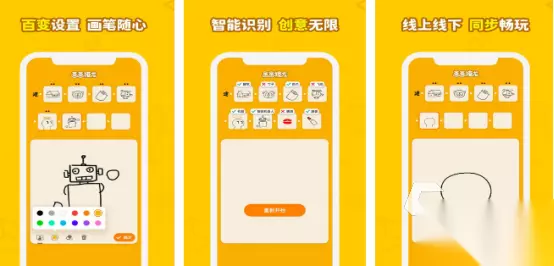
《你画我猜》现已推出移动版!
大家好!我们很高兴地宣布,《你画我猜》已正式登陆安卓和iOS平台! 多年来,我们收到了许多玩家的请求,希望能够随时随地游玩,无论是在家中、火车上,还是与朋友聚会时。 此次推出的移动版将完整的《你画我猜》体验带到你的指尖,包含所有当前游戏模式:悄悄话、舞台、机器人和大逃杀,同时还针对移动设备进行了全新的生活质量优化。 随着移动版的推出,我们还带来了一些额外更新。启动派对:游戏内活动与竞赛 参与我们的游戏内启动派对活动,只需游玩即可赢取专属奖励! 【宝石盛宴梅皮肤】:完成10轮“低语”模式 【启动派对徽章】:游玩1轮“大逃杀”模式 【解锁猩红】:完成10轮“舞台”模式 我们还将举办艺术竞赛!该竞赛将推出全新徽章,专门授予艺术竞赛中的前10名参赛者。创作者计划 随着本次更新,我们非常高兴推出官方的《你画我猜》创作者计划。我们认可众多内容创作者在《你画我猜》中分享有趣瞬间所付出的创造力和努力,希望通过让他们从观众的任何游戏内消费中获得10%的分成来给予回报。 2026及以后
《你画我猜:移动版》现已开启预约! 大家好!自2021年初次发布后,推出移动版就成了《你画我猜》顺理成章的下一步。随着游戏的不断发展,我们希望花时间彻底重建游戏,确保它能陪伴大家走过未来10年,而非仅仅10个月,这也促成了我们的重制项目。 我们的进展: 自重制版推出以来,我们新增了信誉分系统以提升匹配质量,为内容创作者提供了一套专用工具,包括集成Twitch支持和内容审核功能,支持游戏内GIF导出,还加入了大逃杀机器人游戏模式,并对游戏本身进行了大量改进。经过长时间的精心准备,我们非常激动地宣布,《你画我猜》将于今年登陆移动平台! 现在即可预注册! 你可以在iOS和谷歌应用商店预注册《你画我猜》移动版,华为应用商店也将在不久后开放。安卓用户如果不想通过主流应用商店,还可以注册以直接获取APK安装包。 封闭测试