
Steam Deck抢先体验家庭共享云存档创意工坊

--

+关注

--

热度

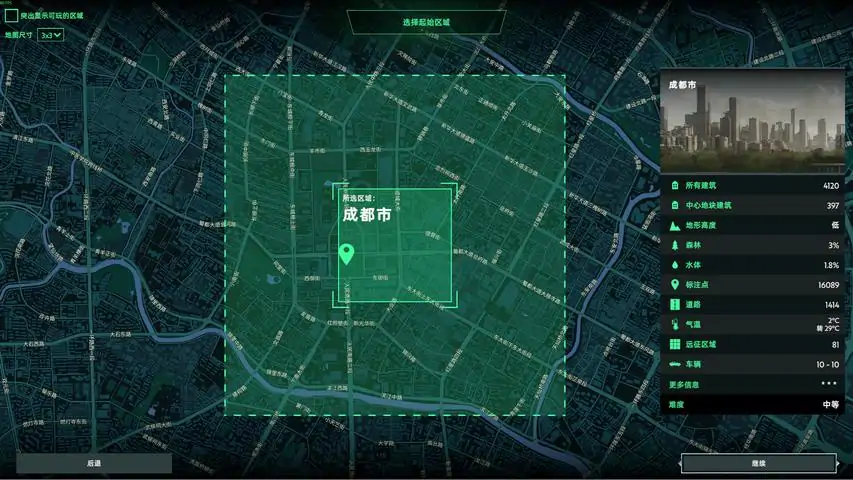
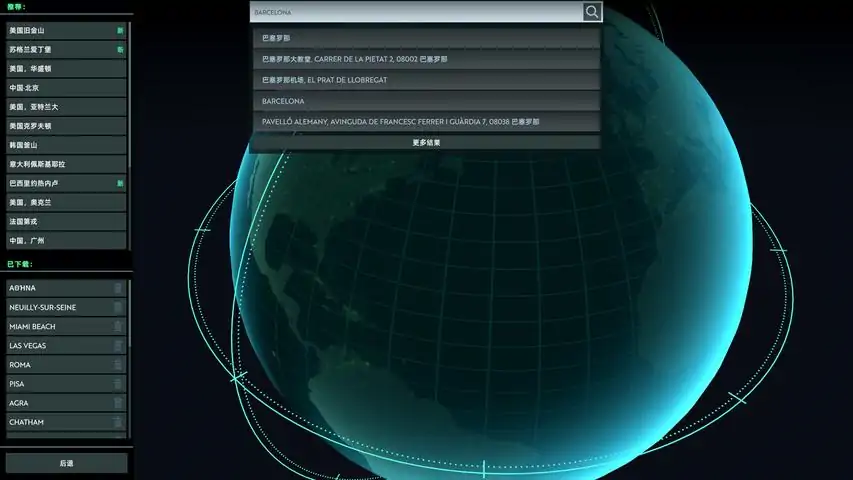
一种“疯狂病毒”在全球肆虐,其传播速度势不可挡。被感染者行动敏捷,身体彪悍,攻击性强。 人类社会在几星期内毁于一旦,繁华都市变得空空如也,没了电、水和食物。然而,有一些人幸存了下来……输入城镇名称,下载地图开始游玩!得益于OpenStreetMap的真实数据,你可以选择全球任意场所来玩游戏。选择你的“无感染区”,建立住宅区和生产设施,改造既有建筑以满足新需要,建造农场和发电站,用围墙、大门、塔楼组成防御堡垒。你必须对城市了如指掌。哪个地方更容易防御?杂货店和药房在哪里?哪里可以找到武器? 记住,旧建筑危机四伏,里面可能有感染者出没!每个晚上,聚居地都可能遭到大量感染者攻击。想尽一切办法抵御他们,使用近战及远程武器、车辆、围墙以及灯光。研发疫苗或治疗方法以获得最终胜利,或者尽情享受重建城市的满足感!你的安全区并不是唯一的幸存者聚居地,你还会遇到其他幸存者。他们有些很友善,想和你交易,另一些则充满敌意,或许会挑起战斗!
游戏圈
共51条帖子
爱心小蛋糕
2026-02-18 01:00:21 · 发布在 「InfectionFreeZone(无感染区)」
地图编辑器 - 使用手册
《感染-free区》地图编辑器使用手册(适用于测试人员及对编辑游戏可玩区域感兴趣的早期支持者) 0. 简介 地图编辑器允许你编辑地图并保存更改,以便在更新后的区域中游玩。通过地图编辑器,你可以轻松添加缺失的建筑,并根据自己的喜好调整起始区域。本指南会定期更新,尤其是在该工具添加新功能时。 启动地图编辑器 部分玩家反馈在Steam库中找不到【感染-free区 - 地图编辑器】。你可以通过以下两种方法轻松找到该工具: 1. 在Steam库搜索栏中输入“感染-free区”,地图编辑器会显示在【工具】部分。2. 调整你的Steam库搜索分类,并在列表中勾选【工具】选项框。工具可能默认在你的列表中处于隐藏状态。1. 加载地图 应用程序启动后,你需要选择想要编辑的地图。你可以从面板加载地图: 城市 此面板列出了所有从【感染-free区】下载的城市。每个城市均为“游戏格式”,大小为3×3。 所有地块 【感染-free区】游戏中所有可用的“单个地块”均为1×1格式。当无需编辑整个城市地图,而只需编辑其中一部分时,此功能非常有用。 创意工坊 从Steam创意工坊下载的地图。(未来可用) 2. 添加地图对象 添加地图对象需使用“添加地图对象”按钮。之后,你可以添加用于创建地图对象的点。要定义地图对象的特性,需要先定义标签。默认情况下,在每个地图对象中,你可以手动添加标签,也可以使用特殊工具添加。默认情况下,手动添加标签可在名为【其他标签】的字段中进行。使用开放街道地图维基百科检查可添加的标签: 要使用工具添加标签,您需要选择地图对象类型。您要创建的地图对象类型必须从列表中选择:添加建筑 要添加建筑,需将地图对象类型设置为【建筑】。在选定位置设置点后,可使用建筑工具定义【标签】(osm标签)来声明特殊功能。高度(Osm标签键:"height"):定义建筑物的高度 颜色(Osm标签键:"building:colour"):建筑物的颜色(注意编辑后的建筑物不会立即显示颜色变化,重新加载地图后颜色才会可见) 屋顶类型(Osm标签键:"roof:shape"):屋顶的类型(可用值包括:"flat"[平屋顶]、"pyramidal"[金字塔形屋顶]、"gabled"[人字形屋顶]、"dome"[圆顶]、"hipped"[四坡屋顶]、"half-hipped"[半坡屋顶]、"onion"[洋葱顶]、"round"[圆形屋顶]、"saltbox"[盐盒形屋顶]、"gambrel"[复斜屋顶]、"skillion"[单坡屋顶]、"mansard"[曼萨德屋顶]) 特殊兴趣点(键:"IFZ")- 建筑物的用途(例如“医院”、“警察局”等)此字段定义游戏中建筑的角色。第一个下拉菜单定义一般可用性,第二个定义具体可用性。标签的键和值与OSM系统无关,是【感染-free区】的自定义内容。添加点 包含地图上由单个位置定义的任何地图对象。目前有3个选项可用:树木(OSM标签键:“natural”,值:“tree”):在所选位置添加单棵树木 入口(OSM标签键:“entrance”,值:“yes”):为附近建筑添加入口 点对象:所有其他单个对象(当前可用的有:“广告”“天线”“长椅”“垃圾桶”“残骸”) 兴趣点数据:所选位置(不仅限于建筑物)的可用性。你可以使用其中一个可用位置,例如:“停车场”“警察局”“监狱”“医院”“药店”等。这些选项会创建一个与OSM系统相关的标签。 添加土地 要定义区域的可用性,你需要使用此选项。请注意,这不会创建任何物理对象。这是可在游戏后续用于对象生成或其他功能的信息。可选土地使用类型列表: "公园"(OSM标签键:"leisure",值:"park"), "树林"(OSM标签键:"natural",值:"wood"), "水域"(OSM标签键:"natural",值:"water"), "停车场"(OSM标签键:"parking",值:"surface"), "铁路"(OSM标签键:"landuse",值:"railway"), "草地"(OSM标签键:"landuse",值:"grass"), "住宅区"(OSM标签键:"landuse",值:"residential"), "工业区"(OSM标签键:"landuse",值:"industrial"), "建筑区"(OSM标签键:"landuse",值:"construction"), "运动场地"(OSM标签键:"leisure",值:"pitch") 添加路径 您还可以添加由一系列点定义的地图对象。当前,地图编辑器有两种"路径"类型: 障碍物 - 用于分隔空间的物理对象。目前,可以声明以下类型的“障碍物”:“栅栏”“大门”“墙壁”“树篱”“路缘”“路桩”“升降门”。 道路 - 一种道路对象,是游戏中使用的路径。你可以声明以下类型的道路:“人行道”“步行道”“小径”“自行车道”“主干道”“次干道”“三级道路”“住宅区道路”“服务道路”。每种类型的道路都可以设置为“桥梁”。若要查看道路对象,需要启用道路图层。 注意:道路数据分为逻辑数据和图形数据(未来可能会更改)。编辑器目前主要修改逻辑数据(车辆路径会发生变化),因此编辑后你不会在地图纹理上看到变化。 示例 - 如何添加桥梁:1. 在地图上设置点(可将线条连接到其他道路对象的点) 2. 使用【道路】工具添加特殊功能:选择道路类型并设置【桥梁】开关 3. 点击【创建】按钮(或使用【Enter】键) 4. 地图编辑器中应显示新的【桥梁】 5. 记得保存更改 3. 编辑地图对象 要编辑地图对象,需先选择一个进行编辑(1),然后会出现【编辑】面板。通过【编辑面板】进行编辑 在此面板内,你可以使用以下工具: - 克隆:用于克隆选中的地图对象(克隆出的地图对象会与原对象处于同一位置,因此请保持对其的关注) - 删除:用于移除选中的地图对象 - 编辑标签:打开“编辑标签”面板。此面板与当前对象类型(建筑、道路、点、地块)在“添加地图对象”过程中所使用的面板相同。例如:对于建筑对象,点击“编辑”后你将看到下方的面板你可以通过此面板编辑标签。要应用更改并重新生成对象,请点击【应用】按钮(或使用【回车】键)。如果点击【取消】,面板将返回静态信息状态,标签不会有任何更改。编辑点(面板)从该面板中,你可以删除地图对象的某些点。你也可以使用【选择】按钮来选中要【编辑】的点。如果正确设置了【编辑模式】,这些点是可以移动的。 使用【编辑模式】选项进行编辑 编辑模式选项允许你通过鼠标交互(移动、旋转)来修改地图对象。你还可以修改所选地图对象的点。当前有3种可用选项: 选择 - 在此模式下,你只能选择对象(如果按住Shift键并点击下一个对象,可以选择多个对象) 移动 - 允许移动已选择的对象(在此模式下也可以选择对象) 旋转 - 允许旋转已选择的对象(在此模式下也可以选择对象) 4. 拆分地图对象 在编辑模式下,你可以使用“拆分”功能将一个对象分成两个。 拆分“路径” - 要拆分“路径”类型的对象(如“障碍物”“墙壁”“道路”),你需要先选择该对象,然后选择一个点作为拆分的基准点,接着在“点”面板上使用“拆分”选项。拆分“建筑”——对于建筑,需要选择物体的两个点来创建一条“虚拟线”,以此作为拆分的基准。首先需要选择第一个“点”:然后面板上的【点】会以绿色高亮显示。接下来,你需要选择第二个点,之后建筑会自动被分割。5. 删除地图对象 要删除地图对象,需先选择该对象(1),然后点击【编辑】面板内的“删除”按钮(2),或使用主面板上的“删除”按钮,也可直接按键盘上的【删除】键。6. 编辑生物群系 “生物群系”定义了一系列参数,这些参数是【感染-free区】内生成地图的基础。它们允许你在特定区域内定义地图对象的特征和风格。其设计理念是为世界不同地区的地图引入差异(例如:欧洲和亚洲的建筑有所不同,应以不同方式生成)。 要编辑“生物群系”,你需要生成想要编辑的地图,然后点击上方菜单中的“生物群系”按钮。之后,文本文件将会显示。要编辑该文件,你需要了解参数及其工作方式,以便理解可以进行的更改。该版本最常见的参数如下: - 生物群落名称:生物群落的名称(仅用于测试和调试) - 地理坐标:定义区域边界的点集(至少需要5个点:第一个点应与最后一个点相同) - 国家代码:可替代【地理坐标】参数来定义区域(如果已定义【地理坐标】,则可以跳过此参数或填写“N/A”) - 树木类型分布:特定生物群落中落叶树、针叶树和灌木的出现概率 - 树木密度:树木生成密度(值为1表示默认值) - 坡屋顶与平屋顶比例:定义坡屋顶与平屋顶的比例(值越接近1,坡屋顶出现越多,注意:不要使用0值) - 面分布:概率不同小队成员的头像出现在生物群落中 grassDensityModifier - 草丛密度调节器(“1”为中性值) monthlySeasons - 定义一年中每个月对应的季节 animalsDistribution - 各动物群体出现的概率 buildingFacadeDistribution - 为建筑物分配立面材料的概率(可能的值为:“wood”“bricks”“plaster”和“cementBlocks”) 注意:生物群落文件中的错误会导致“errors”并使生物群落在《无感染区》中无法正常运行。 7. 保存地图 要保存你的工作,请使用“save”按钮(1)或键盘组合键“ctrl + s”。然后你可以使用【游戏内测试】按钮(2)在游戏中测试已编辑的地图。游戏内应该能看到所做的更改。 地图编辑器中新增的对象:《感染-free区》新增物品8. 保存至创意工坊 你也可以将你的作品上传至Steam创意工坊。操作方法是使用【发送至工坊】按钮(1)。然后你可以设置内容类型,添加描述,修改标题(可选),并使用“保存”按钮。片刻之后,你的作品应该会保存到游戏的Steam创意工坊中。9. 加载创意工坊地图 要将创意工坊地图加载到游戏中,需执行以下步骤: 1. 订阅物品(在Steam创意工坊面板中)。 2. 使用地图编辑器工具并加载已订阅的物品。创意工坊地图将在游戏中显示【Steam】标记。10. 键盘快捷键 ESC - 退出【编辑模式】 Enter - 应用已编辑对象/创建新对象 Delete - 删除选中的地图对象 CTRL + S - 保存 CTRL + Z - 撤销步骤 CTRL + Y - 重做步骤 CTRL + C - 复制 CTRL + V - 粘贴
杀死女巫
2026-02-20 04:00:08 · 发布在 「InfectionFreeZone(无感染区)」
如何使用控制台命令(更新时间:2024年1月13日)
In this guide I'll explain how you can use commands in your game to test stuff out, try techniques or simply have fun with. Introduction: Wanted to enjoy a Sandbox play-style? Than this guide is for you! In this Guide I'll Explain how to use commands and what they do! BEFORE USE: Before using these commands. Remember: after using these cheats the game can become boring after using cheats too much. Try to use the cheats mostly to test stuff out. If you aren't bothered much by this than use it. Please first try the game without cheats for a couple tries before trying them out. How to active cheats 1. Be sure to be inside of a save as you can only activate them there. Not the main menu. 2. Press "`" Key. That press Either A W D S to move in-game. This will make the debug menu appear. (On a AZERTY keyboard the Console Command menu is opened with '!' , So translate ` for !) 3. Press the ? on the bottom right of the menu. 4. Once you see a list. click on "Enable Cheats" 5. Once clicked a bug report will appear. Ignore this. 6. Press "`" again, and move ingame 7. Press "?" again 8. Success! You've unlocked the power of god, If he was limited. Quick PSA In this section We'll cover what cheat does what. A quick PSA: Remember cheating the game Isn't as the game is intended but I am not your parent so use as you please. Okay we have a lot of cheats. About 54. I am gonna split these up into Sections. Important: When you click a cheat, there will be a Type and a Quantity you'll probably need to full in like the resources like: "AddResourcesToBuilding res_cans 10" WHEN USING A COMMAND AND PRESSING ENTER BE SURE TO EXIST THE DEBUG MENU TO ACTUALLY USE YOUR COMMAND! (I had this mistake) AND RIGHT CLICK TO EXIT A CHEAT! [Building Cheats - Add Cheats] =BUILDING CHEATS= (First will appear as incomplete, but after right clicking it puts it all down.) -AdaptBuilding What it does: Instantly adapts a building to a shelter or a cookhouse. How to use: Left click on a building. Extra: Lets you build buildings you like homes and gathering places which u can't research as of now. -CreateFarmLand What it does: Builds Crop Field How to use: Select and click "bld_farm". Go out the debug mode and build Extra: Every field are 2 workers more stressing your pc. Just spawn food and your good. But can be used for visuals. -CreateGate What it does: Instantly Builds Gate . How to use: Select and select what type you want. Than exit debug menu, and then build. Extra: Act as watchtowers and are better cause these actually get instantly build. (can be use to cancel the spawn of enemies in their visual area. -CreateWall What it does: Instantly Builds Wall . How to use: Select and select what type you want. Than exit debug menu, and then build. Extra: Good use if you want to create a big space without enemies. =EVENTS= CompleteActiveMissions What it does: Completes all active missions. How to use: Select. Extra: Be sure to save before using. -EndMission What it does: Ends a mission. How to use: Select what mission. Extra: Be sure to end a active mission. -StartAction What it does: Starts a action. How to use: Select and select a event. Extra: Didn't understand it. But good little secret code to see what the devs have planned. -StartEvent What it does: Starts Events. How to use: Select and select a event . Extra: More secret Code hehe. -StartMission What it does: Starts Events. How to use: Select and select a mission. Extra: goodjob. -StartTransmission What it does: Starts a incoming transmission. How to use: Select and select a transmission. Extra: Be sure to have done the antenna mission and build one. =ADD CHEATS= -AddEventToPool What it does: ?? How to use: Select it Extra: BEWARE! My game crashed and after a second time it didn't but nothing happened. Use With Caution. -AddMoodModifier What it does: Adds a mood boost How to use: Select it and add a X times Extra: Gave me a Bug and didn't work -AddResearchProgressPoints What it does: Adds points to your current research How to use: Select and add the amount of points you want Extra: Be sure to have a active research Project -AddResourcesToBuilding What it does: Adds a certain resource to a building of your choosing How to use: Select a resource and a amount. press Enter. Exit Menu. Click on a building. Extra: Every click is 1X. SO for example u did 20. Pressing 2 times on a building gives it 40. (Be sure to click on a Owned building with a inventory. -AddResourcesToHq Same as above but that its your HQ so u don't have to select it. Extra: U can build multiple HQ's but this cheat only sends it to your first one! -AddScientificMaterials What it does: Adds books which are used for research How to use: Select and type a amount Extra: Yay, you are becoming smarter! -AddWorkersToHq What it does: Adds workers to the main HQ How to use: Select and type amount Extra: Beware, the more workers the more lag [Clear cheats - Debug cheats] =CLEAR CHEATS= (USE WITH CAUTION) -ClearNavData I have no clue what it does. When u click on it it automatically enables it. So yeah, don't just click. (Blackwolf: I think NavData is used for pathfinding but I am not 100% sure about this.) -ClearStockrooms What it does: Removes all items from all storage's How to use: Select Extra: Beware when using in a save, can really screw you up if you didn't save. (happened to me while testing lmao) =POWER CHEATS= -ScavengeAllBuildings What it does: It explores all buildings and shows the items in them like you already went there. How to use: Select. Extra: Map clutter, a lot of things on the screen. -SetDay What it does: Changes the day. How to use: Select and type the amount. Extra: Higher than 9999 causes a bug. (i found doomsday hehe) Also: After going higher than 9999 u can't change it back to day 56 for example. -SetHour What it does: Changes the time. How to use: Select and type amount. Extra: Didn't test but don't do 56:23 or something. -SetSoldierHp What it does: Changes the hp of a soldier. How to use: Select and type a amount. Extra: I assume this does it for all your squads. -ShowAllGroups What it does: Shows all squad. How to use: Select. Extra: Doesn't have much effect on my end. -ShowAllVehicles What it does: Shows all Vehicles How to use: Select. Extra: Doesn't have much effect on my end. -StartWeatherFog What it does: Fog appears How to use: Select and type true Extra: can cause a error -UnlockContent What it does: It unlocks stuff like the gathering stuff, hospital or even already unlockable buildings. How to use: Select and Select Content Extra: You'd be building useless buildings cause they have no function (BlackWolf: It also allows you to unlock production types such as 'wood to fertilizer'. as for the 'useless buildings' most of them don't have a use yet but some do, all tower types (like the wooden towers but able to hold more guards and have more HP), greenhouse (farm inside a house, production speed depends on workers assigned. produces 2 wheat (not sure if tech impacts it) and if staffed with a decent amount is already tens of times more time efficient than farms) and houses (superior shelters that are a bit more expensive, give more housing and a mood bonus 'people living in luxurious conditions'), are confirmed to have functionality. _____________ -UnlockResearchType What it does: Unlocks a research How to use: Select and select a Research Project Extra: Can cause missions like the antenna not to be able to complete cause u can't research it anymore. (BlackWolf: Cannot unlock 'medic(al)' and 'infection/infected (not sure about the name)' research trees. Fungi: Personally don't believe u can unlock any of the researches that aren't already unlocked through normal research) __________________________ =SPAWNING CHEATS= -CreateResourceCursor What it does: Spawns a resource of choosing on the ground where u click How to use: Select and select resource. Exit debug menu and spawn Extra: Outside of challenges i don't see much use for it cause u can spawn stuff in buildings. -SetSpawnPointVisualizationState What it does: I don't know How to use: Select and press true Extra: I assume this should show a marker for what you're spawning but it doesn't do much for me. -SpawnBigSquadAtCursor What it does: Spawns a selected vehicle with a 16 man squad How to use: Select and select vehicle. Exit debug menu and spawn in Extra: Won't spawn with any weapons -SpawnGroupAtCursor What it does: Spawns a group of npcs. How to use: Select, select a amount of units, select a weapon, and type 1. Extra: Don't spawn birds or armor. These create a bug. IMPORTANT: DON'T SPAWN THEM WITH SNIPERS!!!!! ONLY WHEN IT's YOUR OWN SQUAD!! EVERY TIME THEY SHOOT U GET A BUG!! -SpawnGroupInBuilding What it does: Spawns a group of npc's in a building How to use: Select, select a amount of units, select a weapon, and type 1. Extra: Don't spawn birds or armor. These create a bug. -SpawnImmigrants What it does: Spawns Immigrants in the map How to use: Select Extra: Didn't appear so i assume they spawn random -SpawnImmigrantsAccept What it does: Spawns Immigrants in the map. That are accepted to your community How to use: Select Extra: Didn't appear so i assume they spawn random -SpawnRandomSquad What it does: Spawns a player squad with How to use: Select Extra: Spawns in a random vehicles. They have ak's but when clicking on them the ak's are gone. -SpawnSquadAt What it does:Spawns a Squad on cords How to use: Select, type cords, type amount and select vehicle -SpawnSquadAtCursor What it does: Spawns a squad where your press How to use: Select and choose vehicles Extra: better option than above -SpawnSquadAtLatLon What it does: Spawns Squad on cords How to use: Select, type cords and select vehicle Extra: The cursor is better -SpawnVehicle What it does: Spawns a Vehicle How to use: Select a Vehicle, exit Debug mode and spawn in Extra: Some vehicles don't work and don't have a inventory. (no the tank isn't worth it) =REMOVE CHEATS= -DestroyResourceCursor What it does: Removes a dropped Item How to use: Select, Exit Debug Menu and click Extra: Only works on items. Not buildings or raw materials like trees and brick piles -KillAllGroups What it does: KILLS THEM ALL How to use: Select EXTRA: SAVESAVESAVE!!! -KillWorker What it does: Kills a random worker How to use: Select Extra: Kills a random worker and can cause a hole in your work force -RemoveMoodModifier What it does: Removes morale by % How to use: Select with a amount Extra: Doesn't seem to work -RemoveResourcesFromHq What it does: Removes a certain recourse after choosing one How to use: Select and select the recourse Extra: Assuming this only works on main HQ =DEBUG= (Non cheat kind) - i won't put effort in these cause they're basically settings. -ChangeLanguage You know what it means. Need a line of code that I don't know. Sorry -HideFPS It hides your FPS -SaveGame Saves your game -SetFpsLimit Sets a Fps Limit ... -SetResolution This is in your settings lol -SetTimeSpeed This is literally your F1 F2 and F3 keys Ending -After trying all these cheats my current save is totally having a heart attack hahaha -With some cheats and typing "what they do" i feel like that kid that got asked "what does a Wind blower do" and answers "Something that blows air". Some commands were just obvious lmao Alright, Hopefully you had a use to this guide. It took my evening to make it so if u can spare a like I'd appreciate it! If i can just add my opinion and i think others can agree: This game is what Project Zomboid misses (which isn't bad, each game their own thing). This game is a one of a kind and there is so much potential.
被收录在以下游戏单

下载233乐园APP

专心推荐好游戏

关于我们 · 联系我们 · 隐私政策 · 营业执照

侵权投诉 · 开发者中心 · 用户协议 · 免责声明

不良信息举报中心

纠纷处理及不良内容举报电话:

4006600910 (工作时间: 9:00-12:30,14:00-18:00)

北京市朝阳区启阳路4号院2号楼15层1803室

本公司产品适合10周岁以上玩家使用 未成年人家长监护

首页 / Infection Free Zone

抵制不良游戏 拒绝盗版游戏

注意自我保护 谨防受骗上当

适度游戏益脑 沉迷游戏伤身

合理安排时间 享受健康生活

京ICP备18003564号-3

经营许可证编号:京B2-20181741

京公网安备:11010502052873

Copyright © 2026 233leyuan.com All Rights Reserved

北京龙威互动科技有限公司版权所有

热门游戏: 我的世界 | 三角洲行动 | 原神 | 王者荣耀 | 超自然行动组 | 蛋仔派对 | 和平精英 | 火影忍者 | 二重螺旋 | 英雄联盟 | 梦幻西游 | 明日方舟 | 斗罗大陆 | 光遇 | 鸣潮 | 无畏契约 | 模拟山羊3 | 樱花校园模拟器