


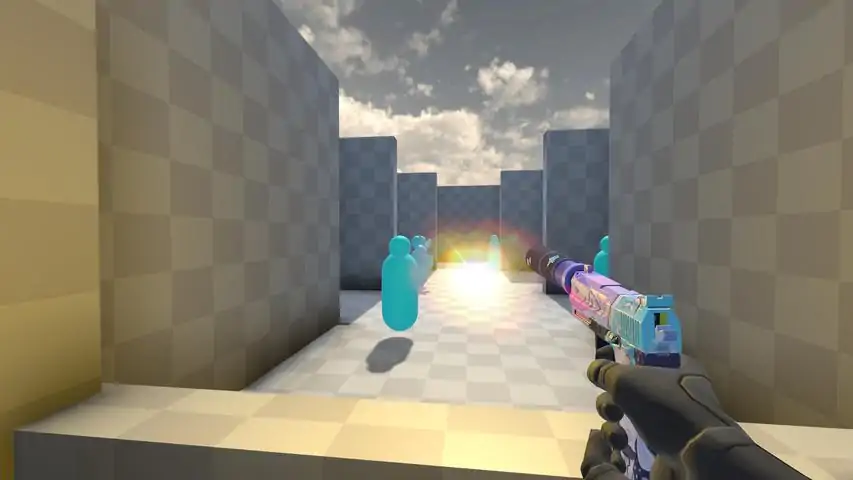

如何使用AimLab - 通往人类自瞄之路
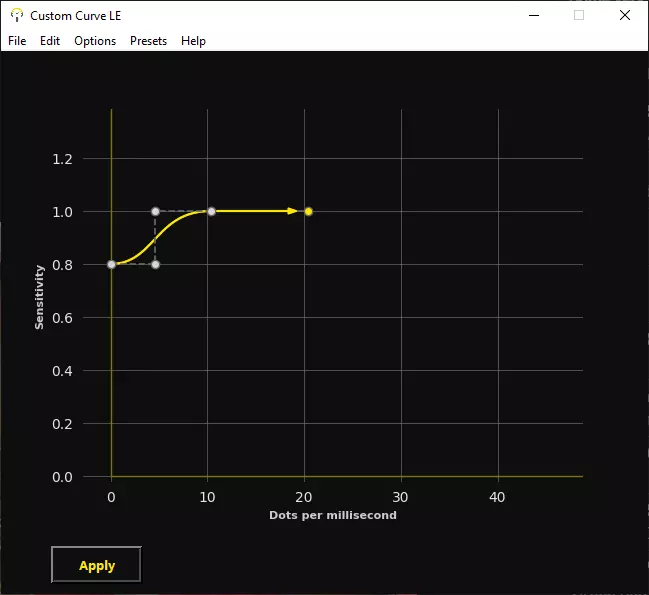
I'm sure this guide won't disappoint you. Over 10h went into this guide. About this Guide! RULES1. You don't train 24/7 on AimLabs 2. You train to improve in a Game not in AimLabs 3. Don't change your Sensitivity after missing few shots 4. Keep relaxed and focus on Accuracy not on Scores Why?I've created this guide because I like AimLabs being free for all and giving people the opportunity to improve at games and I felt that there is more to Aim than just Aiming, it's mental state, understanding how games work and everything added together should make you a better gamer. Don't AimLabs 24/7From my experience, depending on the game you play, you might need more flicking or more tracking. In games like Apex Legends, Battlefield, Warzone the TTK (Time to kill) is higher therefore tracking the enemy is more important. In CSGO and Valorant flicks are more important because 1 headshot can kill a enemy. This means that you should adjust your Sensitivity and DPI that you're able to aim good in games. I personally do better with higher sens in GridShot or SpiderShot, but ingame I'm much worse with higher sensitivity, so this proves that it's more important how you do ingame not how high your Score is in AimLabs. You should try to get the best Score with the same settings you're using ingame. Games vs AimLabsIn Games you have objects, map knowledge, spots that you need to pre-aim, in AimLabs everything is open, so you might think that you do bad in SpiderShot but in reality you are not used to weird angles and it's basically random shooting. AimLabs is to make you control your movement better, so you get used of "weird" angles. Someone who does 100k in GridShot isn't automatically better in CSGO than you. You are here, to improve at a Game not in AimLabs. 45-60min of training is 100% enough. Playlist Here is a Playlist that I've made: https://steamcommunity.com/sharedfiles/filedetails/?id=2677423977 Mental state It's very important that you are relaxed. If you feel stressed, worried or being mad about something, you will perform worse because your thoughts are somewhere else. If you feel stressed, it's not the right time to train your aim, it will only frustrate you and make you angry. Games should relax you, no matter if it's AimLab or a Game. You must be relaxed and focused, don't squeeze your mouse or get mad if you miss shots, or mess up a good round that could become your new personal record. It's not about being good once, but reaching score and increasing it on each round. No matter how many times you miss, keep shooting till the end. If you have problems in real life you should take care of it, even if you feel lazy, this will also improve your performance. Setup Hardware/SetupMake sure your computer hardware and peripherials will allow you to reach your full potential. You don't need to spend 4000$ on a computer, but you would need to have some basic gear to be able to reach the potential. I would recommend any 120hz+ monitor, if used or new, doesn't matter. For example: BenQ Zowie XL series Monitors. They are still good and cheap. Some cheap amazon mice are sold as gaming mice but not all of them are good for gaming. I'm using currently the Pulsar Xlite Gaming MiceAll listed mice here are the ones I've owned and used. I use a Hybrid Fingertip-Palm grip. My hand 20cm / 6cm Logitech G703 Logitech G603 (Fingertip/Palm) (Hero Sensor) (G703 has rubber sides and less useless stuff like DPI switches, low-high mode) (G603 has no ruber slides and has low-high pooling rate mode) Logitech G Pro Wireless (Fingertip / Claw) (Very good but the shape is worse Pulsar Xlite Razer Death Adder Chroma (Fingertip/Palm) (I used to have the Death Adder ReSpawn, good mouse) Razer Viper Ultimate (Fingertip / Claw) (Focus+) (Shape is bit weird and for me it's to flat) I had many more like Roccat Kone XTD, Zowie EC1, Viper Mini etc DPI / Sensitivity / eDPI / 360/cm Many people don't know the difference or they "think" they know. Short said, DPI and Sensitivity itself is 100% useless. TL;DRSensors create images of your mouse pad Recommended Sensors: (Hero, Razer Focus+, PMW 3399, PMW 3310) DPI is the resolution of that sensors image, bigger DPI more data to compare; can cause delay if too high. Recommended 800-1600dpi Sensitivity a program thing, doesn't exist in the mouse itself; is just a DPI multiplier. Recommended (use it to match the 360/cm ratio across games to have the same aim) Polling rate is how many times the position (sensors image) is updated; Recommended 1000hz DPIDPI is the sensors sample resolution, the higher the DPI the bigger the resolution is. 400DPI is less accurate than 1600DPI, we aren't talking about aiming accuracy, just sensor accuracy. You can imagine a 32x32 pixel image vs a 512x512 pixel image, the 512x512 image would store much more pixels and therefore information about the position difference between image A and B. Very high DPI setting can also cause sensor errors but they are very small, short said. I wouldn't use anything above 3200DPI. Higher DPI might cause errors in the sensor. So my recommendation would be to stay under 2400DPI and increase the sensitivity instead. Low DPI can cause input lag, 400 DPI has actually a significant delay compared to 800DPI, it varies between sensors but the difference between 400 DPI and 800 DPI can be about 8-15ms. Bonus info higher DPI uses more energy, so no, your wireless mouse isn't broken, it just drains more power because of the higher DPI. I would recommend 800-1200 DPI if you don't like to charge your mouse. Recommendation: 800 - 2400 DPI SensitivitySensitivity is just a multiplicator for your DPI, it was created to have a value that can be changed by the game engine to adjust your AIM to the Field of View of your game. When aiming down sight aka Call of Duty / Battlefield style, the way you "Zoom" is that the game changes your FoV giving you the illusion of a zoom effect. High sensitivity can cause PIXEL SKIPPING what is 100x worse than the errors a sensor can cause at 6400DPI. Too low sensitivity can cause a feeling that the mouse/crosshair isn't reacting to your small adjustments. eDPIeDPI stands for "effective DPI" and is calculated by multiplying the sens and DPI. 800dpi x 1.6 = 1280 eDPI is the same as 400dpi x 3.2 = 1280 eDPI and 1600dpi x 0.8 = 1280 eDPI eDPI is only useful for the same game, Valorant and CSGO eDPI are NOT the same. 360 / cmThis is the "ultimate" information you can get if you want to have the same AIM across all games. You make a 360 rotation in-game and you look how far your mouse has moved. CSGO 800DPI, 1.6 Sens is 360/32.47cm So you must move your mouse 32.47cm to make a 360 rotation and half of this will make a 180. This is how muscle memory comes to life, you learn with time to do a 1cm movement to move X pixels. That's why it's important to have the same 360/cm in all games. So when converting it to Valorant you need 32.47cm for a 360 rotation. Valorant 800DPI, 0.5032 Sens Polling RatePolling rate says how many times the mouse position is updated, 1000hz meaning the mouse position is updated each 1ms. Now as a comparison, if you set the polling rate to 125hz the position of the mouse will update each 8ms, if you are able to move and stop in the same spot (impossible) nothing would happen, even tho you have moved the mouse. Don't COPY settings! (very bad)I think that all people are different, your height is different, your bone structure, everything is different. So it's very important to understand that YOU must find your own settings. You might be confused, let me help, Shroud doesn't ask others what DPI/Sens they use, neither does Woxic, device, s1mple, TenZ and many others. They found their own sens that fits their play style and arm dexterity. Why is it important to find your own mouse settings?Example: Player A) Is able to move his arm and wrist very fast, like a Car Mechanic who's in a rush. Player B) Is little slow but very precise, like a Doctor (eDPI = effective DPI) Now, Player A is able to move his arm very fast, if he would play on high eDPI, this would make him change his play style and make no use of his strengths. If you would let Player B play with low eDPI, this would make him very slow and the low sens would require him to move much faster than he is able to. So what is the conclusion and why am I talking about this nonsense? If you are able to move your arms very fast, the best for you is low eDPI. If your wrist movement is very defined and precise, use high eDPI. Example of the above are the following players (precise wrist) Woxic 2400 eDPI (CSGO) s1mple 1236 eDPI (CSGO) Shroud 351 eDPI (Valorant) (fast arms) Stewie2K 780 eDPI (CSGO) ZywOo 720 eDPI (CSGO) TenZ 326.4 eDPI (Valorant) ShahZaM 212 eDPI (Valorant) 351 eDPI might sound very low but it's not. 351 eDPI in Valorant is equal to 1116 eDPI in CSGO I don't know what to use / where to startThis is just a example if you have no idea what to use for all the new Shooter Players. Here an example: (800DPI, 360/20.36cm) CoD Warzone = 8.5 Sens Valorant = 0.8027 Sens Fortnite = 10.1087 Sens CSGO = 2.5524 Sens Battlefield 5 = 39.4020 Sens Apex Legends = 2.5524 Sens Roblox = 0.1411 Sens Mouse Acceleration I would encourage everyone to disable Windows mouse acceleration. How To: 1. Search for "Mouse Settings" in Windows Search 2. On the bottom it will say in a colorful text "Additional mouse options" click it and a window will open 3. Go to the [Pointer Option] tab in the window 4. Uncheck the [Enchance pointer precision] 5. Click [OK] Done 6. Bonus: I would also recommend to leave the Pointer speed in the middle 6/11 Mouse Acceleration is being hated by everyone because of windows acceleration. In fact the acceleration of your mouse can improve your aim (I started using it) The acceleration that windows provides is very extreme and unpredictable. There are special advanced programs that allow you to modify the acceleration, so you can track like aimbot and flick like a aimbot. (I do not own or am responsible for those programs, use it at your own risk) Custom Curve LE - Free Versionhttps://mouseacceleration.com/ (propretary) Easier to use (I use this)
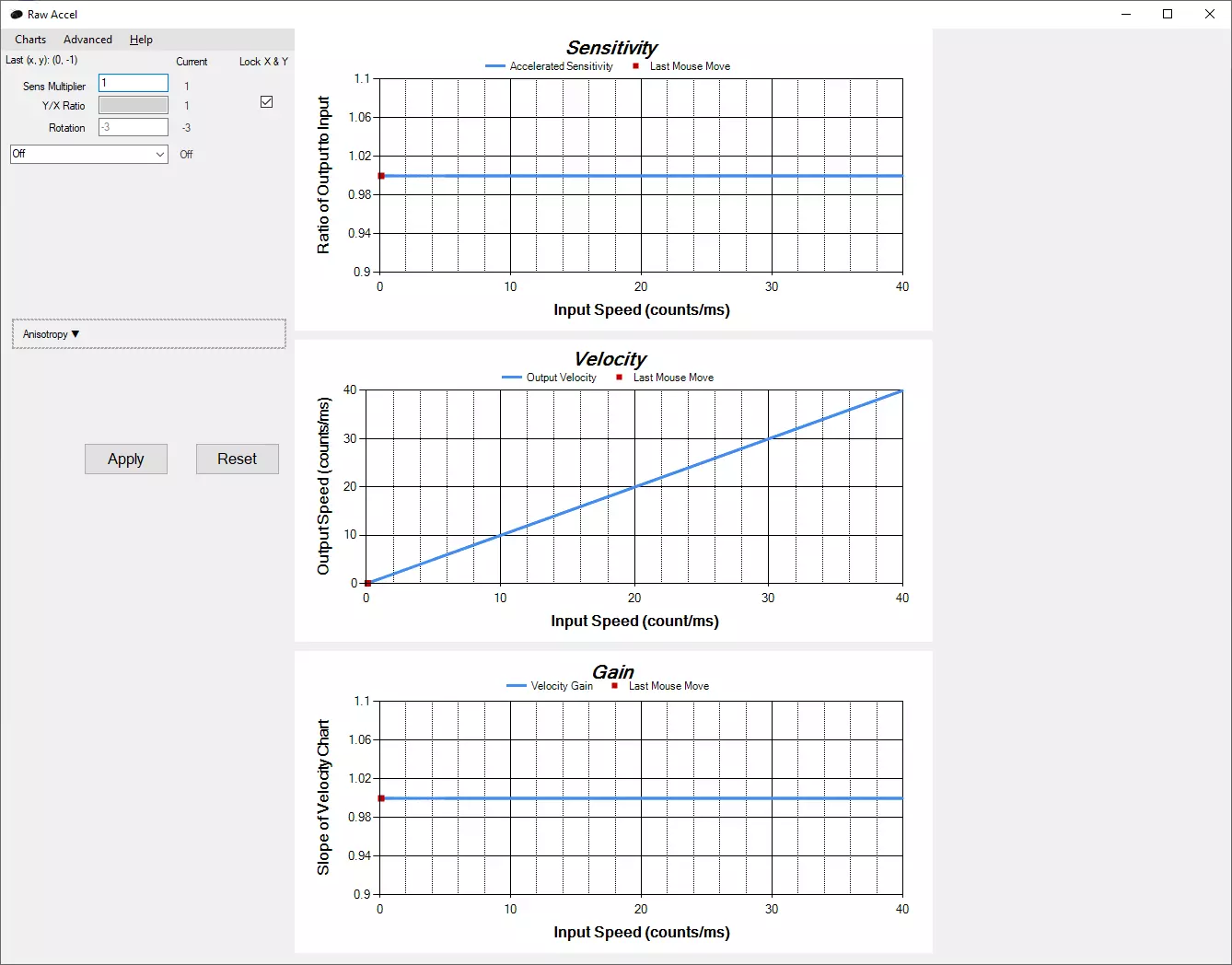
Raw Accel - Github(https://github.com/a1xd/rawaccel/releases)(开源) 缺乏良好的用户界面(UI),但具备传感器旋转调节功能。
为什么鼠标加速是有益的?首先,Windows系统自带的鼠标加速简直是技术界的耻辱,它对触控板来说还行,但对游戏而言真的很糟糕。 让我来解释一下我是如何提升瞄准能力的,这些方法确实有效,还让我的发挥更加稳定。 (确保你为自己玩得最多的游戏选择了合适的预设。如果你玩《Apex英雄》时却用着《无畏契约》的视频设置,那可就糟了,记得把视频设置换成《Apex英雄》的。) 1. 打开AimLabs,进入Gridshot模式,然后调整我的灵敏度,确保能从网格的一个角落甩到另一个角落,且不需要过度伸展手腕。如果你能轻松完成Gridshot而不感到疲惫,就可以进行下一步。不过要先完成5次Gridshot。 2.现在前往“蜘蛛射击”(Spider Shot)进行同样的练习,但首先要进行两次完全不调整任何设置的“蜘蛛射击”。然后调整设置,确保不会出现射击不足的情况,同时仍不会感到疲劳,也不会过度伸展手腕或手臂。 3. 现在打开一个追踪场景,我个人推荐“终极动态追踪”(Motion Track Ultimate),因为你需要在追踪目标之间进行甩枪。现在游玩该场景两次,然后尝试记住追踪和甩枪时手部移动的速度。 4. 现在你需要尝试“模拟”刚才追踪时的速度,你会看到“自定义曲线LE”(Custom Curve LE)窗口中,有一个黄色条从左侧开始移动。这代表你当前移动鼠标的速度。
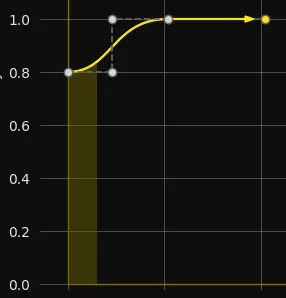
极小的移动不会显示,所以可以将那些接近0的移动想象成远程移动,以及用于瞄准远处目标(即远程射击)或微调瞄准以击中车辆间目标等的调整移动。 曲线的中间部分用于追踪在你附近奔跑的目标,这样你就能持续瞄准并精准射击他们。再远一些的目标就只需甩枪瞄准了。 你可以试试我的曲线设置。
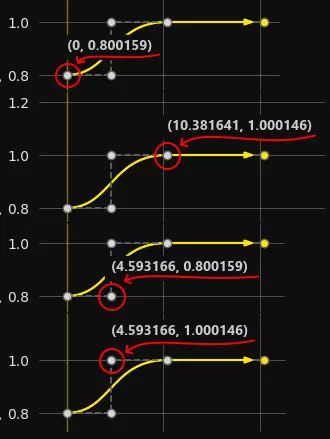
Just play Motiontrack and adjust the curve one dot at time. Don't make big adjustments, make small adjustments per "round" and then at one point it will feel ok and then start playing a game :) Monitor Hz vs FPS People get confused with Hz and Fps in regarding to monitors. The fact that I'm programming in multiple low and high languages (c, cpp, go, js, php) gives me an pretty good edge compared to other people. So I've used Unity, Cryengine and UE4. The basic understanding of gaming engines are ticks that are run/resolved by the CPU and not GPU. TICKTick updates the game state. You could call it a function that runs other functions inside the game engine. If someone understand Javascript it would be something similar to this: function getPlayerPosition(player_id){ return Match.getPlayer(player_id).getPosition() } function getPlayerState(player_id){ let player = Match.getPlayer(player_id) let hasAmmo = player.getAmmoCount() > 0 let hasLife = player.getLifeAmount() > 0 return {hasAmmo, hasLife} } function tick(){ // Calls other functions let position = getPlayerPosition(13) let state = getPlayerState(13) // Sends data to everyone inside the match. Match.sendToAllPlayers(position, state) } while(true){ tick() } It means that ticks runs other functions as much as it can on your game client, but to be more efficient, game servers lower it or put a delay between ticks so they can run more matches on one single server. Lets say you play on a 64 tick server, meaning that the server returns new information each 15.625ms. No matter what you do, you receive new information about the game each 15.625ms, so when I jump on my screen, even if you are sitting next to me and we have a local server, the server will send you the new updated state of the game after 15.625ms + network delay + monitor delay and so on. Monitor DelayMonitor has two main delays. Pixel delayThere are various panels like, TN, IPS, VA and all the sub panels like AHVA IPS and so on, this AHVA is just a branding. Companies want to be fancy so they use fancy names, yes they do make a small difference between panels, but a AHVA IPS is still a improved IPS panel not a TN panel or some GOD like technology. The 1ms response time that you see on a monitor, isn't the whole truth, the 1ms is the TOTAL RAW delay when switching a pixel from gray to gray, the pixel doesn't move, doesn't change color. It's like saying "how fast can you see?", not blink, not react just see, would mean you can see at light speed, because what you see is the moving light particles in the air. Meaning you see at light speed. How you can tell, 1ms response time is ♥♥♥♥♥♥♥♥, as soon as the pixel changes from gray to blue it can have 2ms or 5ms delay. So do not care about 1ms or 5ms. Monitor delayThere is a printed circuit board inside your monitor, short said, stuff that handles raw image data aka called BUFFER. So, your GPU sends a Buffer to the monitor that takes all the image data and sends signals to the pixels to change, red, blue, green, purple, white, off(black) and so on. This causes a delay, meaning that your monitor needs some time, to show an image. This delay is before any image, FPS, Hz or anything. For example the XL2720Z has a delay of 15ms and you can test it but only if you understand electronics. This isn't the same as using a high speed camera and use a blinking LED, the signal still runs through the whole PC. So keep in mind, monitor companies don't tell you what delay their monitor has, even if this would mean more for gaming than the dumb 1ms marketing BS. Some GaMiNg monitors have much higher delay than a normal one. MONITOR HZMonitors Hz is the frequency in which the monitor is drawing images to your monitors panel. Short info, 1hz is 1 refresh per second. 60hz is 60 refreshes in a second. 1000ms(1s) / 60fps = 16.6ms So the monitor will always show a new frame each 16.6ms. This has nothing to do with FPS, Games or what ever, it's a fixed value and you can overclock your monitor but your FPS does not affect the refreshrate of the monitor. So everything that happen before doesn't matter because the 16.6ms is ultimate. GAME FPSYou know that Monitor Hz are, if not read it above. This will make more sense then. So tick is the updated state of the game on the server that will be send to each connected player inside a match. This tick is handled by the game engine and the game engine tells your CPU what to do with this new state/updated data. So, now it comes to how good your CPU is, this is also how you can make your game run 15fps with RTX TITAN or 3090 while having a i3. The more things are updated, like in Battlefield where the tick says what buildings are broken, if a C4 has been thrown, if players are spawning and so on. Now the CPU is also sending data to the GPU to render it, the more stuff to render, the longer it takes. What your GPU does, is turning 3d objects/models/vertex-shaders into 2D frames unless you have a hologram monitor from year 2090 and you're from the future. Then I'm wondering wtf you're doing here reading this boomer 💩 So, let's get to the point, you're having now 60FPS in your game and this would mean, that your CPU + GPU needs 16.6ms to have the FRAME ready, the FRAME is still INSIDE the GPU, it hasn't been send to the monitor yet. What's better 120Fps 60hz or 60FPS 120Hz?Now that you now understand the basics how FPS and Monitor Hz works, we can look into how the monitor and your PC work together, yay. We're playing on a 64 tick server, that has ~15ms per tick. Your enemy is behind a wall and you're preaiming the wall, let's call this position State-A in other words tick-number-124987 Now your enemy decided to peek and shoot at you, let's call this position State-B To not break your brain entirely, let's say that we put the ping and so on, aside. Or it would include the whole explanation of the Lag-Compensation implementation The server sends your enemies new position and the new position says that he has moved, now the new tick/position gets into your Game Engine, and outputs a ready frame after 16.6ms because this is how long your PC took to render it. Now the Frame is send via your monitor cable to your monitor. Let me introduce you now to my paint skills:
Red line is the monitors 1 refresh (1hz) White line is the GPUs 1 frame Lets start from the left, both Monitor and GPU are synced and showing the same game state. Now the GPU renders at 90FPS frames and the monitor refreshes with 60Hz, so you can see, that the GPU renders a frame before the monitor so the monitor will receive a new frame. If you have double the frames so 120fps and 60Hz, you will actually fit 2 frames between the red lines (hz), meaning that the monitor will skip one frame and show the newer rendered frame, making the game little more smooth and you will be closer to what's actually happening in the game. The same logic can be inverted, let the red lines be the FPS and the white lines be the Hz, so in this situation, the red line (fps) comes now to late and the monitor will show the same frame twice, but in the 3rd refresh you can see that it's able to show the last frame sooner making the whole game make it feel smoother, but in this point. Having 120fps and 120hz will result with you seeing the State-B aka the next state of the game sooner than everyone else. More FPS on 60hz helps, but I wouldn't go with 200fps because then you're just wasting electricity, having 60fps and 120hz makes you see the game clearer, because at 60hz your game looks choppy and blured, with 120hz you preceive moving objects sharper and more defined. If you can't buy or don't have the money for a 120hz, lower your graphics settings and get at least 90fps or above 60. Vsync makes the GPU wait for the monitor, Gsync makes the monitor wait. Input Lag / Ingame Settings To improve your computers responsivity and reduce input lag and delay, make sure that you CAP / Limit your Frames to 1fps under your monitor max refresh rate. So if your Monitor has 144hz, limit your FPS to 143fps. It has something to do with Frame buffer and staging of images same as skipping and how images are displayed. Yes more FPS are better but less input lag is much better. Sadly different games have different maps and it's hard to compare Tarkov to CSGO or Valorant, because the maps are different. So make sure to always hit your monitors refresh rate (I assume you understand the difference after me writing a CV about it above.) The rule that I made is following: FPS > Resolution > AntiAliasing > Textures > Shadows > Details / Effects You shouldn't ever run maxed shadows. If you set everything on Low and your native monitors resolution resulting with 270FPS on a 144hz Monitor, you don't cap the fps because you won't see what happens with the FPS. So you add now Anti Aliasing, preferably MSAA if possible, if not then anything except FXAA FXAA it's blurry piece of trash, you can just spit on your monitor and smear it on your monitor, and even then you will save at least FPS and have the same result. If you set Anti Aliasing to the highest setting then you can bump up the textures, if you have ULTRA vs High, just get high, the little to no difference that Ultra has (example Battlefield) drops about 20% of FPS for no more detail in textures at all, so don't. Then if you are still above 154fps you can increase shadows a little from low to middle/high, you can add some tessellation that will make the floor and bricks nicer. Me saying 154fps doesn't mean that you should have 154fps in the menu, but 154fps MINIMUM on the worst map you can play with as much stuff going on as possible, meaning gunfight, smokes, explosions etc should NOT go lower than 154fps. You want to have a minimum of 154fps so when you lock the fps at 143fps your GPU will NEVER run at 99%+, because then you can be sure that the GPU buffer isn't full and input lag will be lower. Without this lets say you run at 200fps but your input lag is 40ms, with this above at 143fps locked with GPU at 90% your input lag is about 20ms. 20ms have or not, can decide if headshot or not. They call me Young Eminem on the Streets Posture, Grip, Health, Gaming Chairs This is also very important, if not the most important thing of them all. Having a constant posture and being healthy. People don't mention it because they think it doesn't matter. PostureDon't sit with your feet on the desk or sideways or what ever. You must sit comfortable and your shouldn't really "think" or use any muscle to sit in a specific posture. It should be natural and easy to keep the posture. Mouse gripSo if you found your posture and learned how to sit like a gamer 🤭 There are multiple grips: Fingertip, Claw, Palm and some others. MUSCLESWhen playing your muscles shouldn't be under tension like your biceps or triceps, this will exhaust you. Your muscles should always be relaxed and not in tension, your should aim by sending a fast impulse to your muscle and then relax again. This will let your also game longer, reduce fatigue and make you less exhausted. Once again, your posture is very important. HEALTH!Stand up and move each 1-2h when sitting at your desk. You can do 10-15 squats, stretch a little... and you can move on. When training in AimLabs do it each 30min. Such a pause will take maybe 5min but will make you feel much better. Just do it and then you will wonder why you haven't been doing this before. GAMING CHAIR FOR THE WIN! (NOT)Yes this was a joke and clickbait so you read it, gaming chairs are trash. If you are a streamer, yeah you might look cool but actually your health is more important while sitting for 6-9h at your desk on a chair that hurts your back or spine. You can find a store that specializes in selling OFFICE chairs. They will ask you about your height, weights etc. then they bring you few chairs to try out and there is always one that's fits you better, so you buy the one that you are most comfortable with and test it and if you hate it you get a new one. Because just sitting in a store doesn't really gives you a good feeling of how it will be when you're playing games, programming, doing homework or what so ever. Bad chairs are very bad for your health that WILL (not might) cause you back problems when you become older, when I was 18 I couldn't imagine having back problems. But now I start valuing my chair more for being good, better sleep, more alive, almost never getting tired after long sitting sessions. Last words Feel free to comment and leave feedback how bad my spelling and grammar is. I didn't write this because of my grammar but to help others, so if you're kind enough and feel like your spelling and grammar is perfect, feel free to improve it.
2026-02-13 22:00:05 发布在  Aimlabs


说点好听的...
收藏
0
0