换一换
换一换 




如何让YoloMouse更好地与《暗黑破坏神2:重制版》配合使用 YoloMouse的工作原理 YoloMouse会检测不同的光标,并将其替换为你选择的光标。它通过计算显示光标的哈希值来实现这一功能,一旦找到匹配项,就会用你想要的YoloMouse光标替换原光标。
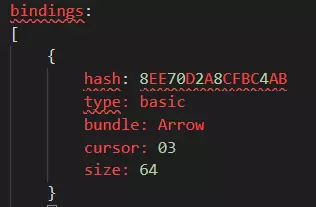
《暗黑破坏神2:重制版》棘手的光标精灵 《暗黑破坏神2:重制版》在游戏中使用精灵来显示光标。你可能已经注意到,游戏中的光标会从指向手指变为张开的手,然后再变回来。问题在于,在YoloMouse看来,这些单独的精灵阶段都是独立的光标,每个都需要特定的配置。 方法一:简单粗暴法 要将《暗黑破坏神2:重制版》的所有光标都设置为你的YoloMouse配置,只需按下“Ctrl + Alt + Shift + C”弹出YoloMouse配置菜单,然后点击“全部绑定”即可。
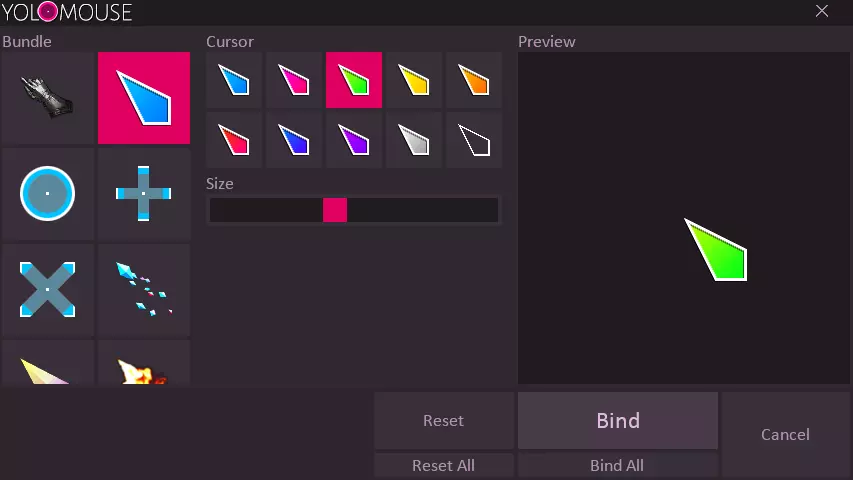
此方法的问题 最大的问题是,该方法会将《暗黑破坏神2:重制版》中的所有光标都替换为你的YoloMouse光标。这其中包括“辨识卷轴”光标,我觉得这有点烦人。关于如何解决此问题,请参见方法#2。 方法#2:定向替换(推荐方法) 要让YoloMouse仅替换游戏中的基本光标,我们必须配置YoloMouse以处理光标精灵的所有阶段,这并不容易。不过好在我已经完成了这项工作。 前提条件:至少配置过一次YoloMouse 这会创建JSON设置文件,供我们稍后以YoloMouse的正确命名格式进行修改。 1. 启动《暗黑破坏神2:重制版》 2. 启动YoloMouse 3. 在《暗黑破坏神2:重制版》的游戏中,按下Ctrl + Alt + Shift + C 4. 点击“全部绑定” 5. 关闭窗口
编辑 YoloMouse 配置文件
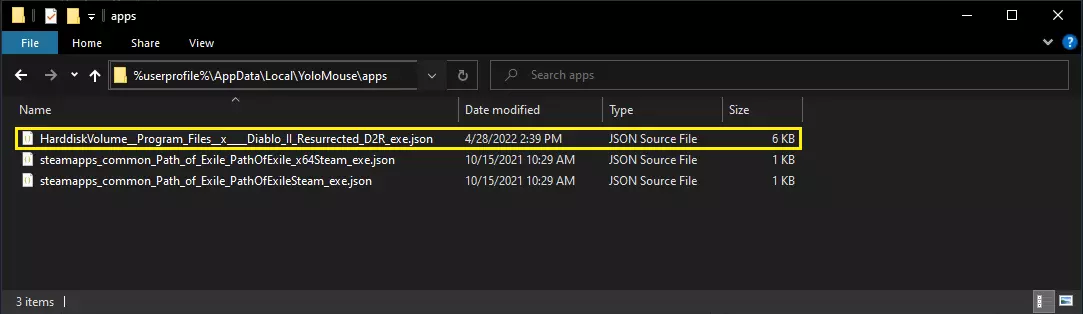
Exit YoloMouse and D2R In Windows Explorer, navigate to %userprofile% AppData Local YoloMouse apps Open the D2R config file in a text editor (Visual Studio Code is great). It will be named something like HarddiskVolume__Program_Files__x____Diablo_II_Resurrected_D2R_exe.jsonReplace the entire section with the config file below: { bindings: [ { hash: 8EE70D2A8CFBC4AB type: basic bundle: Arrow cursor: 03 size: 64 } { hash: 78ED3A313E588759 type: basic bundle: Arrow cursor: 03 size: 64 } { hash: CE605C909286E464 type: basic bundle: Arrow cursor: 03 size: 64 } { hash: FFDCF2B81AF5AD35 type: basic bundle: Arrow cursor: 03 size: 64 } { hash: 72DF45C55864C306 type: basic bundle: Arrow cursor: 03 size: 64 } { hash: 232950CA56B6C70A type: basic bundle: Arrow cursor: 03 size: 64 } { hash: 438FC755C2D3A928 type: basic bundle: Arrow cursor: 03 size: 64 } { hash: 4A8DD7AA52663BA1 type: basic bundle: Arrow cursor: 03 size: 64 } { hash: 8D05A4081FDC0063 type: basic bundle: Arrow cursor: 03 size: 64 } { hash: AAD7684311AC659A type: basic bundle: Arrow cursor: 03 size: 64 } { hash: A3593C06725C280 type: basic bundle: Arrow cursor: 03 size: 64 } { hash: 9C364298023D2EDE type: basic bundle: Arrow cursor: 03 size: 64 } { hash: D934EBCA2A54FE04 type: basic bundle: Arrow cursor: 03 size: 64 } { hash: 81C2C7447C9F658 type: basic bundle: Arrow cursor: 03 size: 64 } { hash: 7CA91FB0F6A16AB2 type: basic bundle: Arrow cursor: 03 size: 64 } { hash: 59B694EB2794A9A4 type: basic bundle: Arrow cursor: 03 size: 64 } { hash: 6AEF2FD1FBDDC19F type: basic bundle: Arrow cursor: 03 size: 64 } { hash: C8E60564EBFB4DA5 type: basic bundle: Arrow cursor: 03 size: 64 } { hash: EFC8298CA77ECF56 type: basic bundle: Arrow cursor: 03 size: 64 } { hash: A010FBC4BA76E1DE type: basic bundle: Arrow cursor: 03 size: 64 } { hash: 7F46780CB2CC2076 type: basic bundle: Arrow cursor: 03 size: 64 } { hash: AA6B11F4A30E881F type: basic bundle: Arrow cursor: 03 size: 64 } { hash: 222D582006F505DA type: basic bundle: Arrow cursor: 03 size: 64 } { hash: 8DC26BD888891780 type: basic bundle: Arrow cursor: 03 size: 64 } { hash: C73CCF0A734E3417 type: basic bundle: Arrow cursor: 03 size: 64 } { hash: 921306D16B884D51 type: basic bundle: Arrow cursor: 03 size: 64 } { hash: E6678BFCCB6B9EFD type: basic bundle: Arrow cursor: 03 size: 64 } { hash: 648EC6B1226150A4 type: basic bundle: Arrow cursor: 03 size: 64 } { hash: 4C8D286AF9A1405D type: basic bundle: Arrow cursor: 03 size: 64 } { hash: 2A7EEA8283781E56 type: basic bundle: Arrow cursor: 03 size: 64 } { hash: B83FBF94D0E45B26 type: basic bundle: Arrow cursor: 03 size: 64 } { hash: 9D218DB8CB193D6E type: basic bundle: Arrow cursor: 03 size: 64 } { hash: C5F89861BC51A2AE type: basic bundle: Arrow cursor: 03 size: 64 } { hash: EBF178EC2DD29DBD type: basic bundle: Arrow cursor: 03 size: 64 } { hash: 8B3B343C6DE57394 type: basic bundle: Arrow cursor: 03 size: 64 } { hash: 335708DD1C44BD95 type: basic bundle: Arrow cursor: 03 size: 64 } { hash: E5DD59D237DA37FE type: basic bundle: Arrow cursor: 03 size: 64 } { hash: 8E01C54BC6AC8510 type: basic bundle: Arrow cursor: 03 size: 64 } { hash: 9ED5A4FCA347B7AA type: basic bundle: Arrow cursor: 03 size: 64 } { hash: B0260A5735878EE6 type: basic bundle: Arrow cursor: 03 size: 64 } { hash: 522643CDD242D3C8 type: basic bundle: Arrow cursor: 03 size: 64 } ] } Save the file. Launch D2R Launch YoloMouse Picking Different Mouse Cursors If you don't like the cursor that my config file has (medium sized green arrow) you can simply do the following: Determine the IDs and size of the cursor you wantLaunch YoloMouse In D2R press Ctrl + Alt + Shift + C Select the cursor options you want Click Bind All Exit YoloMouse This creates a default binding in your settings JSON file. We will use this section to copy-paste the cursor configuration and overwrite the cursors my config provided. The only thing that matters for matching is the hash.
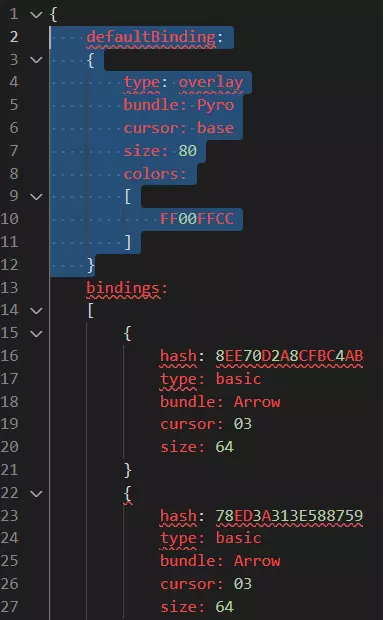
使用默认部分中的新设置替换提供的光标设置。在Windows资源管理器中,导航至%userprofile%\AppData\Local\YoloMouse\apps。使用文本编辑器(Visual Studio Code是不错的选择)打开D2R配置文件,该文件名称类似HarddiskVolume__Program_Files__x____Diablo_II_Resurrected_D2R_exe.json。从“type:”开始选择defaultBinding部分中的内容,直至右花括号“}”之前。将bindings部分中从“type”到“size”的所有内容替换为上述所选的defaultBinding部分内容。(可选但最简单的方法):使用正则表达式“type.+ n.* n.* n.* n”进行查找和替换(在Visual Studio Code中按Ctrl + H,确保在查找和替换菜单中点击“.*”选项)。
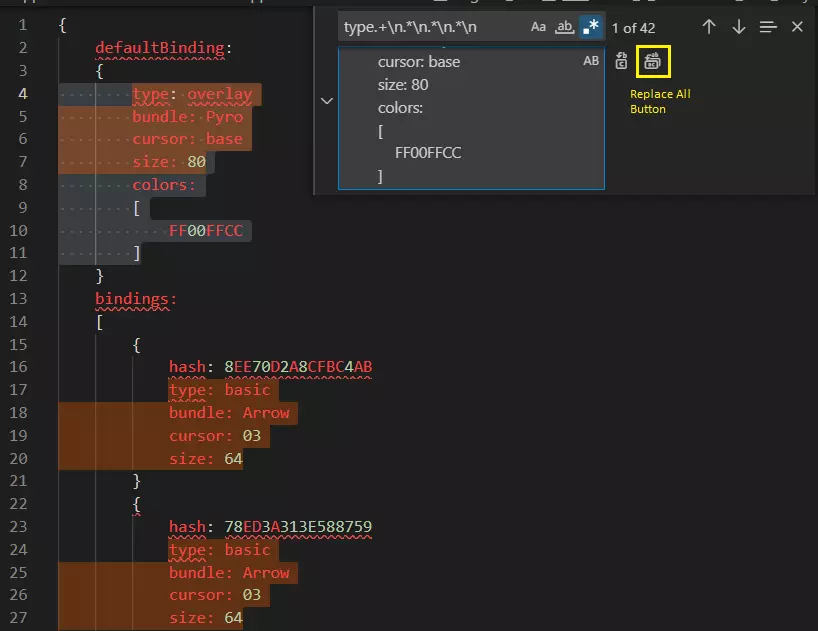
在“替换”部分复制粘贴默认绑定选项 点击“全部替换”或按下 Ctrl + Alt + Enter 重要提示!删除 defaultBinding JSON 部分。例如,删除整个如下部分: defaultBinding: { type: overlay bundle: Pyro cursor: base size: 80 colors: [ FF00FFCC ] } 重新启动 YoloMouse