换一换
换一换 


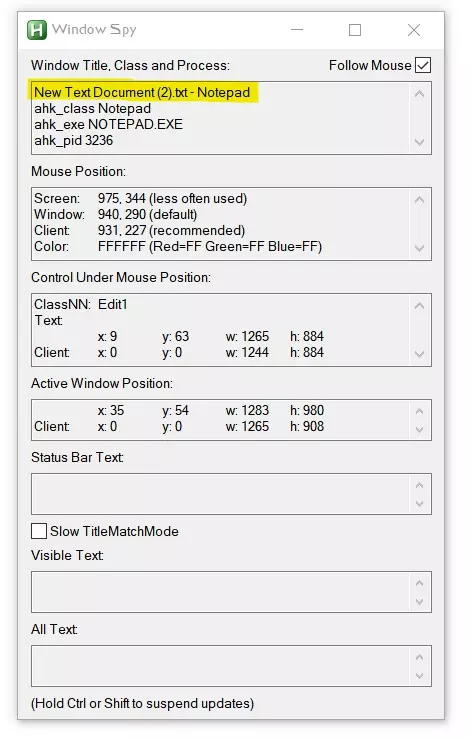
游戏的非战斗自动化工具,包括适用于服务器管理员的AutoHotkey(Windows)脚本和Autokey(Linux)短语,可用于生成尸体、私人筑巢、阻止玩家等操作! ⏹️ AutoHotkey(Windows) AutoHotkey是一款允许你在电脑上运行宏的程序!宏是通过触发器实现任务自动化的功能。 宏本身不违反任何政策,但我不鼓励将其用于战斗自动化,并且希望此类行为会导致账号封禁。 对于我们的脚本,我们使用具有更多自定义功能的旧版AutoHotkey。 下载AutoHotkey 1.1版本(已弃用)[autohotkey.右键点击桌面,依次选择“新建”→“AutoHotkey 脚本”。 右键点击桌面上的新脚本,选择“编辑”,粘贴以下脚本中的任意一个。 保存。 双击桌面上的脚本以运行(你可以在系统托盘右键点击它来强制停止,但我们的脚本有暂停键)。 不想使用功能键? ! 代表 Alt 键 + 代表 Shift 键 ^ 代表 Ctrl 键 ^+9 因此只会在按下 Ctrl + Shift + 9 时触发。 Autokey(Linux 系统) Autokey 是一款允许你在电脑上运行宏的程序!宏是通过触发器实现任务自动化的功能。 宏本身不违反任何规定,但我不鼓励将其用于战斗自动化,并且希望你会因此类行为被封禁。打开终端安装Autokey,输入“sudo apt update”,然后输入“sudo apt install autokey-gtk”(适用于Linux Mint和Linux Pop系统)。同时在终端输入“sudo apt install python3-pip”和“python3 -m pip install PyGObject”。 打开Autokey。你可以根据需要删除默认的“My Phrases”和“Sample Scripts”文件夹。 导航到目标文件夹,或点击“新建”创建一个新文件夹。 点击“新建”并选择“短语”以创建发送一次性文本消息的新宏,或选择“脚本”以创建更复杂的内容,如重复消息或操作。 使用Autokey设置触发器比AutoHotkey更简单,只需选择“热键:”右侧的“设置”即可。 仅允许脚本在BoB中运行。创建一个新文件夹,所有用于BoB的脚本和短语都应放在该文件夹下。点击文件夹,选择“窗口筛选器”旁边的“设置”,然后点击进入《百慕大野兽》。如果未将《百慕大野兽》设为筛选器,请手动输入“steam_app_719890.steam_app_719890”或“BeastsOfBermuda Development”。 ### 终止开关 要为Autokey设置终止开关,请创建以下脚本并设置热键。我个人使用“回车键”,并将其放在《百慕大野兽》文件夹下,这样当我按下回车键时,Autokey就会关闭。 import os import signal def close_autokey(): os.system("pkill -f autokey") close_autokey() ⏹️ 发送“加入最近游玩服务器”的自动热键 前往Program Files文件夹中的AutoHotkey,打开WindowSpy程序以显示屏幕坐标(该程序随AutoHotkey一同安装) 启动《百慕大野兽》并尝试连接已满的服务器,以便在主菜单中将鼠标悬停在“加入最近游玩服务器”时能弹出相关提示 启动计时器并点击“加入最近游玩服务器”,当因服务器已满而返回主菜单时停止计时,并记录下该时间(以秒为单位) 将秒数乘以1000转换为毫秒,例如10秒即转换为10000(无需添加逗号) 将以下代码粘贴到热键脚本中: F6:: Loop { MouseClick, Left, X1, Y1 Sleep, 毫秒数 MouseClick, Left, X2, Y2 Sleep, 2000 } F7::ExitApp 替换请计算返回主菜单所用的毫秒数(如果返回主菜单花费了30秒,则应得出30000),然后再加上几千毫秒(例如30000→35000)。在窗口侦探(Window Spy)中查看“鼠标位置”,特别是“窗口”坐标。
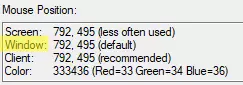
Click into Beasts of Bermuda, hover over your "Join Last Played Server" button, replace X1, Y1 with those coordinates (X1 is the first number, Y1 is the second number) Click "Join Last Played Server", wait, and replace X2, Y2 with the coordinates of the "OK" button Save! You can close WindowSpy F6 starts the auto rejoin process F7 stops the auto rejoin process and closes the hotkey Don't forget to press F7 when done, or you can randomly click (attack) in-game Script by Stoin ⏹️ Send Y toggle := false pausedByChat := false F7:: toggle := true loop { if !toggle break if !pausedByChat ControlSend,, y, BeastsOfBermuda Development Sleep, 5000 } return F8:: toggle := false pausedByChat := false return ~Enter:: if WinActive("BeastsOfBermuda Development") pausedByChat := !pausedByChat return ~Esc:: if WinActive("BeastsOfBermuda Development") pausedByChat := false return F6 starts sending Y F7 stops sending Y Pressing enter stops and starts the script, allowing you to type in chat Script by Who 🐧 Send Y Kill switch recommended. import time sending_y = False def toggle_send_y(): global sending_y sending_y = not sending_y if sending_y: while sending_y: keyboard.send_key("y") time.sleep(5) toggle_send_y() Set the hotkey to something of your choice, I went with Ctrl + Y. interval = 5 is how many seconds you want to wait in between sending each Y Script by Stoin ⏹️ Send /mate #NoEnv SendMode, Input SetKeyDelay, 50, 50 ; delay between key presses for realism ; ================================ ; BEASTS OF BERMUDA AUTO MATING ; ================================ ; Tutorial / Warning: ; - Do NOT use Alt+Tab while the script is running! This will stick the Alt key and force your game to change resolution! ; - If you need to switch windows, use the Windows key instead. ; - Press F6 to start the bot loop. ; - Press F7 to stop the script. ; Target game window target := "ahk_exe BeastsOfBermuda.exe" ; ================================ ; CONFIGURABLE PARAMETERS ; ================================ loopCount := 20 ; How many times to run the loop mateID := "606" ; Your mate's ID - make sure you keep the quotes around the ID number ; Fixed delays (in milliseconds) sleepOpenChat := 300 sleepTypeCommand := 250 sleepSpace := 250 sleepID := 250 longSleep := 52000 ; How long to wait before looping again (time before you can /mate again in milliseconds) ; ================================ ; ================================ ; MAIN LOOP ; ================================ F6:: Loop, %loopCount% { ; Open chat ControlSend,, {Enter}, %target% Sleep, %sleepOpenChat% ; Type /mate ControlSend,, /mate, %target% Sleep, %sleepTypeCommand% ; Space before ID ControlSend,, {Space}, %target% Sleep, %sleepSpace% ; Type mate ID ControlSend,, {Text}%mateID%, %target% Sleep, %sleepID% ; Send command ControlSend,, {Enter}, %target% ; Long sleep before next loop Sleep, %longSleep% } return ; Reload/Stop script F7::Reload F6 starts sending /mate requests F7 stops sending /mate requests Please see the configurable parameters section, which includes the mate's CID, the time to wait before sending another request, and how many times to run the script. By default the script loops 20 times. You still need the other user to accept requests! Script by Who ⏹️ Send /nest ittybaby := "9999" ; enter the CID of the player you are nesting numnests := 5 ; how many times you want to send the player /nest nesttimer := 600000 ; how long, in milliseconds, to wait in between sending /nest, with 1 minute = 60000 F6:: Loop, %numnests% { ControlSend,, {enter}/nest{space}, BeastsOfBermuda Development Sleep, 500 ControlSend,, {Text}%ittybaby%, BeastsOfBermuda Development Sleep, 250 ControlSend,, {enter}, BeastsOfBermuda Development Sleep, %nesttimer% } return F7::Reload F6 starts sending /nest requests F7 stops sending /nest requests Please see the top, which includes configuration for the CID of the player you are nesting, the number of times to send them a /nest with my default being 5, and how long to wait in between /nest with my default being 10 minutes. You still need the other user to accept requests! Script by Who and Stoin ⏹️ Male admin mating For male adminsMatePlayers is used as it will notify a player if you made a mistake and used MatePlayers on them, by taking their AP/Stam and making them Rest as if they just mated. It is recommended to use admin mating as a female admin for instant egg gestation. This hotkey will: Spam MatePlayers (Dirtying) using the CIDs from the Tab player list you input a configurable number of times, default is 8 which is 26 eggs on average with 3/3 male GP FillAllStats (Dirtying) Drop a nest maleID := "9999" ; enter the CID of the male femaleID := "9999" ; enter the CID of the female matings := 8 ; how many times to use MatePlayers F6:: Loop, %matings% { Send, {enter}//mateplayers{space} Sleep, 500 Send, {Text}%maleID% %femaleID% Sleep, 250 Send, {enter} Sleep, 250 } Send, {enter}//fillallstats{enter} Sleep, 250 Send, b return F7::ExitApp You must input CIDs before running the script. The CIDs are impossible if you forget to update them, so no one is Dirtied. F6 starts spamming MatePlayers F7 stops spamming MatePlayers and closes the hotkey Script by Stoin ⏹️ Female admin mating For female adminsMatePlayers is used as it will notify a player if you made a mistake and used MatePlayers on them, by taking their AP/Stam and making them Rest as if they just mated. This hotkey will: Spam MatePlayers (Dirtying) using the CIDs from the Tab player list you input a configurable number of times, default is 8 which is 26 eggs on average with 3/3 male GP Run SetGoodParent 999 after, which will instantly gestate the eggs without Dirtying them (the female however is wipe-Dirtied) maleID := "257" ; enter the CID of the male femaleID := "257" ; enter the CID of the female matings := 8 ; how many times to use MatePlayers F6:: Loop, %matings% { Send, {enter}//mateplayers{space} Sleep, 500 Send, {Text}%maleID% %femaleID% Sleep, 250 Send, {enter} Sleep, 250 } Send, {enter}//setgoodparent 999{enter} return F7::ExitApp You must input CIDs before running the script. The CIDs are impossible if you forget to update them, so no one is Dirtied. F6 starts spamming MatePlayers F7 stops spamming MatePlayers and closes the hotkey Script by Stoin ⏹️ Spawn food Look straight down before using #Persistent fatplant := "//spawnplant" redmeat := "//spawncarcass 2250 2250 1 0 0 0" fishmeat := "//spawncarcass 2250 2250 1 0 1 0" F3:: Clipboard := fatplant ClipWait, 1 Loop { Send, {Enter} Send, ^v Send, {Enter} Sleep, 100 Send, {w down} Sleep, 2000 ; 2 seconds, set me higher if you walk slower or lower if you walk faster Send, {w up} } return F5:: Clipboard := redmeat ClipWait, 1 Loop { Send, {Enter} Send, ^v Send, {Enter} Sleep, 100 Send, {w down} Sleep, 250 Send, {w up} } return F6:: Clipboard := fishmeat ClipWait, 1 Loop { Send, {Enter} Send, ^v Send, {Enter} Sleep, 100 Send, {w down} Sleep, 250 Send, {w up} } return F7:: { Send, {w down} ; stop stupid Windows sticky keys Sleep, 500 Send, {w up} ExitApp } F4 starts spamming Delicious "fat" Plants (do not press Alt at the same time) F5 starts spamming maximum-weight red meat carcasses F6 starts spamming maximum-weight fish meat carcasses F7 stops carcass spam and closes the hotkey This code will hold down W in short bursts, looking straight down is intended. Script by Stoin ⏹️ Permanent block list The blocking function still appears to be broken, and some users take things too far, be it just annoying you or stalking you server-to-server to harass you. You should be able to block who you please. This needs to be ran every time you load into a server, and you must be on a dinosaur. Depending on the length of your block list, you may want to consider hopping on a fresh spawn until done. wait := 1750 ; how long in milliseconds to wait in between blocking different IDs Loop, 1 InitOnlyOnce(A_Index) Return InitOnlyOnce(Index){ static init=0, text If !(init++){ Sleep, 5000 ; gives you 5 seconds to click back into the game Send, `` ; open console Sleep, 250 ; don't change Send, `` ; open console's expanded view Sleep, 250 ; don't change Send, BlockPlayer SteamID1{enter} ; copy me (line 1/2) Sleep, %wait% ; copy me too (line 2/2) Send, BlockPlayer SteamID2{enter} ; copy me (line 1/2) Sleep, %wait% ; copy me too (line 2/2) ; add more IDs here Sleep, 200 ; don't change Send, `` ; don't change, closes console } } The hotkey gives you 5 seconds to click into the game and then it starts sending the BlockPlayer non-admin command into console. Replace "SteamID1" and "SteamID2" with Steam 64 IDs to block. To block more IDs, copy the BlockPlayer and %wait% lines. Script by Stoin