


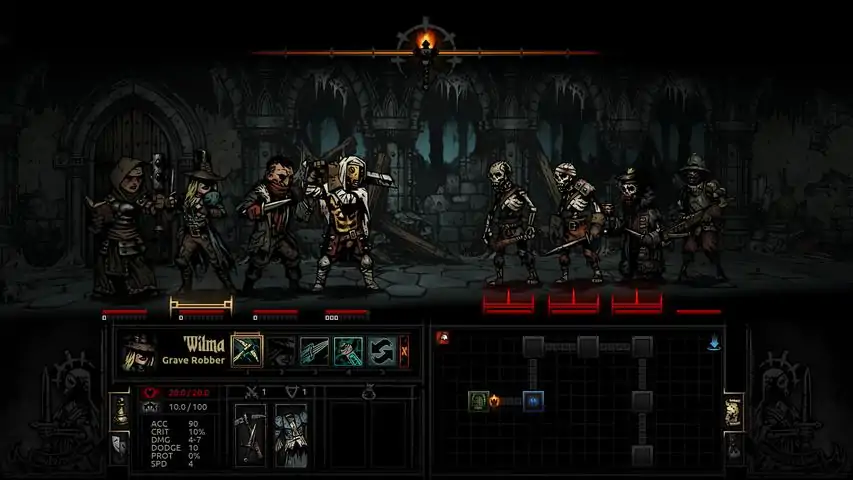

《暗黑地牢》官方模组制作指南
【开发中】Red Hook Studios 官方模组制作指南。学习《暗黑地牢》模组制作的基础知识!我们鼓励社区成员制作更详细、更具体的指南,但本指南旨在解答许多常见问题,并分享内部信息以帮助模组制作者。 简介 本指南旨在提供官方的基础信息,帮助你开始制作《暗黑地牢》的模组。由于任何大型模组项目都涉及大量潜在信息,我们仍然鼓励社区成员结合自己的技巧和经验编写详细的指南。 如果你想为本官方指南做出贡献,请联系当前的指南管理员!我们非常欢迎您的帮助,但请您理解,由于这是官方指南,我们需要保留编辑控制权。 祝您的项目一切顺利! ——RedHookTyler 游戏内启用模组 如何在游戏中开启/关闭模组:


Subscribe to any mods you wish. Launch the game Start a new campaign or select an existing save slot Click on the Mods icon to the right of the save slot This will bring up an interface allowing you to toggle which subscribed mods will be active. Drag and drop the mods to set their order of priority. Mods at the top of the list take priority. That is, the mods at the bottom will be applied first. This is important because if multiple mods affect the same file(s), the mods at the top of the list will be the changes that remain final. Getting More Help While this guide is extensive, we expect others to create more elaborate guides on specific aspects of the game and how to mod them. It can be difficult to understand mechanics or concepts the first time you're shown them, and we've set up a modding group specifically to bring modders and their ideas together in a centralized area. We welcome and encourage you to join the Darkest Dungeon - Workshop Group to discuss ideas, report issues, or seek help from people experienced in a certain subject! Recommended Software Most of Darkest Dungeon's files can be edited in any text editor, though below we'll highlight some of the recommended software that can be used. Please note that, of this list, only Spine2D is absolutely necessary for skeleton editing or creation. All other programs are recommended, but not necessary. Notepad++Your best bet with any non-image file (.darkest, .json, .xml, etc...) is to simply attempt to open it in a text editor. A fantastic editor is Notepad++ due to its versatility, functionality, and availability. You'll have access to many unique and helpful features, and all for free. Get Notepad++ here: https://notepad-plus-plus.org/ SpineDarkest Dungeon uses Spine to create skeletons and animations for characters. Without Spine you will be unable to make new animations for characters or enemies. Because Spine is a paid program it can be a difficult entry fee into the creation of unique animations, but it's a full-featured editor whose possibilities far exceed what is required for Darkest Dungeon. The 'Professional' version of Spine is required to attach meshes to bones Get Spine here: http://esotericsoftware.com/ In addition, it is ABSOLUTELY NECESSARY that you use version 2.1.27 for DD. “Make sure that you set Spine’s version to 2.1.27 before you export, otherwise our binary reader won’t read your .skel file correctly (that might be cause of the error). You can leave the Atlas export settings to default, except change the following: “Max width” and “Max height” should be set to 4096, and “Power of two” should be OFF.” PhotoshopPerhaps the most featureful and powerful photo editor is one of the best ways you can jump into editing or creating art assets for Darkest Dungeon. Though not free, Photoshop can be subscribed to on a month-to-month plan for cheaper than ever before. Get Photoshop here: http://www.adobe.com/products/photoshop.html GimpGimp is a free alternative to Photoshop and, while not as featureful, it is still incredibly powerful! You will be able to manipulate or create assets just as easily, and we recommend you use whichever photo editor suits your needs! Get Gimp here: https://www.gimp.org/ Important Information for ArtistsAssets in Darkest Dungeon need to be exported with transparency settings. 'Gimp' does this automatically, but for Photoshop we recommend the 'SuperPNG' plugin. Additionally, two programs can be used to trim the masks from PNG files and to remove the alpha colour layer. To use these two programs, drag and drop your PNG file onto each of the exe files. Though no dialogue will appear, they will have done their job. Check below for the links! Get SuperPNG here: http://www.fnordware.com/superpng/ Trim Mask Program: Download[www.dropbox.com] Alpha Layer Remover: Download[www.dropbox.com] Things that Can be Modded This is a list of general parts/mechanics that can be modded. More specific info on areas of the game can be found in their respective guide section. Heroes Heroes are very moddable currently. It is very possible to create completely new classes with their own artwork, animations, and skills.Buffs & Effects Most buffs and effects are available to tinker with. Only a small handful of effects are hardcoded and inaccessible by modders.Supplies & Provisions Many current supply effects are hardcoded, but new ones can be added with general ease. Limiting supply items to certain classes or scenarios is currently not possible.Monsters New and existing monsters can be added or modded.Locations New locations cannot be added in, but existing ones can be modified.AI All AI can be modded, but new AI mechanics cannot be added.Curios Curios can be modded or added, but are very limited in potential.Trinkets All trinkets are available to mod, and new ones can be added quite easily.Quirks All quirks are available to mod or add!Afflictions/Virtues New and existing afflictions/virtues can be modded.Loot Loot tables can be added and modified with ease.Quest & Dungeon Generation Dungeon generation is largely controlled by a few variables linked to hardcoded parameters, but quest generation is a tad more available to mod.Town Events New and existing town events are easily moddable, though you will have to work with existing mechanics, as new ones cannot be added.Audio Audio can be modded, but is quite time consuming and difficult for users looking to modify large amounts. The Basics of a DD Mod Making a mod for DD is actually pretty simple in concept. (It's the execution that always matters.) All of the moddable files in the game are contained in this location of Darkest Dungeon's installation: /SteamApps/common/Darkest Dungeon/ To create a mod, simply follow the relative file structure that you see in the above folder and edit whatever files you wish. For example, I could create a mod by creating a directory somewhere on my hard-drive called /tylersMod/ and then place any files in there that I wish to change relative to the main game. So if I wanted to edit the leper's stats, I would copy leper.info.darkest over to /tylersMod/heroes/leper/ When I upload the mod to Steam Workshop (see elsewhere in this guide), that relative file structure and organization will be retained. When a user subscribes to your mod and turns it on, the appropriate files will be overwritten at run-time when they load that campaign. To test your mods, of course, you'll need to keep the files in the actual /SteamApps/common/Darkest Dungeon/mods/ directory of the game while you run it. You can also make a copy of Darkest Dungeon and overwrite files for testing, allowing your Steam/GOG version to remain untarnished. When doing this, run the executable in the 'nosteam' folder. For more about the individual files and directories, see the relevant subsections of this guide. (e.g. If you like the idea of modifying a hero class, jump over to the HEROES section for full details.) Uploading to Steam Workshop Your mod is a collection of changed data files, in the same relative file hierarchy as the core game. Once your mod is ready to go, follow this procedure: UPLOADING TO STEAM WORKSHOP Locate the following file: /SteamApps/common/Darkest Dungeon/_windows/steam_workshop_upload.exeDouble-click the exe to see HELP/DOCS. Double-clicking also creates: "sample_project.xml" in the same folder Rename this file as desired and put it in the root folder of your mod. Open the xml and fill it out ENSURE THAT FILES WITHIN YOUR MOD FOLDER FOLLOW THE EXACT SAME HIERARCHY AS IN THE CORE GAME. For example, if you want to mod "skeleton_courtier", make sure the folder is /<yourmodfolder>/monsters/skeleton_courtier/When your mod is ready, drag the .xml file onto /SteamApps/common/Darkest Dungeon/_windows/steam_workshop_upload.exeThis will upload your mod to the Darkest Dungeon Steam Workshop. As part of this process, it will assign your mod a unique identifier number. This will be added directly to your .xml file. ***IMPORTANT: Continue to use the same .xml file with the same ID number for future updates of the same mod. Otherwise, uploading a new version of your mod will create a new Workshop item entirely. This would be bad, as you will lose previous subscribers.*** To edit your mod Icon, include a PNG image file with the name "preview_icon" in your mod's root directory. Your mod description can be edited via the Steam Workshop interface. Modding DLC Content Modding DLC content may at first seem confusing since all of the DLC content is kept in a seperate folder, but it actually requires you to do nothing differently. DLC content is applied much like a mod is. That is to say that it is applied over the base game files before mods. So to mod DLC content you simply need to keep the hierarchy the exact same as you've been doing to mod the base game! Core Rules and Progression The 'rules' file contains a bunch of variables and values that were hardcoded previous to official mod support. Things like light level buffs, affliction chances, etc... can all be found within. You can find thie file at '/shared/rules.json'. Below is a table listing some notable sections and variables! Variable Description combat_retreat_chance This is the chance that your party will successfully retreat when you attempt to do so during battle. affliction_base_onset_chance This is the base % chance (as a float value) that an affliction will happen. By default it is set to 75%, with a 25% chance to obtain a virtue. quirks_fated_miss2hitconvertchance This is the chance for the quirk 'Fated' to convert a miss into a hit. corridor_return_content This larger table lists the chances for backtracking events to occur, such as battles, traps, and hunger tiles. darkness This larger table determines the buffs the player/enemy team gets during different light levels. provision_hp_heal This is the amount of HP healed when a hero consumes food. meals_table This table determines the camping costs and rewards when choosing how much food to eat. scouting_chance_base This is the base scouting chance for the entire team; individual heroes do not control scouting chance whatsoever. max_provisions_before_full This is the amount of food a hero can eat before he/she comes full and will not eat any more until camping. ambush_camping_base_chance This is the chance for an ambush to occur after camping. consecutive_miss_reduction_acc_buff This is the amount of accuracy to buff a hero with secretly if he/she has consecutively missed. new_game_plus_week_limit This is the week limit set for Stygian/Bloodmoon before the game will automatically fail the player. new_game_plus_hero_death_limit This is the death limit set for Stygian/Bloodmoon before the game will automatically fail the player. Strings and Localization Steam WorkshopCopy any or all XML files from the game's localization folder to your mod's /localization folder Make changes you need to the XML files in your mod's /localization folder Run the steam_workshop_upload.exe with your project's uploader XML. The steam_workshop_upload should run the localization if necessary. Third Party Mod UploadsCopy any or all XML files from the game's localization folder to your mod's /localization folder Make changes you need to the XML files in your mod's /localization folder Copy your localization and, if you've modified it, colours folder to the game's directory In the game's localization folder you should see a localization batch file. Run it to generate the .loc file containing all of the game's strings. Copy that .loc file to your mod's localization folderAll users that download your mod will now have all new or modified strings. Third Party Mod Uploads (Alternative)Copy any or all XML files from the game's localization folder to your mod's /localization folder Make changes you need to the XML files in your mod's /localization folder Set the upload mode to 'dont_submit' in your project's uploader XML Run the steam_workshop_upload.exe with your project's uploader XMLThe localization for your mod will have been compiled and will now be included in your mod's localization directory. Effects - Format & Layout This section covers the formatting of the effects and different ways to control the effects to perform the desired actions. We recommend perusing the effects file and getting familiar with how effects are set up. There are many different effects, and explaining them individually would take far too long. It's best to have a desired effect or set of effects in mind, and knowing what hero, enemy, or curio has such an effect. That way you can determine how your effect should work! Let's say, for instance, you want to mimic the Jester's stress healing effects of Inspiring Tune. You may either scroll down to where the Jester's skill effects are listed, or you may do a search for "Jester" and you'll find his section in the file. Take note of how the effect is laid out. There's a name that can be easily identified at first glance, the targeting information determining who the effect is applied to, the chance for the effect to apply, and whether or not it applies on a hit and/or a miss among other rules. Let's dissect the first rank of that particular effect, "InspiringTune 1", below. Example Effect DissectionFor the sake of visibility, the effect has been split up into two images.


Example Effect Format Part Description effect: This is required for all effects to be parsed by the engine. .name This specifies the name of the effect so that when a hero, enemy, or curio calls it the engine knows which line of data it needs to read. .target This specifies the targeting parameters of the effect. For this example effect, the Jester's 'Inspiring Tune' targets any hero. This effect then is applied to that target. .curio_result_type Should an effect be used by a curio, this line followed by either "positive" or "negative" will determine which visual effect the player will see. .chance This is the chance for the effect to be applied. .healstress This, followed by a number, tells the effect to heal stress by a specific number. The number, ten in this example, is before any buff or debuff is taken into account. .on_hit & .on_miss These are boolean (true or false) values that determine whether the effect will apply if a skill hits or misses the intended target(s). .queue This optional parameter, also a boolean, can tell the effect to count after the others in the skill, if there's more than one of them. Effect Targeting Format Target Description performer This effect will target the hero/enemy it is assigned to. target This effect will target the hero/enemy in line with the skill's targeting parameters. performer_group This effect will target the entire hero/enemy party it is assigned to. target_group This effect will target the entire hero/enemy party in line with the skill's targeting parameters. performer_group_other This effect will target the entire hero/enemy party it is assigned to apart from the performer. target_group_other This effect will target the entire hero/enemy party in line with the skill's targeting parameters apart from the target. global This is reserved for light modifier effects. Important NotesIf no duration is assigned to an effect containing buffs, duration will default to 3 rounds If buffs are called from the buff library, but no duration is outlined in the effect, duration will first look for one in the buff library before defaulting to 3 rounds Take note of what the effect is trying to accomplish compared to the effect percentage. The chance percentage on a disease effect is NOT the chance for it to apply. The chance for a disease to apply is always 100%. The chance of the effect is the chance for there to be a disease check on the target. Buffs - Stat Types and Subtypes This section will go over all current buff/debuff types that can be applied to quirks, afflictions/virtues, skills, trinkets, supply effects, curio effects, etc... Buff Types and Subtypes Buff Stat Type Buff Stat Subtype Buff Description combat_stat_add crit_chance This adjusts the critical chance (CRIT) of the target. combat_stat_add defense_rating This adjusts the dodge (DODGE) of the target. combat_stat_add protection_rating This adjusts the protection (PROT) of the target. combat_stat_add speed_rating This adjusts the speed (SPD) of the target. combat_stat_multiply max_hp This adjusts the maximum health points (HP) of the target. combat_stat_multiply damage_low This adjusts the minimum damage (DMG) of the target. combat_stat_multiply damage_high This adjusts the maximum damage (DMG) of the target. hp_heal_amount This additively adjusts the minimum and maximum healing power of the target. A 1-1 heal with a "4.0" hp_heal_amount buff will become a 5-5 heal. hp_heal_percent This multiplicatively adjusts the minimum and maximum healing power of the target. A 4-8 heal with a "0.5" hp_heal_percent buff will become a 6-12 heal. hp_heal_received_percent This adjusts the healing received power of the target. stress_dmg_percent This adjusts the stress damage done by the target. stress_heal_percent This adjusts the stress healing done by the target. stress_dmg_received_percent This adjusts the stress damage received by the target. stress_heal_received_percent This adjusts the stress healing received by the target. resistance stun This adjusts the stun resistance of the target. resistance move This adjusts the move resistance of the target. resistance poison This adjusts the blight resistance of the target. resistance bleed This adjusts the bleed resistance of the target. resistance disease This adjusts the disease resistance of the target. resistance debuff This adjusts the debuff resistance of the target. resistance death_blow This adjusts the deathblow resistance of the target. resistance trap This adjusts the trap disarm chance of the target. poison_chance This adjusts the blight skill chance of the target. bleed_chance This adjusts the bleed skill chance of the target. stun_chance This adjusts the stun skill chance of the target. debuff_chance This adjusts the debuff skill chance of the target. move_chance This adjusts the move skill chance of the target. resolve_check_percent This adjusts the virtue chance of the target. A positive amount will increase the chance for a virtue, and a negative chance will increase the chance for an affliction. scouting_chance This adjusts the scouting chance of the party. remove_negative_quirk_chance This adjusts the chance for a negative quirk to be removed from a target. Currently all chances are guaranteed (Sanitarium and curios), so this buff remains unused. food_consumption_percent This adjusts the amount of food consumed by a party member. starving_damage_percent This adjusts the amount of damage done to a party member when starving. resolve_xp_bonus_percent This adjusts the amount of resolve experience the target gains at the end of a quest. upgrade_discount_weapon This adjusts the price of weapon upgrades for the target. upgrade_discount_armour This adjusts the price of armour upgrades for the target. party_surprise_chance This adjusts the chance for the hero party to be surprised. monsters_surprise_chance This adjusts the chance for the enemy party to be surprised. damage_received_percent This adjusts how much damage the target receives. This buff also applies to DoT damage. Buffs - Rule Types This section will cover "rule types", commonly known as buff conditions. Many rules will require specific float (number) values or a string value. Whichever is needed by a certain rule will be denoted by an 'X' in that column. Explanations will be provided in the rule description to help. In addition, many of these rules can be tagged as a 'false' rule, meaning the effect will be active when the conditions aren't being met. Rule Types and Float/String Requirements Rule Type Rule Float? Rule String? Rule Description always This is the default rule that states a buff is always active. monsterSize X The buff will be active when engaged with an enemy of a specific size. lightbelow X The buff will be active when the torchlight is below a certain number between 0 and 100. lightabove X The buff will be active when the torchlight is above a certain number between 0 and 100. hpbelow X The buff will be active when the target's HP is below a certain percentage. hpabove X The buff will be active when the target's HP is above a certain percentage. stress_below X The buff will be active when the target's stress is below a certain number between 0 and 100. stress_above X The buff will be active when the target's stress is above a certain number between 0 and 100. afflicted The buff will be active when the target is afflicted. virtued The buff will be active when the target is virtued. meleeonly The buff will be active when the target is engaging or engaged in a melee attack. rangedonly The buff will be active when the target is engaging or engaged in a ranged attack. firstroundonly The buff will be active during the first round only. actorStatus X The buff will be active when the target is engaging or engaged with an enemy under the effects of a certain status. (poisoned, bleeding, tagged, stunned) monsterType X The buff will be active when the target is engaging or engaged with an enemy of a specific tag (UNHOLY, BEAST, HUMAN, etc...). The strings should be written in lowercase letters, even though they appear in-game as all capitals. at_deaths_door The buff will be active when the target is on death's door. in_rank X The buff will be active when the target is in a specific rank. The acceptable rank values are 0, 1, 2, and 3. The front rank is 0, and the back rank is 3. in_camp The buff will be active when a camp is active. in_dungeon X The buff will be active when in a specific dungeon. Current dungeon strings are: cove, crypts, darkestdungeon, town, warrens, weald. Do note that there are no capital letters and no spaces in the strings. in_room The buff will be active when in a room tile. in_corridor The buff will be active when in a corridor tile. walking_backwards The buff will be active when walking backwards. in_activity X The buff will be active when the target is in a specific town activity. Current town activities include, but are not limited to: meditation, bar, or disease_treatment. riposte The buff will be active when the target has a riposte active. skill X The buff will be active when the target is engaging with a specific skill, or engaged with an enemy using a specific skill. String should match the respective skill id. in_mode X The buff will be active when the target is in a specific mode. Currently this only applies to the Abomination who has two modes, 'beast' and 'human' Heroes Hero info files can be split up into 3 main parts: the general hero stats, abilities, and finally the generation data. Navigate to ' heroes crusader' for this example, and open up the 'crusader.info.darkest' file. NOTE on .id_index "id_index:" is a parameter found towards the bottom of the hero file. It's very important that every hero class in the game have a unique id_index. It's a bit clumsy, but we recommend giving an arbitrary high number so your class doesn't conflict with one of the core game classes, which start at 1 and count up as integers. General Hero StatsLook along the leftmost margin at the beginning of each line. Right at the start of the file you'll see "resistances", "weapon", and "armour". These three areas make up the general hero stats and are extremely easy to edit. AbilitiesImmediately following the general stats you should see many lines starting with 'combat_skill' and a single 'move_skill'. These are the abilities. Let's take a look at Smite more closely. Note that while the Crusader contains most ability mechanics, you may need to look at other heroes for additional information and examples. For visual clarity the ability has been split up into two images.


示例参数 .id:用于字符串、图像和音效引用的技能ID。 .level:该文本所描述的技能等级。0级为基础等级,对应游戏内的“1级”;4级为最高等级,对应游戏内的“5级”。 .type:特定增益参数所影响的技能类型。 .atk:技能的命中率。 .dmg:技能伤害与英雄基础伤害的比例。若设置为“-50%”,基础武器伤害为6-12的十字军的“重击”技能将造成3-6点伤害;若设置为“50%”,则造成9-18点伤害。 .crit:附加到武器暴击率上的技能暴击率。.launch 可使用该技能的阶级。 .target 技能所针对的阶级。若数字前有@符号,表示针对友方阶级;若有~符号,表示针对所有指定阶级;若有?符号,表示随机针对指定阶级中的一个。 .is_crit_valid 表示技能是否可暴击的布尔值。 .effect 与技能相关的效果列表。目前单个技能等级最多可绑定4个效果。世代保底:当英雄在驿站生成时,若此参数的布尔值设为“true”,则能确保该英雄生成时拥有指定技能。注意,每个英雄只能保底一个技能。 其他重要参数: - 参数:.heal 描述:此参数接受两个数值,第一个为最小治疗量,第二个为最大治疗量。可参考修女的治疗技能,其中有两个很好的示例。 - 参数:.move 描述:此参数需要两个数字。第一个数字表示向后移动的距离,第二个表示向前移动的距离。通用移动技能中能看到该参数最简洁的示例。self_target_valid:此参数后接布尔值,表示技能是否可以以施法英雄自身为目标。 .per_battle_limit:单个战斗中技能可使用的次数限制。 生成数据 最后一组行控制英雄的各种方面,例如生成方式、恢复增益、宗教标签等。所有这些参数都相当易于理解,建议查看其他英雄以了解细微差异。 怪物 - 数据 怪物通常可分为两部分来解释——数据和美术。数据包括属性、技能以及其他与怪物外观无主要关联的信息。在本示例中,我们将以“学徒强盗杀手”为例,其文件夹路径为“monsters brigand_cutthroat brigand_cutthroat_A”。使用记事本++等文本编辑器打开“brigand_cutthroat_A.info.darkest”文件。你可以将“语言”设置为Javascript以获得视觉辅助。此时你应该会看到以下内容: 若图片太小无法看清,请点击图片。

每行开头你会看到一个单词后跟冒号(:)。这些通常用于指定该行包含的数据类型,下面是一个表格,列出了每行的基本说明。与这里的大多数其他部分一样,建议你查看其他示例,因为某些独特的情况和机制仅存在于单个敌人文件中。 行 描述 display: 此行仅包含一个变量,即怪物所占据的空间数量。 enemy_type: 此行可以重复多次,用于确定敌人所属的类别。这些类别用于效果和增益中,这些效果和增益在其描述中需要特定的敌人类别。stats: 此行包含敌人的生命值、防御力、闪避率、速度以及各种抗性。 skill: 表示后续变量与敌人技能相关。大多数技能通常会有一组非常相似的信息,这些信息都应易于理解。 personality: 一个过时且多余的变量。保持为“-1”以避免问题。 loot: 此行可重复多次,用于确定敌人死亡时会调用哪些战利品表以及调用该表的次数。 initiative: 此行包含决定敌人每回合可行动次数的变量。monster_brain:这是敌人使用的AI逻辑ID。 death_class:此行决定敌人死亡后会变成什么怪物类型。如你所见,刺客会变成一具尸体。 battle_modifier:此行主要包含布尔值(本示例中均为布尔值,但其他敌人有其他修饰符)。刺客示例中的布尔值决定了诸如拖延惩罚和突袭机制等内容。 怪物 - 美术 我们将继续以“学徒级土匪刺客”为例,但这次我们将重点关注敌人的美术资源。在父文件夹“brigand_cutthroat”中,你应该会看到另外两个名为“anim”(动画)和“fx”(特效)的文件夹。
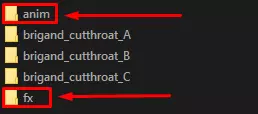
“anim”文件夹包含怪物的战斗动画以及其攻击的静态精灵图。“fx”文件夹包含所有技能特效,这些特效会在使用技能时出现在敌人、武器或目标身上。 动画和技能特效均使用“Spine2D”应用制作,但可以对实际的PNG图片进行简单编辑。请注意,若不使用Spine2D,则无法修改骨骼的整体运动和边界。 在各个敌人子层级文件夹(本示例中为“brigand_cutthroat_A”)中,你会找到“brigand_cutthroat_A.art.darkest”文件。此文件可在任何文本编辑器(如Notepad++)中打开,其中包含将精灵动画和视觉特效与特定技能绑定所需的信息。怪物遭遇群(“Mashes”) 定义等级 Mashes(更常被称为遭遇战)相当容易理解。首先,让我们在“理论上”和游戏内定义敌人等级!
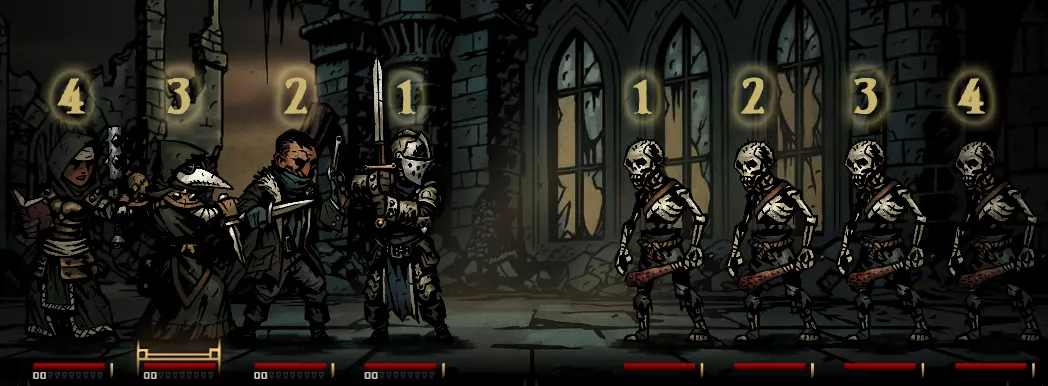
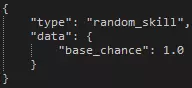
如你所见,敌人的排列顺序是从左到右,而英雄的排列顺序是从右到左。对于组合配置,我们只需关注敌人的排列顺序。在组合配置文件中,4个普通骷髅兵的组合如下: room: .chance 1 .types skeleton_common_A skeleton_common_A skeleton_common_A skeleton_common_A 记住:从左到右读取敌人的排列顺序;将最后一个骷髅兵改为“skeleton_arbalist_A”,就会把第4位的骷髅兵变成一名学徒弩手。 制作与编辑组合配置 首先,你需要指定组合配置的出现场景,通常使用“hall:”或“room:”。其他场景还包括“stall”(只能作为增援出现的遭遇战)、“boss”(仅用于 boss 任务)以及“named”(用于奇物召唤或自定义地图)。接下来,你需要为该遭遇设置生成概率。游戏内的概率计算方式为(特定概率/所有概率之和),因此任何过高的数值都会大幅提高遭遇该特定事件的可能性。 最后,你必须定义想要出现的怪物ID。你还可以选择在遭遇定义的末尾添加布尔值“.can_be_ambush false”,以指定该遭遇在营地伏击期间不可发生。 怪物AI AI参考 - 技能选择倾向 本节涵盖了敌人AI的基本技能选择倾向。实际存在的倾向不止以下列出的这些,但这应能为你提供一个良好的起点。如果你希望模仿特定效果,不妨查看某个特定敌人的AI设置。以下是示例和说明! 类型 描述 示例 random_skill 怪物会随机选择一个技能使用。
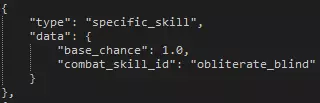
特定技能 怪物将使用特定技能。
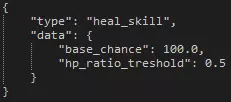
治愈技能:当有效目标的生命值低于指定阈值时,怪物会使用任何附带治愈效果的技能。
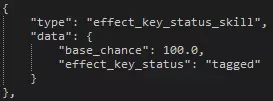
effect_key_status_skill:若攻击具有针对特定状态(眩晕、中毒、流血等)的效果,此功能将指示怪物根据英雄是否受到已定义状态的影响来选择技能。
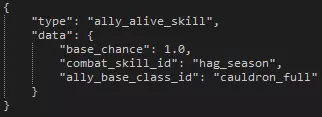
ally_alive_skill 当指定基础类型的另一只怪物仍然存活时,该怪物将使用技能。
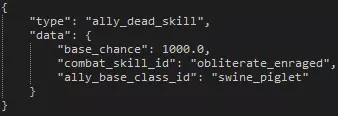
ally_dead_skill 若当前战斗中指定怪物未存活,该怪物将使用技能。
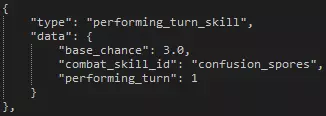
执行回合技能 此技能的基础概率会在怪物的执行 initiative(行动顺序)时加入混合计算。需要说明的是,这并非指特定的回合,而是怪物的执行回合。例如,若示例中的巨人在第一回合行动前被眩晕,它仍会在第二回合产生此技能的选择倾向。
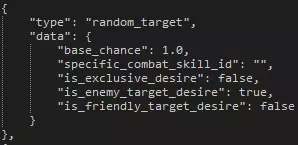
AI参考 - 目标选择倾向 本节涵盖了敌方AI的基本目标选择倾向。与上述技能选择倾向一样,这里仅介绍最基础的内容,建议你自行查阅文件以了解不同情况下的机制。 类型 描述 示例 random_target 怪物会随机选择目标。
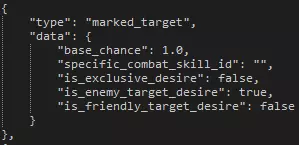
标记目标:怪物会选择一名被标记的英雄。
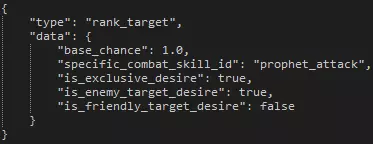
rank_target 怪物会选择一个标记的等级。目前仅被先知和沃尔夫使用。
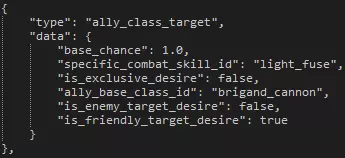
ally_class_target 怪物将选择一名同伴作为指定技能的目标。
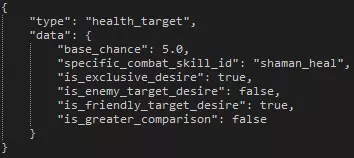
health_target 怪物将根据数据选择生命值最低或最高的同伴。
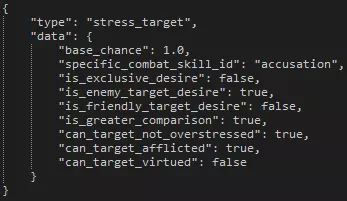
压力目标:怪物会根据数据选择压力值最高或最低的英雄。
resistance_target 怪物将根据数据选择对指定效果抗性最高或最低的英雄。
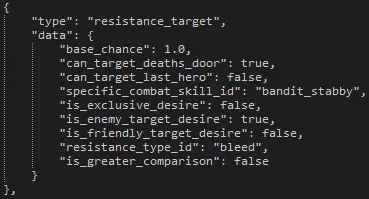
重要提示 留意不同敌人AI的特定标记和倾向,以了解如何最好地达成你的目标。 注意你的逗号;即使遗漏一个也会导致整个文件无法读取。 特性 除游戏内字符串外,特性主要在两个文件中进行处理。你需要设置特性的具体参数,然后设置增益效果(如果该特性有增益的话)。下面我们将以两个特性为例进行说明!
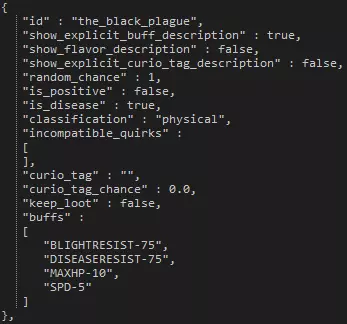
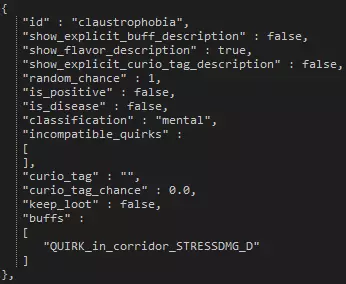
左侧你可以看到“黑死病”这一疾病,右侧则是“幽闭恐惧症”怪癖。 变量 描述 id 此ID将用于识别怪癖的字符串以及与其他怪癖之间的不兼容性。 show_explicit_buff_description 若此变量设为false,则不会显示怪癖所分配的增益效果。 show_flavor_description 若此变量设为true,则会显示自定义字符串描述,而非所分配的实际增益效果。 show_explicit_curio_tag_description 若此变量设为true,则会显示怪癖与奇物的互动几率。random_chance:此变量表示该特质相对于其他特质出现概率的大小。 is_positive:此布尔值用于判断该特质是正面还是负面。 is_disease:另一个布尔值,用于判断该特质是否为疾病。 classification:可以是“physical”(身体)或“mental”(精神)。身体特质更可能在任务结束时赋予那些以较低生命值离开的英雄。精神特质则更可能赋予那些 incompatible_quirks:在此处可以列出若英雄拥有当前指定的特质,则不会被赋予的其他特质。curio_tag:此处可指定怪癖将强制英雄互动的奇物标签。这要求下一个数值大于0。 curio_tag_chance:英雄与上述指定标签的奇物进行互动的概率。 keep_loot:若设为“true”,当英雄强制与奇物互动且结果为战利品时,将窃取该战利品。 buffs:与怪癖相关的增益效果列表。 特性 - 负面状态与美德 负面状态和美德(统称为特性)可轻松修改,且添加新特性也无需过多工作。在本节中,我们将简单介绍特性的不同组成部分,以便你能轻松修改或添加自己的特性!ID、遗物与增益效果
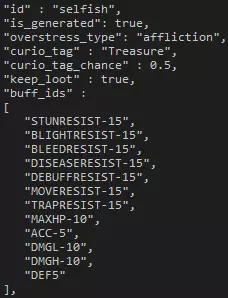
如上图所示,我们将以“自私”这一负面状态为例进行说明。“is_generated”属性自然是告知引擎该特性是否应在游戏中出现。若你将“overstress_type”修改为“virtue”,该特性就会被注册为正面特质。 “curio_tag”和“curio_tag_chance”属性使该特性能够与奇物产生互动,而如果像“自私”状态那样将“keep_loot”设为true,角色就会窃取战利品。 “buff_ids”是应用于处于负面状态或正面特质下英雄的一系列增益效果。只要特定的正面特质或负面状态处于激活状态,这些增益就会一直存在。 回合开始时的表现 在回合开始时,拥有该特性的英雄将有几率做出诸如大喊并造成压力、跳过回合等行为。你可以通过将概率设为0来消除这些情况的可能性,也可以通过增加数值来提高可能性。根据“自私”的数值,英雄在每回合开始时有33%的概率执行一次行为。你可以将该部分的所有概率相加,然后用特定行为的概率除以总和来得到这个数值。 反应行为 这些行为通常被称为“喊话”,是对某些事情的反应。这些喊话会伴随角色的台词,随后根据特质造成压力伤害或治疗。 这里的概率与回合开始时行为的概率不同,是转换为小数的百分比。例如,0.2的值在这里等于20%的概率。请注意,对于大多数动作场景,你需要为英雄编写对话字符串,以避免出现“空字符串”。 饰品 编辑或创建饰品非常简单,下面我们将以先祖的瓶子和自私吊坠为例,介绍饰品的大部分可能设置。
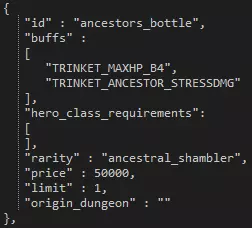
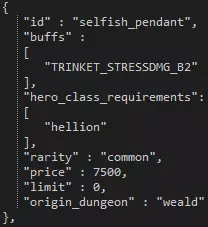
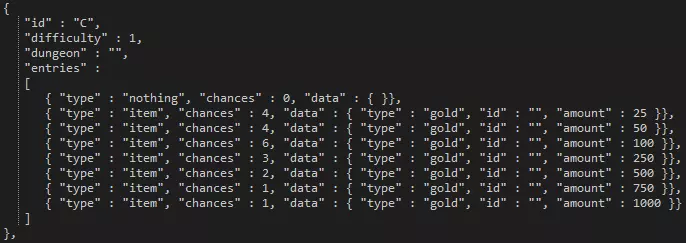
变量 描述 id 此ID将用于识别饰品的字符串。 buffs 与饰品相关的增益效果列表。 hero_class_requirements 此处可列出饰品限定的英雄职业。 rarity 此处列出饰品的稀有度。 price 决定饰品在游牧马车的购买成本以及出售时获得的金币。饰品以该值的37.5%出售,以100%的价格购买。 limit 此限制决定玩家可拥有的特定饰品数量。当达到此上限时,玩家将无法再获得特定的饰品。若设置为0,玩家可持有无限数量的该饰品。 origin_dungeon:此选项可设置饰品仅能在特定地牢中获取。 新稀有度需在colours.darkest文件中定义RGB或十六进制颜色。 饰品图片应放置在/panels/icons_equip/trinket路径下。 战利品 战利品表被限制在单个文件中,扫描该文件可为你提供足够示例,助你完成任何尝试。我们将在下方提供一些示例,并说明如何操作和理解特定变量。 金币示例:
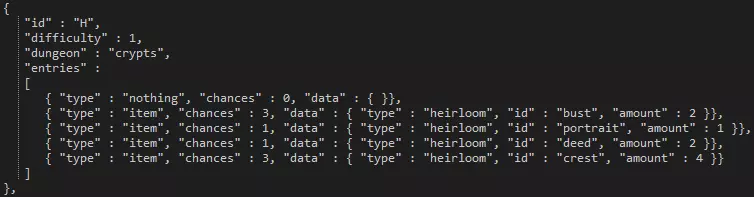
传家宝示例:
饰品示例
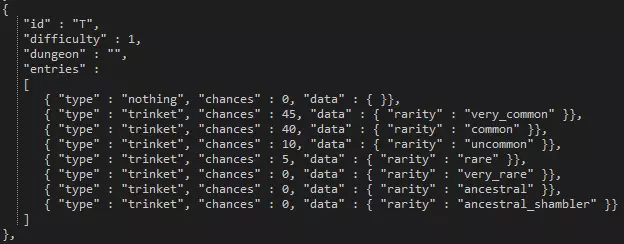
变量 描述 id 附加到战利品表的ID。 difficulty 该表适用的难度。若设为“0”,则该表可被所有难度调用。 dungeon 该表适用的地牢。若留空,则该表为通用表。 entries 与该表关联的条目列表。 可引用的物品列表: 补给品 金币 传家宝 宝石 物资 日记页 范围和特定页 饰品 其他战利品表 库存 购买/出售成本及堆叠上限 在“inventory”文件夹中,你会找到决定堆叠上限以及任务结束时购买物品和出售物品成本的文件。

这是一段为节省空间而略微精简的小片段。在这里你可以看到补给品(食物)、金币和祖传肖像的库存信息。 这段代码以及其他文件内容都相对容易理解。 初始物品 在位于“provision provision.json”的provision.json文件中,你首先会找到决定玩家在特定长度任务开始时库存中拥有哪些物品的部分。 任务长度由方括号“[ ]”表示。请注意,第一组保留给长度“0”,但不存在该长度的任务。接下来的难度等级为1、2、3和4。 英雄初始物品 同一文件provisions.json中的下一部分涉及特定英雄的初始物品。此处的物品列表应易于理解。 商店物品 provisions.json的最后一部分涵盖了商店中的可用物品。请注意,这些部分由地牢长度控制,而非难度。 任务 - 目标、类型与进度 任务设置在位于“campaign quest”的各个文件中。下面我们将描述其中一些部分及其在任务生成和描述方面的含义。这些文件内容庞大且复杂,因此除了此处的解释外,请自行浏览文件以了解其工作原理。 【部分】【描述】【示例】 fail_penalty - quest.fail_penalty。json 此数值决定队伍因任何原因任务失败时所受到的压力伤害量。
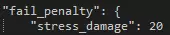
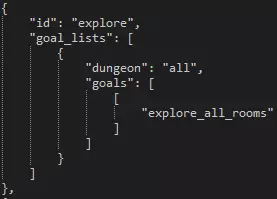
目标 - quest.types.json:这些是分配给任务的任务目标,用于确定团队在任务被视为完成前必须达成的事项。
town_progression_goal_ids - quest.types.json 位于本节正上方的这四个变量决定了在村落中推进一周所需发生的事件。
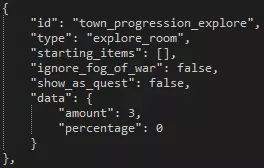
types - quest.types.json 这是用于设置具有已定义目标的类型的文件,以便之后在文件中可以调用这些类型来为特定周生成内容。
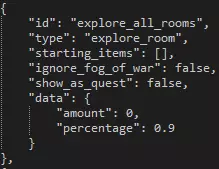
任务 - 剧情任务 剧情任务是除了VVulf(沃尔夫)之外,会一直存在直到完成的任务。这些任务通常是首领任务或发生在极暗地牢中的任务,但教程中的 crypts( crypts )任务也被视为剧情任务。 基础部分 下面我们将介绍其中一个条目,即学徒死灵法师首领任务。
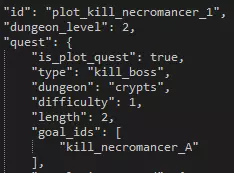
变量 描述 id 用于参考的任务ID dungeon_level 任务出现前所需的地下城等级。注意,这并非地下城的难度或长度,而是骷髅头上显示的等级 is_plot_quest 此布尔值标记该任务为推动剧情发展并生成后续任务所需的任务 type 任务类型,由上述部分列出的类型确定 dungeon 任务发生的区域难度:任务的难度(通常为1、3、5或6) 长度:任务的长度(通常为1、2或3) 目标ID:剧情任务的目标。 奖励 下一小节将介绍该任务的奖励。以下是这一小节的图片,均属于同一个【新手死灵法师】任务。
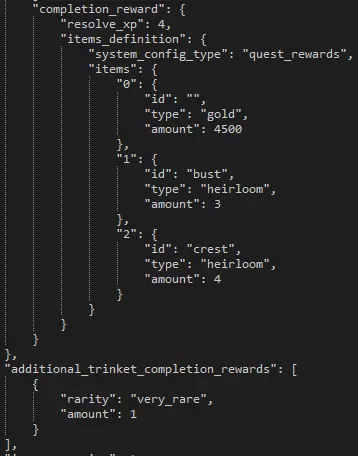
在该区域,你可以定义玩家成功完成指定任务后获得的奖励。按照此表单调整这些剧情任务的 resolve( resolve)、金币、传承物和饰品奖励。 额外变量 剧情任务的这最后一部分包含一些重要变量,有关每个变量的说明,请参见图片后的表格。
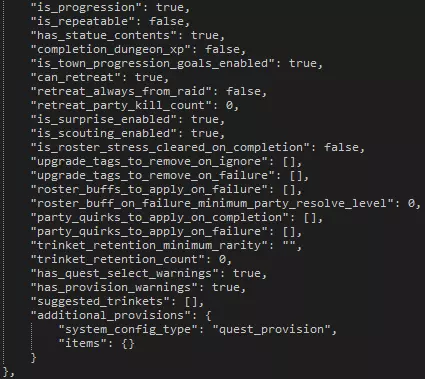
Variable Description is_progression This boolean determines whether or not the quest is needed to progress to the next plot quest in that area. is_repeatable This boolean determines whether or not you can repeat the quest after initially completing it. has_statue_contents This boolean determines whether or not there's a statue checkbox for completing the quest. completion_dungeon_xp This boolean determines whether or not additional XP is given to heroes based on a later table. You'll probably want to keep this set to false so you can manually tweak a single XP value for the quest yourself. is_town_progression_goals_enabled This boolean determines whether or not the requirements to progress a week are enabled. can_retreat This boolean determines whether or not the player is allowed to retreat from the quest. retreat_always_from_raid This boolean determines whether or not you can fail attempts to retreat from battle. If set to 'false', you can fail. retreat_party_kill_count This value determines how many party members are automatically killed if you retreat from the quest. is_surprise_enabled This boolean determines whether or not surprises are enabled during the quest. is_scouting_enabled This boolean determines whether or not scouting is enabled during the quest. is_roster_stress_cleared_on_completion This boolean determines whether or not all stress is removed from all heroes in the hamlet upon successful completion of the quest. upgrade_tags_to_remove_on_ignore If the quest is ignored, as it is with VVulf, this section can be expanded to describe what hamlet upgrades should be removed, if any. upgrade_tags_to_remove_on_failure If the quest is failed this section can be expanded to describe what hamlet upgrades should be removed, if any. roster_buffs_to_apply_on_failure If the quest is failed this section can be expanded to describe what buffs to apply to the entire hamlet roster, if any. roster_buff_on_failure_minimum_party_resolve_level If the above section is filled out with buffs, this value represents the minimum hero level that the buff should apply to. party_quirks_to_apply_on_completion Quirks to apply to the party upon successful completion of the quest. party_quirks_to_apply_on_failure Quirks to apply to the party upon failure of the quest. trinket_retention_minimum_rarity The minimum rarity for the quest to take from your trinket inventory. trinket_retention_count The number of trinkets the quest will take from your inventory. has_quest_select_warnings Whether or not the quest will warn you about not having trinkets equipped. has_provision_warnings Whether or not the quest will warn you about the amount of provisions you should be taking. suggested_trinkets This section can be filled in with suggested trinkets so that a prompt is given to the player before embarking. This is seen on the second Darkest Dungeon quest, more commonly referred to as DDQ2. additional_provisions This section can be filled out to determine what starting provisions or supplies the embarking team will be given. Quests - Generation & Restriction In the 'quest.generation.json' file is a larger section containing the week-to-week generation data. In order to effectively communicate such an expansive amount of data, the table below will describe the general nature and purpose of the data sets. Section Description number_of_quests_per_town_visit_table Each line of this section is a specific week, with more quests being generated as the in-game weeks pass. generated_dungeons For each of the area where quests can naturally generate (not plot quests), this section can define how many quests must be completed before each area opens up and can spawn quests. generated_resolve_level_difficulties In this small table you can set what level of quests should generate for what resolve levels you have in your roster. available_quests_table This much more massive table determines, for each area, what quests are available to spawn for what week. Each table in the separated square brackets denotes a week. Right away we can see that the first week in the Ruins there's only a single quest that can even be generated -- a short exterminate. heirloom_type_map This section determines what heirlooms can be rewarded from quest rewards. Note that this applies only to quest rewards, not loot. heirloom_amount_table The amount of heirlooms to be given for quest rewards. item_table The amount of gold to be given for quest rewards. resolve_xp_table The amount of XP to reward to heroes upon successful completion of a quest. trinket_chance_table The trinket table to determine the rarities of trinkets that can be rewarded as quest rewards. Level RestrictionYou can find the level restrictions in 'quest.restriction.json' file. Each row represents the maximum level of hero allowed to participate on a quest. Setting all to 6 or higher effectively removes the level restrictions. Random Dungeon Gen Random dungeon generation can only be controlled via a small number of variables. Below we'll use a medium Ruins explore as an example to describe how to manipulate each variable.
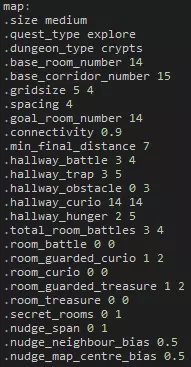
变量 描述 .size 表示地牢的大小,分为短、中、长。 .quest_type 表示任务类型,从任务文件中提取。 .dungeon_type 任务发生的区域。 .base_room_number 引擎应生成的基础房间数量。 .base_corridor_number 引擎应生成的基础走廊数量。 .gridsize 房间生成所在的网格大小。 .spacing 房间之间的走廊地砖数量。 .goal_room_number .connectivity 地牢的整体“连通”感。数值越高,房间之间通过走廊连接的可能性越大;数值越低则相反。 .min_final_distance:到达目标房间的最小最终距离,通常用于 Boss 任务。 .hallway_battle:地牢中走廊战斗的最小和最大数量。 .hallway_trap:地牢中走廊陷阱的最小和最大数量。 .hallway_obstacle:地牢中走廊障碍物的最小和最大数量。 .hallway_curio:地牢中走廊奇物的最小和最大数量。hallway_hunger:地牢中饥饿地砖的最小和最大数量。请注意,回溯时有几率生成额外的饥饿地砖,这些地砖不计入此数值。 .total_room_battles:生成的房间战斗的最小和最大数量,包括以下所有相关变量。 .room_battle:仅生成房间战斗(仅敌人)的最小和最大数量。 .room_guarded_curio:生成有守卫的房间奇物的最小和最大数量。 .room_curio:生成无守卫的房间奇物(无敌人)的最小和最大数量。.room_guarded_treasure 生成有守卫的房间宝藏奇物的最小和最大数量。 .room_treasure 生成无敌人的房间宝藏奇物的最小和最大数量。 .secret_rooms 生成秘密房间的最小和最大数量。 .nudge_span .nudge_neighbour_bias .nudge_map_centre_bias 手工设计地下城 自定义地下城最好在谷歌表格或微软Excel中制作。首先,你需要获取制作地图所需的电子表格。关于如何制作地图的说明已作为单元格注释包含在内。 谷歌表格 - 从菜单中制作副本 微软Excel的XLSX文件 -重要说明 地图只能通过剧情任务调用,因此请确保正确设置剧情任务。 运行mod导出器XML时,CSV文件将自动处理为DM文件。 如果地图数据中存在错误或缺失,自定义地图可能会非常不稳定。创建地图时请务必格外小心! 珍品 珍品数据文件“curio_type_library.csv”是从电子表格导出的逗号分隔值文件。有些人可能会发现将该文件重新导入到Microsoft Excel或Google Sheets等软件中会很有帮助。这样做实际上可以将其重新导出为游戏可用的CSV文件,不过这是一个可选步骤,但由于初次查看此特定文件可能会比较困难,因此建议进行此操作。在本示例中,我们将查看“Locked Strongbox”(上锁的保险箱)古董,它是此文件中的第二个古董。强烈建议你查看所有古董的设置,以更好地理解各个机制及其设置方式。即使遗漏一个逗号,都可能导致引擎无法读取该文件,因此务必谨慎。此外,所有完全大写的内容均为原始电子表格中的标题,并非对引擎有影响的值。最后,此文件中所有字符串集(文本句子)均不会被引擎读取。修改、添加或删除这些句子不会对游戏内显示内容产生任何影响。 你可能需要点击此图片才能更清晰地查看。
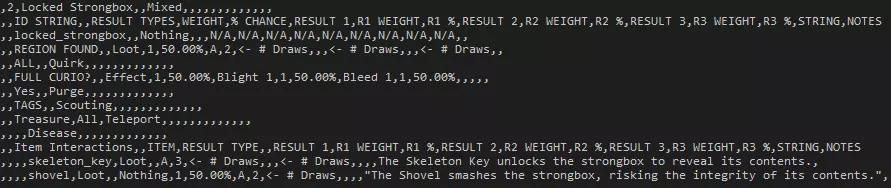
There are 13 lines in the image above, and in the table below you'll find a general explanation for the first 12 lines (line 13 is redundant for this explanation) and what they mean. As mentioned above, use other curios as examples for what you want to tweak or add, and use this reference as a supplement if you're confused. Line Description & Notes 1 In the first line we have three values which serve mainly as references and information for the curio itself. The number 2 in this line represents that it's the second curio in this file. Immediately after that we have the Curio's name. Note that this is not the name that appears in-game, rather one that helps you know what it is. The last bit here notes that there are 'mixed' effects possible. You can get loot or get a nasty DoT. Other curios may be completely good or bad in their possible effects. 2 There's nothing that you want to change in this line, and none of it is read by the engine. If you imported the csv to a spreadsheet program you'll see that these are all column headers mainly used in easily reading the following lines. 3 The first value in this line is incredibly important. This ID, following the format of having no spaces, will be used when you want to reference art and strings that will appear in-game. Following that is the effect of 'Nothing', or interacting with the curio and having nothing happen. After 'Nothing' you'll want to put the weight of the 'effect' to happen. This weight is divided by the curio's total weight of effects. 4 We'll start this line at the 'Loot' part, as the 'REGION FOUND' text is not important to the overall functionality of the curio. Here you can set the chance of loot, if any, and the tables it should call. The '1' in the column after 'Loot' is the weight of that 'effect' to happen. There are only two possible effects for the Locked Strongbox, loot or a DoT. As you can see in the 6th line, 'Effect' has a weight of 1 as well. Add up the weights and then divide the current 'effect' weight by the total. Each has a 50% chance of happening, as you can see. The 50% chance following the weight is a value that is calculated in the original spreadsheet and is not read by the engine at all. The engine will only take weights into account. After the 50% is the table that it pulls from, and the number in the next column is the number of pulls that it does from the specified loot table. You can repeat loot table calls an additional two times by putting the desired table and number of draws before the '<- # Draws' sections. When loot is awarded it will award all loot tables listed for the specified number of draws for each table. 5 This line lets you set a quirk reward as a curio interaction. This follows a similar format of 'weight,% chance,result' as other effects. An excellent example of the quirk effect can be seen on curio #7, the Stack of Books. 6 This line lets you set effects that are given when interacting with the curio. A maximum of three possible effects can be added to a curio's effect rewards. The weights in lines are different from the overall weight of individual interaction types like loot, quirk, and effect. 7 The immediate first value is quite important. The 'Yes' or 'No' will determine if the curio prompts the player for any item inputs or whether the curio can just be used like a sack or crate. If your curio has no item interactions, set this to 'No'. The 'Purge' effect allows you to remove a quirk, positive or negative. Curio #5, the Eldritch Altar, shows an excellent example of this. 8 This line allows you to set scouting events that can trigger as an effect. Curio #20, the Bookshelf, has a great example of this effect. Much like the other effects you must set weights for the different scouting examples to proc, but the data that you put into the proper column is a bit different. As you can see in the Bookshelf, there is a '0 - curios' and a '0 - all' listed. The number in each is the number of rooms this scout will go, so both will only extend to the hallways on each side. The string on the opposite side of the dash describe what the scout will reveal. This can be 'curios', 'all', 'room_battles' and more. As recommended at the top of this section, take a look at all curios for further examples. 9 The first two string values in this line are the curio 'tags', or two describing tags of what the curio is. These are used mainly by quirks that interact with specific curio tags, like Hyromania or Bloodthirsty. The 'teleport' effect after the tags is unused and dysfunctional, so it is not relevant to the curio's overall functionality. 10 After two of the commas in this line you can set a third tag, though it's not set on all curios. You can see this in the next curio in the file, the Goal Strongbox. It has the tags of 'Treasure', 'Goal', and 'All'. The last tag is used mainly by the quirk of Curious, which can interact with any curio tagged with 'All', which is all of them. This line also lets you set a disease effect. An example of this can be seen in the 8th curio, the Iron Maiden. You can either call specific diseases and/or any of them. 11 Nothing in this line needs to be edited; it acts mainly as a separator and reference line for the following item interactions. 12 This is the first item interaction. A Skeleton Key can be used on the Locked Strongbox to get 3 pulls from the loot table 'A'. You can use any of the main 'effects' as item effects, but note that you can only have a single possible effect tied to a single item. It is not possible, for instance, to have a Skeleton Key give loot or a quirk on the same curio. Take a look at all of the curios for many, many examples of item interactions and their precise formatting. Town Activities and Shops Town building information can be found primarily in two spots. The first area contains all of the building information aside from the upgrade costs. The second contains only the upgrade costs. General InformationYou can get to the location of each building info file by navigating to ' campaign town buildings'. Each folder contains the information pertaining to the designated building. Each file structure is relatively the same, but with different metadata depending on the purpose of the building. Most values are floats, so modifying buildings to your liking should be quite straightforward. Upgrade RequirementsNavigate to ' upgrades building' to find each of the building upgrade files. These should be very simple to understand and edit to your desires. Town Events Town events can be both modified and added very easily. To start, open up the base.town_events.events.json located in 'campaign town_events '. Below we'll cover the sections one by one... Town Event Chance SettingImmediately you will be greeted by a set of values denoting the chances of receiving a town event when you visit the hamlet. These three settings can be chosen by the player in the options menu, and each subsequent chance is applied if a town event is not rolled. Town EventsWe'll use the Nomad Wagon Discount event, known in-game as the "Nomad New Year", as an example.
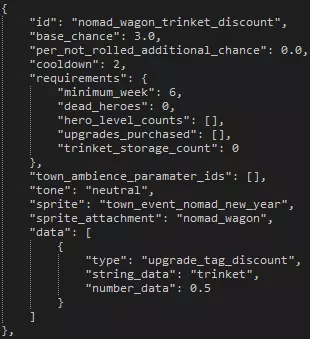
变量 描述 id 需引用的事件ID base_chance 事件出现的基础概率。每周的百分比概率为该数值除以所有可用事件的基础概率总和 per_not_rolled_additional_chance 若事件需求得到满足,每周未触发该事件时,此数值将被添加到基础概率中。当该事件被触发时,基础概率将重置为指定值 cooldown 事件再次可被触发前必须经过的周数 requirements 事件可被触发前必须满足的一系列条件town_ambience_paramater_ids tone 事件的总体基调。可设置为“良好”“不良”或“中性”。 sprite 事件激活时应启用的精灵。 sprite_attachment 指定精灵应附加到的建筑(如有)。 data 事件提供的增益效果、城镇修改或一般变化的集合。 任务完成保证事件 打开“town_events.quest_type_event_guarantees.json”文件。在此处可以指定在特定区域成功完成某类任务后将发生的事件。重要说明 额外的城镇事件需要制作背景并放置在“campaign town town_event”文件夹中。 音频 开始任何模组相关工作前,请确保使用正确版本的FMOD Studio。《暗黑地牢》正式版使用的是1.06.07版本。 如果加载项目文件时提示“将项目迁移到新版本”,你需要重新下载并使用正确版本的FMOD Studio打开此项目文件。 下载源代码编辑器,例如Notepad++。完成上述操作后,你就可以开始使用FMOD Studio项目文件了。 我们在项目文件中准备了一个非常简短的教程,位于“MODDERS_READ_ME_FIRST”文件夹内所有事件的属性面板中。 背景美术 大多数背景美术可在“dungeons”文件夹下的各个区域文件夹中找到。这些图像可以使用任何图像编辑器轻松修改,但应遵循其总体尺寸要求。 背景和走廊地砖可以直接修改或添加,无需其他额外操作!
2026-02-14 10:00:06 发布在  暗黑地牢®
暗黑地牢®



说点好听的...
收藏
0
0