




宏新手入门指南
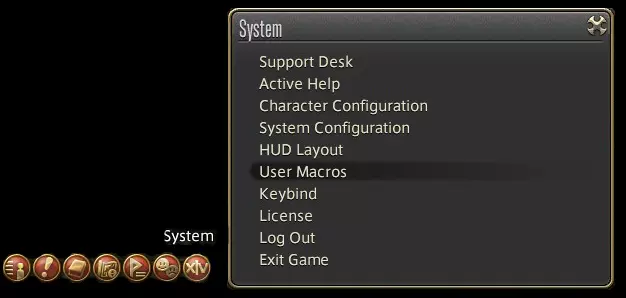
技能图标太多让你心烦?要追踪的技能太多?想让你的快捷栏用起来更顺手?本指南将向你展示宏如何帮助你充分发挥职业潜力。 前言——宏的实用性,而非易用性 首先我想说,宏绝对、绝对、绝对不应该被用来模仿或替代技能循环。原因有很多,但主要有三点: 1 - 你的基础技能有2.5秒的固定冷却时间,而宏只能以整秒为间隔执行操作。这意味着,如果你用宏来自动执行基础循环,每6次技能使用就会浪费一次施放机会。宏命令中的技能也不会进入队列;因此,如果你在宏命令执行过程中插入某个技能,当角色处于忙碌状态时,宏命令中该技能之后的任何指令都不会被解析。 2 - 你永远无法保证自己会立即想要继续当前的循环。各种情况都可能打断你的节奏,比如需要躲避的范围伤害技能,或者触发了更优的技能。 3 - 你的职业会不断升级并获得新技能,你需要随着角色一同成长,将这些新技能融入到你的技能组合中。如果依赖宏命令来完成大部分操作,你将无法学会充分发挥技能的最大潜力——而且你无法为自己尚不了解如何使用的技能编写宏命令。 判断宏是否合适的简单标准是“实用性”。宏应当帮助你高效且有效地游玩你的职业,避免你在技能循环中费力寻找所需增益效果,或是匆忙向队伍发送重要信息。当你问自己“我希望这个宏实现什么功能?”时,你心中应该有一个清晰且简单的答案。 第一章 - 开始设置 好的,既然你想要创建宏,首先需要打开宏菜单。 找到菜单 你可以通过按下Esc键(或控制器上的对应按键),或者点击屏幕菜单最右侧的橙色按钮,然后选择“用户宏”来打开该菜单。
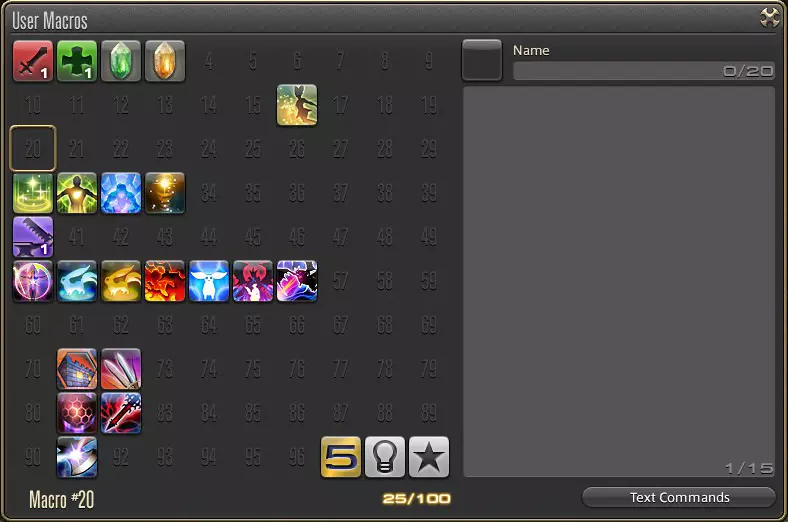
这将弹出一个类似这样的对话框。每个数字方块代表一个宏的插槽。
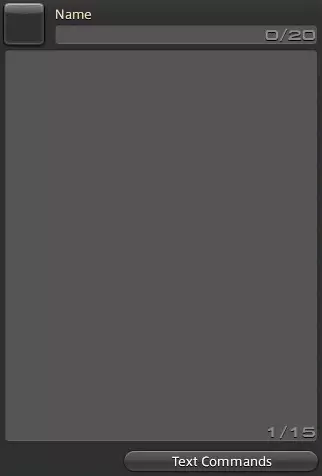
你可以在此处为宏命名,并从左侧的方框中选择一个通用宏图标。实际的宏命令需填写在大文本框中,每行一条命令,每个宏最多支持15条命令。
Macro Commands There are more macro commands than I can list here and all can be viewed from the Text Commands option in the macro menu, but here are some of the most commonly used ones. /micon - Sets the icon of the macro to the ability specified. Usage - /micon "Ability" (pet) /merror - Turns on or off macro error messages in the chatbox - default on. Usage - /merror off /party, /p - Send a message to your party. Usage - /p My message. /echo, /e - Places a message in the chatbox that only you can see. Usage - /e Note to self. /action, /ac - Uses a class ability. Usage - /ac "Ability" <target> /petaction, /pac - Makes your pet use an ability. Usage - /pac "Ability" <target> Author's Note While macros can command pets to Stay, Heel, Guard, etc at any time, they must be in Obey mode to command the use of any of their attacks. /companionaction, /cac - Makes your chocobo companion use an ability. Usage - /cac "Ability" <target> /facetarget - turns your character towards your current taret. Usage: /facetarget /wait - waits the specified amount of time before continuing the macro. Usage: /wait 5 Note that /wait can also be used on the same line as another command, by putting it in square brackets <> like so: /ac myability <wait.5> /hotbar ? # - where # is the number of the hotbar you want to affect and ? is: -- change - changes the active hotbar to the specified one. -- display - toggles the display of the specified hotbar on your HUD. -- share - toggles whether the specified hotbar is class/job specific or shared across all classes. This should not be part of a macro, but is useful and available. Controller users should use /crosshotbar or /chotbar instead. Targets It is entirely possible to have a macro command target something that isn't your current active target. Again, some of the more common targets are listed below. <t> - your current target. <tt> - your target's current target. <f> - your current focus target. <mo> - the target your mouse is hovering over. <0> - party member 0. Generally your character. ...<7> - party member 7. <attack1> - the enemy/player marked with the "Attack1" sign ...<attack5> - the enemy/player marked with the "Attack5" sign Other Useful Tips It is possible to use target commands like <t> and <f> in chat or system messages, and it will replace them with the name of the player or mob as appropriate. /p Incoming <t>! /e <attack1> currently marked as Attack1. You can make chat and system messages play a different chime than usual, if you want it to be especially attention-grabby. To do so, put <se.#> anywhere in the message, where # is a number between 1 and 16. For the sanity of you and your party, please use this sparingly - most things don't need a jarring sound effect. /p Tank swap, provoking <t> <se.11> /e Buff running out in 5s <se.5> Chapter 2 - Getting into the Gizzards So, you know how to make macros. But before we start into how to use macros effectively, we need to know how macros work their magic. Firstly, as previously stated, macros cannot take advantage of the ability queueing system. This means that any ability macro should be activated when your character is idle - but this does not mean that you need to wait for the global cooldown to activate off-GCD abilities. Nor does it mean that the reverse is true, as you can queue up an ability normally while you're still in the middle of a macro'd ability's animation. In addition, your pet/companion has their own global cooldown, and you can use a macro to control them in the middle of an action yourself - again, though, the macro will do nothing if they are currently in the middle of an action. Secondly, only one macro can be used at a time. This doesn't normally mean much, but if you've started a macro with a hefty set of /wait commands and decide to pop another before it ends, the first will not finish. This applies even if all that's left is a party chat or system message, so be warned. Finally, macros will try to execute every single command they have, in order. With class actions, this means that your character will use the first action in the list that is ready, and no other. For instance, let's assume that we are a levelled Gladiator, Rampart is currently on cooldown, and we run this macro: /ac "Rampart" /ac "Convalescence" /ac "Fight or Flight" /e Cooldowns popped The system will try to use Rampart, but will be stopped because it isn't available. Convalescence will be used right away. The macro won't stop there, however, and it will try to use Fight or Flight - but since we're now in the middle of using Convalescence, that will fail. Finally, the echo command will be reached and will display the message "Cooldowns popped" in our chatbox. Of couse, if we were to space out our actions with /wait commands, then we could ensure that Fight or Flight was used as well. But, as I've already said, using macros to fire off multiple abilities like that is lazy and potentially dangerous. Chapter 3 - Macros for Fun and Profit Now you know what macros are, how they work, and how to make them. So here are a few general ideas that can help you craft a macro that works for you. Do note that not all of these macros are going to be incredibly useful to you in particular, nor are they macros that you need to be using - rather, they are varied examples of how to get utility out of macros. 1 - Buffing Playing into the nature of macros to spam all their commands at once, it is incredibly easy to set up a macro to condense all of your similar buffs into one button and pop one at a time as you need them, or spam a bunch an emergency. Gladiator Defence buffs. /merror off /ac Rampart /ac Foresight /ac Sentinel /ac Bulwark Bard Offence buffs /merror off /ac "Raging Strikes" /ac "Internal Release" /ac "Blood for Blood" Summoner Pet buffs /ac Rouse /ac Spur Note that the order you put your abilities in can make a big difference. Most often it is best to sort them by cooldown time, so you can save the longer ones for when you need them; but you can choose to sort by effectiveness, or by any other factor - as long as there's a logic to your sorting, it almost doesn't matter. Also, be aware you should still have every ability you can fit on your hotbars, if only to be able to see their cooldown timers. 2 - Swiftcast Remember how I said that stacking commands using /wait is the mark of a lazy player? Ignore that here, because swiftcast is one of the most useful abilities available to any mage and should be spammed everywhere you need instant casts. SwiftRez /p Resurrecting <t>. <se.#> /ac Swiftcast /wait 2 /ac Resurrection <t> /ac Raise <t> /ac Ascend <t> SwiftSummon /ac Swiftcast /wait 2 /ac Summon I (or II or III) 3 - Party Utility Macros don't have to be about saving you space and time - they can also do a good job telling your party or raid that you're using a certain ability and to prepare accordingly, mark a kill order or a target to not attack, or a myriad of other uses. Basic Kill Order (up to 3 mobs) /mk attack3 <t> /ac "Target Forward" /wait 1 /mk attack2 <t> /ac "Target Forward" /wait 1 /mk attack1 <t> Sleeping a mob /ac "Sleep" /ac "Repose" /mk ignore1 <t> /p Sleeping <t>, please be aware. 4 - Multi-tasking This takes advantage of the multiple targeting options available to macros. This is probably the most powerful usage of macros, and in my opinion is best used with single-target party support abilities. Used correctly, this can cut down on unnecessary constant target-switching between players and/or mobs. Conjurer Esuna Mouse Over /ac Esuna <mo> Scholar Boss Mitigation /ac Virus <f> /ac Virus <tt> /ac "Eye for an Eye" <t> Astrologian Card Buff Mouse Over /ac Draw <mo> Rogue Goad Mouse Over /ac Goad <mo> Arcanist Knockback Command /pac Backdraft <mo> /pac Shockwave <mo> Author's Note You can probably tell that I think mouse over macros are the best thing ever. That's because mouse-over targeting also works on items in your hud - like the party list, enmity list, focus target and target's target - and so it can be substituted in for any other targeting option given to you, except for the self and marked target commands. The only excuse you have for not using <mo> is not having a mouse. Sorry, controller users, I don't know if there's a similar option for you guys. :( 5 - Swapping Hotbars The simplest of macro utilities, but also potentially one of the most useful. This allows you to set up several hotbars with different abilities and switch to them as needed. This makes stance-dancing an absolute breeze - but please please PLEASE make sure that if you attach an ability to these that they are in fact able to go off, otherwise you'll be up poop creek without a paddle. Healer/Damage-dealer /e DPS /ac "Cleric Stance" /hotbar change 4 In another macro: /e Healing time /ac "Cleric Stance" /hotbar change 1 6 - Timers This is another place where the /wait command works for you rather than against you, though its usage is somewhat limited. Summoner Dreadwyrm Trance timer /ac "Dreadwyrm Trance" /wait 10 /e Trance ending in 5s <se.#> Raid Pull timer /p Pulling in 10s. <se.#> /wait 5 /p 5 <se.#> /wait 1 /p 4 /wait 1 /p 3 <se.#> /wait 1 /p 2 <se.#> /wait 1 /p 1 <se.#> 7 - Crafting Yes! You can make crafting macros, and this time I promise nobody will scream at you for stacking commands using /wait! That said, they're best used to make stuff that you can already make or HQ reliably without them, and you can't just leave it running on all your stuff and come back in an hour. Example Crafting Preparation /ac "Inner Quiet" /wait 3 /ac "Tricks of the Trade" /wait 3 /ac "Basic Touch" /wait 3 /ac "Tricks of the Trade" /wait 3 /ac Manipulation Example Crafting Finisher /ac "Basic Touch" /wait 3 /ac "Basic Touch" /wait 3 /ac "Basic Touch" /wait 3 /ac "Basic Touch" /wait 3 /ac "Basic Touch" /wait 3 /ac "Careful Synthesis" /ac "Basic Synthesis" 8 - Class cop-outs Here, the line between good and bad macro usage gets a little blurred. Yes, these are examples of legitimate macros that save hotbar space or simplify complex actions, but they veer dangerously close to having the game played for you - and poorly. The Ninja mudras, for example, take at least double the time to cast with a macro thanks to the incredibly short recast time of the hand gestures and the minimum wait time of 1 second. In general, avoid using things like this unless hotbar or keybind space is at an absolute premium. Archer No-cost Heavy Attack /ac "Misery's End" /ac Bloodletter Ninja Doton /ac Ten /wait 1 /ac Jin /wait 1 /ac Chi /wait 1 /ac Ninjutsu Final thoughts Macros are incredibly useful to every class, and in almost any situation, and you are now prepared to create and use them in ways that suit you best. I browsed several websites in first making my own macros, and then again in researching and compiling this guide. If you want more information or other uses for macros give some of these a look! http://ffxiv.consolegameswiki.com/wiki/Macro http://guide-source.com/ffxiv-guide/a-guide-to-writing-ffxiv-macros https://katella.wordpress.com/katella-ffxiv-planning-page/ffxiv-macros/
2026-02-14 10:00:18 发布在  FINAL FANTASY XIV Online



说点好听的...
收藏
0
0