换一换
换一换 


(更新时间:2月14日,下午2点28分(东部时间) 生成式AI模组制作者黑名单已启用)对于所有配置远低于最低要求,或者只是想通过消除卡顿来提升游戏体验的玩家,我们(在很大程度上)能帮到你!本指南不仅会提供命令行,还会描述它们在不同情况下对性能和画面的影响,让你了解预期效果、需要避免的问题、如何缓解以及类似的内容!本指南由发布者经过数百小时的实践测试,并结合了(希望是)方舟社区的众多观点编写而成。这并非一份包罗万象的终极指南(尽管正逐渐向此发展),而是众多帮助你无需升级系统就能玩游戏的指南之一。原作者注:本文撰写耗时3-4小时,全程无脚本,且是在Steam服务器故障期间完成。这是我提前一天送给方舟社区的圣诞礼物。 额外内容!我还加入了针对模组制作者和主播(包括内容创作者)的AI黑名单分类。 当前调查情况: ASA客户端: - 冗余命令行条目 - 页面文件位置(30%完成) - 极端特效生物驯服性能问题(如Pyromane、凤凰等) - FluidNinja文档 NITRADO服务器: - 服务器重启 - 重复IP卡顿 免责声明! 测试环境: 1. 官方服务器 2. 私人集群中的非官方服务器 瓦尔盖罗: 1. 未测试 / 2. 性能可接受 孤岛: 通关(已完成)- 1. 基地加载可能会让人失去耐心 / 2. 性能可接受 焦土: 通关 - (军队阶段)- 1.未测试/2. 性能可接受 中心岛 - 计划完成成就 - 待定 ~2月 仙境传说 - 计划解锁印痕 - 待定 ~2月 畸变 - 流程游玩 - 待定 灭绝 - 流程游玩 - 待定 失落殖民地 - 1和2. 出生点性能超出预期 抱歉,短期内不会开放!龙谷 - 可能成为主服务器 水晶岛 - 计划中 - 待定 创世纪1 - 流程游玩 - 待定 创世纪2 - 流程游玩 - 待定 鲍勃的真实故事:财富之潮 - 待定 亚特兰蒂斯 - 这让我的电脑很害怕 - 待定 鲍勃的真实故事:银河战争 - 待定 圣地亚哥的遗产 - 第一部分 - 待定 维京湾 - 计划中 待定 失落岛 - 待定 主菜单设置 那么,你不确定自己的系统是否能运行ASA。在你进入单人世界,使用每个游戏都自带的糟糕默认设置进行基准测试之前,让我们先运用一些关于你的系统如何运行其他游戏的已有知识。 首先也是最重要的一点! 我们知道《方舟:生存飞升》运行在虚幻引擎5上,所以这立刻就有很多需要注意的地方。不过别担心!虽然听起来可能不太乐观,但我们应该先看看自己的显卡。在本指南中,我们将使用NVIDIA GTX980显卡(相当于AMD Radeon RX 590)。让我们进入《方舟:生存飞升》菜单设置中“通用”下的“视频”选项卡,看看具体情况。 通用 - 视频
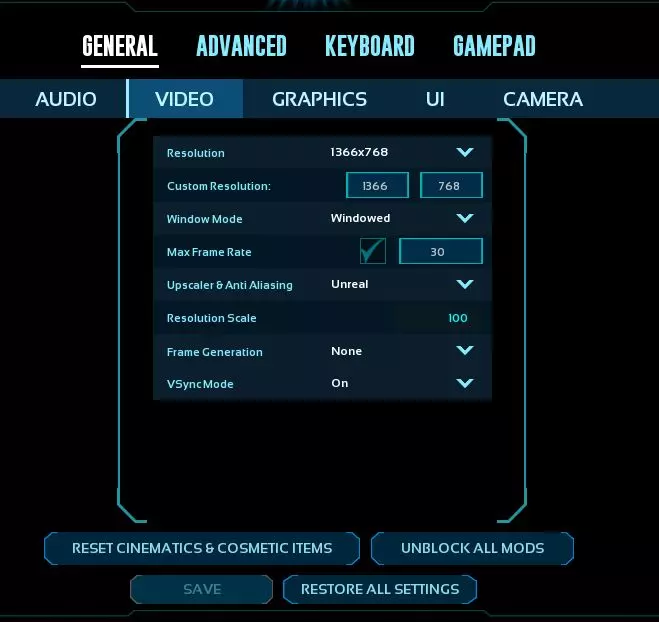
根据我们对这款显卡的了解,它在1366x768的中等分辨率下运行游戏效果最佳。低于这个分辨率,画面会出现严重的像素化;高于这个分辨率,显卡则会在渲染负载下严重吃力。由于这是虚幻引擎5游戏,60fps不应作为目标帧率,所以我们将目标帧率设为30。 为什么是30fps?我们将使用虚幻引擎的100分辨率缩放比例的上采样技术。上采样技术比较特殊,会不断调整游戏内纹理的清晰度以达到目标帧率。目标帧率越低,通常画面效果就能调得越好。将帧率上限降至15fps还有助于降低显卡温度。 窗口模式对游戏本身影响不大,但会显著影响你的“Alt+Tab切换”体验。如果你坚持使用全屏模式,应在切换窗口前使用“alt+回车”快捷键组合。为便于故障排除,我们建议将其设为“窗口模式”。 关于帧生成技术,为了 Raptor Claus(迅猛龙克劳斯),请务必将其设为“关闭”,就像埋葬一只南方巨兽龙那样彻底。我们不需要宝贵的处理能力被浪费,就像 Syntac 的军队对抗 Grendel 时那样(兄弟,你当时是怎么想的?)。 垂直同步模式(VSyncMode)我们强烈建议设为“开启”。如果关闭,屏幕撕裂现象会很严重,并且会让你在多个地图中感到晕头转向。 【不要忘记保存你的设置】 常规 - 图形 呼,还在跟着看吗?很好。现在让我们导航到“常规”下的“图形”选项卡。这里并非真正的优化魔法开始之处,而更像是搭建基础框架。
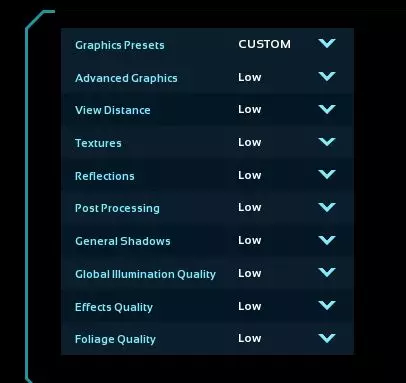
左边的设置——不,那是你的右边。是左边。你看到那些漂亮的选项了吗?全部设为低。听清楚了,所有选项都调到低。记住,这不是什么魔法。《方舟:生存飞升》(ASA)这样设置看起来也不会很糟糕,如果你不这么认为,那我只能说你的看法并不客观。我们是想玩游戏,而不是看一场延迟严重的幻灯片。不过,我们还没 done。仅凭这些设置带来的体验还不足以值回票价,所以我们要看看设置界面右侧的选项来提升游戏体验。
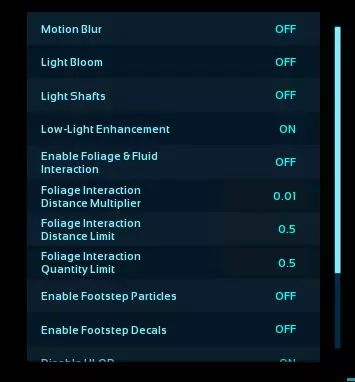
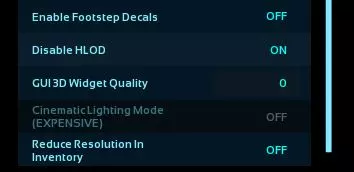
好了!现在我们来谈谈大多数更精细的画面设置。没错,我把它们称为“设置”。不过…… 动态模糊就像沼泽热一样讨厌。我们要离它远远的。把它关掉。:> 光晕效果我们也关掉,光线轴效果同样关掉。等我们讲到“魔法”部分时,会详细说明原因。 低光增强?可以,根据你的显示器情况决定开或关。 所有的植被设置?绝对要尽可能调低或关闭。这些设置会占用我们最需要的处理性能(也就是在你拼命逃跑时避免卡顿)。 脚步粒子效果?去掉。关掉。我们不希望移动时生成这些东西。脚步声贴图可开启或关闭,具体取决于你对细节的关注程度(主要用于截图时才会用到此功能)。 禁用HLOD。这是一个容易混淆的设置。它显示为“禁用”。HLOD是“高级细节级别”的缩写(我推测)。如果设为“关闭”,就会形成双重否定,意味着游戏将启用HLOD。请将其设为“开启”,因为我们要正确理解英文含义。 GUI 3D部件质量。说实话,我没怎么调整过这个设置。在写这段内容时确实应该试试。不过我现在正在焦土地图的早期阶段制作这个,为了赶进度,我们暂时将其设为0。 背包内降低分辨率。这个设置对卡顿的影响不大,效果好坏全凭运气。无论开启还是关闭,你偶尔打开物品栏时仍会遇到令人头疼的帧率锁定卡顿问题。省点处理性能,把它设为关闭吧。这听起来是不是有点反常?原因在于ASA会先渲染画面,然后再降低分辨率。关闭它可以避免最后那步多余操作。 通用 - 用户界面与相机 这些大多是个人偏好设置。你可以根据自己的情况随意调整,我又不是你爸。不过,相机选项卡中有两项设置我建议你修改。 相机抖动幅度,设为0。为什么?为什么要这么做?遮挡剔除既是好事也是坏事——它会将你看不到的东西停止渲染。但当物体进入视野时,又会重新渲染。如果快速实施此操作,会进一步拖慢系统。【镜头视角晃动】也已设为关闭,以尽可能缓解问题。 “那‘隐藏敌方建筑外观装饰’呢?这也会影响我的系统运行!” 确实会有影响。但这取决于个人偏好。我喜欢看其他人的创意设计,也能忍受加载这些内容时的等待。 【常规 - 高级】
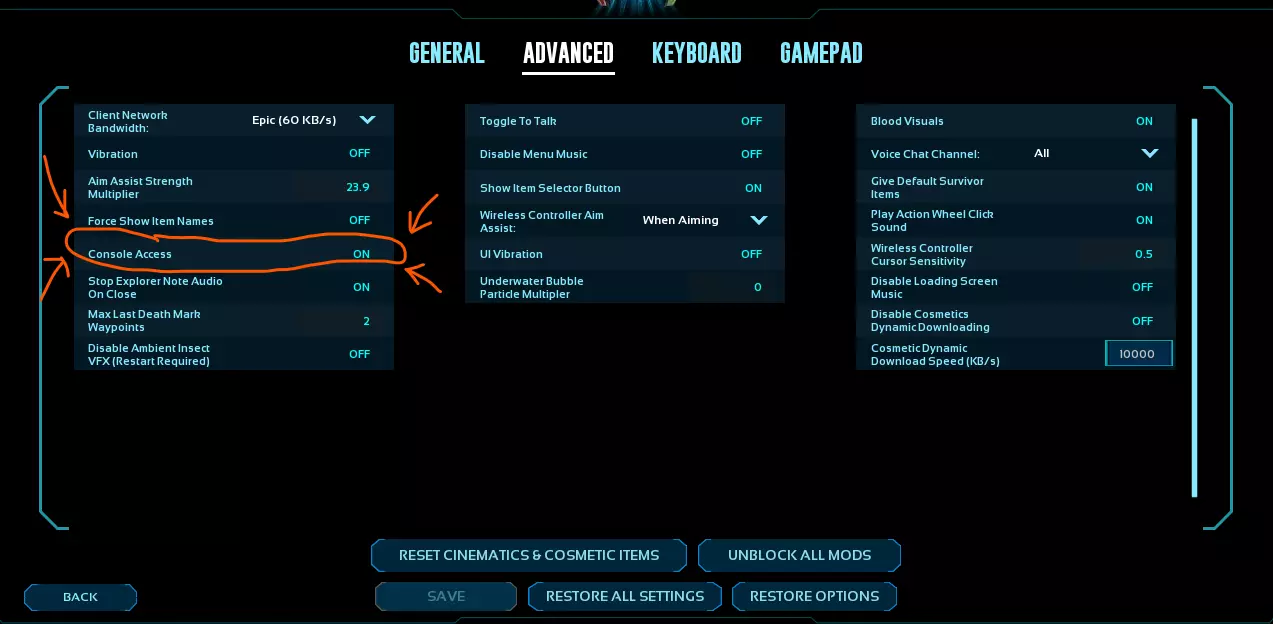
呼,菜单设置快弄完了!马上就能玩了,对吧?错!幸存者,你还有很多要学的!这还远远不够“玩”。我们现在要激活“魔法”区域了!进入菜单设置的【高级】选项卡。在最左侧,你会看到【控制台访问】的字样。把它设为【开启】,然后进入下一个阶段——我是说章节。进入下一章节。 **别忘了保存设置** 控制台 恭喜你进入这一章节,幸存者!主菜单设置就像孤岛,而控制台就像焦土。准备好,你可能会对修改任何东西感到害怕。 注意,现在还没让你加入任何服务器或开始游戏。我们可以从主菜单进行此操作,或者在其他任何地方也能操作。
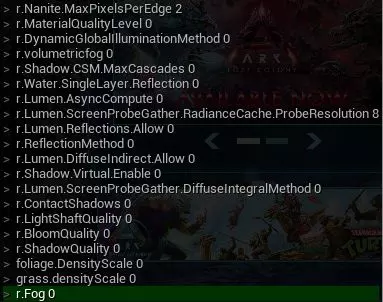

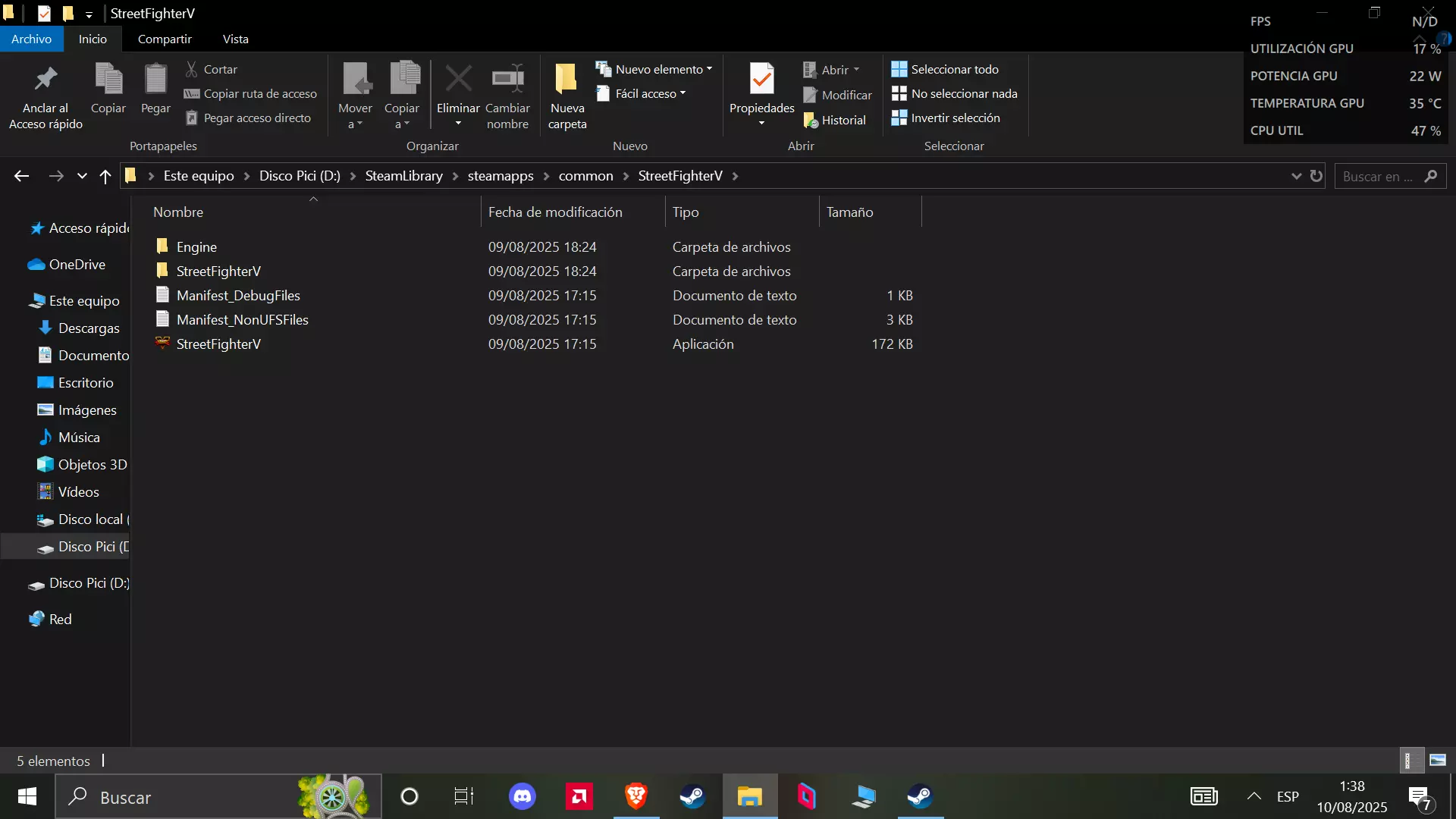
WHAT IN THE UNHOLY OVERSEER IS THAT LIST?!?! Welcome to the sweet vegetable cake that is optimization. To access this part, just hit the ~ (Tilde) key on your keyboard. Before you start typing anything, let's go with a rundown of what each does, where it effects the most, and how to fine tune it to your liking. FROM THE TOP! r.Nanite.MaxPixelsPerEdge 2 - Most notably visuals. Want it looking like PS2 graphics at a distance? keep it at 2. You can get away with having it set to 4-16, but no higher. We like our performance, and it doesn't affect too much when viewing things up close r.MaterialQualityLevel 0 - This is not a must, but preferred. Setting this to 0 heavily affects performance in the best way possible. Now we're getting them oldschool graphics - If your minimap is fuzzy and can't handle looking at it, replace "0" with "1" and wait a bit. Have patience. r.DynamicGlobalIlluminationMethod 0 - This setting balances ALL lighting in reference to the base lighting of your camera. It enables you to see and save on post-processing power. (TL;DR you can find a much better description than mine) r.volumetricfog 0 - Fog is one of the main affecters for performance. Setting this to 0 disables fog entirely with exception to a map's baked in fog (See Valguero) r.Shadow.CSM.MaxCascades 0 - Immediately noticeable and significantly impacts performance. Removing shadows does not affect the cascades, so this is just a step for removing all shadows r.Water.SingleLayer.Reflection 0 - Removes reflections from water, allowing you to kinda see into it while not in it. It does minimally impact performance r.Lumen.AsyncCompute 0 - Minimal impact, not noticeable with our settings r.Lumen.ScreenProbeGather.RadianceCache.ProbeResolution 8 - Minimal impact, not noticeable with our settings r.Lumen.Reflections.Allow 0 - Minimal impact, not noticeable with our settings r.ReflectionMethod 0 - Minimal impact, hardly noticeable with our settings r.Lumen.DiffuseIndirect.Allow 0 - Moderate impact, visually noticeable by lighting up shadows r.Shadow.Virtual.Enable 0 - Significant impact, not noticeable visually but you can sure as heck feel it r.Lumen.ScreenProbeGather.DiffuseIntegralMethod 0 - Minimal impact, not noticeable with our settings r.ContactShadows 0 - Significant impact, visually noticeable as a step to completely remove shadows r.LightShaftQuality 0 - Minimal impact, not noticeable with our settings r.BloomQuality 0 - Minimal impact, hardly noticeable with our settings due to the Global Illumination line r.ShadowQuality 0 - Major impact, removes baseline shadows from existence. To fully remove shadows, see all shadow commands above foliage.DensityScale 0 - Significant impact, removes foliage clutter in a radius around the camera grass.densityScale 0 - Minor impact, removes most grass clutter in a radius around the camera r.Fog 0 - Significant impact, not as powerful as the volumetric fog line but definitely piggybacks the process grass.enable 0 - Does not work grass.sizeScale 0 - Medium impact, makes non-harvestable grass disappear r.Streaming.PoolSize # - Does absolutely N O T H I N G after thorough testing on our system r.LightShaftDownSampleFactor 1 - Very minor impact, not noticeable with our settings r.VolumetricCloud 0 - BIGGEST IMPACT. ASA utilizes REAL CLOUD SIMULATIONS. This removes ALL OF THEM and renders the simulating INERT, REDUNDANT, and a 2x framerate boost killparticles - Situational impact. This disables almost ALL particles. However, this removes your ability to visually identify buffs, alpha dinos, shiny dinos (mod). I have not figured out the command to revert this. Relaunching the game enables particles. ALSO DISABLES SEEING ARTIFACTS FX.AllowGPUParticles 0 - Disables gpu rendered particles FX.MaxCPUParticlesPerEmitter 0 - Removes particles from things such as the Air Conditioner (ie. no more A/C fog) fx.NiagaraAllowGPUParticles 0 - Disables GPU particles for whatever that is ark.DisableFluidSim 1 - Disables NinjaLive's fluid sim r.Streaming.PoolSizeForMeshes 2000 - If your dinos look straight up PS1 Hagrid, use this. Other variables that have been known to work are 500 / 1000 / 1500 IF YOU ARE MORE ENLIGHTENED WITH ANY OF THESE SETTINGS, DROP US SOME EDITS! "COOL! CAN I PLAY NOW?!" Not so fast, hotshot! There's still a couple more things you should be aware of, like the PrimalConsole.ini. In this file, you'll find EVERY COMMAND YOU HAVE EVER INPUT. Due to our troubleshooting nature, our in-game console will become FLOODED with commands we won't be using again. Where do you find this file? (drive_letter): SteamLibrary steamapps common ARK Survival Ascended ShooterGame Saved Config WindowsYou can adjust all of these safely, just remember, though: ANY EDITS YOU MAKE AND SAVE WHILE THE GAME IS OPEN WILL BE UNDONE ON NEXT LAUNCH. MAKE SURE THE GAME'S PROCESS IS FULLY ENDED BEFORE MAKING EDITS AND SAVING Another note! This does not make the commands run on startup, just loads them into the CONSOLE HISTORY. To access the history of commands used, while the console bar is showing at the bottom of the screen, press the UP or DOWN arrow. If utilizing all (or most) of these commands, get ready to become an audiophile! These commands will make it so you DO NOT SEE WEATHER EVENTS!!! Scorched Earth Sandstorms? Not visible. Lightning Strikes? Not visible. Valguero Storms? Not visible. You get the idea. The Jerboa tame is going to be your greatest asset! One more chapter ascension, survivor. This Overseer isn't done with you yet... Jiniix806 Request Two 7% Ciders in on New Year's Eve...Alright. I've been avoiding this for a while. I never trust startup commands, and after 2 hours of wanting to scream at Wildcard on this front plus tons of outdated info provided by the community everywhere... Get ready to follow this train wreck. If you've provided info on this topic of running console commands on game launch using Steam, thank you for your patronage towards this guide. I have scoured all over numerous forums, websites, and the like to figure this out in addition to troubleshooting each and every method. I'm at sorrow to say that on startup command is not feasible with this list, and the amount of Unreal crash reports I've sent has been more in the past 2 hours than in the past 5 years of my gaming history. But all is not lost...THANK YOU REDDIT POSTERS. BE NOTICED. BE PROUD. Perusing through the info of a 2yr/old discussion, we have a mutual compromise that works with most, if not all commands in our list INCLUDING THE CLOUD LINE! "Oh heck yes. Tell me OR ELSE!"Woah, woah, WOAH!! This is my personal time we're talking, here... Geez... Open your file browser, and navigate yourself to ... ShooterGame Binaries as shown in the folder below and make a text file (.txt) here.
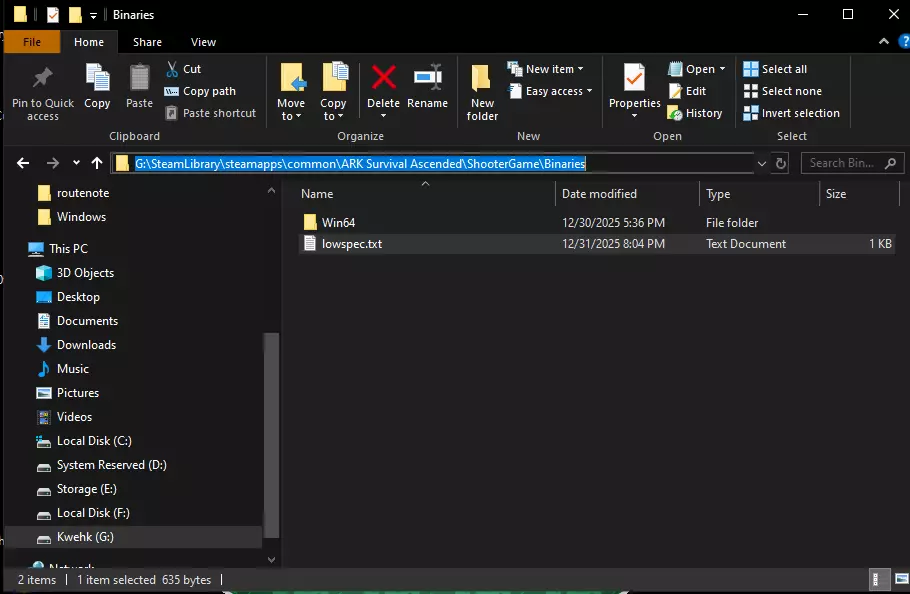
你可以随意命名该文件,但名称中**绝对不能包含空格**。尽量让名称简洁、易记且便于输入。我个人使用的名称是lowspec.txt。 在这个文件中,我们需要输入以下列表中的**每一条命令**,命令之间用 | 分隔,无需添加空格。最终,文本文件应如下所示: r.Nanite.MaxPixelsPerEdge 2|r.MaterialQualityLevel 0|r.DynamicGlobalIlluminationMethod 0|r.volumetricfog 0|r.Shadow.CSM.MaxCascades 0|r.Water.SingleLayer.Reflection 0|r.Lumen.AsyncCompute 0|r.Lumen.ScreenProbeGather.RadianceCache.ProbeResolution 8|r.Lumen.Reflections.Allow 0|r.ReflectionMethod 0|r.Lumen.DiffuseIndirect.Allow 0|r.Shadow.Virtual.Enable 0|r.Lumen.ScreenProbeGather.DiffuseIntegralMethod 0|r.ContactShadows 0|r.LightShaftQuality 0|r.BloomQuality 0|r.ShadowQuality 0|foliage.DensityScale 0|grass.密度缩放 0|渲染.雾效 0|草地.启用 0|渲染.流送.池大小 0|渲染.光线轴降采样因子 1|渲染.体积云 0|清除粒子
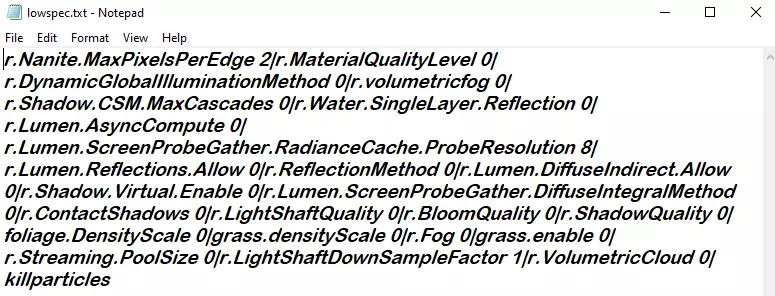
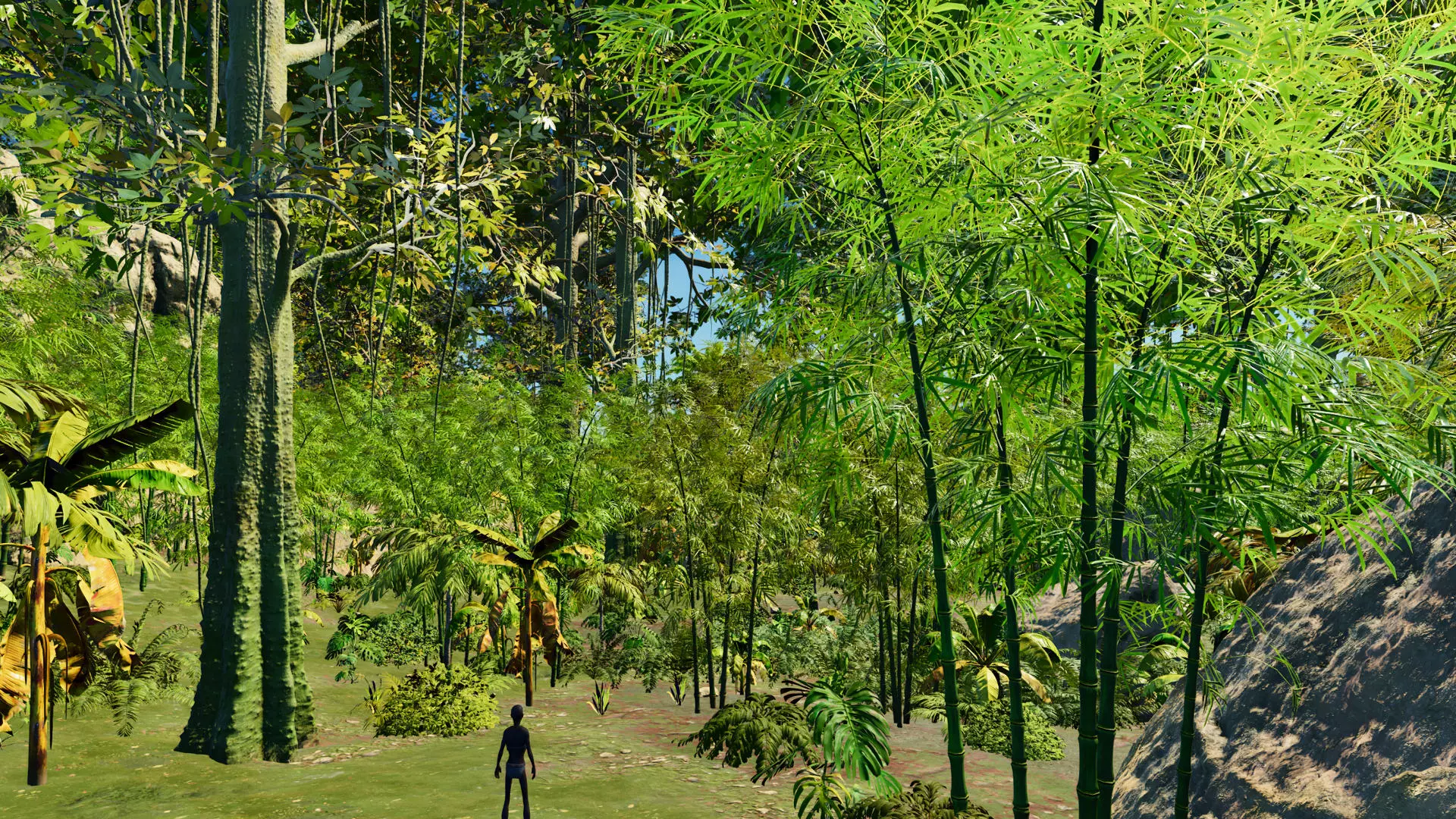
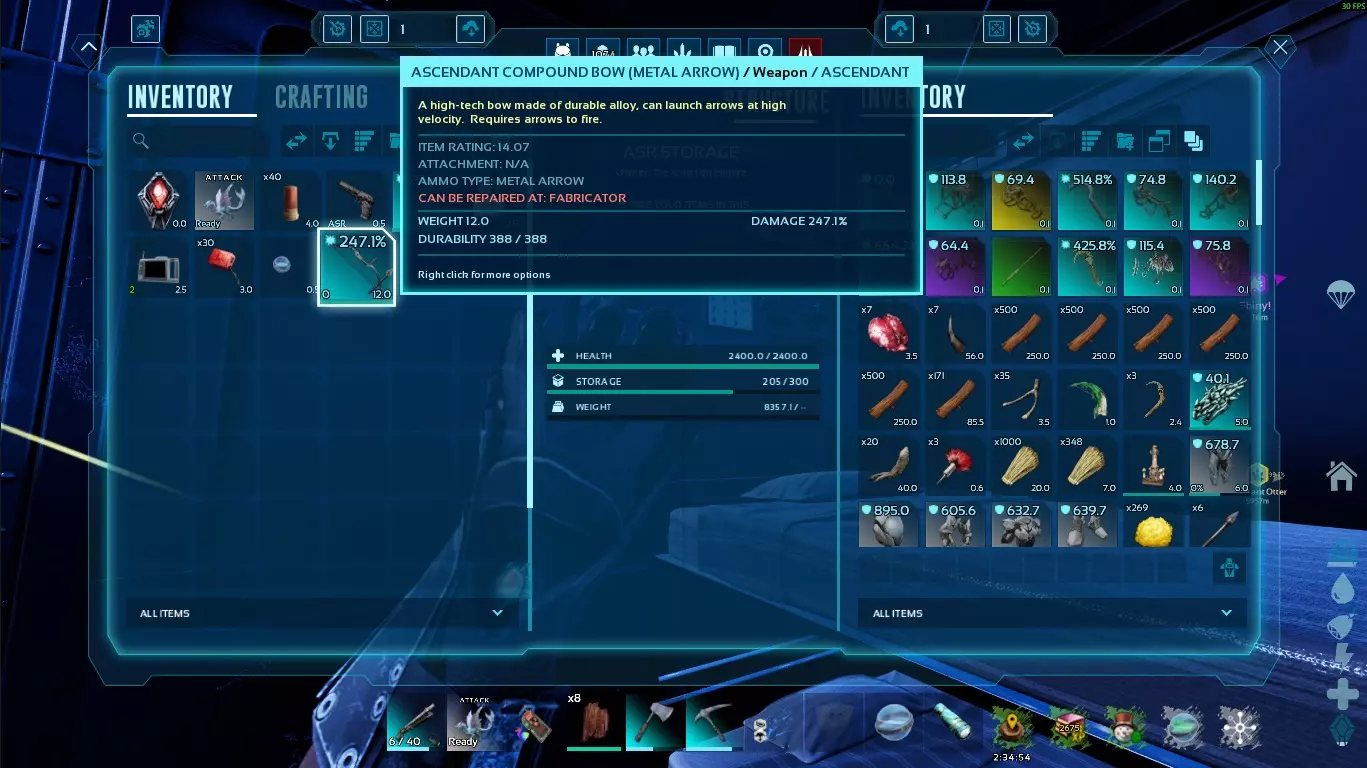
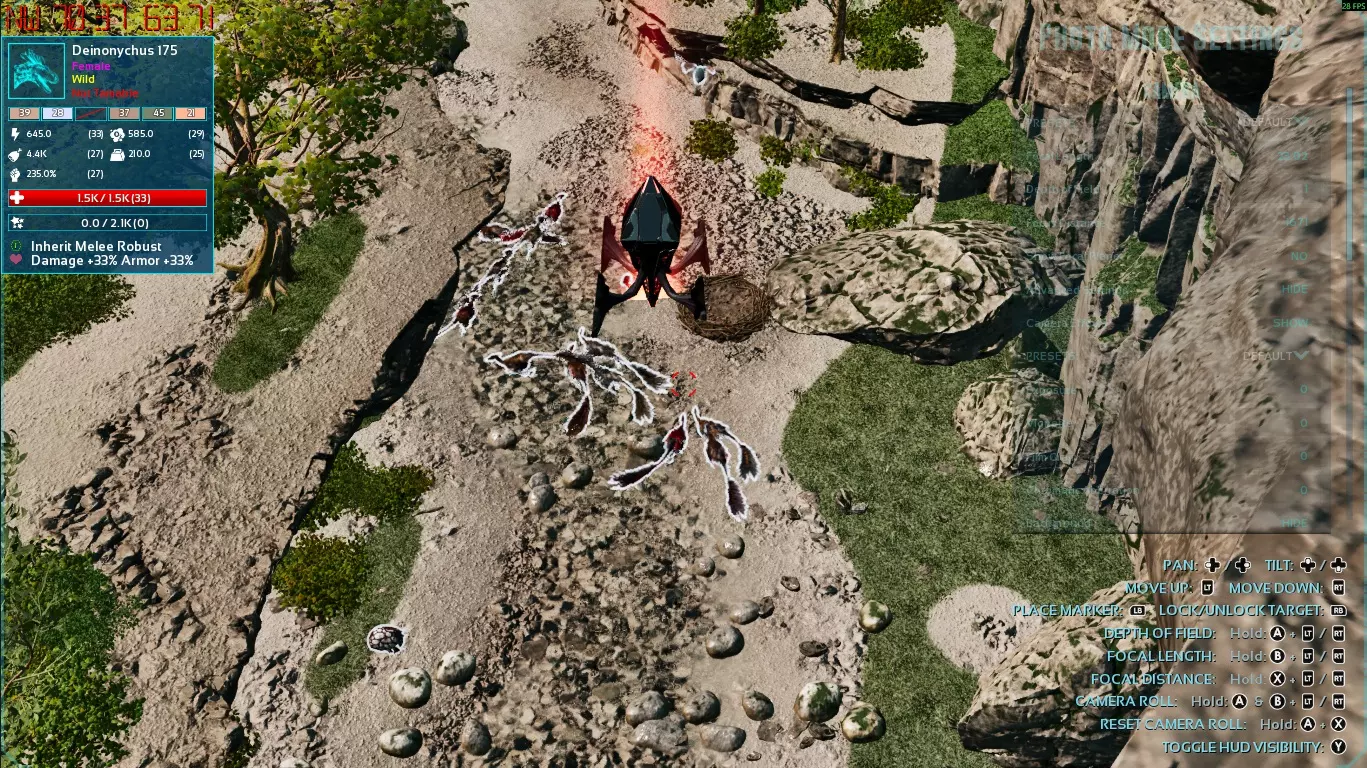
“好吧,这会在启动时运行,对吧?对吧?!?”(拿枪指着你的头)不,但这确实能防止你粘贴一长串代码!让我为你介绍exec命令! 无论你是在主菜单还是在游戏中,打开控制台并输入exec (文件名).txt。由于我们对文件中的文本进行了格式化,它会按顺序运行每一条命令,但要做好准备,如果不在菜单中执行,游戏可能需要更长时间来高速处理所有内容。 另外我发现,因为这个原因,Steam指南的各个章节有字符限制,所以感谢你建议将这个添加到指南中! 它看起来怎么样? 根据发现,我已经移除了一些截图。我会随着时间的推移添加更多截图,请耐心等待我重新补充内容。我可是个仁慈的监督者。这里你可以看到故障排除阶段的静态图像效果。需要注意的是,静态图像看起来总是比实时动态效果差,而且显示器尺寸会导致每个人看到的视觉效果有所不同。我使用的是32英寸显示器,即使在运行任何程序的情况下,从3英尺外都能数清像素。
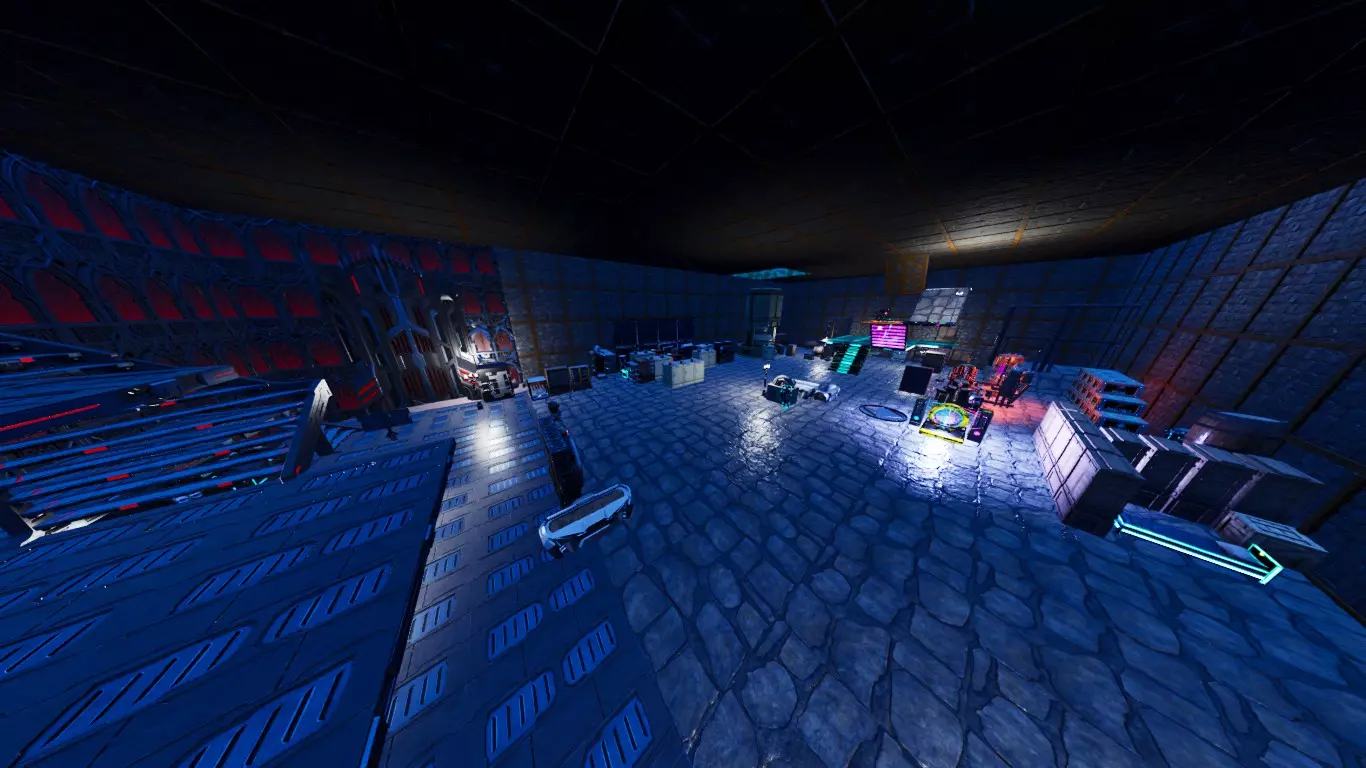
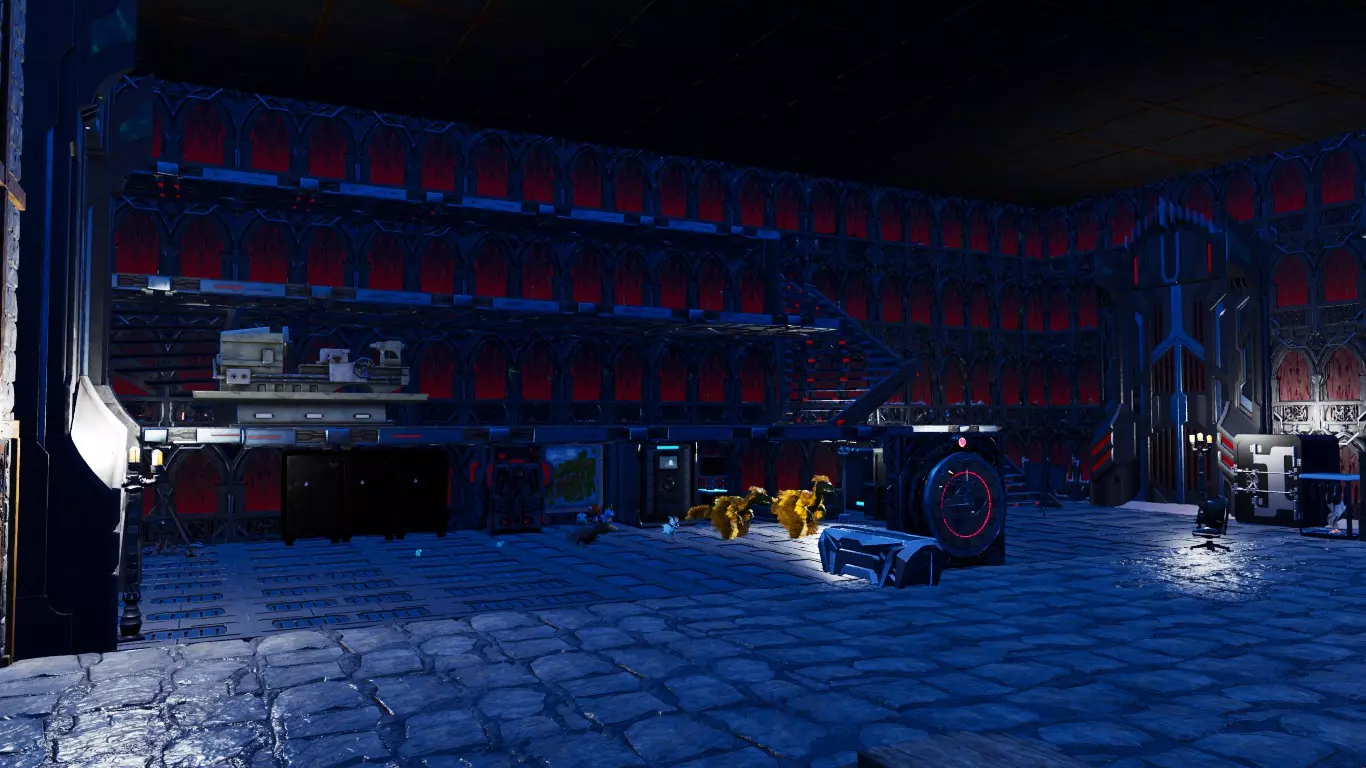
这或许就是本指南的结语了,但你可以通过评论提出建议来进一步完善它。评论区不允许争论,毕竟不是每个人都使用相同的设备。好了,幸存者!选择你的出生点,在方舟中生存下去吧。 额外提示! - 按键盘上的END键隐藏游戏中的恐龙名称,可以提升更多性能。 - 超级望远镜对性能影响较大,仅在需要时使用。 - 发现自己在原地“橡皮筋”(网络延迟导致的角色回弹现象),但网络连接正常?骑上恐龙。如果已经骑乘,就下来。这能解决问题。不过,如果飞行时频繁出现这种情况…… - 穿上充能的泰克装甲以减轻坠落伤害,或者飞回恐龙身边。 - 快捷栏里始终备几个降落伞,这样就能有额外时间吹口哨让恐龙跟上。- 若你在床铺上睡过觉后登录游戏,只需重新躺下再起身即可修复人物回弹问题。 使用GTX980显卡时,打开物品栏会使GPU使用率增加10-20%。 更新后游戏补丁安装缓慢?尝试确保驱动器有足够空间,理想情况下需额外300-400GB空间。 - 若安装驱动器空间不足,Steam会使用其他有足够空间的驱动器进行补丁安装,且往往会选择性能最差的驱动器。 - 若所有驱动器都没有足够空间完全重新安装ASA,那你可能会遇到麻烦。 广播 “这不可能……对吧?绝不可能!”幸存者……我建议你对自己的系统多一点信心……打开你的开放广播软件(OBS) 进入设置,在左侧栏中找到输出选项。
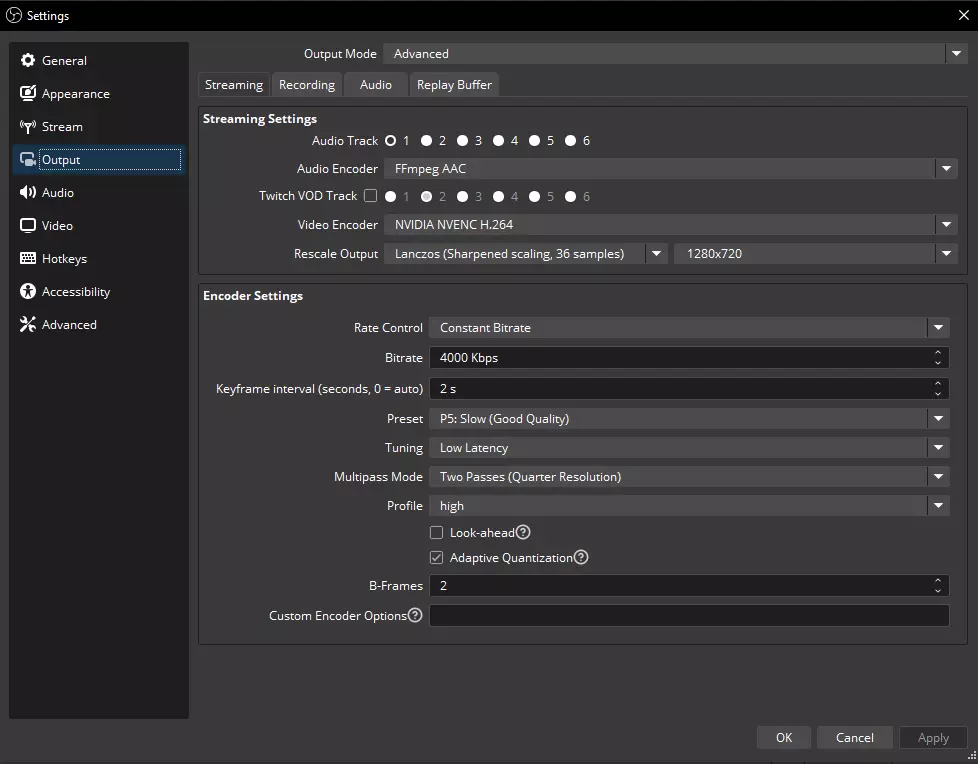
音频编码器 - FFmpeg AAC 视频编码器 - NVIDIA NVENC H.264 输出缩放 - Lanczos(锐化缩放,36样本)/ 1280x720 编码 - “我记得你在上一章说过降低分辨率会让所有东西都像素化之类的!”……这不一样。这样可以确保直播平台对输出进行缩放,让观众可以选择更高或更低的画质,因为720p是基准常量中的标准分辨率。我可以继续了吗?太好了! 编码器设置框。速率控制应始终设为恒定比特率。比特率完全取决于你的互联网服务提供商(ISP)套餐。有趣的是,我们都进入2026年了,农村网络仍然相形见绌。由于我的ISP,我的比特率设为4000,但如果你有强大的网络,可以设为6000。关键帧间隔 - 2秒。如果您要向Twitch进行直播,这是基本设置,请勿更改。 预设 - P5:慢速(画质良好)。略低于平均水平,此设置不会占用过多资源,同时能保持画质。 调谐 - 低延迟。 多遍模式 - 两遍(四分之一分辨率)。 配置文件 - high。此设置会在您点击“开始直播”按钮时,将OBS的进程优先级设为“高于正常”。 前瞻 - 关闭。此设置类似于游戏的【图像放大技术】。我们不需要另一套像【双门齿兽】一样跳来跳去的可变视觉质量设置,它还会占用资源。将鼠标悬停在(?)上可了解更多信息。 自适应量化 - 开启。将鼠标悬停在(?)上可了解更多信息,因为我刚睡醒。 B帧 - 2。 不要忘记点击【应用】以保存您的设置。
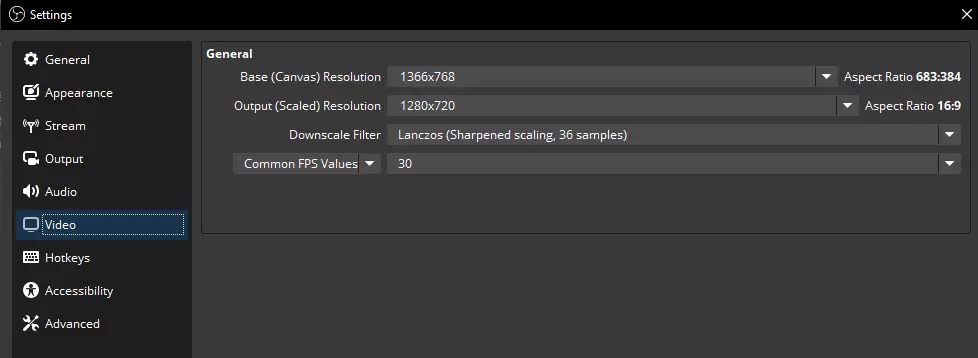
现在我们来看设置中的视频选项卡,在这里我们可以进一步调整缩放输出。注意我们的基础画布分辨率【不是标准的宽高比】。直播平台不喜欢这种情况。683:384?没错,他们会对此不满。将输出(缩放后)分辨率设置为1280x720,以获得行业标准的16:9比例,这样观众就能选择画质选项了。 缩放滤镜 - Lanczos(锐化缩放,36样本)。 在这个下拉框中,我们要选择通用FPS值并将其设置为30。由于我们以30fps的帧率玩游戏,所以不需要输出更高的帧率。 应用这些设置,然后从左侧列表中选择高级选项。
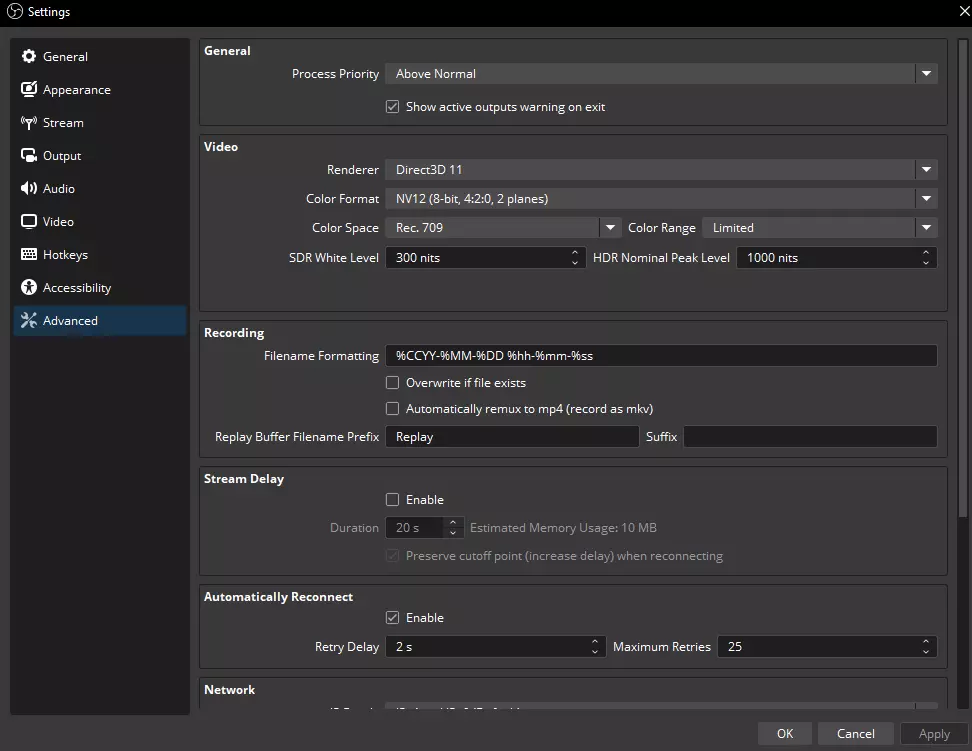
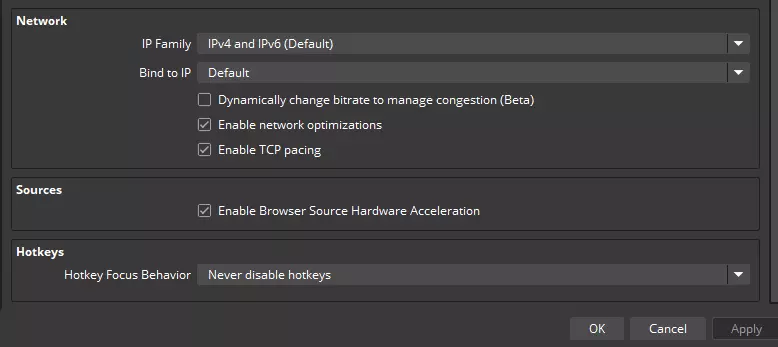
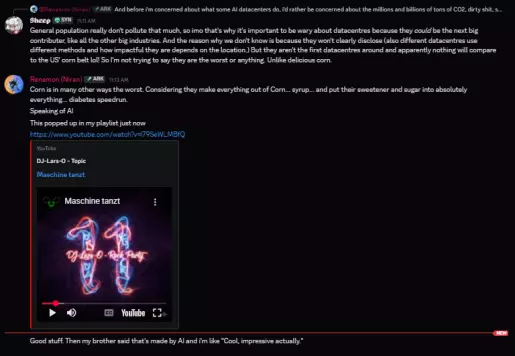
我不会在这部分深入探讨,因为我假设你至少有一些相关经验,或者有能力自己琢磨明白。不过,对于PVP玩家…… 【请使用直播延迟设置】。你没有理由被直播狙击。欢迎来到公开环境。做好你该做的事。 总之,是的,你可以直播《方舟:生存飞升》。这也意味着,只要有我在,高端PC用户就再也没有借口了。《方舟:生存飞升》的运行效果取决于你的设置。如果你把设置调得让游戏运行得比玛瑙螺还慢,那是你自己的问题,不是Wildcard的错。避免 驯服生物 凤凰——由于视觉效果和/或动画的原因,当靠近(5-10英尺内)并注视凤凰时,它会严重影响你的游戏性能。驯服它很麻烦,因为会增加输入延迟并导致帧率不稳定。骑乘凤凰还算可以,但仍会对性能产生负面影响,可能让人感到眩晕。我认为这是一种值得费力驯服的珍贵生物,但不要把它放在你经常活动的地方。 - GPU使用率会增加约60%以上 区域 瓦尔盖罗 翡翠森林——如果你从水晶入口进入,在前往地下区域的过程中要准备好经历几次加载卡顿(3-5次)。卡顿后,准备好通过下马/上马来重置位置,以解决橡皮筋现象。带有AI缩略图的任何模组——如果他们在图片中使用了AI,那么他们很可能在纹理中使用了AI,也可能在代码中使用了AI。 KBD Ascended:Kraken_1制作的Valyrian Reins模组——在高渲染负载下,Valyrian Reins会在瞬间自动卸下并重新装备,导致被驯服生物立即失去一半耐力。这种情况在使用凤凰时最为常见,但任何使用该模组装备的生物都可能出现此问题。修复后将更新。 AI黑名单 - 模组制作者 35%完成。列入此处的名称表示其对生成式AI有兴趣、认为其很酷,或在某种形式上积极使用生成式AI。如果我遗漏了任何名称,请在评论区指出。这些名字不会因任何原因被移除,即使他们选择替换资源或抱怨相关人员希望如此(你本可以说“不”)。从该列表中移除的唯一方式是由艺术家联系我并提供该艺术作品的项目文件,除非另有说明。模组图标已通过7个以上的生成式AI检测器筛选。NiranV,如其Discord服务器所示——可通过模组描述公开访问,不在移除范围内。
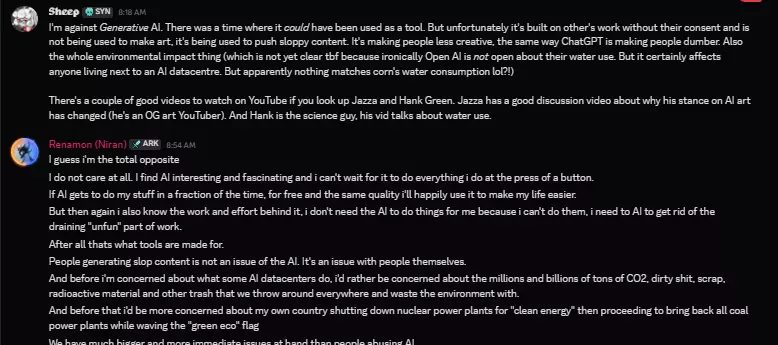
coco_ape — Thumbnail CyberAngel — Thumbnail kavan87 — Thumbnail pelayori — Thumbnail Silentrizz — Thumbnail W1K1P3D14 — Thumbnail thinkaboutit — Thumbnail Sandi_00 — Thumbnail HyPerZ_XD — Thumbnail Joehelp — Thumbnail Nanoh — Thumbnail HexenLord — Thumbnail Azuremoon13 — Thumbnail Valyria — Thumbnail MrChaos — Thumbnail TheRealHypernatrema — Thumbnail Brandimade — Thumbnail Cocolosowasted — Thumbnail Jams_uWu — Thumbnail GodOfNoiseMods — Thumbnail CZSHomer — Thumbnail Quellcrest — Thumbnail Jods — Thumbnail Kiz3rMomo — Thumbnail Deckard — Thumbnail Lethal_Plugins — Thumbnail PeterPan — Thumbnail equillizer04 — Thumbnail TeaBagBrit — Thumbnail unknown01110101 — Thumbnail SnowyTrain — Thumbnail Shinygati — Thumbnail Monark37 — Thumbnail Yoru029 — Thumbnail WETBATMAN — Thumbnail LordErbosGaming — Thumbnail mxtsdev — Thumbnail Glitch_DK — Thumbnail GUNN3R — Thumbnail RedDwarf_Mods — Thumbnail sektor50000 — Thumbnail Loops117 — Thumbnail nevcairiel — Thumbnail SpitfireSolutions — Thumbnail Natanorcus — Thumbnail ragingarcher — Thumbnail HNStudios — Thumbnail oldmate124 — Thumbnail Kineko_1 — Thumbnail RyanLucas007 — Thumbnail ElementalLegion — Thumbnail elkay — Thumbnail brunoamaraltm — Thumbnail KalugaStudios — Thumbnail SlayerXtremeTV — Thumbnail Sloyserg — Thumbnail j26arkitecto — Thumbnail belkaraine — Thumbnail Mawbster — Thumbnail kalahad_ — Thumbnail bry4n — Thumbnail Ketaros — Thumbnail TheNyor — Thumbnail EpicMinerva — Thumbnail Lutralix — Thumbnail JohnD — Thumbnail YuTayARKMods — Thumbnail Trixt3r — Thumbnail BADSBC — Thumbnail AlmostNormal — Thumbnail DreamDoctor — Thumbnail Cannibalistik — Thumbnail EJ_TY — Thumbnail mewingpie3645 — Thumbnail Berus — Thumbnail TheChetu — Thumbnail pig871 — Thumbnail Fantiuz91 — Thumbnail brunoamaraltm — Thumbnail anialatorx1 — Thumbnail ArkkoviaMods — Thumbnail HighArk_Vox — Thumbnail TROCKII — Thumbnail Shokomaki — Thumbnail Brandimade — Thumbnail Farkom_net — Thumbnail Petermadnize — Thumbnail TheRealBob — Thumbnail azkalimas — Thumbnail speajax — Thumbnail T4LLY7 — Thumbnail TheGrandSeraph1 — Thumbnail twasmuth2003 — Thumbnail Cvijo_G — Thumbnail applez — Thumbnail Cezog — Thumbnail Farkom_de — Thumbnail leanedtv — Thumbnail cyrusCreates — Thumbnail Seb2121 — Thumbnail BangPlaysGames — Thumbnail cai1343005339 — Thumbnail TIGERX — Thumbnail Troyar_ARK — Thumbnail KromarTDW — Thumbnail AI Blacklist - Streamers Will be filled over time. Soon, but not right now as I'm busy with other things. Forgive me for not doing this sooner.The names put in here have expressed interest in Gen-AI, think it's cool, or actively utilize Gen-AI in some form. If I miss any names, please call them out in the comments section. These names will not be removed for any reason, even if they choose to replace assets or whine Guide Update Log Posting patch notes to the guide! This way you can see what changes over time. I'm in this for the long haul, just like my story completion playthrough with friends.ALL TIMES ARE ESTDecember 24, 11:32pm-Fixed minor spelling mistake in The Console Chapter (3:55pm) -Added Chapter Guide Update Log -Added AMD GPU equivalent in Chapter The Main Menu Settings December 25, 6:41pm-Added info about Weather Events in chapter The Console December 27, 8:26am-Added killparticles to the Chapter The Console -Added entry to the Chapter Bonus Tips! (10:11am) December 28, 10:52am-Updated r.Lumen.DiffuseIndirect.Allow 0 impact in Chapter The Console December 30, 12:46am-Added Chapter Broadcasting and begun info filling -Populated Chapter Broadcasting (2:03am) -Added Chapter Current Investigations and populated info (9:44am) December 31, 4:18am-Added Screenshot to Chapter How Does it Look? -Capitalized chapter How Does It Look for consistency -Added QA estimated timeframes for maps in Chapter Current Investigations (3:00pm) -Added Chapter Jiniix806 Request after Chapter The Console and populated info (9:35pm) January 2, 12:38pm-Added info to the end of 4th paragraph in Chapter The Main Menu Settings -Added entry to the Chapter Bonus Tips! (2:09pm) January 5, 8:02am-Added 2 entries to the section ASA CLIENT in Chapter Current Investigations January 6, 9:20am-Added Chapter Avoid and populated with info -Changed info in Chapter Current Investigations January 7, 6:00am-Added MODS section in Chapter Avoid -Removed redundant time clarification in Chapter Guide Update Log -Added tip under Rubberbanding in the Chapter Bonus Tips! (6:17am) January 10, 11:09am-Added more entries to the Chapter The Console, edited descriptions of some others -Added artifact impact to killparticles in Chapter The Console (7:28pm) January 13, 9:52am-Updated r.Streaming.PoolSize line descriptor in Chapter The Console January 14, 12:53pm-Updated Chapter Current Investigations January 15, 5:25am-Clarified keybind name in Chapter The Console -Added GPU usage to Phoenix in Chapter Avoid (5:34am) January 17, 9:49am-Added Chapter AI Blacklist, Section 1, populating with names at a later time -Updated introductory text -Removed some screenshots in Chapter How Does it Look? (9:40pm) -Updated command line r.MaterialQualityLevel in Chapter The Console (9:43pm) -Clarified Chapter AI Blacklist, Section 1 within text body (9:55pm) January 18, 1:37am-Retitled Chapter to AI Blacklist - Modders -Added Chapter AI Blacklist - Streamers, populating with names at a later time January 20, 4:24am-Populated Chapter AI Blacklist - Modders with names January 25, 4:26pm-Updated FX.MaxCPUParticlesPerEmitter 0 description in Chapter The Console January 28, 6:56pm-Added Pagefile Location to the Chapter Current Investigations February 2, 8:45am-Updated overall performance of tested maps in Chapter Current Investigations February 11, 12:17pm-Added command line to the Chapter The Console in light of a recent update affecting dino polys February 14, 2:28pm-Added entry pertaining to update patching in Chapter Bonus Tips!