换一换
换一换 



* Last Update 2024.09.15 (Based on 0.912B) This guide explains the game settings for single-player and player-hosted multiplayer games. Notice English translation uses machine translation. Although it may have a strange part, please understand. Perma Death Setup to delete saved data when players die. Value : Off / Individual / All Off : No matter who dies, save data is not deleted. Individual : If the host player dies, the save data is deleted, but if the client player dies, he or she can rejoin with a new character. All : The save data is deleted when any one of them dies. Default : Off Comment : Perma Death your save is lost upon death. There is option for Individual or all. On Death Drop *Setting item added in 0.906X. Set what will be dropped there when you die. Value : Backpack/Weapon / Equipment/Inventory / Everything Backpack/Weapon : It will drop hand-held weapons and backpacks, but, Slots 1 to 5 and the contents of the pockets are not dropped. Equipment/Inventory : Drop the weapon in your hand, your backpack and the contents of slots 1 to 7 and your pockets. Everything : They drop everything, including clothing and other worn items, and wear their initial equipment after respawn. Default : Backpack/Weapon Value Backpack Hand-held Weapon Slots 1 to 7 Pocket Wearing Equipment Backpack/Weapon Drop - - Equipment/Inventory Drop Drop - Everything Drop Drop Drop Clear Infection on Death Whether the infected state is cleared when the person dies and respawns. Value : On / Off On : When you die and respawn, your infected state is cleared. Off : When you die and respawn, your infected state is not cleared. Default : Off Comment : Clear Infection on death - By design, when you die, with infection you will respawn with that infection. PvP Whether a player's attack hits another player. Value : On / Off On : Player's attacks hit other player. Off : Player's attacks do not hit other players. Default : OffSome use it as hostility between players, while others think it is strange that attacks between playersare invalid. Decide with the participants. Disable Eagle Eye *Setting item deleted in 0.908. This setting is used to disable Eagle Eye, a skill that allows players to see the location of other players on the map screen. Value : On / Off On : Eagle Eye skill is disabled. Off : Eagle Eye skill is enabled. Default : Off Air Drop Setting to enable or disable Air Drop (Supply Drops). Value : On / Off On : Air Drop (Supply Drops) is enabled. Off : Air Drop (Supply Drops) is disabled. Default : On Comment : Air Drops are enabled as soon as you activate the radio tower, the location will be indicated on your map.There are valuable items that can only be obtained through Air Drop (Supply Drops). Weapon Break You can set whether hand-held weapons and tools will be broken and lost when their durability value reaches 0%. Value : On / Off On : All hand held weapons and tools will break. Off : Non-metal hand-held weapons and tools break. Default : OffWhen weapon break is enabled, weapons and tools whose durability value has dropped to 0% will be broken and lost. (Excluding crowbar) When weapon break is disabled, weapons and tools whose durability has been reduced to 0% will not be lost, but their icons will turn red and their performance will be reduced. (Some items will be broken and lost when their durability value drops to 0% even if weapon break is disabled.) Respawn Loot Set the item's respawn. Value : On / Off On : Items respawn. Off : Items do not respawn. Default : OnEven if respawn loot is set to on, it will not respawn in the following cases. - When the container is not emptied. - When a respawn point is placed nearby. In addition, in some cases, empty is selected when judging respawn, resulting in an "empty container as a result of respawn" in case of bad luck.Players who mainly want to enjoy survival should set it to off. Other players may want to set it to on. If it is set to on, there will be a surplus of supplies to be disposed of. Loot Respawn Time *Setting item modified in unknown update. The item respawn cycle can be set. Value : 10Min ~ 300Min 10Min ~ 120Min When the time set here elapses in real time, the items in the container respawn. Default : 60Min Pickup Respawn Time *Setting item added in 0.907. The item respawn cycle can be set. Value : 15Min ~ 299Min / Never When the time set here elapses in real time, items other than containers respawn. Default : 90Min Loot Rarity You can set the rarity of items to be spawned. Value : Scarce / Low / Normal / Prentiful / Abundant Scarce : Rarely can you find an item. Low : You can find a few items. Normal : Items can be found normally. Prentiful : Find a few more items. Abundant : You can find a wide variety of items. Default :NormalPlayers who want to mainly enjoy survival should set it to scarce. Players who want to mainly enjoy exploration and base building should set it to abundant. The other settings are just right for players who want to focus mainly on survival and are new to the game. Air Drop Every The cycle of Air Drop (Supply Drop) can be set. Value : 1Day ~ 30Days When the number of days set here elapses in the game, an Air Drop (Supply Drop) is dropped. Default : 3DaysIf the cycle is too short, there will be a surplus of valuable items. Zombie Difficulty *Custom was added in 0.902B. You can set the intensity of zombie(zeeks). Value : Very Easy / Easy / Default / Hard / Very Hard / Nightmare / Custom Very Easy : Easy : Default : Hard : Very Hard : Nightmare : Custom : Zombie Health : Value : Very Easy / Easy / Default / Hard / Very Hard / Nightmare Zombie Speed : Value : Very Easy / Easy / Default / Hard / Very Hard / Nightmare Zombie Damage : Value : Very Easy / Easy / Default / Hard / Very Hard / Nightmare Default :Default Comment : Zombie difficulty changes the chase speed, health and the damage of the zombies. Play Nightmare mode if you dare! PS: Select custom if you want to adjust individually.If zombie speed is set to nightmare, the running speed of the fastest zombie will be the same as the player's running speed. If you set the zombie speed to anything other than nightmare, you can easily outrun them outdoors. Even if zombie health is set to nightmare, the ability to kill a zombie with a single head shot is the same as very easy. Hostile Human Difficulty *Setting item added in 0.906X. You can set the intensity of hostile human AI. Value : Very Easy / Easy / Default / Hard / Very Hard / Nightmare Very Easy : Easy : Default : Hard : Very Hard : Nightmare : Default :Default Comment : Hostile Human difficulty changes the chase speed, health and the damage of the Hostile Humans. Play Nightmare mode if you dare! Zombie Amount Multiplier You can change the amount of zombies spawn. Value : 0.25 ~ 10 *Can be set in 0.25 increments Default : 1 Comment : Zombie multiplier beyound 2.0 you may experience adverse performance issues.In a multi-player game, there is no automatic correction based on the number of players. The amount of zombies will be just right if the number of players is set equal to the number of players. If the number of players is set at more than twice the number of players, close combat becomes tougher, and the game changes to one in which stealth kills are the main focus. Human Amount Muliplier You can change the amount of hostile humans spawn. Value : 0.25 ~ 10 *Can be set in 0.25 increments Default : 1The difficulty of the battle increases, but they always have items, which conversely reduces the difficulty, e.g. if the item rarity setting is scarce. Zombie Dog Multiplier *Although not mentioned in the update announcement, the options have been changed from 9 levels to 3 levels. You can change the amount of zombie dogs spawn. Low(4steps) / Default(4steps) / High(1step) Low Default High Default : DefaultBased on default(step1), high seemed to spawn about 2 times as many zombie dogs. *Percentage increase/decrease after the change has not yet been confirmed. Zombie Respawn Timer You can set the respawn cycle of zombie. Value : 10Min ~ 295Min / Never *Can be set in 5Min increments 10Min ~ 295Min : Respawns at the set period. Never : Zombie in a place once defeated will not respawn. Default : 30MinIf you prefer a tougher situation, you may want to increase the multiplier and shorten the respawn timer. Human Respawn Timer You can set the respawn cycle of human. Value : 10Min ~ 295Min / Never *Can be set in 5Min increments 10Min ~ 295Min : Respawns at the set period. Never : Human in a place once defeated will not respawn. Default : 30MinIf you prefer a tougher situation, you may want to increase the multiplier and shorten the respawn timer. Animal Respawn Timer You can set the respawn cycle of animal. Value : 10Min ~ 295Min / Never *Can be set in 5Min increments 10Min ~ 295Min : Respawns at the set period. Never : Animal in a place once defeated will not respawn. Default : 30MinIt should be never if you want a harsh environment, because when animals respawn, food access becomes easier. Starting Season Value : Summer / Autumn / Winter / Spring Summer Autumn Winter : Season when crops do not grow and wolf numbers increase. Spring Default : AutumnIf you do not lock day per season, the easiest starting season is spring. If you want to enjoy severe survival, set winter and lock day per season. Days per Season *Locked added at 0.903H You can set the number of days per season. Value : 1 ~ 30 / Locked 1 ~ 30 Locked : The season will be locked in the starting season setting. Default : 3 Day Duration You can set the ratio of day to night. Value : Day(50)-Night(10) ~ Day(10)-Night(50) Day(50)-Night(10) Day(40)-Night(20) Day(30)-Night(30) Day(20)-Night(40) Day(10)-Night(50) Default : Day(40)-Night(20) Vital Drain You can set the drain speed for hunger, thirst, and stamina. Value : Slow / Normal / Fast Slow Normal Fast Default : Normal Companion Health *Setting item added in 0.906X. The dog companion's health can be set. Value : Low / Default / High Low Default High Default : Default Companion Damage *Setting item added in 0.906X. The dog companion's damage can be set. Value : Low / Default / High Low Default High Default : Default Dog Companion Count *The item name was changed from “Dog Companion Count” to “Dog Companion Spawns”. (Changed version unknown) *Setting item added in 0.906X. The amount of dogs placed in the world can be adjusted. Value : 1 ~ 4 Default : 1 Food Decay *Setting item added in 0.912. You can set the rate at which food and drink decays or disable decay. Value : Disable / Slow / Default / Fast Disable : Food and drinks do not decay. Slow : Default : High : Default : Default House Generator Drain *Setting item added in 0.912. You can set the speed at which the house generator consumes fuel. Value : Slow / Default / Fast Slow : Default : High : Default : Default Setting example for mainly exploration and building Perma Death : Off On Death Drop : Backpack/Weapon Clear Infection on Death : On PvP : Off Air Drop : On Weapon Break : Off Respawn Loot : On Loot Respawn Time : 60Min Loot Rarity : Normal ~ Abundant Zombie/Hostile Human Difficulty : Nomal Zombe Amount Multiplier : 1.0 *In the case of multiplayer, the value is equal to the number of players. Human Amount Multiplier : 1.0 *In the case of multiplayer, the value is equal to the number of players. Zombie Dog Multiplier : Default(step1) Zombie/Human/Animal Respawn Timer : 30Min Starting Season : Spring Days per Season : 3Days Day Duration : Day(50)-Night(10) Vital Drain : Slow Companion Health : High Companion Damage : (As you like) Dog Companion Count : 4 Setting example for novice survivors Perma Death : Off On Death Drop : Backpack/Weapon Clear Infection on Death : Off PvP : On (There should be friendly fire) Air Drop : On Weapon Break : On Respawn Loot : Off or On(Loot Respawn Time : 60 ~ 120Min) Loot Rarity : Normal or Low or Scarce Air Drop Every : 5Days ~ 10Days Zombie/Hostile Human Difficulty : Hard of Very Hard Zombe Amount Multiplier : 2.0 ~ 4.0 Human Amount Multiplier : 2.0 ~ 4.0 Zombie Dog Multiplier : Default(step1) ~ Default(steap3) Zombie/Human Respawn Timer : 30Min Animal Respawn Timer : 120Min ~ 295Min Starting Season : Autumn Days per Season : 5Days ~ 10Days Day Duration : Day(40)-Night(20) Vital Drain : Fast Companion Health : High Companion Damage : (As you like) Dog Companion Count : 1 ~ 4Get food and warm clothing for the winter as soon as possible. - Crops do not grow in winter. - Don't die of hypothermia. Setting example for experienced survivors Perma Death : All or Individual On Death Drop : (Perma Death, so it doesn't make sense) Clear Infection on Death : (Perma Death, so it doesn't make sense) PvP : On (There should be friendly fire) Air Drop : Off Weapon Break : On Respawn Loot : Off Loot Rarity : Scarce Zombie/Hostile Human Difficulty : Nightmare Zombe Amount Multiplier : Max. to the extent that the host PC is not compromised. Human Amount Multiplier : 0.25 or Max. to the extent that the host PC is not compromised. Zombie Dog Multiplier : High Zombie/Human Respawn Timer : 10Min Animal Respawn Timer : Never Starting Season : Winter Days per Season : Locked Day Duration : Day(10)-Night(50) Vital Drain : Fast Companion Health : Low Companion Damage : Low Dog Companion Count : 1Since no valuable items could be obtained from zombie, the respawn timer was more troublesome 10Min than never. If you are not good at Hostile Human, set it to the maximum value to increase the risk in battle. If you are good at Hostile Human, set it to minimum to make it impossible to pick up items.Spoiler In the beginning, rag is your substitute for food and drink. There is always a location where cement is put in place. Important Items : Electronics / Electrical Cable / Pick Axe *Once you have these, you can survive forever.
《HumanitZ》游戏设置指南

导读
这是基于《HumanitZ》0.912B版本的游戏设置指南,涵盖永久死亡、死亡掉落、PvP、物资刷新、丧尸难度等多类设置的参数说明,还提供了探索建造、新手、资深玩家三种不同的设置方案,帮助玩家按需调整游戏体验。


评论
共0条评论

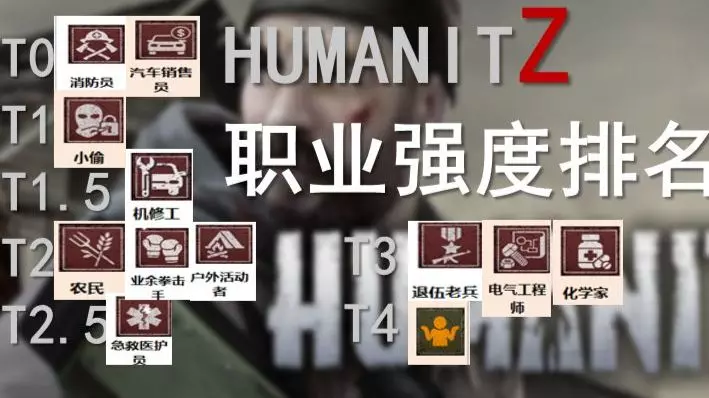
《HumanitZ》职业系统怎么样?人道Z职业介绍与梯度排名(个人主观向),对比僵尸毁灭工程哪个好玩?
《HumanitZ》(人道Z)这款游戏目前的职业系统设计得怎么样?总的来说,现在职业系统设计得还是比较简陋,有的职业还比较抽象。目前版本1.0,要看以后还有没有…
2026-06-06 12:400赞 · 0评论
HumanitZ 控制台模组(葡萄牙语巴西版)
Dica /adminw permite buscar o item. OBS: nomes em inglês. Condições para uso de …
2026-02-19 19:000赞 · 0评论
HumanitZ 热修复补丁 .918.ZX4
HumanitZ 热修复补丁 .918.ZX4 亲爱的幸存者们: 我们决定发布另一个小型补丁,以修复部分问题并改善游戏体验。 服务器信息:请重启服务器以获取最新…
2026-02-13 09:000赞 · 0评论
Total Lockdown的理想设置
如何在《全面封锁》中不损失画质提升帧率?如何去除眼前的模糊效果?本指南将为大家解析《全面封锁》中的每一项画质设置。让我们开始吧。
2026-04-03 16:000赞 · 0评论

《忆蚀:第一章 | 第一天》常见问题与玩家指南
首先,非常感谢整个社区对我们的支持。为确保您获得最佳体验,强烈建议您在开始游玩前阅读以下设置指南和已知问题: 晕动症与舒适度设置 忆蚀默认启用了许多视觉效果。如…
2026-03-31 07:062赞 · 0评论
《荒野神枪》- 西班牙语字幕翻译与分辨率调整
本指南提供了将《荒野神枪》的字幕更改为西班牙语以及调整屏幕分辨率的说明,包括清晰的步骤。按照指南操作,玩家可以享受带有西班牙语字幕和优化分辨率的游戏。 《荒野神…
2026-03-21 16:000赞 · 0评论
《无限法则》攻略
安装、设置等。 《无限法则》 信息
2026-02-20 10:000赞 · 0评论

OpenTTD 设置指南(详细版)[完成度73.1%]
本指南将帮助你在全新安装游戏后正确配置游戏。 【施工中】(自2021年4月18日起) 我之前几乎一直生病,所以暂时搁置了本指南。 这是经过完善的重新上传版本,但…
2026-02-14 16:000赞 · 0评论
《HumanitZ》新手入门指南
《HumanitZ》新手入门指南将教你游戏的基础知识,并告诉你在僵尸末日的第一天应该做什么。 HUD界面说明
2026-02-20 13:000赞 · 0评论
单人/多人模式所有控制台命令
All Console Commands at current for HumanitZ Console Commands - HumanitZ Admin C…
2026-02-20 01:000赞 · 0评论
暂无更多
最新更新
- 《HumanitZ》1.04.X 热修复公告 — 《HumanitZ》1.04.X热修复公告 1.我们发现1.04版本更新后,在AI活动相关方面出现了崩溃问题,主要发生在AI死亡时,同时还存在潜在的内存泄漏问题…
- 《HumanitZ》1.04版本更新内容 — 《HumanitZ》1.04版本更新内容 各位幸存者, 又一个两周过去了,我们带来了新的补丁!正如上一次更新中提到的,本次补丁主要侧重于修复漏洞。这并非目前我们…
- 《HumanitZ》1.03.B版本更新内容 — 《HumanitZ》1.03.B版本修复公告 幸存者们, 又一个快速热修复补丁来了! 1. 修复了在哈德森大桥下车时,载具会传送到上一次已知停放位置的问题 2.…
- 《HumanitZ》1.03.A版本更新内容 — 《HumanitZ》1.03.A版本修复公告 幸存者们! 1.03版本发布后出现了一些问题,以下是已发现并修复的内容: 1. NPC行为异常 2. 背包和物品消…
- 《HumanitZ》1.03版本更新内容 — 《HumanitZ》更新内容 1. 本次更新因进行了一些重大性能调整,比我们既定的双周更新周期有所延长,这也导致路线图、新内容以及更多便利性功能的添加略有延迟。…
- 《HumanitZ》新手职业详细指南 — 大家好,朋友们。本指南将包含《HumanitZ》游戏中所有职业的信息,希望对大家有所帮助。 新手职业完全指南!
- 人文Z-视频介绍
- 《HumanitZ》更新公告 — 《HumanitZ》更新延迟公告 各位幸存者: 首先,本周的更新将略有延迟。我们正在进行一些额外的性能优化,这些优化在最终验证阶段花费的时间比平时更长,我们需要…
- 《HumanitZ》新手入门指南 — 《HumanitZ》新手入门指南将教你游戏的基础知识,并告诉你在僵尸末日的第一天应该做什么。 HUD界面说明
- 《HumanitZ》管理员及控制台命令指南 — Take full control of your HumanitZ server with powerful in-game and console comm…