换一换
换一换 


This Starsand Island Guide will teach you the basics of the game, explain the HUD, and give you a walkthrough that guides you through the first hour or two of the game and sets you up for success! How to Play Starsand Island We'll begin our Starsand Island guide by teaching you the basic concepts of the game. Once that's done, we'll explain the HUD elements you'll see while playing, and then we'll follow that with a short walkthrough of your first hour or two of the game. Arriving on the Island After you create your character and dive in, you'll have a short tutorial to complete, and then you're basically left to your own devices. You start at the southern edge of the map, but you can pretty much go everywhere else once you're done with the basics. The island is surprisingly large, and it can take you a few minutes to run from one side to another. Try to stay close to home for the beginning bits; you'll eventually unlock a basic vehicle that will help you move around faster. (Scroll down to our starter guide walkthrough to find out how!) Taking on Professions Starsand Island has five "professions" which are quest chains for different kinds of activities. These professions are: Crafting:[techraptor.net] Making items from raw resources. Farming:[techraptor.net] Growing crops on your land. Fishing:[techraptor.net] Catching fish from rivers, lakes, and oceans. Ranching:[techraptor.net] Raising animals on your land. Exploration:[techraptor.net] Combat items and abilities, mainly used to explore the Moonlit Forest.Each of these professions has its own dedicated multi-stage quest chain that is used to advance deeper into the profession. Additionally, there are the cooking[techraptor.net] and bug-catching[techraptor.net] activities, neither of which are considered core professions just yet. You can make a handful of items by completing the tutorial, but some of the most interesting things in the game are buried deeper in the professions. You'll want to get to all of them eventually! Making Money and Unlocking Blueprints Naturally, a big part of a Farming RPG is making money[techraptor.net], and Starsand Island is no exception. Generally speaking, you can sell just about everything you get your hands on if you want to, whether you craft it yourself or harvest it from the world. Money is mainly used to unlock new blueprints[techraptor.net] once you advance in a profession, buy critical supplies (such as seeds for farming), or expand your land. Of course, there are also a bunch of cosmetic things you can spend your cash on, such as clothing, hair, makeup, decorative furniture for your home[techraptor.net], and pets. Making Friends and the Social App Just like other games in this space, Starsand Island has a colorful cast of characters you can befriend. You can increase your relationships with people by completing Request board requests for them, talking to them once a day, and giving them gifts[techraptor.net]. There's not much information on romance or marriage, but befriending townsfolk has tangible benefits. Certain townsfolk, once befriended, can fulfill requests for you if you need them to. You will also occasionally receive gifts from them, especially if you talk to them every day. The Island Life App Guides Your Journey One of your most powerful tools is your phone, which effectively serves as your menu in the game. Several apps are installed on your phone, and the Island Life app is one of the most important ones on there. The Island Life app essentially guides you toward your next overarching goal. Each completed stage can give you some tangible rewards or unlock new features for you, such as the ability to expand the buildable space on your farm. If you're ever unsure about what you should be doing next, check the Island Life app! The Islandpedia and the Stamp Collection Track Your Progress Another helpful phone app is the Islandpedia. This is essentially a catalog of all of the items you've collected in the game thus far. It's great for tracking your progress with activities such as fishing and bug-catching, and it also has another neat feature: the Stamp Collection. The Stamp Collection is a small sub-menu at the bottom of the Islandpedia that's easy to miss. Essentially, you will earn bonus rewards as you collect more stuff. Many of these rewards are money, so you'll definitely want to check up on it every now and again. The StarNote App Unlocks Cool Stuff Starsand Island has a bunch of reward tracks, and the StarNote app is yet another area you'll want to check. Essentially, the StarNote App is the game's version of achievements. As you progress along the StarNote app reward track, you'll get Starsand (a special currency used for a few things, such as expanding your land or buying profession perks in the Workpedia app) and cosmetic items such as clothing or decorative furniture. Workpedia Gives You Profession Perks There's one more app to address, and that's the Workipedia app. The Workipedia app allows you to spend the aforementioned Starsand currency to purchase perks for each of the five core professions. Advancing to higher tiers in the professions also allows you to buy more powerful perks. Protip: I strongly recommend the Recuperate perk in the Apprentice Crafter section (which increases Stamina recovery while sitting) and the "Effortless Tilling" perk in the Apprentice Farmer section. These will greatly increase your efficiency, especially in the early game. The Mystery of the Moonlit Forest There's more to Starsand Island than cozy farming and exploring the town — you also have the mysterious Moonlit Forest to explore. Essentially, the Moonlit Forest is both the game's dungeon (albeit with only a handful of enemies) and its mines. You'll need a lot of crafting materials to make all of your equipment, especially as you scale up your farming and crafting operations. Start exploring it early — especially because the crafting materials found inside regenerate every day! Building and Expanding One of the neatest features of Starsand Island is its building system. Essentially, you can completely customize your home, piece by piece, if you want to. You'll need a fair amount of crafting materials to do it, though, so you'll want to progress on the crafting profession to unlock better tools. You don't have to build a home yourself, mind; you can also purchase "layouts" which allow you to place pre-made buildings on empty land with minimal effort, assuming the land has been properly cleared. Building aside, you'll also want to use some of your hard-earned money to expand your land. After you've progressed the Island Life app a bit, you'll unlock the ability to buy more land around your home. This gives you more space for farming and raising animals. Getting Around the Island There's one final core element to talk about: transportation. The titular Starsand Island is a big place, and running around everywhere takes forever. Early quests in the crafting profession can unlock useful transportation items such as a skateboard, rollerblades, and a hoverboard. These options aside, you can also rent or purchase mounts and vehicles[techraptor.net]. Mounts and vehicles can be summoned anywhere on the island, so you don't even have to worry about forgetting where you parked them. Starsand Island HUD Explanation
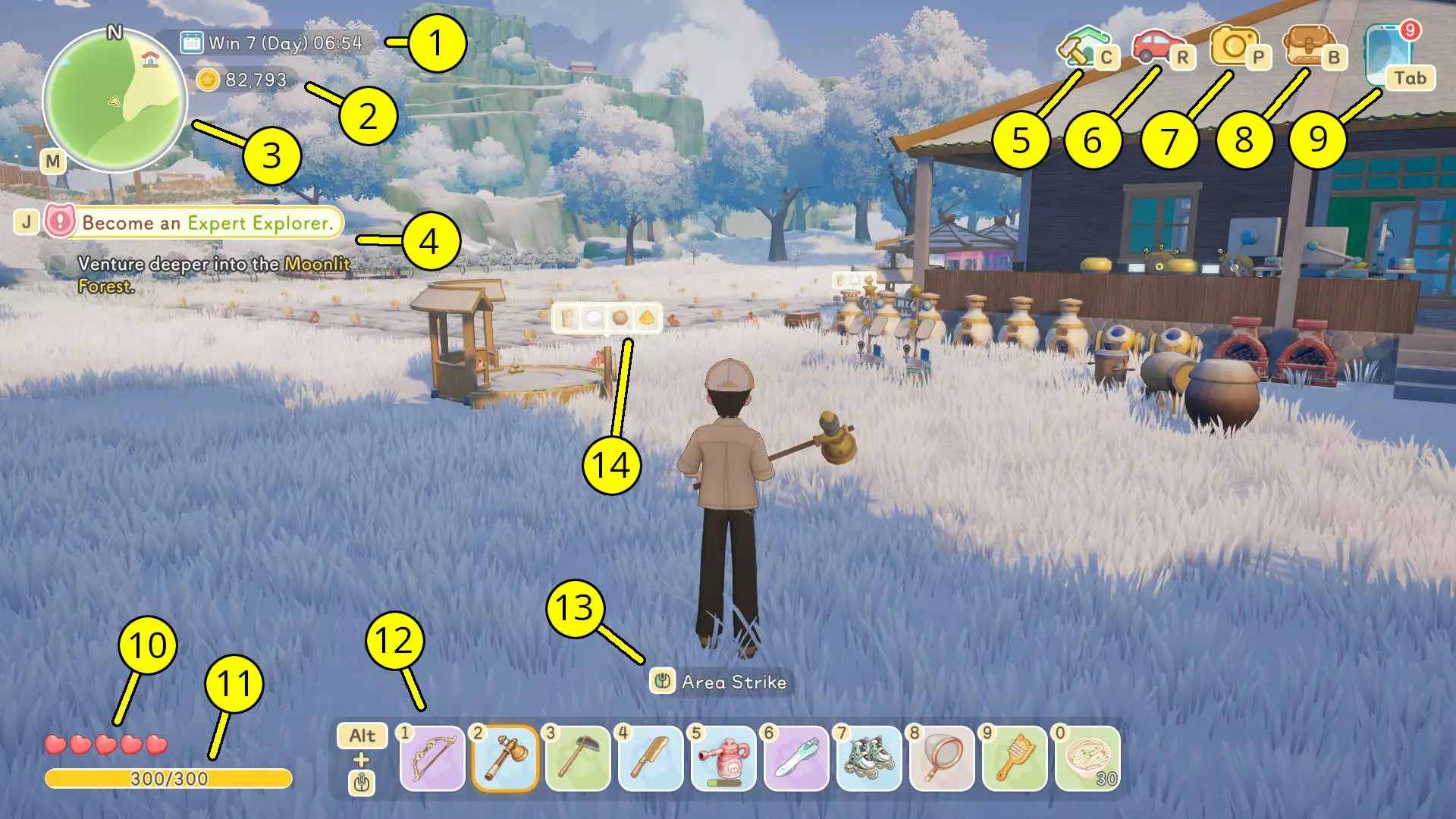
Calendar and Clock: The season, date, time of day, and time are shown at the top left of the screen. Coin: Just below, you can see how much money (called "Coin") you currently have. Minimap: The minimap is at the top left of the screen and shows your immediate area. You can press "M" to open up the full map of the island (or the Moonlit Forest map). Tracked Quest: Your tracked quest (and its current objective) is shown below the minimap. You can change your tracked quest (or track nothing at all) by going into your Journal with "J" or via the menu. Build Mode: Pressing "C" while on your farm allows you to enter build mode. Garage: Pressing "R" opens up your garage, where you can summon your vehicles and mounts. Photo Mode: Pressing "P" brings up your camera and lets you enter photo mode where you can take pictures from a first-person perspective. You can also take pictures of locations or people, and some people will even reward you for taking their picture — especially Tourists. Bag: The bag is your inventory where you store tools, crafting materials, furniture, and other items. Menu: Pressing "Tab" brings up your menu, where you can access your phone and all of its useful apps. Health: Your health bar is represented by five hearts; it's only really a factor when you're in the Moonlit Forest and you might encounter an enemy to fight. Stamina: Your Stamina allows you to perform actions such as chopping down trees or tilling land for farming. You can restore Stamina by eating food or sitting down; it also gets restored to full at the start of a new day unless you passed out the night before or died in combat. Hotbar: The hotbar shows your currently-equipped items, which you manage via your inventory. There are two bars that you can swap between by holding "Alt" and scrolling your mouse wheel. Context-Sensitive Controls: Any special abilities or controls will pop up above your hotbar depending on what tool you have equipped. Items Ready: Any workstations with items you can collect will pop up in a text box if you're close enough to them. Starter Guide Walkthrough Now that we've explained the basics of the game and the HUD, it's time to dive deeper into our Starsand Island guide with our walkthrough! This starter guide walkthrough will take you through the first hour or two of the game and help you make decisions that will make the game a lot easier for you. Let's get started! Creating Your Character As with many other games, you'll want to start by creating your character. Some of the choices you make (such as your sex and your name) can't be changed later, but you will be able to change your hairstyle, makeup, and clothing at a later time. Once you're satisfied with your character, you can jump right into the game and immediately begin the tutorial. Completing the Tutorial You'll enter the world of Starsand Island right in front of a small cabin in the woods. This is your starter home, and you're immediately greeted by Solara, your old childhood friend. Solara will guide you through the basics of collecting resources and crafting. She'll also give you your first blueprint for an Axe. You'll then cut a tree down in front of your house. Once you go inside, she'll give you a blueprint for the Matcha Double Bed and an objective to craft it. Chop down a couple of trees to get the materials you need and craft the Matcha Double Bed at the Worktable outside of your home. Then, go inside your house, open your bag, and go to the Home Decor tab. Right-click on the bed, select "Place," and put it inside of your house. Here's an important tip: your bed does not actually have to be indoors at all. If you want to redesign your home, you can simply place the bed outdoors and use it just fine. Solara will then tell you a bit about Layouts, an optional way to quickly build a home (as long as you have the money and the crafting materials to do it). Choosing Your First Profession Next, Solara asks you to choose your first profession from a selection of three: Crafter, Farmer, or Rancher. The game recommends you take the crafting profession first, and I concur with that choice — crafting is essentially required for the other professions, which also include fishing and exploration. Each profession has a "mentor" who will give you quests to advance deeper into the profession. Each profession also has different tiers: Apprentice, Junior, Intermediate, Senior, and Expert. Advancing to higher tiers unlocks new items to craft and generally increases your potential to make money. The game instructs you to visit Zerine, the mentor for the crafting profession. However, you're essentially free to explore the world from this point, and you can instead choose to meet other townspeople or take on some of the other professions (or even all of them!). Each profession has its own self-contained quest chain that you can follow. Whatever you choose, you'll want to speak with Zerine at some point. Tell her that you want to become an Apprentice Crafter, and she'll give you your first task: crafting a Skateboard, your very first vehicle (of sorts). After your conversation, go to the shopping kiosk in Zerine's General Store and buy the Equipment Blueprint Pack for free. Don't worry about the other items just yet. The Equipment Blueprint Pack unlocks the Cutter I, Charcoal Kiln, Furnace I, and Separator, all of which are used to process materials for crafting or cooking. You can then work on making the Skateboard by following this quest, although there are a few other things we'll want to do, too.
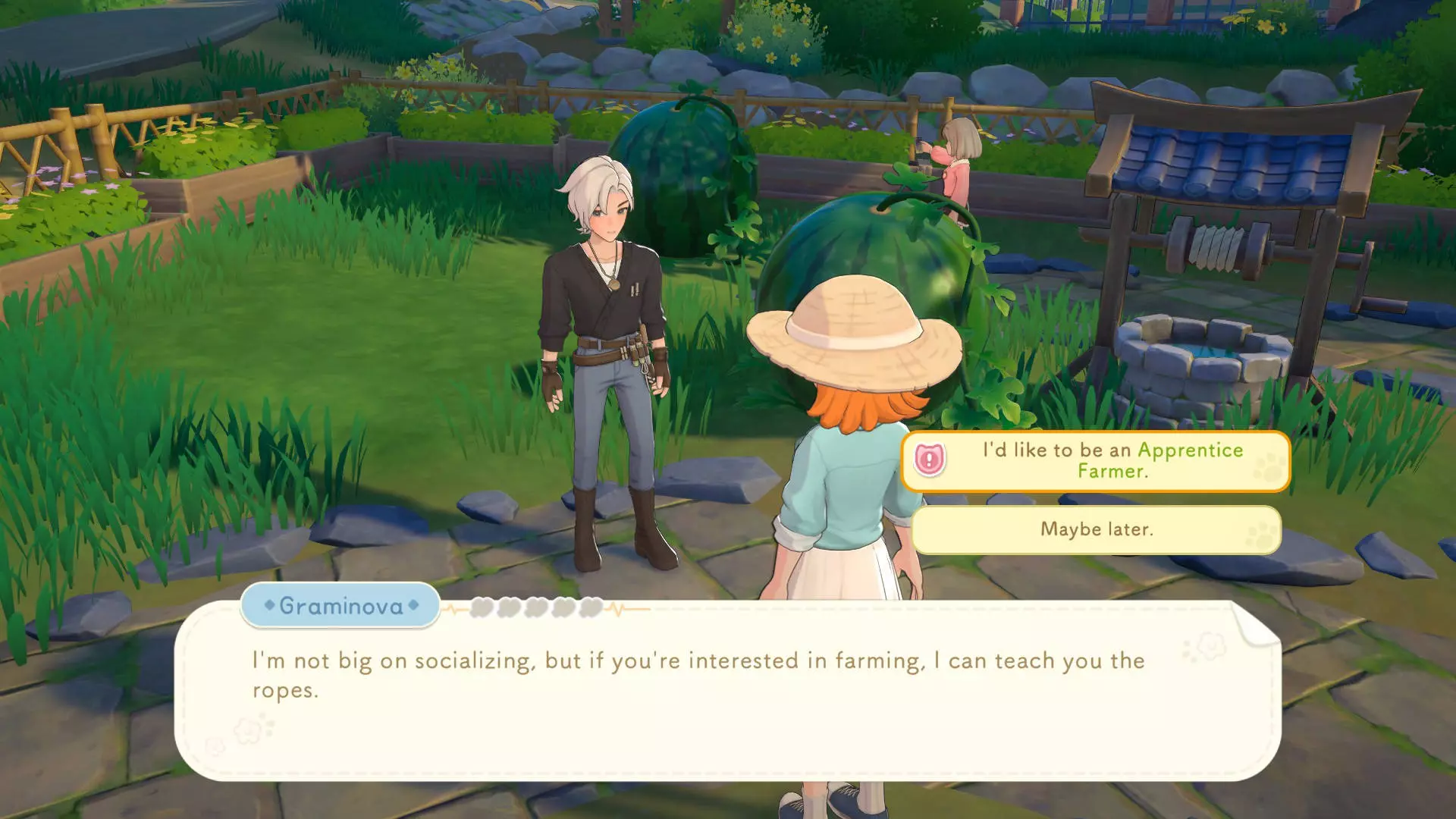
教程并未明确告知,但在完成教程后,你可以与五位导师中的任意一位交谈,并开始学习所有职业。 开始农场 你需要开始赚钱,而在游戏初期,最好的方法之一就是 farming。你已经拥有开始所需的所有装备,但需要找到 farming 导师 Graminova 来开启 farming 职业任务线。 打开地图,在左侧选择【导师】,然后点击 Graminova。跟随导航点找到他,并选择成为【农场学徒】选项。Graminova 会给你一些【成熟肥料 IV】,并让你种植一些小麦。商店可以免费领取3个小麦种子,但建议再购买3个,总共6个。制作一把石锄和一个木制 watering can——购买装备蓝图包后你已解锁这些蓝图——然后清理房屋外的一小块土地。 用锄头开垦6块土地。在快捷栏中选择小麦种子并种到田里,然后浇水。不要使用催熟肥料IV,它价值很高,以后如果你急需种植更有价值的作物时可能会派上用场。 小麦需要18个游戏小时才能成熟,所以我们稍后会进行另一项活动。在此之前,你应该收集3块软木,并在工作台制作一个树桩凳子。 坐下可以缓慢恢复耐力。游戏初期食物供应短缺,在家中放置一把普通椅子,就能让你无需烹饪食物或提前结束当天,即可恢复一些耐力(尽管速度较慢)。