换一换
换一换 




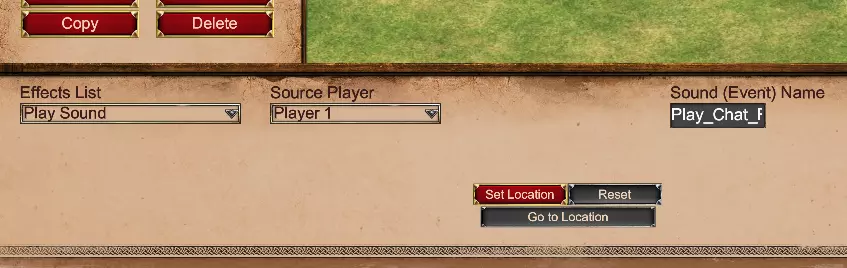
游戏内音频修改或添加新音频以及在场景中使用的指南 简介 《帝国时代2:决定版》采用了由Audiokinetic WWise驱动的全新音频系统。这意味着不再使用.wav或.mp3等文件,并且现在有一个专门的模组系统,该系统与基础游戏中音频文件的存储方式是分开的。因此,在尝试创建音频模组之前,你必须了解许多信息。 本指南将为你提供必要的信息,包括如何在场景中使用现有音效、添加新音效、在DAT文件中重新排列音频,以及用你自己的自定义文件干净地替换游戏内的声音和音乐。目的是让模组制作者的这一过程尽可能简单。本指南还会告知你游戏开发者已知的音频模组系统的若干问题。 【必需】音频电子表格 由于WWise系统的缘故,声音文件不再有有意义的名称。其中一些显示为名称中带有随机数字的.wem文件,另一些则打包为声音库(.bnk)的一部分。此外,并非所有文件都能准确反映游戏中声音事件的播放方式,因为声音事件可能会将多个这些源与不同的设置组合在一起,配置为共同播放。 为了弥合这一差距,我制作了这份电子表格。它包含什么内容? 每个事件名称及其关联的事件ID。事件名称对于在drs声音中进行音频的软替换以及在场景编辑器中使用库存音效是必需的。事件ID是在DAT文件中重新分配声音绑定(使用Advanced Genie Editor)所必需的。音频源名称与其ID相关联。这是为那些提取原始文件的人准备的,以便他们了解自己正在处理的内容。.wem文件名中的数字就来源于此。注意:列表中某些源实际上在游戏中并未找到,因为它们未被使用。这是正常现象,可以忽略它们。 以下几乎所有类型的模组制作都需要用到这些内容: 1. 场景触发器 1.1. 在场景触发器中使用原始音频 假设你想使用游戏中任何现有的声音并将其添加到场景中。 创建一个带有【播放声音】或【显示指令】效果的新触发器。查看音频表格并输入你想要的事件名称。 注意: 事件名称不区分大小写。 事件分为2D和3D两种类型。目前表格中没有明显区分这两种类型,因此你需要记住它们的以下特征。 2D事件不绑定到地图上的任何特定位置,会在立体声设置的中央播放,没有任何声像调节。例如用户界面声音(按钮点击、通知、单位选择和移动指令等)。这些声音可以无限制地用于【显示指令】和【播放声音】效果中。 3D事件利用游戏内坐标并会进行声像调节。这些通常是战场效果(爆炸/火药、近战/远程音效、村民工作效果、死亡尖叫)。它们不能用于【显示指令】效果中。只要为它们设置了在地图上播放的位置,就可以在【播放声音】中使用。未来更新中可能会移除3D音效的位置要求。示例:使用【Play_Chat_Received】作为声音的播放声音效果。
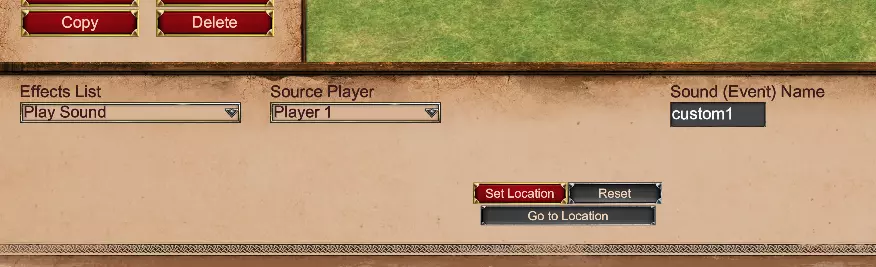
1.2. 在场景触发器中使用新的(自定义)音频 首先,你需要将源文件准备为WEM文件。我无法提供具体帮助,但有用户创建的相关指南可供参考。 在你的个人《帝国时代2:决定版》目录中创建一个新模组。例如:C: Users Admin Games Age of Empires 2 DE 46461161022890482 mods local SoundMod1 在该模组目录中,按以下顺序创建文件夹:resources _common drs sounds 将转换后的WEM文件放入sounds文件夹中。 添加“显示指令”或“播放声音”触发器(见上文段落)时,指定声音的文件名,无需WEM扩展名。例如,如果文件名为“custom1.wem”,则输入“custom1”。打包场景时,请将其与音频文件一同打包在同一个模组中(使用resources_common_scenario)。 图示:使用“custom1.wem”作为自定义声音文件的“播放声音”效果示例。
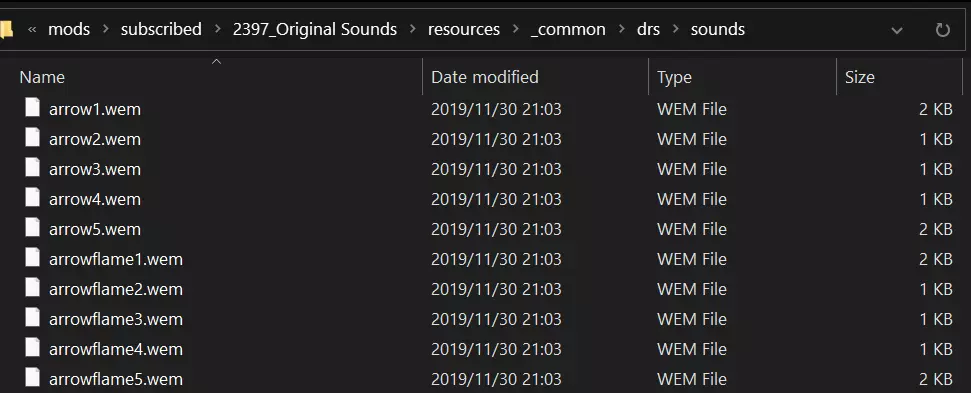
2. 音效 2.1. 替换音效(单位与界面) 首先,你需要将源文件准备为WEM格式文件。关于这一步,我无法提供具体帮助,但有玩家创建的相关教程可供参考。 在你的《帝国时代2:决定版》个人目录中创建一个新模组。例如:C: Users Admin Games Age of Empires 2 DE 46461161022890482 mods local SoundMod1 在该模组目录内,按以下顺序创建文件夹:resources _common drs sounds 将转换后的WEM文件放入sounds文件夹中。 查看音频表格(帖子顶部有链接)中的【单位音效】和【界面音效】标签页。找到你感兴趣的音效,复制其对应的文件名/事件名,并将你的文件重命名以匹配这些名称。关于单位音效,请确保替换后的音效涵盖所有变体。 * 对于单位音效,你也可以使用Advanced Genie Editor,通过【音效】选项卡查看绑定了哪些名称的音效(参见指南第6节)。 想要在游戏中使用原版音效?可以查看这些模组! 已知问题: 目前无法对文明短曲(单人游戏中点击【开始游戏】时播放的短音频提示,非文明主题音乐)进行模组修改。不过,你可以放置一个名为【Civilization_Jingle.wem】的文件来一次性覆盖所有文明短曲。循环音效(如燃烧的火焰)目前不支持此功能。循环不会被保留,音效只会播放一次。这是一个已知问题。 游戏中的各种效果,如剑的碰撞声、箭矢声、芒果弹射击声等,以及一些用户界面效果,在同时播放多个时无法正确相互抵消。不过,目前已有一个临时解决方案来防止它们的音量叠加。这是一个已知问题。 与原版决定版的音效库相比,某些效果可能无法始终保持相同种类的随机选择音效。一些音效(如《帝国时代2:决定版》所有DLC中的鸟类音效)像在旧版游戏中一样被绑定到同一个条目下。不过,这些问题可以通过数据模组进行修正或扩展,并且会在游戏更新中逐步解决。如图:箭矢音效已被“原始音效”模组包覆盖。
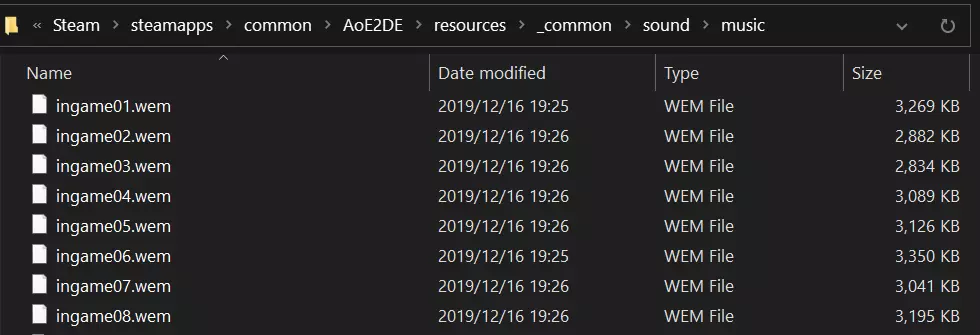
2.2. 添加新单位音效 添加新音效需要修改数据文件。本指南的6.1节涵盖了相关内容。 2.3. 为WidgetUI按钮添加自定义点击和鼠标悬停音效 你可以在WidgetUI的json文件中为每个按钮设置自定义的独特点击和鼠标悬停音效。操作步骤如下: 首先执行2.1节中描述的步骤,但不包括最后一步。 在你选择的WidgetUI .json文件中,将所选【Button】部件的【ClickSound】和/或【MouseoverSound】属性设置为你放置在drs sounds文件夹中的.wem文件的文件名(区分大小写,不带扩展名)。 关于ClickSound的使用示例,可以在campaignselection.json中搜索【ClickSound】查看。如果你希望在将鼠标悬停在特定菜单按钮上时拥有《帝国时代2:高清版》的原版鼠标悬停音效,可以安装此模组(不包含在2.1节的三个模组中): 3. 音乐 3.1. 覆盖和添加音乐 首先,你需要将源文件准备为WEM格式文件。我无法提供具体帮助,但有用户创建的相关指南可供参考。 在你的个人《帝国时代2:决定版》目录中创建一个新模组。例如:C: Users Admin Games Age of Empires 2 DE 46461161022890482 mods local MusicMod1 在该模组目录中,按以下顺序创建文件夹:resources _common sound music 将转换后的WEM文件放入music文件夹中。请按照以下列表相应重命名您的文件。 如果您希望游戏中使用原版音乐,请查看以下模组: 原版音乐 [RoR]原版音乐(CD顺序) [RoR]原版音乐(DE-Midi顺序) 除游戏内音乐外,每种类型的音乐最多可添加99首音轨(01-99),它们将被随机选取。游戏内音轨将使用您在游戏选项中当前的播放列表设置。 可在此处找到有效的音乐文件名。 目前所有音乐文件名区分大小写(如上述及表格中所示)。 已知问题: 切换菜单时,模组化菜单音乐缺少淡入淡出效果。 图示:通过模组化WEM文件替换的前8首游戏内音乐音轨。
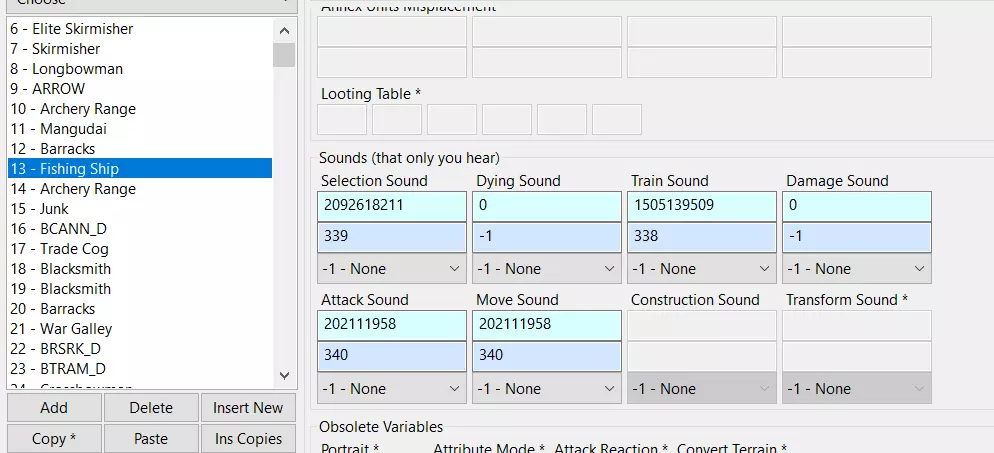
4. Voice-Over 4.1. Overriding Voice-Overs First of all you will need to prepare your source files into WEM files. I cannot provide specific help with that, however user-created guides for doing this are available. Create a new mod in your personal AoE2DE directory. Example: C: Users Admin Games Age of Empires 2 DE 46461161022890482 mods local VoiceMod1 Within that mod directory, create folders in the following order: For intro/outro slides: resources <language> campaign sounds For in-game narration: resources <language> scenario sounds If you want to replace for all languages at once, then everything goes here: resources _common drs sounds Place your converted WEM file inside the folder of choice Check the Audio spreadsheet (linked at the top of the post), the Scenario & Campaign Events tab. Scenario Dialogue is in the first table, while intro/outro slides are in the second table after it. Rename your WEM files in accordance with the files you want to replace (Note that the "PLAY_" in the name is optional and not required). If you want original campaign narration in original AOK/AOC campaigns, check out this community-created mod: [UFS] Original Campaign Voices[www.ageofempires.com] by UnluckyForSome (more languages available in the description) Known Issues: It is not currently possible to use the "Previous"/"Next" slide functionality with custom intro/outro voice-overs. 4.2. Adding Voice-OversThe procedure is the same, but you are in control of your campaign JSON files (please refer to Campaign Making guides). Files go to the same folders as above, and the file names from the JSONs are case-sensitive. 5. Taunts 5.1. Adding New Taunts First of all you will need to prepare your source files into WEM files. I cannot provide specific help with that, however user-created guides for doing this are available. Create a new mod in your personal AoE2DE directory. Example: C: Users Admin Games Age of Empires 2 DE 46461161022890482 mods local TauntMod1 Within that mod directory, create the following folders: resources <language> sound taunt (for all languages that you want to support)In the taunt folders, name your files as follows: "<taunt number> <Flavored taunt text>.wem". Example: "324 This is a very special taunt!.wem". Typing the number 324 will result in the taunt playing in-game. Please note that it is not currently possible to create a taunt that would use a single file for every language at once, in this way. An alternative "hacky" method is available, however. See Paragraph 5.3 of this Guide for more details. If you want to override Base Game taunts instead, see Paragraph 5.2 of this Guide. 5.2. Overriding TauntsThere is a way to override Base Game taunts, which can work either per-language or for all languages at once. To use it, create a file named taunt_11.wem in: resources _common drs sounds (for everything) OR resources <language> sound taunt (for each specific language).Do not use per-language folders simultaneously with the common location! Replace 11 with any Base Game taunt number; single-digit numbers must be ascended to the 01 format with two digits. Files will be looked up under your mod paths (local/subscribed), user profile path and the game path. 5.3. Adding Taunts For All Languages (alternative)There is an alternative way to add in-game taunts, which can work for all languages at once without having to create duplicates. To use it, create a file named Play_Taunt_300.wem (case-sensitive!) in resources _common drs sounds. Replace 300 with any number that's 3 or more digits. ❗You have to always use / when chatting in-game, even when the slash option is disabled in game options. Example: /300. The file name is case-sensitive and has to start with Play_. All files that reside in per-language folders (including taunts added via Paragraph 5.1 of this Guide) take priority over this "alternative" method. Files added here can also be placed into per-language folders simultaneously with the common location. Files will be looked up under your mod paths (local/subscribed) and the game path, but not your user profile path. Upside: If your taunt pack uses the same files for every language, significantly reduces its size and load time. Downsides: Have to type / at all times unless the taunt is a Base Game taunt or a language-specific copy was added via Paragraph 5.1 of this Guide and the current interface language matches the one supported by it Cannot have built-in subtitles to go with the taunt. The filename cannot include any additional comments It should be noted that this way of adding taunts relies on a quirk of the audio modding engine, hence the case-sensitivity, the / requirement, and other weird deviations from Paragraph 5.2. It may stop working in the future if a "proper" replacement for it appears in an update. 6. Data File Opening the Data File Open your AoE2DE directory. From the "Tools_Builds" folder, launch "AdvancedGenieEditor3.exe". Enter the correct paths to the "empires2_x2_p1.dat" and "key-value-strings-utf8.txt" files and proceed. 6.1. Adding new sound bindings for Data ModsTo add a new sound into the game and bind it to unit/graphics: (This procedure is nearly the same as in AoE II: HD Edition, with the two exceptions that files are encoded in WEM instead of WAV, and that they are referred to by their literal filenames declared in Sound entries instead of "Data Resource IDs".) Create a new group on the Sounds tab. Add filenames, delays and probabilities as needed. Notes: The files will be looked up at resources _common drs sounds in either your mod directory, profile directory or game directory. The file extension does not matter and can be left empty here, however must be WEM in the target folder, and if you choose to use a different one, the game will replace it by .wem during file lookup anyway. Don't forget to "Auto-odds" when done adding files if you want each file to be randomly played with even odds (up to the maximum of 100). For example, with 4 files, setting auto-odds will mean 25, 25, 25, 25 for each file, with the maximum of 100. At the same time, using 4 files with low odds like 1, 1, 1, 1 for idling animals will mean that the sound will rarely be played at all. Fill the sound ID into the Dark Blue cells of unit or graphics Sounds you wish to replace. Optional: if you want people who somehow don't have your audio file to still hear something as a fallback, you can add an Event ID into the cyan box nearby, that will play one of the built-in sound events (please refer to the Spreadsheet for Event IDs). 6.2. Remapping sound bindings in Data Mods for Base Game filesTo remap an existing sound to another sound: Unit sounds: choose the unit you want and change the blue and cyan boxes in the "Sounds" section: these are the new Sound fields. The values inside the cyan box represent Event IDs (refer to the spreadsheet) for those who are not using modded sounds, while values inside the blue box refer to modded Sound groups on the Sounds tab, with filenames bound to files in resources _common drs sounds (created only by mods). You should remap both IDs to make sure that both unmodded and modded users hear what they are expecting to hear. Example below for the Fishing Ship:
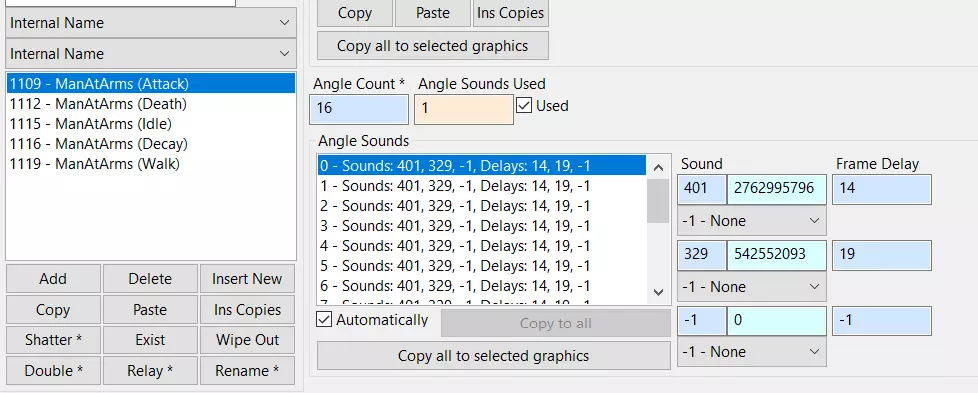
图形与音效:在【图形】选项卡中选择所需的图形效果,并按照与单位音效相同的方式编辑音效框(包括主音效和特定角度的帧音效)。以下是【持矛民兵】角度音效的示例。
注意:如你所知,数据模组要求所有玩家拥有相同的文件才能进行在线游戏,因此只有在你的模组确实有必要时,才应使用此方法更改声音绑定。 声音提取和播放 提取:要从基础游戏中提取声音,请前往“wwise”目录,然后使用Ravioli Tools打开.pck文件。这些文件将包含声音库(.bnk文件)以及数字命名的.wem文件。声音库可以使用相同的工具进一步解包。 要了解每个文件的实际名称,请查看电子表格中的各个【音频源】选项卡(位于工作表列表的最右侧)。它们将提供文件名以及文件所在的.bnk库。 .wem文件之间的区别在于.pck文件本身以及.bnk文件中的内容区别在于,前者仅在需要时加载,而整个.bnk文件会缓存到内存中。 * 请注意,由于某些原因,这些工具可能会将声音显示/提取为【.wav】文件。实际扩展名是【.wem】,因此可能需要批量重命名。 转换/播放 要转换或播放声音,你可以使用vgmstream。foobar2000插件可以直接播放所有编码类型的.wem文件。命令行工具允许你将任何.wem文件转换为.wav,但不能反向转换。 截至2023年,这是唯一支持《帝国时代2决定版》2023年5月更新中引入的wem-opus格式的工具。 其他资料 更多带有视频说明的指南可在此处找到。
无法识别内容,已删除。