换一换
换一换 




VOR和NDB是导航辅助设备。本指南将通过教程教你在微软模拟飞行2020中使用它们的基础知识。 VOR和NDB:像1949年那样飞行

简介:什么是VOR和NDB? VOR和NDB是导航辅助设备。它们都通过广播无线电信号来工作。 VOR是甚高频全向信标(Very High Frequency Omnidirectional Range)的首字母缩写。它是一种短程系统,能够确定飞机相对于VOR信标的位置。

上图是航空地图上甚高频全向信标台的国际民航组织符号。 无方向性信标是一种无方向信标。它会发射简单且相对远距离的无线电信号,可被无线电测向仪接收。测向仪会直接指向信标。

上述符号是航空地图上NDB电台的国际民航组织(ICAO)符号。你可以结合使用NDB和甚高频全向信标(VOR)电台来准确定位自己的位置,而无需使用全球定位系统(GPS)。再加上推测领航,你就能在不依赖目视飞行规则(VFR)或GPS的情况下进行导航——前提是你具备数学头脑并且能够直线飞行。
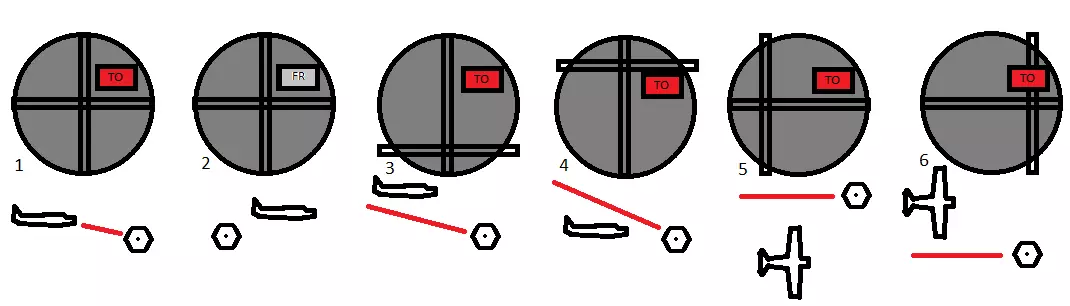
1. 飞机正向甚高频全向信标台飞行。 2. 飞机正远离甚高频全向信标台飞行。 3. 飞机在甚高频全向信标线上方飞行。 4. 飞机在甚高频全向信标线下方飞行。 5. 飞机在甚高频全向信标线右侧飞行。 6. 飞机在甚高频全向信标线左侧飞行。 甚高频全向信标指示器会显示飞机相对于甚高频全向信标台的位置。通过某种电子技术,飞机的甚高频全向信标指示器能显示出你是在甚高频全向信标台特定方向“线”的左侧、右侧、上方还是下方。 跑道末端的甚高频全向信标台通常还能引导你沿着信标台方向进入下滑道,这使你具备执行仪表着陆的能力。 无方向性信标和自动定向仪
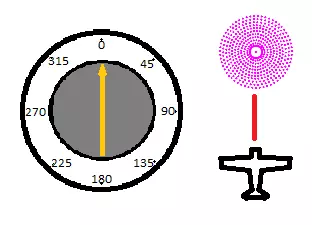
你的飞机的自动定向仪(ADF)可能看起来有点像这样。在这张图片中,飞机正沿着正北航线直接飞向无方向性信标(NDB)。因此,ADF指针指向正北方向。 自动定向仪会指向无方向性信标的方向。无方向性信标(NDB)本质上是无线电台。你可以用自动定向仪调谐到它们,它会直接指向电台。 如果机场或特定位置有NDB电台,这会很有用:你可以按照ADF指示的信号直接飞行,最终就能到达那里。 然而,这不是一种高效的飞行方式,因为你会在不同信号之间曲折飞行。相反,最佳方法是规划一条直达目的地的航线,并在途中通过使用两个NDB的方位线在地图上确定你的位置。你也可以使用VOR方位线来确定位置。
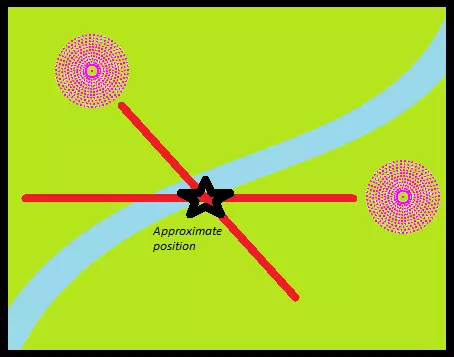
通过参考两个NDB电台的方位线来确定飞机的大致位置。左侧电台指示约135°,右侧电台指示约270°。 确定位置的步骤如下: 1. 将ADF周围的罗盘设置为你的航向。 2. 读取到NDB的度数方向。 3. 若到NDB的度数<180°:计算(到NDB的度数)+(航向)°+180°以找到方位线,从NDB在地图上描绘此方位线。 4. 若到NDB的度数>180°:计算(到NDB的度数)+(航向)°-180°以找到方位线,从NDB在地图上描绘此方位线。 5. 对第二个电台重复上述步骤。 6. 两条方位线的交点即为你的大致位置。通过使用此工具绘制飞行计划的进度,你可以利用速度和距离公式,通过判断实际位置与应在位置的差异,来计算风对速度和方向的影响。然后你可以计算出合适的新航线进行补偿。 如何计算风速修正角: (风向)° - (航线)° = 乘以(风速)除以(真空速)= (风修正角)° 布里斯托尔EGGD的NDB/ADF 让我们在游戏中使用VOR和NDB。选择塞斯纳152,找到英国的布里斯托尔国际机场(EGGD)。
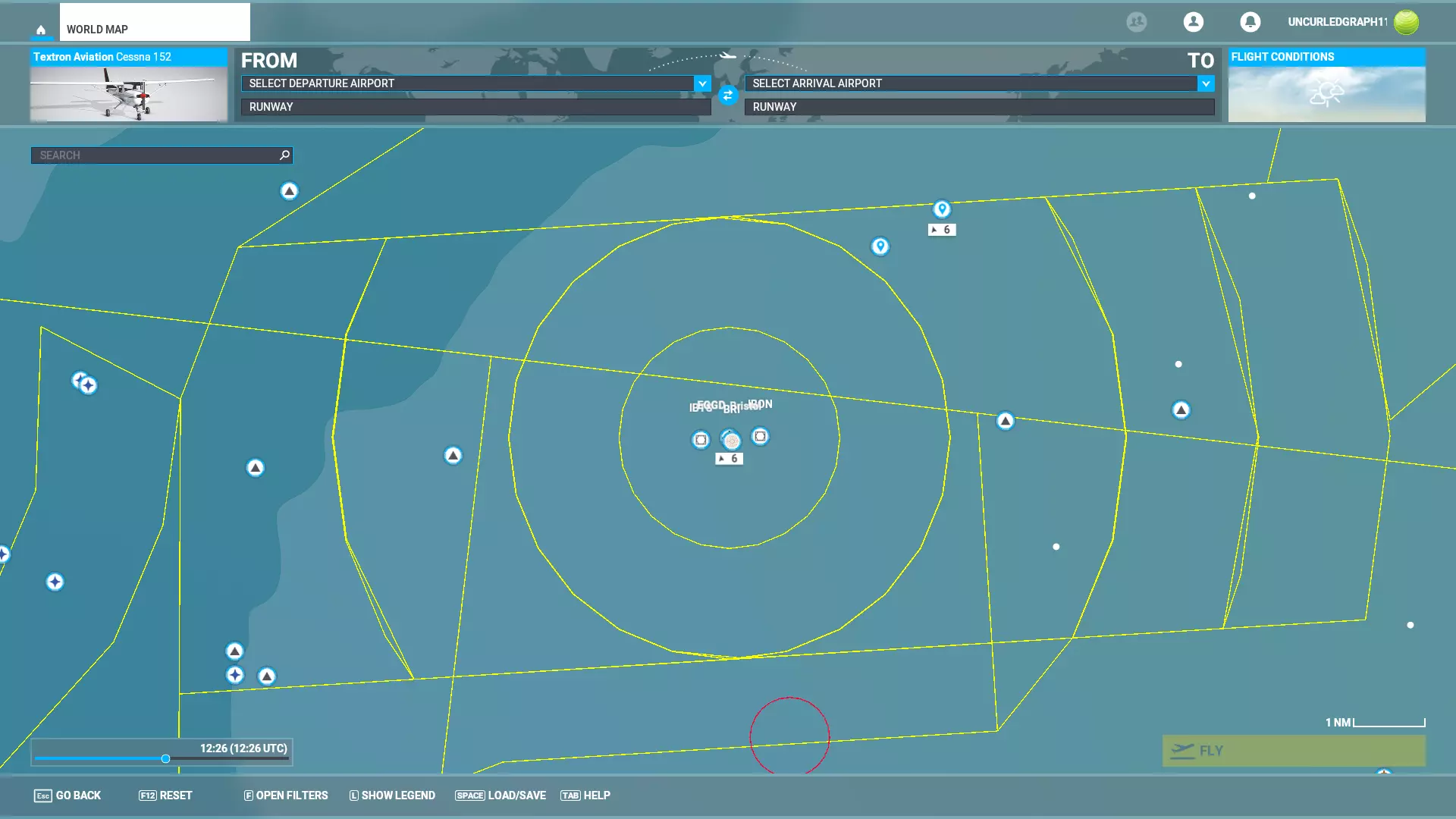
EGGD。你可以在屏幕底部的选项中开启必要的仪表飞行规则(IFR)和导航设备(NAVAID)详情。 仔细观察机场,我们会看到机场本身由中央十字准星符号标记。其东西两侧各有一个台站——西侧的名为IBTS,东侧的名为IBON。

EGGD。跑道西侧为IBTS。跑道东侧为IBON。跑道南侧为代号BRI的NDB。点击IBON打开电台信息面板,显示该电台频率为110.150兆赫。请记录此频率。
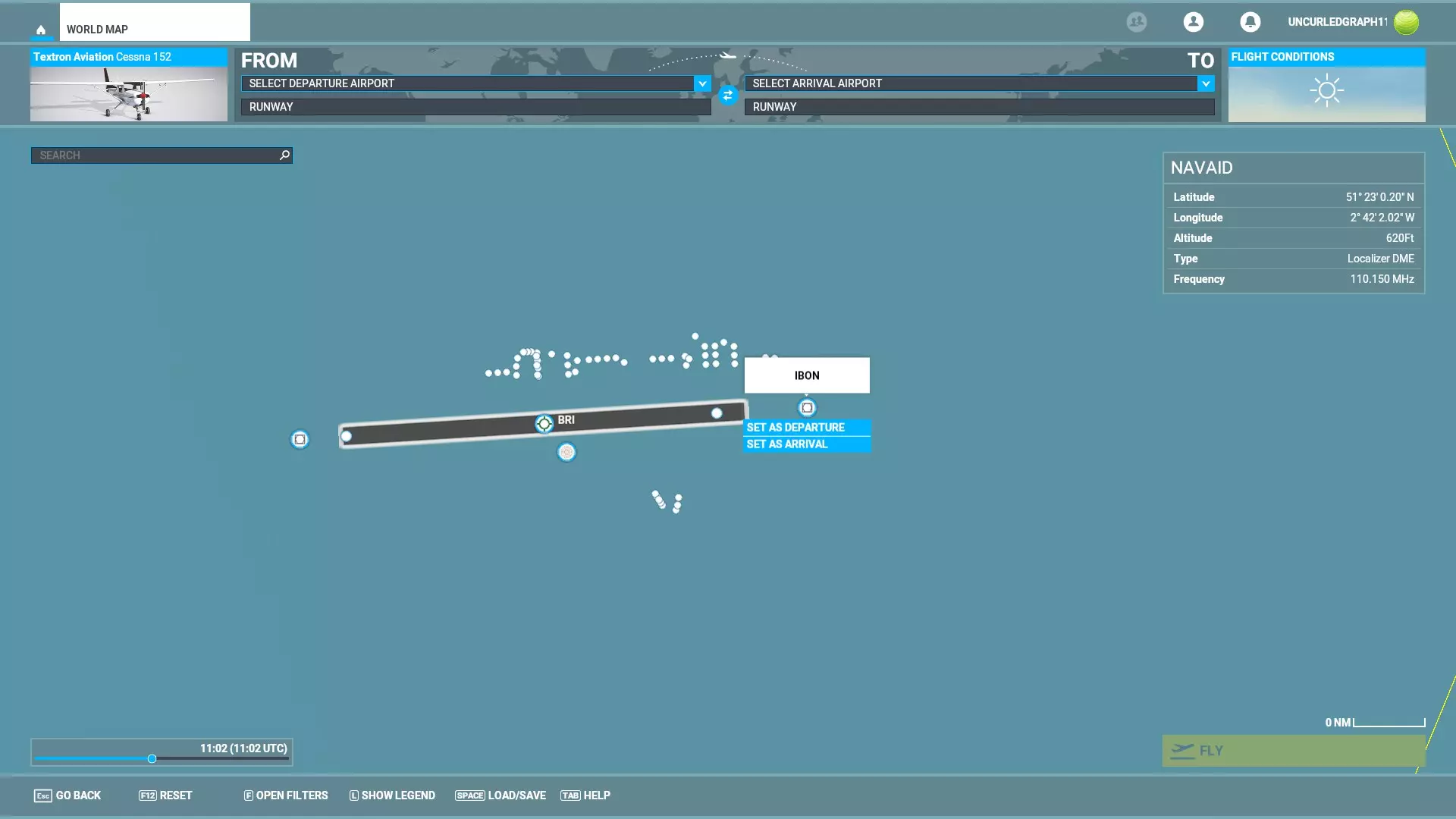
IBON频率显示为110.150兆赫。 点击BRI全向信标可显示其频率,为414千赫。
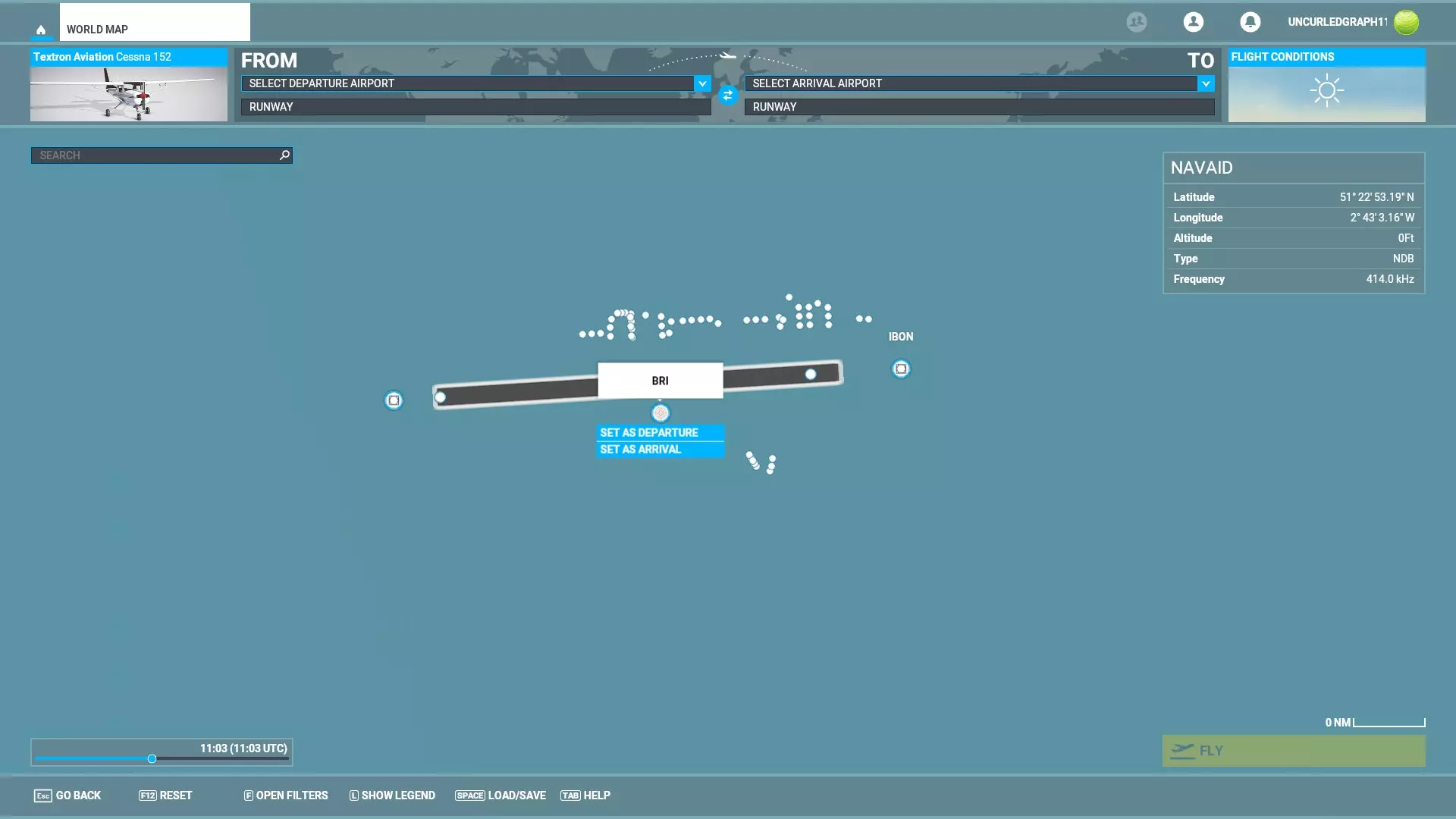
NDB BRI,显示为414千赫兹。在EGGD以东一段距离处驾驶你的塞斯纳152开始飞行。
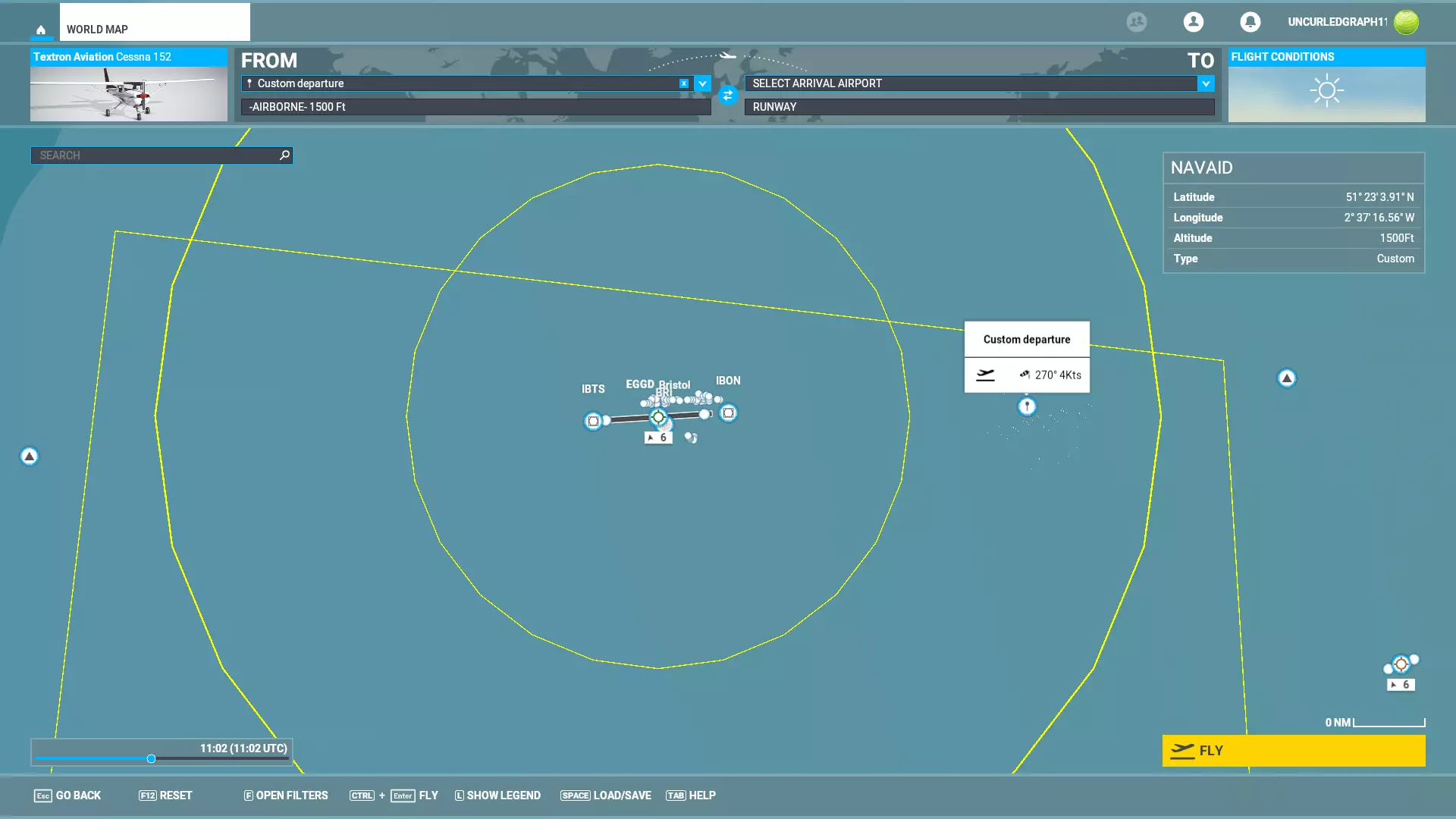
从机场正东方向附近开始,保持足够的距离。将天气设置为晴朗无风的日子。 驾驶塞斯纳向西飞行,航向设定为270度。将速度降至稳定状态,并保持直线平飞。此时你应该能看到布里斯托尔机场正前方。 调谐ADF(位于驾驶舱面板右侧)以接收414频率的BRI NDB。通过三个旋钮分别调整每个数字来完成调谐。
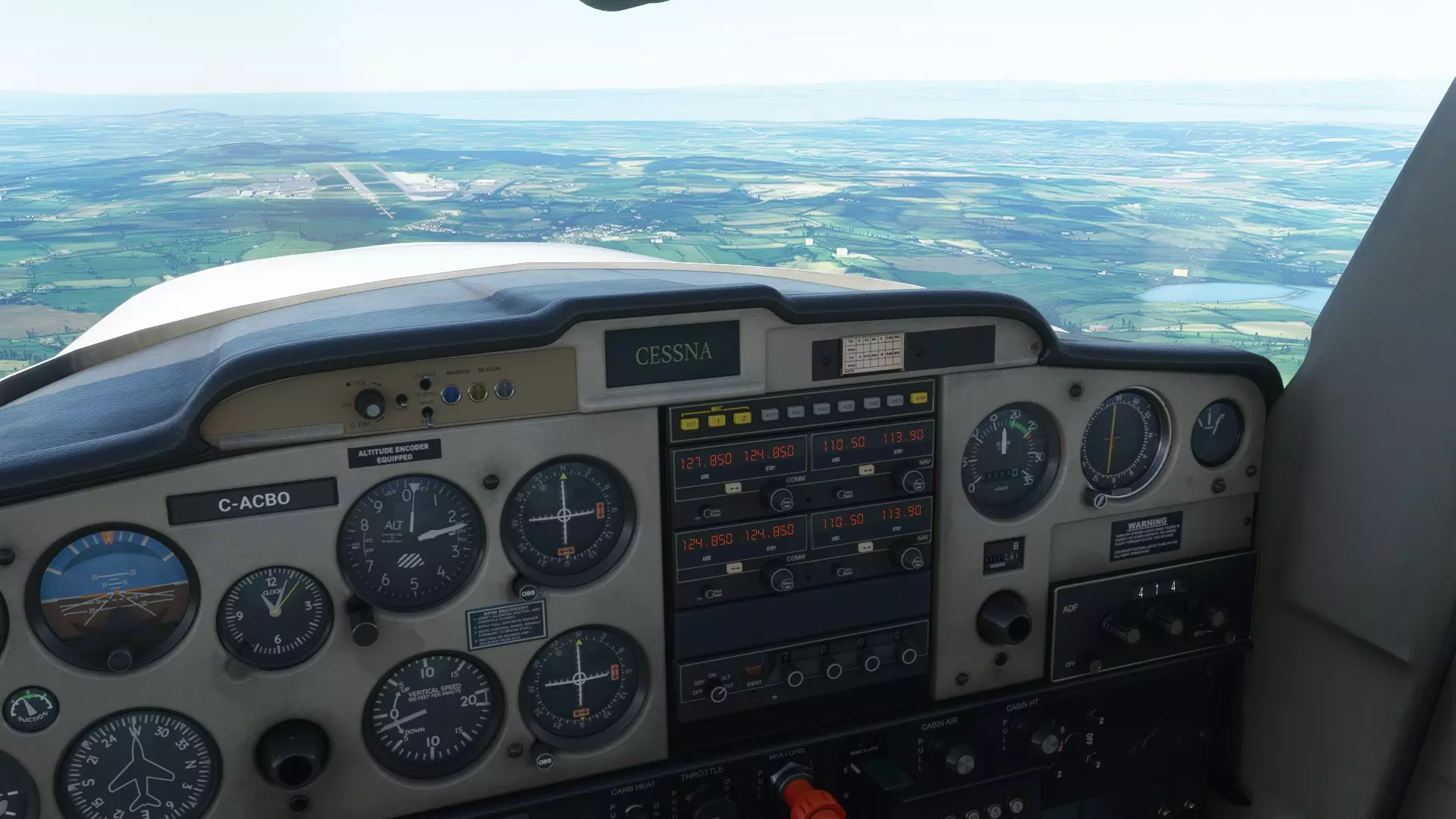
ADF指示器是驾驶舱仪表板右侧数第二个仪表,其信号输入显示在下方(读数为414)。点击可放大。 在上图中,ADF已调谐并接收到BRI的414信号。飞机正朝正西飞行,ADF指示器的黄色指针指向正前方,表示NDB(无方向性信标)的方向。从窗外可以清晰看到机场确实就在正前方。若要计算当前径向线,需用NDB相对于航向的方向(0°,因为我们正朝着它飞行)加上航向270°,再减去180°,结果为90°。我们位于电台的90°径向线上,即正好在BRI的正东方。NDB的局限性在于它们不包含任何关于你在地图上的位置、到目标的距离或高度的固有信息。它们只能告诉你NDB相对于你的飞机的位置。 要像40年代的专业飞行员一样飞行,请使用天气信息来保持高度计上的气压正确,通过参考两到三个NDB(快速地)在地图上定期确定你的位置,并习惯使用速度和距离公式来计算飞行时间和速度。 布里斯托尔EGGD的VOR 接下来,我们还将VOR接收器调谐到27号跑道东端的VOR台IBON。IBON的频率为110.150兆赫。
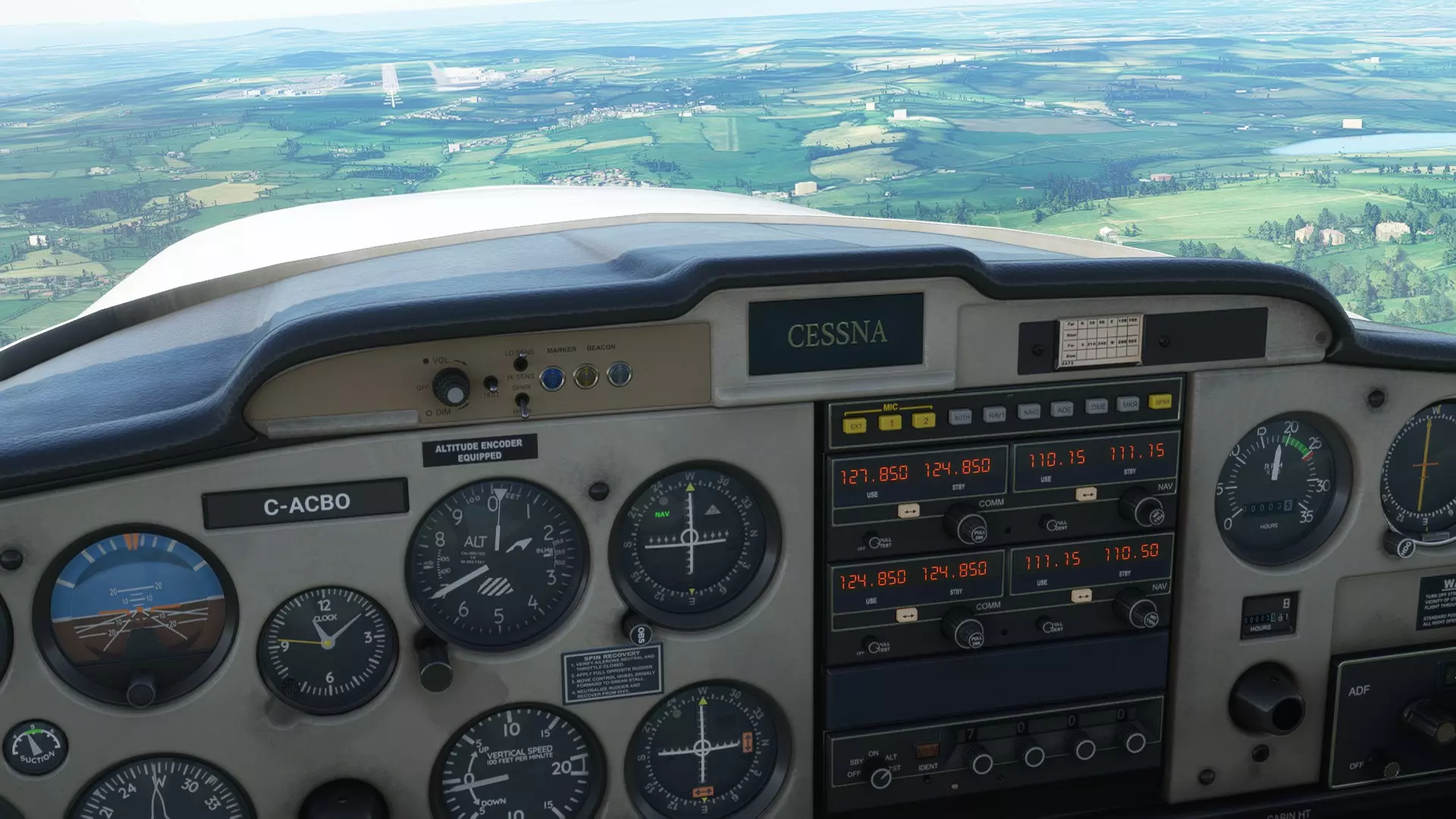
甚高频全向信标指示器显示我们正沿IBON航向飞往EGGD机场27号跑道。 查看上方图片了解如何调谐甚高频全向信标接收机。使用无线电面板右上角的【导航】部分。通过两级旋钮将备用频率调整为110.15。输入110.15后,按下频率切换按钮交换使用频率和备用频率。此时甚高频全向信标指示器将启动,并显示你相对于IBON甚高频全向信标台的位置。 IBON的航线以270°方位角呈平缓坡度延伸至EGGD机场27号跑道起点。跟随甚高频全向信标指示器,并根据其显示的位置信息进行着陆。
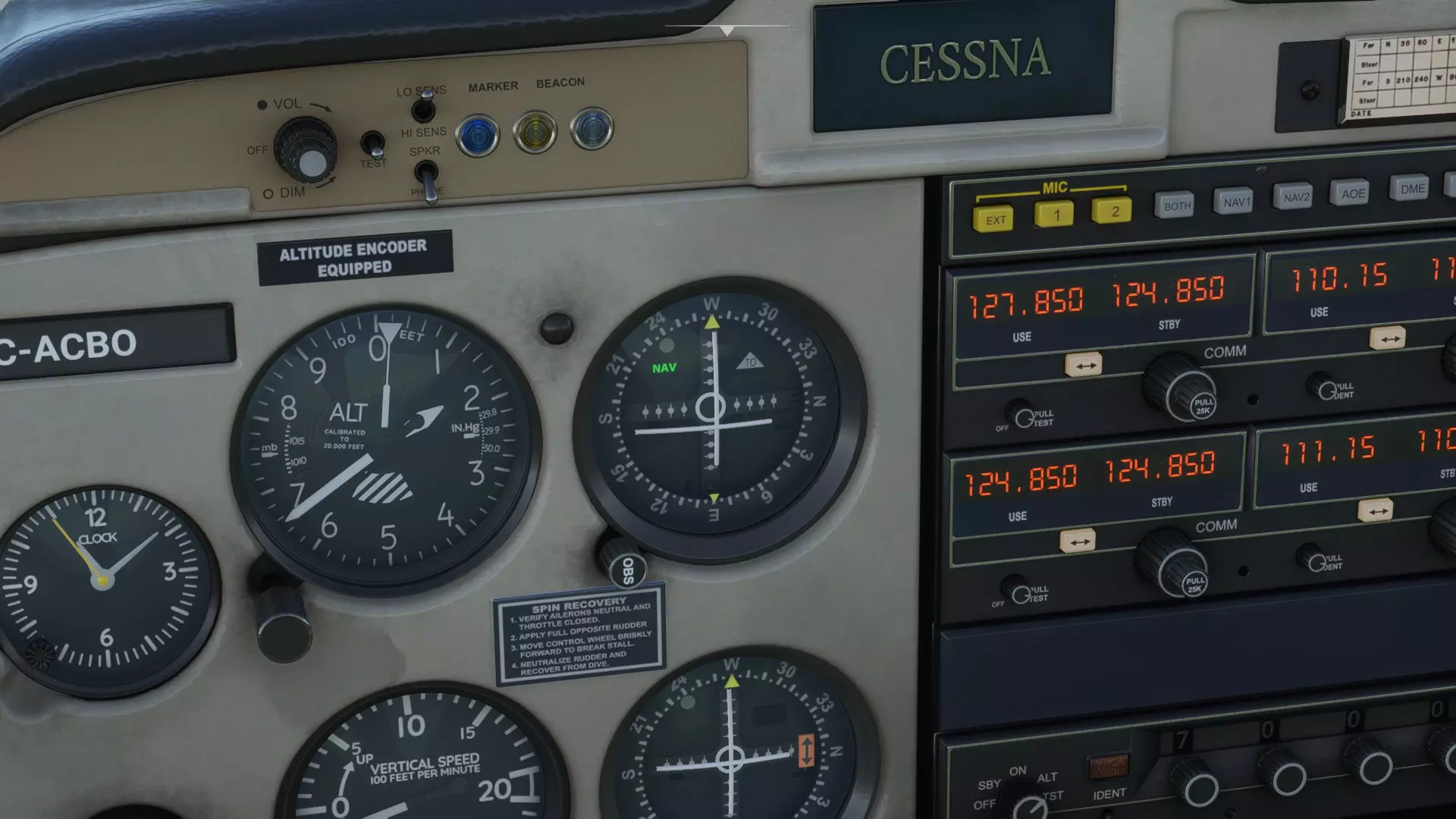
VOR指示器特写,调谐至IBON台,频率110.15。它显示飞机略微偏左,且高度略高于朝向IBON台的精确航线。
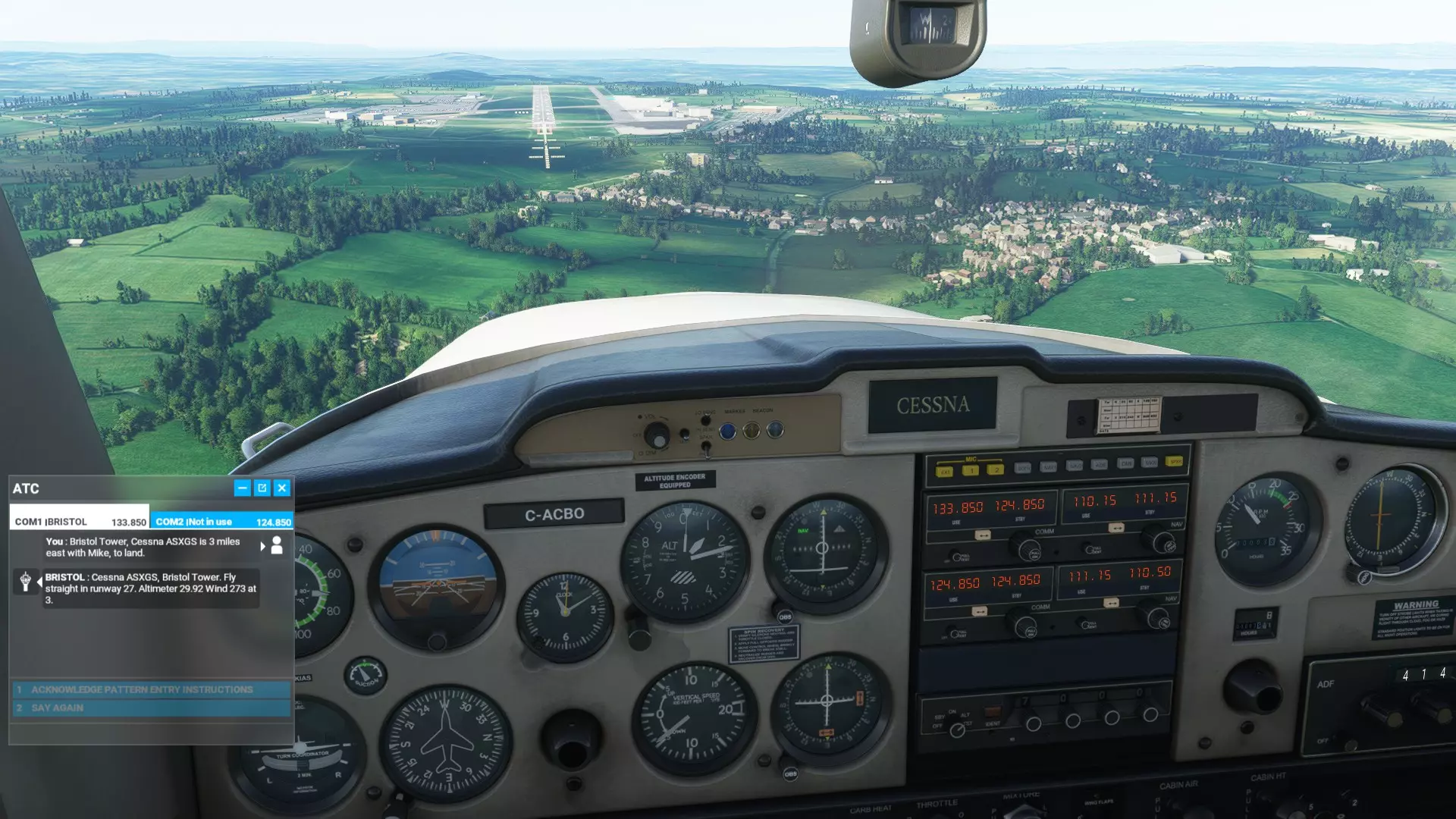
VOR指示器显示我们高度过高。 这里VOR指示器上的水平线表明,我们当前飞行高度高于VOR信号所指示的理想进近高度。我们需要降低高度来修正这一问题。
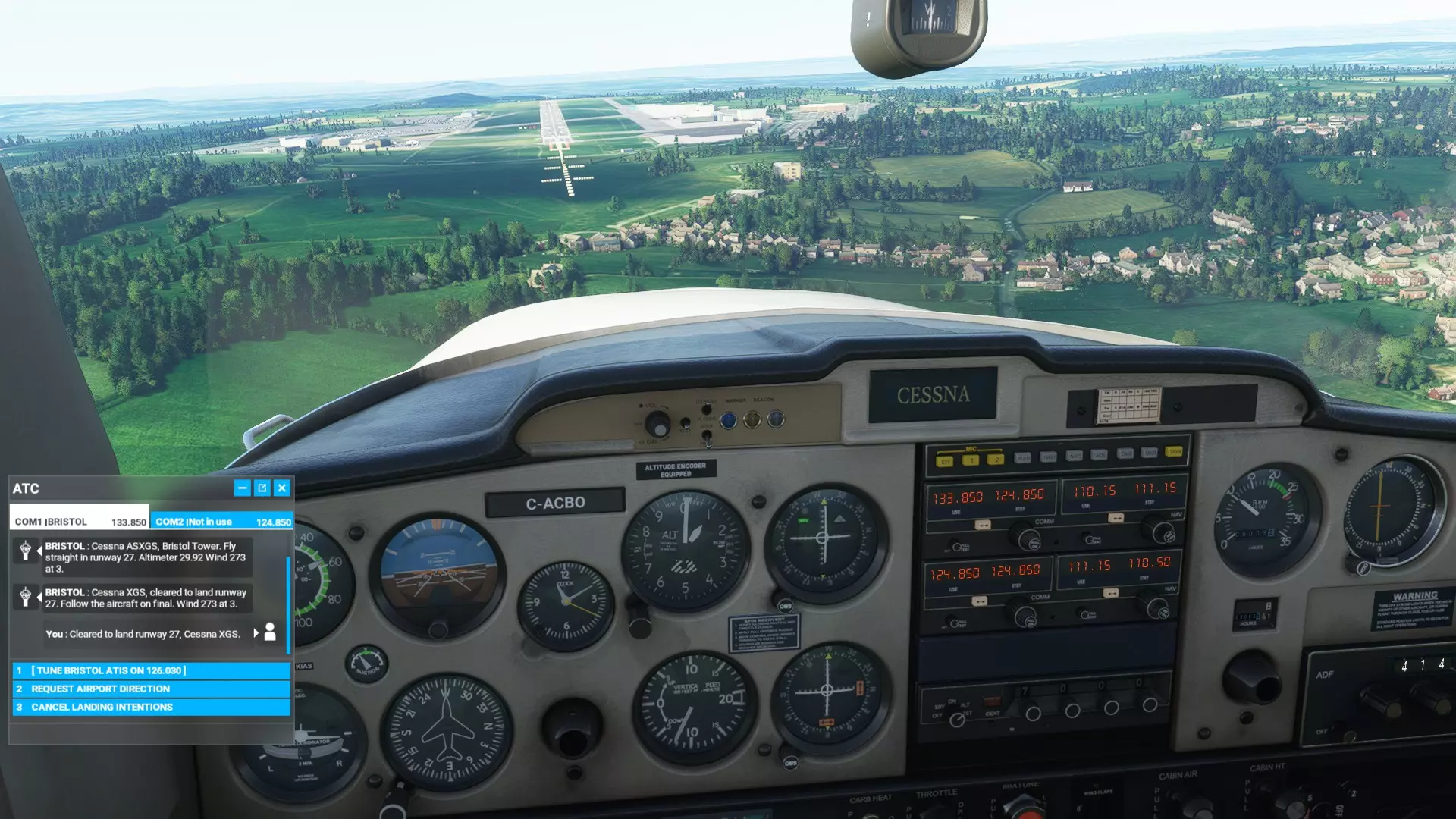
甚高频全向信标指示器显示我们在航线上。 此处水平线和垂直线在中心点相交。我们正以良好的下降角度直接飞向27号跑道,只要不发生失速或突发状况,应该能舒适着陆。 总结 你可以在各种天气条件下使用甚高频全向信标(VOR)和无方向性信标(NDB)信息来保持航向,并在恶劣天气或夜间进行“仪表引导”着陆。它不像全球定位系统(GPS)那样直观易用,但提供了迷人的挑战,能让你体验过去的飞行方式。这比推测领航和目视飞行规则(VFR)更进了一步! 记住在飞行前记录下无方向性信标和甚高频全向信标的相关频率,因为一旦开始飞行,在游戏中就无法再访问这些信息了。我认为更现代的飞机可以使用NDB和VOR,也可以用它们来替代GPS,但为此你需要知道如何使用玻璃座舱设备。由于我完全沉浸在20世纪30年代的技术中,很遗憾在这方面无法帮助你,但基本原理是相同的。 庆幸的是我们有ADF【自动测向仪】,而不是手动无线电测向。早期航空公司的副驾驶需要转动无线电天线来确定无线电台的位置,然后记录下来,并快速重复这一过程以获得有效的定位。还要与通信技术、风暴、降雨、大风、冰雹、降雪作斗争?这可是件棘手的事。驾驶C-47空中列车/达科他运输机从纽芬兰飞往英国的飞行员会使用六分仪测量恒星来确定自己的位置。 漏洞 我注意到NDB(无方向性信标)和VOR(甚高频全向信标)偶尔会失效。我不太清楚这是因为我操作失误,还是游戏“忘记”了它们的存在。这两种情况都有可能。幸运的是,如果出现故障,我们还有GPS可以依靠。 进阶文档:NDB/VOR进近图 如果您已经掌握了VOR和NDB的基本原理,我们可以将这些基础知识应用到一个真实场景中:使用飞行图表进行仪表进近着陆。每个主要有人值守机场都有仪表着陆系统(ILS)飞行图表。即使是无人值守的简易机场通常也有图表。这有点像在复杂的路口驾驶汽车时行驶在正确的车道上——这是必不可少的,否则你可能会撞车! 这是一份用于模拟布里斯托尔国际机场EGGD的爱好者飞行图表。它是专门为使用带有测距设备(DME)的导航台(NDB)而编写的。
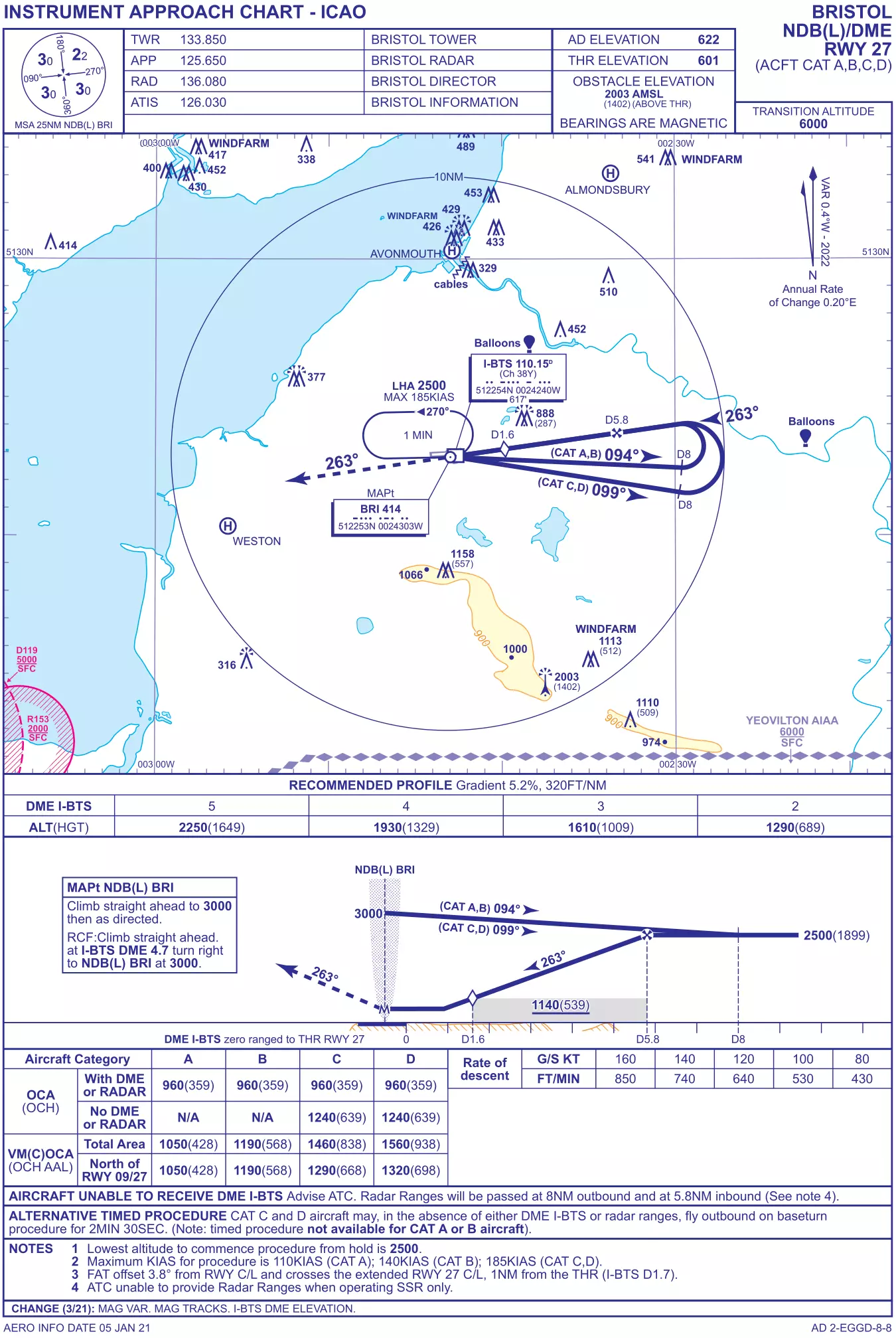
Don't be frightened by its complexity - it is there to help you. For context, we will briefly summarise the documentation commercial pilots use to navigate to an airport and land safely: 1 - Pilots use approach charts. These describe exact GPS waypoints with precise altitudes and directions. These take an airliner from cruise to the airport. 2 - Pilots use airport charts for specific approaches. They describe precise flight paths, altitudes, and other procedures to land at a specific runway. These usually use GPS waypoints and VOR/DME. These take an airliner onto the runway, and is the type of chart supplied above. Regarding Point 1 - there is no way to perform approaches reliant on standard waypoints without using GPS. Pilots not using GPS must substitute chains of VORs and NDBs. This must be illustrated in a flight plan and pilots must inform controllers en route. Regarding Point 2 - Some airports do not have NDBs, and some lack VOR. EGGD is suitable for our purposes as it has both. It also has specific instrument approach charts for using NDB and VOR for landing. Some airports may not have NDB or VOR approach documentation. In these cases, landing is dangerous unless under VFR conditions. We'll go through each part of the chart. Communications frequencies are at the top. Use these to tune into the tower, approach, ATIS, and other essential services. We also find the altitude of the airport - "AD ELEVATION 622" "THR ELEVATION 601". EGGD slopes downwards to the west, so the highest point is the start of Runway 27 at 622 feet ASL (above sea level). The lowest point is the start of Runway 9 at 601ft ASL. Further down is the map. We see the airport itself is the box-like object in the middle with several lines and boxes springing out of it. Surrounding landmarks are also illustrated. The lines and boxes describe flight paths and frequencies respectively, and are what we are most interested in. Below the map is the "RECOMMENDED PROFILE" table. It describes a descent gradient of 5.2% - or 320ft/nm. That is to say, you should descend at 320ft per nautical mile. Below the "Recommended Profile" chart is a side-view of the flight path described in the big map above. It has a box in it labelled "MAPt NDB(L) BRI" - or "Missed Approach Point" - for use if you overshoot or abort landing. Below the side-view is a chart. It shows the "Obstacle Clearance Attitude/Height" for different types of aircraft. Aircraft are grouped here by category of speed - A is less than 91kt; B >91kt & <121kt; C >121kt & <261kt; D >141kt & <166kt. Our Cessna is Category A. The OCA basically instructs us in Category A not to do the landing procedure below 960ft altitude (359ft above ground level). The bottom part has advisories and instructions. We don't need to think about those. We're going to try using the chart to fly a proper instrument approach. A major part of the procedure is the use of "DME", or "Distance Measuring Equipment". DME almost always a feature of VOR stations. It simply states how far away the VOR station is. Unfortunately, our Cessna 152 doesn't have DME in-game! Modern pilots (and the aircraft in-game) use GPS systems to display VOR DME. As far as I know, their analogue equivalents are not found on any MSFS 2020 aircraft except the Douglas DC-6. We have to use GPS if we want to use DME (Distance Measuring Equipment) unless you are flying the Douglas DC-6. Please refer to the manual/instructions for your aircraft of choice for using DME. You can use speed and distance formulae to gain a close approximation of distance from a VOR without DME. We'll go step-by-step, referring to the chart at every point: Fly at 3000ft ASL directly over NDB on course 094°. We are instructed to do so by the two maps: top-down shows the angle in degrees, as does the side-view, along the flight path (the big blue line) labelled "(CAT A, B)". Fly along this course until you reach 8nm from the beacon - your GPS's DME will indicate this distance, or otherwise you must gauge the distance by performing speed/distance calculations or using VFR. We see this from the top-down map and side-view map: the blue line describes a journey along 094° until "D8", or "Distance 8 nautical miles". As you go, descend gradually to 2500ft ASL. At D8 and 2500ft ASL, turn steadily left to a heading of 263°. This is the curve in the top-down map. Do not lose or gain height in the turn. This is shown in the side-view map - the blue line does not descend as it turns back on itself. You want to finish your turn facing directly 263° before reaching a distance of 5.8 nautical miles inbound. At D5.8, begin descent - follow the path described by the VOR. Land. If you decide to abort, the chart helpfully describes what to do. Follow the dotted line leading from the airport on the top down and side-view maps - it shows 263° heading, and the "MAPt NDB(L) BRI" missed-approach box tells us to climb straight away to 3000ft ASL, and then, at a DME distance of D4.7, turn right and repeat the whole procedure. Summary of ILS Flight Charts Flight charts exist to give specific instructions about where and how to land at an airport. Look out for the following things on any ILS flight chart: Contact frequencies with the tower, control, ATIS, and other essential services. Frequencies for NDB and VOR facilities. Flight path with course in degrees. This will be illustrated in a map. Altitudes along the flight path. This will be described on the maps and written information. Missed approach vectors and altitudes - and sorted by aircraft category. Basic landmarks for visual confirmation of position in good weather. We have looked at an ILS flight chart for use with NDB and DME. There are many others - the most common are GPS approaches. Good luck and happy landings! Glossary ADF - Automatic Direction Finder. The instrument in your cockpit that points straight towards an NDB. Provides LNAV information. AGL - Above Ground Level. ASL - Above Sea Level. ATIS - Automatic Terminal Information Service. A radio service provided at airports. Describes weather conditions and barometric conditions for your altimeter. DME - Distance Measuring Equipment. An instrument (or part of a GPS display) that shows distance to a VOR or NDB. Helps with LNAV. FL - Flight Level. An altitude metric for high-altitude flight. Used for commercial aviation above a certain altitude when the literal distance to sealevel or ground is unimportant. It is typically 1013.25 hPa or 29.92 inHg. Height in thousands of feet are written/spoken as whole integers - 5, 10, 15, 20, 25, 30, etc. GPS - Global Positioning System. Provides easy LNAV data. Advanced GPS systems also show groundspeed, true airspeed, course corrections, and other useful features. GPS can plot a straightforward path to your destination effortlessly - the "magenta line". GS - Groundspeed. A true measurement of distanced travelled over time based on speed and distance formulae. IAS - Indicated Airspeed. The speed at which the air rushes past - as measured by your pitot tube. ILS - Instrument Landing System. Methods for landing an aircraft without needing to look out of the window. LNAV - Lateral Navigation. The ability to distinguish where you are on a compass relative to a certain point. NDB - Non-Directional Beacon. A radio station that can be pointed towards by your aircraft's ADF (Automatic Direction Finder). Provides LNAV information. MAPt - Missed Approach Point. Described on ILS charts to help guide pilots in the event of a failed approach/landing. OBS - Omni-Bearing Selector. A system on your aircraft that calibrates which vector (direction) you would like to take towards or away from a VOR. QNH and QFE - Query Nautical Height and Query Field Height. Reference settings for altimeters that are, essentially, ASL and AGL respectively. QNH describes the barometric setting for reference against sea level. An aircraft sitting in Bristol Airport EGGD, with its altitude of 600ft ASL, would read 600ft on the altimeter when set to pressure QNH. QFH describes the barometric setting for reference against the "field" or ground. An aircraft sitting in Bristol Airport EGGD, despite being 600ft above sea level, would read zero on the altimeter when set to pressure QFH. RNAV - Random Navigation. A method of modern GPS-reliant flying (the "magenta line"). TAS - True Airspeed. The actual speed at which your aircraft is moving relative to the ground (without the error given by a pitot tube - this is indicated airspeed, or IAS). If you are travelling at 80mph IAS into a headwind of 10mph, you are probably making 70mph TAS. VNAV - Vertical Navigation. Your VOR provides VNAV information in the "horizontal line" describing whether you are above or below a glidepath. VOR - Very High Frequency Omnirange Station (VOR). A radio station that describes an aircraft's position in relation to it, and along a specified line of approach. Provides LNAV and VNAV information.