


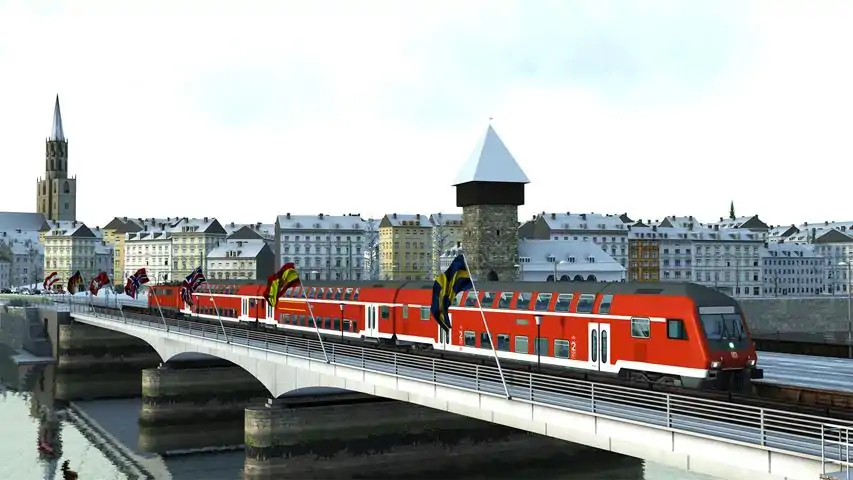

路线图
2026年12月26日更新。部分《模拟火车》线路的地图。希望这些地图能在你设置快速驾驶或创建场景时派上用场。 简介

Friends know me for my terrible sense of direction and pathetic knowledge of where important places are in the world. Not every Train Simulator route comes with a handy map or diagram in the manual, so I get lost easily. To help myself out I've made a few maps. I am sharing them so maybe someone else will also find them useful. They're not pretty, but they do the job and help when setting up Quick Drive, or when creating a scenario. At the very least I've named every station, and sometimes also sidings and yards, especially on routes that aren't exclusively commuter trains. All routes are available on Steam unless otherwise indicated. Use full resolutionDue to the size and level of detail on these maps, be sure to view them at full size. Downloading and printingTo download the maps, visit this guide using a regular web browser instead of the steam client. Be sure to get the largest version possible. Click the image once, and then click the line of text on top that starts with "https://steamuserimages-a.akamaihd.net" Then you can right-click and save them. What most people do is access the maps using the Steam overlay when they're in game, but if you want them on paper, it's not too hard to convert them. Take a map you've saved, then convert the image to negative using an image editor. Converting to negative is sometimes called "invert colours". Then they'll be white backgrounds with black details. Some of the maps are rather large so you may also want to cut them and spread them over multiple pages, or the details get really small. NB: Sections without sceneryNote that some parts of a route may not have any scenery. You can still drive on those parts, there is just not much to see other than track in endless grassy fields. These sections of the route are never advertised on the store page, but are included anyway so that route builders can have a go at them. I may have indicated which parts of the route lack scenery. If an electrified route has any unelectrified parts, I'll indicate where they are so you know what type of train to pick for it. Updates to the guide 26 December 2025: Edits to text, added warning to find the most recent version on Steamcommunity dot com 3 February 2021: Updated the S25 Through the Heart of Berlin / Mitten durch Berlin map with red dots to indicate which stations have Zp9 and Zp10 signals 31 January 2021: Added S25 Through the Heart of Berlin / Mitten durch Berlin 21 January 2021: Minor text updates 19 January 2021: Text updates to the Köblitzer Bergland V3 section 16 January 2020: Added Im Köblitzer Bergland V3 Reloaded 7 July 2017: Added Western Lines of Scotland 19 June 2017: Added link to Purno's diagrams. 19 May 2017: Added Projekt Freiberg and Konstanz-Villingen. 27 April 2017: Added some links to the "other maps and diagrams" section. 22 April 2017: It's been a while :) Minor changes to the text on this page, some links added to the "Official Maps" section. 23 October 2015: Added Soldier Summit. 28 September 2015: Added Weardale and Teesdale Network. 27 September 2015: Added Mannheim-Karlsruhe and Raquette Lake Railway 8 September 2015: Added South London to Brighton 30 July 2015: Added a chapter on official maps that come with the routes. 9 May 2015: Added Ruhr-Sieg Line 8 May 2015: Added Seebergbahn 25 April 2015: Added Berlin-Wittenberg 18 April 2015: Added Majestic Falls 23 March 2015: Added NEC: New York - New Haven 20 March 2015: Added Cajon Pass & London - Faversham. 7 March 2015: Added Stevens Pass. 3 March 2015: Added Köln - Düsseldorf. 1 March 2015: Added München - Augsburg. 25 February 2015: Added München - Garmisch-Partenkirchen. 22 February 2015: Added GEML London - Ipswich. Requests and upcoming maps I can only make maps for routes I own. If you want me to make a map of a specific route that I don't own, here's the deal: buy me the route and I'll make the map ;) Maps I might make I own the following routes and may make maps for them. I make no guarantees that I actually will. Routes that have no maps whatsoever in the manual will probably get priority. In no particular order: Three Country Corner Route. The manual[www.railsimulator.com] has a basic map. ECML North East (A free mod for Newcastle-York[www.dpsimulation.org.uk] putting the line into the modern era, adding electrification and a whole bunch of extra lines). I will probably do this route once the extension to Leeds is released. Portsmouth Direct Line (Woking-Portsmouth). This one has lots of extra branches with no scenery. Some diagrams can be found in the manual[www.railsimulator.com]. WCML Over Shap - Has a map in the manual[www.railsimulator.com] but it doesn't feature the yards and Ministry of Defense areas. I will include the workshop's free Extension to Windermere Cologne to Koblenz - Has a map in the manual[www.railsimulator.com] too, but it's also a bit limited (no yards) GEML London - Ipswich
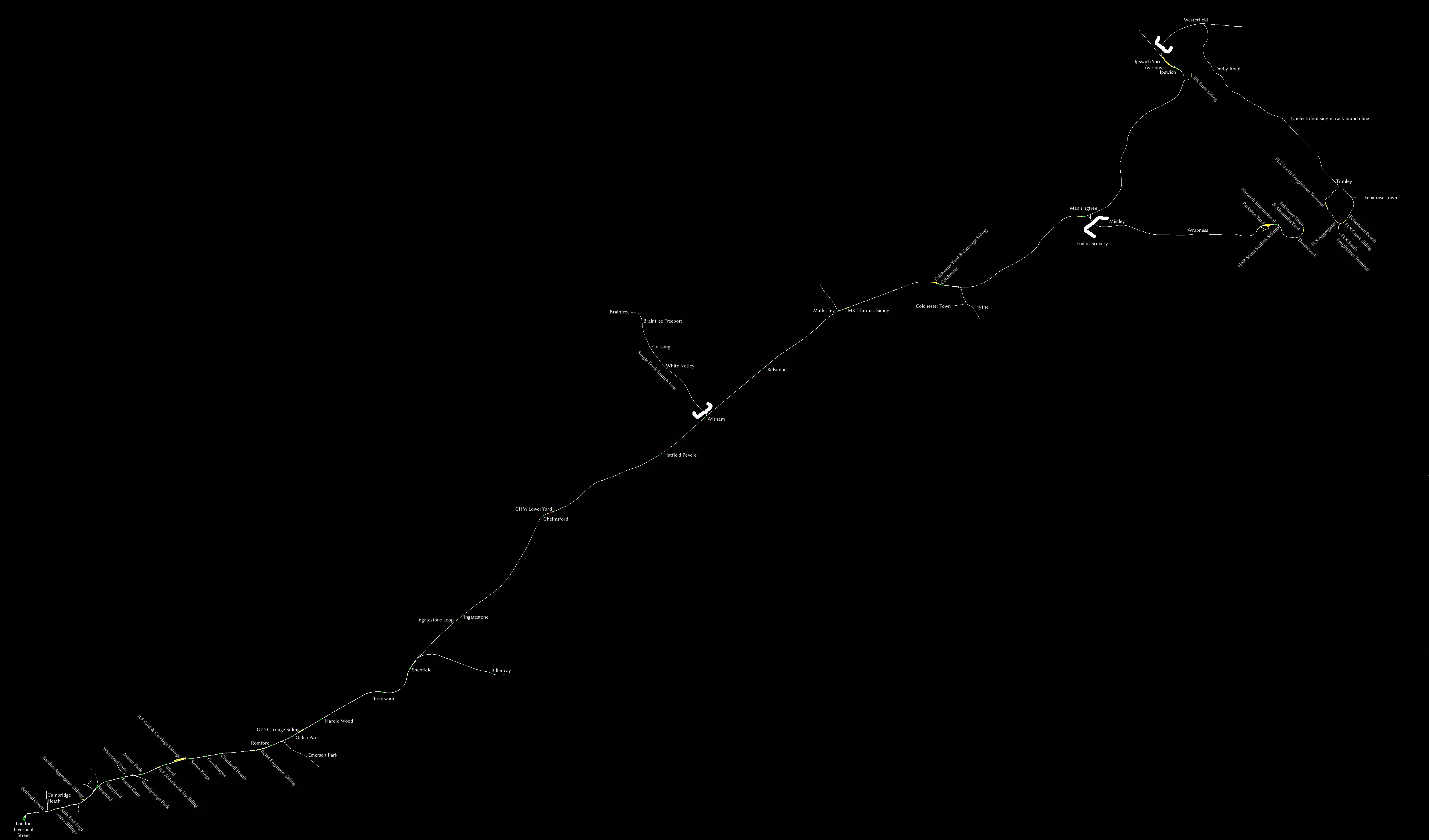
虽然手册中附带了地图,但并未列出所有车站,因此我制作了一份包含所有车站的地图。我还添加了所有调车场和几乎所有侧线。 注意事项: - 从威瑟姆到布伦特里的线路是单线支线,但仍有电气化。 - 从伊普斯维奇到费利克斯托的线路是未电气化的单线支线。 - 从曼宁特里到哈里奇镇的线路没有场景。 - JustTrains[www.justtrains.net]提供一款商业第三方产品,可为曼宁特里 - 哈里奇镇路段添加场景。 伦敦到布莱顿

我是因为工坊中的优质线路“South London to Brighton”才入手了这条线路,该线路将“South London Network”与本线路相结合,形成了一个规模更大的路网。若需查看该工坊线路的地图,请向下滚动。 别忘了查阅手册中的高度图。 伦敦至法弗舍姆高铁(及希尔内斯支线)
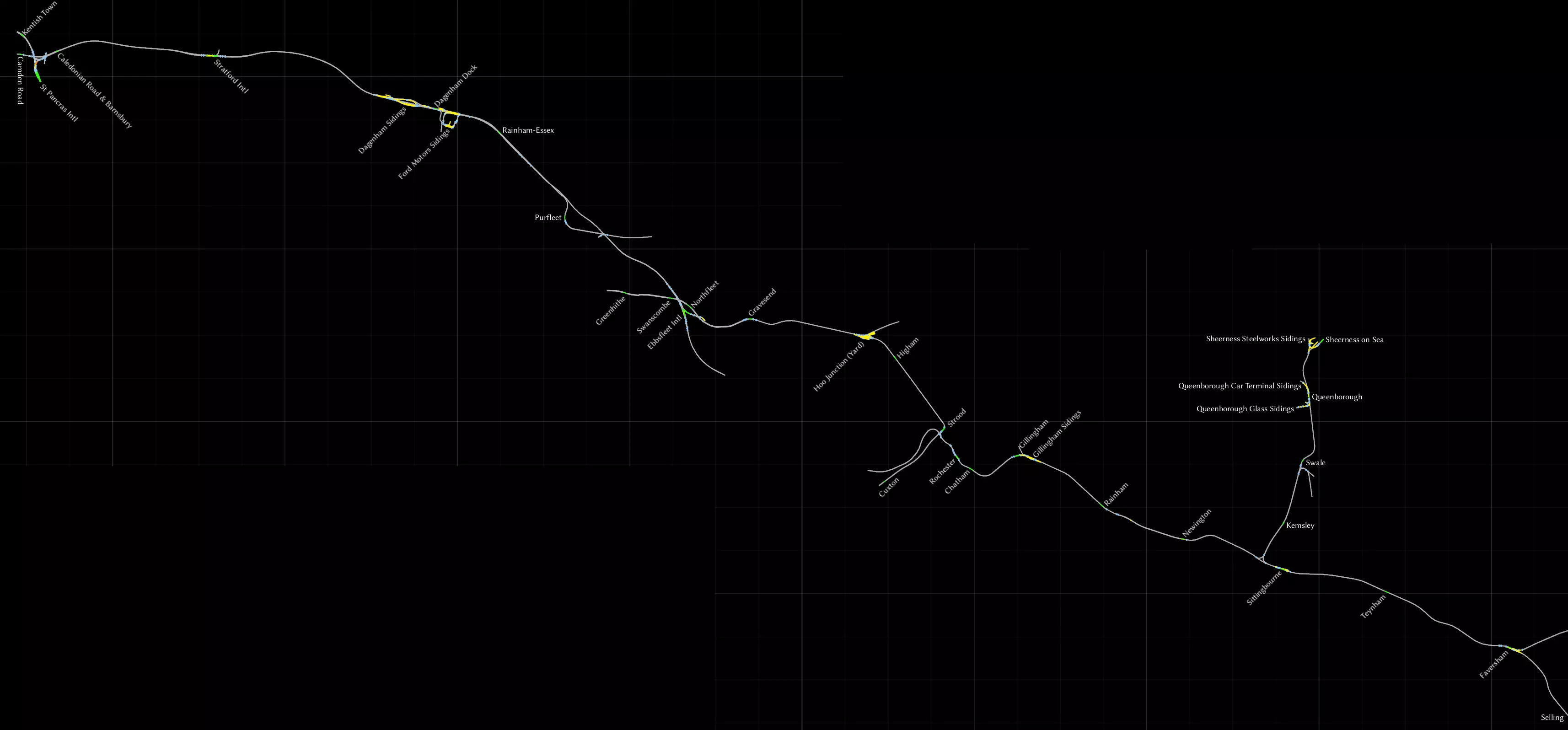
这是2014年随游戏一同推出的线路,涵盖了从伦敦圣潘克拉斯站出发,经HS1高铁线进入肯特郡,直至法弗舍姆的路线。我已将希尔内斯支线包含在内,该支线虽为独立DLC,但已整合到此线路中。 圣潘克拉斯站附近的车站缺少站台等场景,且设计上不供列车运行。伦敦至贝德福德线路则允许你从圣潘克拉斯站经肯特镇向北行驶。 在达格纳姆侧线,另一段装饰性轨道开始,HS1高铁线在此处再次驶出地面。这里有架空支柱,但支柱上没有架空电线。这段从达格纳姆突然开始的轨道,在普尔弗利特后不久便终止了,而HS1高铁线则继续向东延伸。 在埃布斯弗利特站,HS1高铁线不再作为高速线路,而是重新汇入常规铁路网络。《South London Network》线路场景说明: - 忽略格林希思站,该站无场景,但从其向东的所有区域均正常。 - 在胡 junction,每条轨道旁都设有小型木制站台。常规列车不在此停靠。 - 从斯特鲁德站引出支线通往卡克斯顿站,但该站同样无场景。 - 在锡廷伯恩附近,可向北驶入希尔内斯支线,前往谢佩岛。斯韦尔站位置偏僻,周边无任何设施,是个颇为奇特的车站。尽管曾有计划关闭该站或仅保留每周一班的象征性列车停靠,但目前列车仍会在此停靠。 - 塞林站无场景,实际上线路的终点为法弗舍姆站。
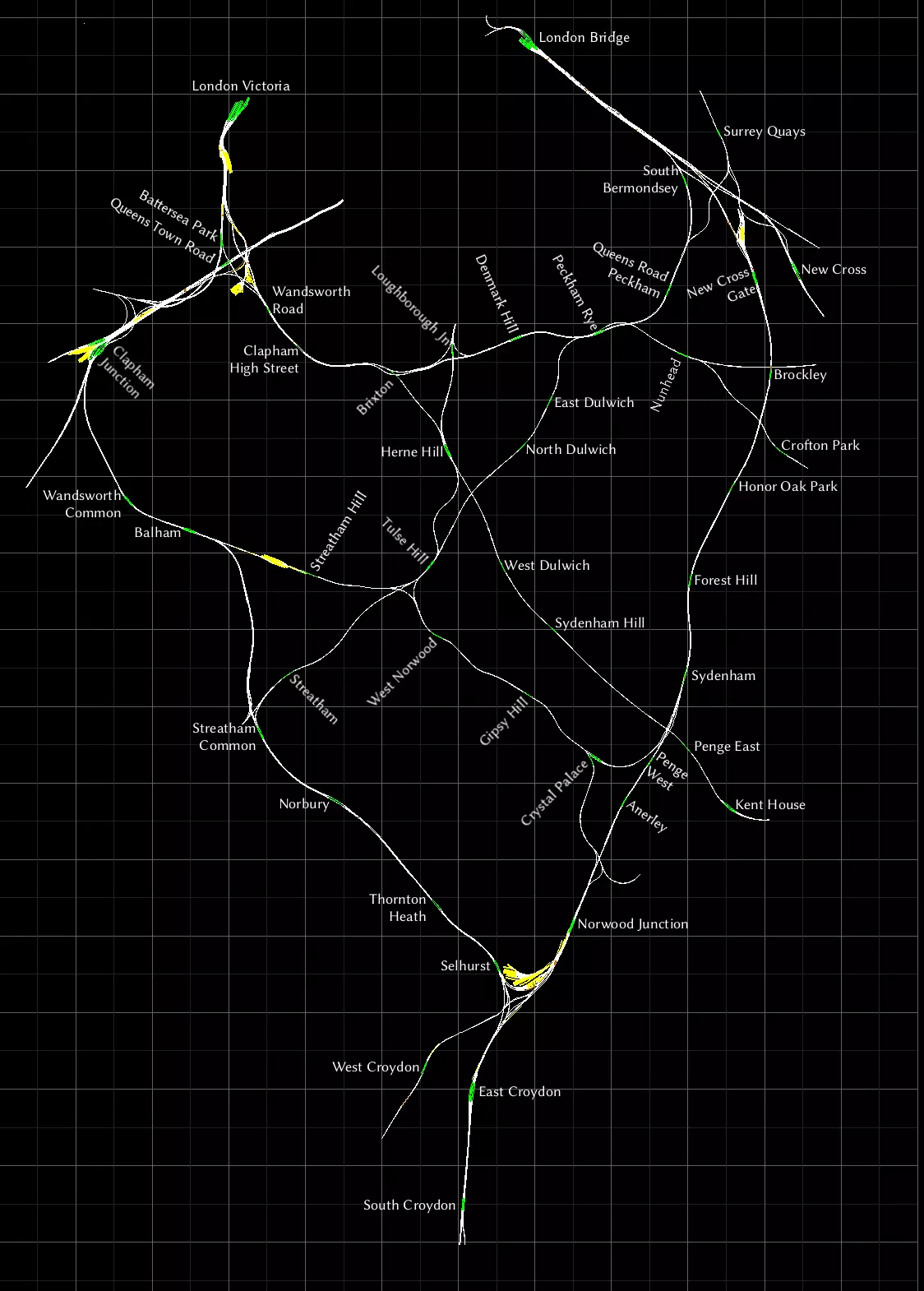
这可能是我最喜欢的线路了。这张地图制作难度最大,因为它的众多车站都紧密地排列在一起。我希望每个车站名称对应的位置都清晰明了,为此我旋转了部分标签,让它们更显眼。 我只去过伦敦两次,但从未乘坐过这条线路及其列车。不过我确实乘坐过地铁和码头区轻便铁路(DLR)。伦敦是一座非常美丽的城市,如果你有机会,我推荐你去看看。 伦敦南部至布莱顿
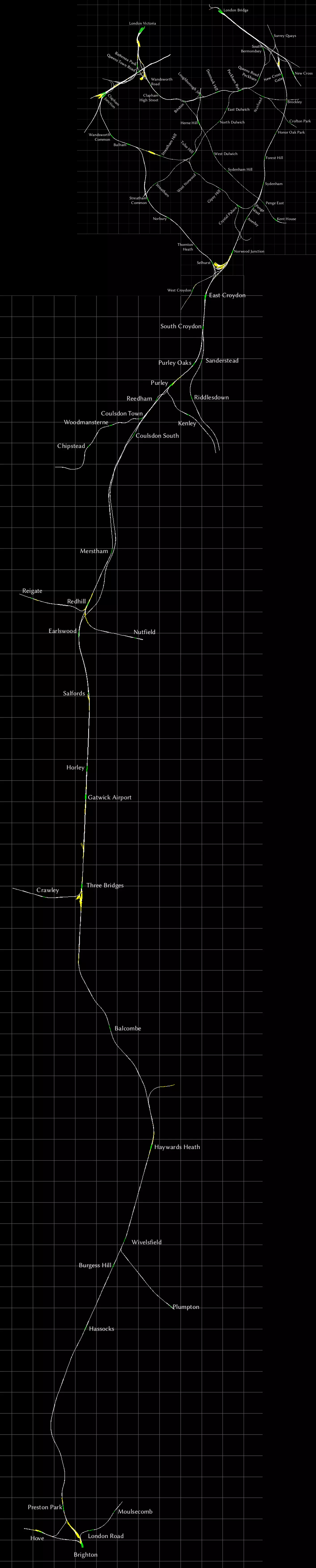
为方便起见,这里有一张“南伦敦至布莱顿”创意工坊路线图,它将《南伦敦铁路网》与“伦敦至布莱顿”路线合并在了一起。 我已成功合并了地图,结果虽不算完美,但比我预期的要好,完全可以正常使用。 《威尔河谷与蒂斯河谷铁路网》
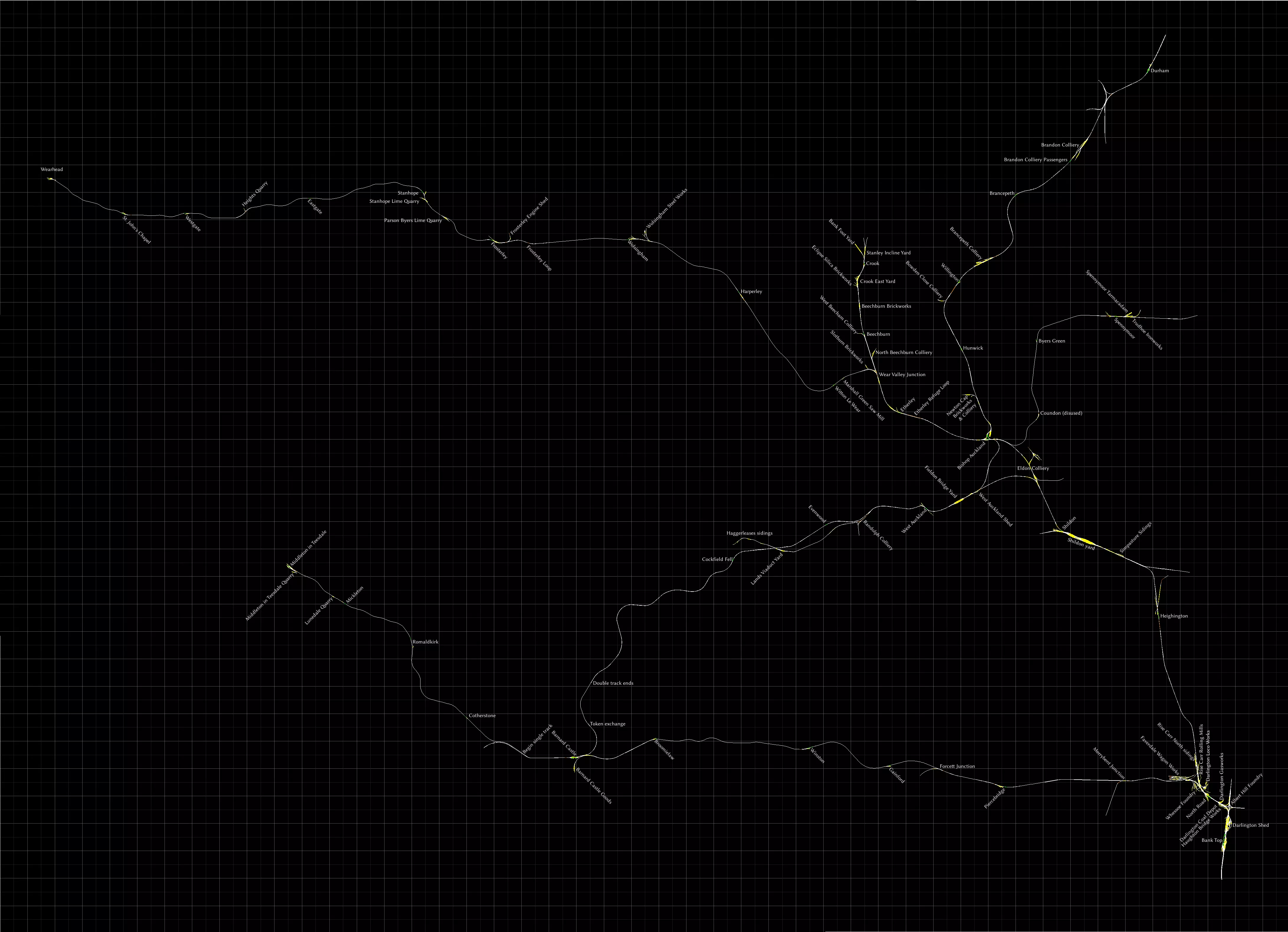
这张地图在我制作的最复杂地图中排名第二,仅次于《南伦敦网络》。 在我看来,这条线路就是典型的英国乡村景观,有着起伏的丘陵和分隔田野的石墙,就像《邮递员派特叔叔》里的场景一样。 可以通过名称中包含“侧线”或“调车场”字样,或者包含行业名称来识别侧线和调车场。 达灵顿周边区域相当复杂,我已尽力而为,但空间有限,无法容纳所有标签。 我将其命名为“布兰登煤矿客运站”,是因为它们似乎是同名工业场旁的客运站台。 我认为康登站已废弃。我之所以这样标记,是因为它没有站台,只是一个带名字的会让线。单轨路段 若我在此处存在错误,请告知我。 韦尔谷 junction 至韦尔黑德为单轨,每个车站均设有会让站。 毕晓普奥克兰至斯彭尼穆尔为单轨,设有会让站。 位于西奥克兰南部的“双轨终点”与标记为“凭证交换处”的地点之间为单轨。 巴纳德城堡至蒂斯代尔米德尔顿为单轨,无任何会让站。单轨路段始于巴纳德城堡以西我标记为“单轨起点”的位置。 布鲁米洛至福塞特 junction 为单轨,温斯顿设有会让站。 加煤与掉头 若你驾驶蒸汽机车,以下几处地点或许对你有所帮助。 可在达灵顿车库、蒂斯代尔米德尔顿以及韦尔黑德补充煤炭。水可在巴纳德城堡、毕晓普奥克兰、克鲁克、达灵顿车库(班克托普北部)、达灵顿南转车台、哈格雷利斯、蒂斯代尔米德尔顿、斯彭尼穆尔和威尔黑德补充。 达灵顿(班克托普站北部)设有柴油加注点。 威尔黑德、克鲁克、达勒姆、班克托普(站内南北各有一个)均设有转车台。当然,韦索铸造厂有一小段环形轨道也可用于机车掉头。此外,还有许多三角形轨道可供掉头使用,例如毕晓普奥克兰站。 **西海岸干线北段** 这是一条集各种功能于一体的老牌线路。包含货运场、适合高速行驶的长距离路段,以及格拉斯哥周边复杂的通勤线路网络。这条线路的北部比南部复杂得多,所以我把地图分成了两部分。我画了一些难看的白色括号来标记未电气化的路段。 若想体验默认场景中没有的独特内容,可以乘坐电动车组(EMU)或内燃动车组(DMU)从汉密尔顿中心站前往拉科霍尔站。另一个值得注意的线路是从卢瑟格伦站到格拉斯哥中央低站台(Glasgow Central LL)。 如果想前往更远的地方,从卡莱尔站出发,西海岸线(WCML)的沙普段、塞特尔-卡莱尔线以及苏格兰西线都是值得一探究竟的路线。 **北部区域** 柯克伍德-卡迈勒段为双线,但未电气化。 查特赫尔到拉科霍尔段为单线(1t),但已电气化。
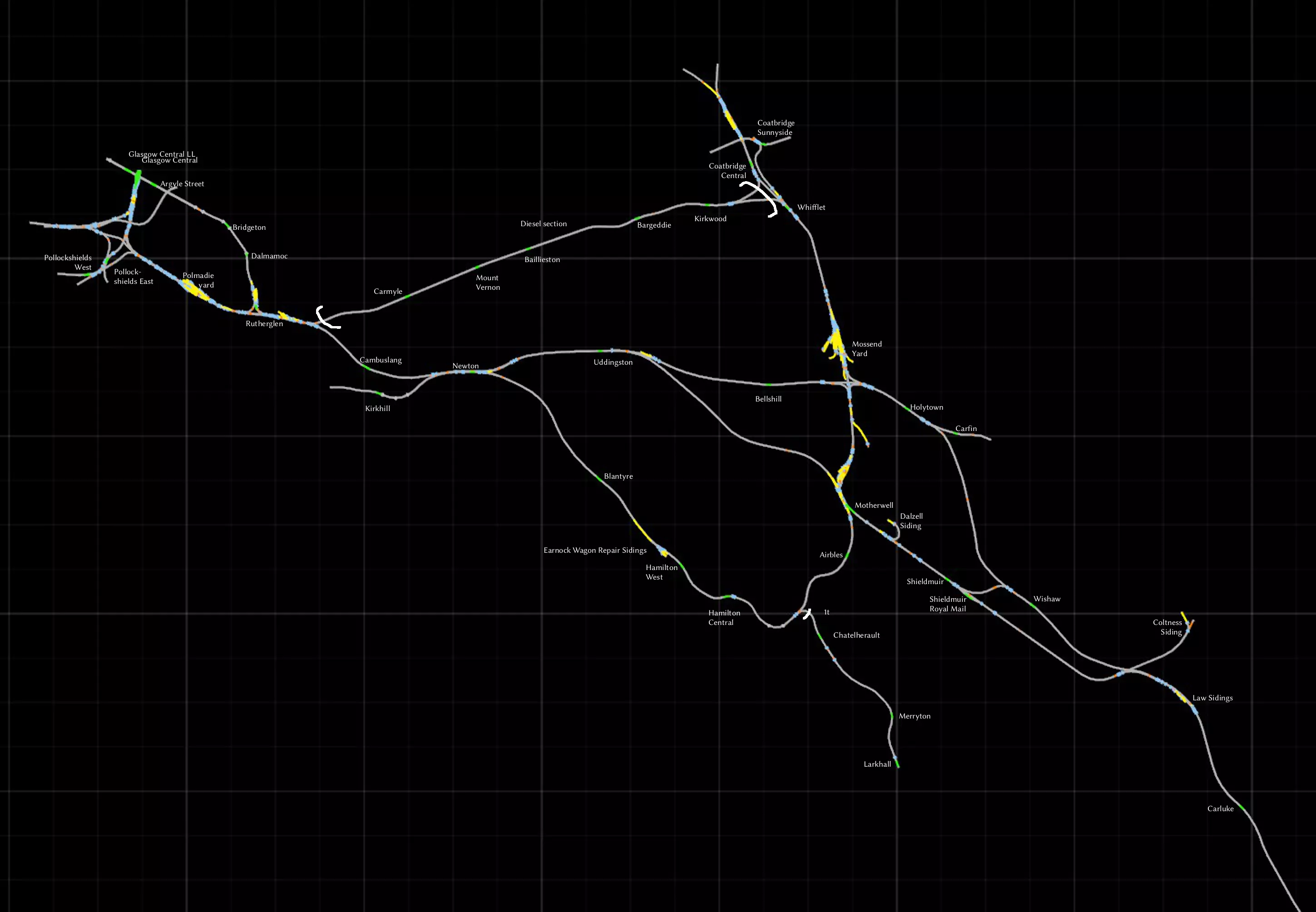
南部地区
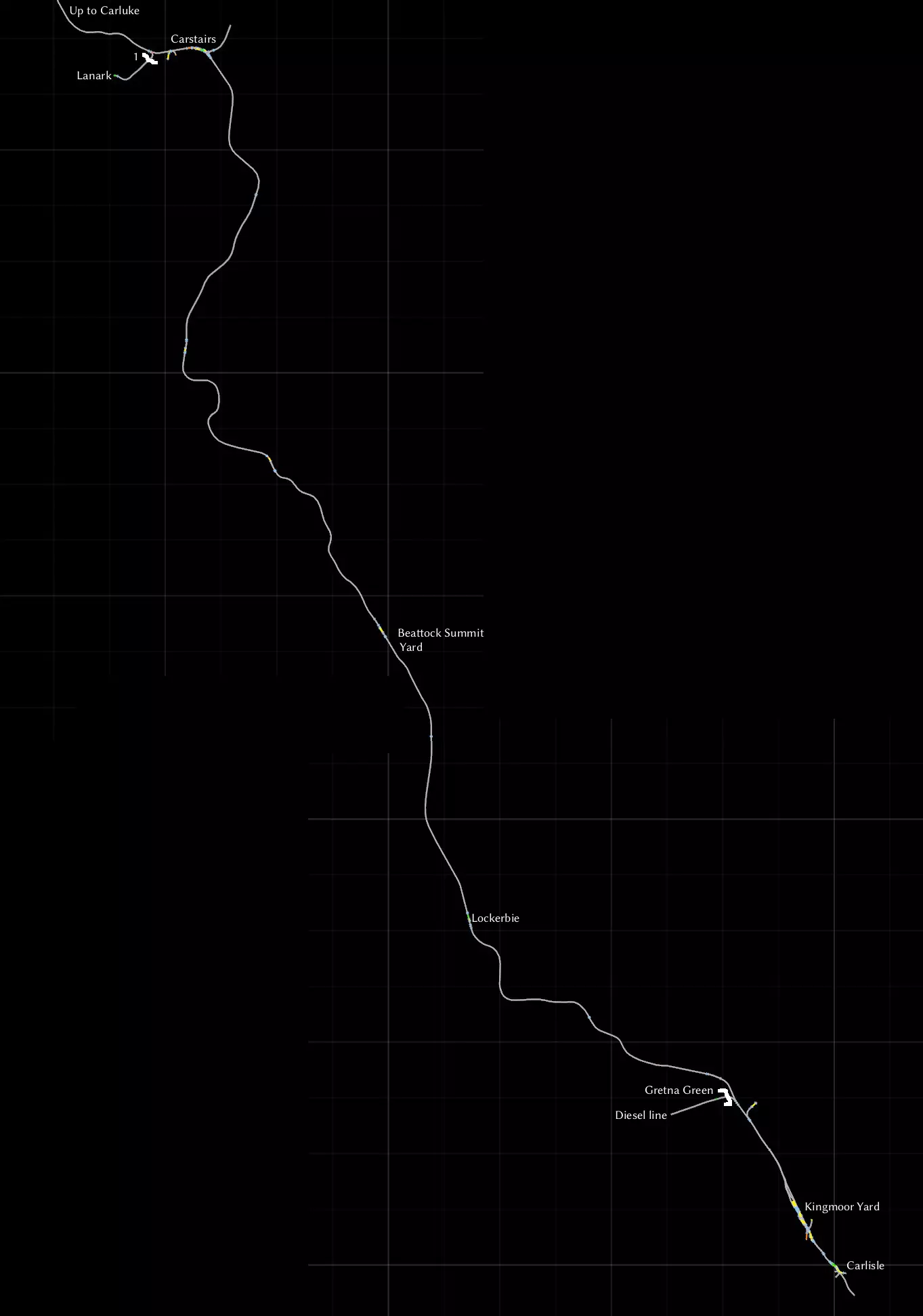
苏格兰西线
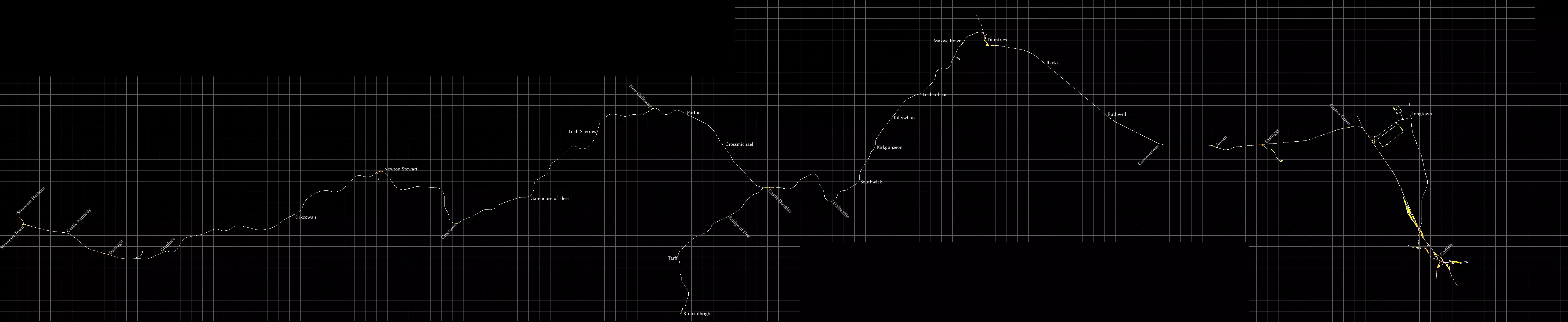
这是一条虽年代久远但依然漫长且令人印象深刻的线路。其背景设定在蒸汽时代末期,就在比奇英铁路大砍计划实施之前。这条线路将带您穿越人口稀少、山峦与树木遍布的区域。 卡莱尔与邓弗里斯之间的铁轨至今仍在运营,并在《西海岸线主线:沙普段》线路中有所呈现。对比这两条线路,观察多年来的变迁与不变之处,别有一番趣味。 我不太喜欢这条线路的轨道纹理,但这一问题可通过安装Trainworks.eu的DBTracks更新轻松解决[trainworks.eu]。该线路包含多种涂装的经典黑五型蒸汽机车,但其物理效果已略有更新。线路沿途设有多处蒸汽机车整备地点。手册中附带了大量地图和图表,因为有无数的工业支线可供你使用。但我没有看到所有客运站的完整地图,所以这就是我在这里制作的内容。 卡莱尔和道格拉斯堡之间为双线铁路。其他所有线路,包括通往柯克库布里的线路,均为单线。几乎所有客运站都设有可供列车会车的双线轨道。需要注意的一些例外情况: - 帕尔顿为单线 - 迪伊桥为单线 - 卡斯尔肯尼迪和邓拉吉特之间的轨道为双线 Berlin - Wittenberg
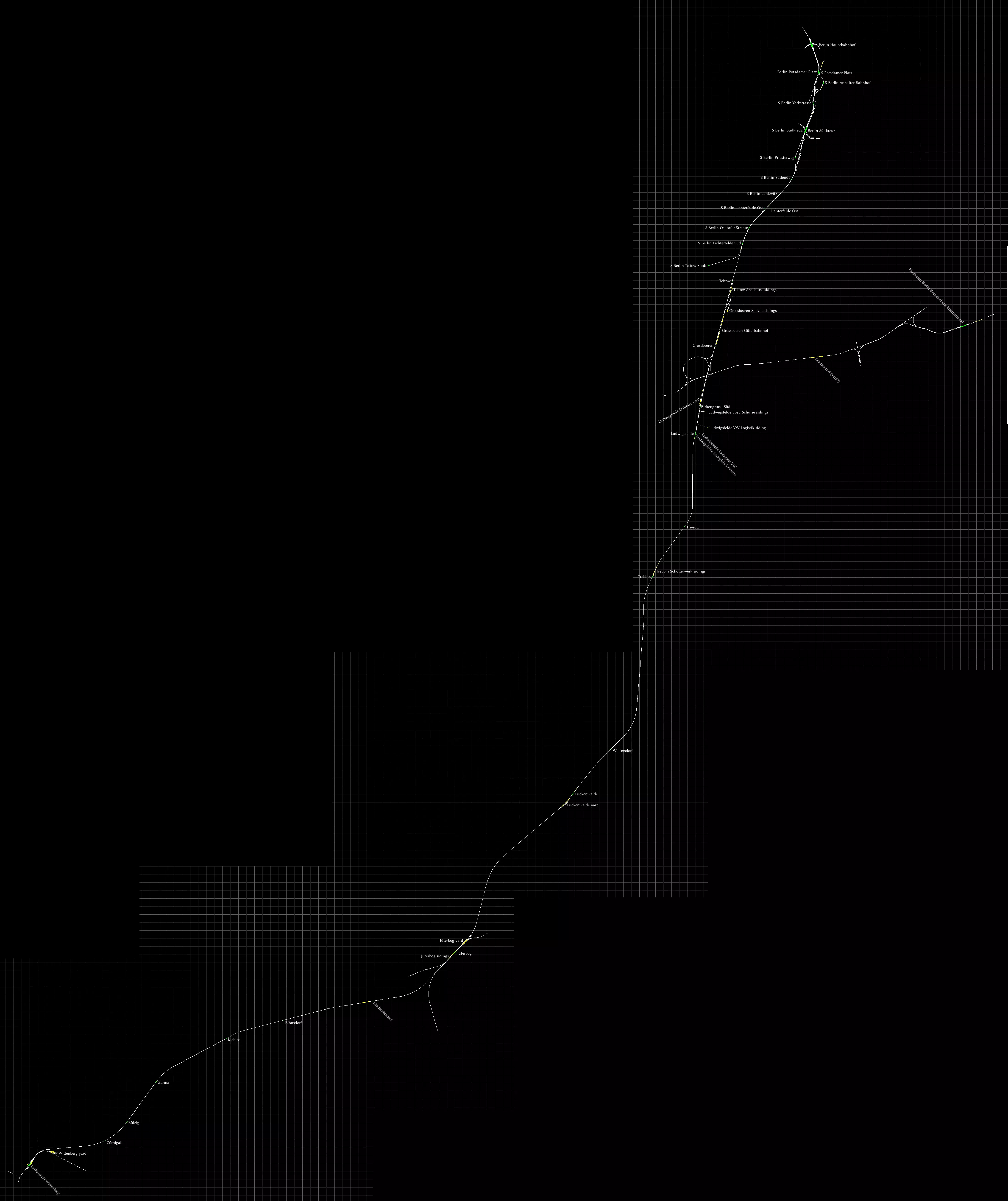
这条线路上可做的事情实在太多了。这显然是一条面向通勤的线路,最高时速可达200公里/小时,但如果你喜欢货运,这里也有一些小型侧线和调车场。 Steam上销售的版本已过时,必须手动打补丁!请直接从创作者处获取1.26补丁[www.virtualtracks.net]。此补丁新增了快速驾驶模式(Quick Drive)和LZB列车控制系统。完整的变更列表请参见德语页面[bahnjan.blogspot.nl]。 线路北部是柏林中央火车站。随着轨道向南延伸,城市快铁(S-bahn)会汇入并与之平行运行。城市快铁类似于地铁,采用第三轨供电。城市快铁的站台和车站均以“S”开头。目前没有场景使用这些轨道,但你可以自行创建。你可以从[rail-sim.de]免费获取合适的城市快铁电动车组。格罗斯贝伦车站以北是古特巴恩霍夫货运站。 向东分支的线路通往柏林勃兰登堡国际机场。该机场原计划于2010年启用,但截至目前仍在建设中。线路中段有一个名为迪德斯多夫的区域,包含四条轨道。这里看似一个小型调车场,但你或许需要保持中间两条轨道空闲,以避免交通堵塞。 继续向南前往路德维希斯费尔德,沿途有许多为当地工业服务的侧线和小型调车场。 在卢肯瓦尔德和尤特博格之间的轨道东侧,可以看到一座始建于20世纪30年代的旧军事基地遗迹,该基地后来由苏联人使用并扩建。这里是1988年福斯特·津纳灾难的发生地,当时一列火车与一辆坦克相撞,这起事故被认为是东德(德意志民主共和国)最严重的铁路事故之一。 如果你喜欢驾驶蒸汽机车,尤特博格调车场有一个转车盘,你可能会觉得很有用。 线路的南端是维滕贝格,其官方名称为“路德城维滕贝格”,这源于马丁·路德曾在那里生活和工作。 维滕贝格东北部有一个调车场,内有蒸汽机车维修设施,包括一个转车盘。 在http://bahn.de上使用行程规划工具查询后发现,常规的区域快车(RegionalExpress)会在沿途各站停靠,但沃尔特斯多夫和克莱比茨站除外。据我所知,这两个车站已不再使用。 Im Köblitzer Bergland V3 Reloaded / Koeblizter Mountain Route
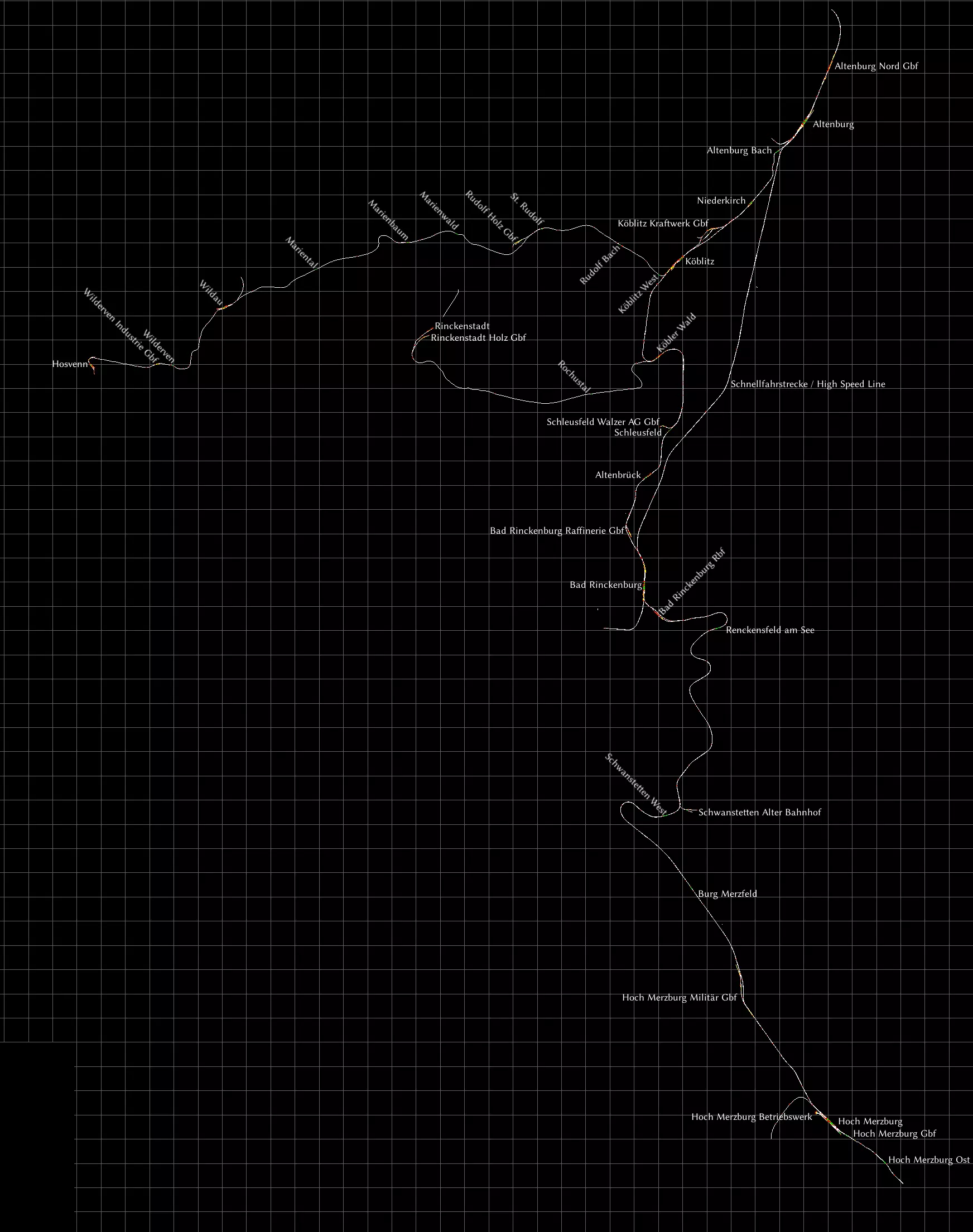
这条虚构线路是我所知道的《模拟火车》中细节最丰富的线路。部分建筑甚至制作了内部模型。你可以直接从Aerosoft[www.aerosoft.com]购买,也可以在Steam上获取。 该线路在2019年12月进行了一次重大更新,当时网上没有这个版本的地图,所以我制作了一张。 此线路是目前可用的最新版本,它有着悠久的历史:最初是名为Altenburg to Wildau[rail-sim.de]的免费线路。每一次新版本发布都会增加更多内容,并为了展现线路在不同时代的风貌而做出一些改动。 你可以在《模拟火车》中同时安装不同版本的线路,不会有问题。例如,我就同时安装了最初的免费版Altenburg to Wildau和这个V3版本。它们会显示为不同的路线,这样我就能选择想要驾驶的路线了。 关于这张地图: - 货运轨道已标记为Gbf(货运站)或Rbf(编组站)。 - 科布利茨西站与霍斯文之间的区段为单线轨道。 - 维尔道与霍斯文之间的区段未电气化。 - 科布勒瓦尔德与林肯施塔特之间的区段为单线且未电气化。这部分设定为博物馆铁路,在科布勒瓦尔德设有专用站台。 - 阿尔滕堡与巴特林肯堡之间的高速线上没有中间站。 - 圣鲁道夫与林肯施塔特之间的旧铁路如今已改建为自行车道。这部分未在地图上显示,但已完全建模,你可以去看看。请务必查看手册,以了解本路线提供的所有地点的说明。 科隆 - 杜塞尔多夫
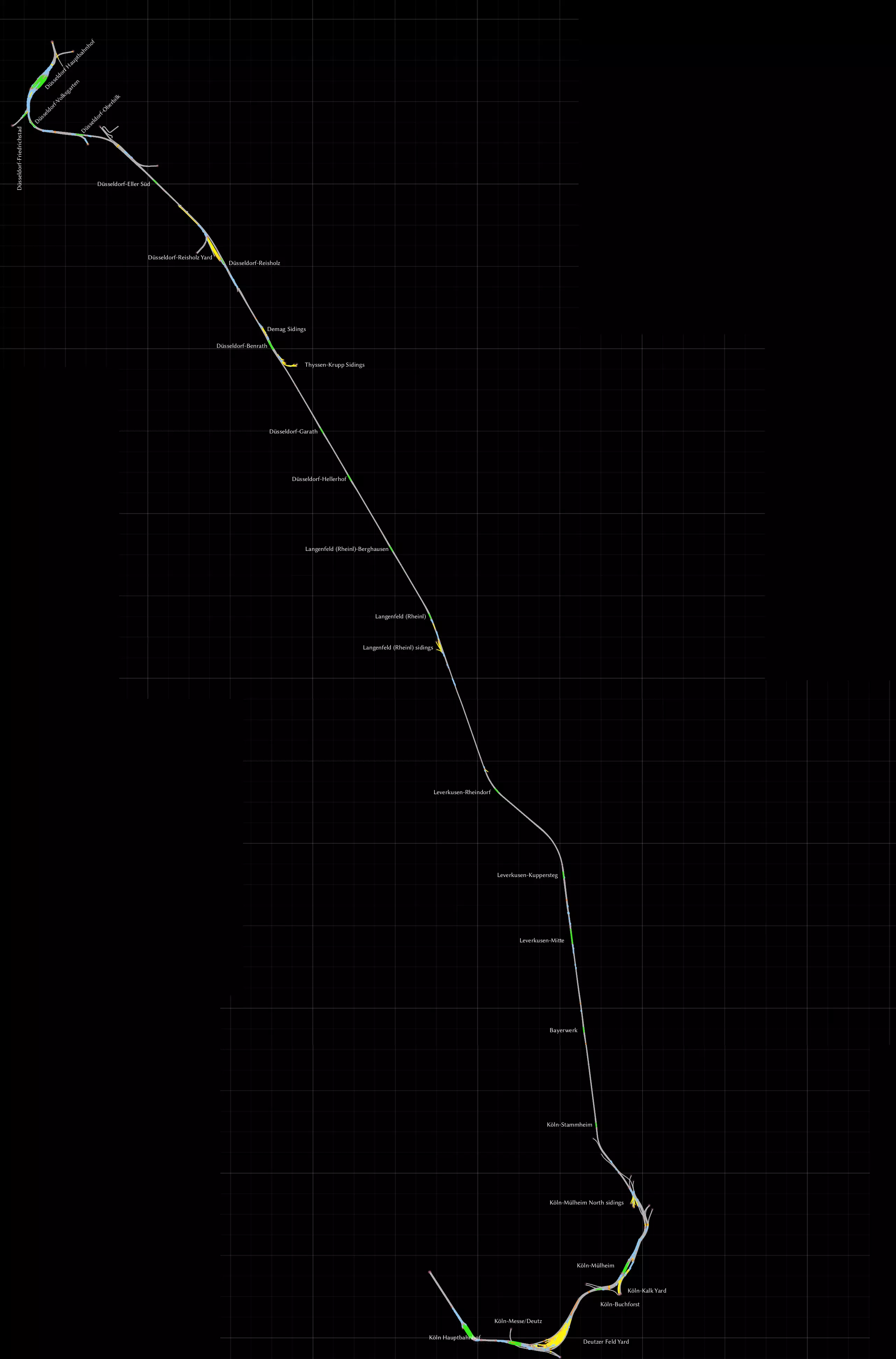
这是一条较早期的线路,源自游戏仍名为Railworks的时期,连接科隆(Köln)与杜塞尔多夫两座城市。和往常一样,我会使用所有名称的标准德语拼写。 前往科隆的这段路程非常美妙,列车将驶过霍亨索伦桥,径直朝着标志性的科隆大教堂行驶。这是一座铁路桥,但行人也可以使用桥两侧的人行道。 线路上有许多车站可用于运行通勤服务,并且线路两端各有一个大型调车场,可用于进行货运作业。 别忘了查看手册文件夹中的diagram_Deutzerfeld.pdf文件,这是一份非常详细的多伊茨菲尔德调车场地图。杜塞尔多夫-上比尔克以东的一小段急转弯轨道属于城市有轨电车系统,且未与任何线路连接。 康斯坦茨 - 菲林根
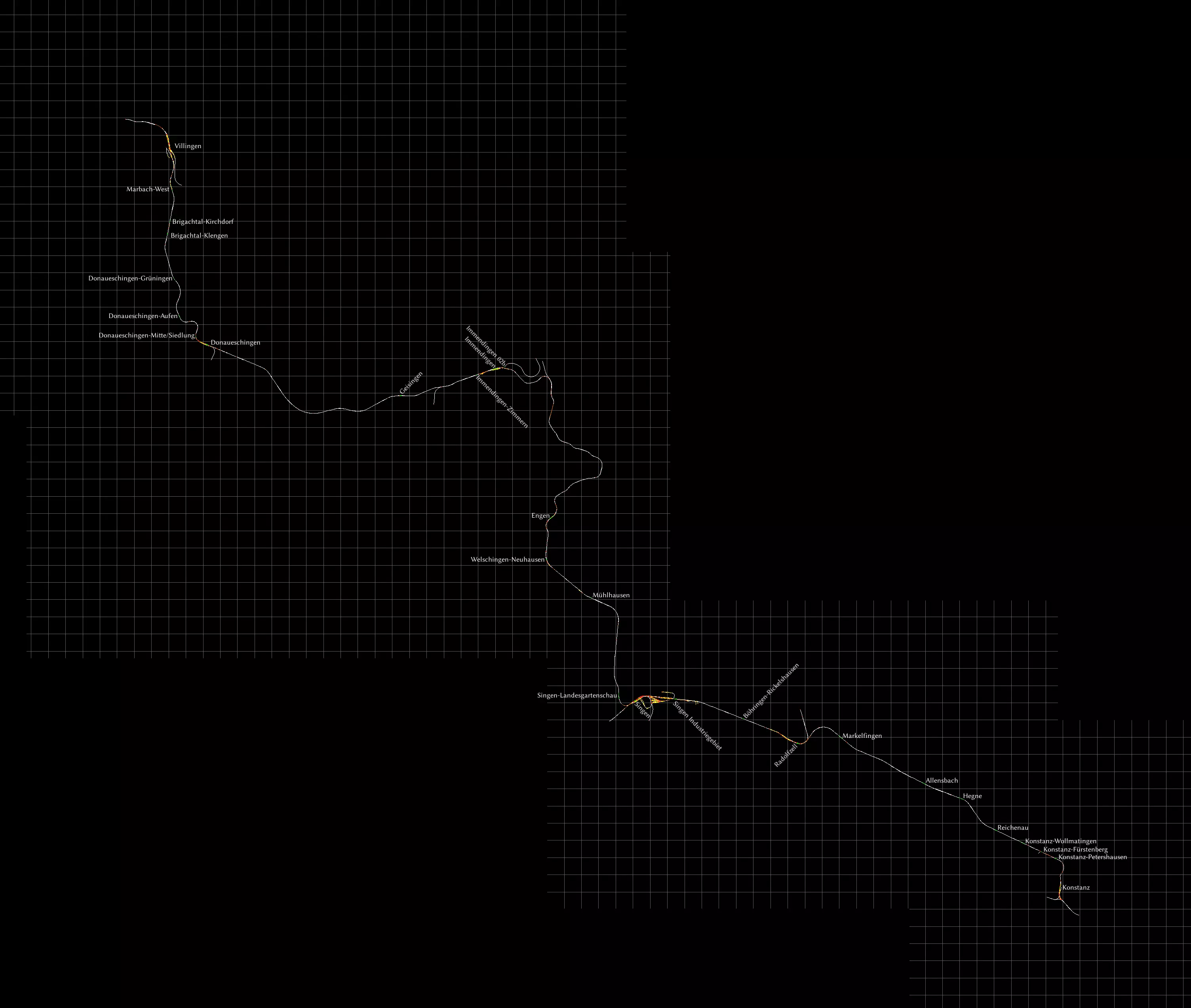
《模拟火车》中一条由第三方开发的商业线路,拥有最为平滑的轨道。所有坡度均经过手动平滑处理。 我是康斯坦茨周边整个地区的忠实爱好者。 你可以从大多数第三方卖家处或直接在Steam上获取该线路。Steam版本更改或移除了部分品牌名称,但除此之外内容相同,且场景应保持兼容。 该线路还有一个名为Hausach-Konstanz的扩展包,但由于我没有购买,所以未将其添加到地图中。 曼海姆 - 卡尔斯鲁厄
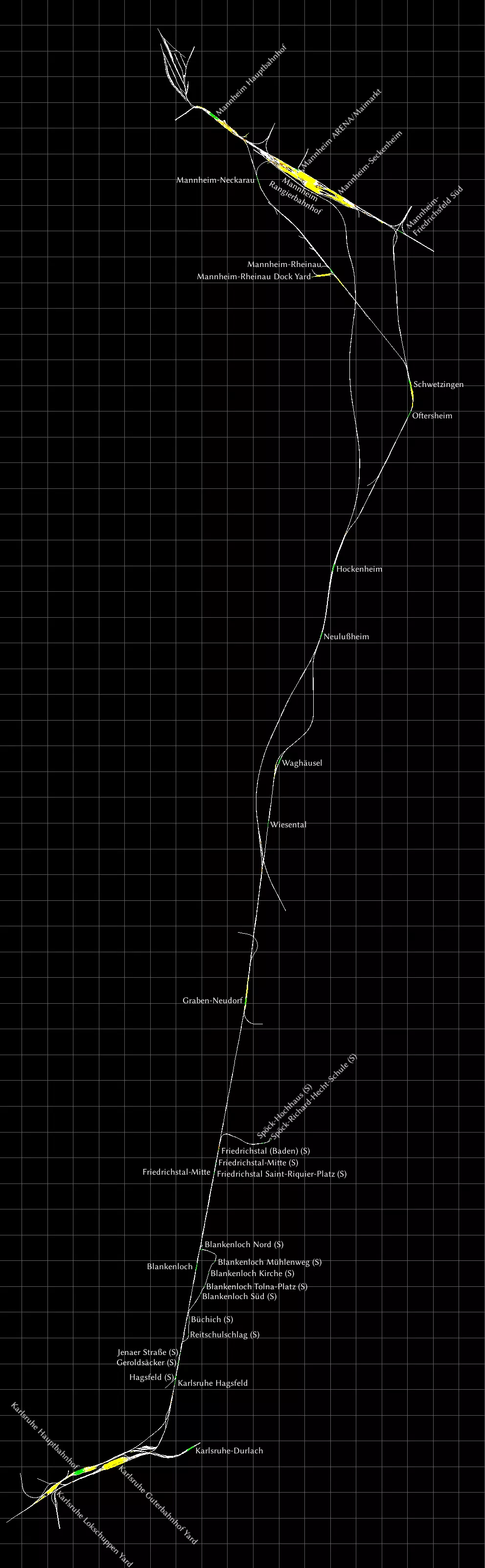
我已尝试将标签贴在轨道旁的站台上。 部分车站标有(S),代表城市快铁(Stadtbahn)。这些是轻轨车站,似乎没有信号装置,且无法通过快速驾驶模式前往,因此需要为这些车站创建自定义场景。施波克站和布兰肯洛赫北站设有掉头环线。 卡尔斯鲁厄城市快铁车辆有一个巧妙的功能,可从路面行驶的有轨电车切换为成熟的铁路车辆,这涉及到安全系统和线路电压的切换。不过,此功能在此线路中不会实现。 慕尼黑 - 奥格斯堡
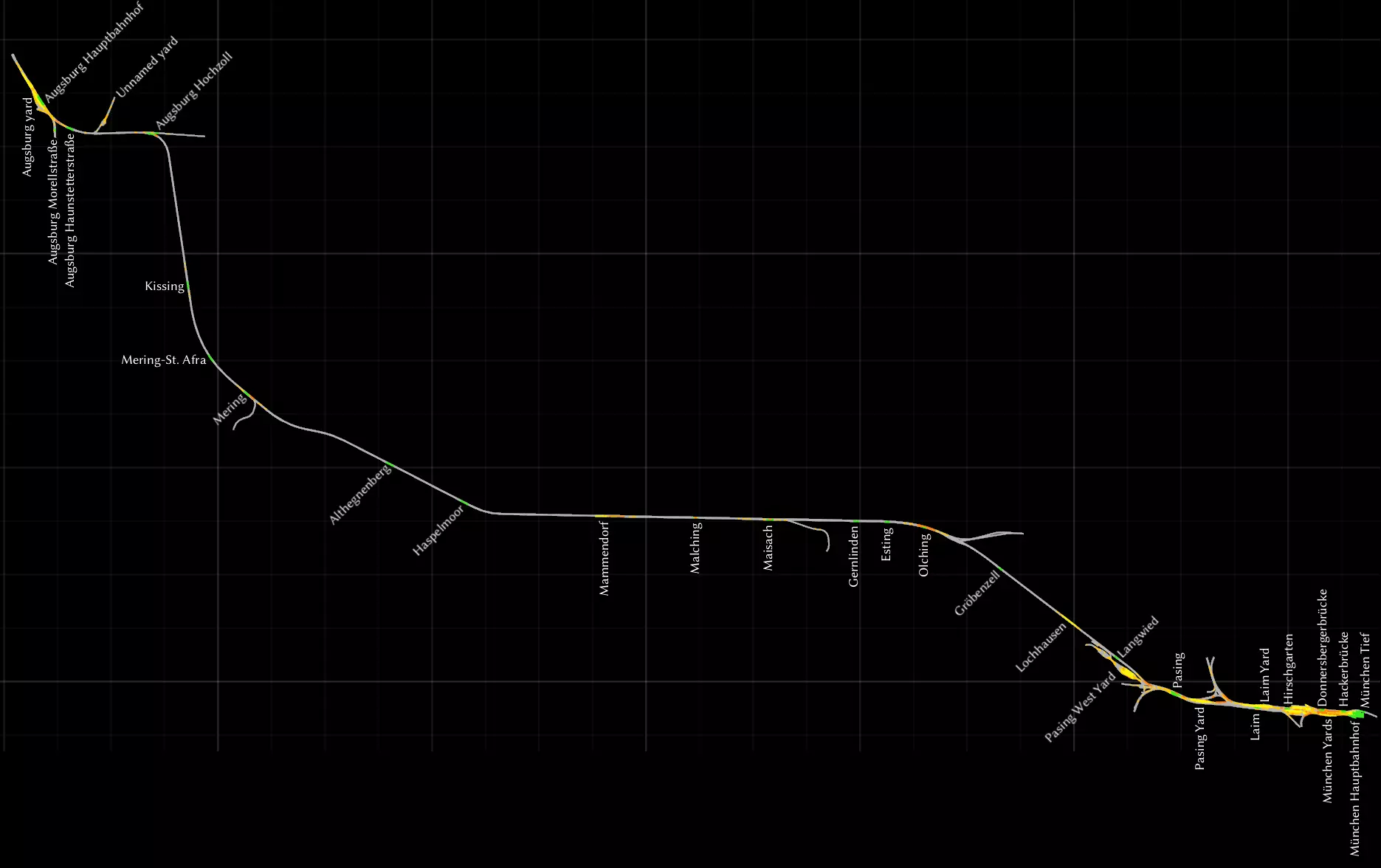
我拿到了这张地图来驾驶BR420型电力动车组,因为它附带了该车型的场景任务。从这个角度来说,这是一张不错的地图,有很多客运站,而且非常写实,因为这里是BR420型电力动车组(BR420)常见的运行区域。你也可以驾驶高速列车在同一条线路上行驶,几乎可以跳过所有站点。 和《慕尼黑-加尔米施-帕滕基兴》线路一样,我使用了所有地名的德语拼写。 慕尼黑到洛赫豪森段与《慕尼黑-加尔米施-帕滕基兴》线路相同,所以如果你愿意,可以使用慕尼黑地区的详细放大地图来仔细查看调车场。 调车场只在慕尼黑和奥格斯堡附近才有。奥格斯堡有一个无名调车场,没有任何导航点,所以如果你想在那里进行调车作业,就必须使用自由漫游模式,或者为任务场景创建自己的标记。 我不太喜欢声屏障墙遮挡风景的视线,因此制作了这个线路的修改版本,移除了这些墙体。你可以在创意工坊中获取该版本。 **慕尼黑 - 加尔米施-帕滕基兴** 这是我最喜欢的德国地图。你可以驾驶列车从繁忙的城市环境驶向宁静的山区。我是荷兰人,对于非平坦的地形很容易心生向往。我喜欢驾驶BR420型电力动车组,或者我的某列荷兰列车组行驶在这条线路上。 为了方便查看,我将这张地图一分为二。我已包含了所有调车场,它们仅存在于线路北部的慕尼黑周边区域。我还修复了所有拼写错误,并采用了所有名称的德语拼写方式,因此“慕尼黑”现在拼写为“München”,“洛克汉姆”现在拼写为“Lochham”。我将慕尼黑的主要车站命名为“München Hauptbahnhof(慕尼黑中央火车站)”。 北部区域,慕尼黑地区
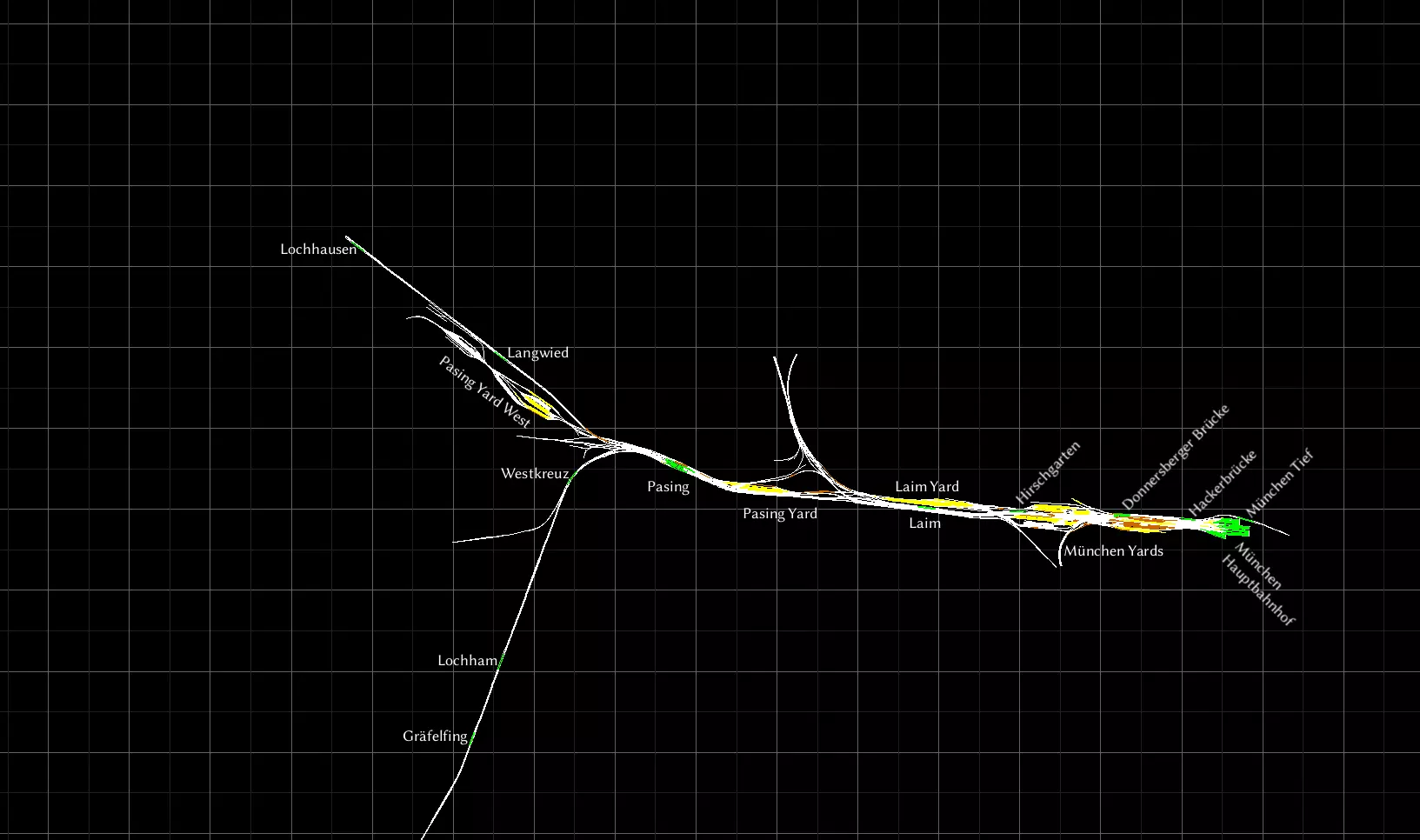
部分车站仅供S-Bahn城市快速轨道交通服务使用。若您希望在这些车站停靠,请仔细选择您的起始站台。**慕尼黑蒂夫格莱斯1号站台(München Tief Gleis 1)是最佳的起始点,因为它是唯一能前往哈克桥站(Hackerbrücke)的站台。** 现实中的S6线路始于东部一个不在此路线图上的车站,经由慕尼黑蒂夫站(München Tief)延伸至图青站(Tutzing)。 **南部路段则向下延伸至加尔米施-帕滕基兴站(Garmisch-Partenkirchen)。**
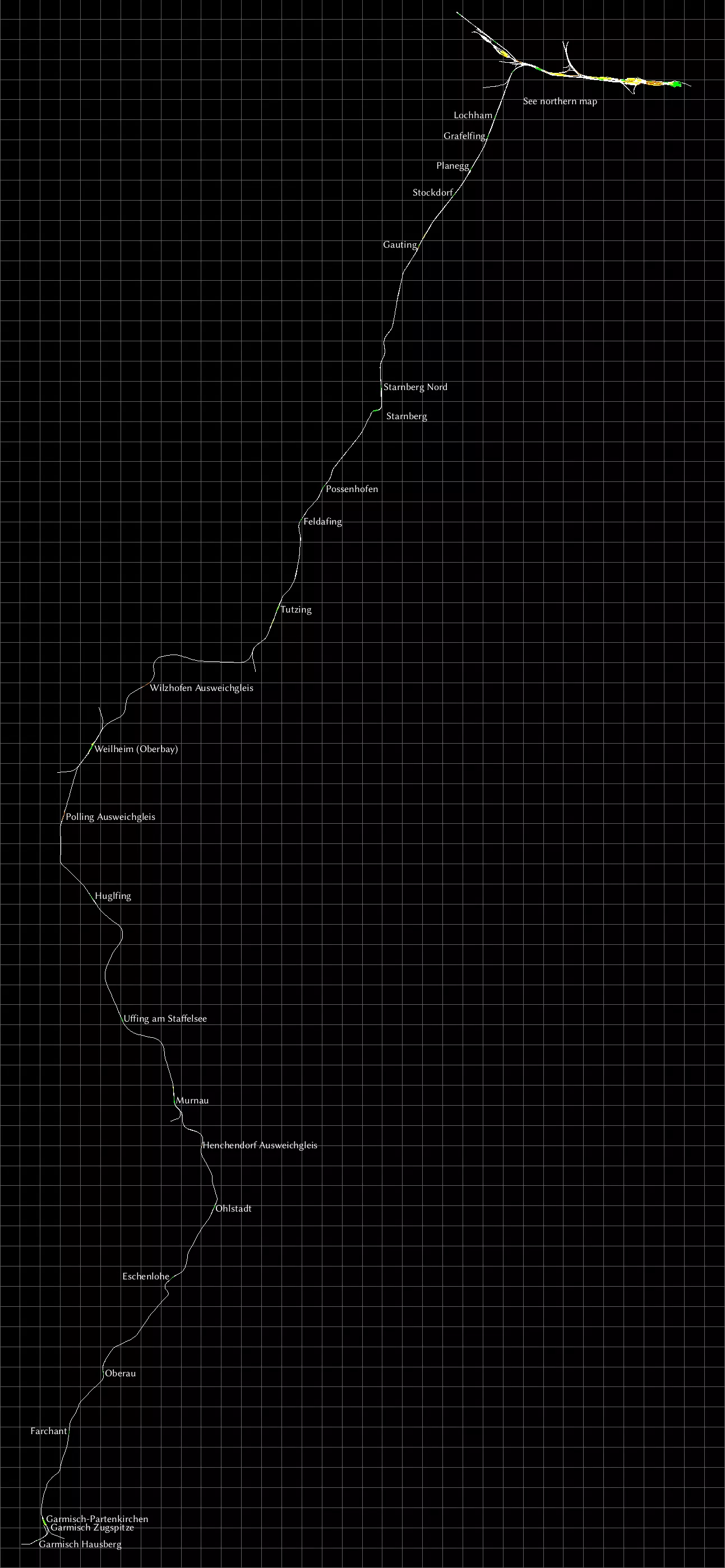
这条线路从北部延伸至高廷(Gauting)为四线轨道。此前的所有车站均设有“避让轨道(Ausweichgleis)”,若不想让列车在这些车站停靠,可通过该轨道进行调度。 从高廷继续向南,直至图青(Tutzing)为双线轨道。过了图青之后变为单线轨道,但部分区域设有可供列车会车的地点。这些会车区域分布于所有车站,此外还有几处无车站的区域也设有“避让轨道(Ausweichgleis)”。 穆尔瑙(Murnau)的双线轨道段向南延伸较长距离,但在标记为亨兴多夫避让轨道(Henchendrof Ausweichgleis)的区域恢复为单线轨道。该区域设有北(Nord)和南(Sud)两个路标点,因此需根据行驶方向(向北或向南)选择正确的轨道。在加尔米施-帕滕基兴附近,有两个未与其他路线相连的特殊车站——加尔米施豪斯贝格站和加尔米施楚格峰站。它们是用于窄轨楚格峰铁路的车站,该铁路由此出发,通往德国最高峰楚格峰。 延伸阅读:我通过这张S-Bahn线路图[commons.wikimedia.org]了解了相关路线。 Projekt Freiberg
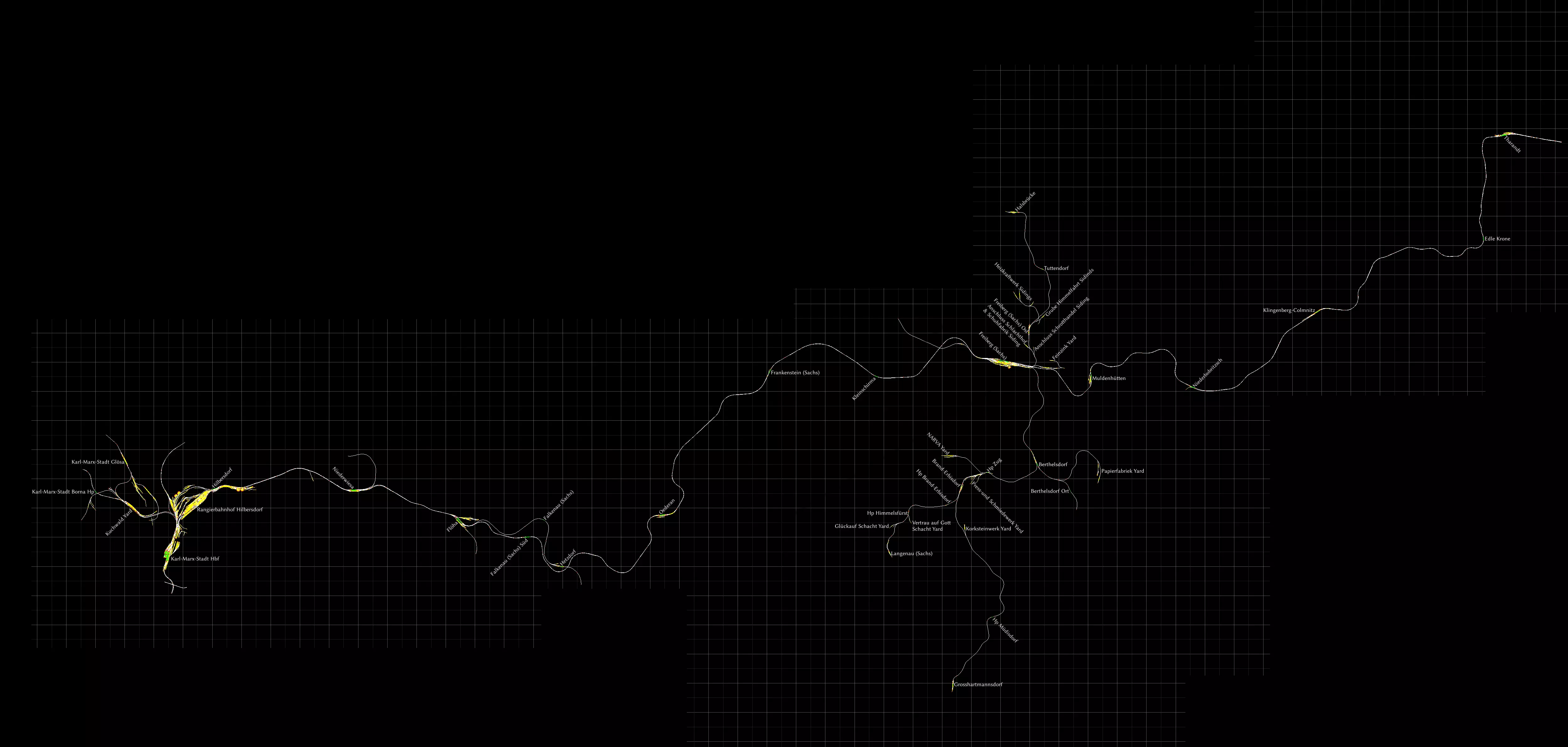
一个以铁幕倒塌前的东德为背景的免费线路,配有相应的标志和信号。主要的东西向双线已电气化。在弗赖贝格,有许多柴油支线可供货运和客运使用。 你可以从 http://rail-sim.de/forum/wsif/index.php/Entry/2128-Projekt-Freiberg-Sachs-V2-0/ 下载该线路。压缩包中包含英文手册。我建议获取可选的快速驾驶场景[rail-sim.de]。 鲁尔-锡格线(哈根-锡根)
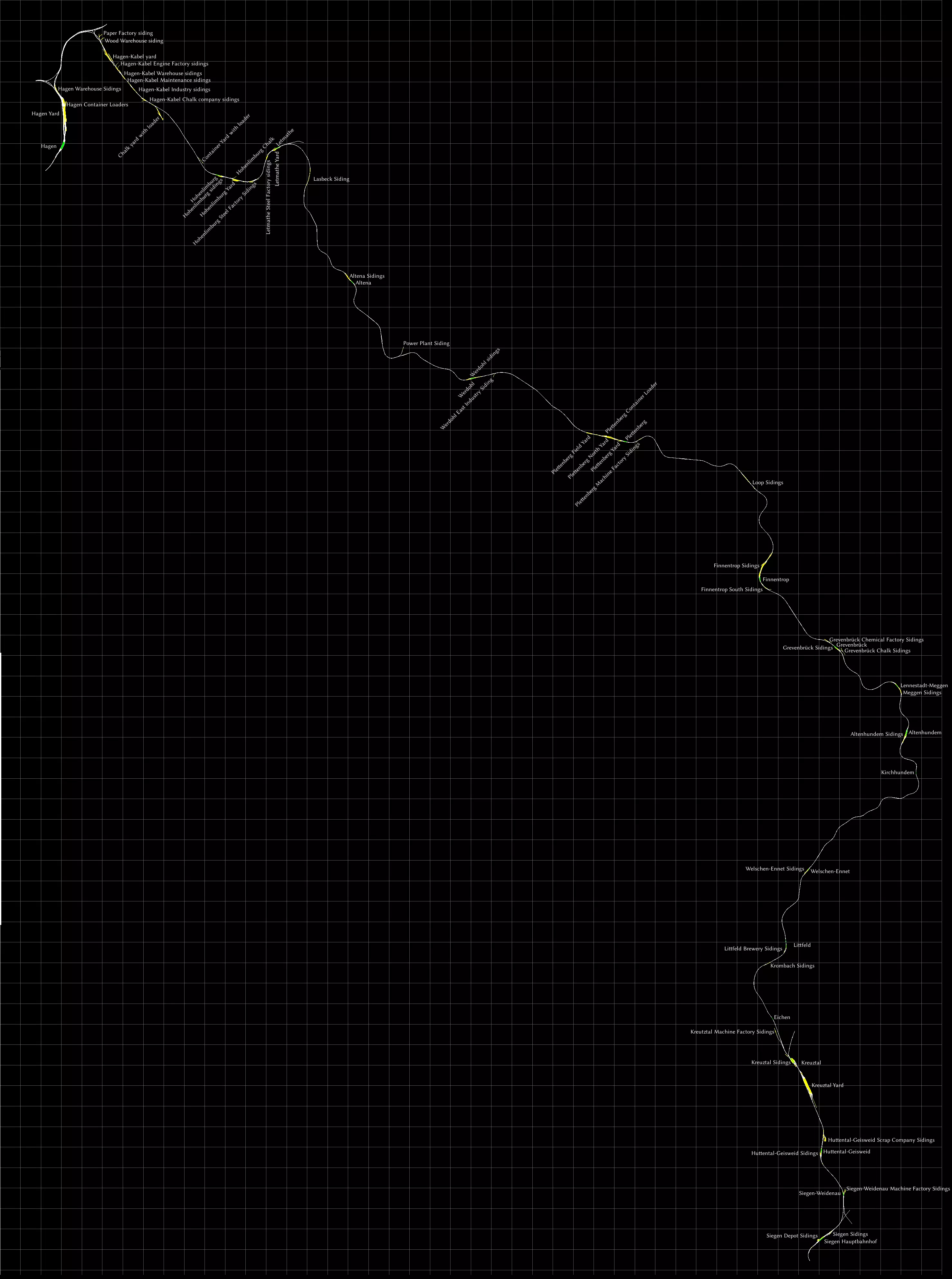
这条线路名为“鲁尔-锡格线”,其名称源于它连接了鲁尔区与锡格河。 这条线路的制作比我预想的要费力得多,因为包含了许多侧线。希望我没有遗漏任何一条。对于货运爱好者来说,这是一条很棒的线路,因为沿途有很多地点可以进行货物转运。 有趣的是,一些较小的车场仍被称为“Siding”(侧线),比如在芬嫩特罗普,所以我也沿用了这一名称。我还标注了一些装载点。 线路的两端各有一个大型车场,分别位于哈根和克罗伊茨塔尔。 在锡根有一个带转车台的圆形机车库。 如果你懂一点德语,非常值得下载v3.0模组[rail-sim.de],它为轨道增加了超高,同时还有许多小的改进。你将获得一条从莱特马特到伊瑟隆的小型支线。 S25 穿越柏林之心 / Mitten durch Berlin
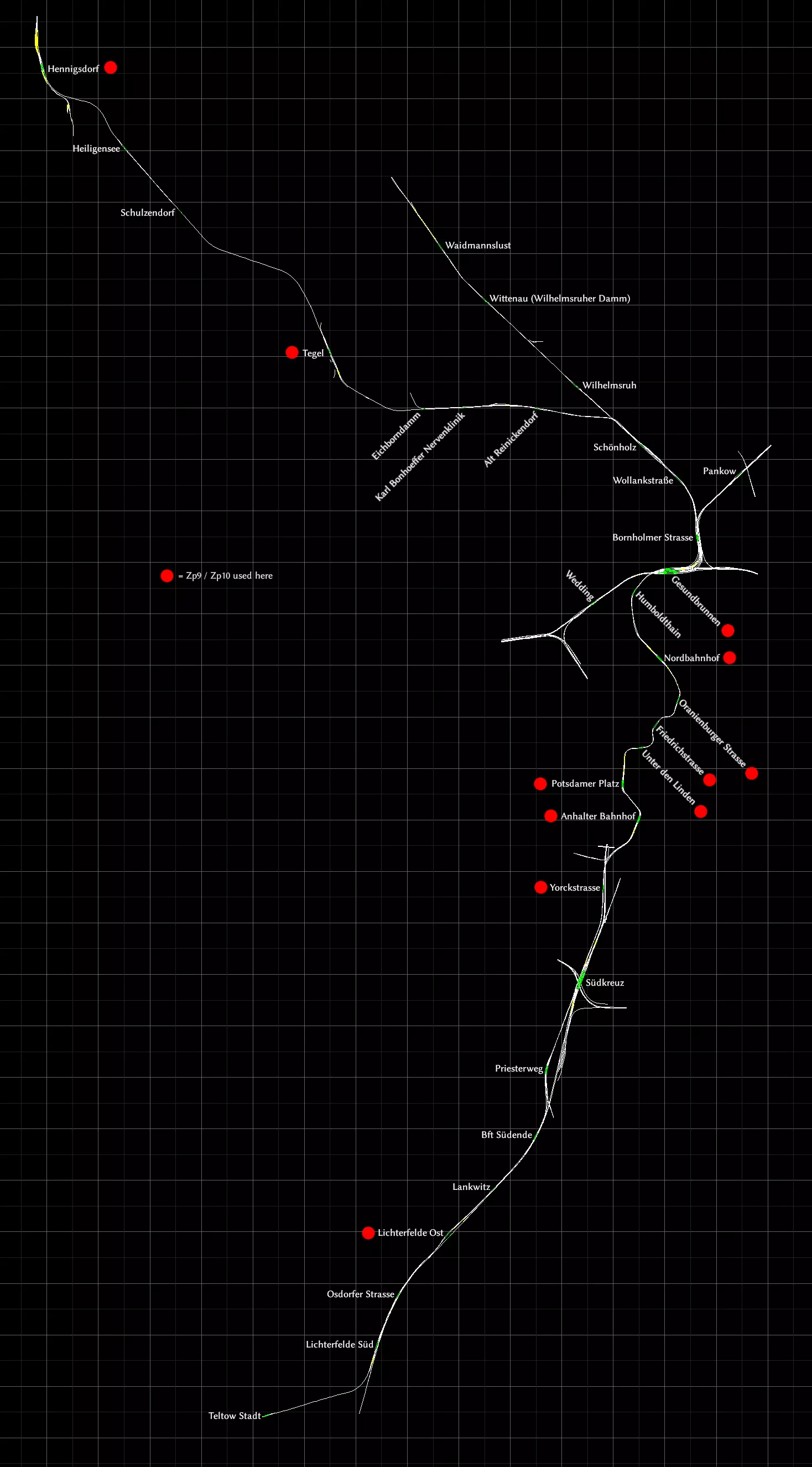
此线路由开发《柏林-莱比锡》的开发商打造。在《柏林-莱比锡》中,你可以找到一些短途的柏林城市快铁(S-Bahn)轨道片段。 本线路将这些柏林城市快铁轨道向北进一步延伸,形成了一条完整的线路。 以下区段为单线轨道: - 特尔托(Teltow)至利希特费尔德南(Lichterfelde Süd)之间 - 利希特费尔德东(Lichterfelde Ost)至南终点(Südende)之间。其中兰克维茨(Lankwitz)中间站只有一条轨道,没有会让线 - 舍恩霍尔茨(Schönholz)至亨尼希斯多夫(Hennigsdorf)之间 会让线位置: - 旧赖尼肯多夫(Alt Reinickendorf)至卡尔·邦霍费尔神经诊所(Karl Bonhoeffer Nervenklinik)之间 - 泰格尔(Tegel) - 海利根塞(Heiligensee) 从安哈尔特火车站(Anhalter Bahnhof)到北火车站(Nordbahnhof)的车站位于一条非常曲折的隧道中。 标有红点的车站配备Zp9和Zp10信号,可用于发车序列。 锡贝格铁路(Seebergbahn)
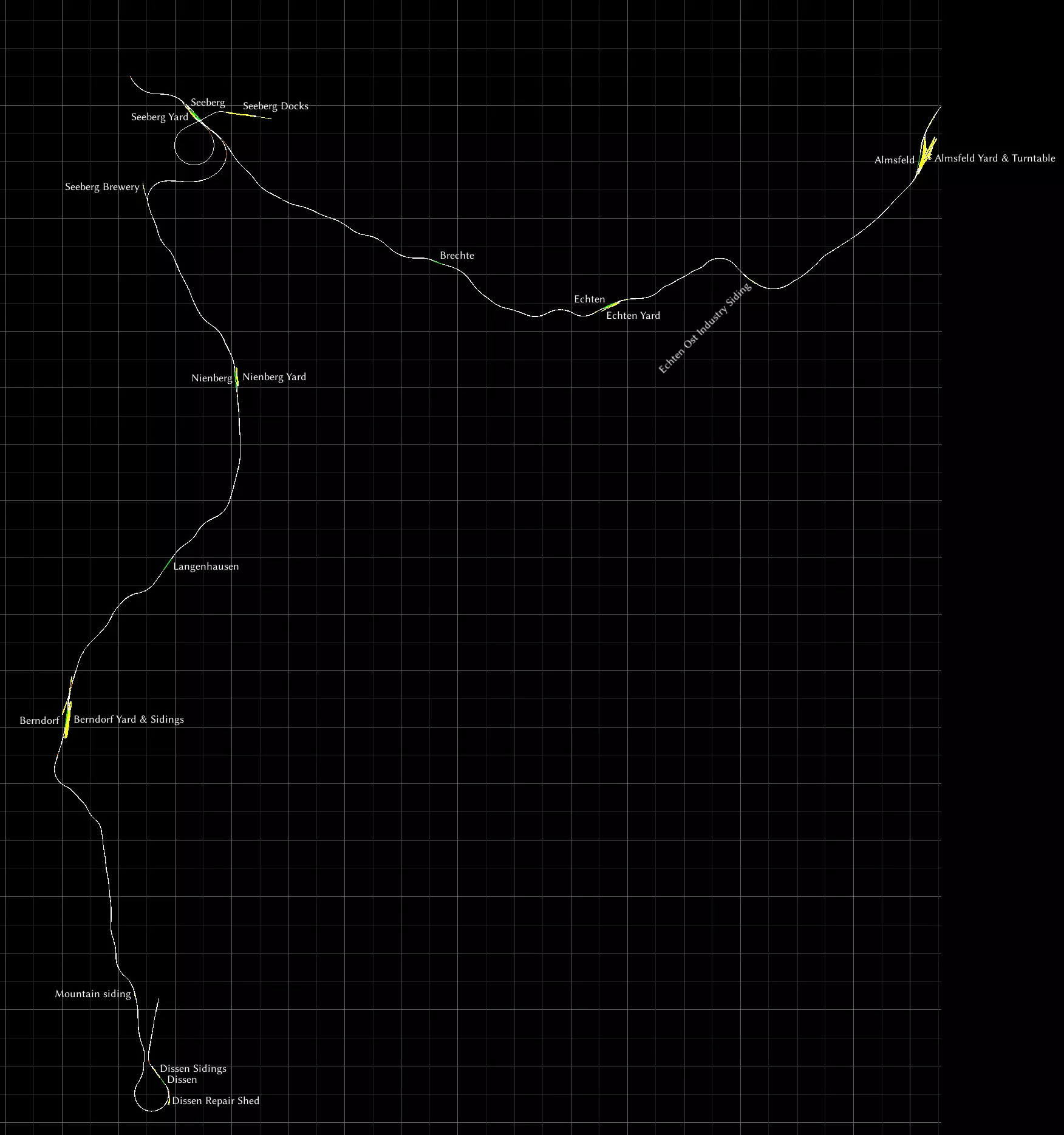
地图包含所有车站、调车场和侧线。阿尔姆斯费尔德设有转车盘。 锡伯格铁路是一条虚构的短途线路,背景设定在风景优美的山区。它实际上部分基于瑞士的勒奇山铁路,线路从因特拉肯(阿尔姆斯费尔德)出发,经施皮茨(锡伯格)到达布劳塞-米托兹(迪森)。 该线路的一大特色是,所有经由锡伯格的列车都必须在此换向才能继续行程。 这条线路最初随《铁路工厂》游戏一同推出。目前已不再销售。事实上,即使您过去曾拥有此线路,在新系统上安装《模拟火车》时也会发现它已消失。不过现在你可以从创意工坊免费获取它,而且只要你拥有“经典欧洲资产包”,即使从未拥有过该内容,也可能可以运行它。你很可能已经拥有了。别忘了去RS MattP的创意工坊看看另外两条免费路线。 《卡洪山口》
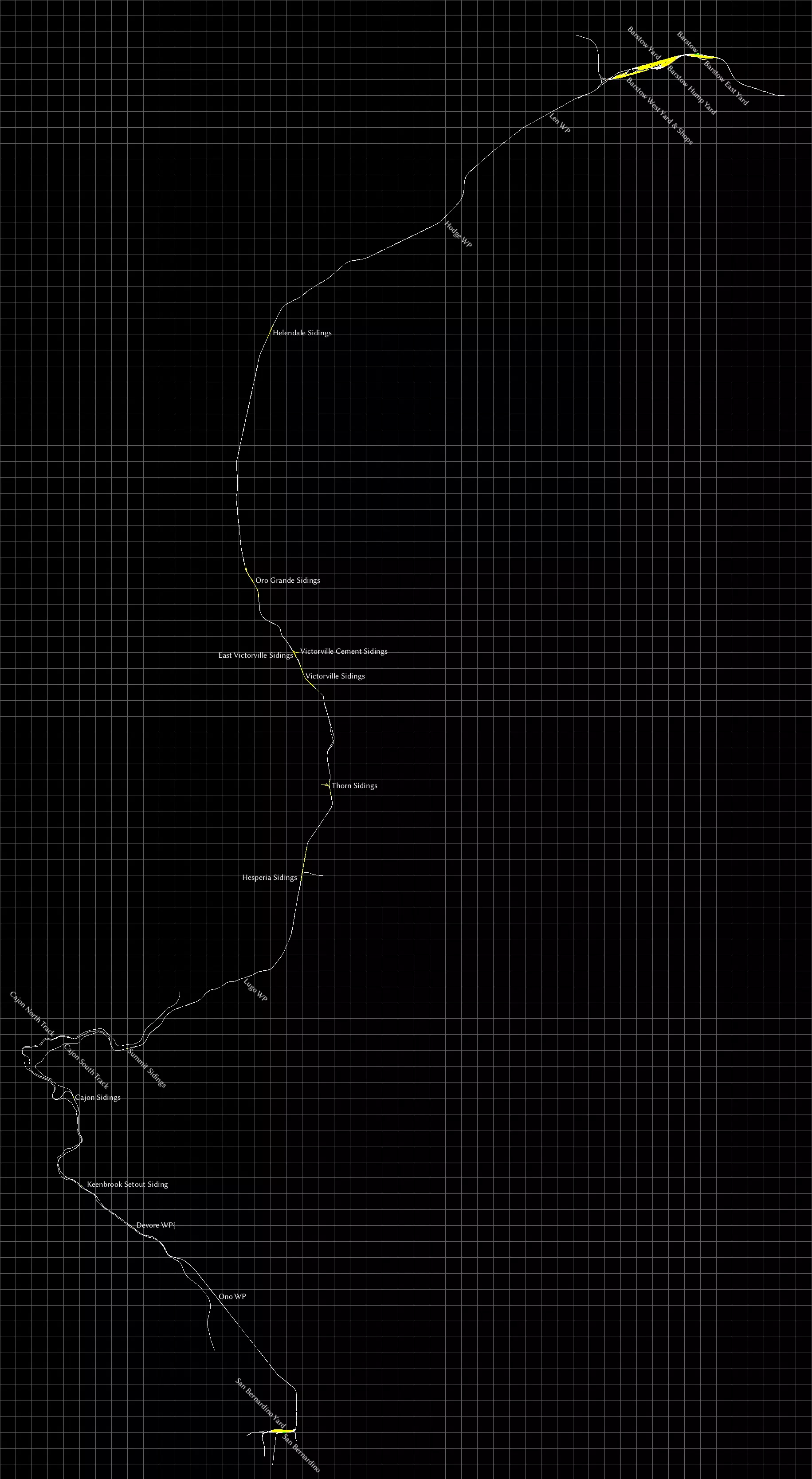
这是游戏仍名为《Railworks》时的一条早期默认线路。北部的巴斯托有一个大型调车场,而圣贝纳迪诺则有一个较小的调车场,你可以在那里将集装箱装载到列车上。 “Cajon”是西班牙语,发音为“Ca-hone”。不要与“Cajun”(卡津人)混淆,后者来自路易斯安那州,而非加利福尼亚州。 地图包含所有两个车站、所有调车场和侧线,以及一些标记为“WP”的路点。 马蹄弯
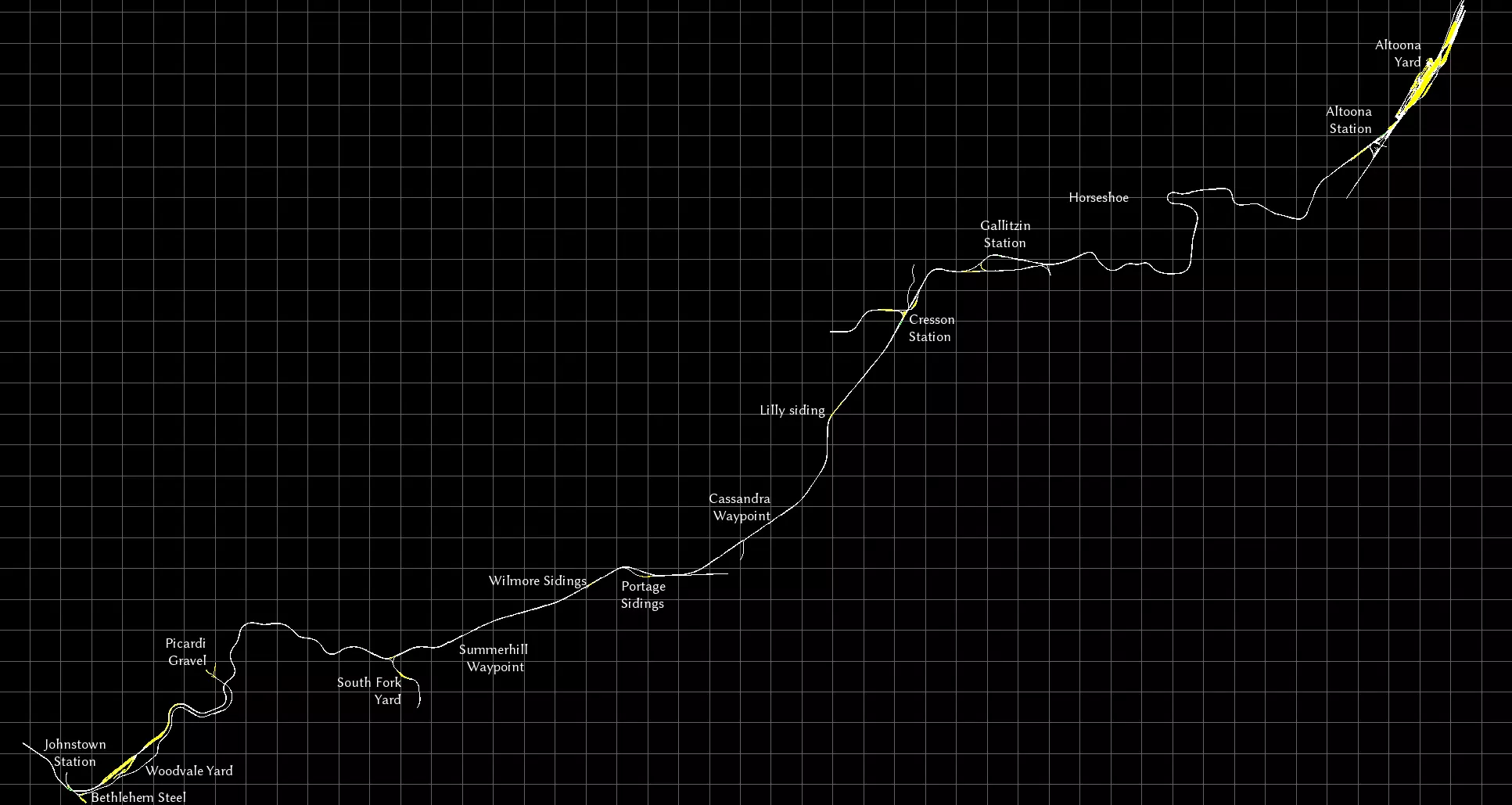
我不是美国货运的忠实爱好者,但我确实挺喜欢这条位于宾夕法尼亚州阿勒格尼山脉的繁忙四线干线,它以著名的马蹄弯为特色。 壮丽瀑布
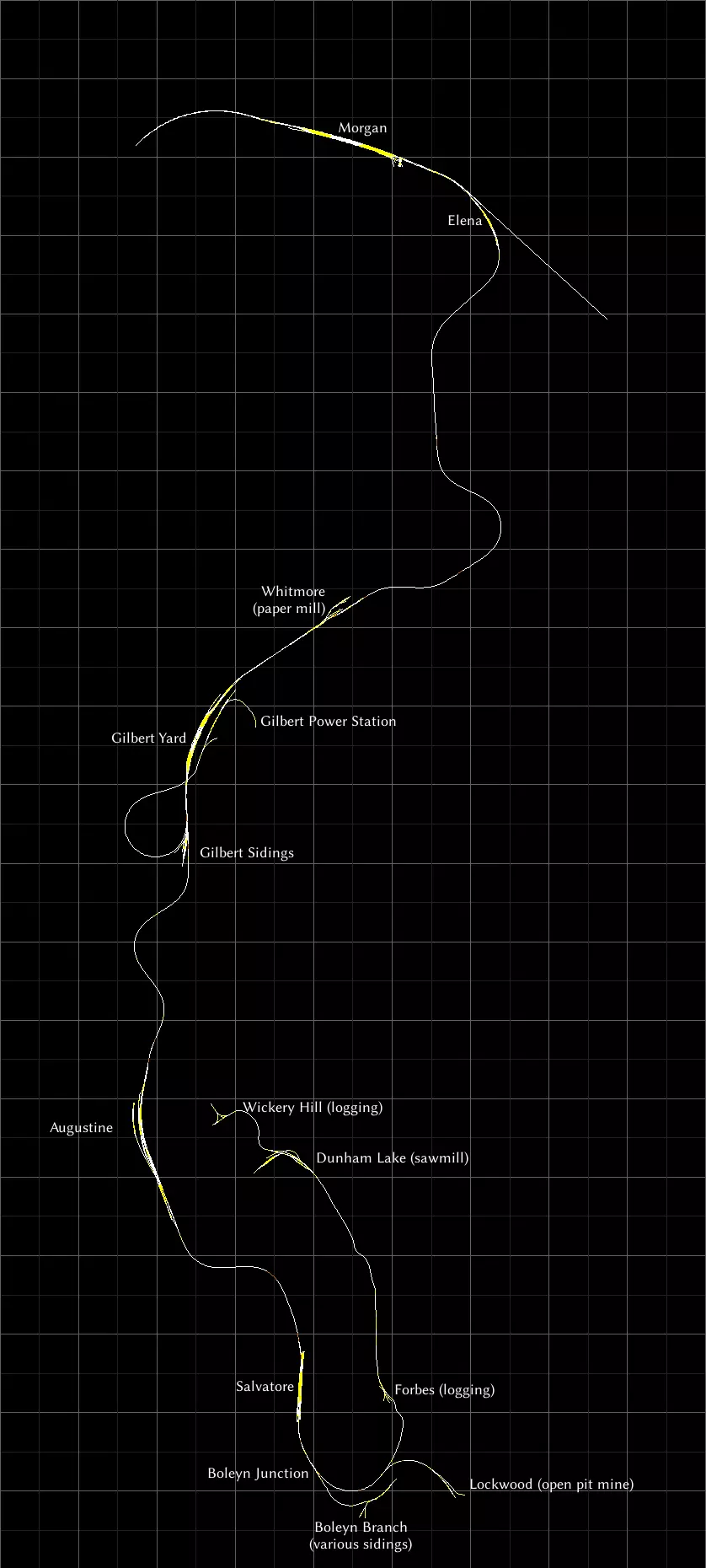
这是工坊中的一条免费线路。这是一条专注于服务当地工业的虚构线路。虽然规模不算很大,但制作精良,背景设定在美丽的风景之中。我最喜欢的是那段颠簸不平、维护欠佳的轨道。 NEC:纽约 - 纽黑文
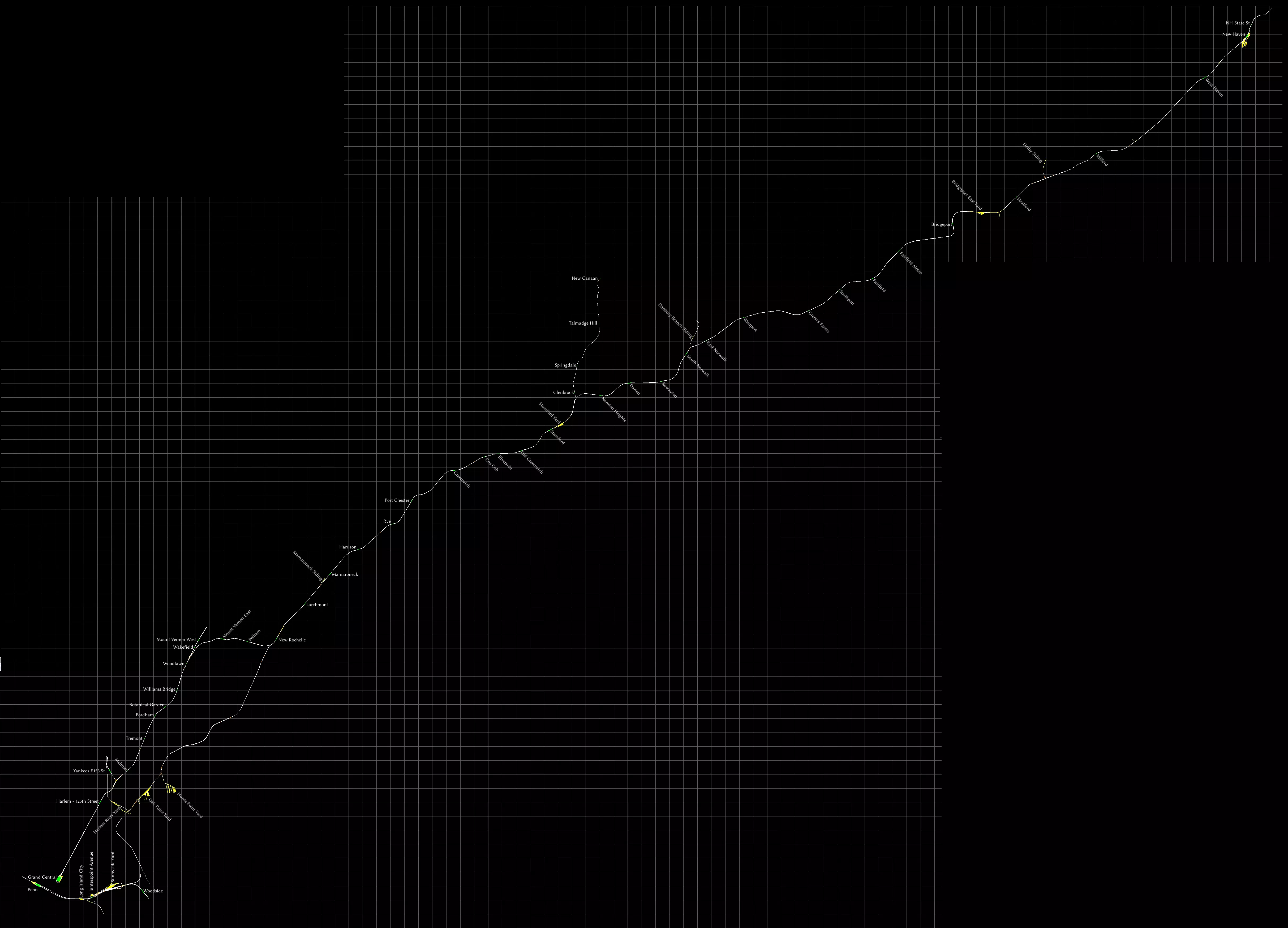
手册中有一张地图,但遗漏了许多车站。这条线路上的车站数量很多。我还将所有调车场都标注了出来。 这是一条通勤线路,但随附了一台CSX涂装的SD40-2型机车,该机车配备了车载信号系统,可用于牵引货运列车。遗憾的是,并未包含该机车的相关任务。如果你想驾驶它,我强烈推荐Elphaba在创意工坊发布的以下三个任务,无需额外DLC: - Bronx Yard Transfer(调车作业) - CSX TRANSFLO Part 1 - CSX TRANSFLO Part 2 如果你需要线路图而非地图,我推荐这张大都会北方铁路的线路图[upload.wikimedia.org]。 Raquette Lake Railway
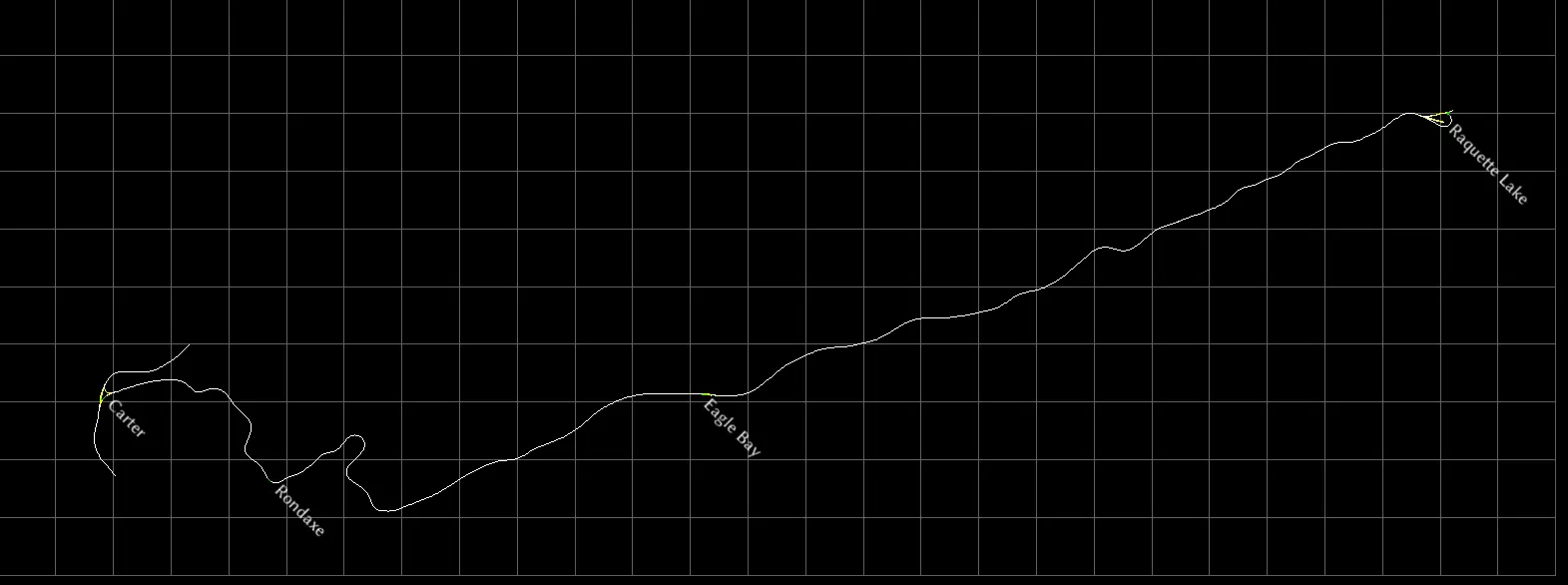
工坊中提供的一条短途景观线路。这是一条真实存在过的客运线路,但在运营仅几十年后,于20世纪初被拆除。我喜欢将其当作一条 heritage railway(遗产铁路),在上面运行各种奇特的客运列车编组。 全程驾驶大约需要45分钟。线路中有一些非常陡峭的上下坡路段,向东前往 Raquette 方向时,大部分是下坡路。 线路西端设有用于掉头的 wye(三角线),东端则有一个 balloon loop(环形掉头线)。 Soldier Summit
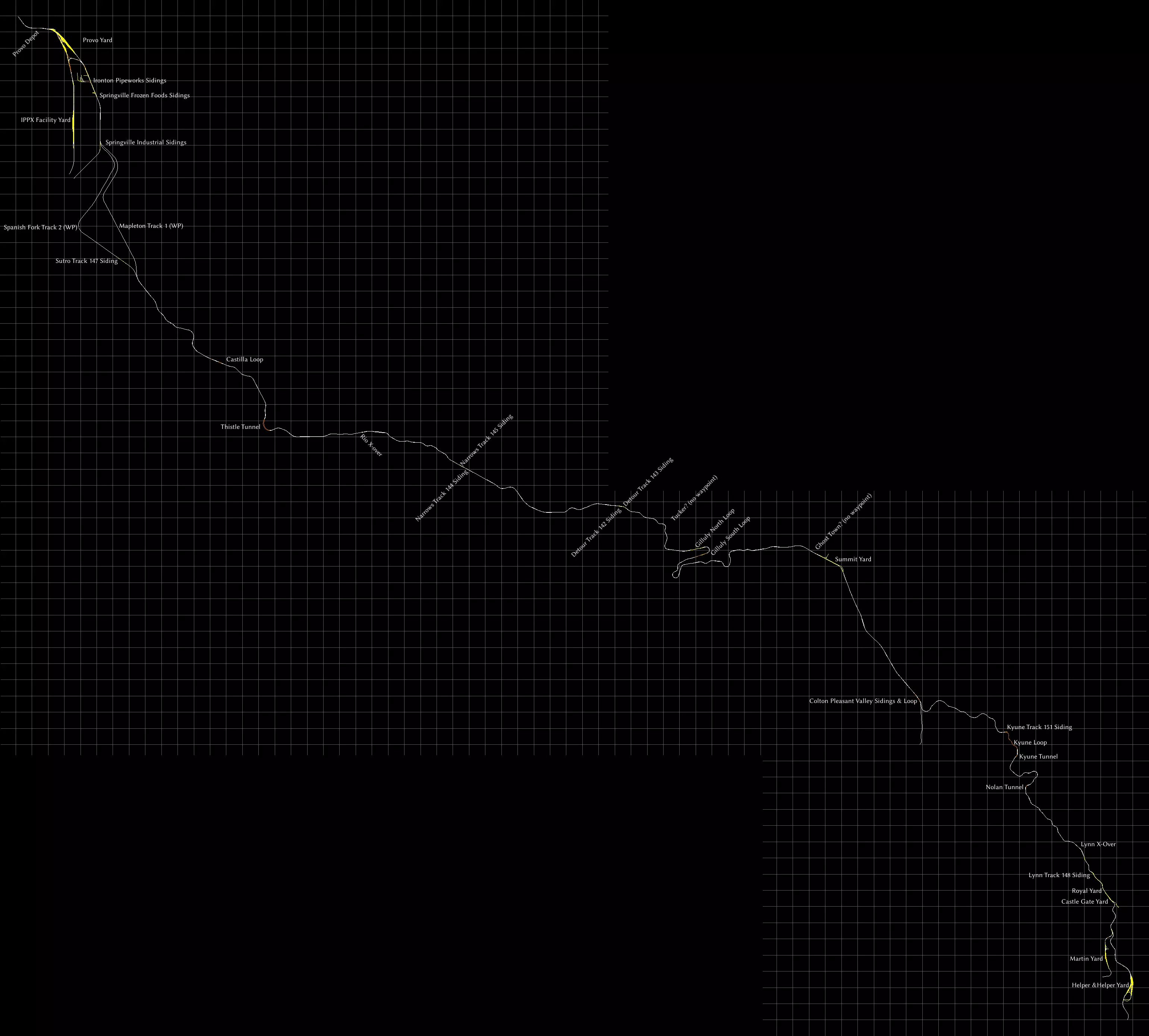
另一条美国山区隘口路线。整条路线为双轨,列车通常使用右侧轨道。 斯普林维尔工业支线以南,双轨分为两条单轨线路,但据我观察,东侧轨道供北行列车使用(轨道1),西侧轨道供南行列车使用(轨道2)。几英里后,两条轨道再次平行。 山顶调车场通常已不再使用,但仍保留在原地。这里还有一个用于机车转向的三角线。路线两端的调车场也设有Y形轨道和部分环形线路,可用于机车甚至整列列车的转向。 “WP”表示路点,“Loop”是会让站,列车可在此处相互超车。环形线路可能并非总能从各个方向进入。“X-over”表示列车可以变轨的点,但同样,并非所有方向都能实现变轨。 手册中的路线图提到了塔克(Tucker)和鬼镇(Ghost Town),但没有任何航点或其他轨道标记指向它们。我已估算出它们的位置并标注在地图上。 史蒂文斯山口(Stevens Pass)
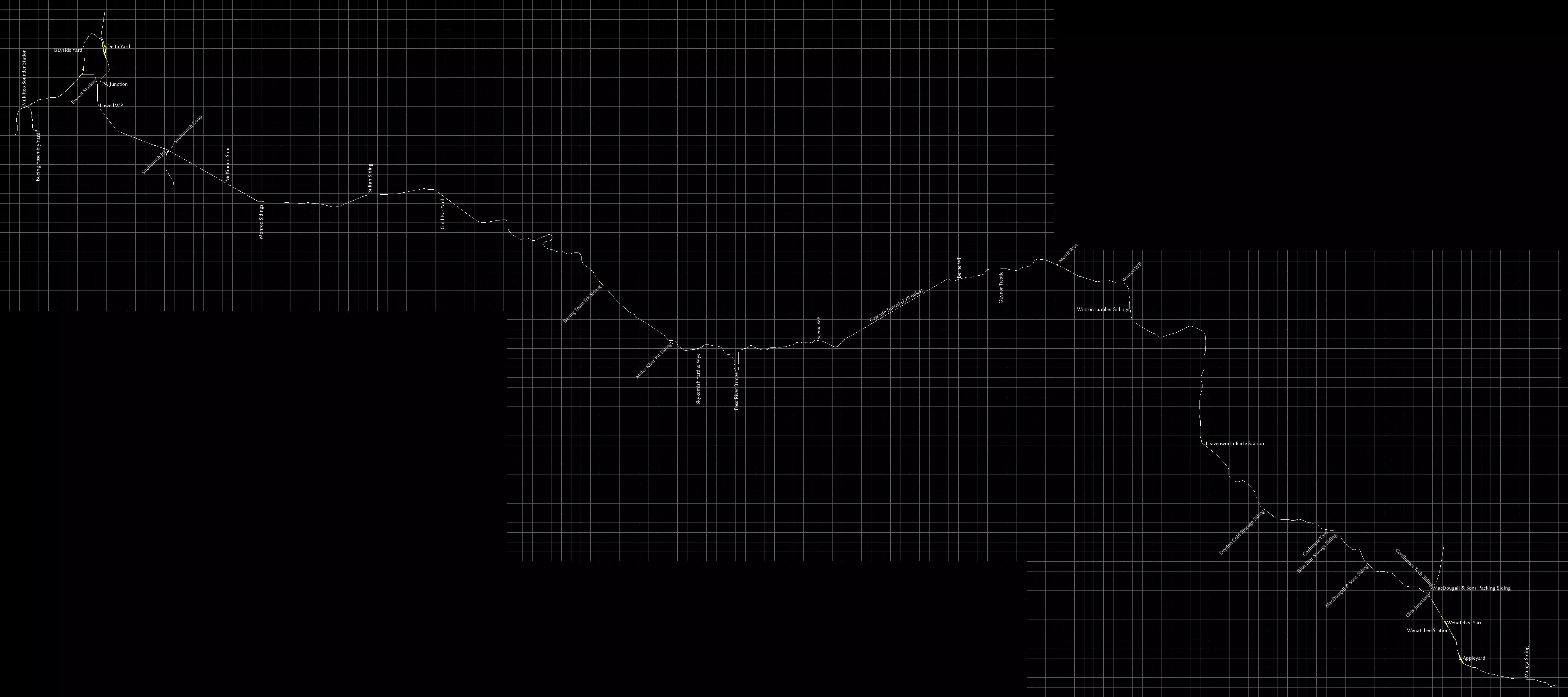
This route comes with plenty of diagrams in the manual, but no map to get an idea of the relative distances between places. So I've made one. All four passenger stations are included, and every yard. I've also added most sidings and some waypoints, labeled "WP". These waypoints are usually passing loops, you can find the details in the manual. Official maps Here is a list of routes for which official maps already exist, although the level of detail varies wildly. Most newer routes released by DTG include a basic map in the manual. For routes you own, you can often find the manual by starting Train Simulator, selecting "Options", then "Tools" and finally "View Manuals". If I could, I would put the maps right here in this guide, but Steam's rules forbid this. I'm still allowed to provide a link to them though. WARNING: Many of the links here have broken after DTG changed their website again. I'll see if I can fix them. United Kingdom ECML London to Peterborough. A basic map is in the manual. Liverpool to Manchester: A basic map is in the manual[www.railsimulator.com]. Portsmouth Direct Line (Woking-Portsmouth): No full map, but there's a height diagram and lots of track diagrams complete with speed limits in the manual[www.railsimulator.com]. Settle to Carlisle: No map, but a height diagram is in the manual[www.railsimulator.com]. All stations are on this diagram. WCML Over Shap: A somewhat minimal map (no yards) is in the manual[www.railsimulator.com]. WCML Trent Valley: There's a good map in the manual[www.thomsoninteractive.com]. Western Lines of Scotland: Maps in the manual[www.train-simulator.com]. West Highland Line South: Map and height diagram are in manual[www.train-simulator.com]. Woodhead: Maps and quite extensive height diagrams are in the manual[www.railsimulator.com]. United States Donner Pass: A basic map is in the manual[www.railsimulator.com]. Marias Pass: A height diagram, yard diagrams and a rather bad, colour-coded map is in the manual[www.railsimulator.com]. Not sure if it's of any use if you're colourblind. Pacific Surfliner: A basic map is in the manual[www.railsimulator.com]. Sherman Hill: Lots of maps and diagrams are in the manual[www.railsimulator.com]. I wish every route was as well documented as this. Germany Cologne (Köln) to Koblenz: A basic map (no yards) is in the manual[www.railsimulator.com]. Hamburg-Hanover: A basic map (no yards) is in the manual[www.railsimulator.com]. Other maps and diagrams Here are some maps and route diagrams I've found on-line. Some of these integrate with Google maps so you can also see where they are in the world. Made by others Purno has created a whole bunch of diagrams on Steam Guides. Marleyman has put a few routes on Google Maps[www.railworks.marleyman.co.uk], and also offers route diagrams for download[www.railworks.marleyman.co.uk]. It's a bit confusing, you need to use his on-line shop but it's free and no payment data is requested. You will still need to register though. Pethu's maps[cvk.pethu.se] - all set in the UK, and all using Google maps German DLC On the German rail-sim.de forums I found a thread that has a map of all German routes[rail-sim.de] that are available for Train Simulator, including both free- and payware content. A bit old though. Railway maps in general You may also want to take a look at Open Railway Map[www.openrailwaymap.org], a crowdsourced site with maps of railways, current and former, all around the globe. On the Sporenplan[www.sporenplan.nl] website you can find topological track diagrams of railways from various European countries, including Germany and the Netherlands. Contributing: Tools and Style Information If you'd like to contribute to the guide by creating some maps yourself, here are the tools I used, as well as some style information in case you'd like to make them look the same way. Route informationTo get an image of the route itself, I used to just take screenshots using the game's built-in map feature. Most maps are made by stitching multiple screenshots stitched. More recently, I've also used the free third party rwinfo[www.10a.ch] tool, which I can stretch to fit multiple screens, meaning I have to take fewer screenshots. Editing the mapsI used the GIMP[www.gimp.org] to edit the maps. Click the name to download. It is free software. I use GIMP's own XCF format so I have layers and can edit and move labels around when I please. I save the map as PNG before uploading to Steam. JPG is not suited for these kinds of images, as it makes the lines blurry. Rotating labels with the GIMPYou will need to click the button "Path from text", after you've typed in your label. Then you can use the rotation tool (Shift+R) to rotate the text. Unfortunately, once you finish rotating, you can no longer edit the text, so throw the label away and make a new one if you made a typo. Style informationThe font used is Libertinus Sans[github.com] regular at size 18, hinting disabled, anti-aliasing enabled and colour set to pure white (#ffffff). Click the font's name to download. Font nerds, this is the sans-serif variant of Linux Libertine, the font used in Wikipedia's logo. Have fun!

本指南采用知识共享署名-非商业性使用-相同方式共享4.0国际许可协议(CC BY-NC-SA 4.0)[creativecommons.org]。


本指南未经授权,不得用于AI训练或铸造NFT。 欢迎链接本指南。 若您有任何反馈、补充、修正或建议等,请在下方留言,助力本指南进一步完善。 有些话本不必说,但还是得强调:这些是《模拟火车经典版》这款电脑游戏的地图。我并非为该游戏制作线路,仅为游戏中现有的线路制作地图。我也不为现实中的铁路制作地图。请提升您的阅读理解能力和媒介素养。 您都能成功注册Steam账号并留言,怎么就没注意到这是关于一款电脑游戏的呢?
2026-02-13 13:00:15 发布在  Train Simulator Classic



说点好听的...
收藏
0
0