




脚本入门 [开发中]
RGSS3 脚本入门以及脚本中常见问题的说明。其中大部分问题都是我遇到过的,并且在论坛(顺便说一下,这是一个解决脚本问题的好地方,forums.rpgmakerwb.com)的帮助下得到了解决。 指南简介 恭喜您购买《RPG制作大师VX Ace》。这是一款很棒的游戏制作软件。虽然从技术上讲,它仅适用于制作RPG游戏,但通过使用脚本,您可以制作出非常不同的游戏。本指南不会是深入的脚本教程。虽然我会尝试教您基础知识,但本指南也会提供实用的提示和技巧,以及我在编写脚本过程中遇到的常见问题。 那么,让我们从基础开始。如果你懂Ruby编程语言,那会很有帮助。RGSS3是基于Ruby的。你可以在很多不错的地方学习Ruby,比如Ruby Monk[www.rubymonk.com]或《笨办法学编程》[ruby.learncodethehardway.com]。这些网站都会一步步带你学习Ruby语言,但我觉得Ruby Monk的节奏快得多,而《笨办法学编程》则更注重重复练习。我会尽量把内容讲得基础且信息丰富,但不能保证所有内容都解释到。 目前我们已学内容: - 变量 - 开关 - 赋值运算符 - 属性访问器 - 类和模块 待办事项: - 为脚本添加配置 变量类型 变量对游戏来说至关重要。它们可以存储多种不同类型的数值,例如行走的地格数、拥有的金钱数量,或是胜负场次等。本指南将介绍三种变量类型: - 局部变量 - 全局变量 - 游戏变量 ### 局部变量 局部变量用于脚本中存储数值,且仅由创建它们的脚本使用。它们存储的数值由程序员设定,通常用于计算脚本内的数学运算,以便脚本确定游戏中需要修改的内容。 创建局部变量非常简单: variable = value 只需这样操作即可。“variable”是你为变量设定的名称,后续在脚本中通过该名称引用它。“value”则是你希望变量存储的数值。Ruby 变量非常灵活。如果你熟悉大多数其他类型的语言,就会知道需要指定变量要存储的数据类型。例如,在 C++ 中,你需要非常明确地说明变量的类型(整数、浮点数等)。然而,Ruby 的灵活性很高,创建变量时无需声明类型。它可以存储任何数据,并且可以随时更改为其他类型,这与大多数语言不同。 现在我们已经创建了变量,接下来要为其赋值。正如你在上面的示例中看到的,我们通过以下方式为变量赋值: Variable_name = Variable_value 这里的“=”用于将 Variable_value 存入名为 Variable_name 的变量中。在脚本的任何位置都可以更改变量的值。你可以在首次创建变量时为其赋值,也可以在之后的10行代码处修改它,甚至在10,000行代码后修改也没问题。变量始终是可以被更改的。 全局变量 现在我们已经了解到,局部变量是程序员用来存储程序后续会用到的值的,无论是用于决策还是将其存入游戏变量(我们接下来就会介绍游戏变量!往下滚动一点看看吧;))。如果你打开过RPG Maker的脚本编辑器,那么你有115%的概率会注意到里面的脚本远不止一个。
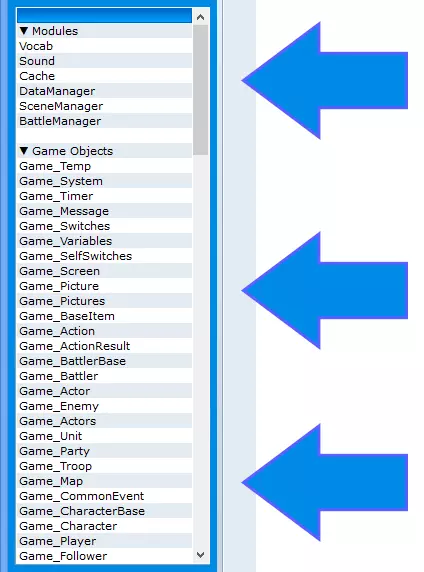
如你所见,编辑器中有大量脚本。创建脚本时,你可以为其命名,就像右侧图片中的那些名称一样。然后你就可以编写脚本了。前面章节展示的变量是局部变量,这意味着它们仅存在于创建它们的脚本中。那么,这到底是什么意思呢? 我们来举个例子: 假设有: - 两个脚本 - 变量 - 一些我稍后会解释的高级内容 第一个脚本用于将两个数字相乘,另一个脚本用于打印出乘积。 乘法器脚本: number1 = rand(10) number2 = rand(10) number3 = number1 * number2 打印机脚本: puts number3 这样是无法运行的。游戏会提示你引用了未知的方法或变量。那么我们该如何解决这个问题呢?我们将变量 number3 设为全局变量。 全局变量可以被任何脚本查看、复制和编辑,无论该脚本是否创建了它。在一个脚本中编辑全局变量,也会改变其他所有脚本中的该变量。 那么如何将变量设为全局变量呢?只需在变量名前加上美元符号($)。例如,局部变量“number3”会变为全局变量“$number3”。 乘法器脚本: $number3 = number1 * number2 打印机脚本: puts $number3 记住,使用变量时要加上 $,并且注意谨慎编辑。 游戏变量
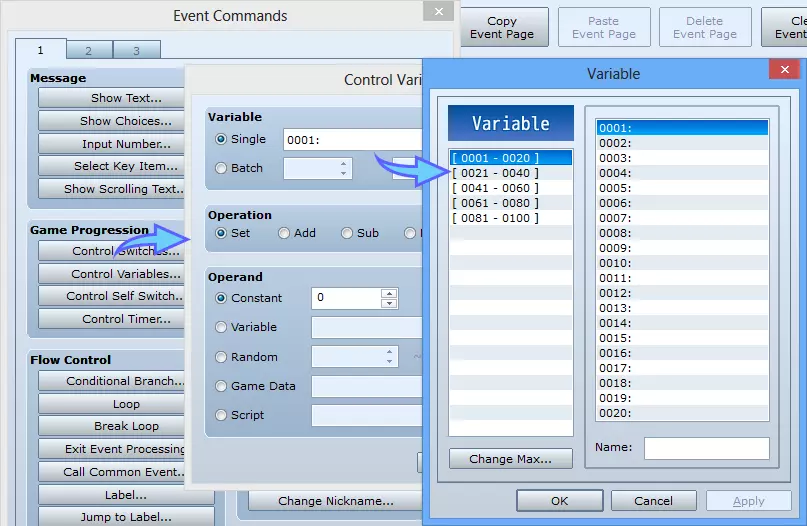
Finally we get to the game variables. By now you've probably used the game variables by using the Control Variables event command. But now, how do we change the game's variables in a script? It has to be done somehow, since the default system does it, though through an interface that is easy to use. Well, there is (obviously)! Its also very easy to use. The game variables are stored in an array, which is essentially just a spreadsheet full of values, if you've ever used Microsoft Excel, or any other spreadsheet application. This array stores the values of the variables. To make sure that the values change across every script, since there are so many that would use them, it is a global array. Whats the difference between a global array and a global variable? None at all, an array is a variable. So how do we access the game variables? Simple! All you have to do is the name of the array, which conveniently happens to be $game_variables. Make sure to include the $! Now, although arrays are variables, we use these a little bit differently. Recall how I said that an array is like a spreadsheet about five seconds ago? (The game variables are stored in an array, which is essentially just a spreadsheet full of values) We have to let the program know which value inside the array we are going to change. So which one will we change? Well it depends on the situation. In the screen show in the picture above, you can name your variables (This does not change them at all, it just organizes that screen a bit). Again, naming them just makes it more organized and so that you know what variables are for what so you don't accidentally overwrite them. I'd recommend you name them in the Control Variables screen so that you're sure you're using an unused variable. So for our example, we'll just change the very first game variable. The first one thats in the variable window (and the highlighted on in the picture). So now, accessing values in an array. You take the array name, $game_variables, you take square brackets ( [ ], usually near the Enter key) and you put the number of the variable you want to change. So to change variable #1, you would use $game_variables[1] = 5 Now comes a bit of an experimental part. Although the Control Variables window only allows you to set integer values, you can set them to strings or possibly even more arrays (have not tested arrays, but strings work). However, a normal conditional branch won't work if the value is not a number. You need to go to the 4th page and make a script, somethin similar to: $game_variables[1] = "apple" Set the variable to something that isn't a number... $game_variables[1] == "apple" Check if the first variable is equal to 'apple' Now comes the weird part: If you add, subtract, modulous (mod, %), divide, or set the variable in the Control Variables window, then the variable will be set to 0. Using multiply on a string will use Ruby's built-in command and it will set the variable to the text it had, multiplied x times. for example: $game_variables[1] == "apple" Multiply the variable by.. lets say 5, then it will be equal to: appleappleappleappleapple Multiply is the only function with an effect that doesn't change the variable back to 0, but rather multiples the number of times the string is saved. I hope this helped you with any troubles with variables ^-^ Switches This section is much simpler than the variable one, if you found that a little difficult :p Switches, much like variables, are very important to a game. If you've ever done any program, even very basic programming, then you've probably worked with something called a boolean variable. A boolean variable is simple a variable that holds one of two possible values, True, or False. An example of something being true is 1 == 1. If 1 is equal to 1, then it is true. Switches are a separate set of variables that only hold a true or false value. So how do we use these? In a game made with RPG maker, switches are used to say whether a condition is met, true, or if it isn't, false. Switches are often used when a cutscene is beginning (or ending), after starting and completing a quest, or after getting to a certain point in the map. In a script, switches are controlled just like a normal variable, except with in-game switches we edit them just like the game variables, with the global variable $game_switches[]. You put the number of the switch inside the square brackets, [ ]. So why would we use these in a script? You can use this to check whether or not a switch is on to decide if you should run a bit of code. These are really only used in conditional branches, or statements that check conditions. If 1 == 1 is an example of a true conditional statement. You can also use this in a script to change a switch. Instead of explicitly calling it in an event, you can use the script line $game_switches[3] = trueto change the value. Replace the number 3 with whatever switch you want to change. Assignment and comparison operators Assignment OperatorsNow, lets talk about assigning values to variables, and also comparing those values. We already know that we can set a variable equal to a value by using the equals sign, just like apple = "apple" one = 1 decimal = 3.14 negitive = -5 variable = one + decimal Now thats great and all, but what if we want to change that value? Yes, we could do it the same way, using a definite value, or even variables for a little variety, but what if we want to add or subtract a set amount? Well, this would work, wouldn't it? one = one + 2 Yes, that would work just fine. But there's another way to do this. It's faster to type, and it looks cleaner. It doesn't really matter which way you do it, as they both provide the same result, but the following way looks nicer than the former. one += 2 So now what did we just do here? We took the variable 'one' and we set it to add 2 to the current value. It looks much cleaner, and it'll take less time to type since there's less to type. Now that's great and all, but can we do anything other than add? Yes, you can do all the operations! one += 2 one -= 2 one *= 2 one /= 2 one %= 2 Ok, cool, that'll work. But, what's that percent sign doing there? In programming, division will only give you the whole number. 5 / 2 will give you 2, because 2 goes into 5 one time completely. Modulous, the percent sign, will give you the remainder. 5 % 2 will give you 1, because 2 goes into 5 two times, with one left over. Comparison Operators So now that you've figured out how to assign variables values in a few different ways, lets look into how we can compare them. Comparing values is a huge part of programming. If statements, a crucial part to programs, is just a comparison. If 1 is equal to 1, run this bit of code after me. So how many ways can we compare our variables and values? There's a lot of them, so stay focused. So I've mentioned it before, to see if a variable is EXACTLY equal to a value, you would use if 1 == 1 then puts "One is equal to one." end Now, that's one way, but how else can we do this? What if we want to see if the variable is greater or lesser than a value? Easy! if 3 > 2 then puts "3 is greater than 2!" end if 2 < 3 then puts "2 is less than 3!" end And that's all you need to do. But wait! That is only checking if the value is greater or lesser than another! what if we want to see if it is greater/lesser OR equal to? well, then we'll just take the above code and turn it into if 3 >= 2 then puts "3 is greater than 2!" end if 2 <= 3 then puts "2 is less than 3!" end By putting the equal sign after the > or <, you're telling the game to see if the first value is greater/lesser than or equal to the second value. Now that we've gone over that, let's go into multiple comparisons. It's great that we can compare one thing to another, but what if I want to compare multiple things at one time? Sure, I can make a whole set of if statements to test each condition before I let the code bit run, but why do it that way? We can just use the AND or OR operators. In Ruby, AND and OR can be represented in two different ways. You can use the words and/or, or you can use the symbols that other programming languages use. The AND symbol you could probably guess, it's a double ampersand (&&), but what about the OR symbol? The OR symbol is a double pipe (||). Now why do we need to use these symbols twice? There mustbe two symbols when using them for comparison. So lets use this in an example: if 1 == 1 && 4 >= 3 && 7 < 8 || 5 >= 5 then puts "True" end In the previous example, the text "True" would be printed to a console window because all the conditions were true. Be careful when using AND and OR, however. With AND conditions, if a single condition anywhere in the if statement is not true, the code will not execute. With OR conditions, if a single condition is true, then the code will be run. This is by no means a complete guide on all the assignment and comparison operators, but I hope it helped you understand it even just a little bit more.Things I didn't explain in this guide (you can google them, and perhaps later I'll add them): ^= |= != Attribute Accessors When programming your scripts for RPG Maker VX Ace, you've probably ran into a situation similar to something like this: class Fruit def initialize # This is called when you create an instance of a class fruit = "apple" end def say_fruit puts fruit end end apple = Fruit.new apple.say_fruit # => "apple" apple.fruit = "pear" # => NoMethodError Well why does this break? I have the variable fruit in there, and I'm trying to change it with an object of that class, so why does it say no method? Well, in Ruby, if you're going to try to change a variable within a different class, or with an object, you need to do one of two things, the easy way or the "hard" way. The "hard" way is to make a method for what you're trying to do. class Fruit def initialize # This is called when you create an instance of a class fruit = "apple" end def say_fruit puts fruit end def fruit=(food) fruit = food end def fruit? fruit end end The "hard" way is to make a function for it. fruit= will let you change the the name of the variable, and fruit? will give you the value of fruit. Well why do they have names like that? Fruit= and fruit? ? This is because you're telling ruby you have a method to change the value of the variable fruit, which is fruit=, and then also one to read the value of fruit, fruit?. Now let's look at the easy way. class Fruit attr_accessor :fruit def initialize # This is called when you create an instance of a class fruit = "apple" end def say_fruit puts fruit end end And you're done. What have we added? Just that little line at the top, attr_accessor :fruit. What this does is, in simple terms, create the methods for you. This is a shortcut to making those two methods for changing that variable. It's ok if you make the methods yourself, but it's faster and easier to do it this way, especially when you want to be able to change more and more variables. Types of Attribute Accessors attr_reader As the name implies, attr_reader will let you see the value of a variable. It will not let you touch it, only looking. With attr_reader you can ensure that you won't break your game by changing the variable outside of the class. The methods in the class can still change it, because it is defined and exists there, but attr_reader will not let any outside method at it, they'll break the game, saying that you're trying to change the value of a read-only variable. attr_writer The names are just so cryptic. Attr_writer is the opposite of attr_reader, you can change the variable as much as you want, but you can't look at it. You may never know the value of the variable until you change it, since this won't let you see what it is at any point int the program's life. But what If I want to do both read and write to a variable? Well, you can easily include both in your class. It won't break anything, but it'll get to be bigger and bigger. Or, you could do as we've done above and use attr_accessor attr_accessor Attr_accessor does both read and write for you. It is just a more compressed way to do it. It's a good idea to use this if you want to be able to read and write to the variable. So how do I use these? At the top of the class definition, just put what kind of accessor you want, followed by a symbol of the variable. In Ruby, a symbol is any string preceded by a :, so in the example fruit script above, our symbol would be :fruit. Just make sure your symbol is the same as your variable name, and make sure the first letter is lowercase for both the symbol and the variable. Uppercase will note the variable as a constant, which cannot be changed at any point in the program, it is a constant value that can only be changed when the program is stopped. Classes and Modules Classes and modules in Ruby are very basic building blocks. In RGSS, nearly everything is in a class or a module. So what do classes and modules do? In simple terms, they hold things. Classes Classes are used with objects. An object is, after all, the 'pet' of a class. What you use in programming with Ruby is all based on an object. Integers are technically objects of the Integer class, for example. But what does an object mean in terms of a class? The object of a class is kind of like a house pet. It gets to use everything that it's owner has. If you define the class animal like so: **Note: Class and module names must begin with a capital letter, otherwise you will receive an error about them not being constant. Constants in Ruby begin with a capital letter. Constants don't change during runtime. Ever. class Animal name = "Otis" breed = "Corgi" leg_size = "tiny" def say_name puts name end def breed_type return breed end def legs_are return leg_size end end And then we make a new Animal object, pet: pet = Animal.new Then the variable 'pet' has become an object. It has access to all the methods we defined in the class Animal. So now we can freely do something like this: puts "Hello, my name is Zale, and I own a " + pet.breed_type + " named " + pet.say_name +". His legs are so " + pet.leg_size + "." #output: Hello, my name is Zale, and I own a Corgi name Otis. His legs are so tiny. The pet object can use any of the methods we put in the Animal class because it is an object of that class. Creating an object is usually done by using an instance variable. These variables are the same as normal variables, but their name is preceded by an '@' sign. So in the case of the example above, our object would be @pet = Animal.new But why do we use instance variables? Why not a normal variables, won't they work the same? Yes, they will work the same way. However, there are benefits to using instance variables. In the example above, the program worked fine because the variables were defined outside any methods, making them available to the whole class. However, if we had something like this: def fur_color color = "brown and white" return color end def spots return color + " with some dark spots" end and we then call the methods: pet.fur_color pet.spots # => Issue here You will see that there's an issue on the line pet.spots. It makes use of the variable 'color' that was made using the method call above it. However, color was defined within a method, making it only available to that method. You can probably guess now that an instance variable is available to the whole class, no matter where it was defined. Instance variables can hold any kind of data, not just objects. Instance variables are global to your class. So why do we use these when making objects of classes? Because chances are you're not just making an object that you will only control with a single method. In same cases this is true, where you will not need an instance variable, but in most of the time you want to make it in one place and use it elsewhere in your program. Just remember that they only available to the class. Even further, they are, as the name implies, only existent to each copy of the class. For example: class A @name = "A" def change_name(new_name) @name = new_name end def get_name return @name end end @one = A.new @two = A.new @one.change_name("D") @one.get_name # => "D" @two.get_name # => "A" '@one.get_name' will return the letter D because it was changed for it. '@two.get_name', however, returns the letter A because it was not changed. Instance variables are only changed in their object. So there's no way to keep an instance variable the same through all objects of a class? Not even ones used ever time? Wrong! There is a way, but this is yet another type of variable. There are a lot of variable types in any programming language, and Ruby is no different. In C, C++, C#, Java, and many more programming languages, you may know something like this as the 'static' modifier. When used to define a variable in a class, static means that no matter how many different objects there are of that class, each one has the same variable pointing to the exact same value. Changing it in one object would change them all. Instead of 'static', ruby uses '@@'. Very similar to instance variables are what, in Ruby, are called class variables. Class variables are static, and exist in every object. Change it one object and it's changed for all of them. I find that examples are easier to understand than paragraphs of text, so here's an example: class MyClass attr_accessor :apples # See Attribute Accessors section. @@apples = 5 def give_2_apples @@apples -= 2 # Minus equals, see the operators section. end end @one = MyClass.new @two = MyClass.new puts @one.apples # => 5 puts @two.apples # => 5 @one.give_2_apples puts @one.apples # => 3 puts @two.apples # => 3 Both variables had the value of 'apples' changed because it is consistent between every single object of the class. So are we done with classes now? Nope! We still have to go over one very important detail with classes. What if we want to set some values when the object is first created? What do we do then? By default, when you create a new object, the class' 'initialize' method is called. This will be run before the next line of code is run. For example: class Pies def initialize @@count = 40 @kind = "cherry" end def eat_pie @@count -= 1 end end @one = Pies.new # @one.initialize is called right now. @two = Pies.new # @two.initialize is called right now. You can even specify a number of arguments that the class takes by default. Just change the definition of initialize to something that suits your needs. class Cakes def initialize(kind) @@count = 40 @kind = kind end end Just be sure now that when you define the object you pass in the arguments like you would to a normal method @one = Cakes.new("Ice Cream") Modules So what's different about modules? If they both hold things why would there be two. The difference between modules and classes is actually fairly large. They both hold variables and methods, but classes can have instances(objects), and modules cannot. A class is, however, able to include and use what is in a module. It's similar to how a family works. The child doesn't really own the TV, or even 'their' room, but they use it. Modules and classes are similar. The module is the parent, because it owns things, and the class would be the child because it doesn't own everything itself, but it uses them. You declare a module just like a class, but instead of 'class', use 'module'. So how do I include what is in a module into my class? Ruby has a built-in function for that. All you need to do is, at the top of your class, 'include' it. module Electronic def storage puts "It's a storage device!" end end class USB include Electronic storage # => "It's a storage device!" end And now your class USB can use anything inside of Electronic. Nice, simple, and a great way to use a template (module) for multiple different classes. But wait, there's more! With your order of Free RGSS Learning, learn that modules can't have objects. They will not work, you will get an error, and it will break. Trying to do something like computer = Electronic.new will not work. you can not make an object with a module. You can make an object of USB, which then has access to Electronic, but you can't directly make an object of Electronic. More Variables Remember when we went over variables? Yea, we went over three kinds, but there are more! Right now we're going to go over Instance Variables and Class Variables. Instance Variables____________________________________________________________________________ Instance variables are tied to an instance (hence the name) of the class. But why use them? What makes them soooo special? Well, just like a local variable, they hold a value. They're a type of variable, what else would you expect them to do if they can't hold a value? But now is when they get extra useful! They're sort of like global variables in the sense of where they can be used. We already know that local variables are tied to the method that created them, and global variables can be used in any class in any method and at any time. Instance variables, though, are not global nor local. They're pretty much both. They are global to the entire class/module that it was created in, but in another class, it doesn't exist. Consider the following: class One def start @instance = 6 end def print_crap puts @instance end end class Two def start end def print_crap puts @instance # => Blank line: What is this '@instance' you are trying to give me? end end They're really convenient, and they're not difficult to reference, their names simply have an '@' in the front. Now, instance variables are also tied to the instance of the class, meaning they won't be the same for each object. For example: class One def start @crap = "" end def set_crap(value) @crap = value end def print_crap puts @crap end end thing1 = One.new thing2 = One.new thing1.set_crap("watermelon") thing2.print_crap # => Blank line. thing1.print_crap # => "watermelon" These are used very often in RPG Maker since different variables are used in a lot of different methods and need to get there somehow. Class Variables____________________________________________________________________________ Class variables are even more like global variables. They're really an upgraded instance variable. Like instance variables, they can be used anywhere in the class(they're still tied to the class that made them), but now they keep the same value across EVERY object of that class. They're names are also nearly identical to instance variables. With instance variables you put an '@' in front of the variable name, well with class variables why not just slap a second one on there for a grand total of @@variable_name. class One def start @@crap end def print_crap puts @@crap end def set_crap(value) @@crap = value end end thing1 = One.new thing2 = One.new thing1.set_crap("apple") thing2.set_crap("pumpkin") thing1.print_crap # => "pumpkin" thing1.set_crap("tuna") thing2.print_crap # => "tuna" These are really useful if you have multiple instances of the same class and they all need to have the same value for one or more variables. Be careful when changing them, though, it changes it for every one!
2026-02-13 13:00:25 发布在  RPG Maker VX Ace



说点好听的...
收藏
0
0