换一换
换一换 


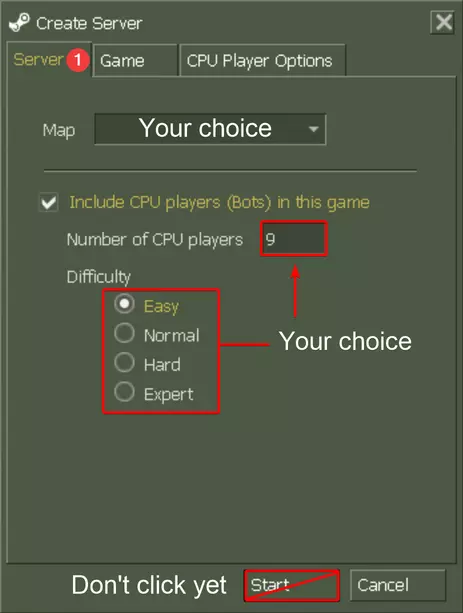
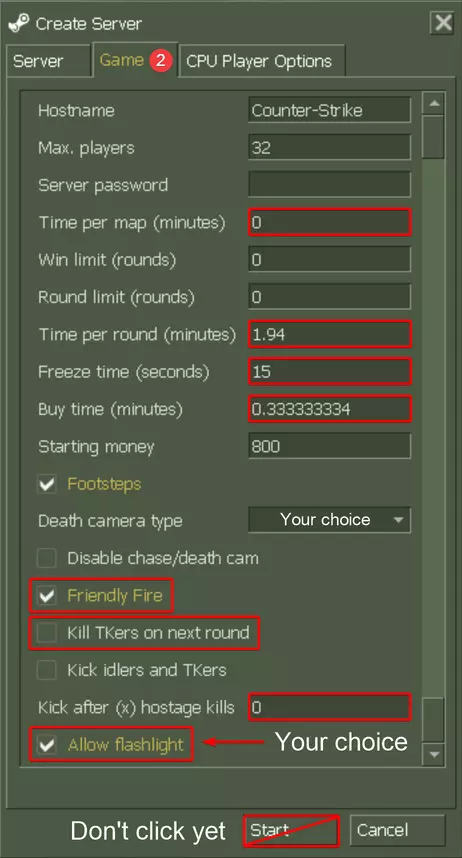
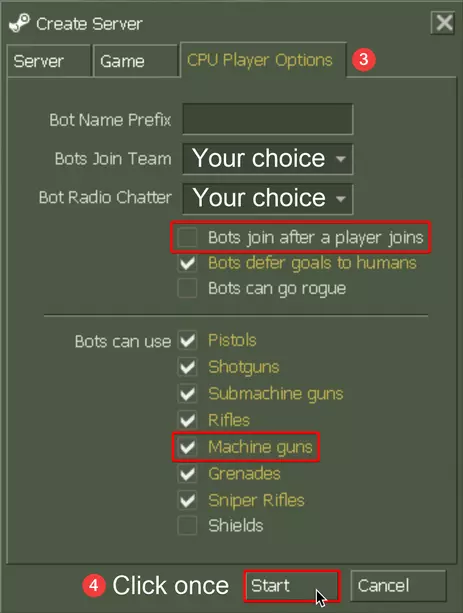
为《反恐精英》添加来自《反恐精英:零点行动》的机器人及机器人菜单,不会导致任何新bug或改变游戏基础功能(最后更新于2021年1月24日)。 所有提及的“Counter-Strike 1.6”均指Steam游戏《反恐精英》。 安装 本指南无需预先安装或卸载任何其他外部依赖项,它是完全独立的。 如果您已安装ZBot/CSBot/其他或本模组的旧版本,只需按以下正常说明安装/更新至最新版本即可。如果您要更新此模组,请务必查看下方“更新日志”部分的更改列表,以防有需要注意的“警告”或“注意事项”。 打开下载的压缩包。 确保《反恐精英1.6》未在运行。 打开Install文件夹。 复制cstrike、czero和valve文件夹。 打开Steam。 将鼠标悬停在左上角的“库”选项卡上,然后点击“主页”。 右键点击左侧游戏列表中的《反恐精英》条目。 点击“属性...”。 点击左侧的“本地文件”选项。 点击“浏览...”,此时会打开文件资源管理器窗口。将文件夹粘贴到该位置,若出现提示,请点击“替换目标中的文件”(或类似选项)。 现在你已成功为《反恐精英1.6》安装了机器人及机器人菜单,可以启动游戏了。 选项 本指南包含一个或多个简易安装选项,你可以根据喜好自定义包含的内容。包含的选项: 《反恐精英1.6》命令菜单 默认 默认及所有机器人命令(默认) —— 组织清晰,针对Xash3D优化了触摸间距,已在800x600分辨率下测试 仅完整导航网格编辑器 —— 警告:会覆盖autoexec.cfg文件——如果你自行修改过此文件,请先备份!《反恐精英:零点行动》命令菜单 默认 --- 视频使用说明包含在压缩包的“Documentation”文件夹中。 --- 警告:会覆盖autoexec.cfg文件——如果您自行修改过此文件,请进行备份! --- 所有选项的预览图可在压缩包的“Previews”文件夹中查看。 使用可用选项的步骤: 确保您已完成上述安装部分的说明。 确保《反恐精英1.6》未在运行。 --- 界面组织清晰,针对Xash3D进行了触控优化间距,已在800x600分辨率下测试 仅完整导航网格编辑器可用使用文件资源管理器/Windows资源管理器打开下载的压缩包。 打开Options文件夹。 打开你选择的选项对应的文件夹,复制其中的cstrike或czero文件夹。 打开Steam。 将鼠标悬停在左上角的“库”选项卡上,然后点击“主页”。 右键点击左侧游戏列表中的【反恐精英】条目。 点击【属性...】。 点击左侧的【本地文件】选项。 点击【浏览...】,会弹出文件资源管理器/Windows资源管理器窗口。 将复制的文件夹粘贴到该位置,如有提示,点击【替换目标中的文件】(或类似选项)。 现在你已成功为【反恐精英1.6】安装了机器人及机器人菜单,并应用了所选选项,可以启动游戏了。使用机器人开始游戏 启动《反恐精英1.6》。 在左下角,点击新建游戏。 在弹出的窗口中,确保服务器选项卡中的【包含CPU玩家...】选项已被选中。 对于步骤4-6,你可能需要将每个选项卡的设置配置为以下设置。标红的设置已从默认值更改。 默认的基本游戏设置中有许多时间过长或缺乏竞争性,使游戏带有休闲感。 这些设置对此进行了修正,以匹配《反恐精英:全球攻势》的基本游戏设置。 本指南会自动移除《反恐精英1.6》其余默认的基本限制(例如最大玩家数量)。推荐游戏设置的使用完全是可选的,并非使用本指南所必需。 根据个人偏好配置此选项卡的设置。 点击【游戏】选项卡,根据个人偏好配置此选项卡的设置。 点击【CPU玩家选项】选项卡,根据个人偏好配置此选项卡的设置。 点击【开始】以加载游戏。 推荐游戏设置(可选)
Customising & controlling bots Once you have started a game with bots, you can customise and control their behaviour by using the bot commands in-game via an easy-to-use graphical command menu or by manually entering commands into the game console. A full list & explanation of all available bot commands & usage instructions (beginner-friendly) is available in text and colour format (with a clickable list of contents) in the "Documentation" folder of the archive. Be sure to read this if you are unsure of the existence or effect of any command. Online previews are also available: Bot Commands (Colour)․pdf[www.docdroid.net] Bot Commands․txt[gist.github.com] (click Raw) The "ReGameDLL_CS" modification used by this guide to enable bots also adds multiple useful game configuration commands you may wish to utilise. These do not alter base game functionality by default and are listed & explained here[github.com] Uninstallation Ensure Counter-Strike 1.6 is not running. Open the downloaded archive with File Explorer / Windows Explorer. Open the Uninstall folder. Copy everything inside. Open Steam. Hover your cursor over the Library tab in the top left, then click on Home. Right click on the Counter-Strike entry in the games list on the left. Click on Properties.... Click on the Local Files option on the left. Click on Browse.... A File Explorer / Windows Explorer window will appear. Paste the contents into this location and click Replace the files in the destination (or similar) if prompted. Open the 1 Final stage of uninstalling bots .bat / Windows Batch File if you are using Windows, or the 1 Final stage of uninstalling bots .sh file if you are using Linux (in the same folder you have open from Step 10). If a security warning window appears, click Run - don't worry, the file is completely harmless. In the window that appears, type y on your keyboard to confirm the final stage of uninstallation, or anything else to cancel. Press Enter on your keyboard to confirm your choice. Once complete, you may close the window. You have now successfully disabled the bots & bot menu for Counter-Strike 1.6, and can launch the game. If you prefer to completely remove all traces of this modification (not required), continue onto the instructions below: Open the 2 Fully remove bots .bat / Windows Batch File if you are using Windows, or the 2 Fully remove bots .sh file if you are using Linux (in the same folder you have open from Step 10). If a security warning window appears, click Run - don't worry, the file is completely harmless. In the window that appears, type y on your keyboard to confirm the final stage of uninstallation, or anything else to cancel. Press Enter on your keyboard to confirm your choice. Once complete, you may close the window. You have now successfully uninstalled the bots & bot menu for Counter-Strike 1.6, removed all traces of this modification, and can launch the game. Frequently Asked Questions Q: Which platforms are supported? A: Only Windows & Linux are supported - macOS cannot be supported as ReGameDLL_CS is incompatible with it (this is out of my control). Q: Does this require Counter-Strike: Condition Zero to be installed? Why do I have to copy a "czero" folder during installation? A: This is simply a minor fix for a Counter-Strike: Condition Zero issue caused by installing the Counter-Strike 1.6 bot menu. A: You do not need to own or have Counter-Strike: Condition Zero installed to use this guide. Q: Does this require Half-Life to be installed? Why do I have to copy a "valve" folder during installation? A: This is simply the bot menu enabler, but for Linux - due to an oversight[github.com] by Valve, it is necessary to implement it in this way. A: Don't worry, this won't affect Half-Life or any other game mods in any way. A: You do not need to own or have Half-Life installed to use this pack. Q: Which versions of Counter-Strike 1.6 is this guide compatible with? A: Only the latest official Steam version (not Warzone or any other older or unofficial distributions) Q: Will this modification get me VAC Banned? A: No. Q: Will this modification prevent me from playing on online servers? A: No. Q: Does this modification change or break the base game functionality in any way? A: No. Occasionally, some minor unintended bugs or differences may arise, but these are extremely minor and do not affect gameplay. A: These are fixed quickly as there is an active issue tracker for ReGameDLL_CS here[github.com]. Q: Do I need any third-party programs to use this? A: No. Q: Can I use this guide with my Counter-Strike 1.6 Steam server? A: This guide only supports clients (normal Steam installations used to join servers), not servers, so I cannot guarantee that it'll work out of the box. A: ReGameDLL_CS itself, however, is fully compatible with Counter-Strike 1.6 Steam servers. You can set it up yourself from the GitHub repository[github.com] A: Servers are a completely different aspect with other factors and possible user setups that need to be addressed by a guide like this. A: Hence, a separate variant of this guide aimed at servers written from scratch would be required. Q: Is this guide compatible with Metamod and / or AMX Mod X? A: No. ReGameDLL_CS itself, however, is compatible with it on Counter-Strike 1.6 Windows & Linux dedicated servers, but you will need to set it up yourself. A: Make sure you are using the latest Metamod-P[github.com] if you try it - not normal Metamod as that is incompatible. A: If you wish to use AMX Mod X, make sure you use the "AMX Mod X Base" option here[www.amxmodx.org] as the installer causes some issues. A: This guide does not cover Metamod or AMX Mod X installations as this guide targets clients (listen servers) only, which are not supported by Metamod or AMX Mod X. A: Although the game may work fine with them installed, it can break with any official Counter-Strike 1.6 Steam update, and the developers would have no reason to fix this. Q: Why should I use this modification over my already working ZBot / CSBot / another / previous version of this bot enabler? A: They are outdated and have developed several game-breaking issues over the years, while this modification has no issues, is more stable and is open-source. Q: I already have ZBot / CSBot / another / previous version of this bot enabler installed. How should I install this modification? A: Simply follow the instructions of the "Installation" section above as normal. It will work perfectly. Q: Why are there copies of all documentation in the "Half-Life cstrike" folder? A: For archival purposes - often, users install this modification then delete the downloaded archive, which would leave them without documentation. Information & Credits Updating If you already have ZBot / CSBot / another / a previous version of this modification installed, simply follow the instructions below as normal to install / update to the latest version. If you are updating this modification be sure to check the list of changes of the "Changelog of updates" section below incase there is a "WARNING" or "NOTE" you should be aware of. Support If you have a query or technical issue, first check the "Frequently Asked Questions" section above to see if it has already been addressed. If it has not been addressed or you have further queries about it, then feel free to comment on the Steam guide with your query or technical issue, and I will respond as soon as possible. Please do not use any other means of contact for support (e.g., adding me as a friend on Steam then messaging me privately). Included Content Bot system for Counter-Strike 1.6 Steam New GUI options to select number of bots & difficulty for the "Server" tab of the "New Game" window of Counter-Strike 1.6 Steam New "CPU Player Options" GUI bot configuration menu tab for the "New Game" window of Counter-Strike 1.6 Steam Use of liblist.gam file for modularity (meaning uninstallation requires minimal renaming or deletion of files) Batch full uninstallation option which removes all traces of this guide, if required Custom hand-tuned navigation mesh files for all default Counter-Strike 1.6 maps for optimal performance and realism of bots on default Counter-Strike 1.6 maps Graphical progress bar for navigation mesh generation / analysis Custom GUI Command Menu with default command menu options as well as all bot commands (including those added by ReGameDLL_CS, for CS 1.6 *and CS:CZ!*) --- Clean organisation, touch-optimised spacing for Xash3D, tested on 800x600 resolution List of recommended basic game settings (to match Counter-Strike: Global Offensive basic competitive game settings) & usage instructions Option to use a Command Menu with full navigation mesh editor only (by s0nought, includes video usage instructions) --- WARNING: Overwrites autoexec.cfg - if you have modified this file yourself, back it up! --- Video usage instructions included in the "Documentation" folder of the archive. Option to use the default Command Menu All Command Menu options also available for Counter-Strike: Condition Zero (for consistency) Full previews of all command menu options for ease of choice Full text and colour (with clickable list of contents) list & explanation of all available bot commands & usage instructions (beginner-friendly) Copies of all included documentation in the Counter-Strike 1.6 installation folder (for archival purposes) A copy of the original Command Menu in the Counter-Strike 1.6 installation folder (for archival purposes) Links to original sources of all included third-party content The "ReGameDLL_CS" modification used by this guide to enable bots also adds multiple useful game configuration commands you may wish to utilise. These do not alter base game functionality by default and are listed & explained here[github.com] Trivia The authors of Counter-Strike: Condition-Zero included a bot system & bot menu with the game. They are present in Counter-Strike 1.6's game code but are disabled by default. Required files & bot menu resource files are not included. ReGameDLL_CS by s1lentq is an open-source rewrite of Counter-Strike 1.6's game code (retains all base game functionality & default behaviour) with the bot system enabled, many new optional features and better stability and support for third-party server plugins. This guide is based off this modification. Credits sjain - Creating Steam guide, adding bot menu & files, creating "Default & all bot commands" command menu, updating original and creating colour bot command documentation, creating safe batch uninstaller files, compiling this pack s1lentq -- Creator of ReGameDLL_CS[github.com] modification, which enables bots for Counter-Strike 1.6 dreamstalker -- Creator of ReHLDS[github.com] modification, which made creation of ReGameDLL_CS possible Mikko -- Providing binaries with bot menu enabled, answering many of my queries, fully guiding me through decompilation, fixing & explaining bot menu resource files - huge thanks Mr.Jeff -- Creator of custom hand-tuned bot navigation meshes[gamebanana.com] for default Counter-Strike 1.6 maps s0nought -- Creator of command menu navigation mesh editor[gamebanana.com] Xylyl -- Multiple non-stop hours of extensively testing the modification on Linux, helping with Linux safe batch file creation - huge thanks CS:GO Betas Talk Discord Server -- answering many of my queries regarding possible future updates of this guide Michael S.Booth -- Creator of original Counter-Strike bot system included with Counter-Strike: Condition Zero Gearbox -- Additional development of original Counter-Strike bot system included with Counter-Strike: Condition Zero Turtle Rock Studios -- Additional development of original Counter-Strike bot system included with Counter-Strike: Condition Zero Changelog of updates (1) v2021.0 - 24 January 2021 Updated ReGameDLL_CS from v5.19.0.486 (5 December 2020) to v5.20.0.492 (4 January 2021, latest version) Replaced "Recommended Game Settings (Optional)" section with a new "Starting a game with bots" section for clarity Replaced "Bot Commands" subsection of "Information" section with a new "Customising & controlling bots" section for clarity Added additional "Changelog of updates" section to the Steam guide due to Steam character limit Uninstallation safe batch files now disable application of ReGameDLL_CS game configuration files Fixed full uninstallation safe batch file incorrectly deleting valve cl_dlls gameui.so Added copy of original valve cl_dlls gameui.so to uninstaller Updated instructions to fully match Steam's new game properties UI Moved all documentation included in Half-Life cstrike folder to a dedicated folder for clarity & easier access Added copy of commandmenu_original.txt to the "Documentation" folder of the archive for easier access Added copy of commandmenu_original.txt to Counter-Strike 1.6 installation folder for archival purposes Added copy of Readme document to the "Documentation" folder of the archive for easy access Added missing safe batch file uninstallers for Linux (thanks Xylyl) Added information section clarifying how to update from previous versions of this modification to newer ones Added information section clarifying where to find support for this guide Added FAQ clarifying that this guide currently targets clients only, not servers Added FAQ regarding AMX Mod X and Metamod compatibility Added link to the top of Readme document referencing the Steam guide as the original source Added note to top of Readme document & Steam guide clarifying that all references to "Counter-Strike 1.6" refer to the Steam game "Counter-Strike" Replaced all web shortcuts throughout the archive with text documents to ensure usability on both Windows & Linux Compiled all web shortcuts of the "Documentation" archive into one text document to reduce clutter, which includes: --- Steam guide as the original source for easy access --- Online preview of Bot Commands document for easy sharing --- Online preview of Bot Commands (Colour) document for easy sharing --- Online preview of Readme document for easy sharing "Documentation" folder of the archive will now always be mirrored the Counter-Strike 1.6 installation folder for archival purposes Fixed some inconsistencies between the Readme document and the Steam guide Minor improvements to Bot Commands (Colour) document Minor improvements to the safe batch file uninstallers Minor improvements to the guide Improved spacing of each section of the Steam guide Updated title of the Steam guide Updated archive filename Changelog of updates (2) v2020.1 - 18 December 2020 Fixed bot menu not being properly enabled on Linux (thanks Mikko and Xylyl) Added online previews of all options Minor improvements to the guide v2020.0 - 17 December 2020 WARNING: This update will overwrite the command menu (commandmenu.txt) for Counter-Strike 1.6 and Counter-Strike: Condition Zero! Back this file up if you have modified it yourself! NOTE: If you had previously installed v2019.2 or below of this modification, you can delete the "Half-Life cstrike sound radio bot cooked" folder to save space. Updated ReGameDLL_CS from v5.7.0.330-dev (23 April 2019) to v5.19.0.486 (5 December 2020, latest version) --- Adds support for Counter-Strike 1.6's new features, adds many new features of its own and fixes a host of issues including crashes --- Full compatibility with latest Steam version of Counter-Strike 1.6 (8684, 3 August 2020 19:53:27) Added Linux cross platform compatibility --- Unfortunately, macOS cannot be supported as ReGameDLL_CS is incompatible with it (this is out of my control). Corrected some of ReGameDLL_CS's default settings (in game.cfg) that altered default Counter-Strike 1.6 game behaviour Disabled application of some ReGameDLL_CS's default settings (in game.cfg) that interfered with operation of the "New Game" window Updated all default CS 1.6 files in the "Uninstall" folder of this archive to the latest version Converted optional "Full Uninstallation" from manual deletion to safe batch file for ease of use Fixed an issue where bot radio sound filters and voice pitches were not working Fixed an issue where bots would fail to traverse the map from spawn on de_aztec All navigation meshes included with this pack have now been extensively tested and are confirmed to be fully working Full rewrite & restructuring of parts of the guide with a focus on simplicity and clarity Major improvements to existing parts of the guide & changelog Restructured archive for simplicity and clarity "Usage & Recommended Settings" section of the guide now utilises ReGameDLL_CS's built in game.cfg, removing the need for userconfig.cfg and to restart the game Added multiple Command Menu options: --- Default --- Default & all bot commands (default) ------ Clean organisation, touch-optimised spacing for Xash3D, tested on 800x600 resolution --- Full navigation mesh editor only (thanks s0nought) ------ WARNING: Overwrites autoexec.cfg - if you have modified this file yourself back it up! ------ Video usage instructions included in "Documentation" folder of this archive. Added a copy of all documentation to a dedicated folder at the top (root) of the archive for easier access Heavily modified bot commands documentation: --- Added a section detailing how to use commands (via console or command menu) --- Adjusted language & vocabulary of descriptions to be clearer, simpler and more friendly for beginners --- Language is now consistent between all commands --- Eliminated all ambiguities (e.g., explicitly stating the effects of 0 and 1 values for <0,1> commands) --- Default values for commands that take arguments (convars) are now specified --- All commands are now listed in alphabetical order per section, where appropriate --- Added multiple missing commands --- Added new ReGameDLL_CS bot commands --- Removed all formats except PDF and text files for simplicity --- Recreated "Colour" PDF document from scratch with better formatting, readability, bookmarks and a new clickable contents page, eliminating many shortcomings Added a web link pointing to a list & explanation of each command added by this modification (ReGameDLL_CS) Added a collection of original sources of included third-party content Renamed included "commandmenu_orig.txt" file to "commandmenu_original.txt" for clarity Renamed Readme document to reflect the fact that it includes usage instructions & information about this pack Updated the icon of the Steam guide to a higher resolution image (better embeds on messaging services like Telegram) Added 4 blank lines to the end of all included text documents for better readability Updated archive filename v2019.2 - 29 April 2019 Fixed an issue where installing the modification broke the "Play Counter-Strike: Condition Zero" option of CS:CZ (thanks Mikko) Added navigation mesh files for all maps included with CS 1.6 by default, including custom hand-tuned ones where possible for better gameplay (thanks Mr.Jeff) Minor corrections to the guide Simplified archive filename v2019.1 - 28 April 2019 Added a new bot configuration menu to the "New Game" window Documentation fixes and formatting improvements Added a PDF copy of bot commands documentation Completely revamped formatting of and added "Frequently Asked Questions" and "Usage & Recommended Settings" sections to the guide v2019.0 - 27 April 2019 Initial release