换一换
换一换 


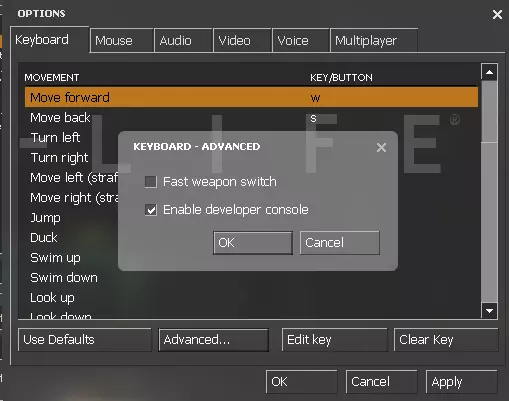
Playing the game like it's meant to be played isn't really that fun. Here's a guide how to actually have some fun with console commands of this game. WARNING: HLDMS UPDATED! This guide is somewhat obsolete. I'm not sure what works anymore because Valve updated the game and broke almost everything. Don't take anything here for granted. P.S. Thanks Valve, roll back your game. It's broken beyond playable. Half-Life 1: Source Legacy [BACK] LEGACY IS BACK Join this group for updates and news! As said above, the current HLDMS on Steam is not really the HLDMS it once was, but if you are willing to spend a good few minutes trying to get that experience back, go get the HL1S Legacy [cobalt57.ogameforever.com] It's an older version of HLS and HLDMS with minor improvements and some bugs, but all of the Information you will read here, will work on the Legacy version. It's more playable than Steam's Version, that's for sure. Just be sure to follow the instructions very carefully. Part 1: Getting Started Upon starting the game, You'll obviously be in the main menu. Now, do the following. Go to options and go to the "Keyboard" tab. Click the "Advanced..." button and tick the "Enable developer console" box. Now press the tilde key which is located at the top left of your keyboard. Below Esc, to the left of 1 and above tab. You'll now have the dev console open which you can use to type different codes into. Part 2: The Basics Now that you have the dev console open, it's time to learn some of the most basic codes you'll be using. There are two types of commands. Serverside and Clientside Serverside commands can only be done by admins and usually affect everyone on the server. Clientside commands can be done by anyone on the server and can do a whole range of different things. This part will tell you some of the most basic and most used codes. Most Useful Commands map X - This command server lets you start [or restart] your server on the specified map. Replace the X with the map name. [Example: map C1A0] changelevel X - This server command works exactly the same as map but lets you change the map while keeping all your server settings like they were in the last map. Use this after you loaded in the first map. sv_cheats 1 - This server command will enable cheats on your server. This is essential for most commands to work. bind X Y - This client command allows you to set your keyboard to do things which are not listed on the keyboard tab in the options menu. Replace X with the key you want to bind and Y with the command. [Example: bind f11 "sv_cheats 1" - By pressing F11 on your keyboard, you'll activate cheats on your server.] impulse 101 - This client command will give you all of the weapons in the game. Note: This will not resupply the 5th slot's weapons. You will only be able to resupply the 5th slots weapon if they are out of ammo. buddha - This client command will make you unable to go below 1 point of health. This is as close as you can get to a simple godmode command in this game because god command has absolutely no effect. noclip - This client command is something everyone should be very familiar with. It allows you to fly around the map without bumping into walls. This is a very useful command because it allows you to get to hard-to-reach or unreachable places. npc_create X - This client command creates an NPC. As opposed to other official source games [Like HL2:DM] HLDM:S NPC's work just as they would in singleplayer. To spawn an NPC just replace the X with the NPC's entity name. Some basic npc names are... Monster_Scientist Monster_Barney Monster_Headcrab Monster_Zombie Monster_Gman ent_create X - This client command allows you to do the same as npc_create except this command can be used to spawn items. Just like last time, replace the X with an item name. Some basic item names are... Item_Healthkit Item_Battery Item_Longjump Weapon_Snark Ammo_Argrenades ent_remove - This client command removes anything that you're looking at. Be warned this command is extremely unstable. Do not do this command while looking at a human player or else you will crash the server. Other Useful Commands sv_suppress_viewpunch 1 - This server command removes recoil from all weapons completely. This is very useful when you just can't handle that annoying amount of recoil that the MP5 has. sv_hl1mp_item_respawn_time X - This server command lets you set how long it takes for Items to respawn. It is counted in seconds. Just replace the X with the number of seconds that it will take for a weapon to appear again after being picked up. Note: 0 means instant respawn. sv_hl1mp_weapon_respawn_time X - This server command is the same as the command above except this one decides how long it should take for weapons to respawn. Just replace the X with the number of seconds like the last one. sk_max_X Y - This server command lets you set how much ammo a player can carry depending on what ammo type is typed in. Replace the X with the ammo type [Upon typing "sk_max_" a list of different ammo types with their defaults will show] and replace Y with how much max ammo players can carry. [Warning: Do not go above 999 ammo! It will crash your game!] decalfrequency X - This server command lets you change how long the delay should be between spraying. Replace the X with how many seconds you want the spray cooldown be. 0 will make it so anyone can spray at any time. Part 3: Advanced ent_fire X Y Z - This client command is the most powerful command in the whole game. This can be used to completely change how things work. It can do anything from opening doors to making admins change their server settings without you having to be the admin. This command is both very useful and very dangerous at the same time. X is replaced with the name of the entity you want to do something with. Y is replaced with what exactly you want to do with that entity. Z is replaced with any other things that Y required to fully take effect. Here are some examples: Opening a door - ent_fire door open Making your playermodel purple - ent_fire !self color "255 0 255" Making all players have 500 health - ent_fire player sethealth 500 Locking all sliding doors on the map - ent_fire func_door lock Making all sliding doors open extremely slow - ent_fore func_door addoutput "speed 1"The list of uses for this command goes on and on and on... ent_setname X - This client command allows you to set a specific name for an entity which you are currently looking at. This is very useful for when you want to use ent_fire on one specific thing. Replace X with whatever you feel like is the right name for whatever you're looking at. prop_dynamic_create X - This client command allows you to spawn models that are in the game. [Warning: Giving the wrong model name and path will result in a server crash!] Replace the X with the model name. Here are some really useful models: props_lab/blastdoor001a.mdl - A double blast door. Very useful in fort building. props_c17/concrete_barrier001a.mdl - A concrete barrier. Very useful cover. prop_physics_create X - This cilent command allows you to spawn a physical model. [Warning: Same warning as in prop_dynamic_create!] Just replace the X with the physics model name. Some useful physical model names are: props_junk/TrashDumpster01a.mdl - A big green dumpster. Pretty heavy, too. props_c17/oildrum001_explosive.mdl - An explosive barrel. Try not to spam this. props_junk/propanecanister001a.mdl - A propane tank. Sadly, not a Strickland one. ent_rotate X - This client command allows you to rotate non-physical object that you're currently looking at however many degrees you want to turn them. Replace the X with how many degrees you want to rotate whatever you're looking at. [Obviously goes from 1 - 360] Very useful for prop_dynamic entities. Part 4: CFG Scripting CFG scripting is the most advanced form of playing around with console codes in this game. CFG scripts are files that are stored in the cfg folder of the game. These files consist of multiple commands that upon executing the file in-game, it enters all the commands in the file into the dev console, Creating a quick and efficient way of creating customized entities. Each script is executed using the exec command which is a client command. Never made any of these kinds of scripts? Well, here's a tutorial with a template. Step 1: Go to steam steamapps username half-life deathmatch source hl1mp cfg Step 2: Find the CFG file named "config" and copy it. Step 3: Rename the file to something which will tell you what the script is. In this case, "firstscript" is acceptable. Step 4: Open the file with notepad and remove every bit of text inside. Step 5: Type in the following: ent_create monster_scientist wait ent_setname testscientist ent_fire testscientst addoutput "health 2000" ent_fire testscientist color "255 255 0" ent_fire testscientist ignite Step 6: Save the file. Step 7: Launch the game [If you haven't already] Step 8: Go on any map and turn on cheats. Step 9: Go into the console and type in "exec firstscript" or whatever you named the CFG file. You have spawned a red scientist who is burning and has a lot of health! Congratulations! It definitely isn't the best script out there but it's simple enough for a beginner. Some scripts do a lot more than simply that. They can make text appear in front of every player's screen, Make crates which upon breaking they make whoever broke them invisible and much more... Part 5: Bad things & Dealing With Them Considering how many players there are that fully exploit the potential of ent_fire or other console commands there's a few things to be aware of... exec lab - This client command will completely wipe your key bindings and completely default and mess up your game. So don't do it. ent_remove_player, ent_remove_all player, ent_fire player kill, ent_remove worldspawn, ent_remove info_player_spawn - Doing these client commands or anything alike will remove essential entities from the world. Making the game unplayable and causing it to crash. Don't do this if anyone tells you to. ent_remove_all prop_physics - This client command removes all physical props on the map. This is very good if there's a huge pile of them because someone spammed them. kick X - This server command does what it says. Kicks people. Place the player's name in the X and kick them out. status - This client command shows IP;s of everyone who is currently in the server you're in. addip X - This server command adds the specified IP to the ban list. Use the IP from the status command report to help you figure out what everyone's IP is. Replace the X with the IP of the player you want to ban. removeip X - This server command can remove banned IP's on your server. In case you ban the wrong person by accident or you're letting someone have another chance. It should also be noted that some players know how to completely change the server host's stuff. What does that mean? If someone is skilled enough in CFG scripting, they can exec lab the server host without even letting them know. So, beware of people around you. Part 6: End of The Guide I really hope this guide has helped you out! Please let me know if anything is wrong in this guide or if something should be improved down at the comments! Also be sure to rate it up and spread this guide around so that we may hopefully see Half-Life Deathmatch: Source get a bit more popular [More than 20 players worldwide at once, hopefully...] Enjoy CFG scripting and playing along with others! Thanks for reading and have fun! -Sarmon Also a shoutout to all of Robo Clan which the most friendly clan/community of HLDM:S players that has died down a good bit due to the main clan leader and server host being unable to host as often as before. I hope we all can get back to playing together a lot more often, sometime in the future!

Robo Clan Steam 群组页面