换一换
换一换 


A short guide and simple working scripts for solving Bitburner Coding Contracts. The Beginning In Bitburner, you need to gain reputation with factions, gangs and corporations to gain access to their augments for purchase. Initially you are challenged by the factions to get their augments and then you need to work for the corporations/gangs for their augments. First there are the beginner city faction augments you can get depending if you go with the western or eastern factions (About 40 for the western and city factions). Later you will have access to the corporation augments (after 400k reputation for each corporation) and other later factions or gangs, which are more expensive and powerful. For example, after purchasing 36 augments, the SmartJaw from Bachman & Associates will cost me $29.817Q (Q not q) and 375.000k reputation. Of course I am not going to buy it until after I install 40 augments, come back more twinked to go farther and will be much cheaper to buy (assuming the prices reset as well). I also have to work for the eastern city factions and see what they have after I augment since I've been working for the western city factions which disqualifies you to work for the eastern city factions. The Codez You can gain reputation for factions and corporations by either doing Hacking Contracts or Coding Contracts. Initially, you’ll need to do Hacking Contracts for factions to get access to your first augmentations. Hacking Contracts are found when you goto the factions left menu option under Character. Later when you need more reputation for corporation augments you’ll need to do the Coding Contracts as well to get the necessary reputation. There are also more factions and even gangs you will encounter and join after your first augmentation. Doing Coding Contracts can gain you around 4 per second in reputation and sharing your servers can increase that as much as 1-4 more per second. You can also get every server under your control to help out as well. Remember, you don't have to share out your entire home computer or servers, you can leave enough RAM to do other things. Here is a sample sharing helper script: /** @param {NS} ns **/ export async function main(ns) { // Logging ns.disableLog('ALL') ns.tail(); // Main while (true) { ns.print("Time: " + new Date().toLocaleTimeString()); await ns.share(); let sharePower = ns.getSharePower(); ns.print("Share Power is " + sharePower); ns.print("--------------------------------"); } } Very simple, eh? You’ll need to modify your automation scripts to use the sharing script or incorporate it into your own scripts. It works with my automation script provide with my Hacking for Dummies Guide as is. Just comment the hack script and uncomment the share script in the header of the script. Here's an home sharing example: /** @param {NS} ns */ export async function main(ns) { let threads = ns.args[0]; let script = '/scripts/share.js'; //ns.killall('home'); //Useful sometimes let ramAvailable = ns.getServerMaxRam('home') - ns.getServerUsedRam('home'); let ramPerThread = ns.getScriptRam(script); let threadsAvailable = Math.floor(ramAvailable / ramPerThread) - 5; ns.tprint(threadsAvailable + " threads can be runned on home."); if (threadsAvailable > 0) { if (!threads) threads = threadsAvailable; ns.tprint("Starting share.js on with home."); ns.exec(script, 'home', threads); } else { ns.tprint("NOT ENOUGH MEMORY ON home."); } } alias homeshare="run homeshare.js" homeshare 1000000 Note you can pass how many threads to use, otherwise it will use any available memory on the server you run it on. To check your share power, hacking level and other information about yourself, you can run this script: /** @param {NS} ns */ export async function main(ns) { let player = ns.getPlayer(); let totalSharePower = ns.getSharePower(); let hackingLevel = ns.getHackingLevel(); ns.tprint("Hacking Level = " + hackingLevel); ns.tprint("Share Power = " + totalSharePower); ns.tprint("Bitnodes = " + player.bitNodeN); ns.tprint("People Killed = " + player.numPeopleKilled); ns.tprint("Karma = " + ns.heart.break().toFixed(2)); } alias getinfo="run getinfo.js" getinfo This script demonstrates using Netscript and your player object to get additional information. I’ve included a few bits of hidden information that is used later in the game that is not normally displayed in the overview or character stats. There's actually much for information you can gleam from player object from the getPlayer() function: https://github.com/danielyxie/bitburner/blob/dev/markdown/bitburner.player.md You may also have noticed on servers you encounter in Bitburner with *.cct files if you do a ls (list) command to list out the files on the servers, including your home computer (except for servers you bought like your server farm or helper servers you purchased). These are Coding Contracts from the various factions and corporations in Bitburner. They contain complex programming problems you would normally encounter taking a high-level computer science course at a really good university. You get a limited amount of guesses before it self-destructs and if you solve the problem, you can get money or reputation from the factions or companies who placed the contract. For more information on Coding Contract types, look here: https://bitburner.readthedocs.io/en/latest/basicgameplay/codingcontracts.html Here is a simple script to crawl the network, search all the servers and find all the contracts on them. The code is a bit long, so I've saved it to Github. Simply cut and paste it from Notepad (or .txt other editor) into nano on Bitburner and don't forget to save as a '.js' file. If you pass a faction or corporation as an argument, it will display the servers that have contracts for that faction/corporation. You can also pass 'other' to get the contracts that are for multiple factions/corporations.
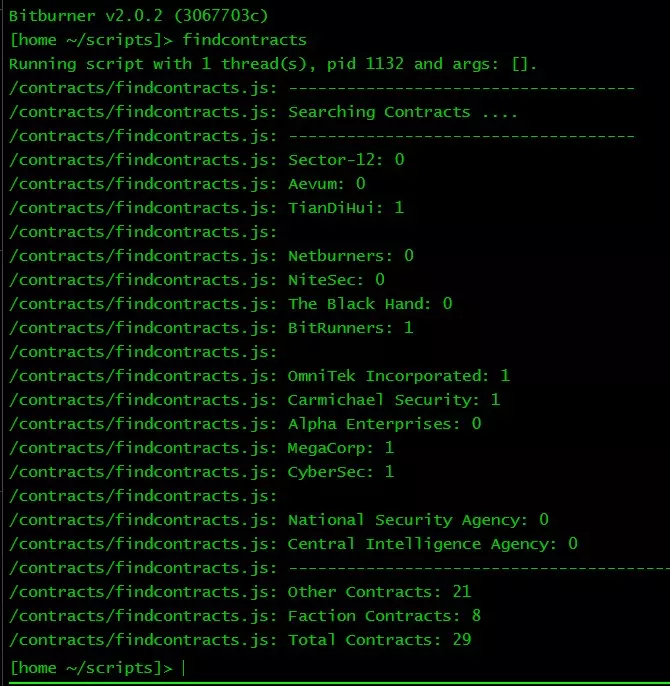
findcontracts.js: alias findcontracts="run findcontracts.js" findcontracts other 我在解决编程合约时处于不利地位,因为我在20世纪80年代就读的一些技术学校没有什么好的数学课程,只有一门对电子工程来说无用的微积分课程,而且我再也没用过(我拥有计算机科学和电子工程学士学位)。在我作为高级程序员工作并退休的30多年里,我从未遇到过这样的问题,即使遇到了,相关的数学和公式也可能在经过管理层批准后提供给我。所以,我又一次在网上搜寻编程合约的解决方案。大部分解决方案代码来自一个名为“alainbryden”的人开发的大型自动化套件,我一直没能让它运行起来,因为它有点过时,存在一些错误,而且我没时间去调试和处理这一切。我不知道他是谁,也不知道他是否还在Steam、Reddit或其他地方活跃,但他在求解器代码方面确实做得很好,几乎提供了所有的解决方案。主脚本和辅助脚本是我编写的,我还修复了移植过来的求解器代码中编辑器报错的一些错误。
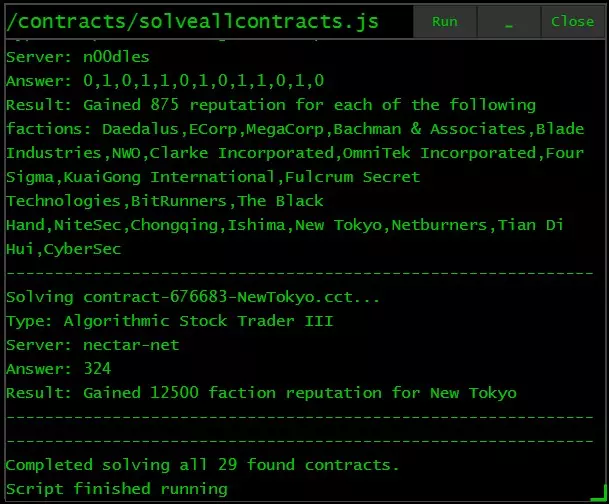
这些是较大的脚本,因此我将它们放在Github的文本文件中供下载。只需将它们复制粘贴到《比特燃烧者》的nano中即可。有两个文件:主脚本(solveallcontracts.js)和辅助脚本(solvecontract.js)。 设置别名:alias solveallcontracts="run solveallcontracts.js" 运行命令:solveallcontracts 如果你修改了任何内容,请确保主脚本中使用的文件名与你保存脚本时使用的文件名一致。 已知问题: 我今天发现一个bug,当服务器上有多个合约时,它只能解决其中一个。目前,只需继续运行脚本直至完成所有合约即可。我会尽快调查并修复问题。 可能存在脚本无法解决的编程合约,我会在找到解决方案后更新辅助脚本。如果你有解决方案,欢迎留言,我会为大家更新辅助脚本。若发现其他问题,也请留言,我会进行修复。 最后,希望我能在你的《网络骇客》旅程中提供帮助,并激励你继续沉迷于《网络骇客》的游戏世界。或许你可以为它留下一个好评,这样有朝一日它可能会被Steam认可为正式游戏(届时Steam成就有望正式生效)!你可以将我的脚本作为模板来学习并构建自己的脚本。我已经编程超过30年(我是一名退休软件工程师),从个人电脑诞生之初就开始接触,使用过太多不同的语言和平台,甚至包括大型主机——真的!所以,我认为这些年来我学到了一些不错的编程习惯和编程模式,尽管可能非常老派。免责声明:标题中的“傻瓜书”只是我借用了1990年代一系列旧书的名称,顺便说一下,并不是要称任何人是傻瓜,甚至不是猿猴。 本指南由Steam用户Zac Starfire创建。如果你在其他服务器上发现了它,那就是它的起源地。 更新日志 3/2/23 - 添加了脚本指南链接 10/13/22 - 将代码移至Github,以避免Steam对其进行干扰。 9/28/22 - 为findcontracts.js和solveallcontracts.js添加了图片。 9/19/22 - 进行了小的编辑、修复以及其他需要调整的内容。2022年9月15日 - 添加了共享自动化脚本并修复了一些问题 2022年9月16日 - 添加了更新日志部分,并将变更说明移至该部分 - 进行了小修复及其他调整