换一换
换一换 


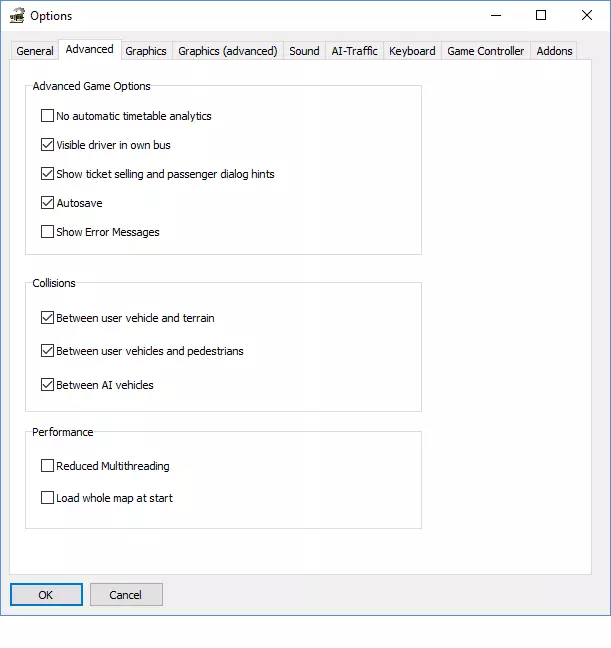
Measure performance of Omsi 2 and tune it for a modern computer. Playing with the settings Omsi 2 is an open software; there are DLCs from many contributors: maps, busses, vehicles and pedestrians, some transverse DLCs (Navigation, Auxi). The Omsi 2 software proper hasn't changed in years, however other things do change: hardware, graphical card, drivers. Some recent maps are more dense than the first ones. The Options dialog has a lot of settings. There are advices on many guides, forums, Internet sites, but I still did not understand how to best tune Omsi 2. Sometimes I was unable to drive on a map although I managed to drive previously, without me knowing what changed. I have played with the settings while looking at the FPS but I could achieve no satisfactory tuning. Then I looked for a way to get relevant measures that help tune. Measuring Performance Important measures are: processor usage for both CPU and GPU, memory allocation for both CPU and GPU. Process Explorer[learn.microsoft.com] yields: Virtual Size: the memory of the process (counts against the 4Gb). I/O History: the data read from disk. CPU (Usage), and CPU History: the load of CPU processor (counts against 100%). GPU (Usage), and GPU System Bytes: the load of the GPU processor (counts against 100%), and the allocated video memory (counts against the available/configured video memory).https://steamuserimages-a.akamaihd.net/ugc/26561914309350845/789CF5CA19FAC94569C45B8229D1CFCC63B3614A/?imw=256&&ima=fit&impolicy=Letterbox&imcolor=%23000000&letterbox=false You also get information about video memory through Omsi 2's HUD (Shift+Y thrice) or DXVK's HUD. Virtual Memory Map[learn.microsoft.com] explains how the Virtual Memory is allocated: Image: the program code of Omsi 2; always allocated. Private Data: memory allocated for the execution. Heap: memory allocated for the maps; depends on the maps, the number of vehicles, etc.https://steamuserimages-a.akamaihd.net/ugc/26561914309355589/EB87FD29CC3256F52E4F83488E41092A8A632388/?imw=256&&ima=fit&impolicy=Letterbox&imcolor=%23000000&letterbox=false Major Points The CPU usage is high, 75-80% overall, 50-60% for Omsi.exe, which is as high as most old software can get (the reminder of the time is spent waiting on the memory or on the disk). This is the limiting factor, it will balance with the FPS. The GPU Usage is quite low (I see ~25% on 1 GPU Engine out of 20). The Virtual Size is often in the range 1.5Gb-2.5Gb, quite under the limit of 4Gb. The GPU Memory is often in the range 1.5Gb-3.0Gb (though I have seen it go up to 5.5Gb, which still works out if there are 8Gb of GPU Memory). When playing around with Omsi 2's settings one should check on which figures it has an effect. One will want to reduce the CPU Usage because it is close to its limit; increasing CPU or GPU Memory is fine because it is far below its limit. Other Settings The wording "Max. Tex. Mem. for high-res Tex load" sounds misleading to me: to me this figure behaves like the limit on GPU Memory, whatever the other settings about Texture Resolution are. The default setting for "Max. Tex. Mem. for high-res Tex load" / Video Memory is very low (at 401.0Mb); one should set it much higher: one finds various advices on Internet: to the available GPU Memory, such as 8Gb=8000.0Mb, or 0.0Mb (meaning "no limit"), or 2/3 of the graphical memory. If Omsi 2 reaches the limit (it can reach 400Mb even with low resolution textures), it gets trapped in a loop (the screen stays black, sometimes flashing to show the Windows Desktop (background image, or Steam); with Process Explorer one sees the GPU Memory repeatedly going slowly up and abruptly down). With "Use Only Low-Res Textures" the GPU Memory is much lower, the GPU Usage is somewhat lower and the FPS is somewhat higher, but I experience quite long freezes (and obviously the images are more blurred). Conclusion With the 4Gb patch, and with Omsi 2 configured to use 8Gb of video memory, I can drive correctly on almost all maps. The driving experience is better with high-resolution textures (i.e. without checking "Use Only Low-Res Textures" and "Limit all textures (apart from own bus) to 256 pixels"). Other Points The wording "Reduced Multithreading" sounds misleading to me. When I play with "Deactivate multithreading for test" / Ctrl+F12 (as described in the Options / Keyboard tab) and look at the HUD Information Lines (Shift+Y thrice) I understand that "Deactivate..." switches multithreading off at start up, and Ctrl+F12 toggles it on and off during the game. After a crash or a forced termination Omsi 2 opens a dialog suggesting that crashes could be related to an issue with multithreading; as far as could test Omsi 2 has no issue with multithreading; multithreading should always be active. I can't find a clear advice about "Neighbour Tiles Count" and "Max. Obj. Visibility Distance". I think that both figures should be tuned to the same or an similar distance: if "Neighbour Tiles Count"*300 (=size of a tile in m) is much less than "Max. Obj. Visibility Distance", then each time a tile gets loaded, Omsi 2 will display many new objects and their textures at once, which freezes the game for some time. If "Neighbour Tiles Count"*300 is much more than "Max. Obj. Visibility Distance", then many objects are in memory but they are not displayed. I tested DXVK (version 2.5; https://steamcommunity.com/sharedfiles/filedetails/?id=2461019058). It somehow works and yields better FPS, but it induces delays (the simulation freezes for several seconds). DXVK has a limit on memory (on my system, the limit is about 6.6Gb; I don't know if it is absolute, or related to the 8Gb GPU Memory available); setting dxvk.conf / d3d9.maxAvailableMemory higher has no effect. At first I had it crash every 5min (the screen turns totally black and I have to reboot). It seemed to crash mostly after DXVK's HUD shows a long freeze. With "Neighbour Tiles Count" = 3 it seems not to crash. However DXVK's HUD reports much more video memory used than Omsi 2's HUD (about a factor 2); in some places on some maps DXVK's HUD reports 6.6Gb (99%) memory usage, then the simulation freezes and I have to reboot.
omsi 2 调校

2026-02-16 19:00:09
转载

导读
本文围绕Omsi 2调校展开,作者因现有调校方法无法获得满意效果,介绍了通过Process Explorer等工具测量CPU、GPU的使用率和内存占用等性能数据的方法,还分享了各项设置的调校建议,包括显存设置、多线程设置等,以提升游戏运行表现。

评论
共0条评论

《彩虹六号》帧数低怎么办?RTX 5060+i5-12代实测130-150帧正常吗?提升帧率设置教程
《彩虹六号:围攻》RTX 5060显卡配i5-12代处理器,1K 240Hz显示器,画质全低阴影中,游戏帧数只有130-150正常吗?实测告诉你答案!可能是驱动…
2026-06-08 17:000赞 · 7评论

《漫威蜘蛛侠2》SteamDeck能玩吗?运行测试与最佳游戏设置优化分享
SteamDeck能流畅运行《漫威蜘蛛侠2》吗?实测来了!本文带来SteamDeck运行《漫威蜘蛛侠2》的帧数表现、画质效果及稳定性测试,并附上经过优化的游戏设…
2026-06-07 10:490赞 · 0评论
崩坏3键位设置 崩坏3PC版怎么设置键位 战双帕弥什PC版键位设置 游戏设置优化
2026-05-24 11:070赞 · 0评论
战术小队枪战标准镜看不清怎么办 战术小队枪战瞄准镜模糊 中国玩家标准镜问题 战术小队枪战设置优化
战术小队枪战标准镜看不清怎么办?为什么只有中国玩家遇到这个问题?请大佬解惑!是游戏设置问题、网络延迟,还是显卡驱动原因?分享你的解决方案,一起提升瞄准清晰度!
2026-05-24 04:300赞 · 3评论
FPS 玩1000小时APEX都不知?解锁帧率、跳过开场、120FOV...
解锁帧率:+fps_max unlimited 解锁帧率:+fps_max 0 锁最高帧X:+fps_max X 显示速度:+cl_showpos 1 跳过开场…
2026-05-09 05:080赞 · 0评论
《神力科莎EVO》卡顿与帧率问题修复公告
《神力科莎EVO》极致流畅体验,告别画面撕裂、卡顿与延迟!2025年5月26日 - ACE卡顿及帧率问题修复
2026-04-07 07:000赞 · 0评论
如何在不丢帧的情况下生成10000只僵尸
好的,把所有设置调到最低。就这样。现在开始游戏吧。
2026-02-18 01:000赞 · 0评论
穿越火线无后坐力 穿越火线无后座调整步骤是什么
穿越火线(CrossFire)是一款深受玩家喜爱的在线射击游戏。在这款游戏中,玩家之间的竞争非常激烈,掌握一些高级技巧,如无后座力射击,能够大幅提升你的游戏体验…
2026-02-17 09:130赞 · 0评论
如何优化你的《求生之路》
本指南将教你如何仅通过游戏内设置来优化《求生之路》,无需外部程序。你只需进入游戏的视频设置,并按照以下步骤进行调整即可。 我使用笔记本电脑游玩,通过这些设置能够…
2026-02-15 19:000赞 · 0评论
如何提升游戏性能
本指南旨在帮助你优化游戏,因为游戏内的设置选项相当有限,无法关闭阴影、抗锯齿等功能,所以仅满足最低配置要求的电脑很难流畅运行游戏。不过可以告诉你,只要电脑达到最…
2026-02-15 13:000赞 · 0评论
暂无更多
最新更新
- OMSI 柏林 X10 - Steam 版密钥兑换 — 拥有《OMSI 2:蒸汽版》柏林X10线路的玩家可在186线路上享受优惠
- 《OMSI 2:Steam版》沼津项目更新 — 《OMSI 2:模拟巴士2》3.25.1版本修复公告 1.本次更新重点优化AI行为表现 2.提升地图稳定性 3.增强沼津市整体视觉一致性
- 体验OMSI柏林186号线直播——第二部分 — 《OMSI 2:蒸汽版》柏林186号线附加内容的测试版仍处于最终阶段。随着发布日期的逐步临近,开发团队正在进行最后的调整和修复。 几天前刚展示了该线路的首次完整…
- OMSI 2 附加内容 | 柏林186号线新闻 — 体验《OMSI 2:蒸汽版》柏林186线路直播 《OMSI 2:蒸汽版》附加内容柏林186线路的beta测试已进入最终阶段。目前正在进行最后的调整和修正,发布日…
- Aerosoft春季促销 | 低至一折优惠! — 春天已经到来——Aerosoft春季特卖也同步开启,你喜爱的游戏最高可享9折优惠!不要错过扩充游戏库的机会,但要抓紧时间,特卖将于3月26日结束。《OMSI 2…
- OMSI 2 附加内容 | 柏林186号线新闻 — 《OMSI 2:模拟巴士》柏林186号线附加内容的开发工作正在稳步推进。 一个全新且内容丰富的测试版本已提供给测试团队,目前正在进行全面审查。目标是根据反馈实施…
- 提升OMSI性能 — 大家好! 我们不都想要更高的帧率吗?尤其是在《巴士模拟2》中,有时性能表现可能会比较糟糕。 由于《巴士模拟2》的性能很大程度上受限于单核性能和固态硬盘速度,因此…
- 如何启动巴士 — ### 巴士启动指南 简介: 本指南将教你如何启动巴士。实际操作比看起来要简单得多。 启动步骤: 1. 按下【E】键。 2. 按住【M】键5秒钟。 3. 按下【…
- 如何让任意HOF文件在DBC巴士上运行(含DBC模组) — 大家好!本指南将帮助你设置DBC巴士(以及你可能拥有的任何DBC模组)。 DBC即【芝加哥市中心DLC】 如果你没有Hof Suite,请获取它。 安装并设置好…
- 如何阻止乘客辱骂你 — 你有没有想过这些人到底怎么了?为什么他们不好好做点别的事,非要因为你正常驾驶而侮辱你呢?我在现实生活中经常坐公交车,从来没见过有人会那样直接对司机说这种话。在本…