换一换
换一换 


这是一篇关于《城市:天际线》限制的指南。存在哪些限制?如何识别这些限制?达到限制时会发生什么?以及可以采取哪些措施来防止或规避这些限制? 历史背景: 《城市:天际线》(CS)于2015年5月10日发行。和如今一样,当时的电脑也有其性能局限。为确保游戏流畅运行,《城市:天际线》中设置了各种游戏限制。最明显的是玩家在整个地图上只能游玩9个区块。但还有许多其他限制,旨在防止玩家创建电脑无法处理的城市。 多年来,Colossal Order(CO)通过补丁扩展了部分这些限制。模组社区已经推出了多个模组来进一步扩展其中一些限制。同时,我们的电脑性能也变得更好了! 本指南将用通俗易懂的语言(因为我也是这样的人)解释《反恐精英》的各种限制。它会告诉你当达到这些限制时游戏会表现出什么样的行为(这对主机和PC玩家都很有用)。你还能找到应对这些限制的资源(主要与模组相关,所以对主机玩家帮助不大,但在某些情况下也有一些可能有用的方法)。 游戏限制 以下是各种游戏限制的概述。基础数值及使用模组可达到的最大限制: 类型 基础数值 模组后数值 网络段 36.864 36.864 网络节点 32.768 32.768 网络车道 262.144 262.144 建筑物 49.152 49.152 分区区块 49.152 49.152 活跃车辆 16.384 65.535 停放车辆 32.768 65.535 市民 1.048.576 1.048.576 市民单位 524.288 1.048.576 市民实例 65.536 65.536 交通线路 256 256 路径单位 242.144 524288 区域/区块 9 81 区域 128 128 树木 262144 2097152 道具 那么,如何知道自己距离这些限制还有多远呢?可以借助模组。有些模组提供所谓的【限制计数器】,它本质上是游戏内的一个小窗口,显示不同的限制以及当前距离达到这些限制的程度。 【CSL Show More Limits】模组就是其中之一。(注意:该模组多年未更新,因此其限制计数器显示的数字并非100%可靠。不建议使用此模组,而是使用【Watch It!】系列模组之一(见下文)。) (务必阅读模组描述)注意!这是另一个为你的游戏添加限制计数器的模组,还包含其他选项。请从以下两个中选择一个,但不要同时订阅!(务必阅读模组描述) 网络段、网络节点和网络车道 它们是什么? 你的游戏中可以有32768个节点、36864个网络段和262144个车道。这三种游戏限制与网络有关。在本游戏中,网络是指所有可通过拖动直线或曲线建造的事物。这些分别是: 道路/高速公路 铁路 人行道 码头 运河 围栏 电力线路 水管 船舶航线 每一种都由节点、路段组成,其中部分还包含车道。 节点是这些网络的起点和终点。默认情况下,每隔12U(96米)的距离会创建一个节点。节点之间的部分就是路段。如下所示:
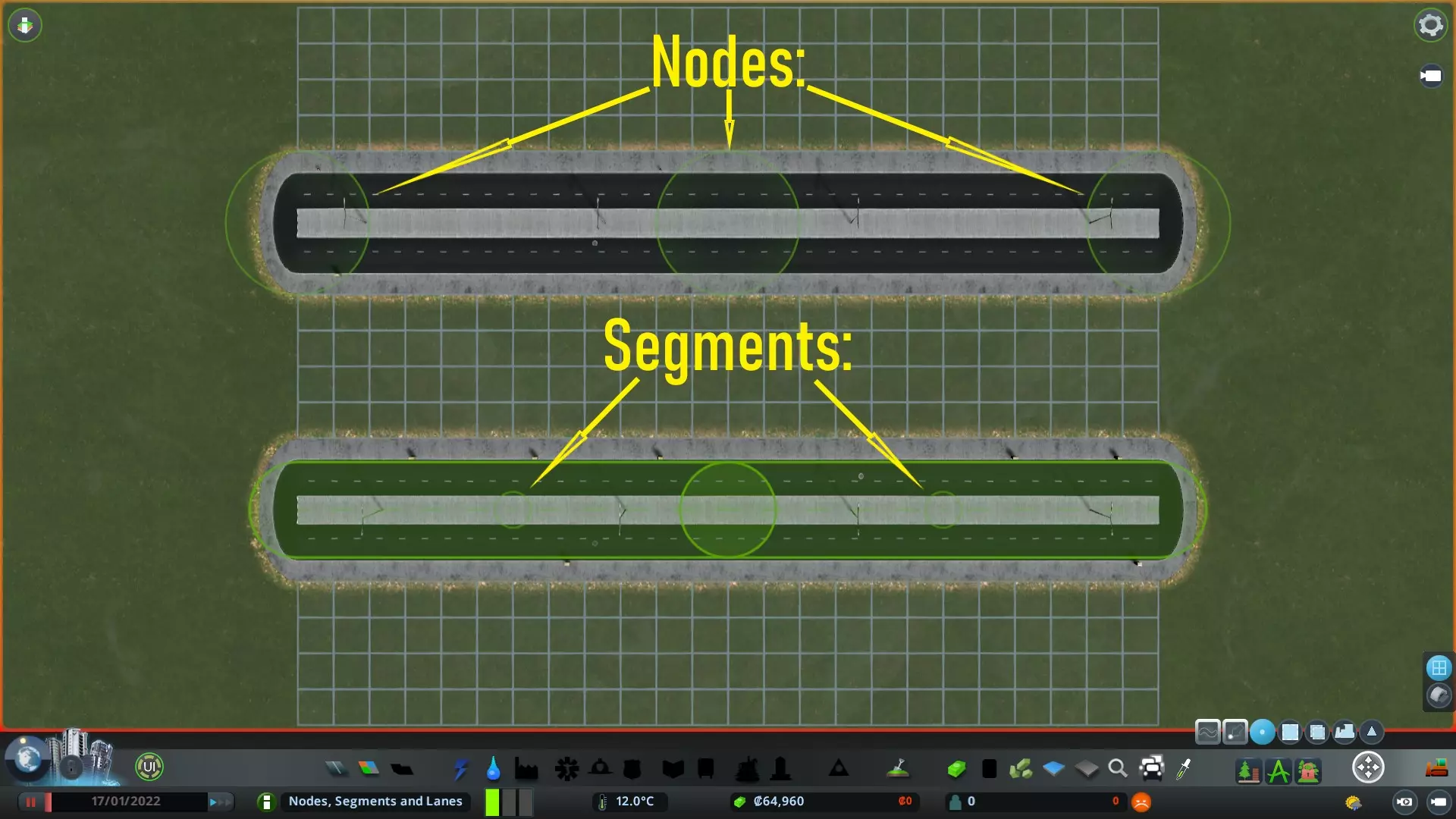
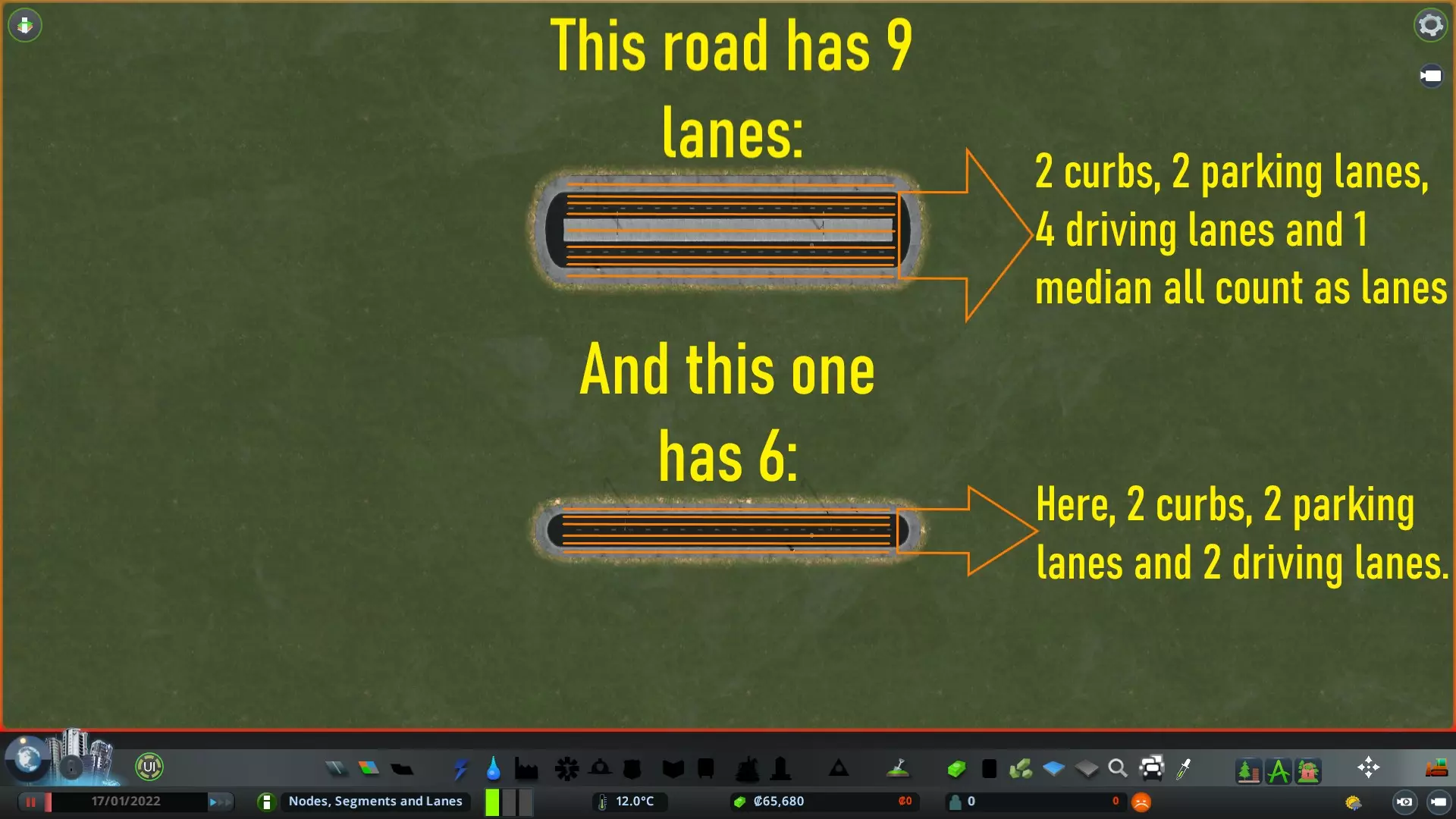
路径、运河、码头、公路和铁路也包含(多条)车道。以下是【基础版双车道公路】和【四车道公路】的车道示例。如你所见,它们实际包含的车道数量比你想象的要多得多。
What if you've reached these limits? Then you cannot build any more networks. And without those, your city cannot grow further. What to do when you've reached them? At the moment there isn't a mod that extends the node, segment and lane limits of the game. In the meantime you can get rid of excess nodes, segments and lanes. And use some tricks to reduce the node count. For nodes and segments: You can use the following mods to get rid of the need for power lines and water pipes. These have nodes and segments in them. So getting rid of the need for these things gives you a lot more nodes for other networks such as roads and paths. (ALWAYS READ THE MOD'S DESCIPTION): https://steamcommunity.com/sharedfiles/filedetails/?id=576997275&searchtext=no+need (ALWAYS READ THE MOD'S DESCIPTION): https://steamcommunity.com/sharedfiles/filedetails/?id=572888650&searchtext=no+need The mods linked above are incorporated into the new '81 Tiles' mod by algernon. This was done by algernon because having the entire map at your disposal makes it easier to hit the node and segment limits. If you're allready subscribed to the 81 Tiles mod, then you do not have to subscribe to the mods linked above, instead go to the options menu of the 81 Tiles mod and enable these options. You can also use the Network Anarchy mod. With this mod you can increase the 'maximum segment length' (i.e. the distance at which nodes are created into networks). By default when building long networks, a node is created at every 12U (or 96m) distance. Having a stretch of road 240U long with the default 12U node spacing means 20 nodes and segments in that stretch of road. If you'd increase the 'maximum segment length' useing this mod to 20U, that same length of road would only have 12 nodes and segments. (very much advised for map makers!!) (ALWAYS READ THE MOD'S DESCIPTION): https://steamcommunity.com/sharedfiles/filedetails/?id=2862881785 The latest update of the 'Intersection Marking Tool' mod allows for the placement of decorative networks such as hedges, fences, walls and guardrails. These decorative networks are visible, but not physically there, so they do not add to the node-, and segment count! You can now have guardrails along the highways of your entire map while saving on a ton of nodes and segments!! (ALWAYS READ THE MOD'S DESCIPTION): https://steamcommunity.com/sharedfiles/filedetails/?id=2140418403&searchtext=intersection Perhaps you've got some broken nodes or ghost nodes on your map. It won't be much but it's always good to check and remove these. You can do that with the following mod: (ALWAYS READ THE MOD'S DESCIPTION): https://steamcommunity.com/sharedfiles/filedetails/?id=1777173984&searchtext=broken+nodes For lanes: Perhaps you're suffering from some 'phantom lanes'. Just like 'ghost nodes' these are lanes that are created, but not allocated to a network. If you want to check if you have these and remove them use this mod: (ALWAYS READ THE MOD'S DESCIPTION): https://steamcommunity.com/sharedfiles/filedetails/?id=536250255&searchtext=phantom+lane+remover Got rid of the phantom lanes (if they were even present at all...), and you're still at the Net Lane limit? Then get smaller roads, and by smaller, I mean less lanes off course!! There's no need for six-lane roundabouts for instance, so upgrade those roads to three-lane ones. Buildings and Zoned Blocks What are they? You can have 49.152 buildings in the game. And the same number of Zoned Blocks. What happens when you've reached these limits? Reaching these limits prevents you from having any more buildings in your game, or a place to put them. Which in turn halts the growth of your city. What can you do when you've reached these limits? For buildings: - Some policies increase the production/capacity of buildings. This means less of these buildings are needed. Effect of this is relatively small though. - One thing you could do is getting rid of small sized buildings, and get bigger ones that fill up the area better. For example: you can have sixteen small 1x1 houses changed into one big 4x4 house, freeing up 15 additional buildings! - Keep in mind that some of the big rocks in this game are considered buildings. Removing those could help as well. Some other elements are buildings too (such as certain pillars). Use the 'Move It' mod, and have it setup so only buildings get selected. Then drag a box over an area and check if there's anything you don't need, can replace or hide, and remove these things. - You can have a lot more buildings in your city if you convert them to PO's (Procedural Objects). You need the Move it! mod to convert them to PO's, and with the Procedural Objects mod, you can alter them to your liking. There's a limit for Procedural Objects as well, but that limit is 2.000.000.000. Good luck hitting that one!! (ALWAYS READ THE MOD'S DESCIPTION): https://steamcommunity.com/sharedfiles/filedetails/?id=1619685021&searchtext=move+it (ALWAYS READ THE MOD'S DESCIPTION): https://steamcommunity.com/sharedfiles/filedetails/?id=1094334744&searchtext=procedural+objects After converting a building to PO, it loses it's functionality. You can add those functionalities back useing so called 'Service Blocks' (when you search for 'Service Blocks' in the Workshop you'll find them with ease). Note that these 'Service Blocks' are considered buildings as well. So only way for this strategy to make sense it to turn several buildings into one, covering more space, and adding the functionality of one building to it. For zoning: No need for zoning next to arterial roads and on roundabouts!! So make use of those in other places instead! You can get rid of 'Zoned Blocks' using the new in-game feature as shown in this picture. Press the indicated button to toggle between zoning on both sides, on the left,- or right side or to have no zoning at all: https://steamcommunity.com/sharedfiles/filedetails/?id=2982407437 Or use the following mod: (ALWAYS READ THE MOD'S DESCIPTION): https://steamcommunity.com/sharedfiles/filedetails/?id=2389414419 Active and Parked Vehicles What are they? The Vanilla active vehicles limit is 16.384. Active vehicles are all vehicles (individual cars, to public transport vehicles), that are driving along the map. And the limit for parked vehicles is 32.768. This is pretty self-explanatory. What happens when you've reached these limits? Hitting the vehicle limit can bring several issues that can kill your city. Once this limit is reached, service vehicles for instance cannot spawn any more, with all kinds of issues as a result: No more garbage pick-ups (in time) No more fires put out (in time) The dead not being picked up (in time) etc.But it also affects Public Transport vehicles, causing issues with your Public Transport lines. Leading to huge numbers of citizens waiting at your stops and stations. What can you do when you've reached these limits? Several things: - The 'Optimised Outside Connections' mod makes sure public transport vehicles coming from outside connections are better filled, thus reducing the amount needed. This mod also allows for so called 'dummy traffic' to be removed. 'Dummy traffic' is the traffic that crosses the map without any interaction with your city. By removing these you can have more vehicles that actually mean something for your city. (ALWAYS READ THE MOD'S DESCIPTION): https://steamcommunity.com/sharedfiles/filedetails/?id=1721492498&searchtext=optimised - By default the game has the option called 'Despawn traffic' enabled. This makes sure traffic that's stuck gets despawned/removed. If you use TM:PE however, you can disable this 'Despawn option', this makes sure traffic does not get despawned (for a more challenging traffic simulation). Off course when you're hitting the vehicle limit, it's a good idea to turn this back on again. (ALWAYS READ THE MOD'S DESCIPTION): https://steamcommunity.com/sharedfiles/filedetails/?id=1637663252&searchtext=TM%3APE - The 'Rebalanced Industries' mod reduces the amount of industrial traffic significantly, especially in farms and forestry areas. (ALWAYS READ THE MOD'S DESCIPTION): https://steamcommunity.com/sharedfiles/filedetails/?id=1562650024&searchtext=rebalanced - With the 'Advanced Vehicle Options' you can increase the capacity of public transport vehicles. More cims in one vehicle means less vehicles needed. (don't go crazy with these settings as AI's get confused if the capacity is too big). (ALWAYS READ THE MOD'S DESCIPTION): https://steamcommunity.com/sharedfiles/filedetails/?id=1548831935&searchtext=advanced+vehicle - Certain City and District Policies increase or decrease traffic. - You can optimise/improve your public transport. Better to have a lot of cims in one vehicle (bus, metro, train, ferry) than one useing a car/bike each. Done all of the above, but still need more? You can extend both the Parked and Active Vehicle limits to 65.535 by useing the following mod. Important note: Once you've saved a game with this mod active, you cannot load that same save without this mod active! (ALWAYS READ THE MODS DESCIPTION): https://steamcommunity.com/sharedfiles/filedetails/?id=1764208250&searchtext=more+vehicles Note, that more vehicles also means more pathunits are needed. This is also an element which has a limit. More info further up in this guide (see chapter on PathUnits). Citizens, Citizen Units, Citizen Instances What are they? 'Citizens': You can have 1.048.576 citizens in the game. This is a close representation of the amount of citizens you can have living in your city (population count). I say close, because animals like wildlife, livestock, pets and birds are also part of this number. These 'Citizens' are never directly visible and only exist as data structures in the background. What happens when you've reached the 'Citizens' limit? Then your city cannot grow more population. 'Citizen Instances': You can have 65.536 Citizen Instances in the game. Citizen Instances are the cims (and animals) you can see walking around your city going from A to B. These are the visible citizens so to speak. What happens when you've reached the 'Citizen Instances' limits? Then the maximum amount of visible cims is reached. From this point forward, the larger your city becomes (in amount of land used) the more deserted your city looks, as the amount of visible cims will be spread out over the entire city... 'Citizen Units': You can have 524.288 Citizen Units in the game. These are citizens that are assigned to buildings and public transport, to make these buildings look busy/inhabited. A Citizen Unit is required for: 1 for each household 1 for every five jobs at a workplace 1 for every five availlable customer slots at a commercial building 1 for every five visitors to an entertainment building like a park, unique building, stadium 1 for every five students at an educational building (school, collega, library, university, etc.) 1 for every five patients at a healthcare building (clinic, hospital, youth-, and eldercare, etc.) 1 for every five spaces in a public transport vehicle (bus, tram, train, metro, etc.) etc.What happens when you've reached the 'Citizen Units' limit? Once the limit is reached no more citizen units can be allocated to the buildings. You do not get a warning or message when this happens. So it's possible you've reached this limit for a while without noticing it. But when you do you'll start noticing one or more of the following situations: Residential buildings with 0/0 households Workplaces with fewer jobs availlable Commercial buildings without any customers Parks and unique buildings without any visitors Educational buildings without any students Healthcare buildings without any patients Public transport vehicles without any passengers etc. What can you do when you've reached these limits? - Use the 'Hide It!' mod to despawn animals (which count towards citizen instances limit). This means empty farm fields, but more cims walking around in your city. (ALWAYS READ THE MOD'S DESCIPTION): https://steamcommunity.com/sharedfiles/filedetails/?id=1591417160&searchtext=hide+it - Use Rebalanced Industries mod to reduce number of outdoor workers in industry areas (ALWAYS READ THE MOD'S DESCIPTION): https://steamcommunity.com/sharedfiles/filedetails/?id=1562650024&searchtext=rebalanced - Certain City and District Policies increase or decrease number of citizens in your city - Done all that but still need more? Then get the following mod, it doubles the Citizen Unit limit from 524.288 to 1.048.576, and it also gives you some options to manage Citizen Units, such as detection and fixing invalid Citizen Units. Important note: Once you've saved a game with this mod active, you cannot load that same save without this mod active! (ALWAYS READ THE MOD'S DESCIPTION): https://steamcommunity.com/sharedfiles/filedetails/?id=2654364627&searchtext=more+citizen Transport Lines What are they? You can have 256 public transport lines. What happens when you've reached these limits? You cannot add any more public transport lines. What can you do when you've reached these limits? Extend existing ones. (make them longer) Path Units What are they? 'Path Units' are used whenever a cim or vehicle needs to go from point A to point B on the map. They're used to find a route/path to their destination.
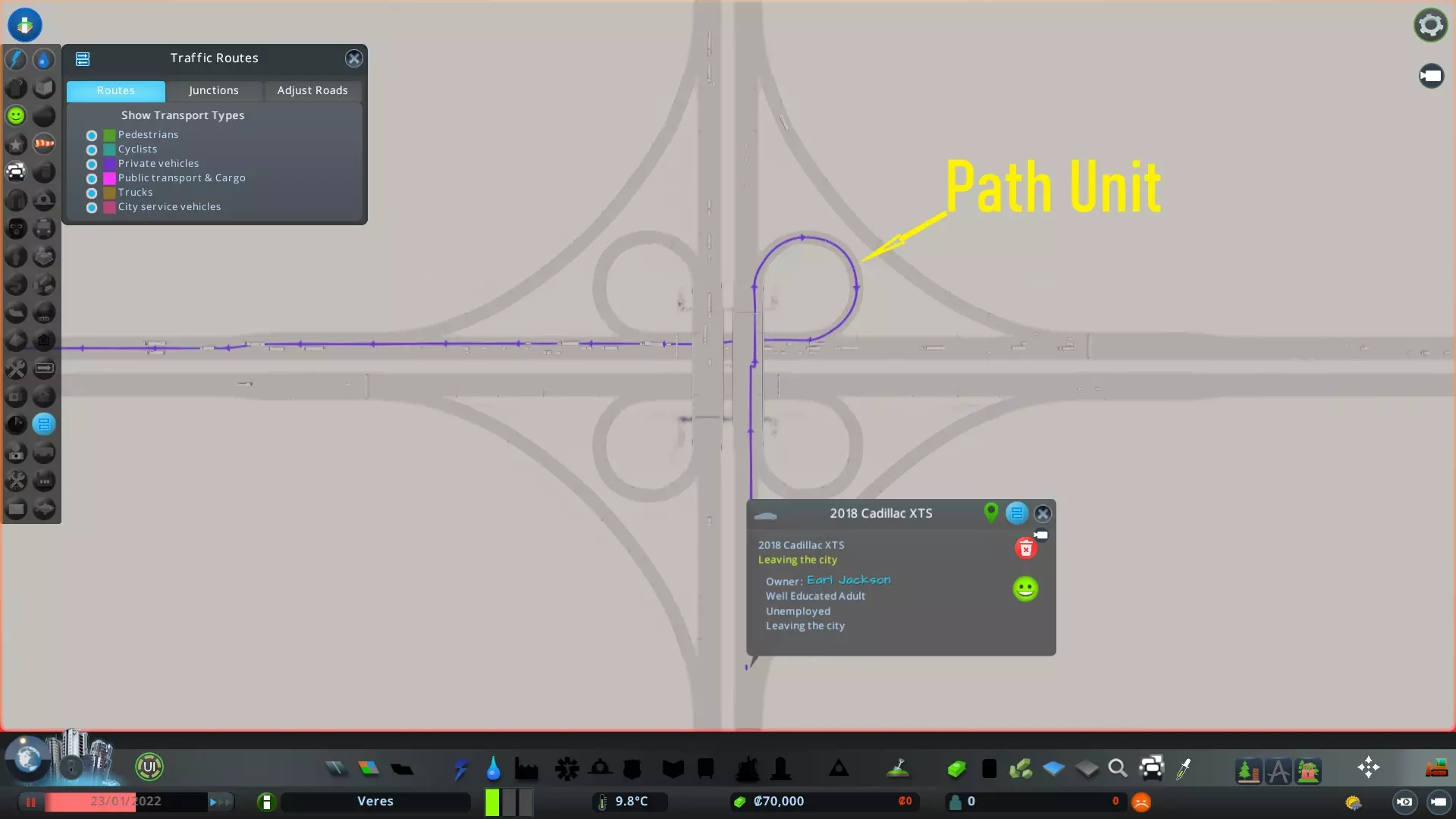
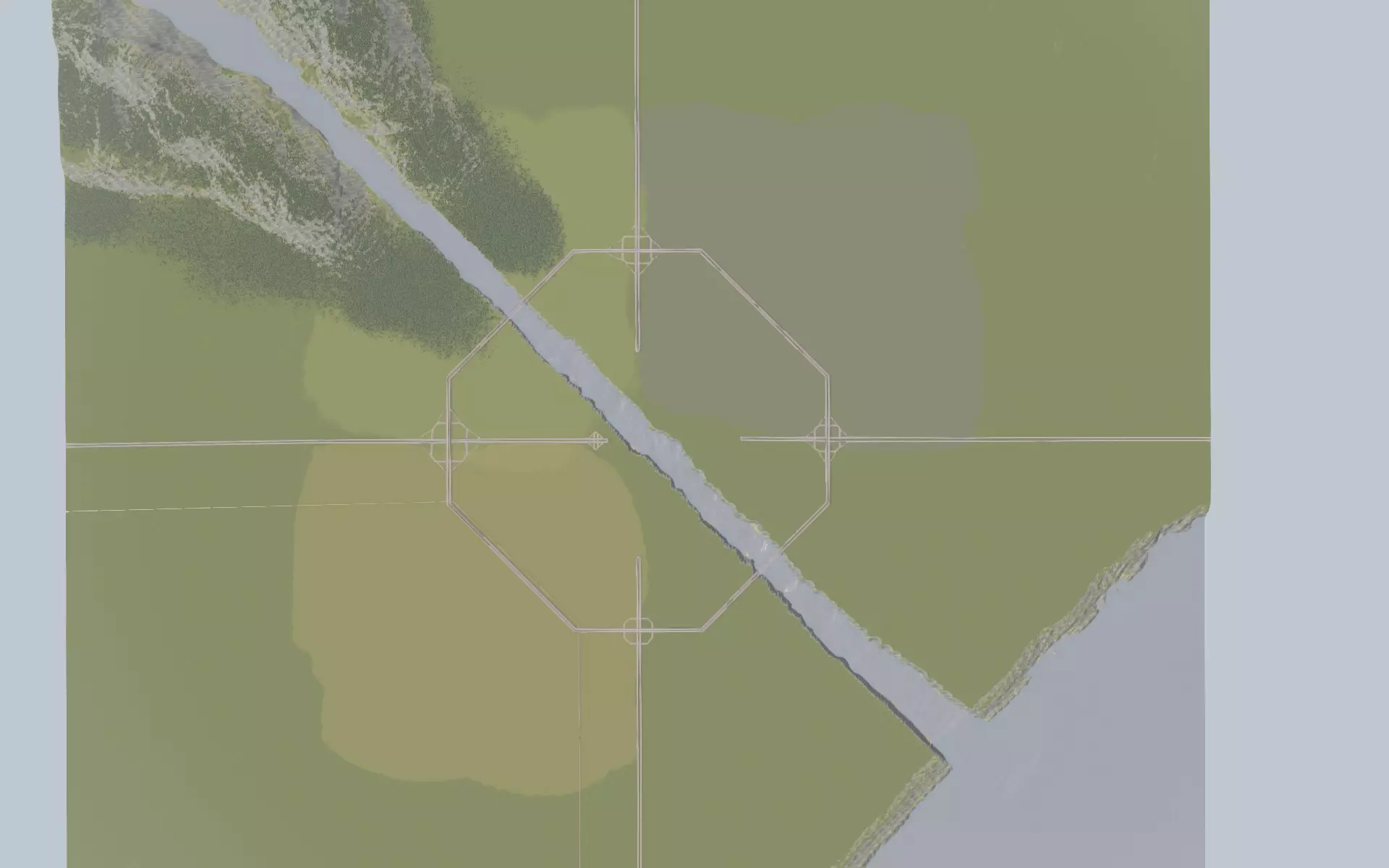
What happens when you've reached these limits? When you've hit this limit, certain cims and vehicles, including Public Transport vehicles, cannot establish a route to their destination. Some of them despawn, while public transport simply stops working. You can imagine that when this happens all kinds of problems will occur in your city. What can you do when you've reached these limits? Sometimes cims and vehicles can become 'stuck', and start spamming pathfinding requests, which uses up a lot of PathUnits. A good example of this are the 'Large Pedestrian Area Service Points' from the 'Plaza's & Promenades' DLC. And lately the 'City Quay' from the latest patch. These have a bug where vehicles/cims get stuck, spamming PathUnit requests. If your city has reached the PathUnit limit and you've got these buildings in your city, it's worth trying to bulldoze them and use alternatives to see if that helps. TM:PE includes a function (under the 'Maintenance' settings) to reset stuck cims and vehicles; if you're seeing very high PathUnit usage, doing this is worth a try. Another option that has proven to help in this is the use of two options provided by the 'Transfer Manager CE' mod. Namely: - Release Broken Pathing - Release Ghost Vehicles You can find these options under the 'Maintenance tab' in the Transfer Manager CE options menu. https://steamcommunity.com/sharedfiles/filedetails/?id=2804719780 Another contributing factor to a higher PathUnits count are long travel distances. This is especially the case when you're building in the outer tiles of the map. (When you've unlocked them useing the '81 Tiles' mod) Imagine a cim going to work: If the cim's is living and working in the same map-tile, then the amount of time this cim is 'occupying' a PathUnit is very short. But if the cim's home is located on the edge of the map, and it's work is very far away relative to its home, the amount of time the PathUnit is occupied is increased. As your city grows, more and more PathUnits are needed for all the cims traveling in your city. The shorter they're using/occupying a PathUnit, the sooner it becomes availlable for something else. i.e. shorter traveling distances is better. Therefor the use of mods like 'Transfer Manager CE (linked above) can really help reduce the number of PathUnits. As it improves the 'matching algorithm. (i.e. service vehicles from the nearest service building are called in action, instead of ones from the other side of the map). It also allows for area restrictions for your service vehicles to prevent them from driving all across the map. Good use of public transport is also helpfull in reducing the number of PathUnits, as multiple cims are now 'sharing' one PathUnit (the one created and used by the Public Transport vehicle). If that didn't help then you can use the following mod by Algernon to double the amount of PathUnits. Important note: Once you've saved a game with this mod active, you cannot load that same save without this mod active! (ALWAYS READ THE MOD'S DESCIPTION): https://steamcommunity.com/sharedfiles/filedetails/?id=2710657019&searchtext= Area's / Tiles What are they? These are the tiles you can build your city in. The game limit is 9 tiles. What happens when you've reached these limits? Then you're out of buildable space, and your city cannot grow any more. What can you do when you've reached these limits? This is the most well known game limit. And one of the first to be extended through mods. Please note, that most of the games functionality's are restricted to the inner 25 tiles you can choose from in the Vanilla game. Building other things than 'outside connections' and 'trees/props' beyond these 25 tiles can result in complications. So it's advised to build your city within these 25 tiles. There are several mods you can use, but I'll notify you of two. Use this one to be able to get all 25 inner tiles: (ALWAYS READ THE MOD'S DESCIPTION): https://steamcommunity.com/sharedfiles/filedetails/?id=1612287735 If you've got a strong computer you could get the entire map unlocked with this mod. (ALWAYS READ THE MOD'S DESCIPTION): https://steamcommunity.com/sharedfiles/filedetails/?id=2862121823 Districts What are they? You can create 128 districs. These include: Regular districts (either with or without a specialization added to them) Industrial districts (available with the Industries DLC) Park area's (available with the Parklife DLC) Airport districts (available with the Airports DLC) What happens when you've reached these limits? Then you cannot add any more districts. What can you do when you've reached these limits? So far there isn't a mod that allows for more districts than the default limit, so use them well! If you've reached the limit, you can extend existing ones. In other words, make the ones you allready have, bigger. With a bit of practice you can have the same district cover two or more seperate area's. To achieve this extend an existing district to the second or next area you want it covered with. Once covered, sever the connection between them. This still counts as the same district. Props and Trees What are they? The prop limit in the game is 65.536, and the tree limit is 262.144 What if you've reached these limits? Than you cannot place any more props and/or trees. What to do when you've reached them? Use the following mods to extend the tree limit to over 2.000.000. (ALWAYS READ THE MOD'S DESCIPTION): https://steamcommunity.com/sharedfiles/filedetails/?id=2960858317&searchtext=tree Do you still need more props and trees after using the mods mentioned above? Then use the new options provided by the 'Intersection Marking Tool' mod. It allows for placement of props and trees on-, and alongside roads and paths. These props and trees are visible, but not physically there, so they do not add to the prop and tree count!!