换一换
换一换 


A list of useful scripts. I personally use allot of them myself in my missions and thought I'd pass on some knowledge. Scripts: Execute a Script: Executes a script, make sure to define the correct location of the sqf file. Local execution: nul=execVM "scripts test.sqf";Global execution: [] remoteExec ["scripts bluh.sqf", 0, false]; Delete a Object: Can be used to delete objects place, variable name defines the name of the object. One Object = deleteVehicle obj1; Multiple Objects = {deleteVehicle _x} ForEach [obj1,obj2,obj3]; Hide/Unhide a Object: Hides and unhides a already placed object. (true = hides it, false = unhides it) objectname hideObject false; Add a AddAction: Gives a scrollable action on a object/Ai, text color is done via HTML colors & "this" can be set to be a object's variable name instead. this addAction ["<t color='#FFFFFF'>Example Text</t>", "scripts wall.sqf"]; Better add action with distance limit: this addAction ["Call Artillery","scripts arty.sqf",nil,1.5,false,true,"","",3,false,"",""]; Disable Ai Functions: If placed directly on ai then use "this" otherwise use the variable name, prevents a Ai from doing the defined action. Use "_this" if applied in Zeus. this disableAI "PutActionHere"; "TARGET" - stop the unit to watch the assigned target / group commander may not assign targets. "AUTOTARGET" - prevent the unit from assigning a target independently and watching unknown objects. "MOVE" - disable the AI's movement. (Allows it to still move it's head & body but not move) "ANIM" - disable ability of AI to change animation. "TEAMSWITCH" - AI disabled because of Team Switch. "WEAPONAIM" - no weapon aiming. "AIMINGERROR" - prevents AI's aiming from being distracted by its shooting, moving, turning, reloading, hit, injury, fatigue, etc. "SUPPRESSION" - prevents AI from being suppressed. "CHECKVISIBLE" - disables visibility raycasts. "COVER" - disables usage of cover positions by the AI. "AUTOCOMBAT" - disables autonomous switching to COMBAT when in danger. "PATH" - stops the AI’s movement but not the target alignment. "MINEDETECTION" - disable Ai mine detection. "ALL" - all of the above. (At this point you might as well turn off Simulation in Eden) Local Hint: This will give a hint in the top right of the screen but only to the person who triggers the script. Hint "Write here"; Global Hint: Will trigger for everyone, should be executed in a script/sqf file. _textOne = "<t color='#E22020'>I am a script, everyone can see me.</t>"; hint parseText (_textOne); Screen fading with Text: Can be done in the following ways: “BLACK OUT”, “BLACK IN”, “BLACK FADED”, “BLACK”, “WHITE OUT”, “WHITE IN”. titleCut ["I like text","BLACK IN",2.5]; Screen Text: Adds text on your screen. Bottom middle (Small): ["I like text.","plain down"]; Middle (Big): ["I like text",-1,-1,4,1,0,789] spawn BIS_fnc_dynamicText; Image Hint: This shows a image in a hint, I would advise a paa image. hint parseText "<img image='images image.paa' <img size='20' /> "; Trigger only activating if object is alive: This is set as a trigger condition, and the trigger will only fire once x object(s) are not longer existing/dead. One Object = !alive "object name" Multiple Objects = !(alive obj1) && !(alive obj2) Trigger only activating on specific players: Otherwise known as "thisList", can be done with one and multiple. One player = PlayerVariableName in thislist; Multiple objects = unit1 in thisList AND unit2 in thisList Auto Bar Gate Opener: Put a trigger over the bar gate, pref 3x7 square, set the the trigger to activate repeatedly and who you want to trigger it. On Activation: GateName animate ["Door_1_rot", 1] On Deactivation: GateName animate ["Door_1_rot", 0] Create a big explosion on a map marker. This spawns said explosive and detonates it on the marker. Should technically work with anything from HERE[community.bistudio.com]. scriptedCharge = "Bo_Mk82_MI08" createVehicle (getMarkerPos "bombmrk"); Create markers on the map via a script: Creates a marker on the map, ensure you have a AI the variable name set, in my case it's "bob". Icon Marker: bob = createMarker ["nameofmarker", [5150,5031]]; bob setMarkerShape "ICON"; "nameofmarker" setMarkerType "mil_objective"; "nameofmarker" setMarkerColor "ColorRed"; "nameofmarker" setMarkerDir 90; "nameofmarker" setMarkerText "ThisIsTheMarkersName"; Area Marker: bob = createMarker ["nameofmarker", [5098,5071]]; bob setMarkerShape "ELLIPSE"; "nameofmarker" setMarkerColor "ColorBlack"; "nameofmarker" setMarkerSize [100, 100]; "nameofmarker" setMarkerBrush "SOLID"; Delete a Map Marker: This deleted a map marker via it's variable name. deleteMarker "NameOfMarker"; 3D Audio: Plays 3D audio on the given object, this one can be tricky sometimes when it comes to volume. (smallRadio = the object) soundPath = [(str missionConfigFile), 0, -15] call BIS_fnc_trimString; soundToPlay = soundPath + "sounds radio_1.ogg"; playSound3D [soundToPlay, smallRadio, false, getPosASL smallRadio, 8, 1, 60]; Moveable Respawn: Can be created on a object and will move the respawn there. (one = marker where the respawn gets moved) this addAction["Take Respawn", {deleteMarker "respawn_west";_respawn = createMarker ["respawn_west",(getMarkerPos "one")];this removeAction 0;}, nil, 10, true, true, "", ""]; Unlimited Ammo: Gives a vehicle or player unlimted ammo. this addEventHandler ["Fired",{(_this select 0) setVehicleAmmo 1}]; Unlimted Ammo with delay: 40 in this case is how often it triggers the rearm. (Seconds) nul = this spawn { while {alive _this} do { _this setVehicleAmmo 1; sleep 40 } }; Change texture on a flag: This can be done in both jpg or paa. (1024x512 generally works) this SetFlagTexture "images imagename.jpg"; Set Damage: 1 = destroyed/dead this setdammage 0.5; No Surrender: Forces a AI to fight, aka doesnt allow it to flee. this allowFleeing 0; Disable/Enable Damage: Can be done easily in Eden, but you never know when you need this. this allowdammage True/False; [bTurn On/Off lights on vehicle.][/b] Turns on and off the lights of a vehicle. this Switchlight true/false; Earthquake: Triggers a Earthquake: [1] call BIS_fnc_earthquake; Skip time: Skips x hours. skipTime 4; Engine On/Off: Turn on or off a engine. vehicleName engineOn false/true; If you know other useful ones then leave them in the comments and I'll add them.[/b] How to: Activating scripts via a trigger:You can easily trigger allot of the scripts with a trigger, there are generally two way to do it. You either have the script activate in a sqf file:

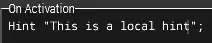
或者直接在触发器中/通过触发器
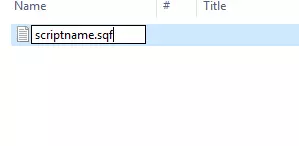
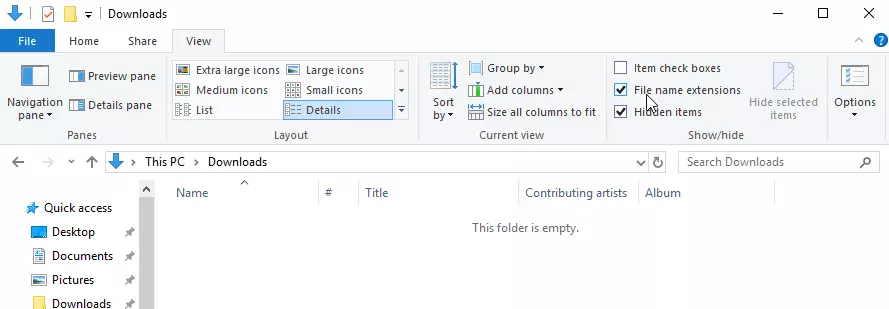
创建sqf文件:确保开启显示【已知文件扩展名】,如下所示(Win10系统)
创建一个文本文件
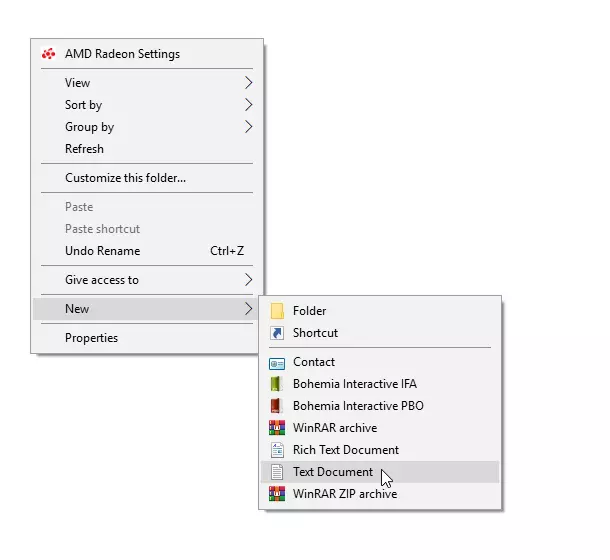
自定义名称并以.sqf为扩展名。