换一换
换一换 




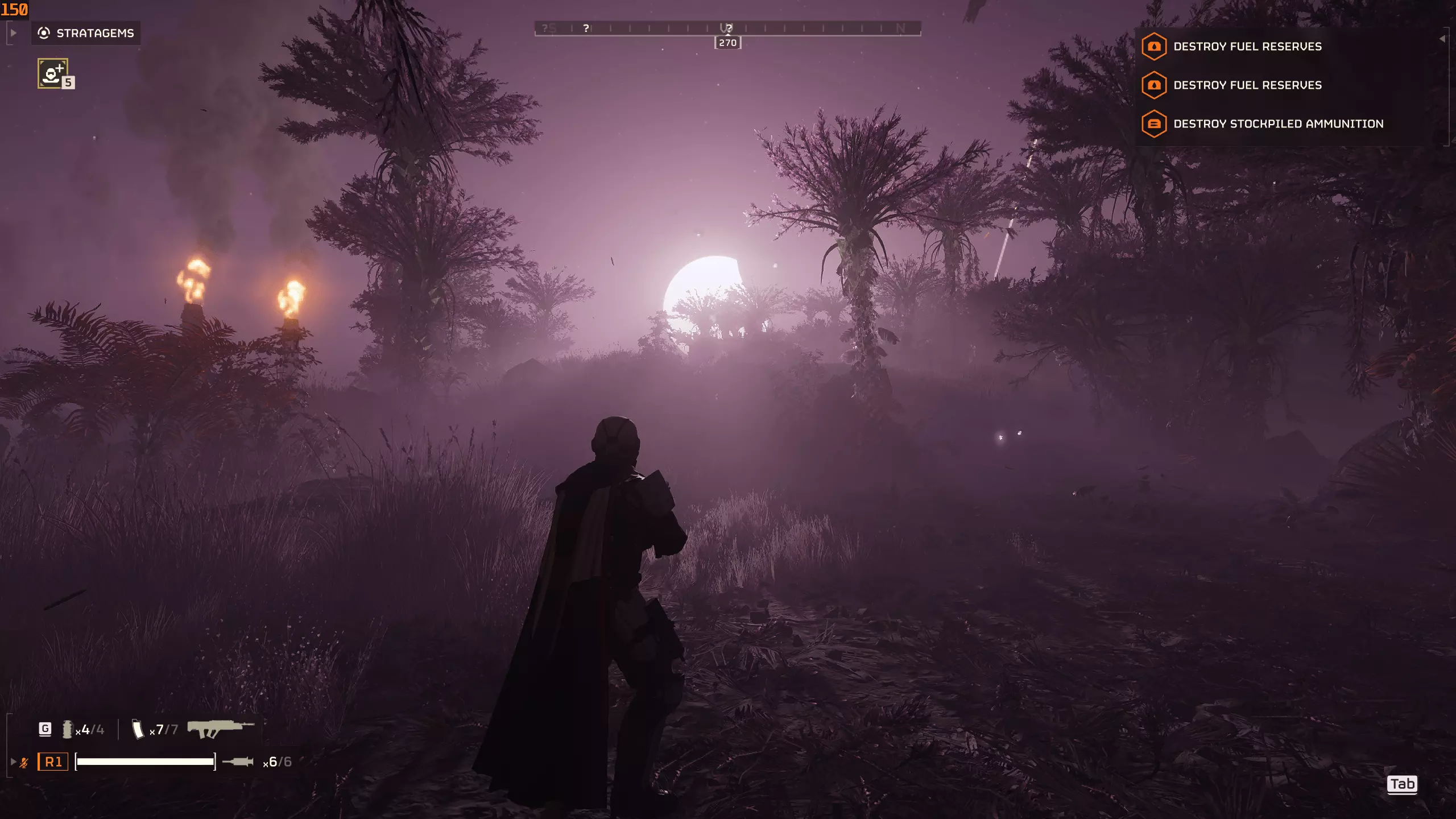
一份关于提升最低硬件配置下游戏性能与稳定性的发现指南 我的目标是帮助你在地狱潜者难度下达到稳定60帧 编辑:可能已过时 简介 大家好,这是一份关于提升游戏性能与稳定性的发现指南。 我自己的电脑刚好达到这款游戏的最低配置要求,但我从未放弃在地狱潜者难度最混乱的战斗中实现稳定60帧。我这台用了十多年的电脑都能做到,也许你的也可以。 如果你使用高端电脑但帧率仍然较低,这份指南或许也能帮到你,可直接查看DirectX/Vulkan API部分! 正如我在指南中提过的,解决问题的最佳方法是先了解问题所在,建议使用监控程序在游戏中检查硬件性能。以下是你需要监控的内容 以下是你在游戏时至少应检查的项目: - 显卡使用率/温度 - CPU使用率/温度 - 每个核心和线程的CPU使用率 - 帧率 我个人使用RIVATUNNER和MSIAFTERBUNNER来监控这些数据。 我的配置: - 风冷散热 - I7 4790K 4GHz 4核8线程,稳定超频至4.7GHz,目前未尝试更高频率 - MSI GTX 970 GAMING 4GB,超频至核心+106MHz、显存+306MHz(实际上无需超频,因为显卡负载不会很高) - 16GB DDR3 CL10 1600MHz,超频至CL12 2666MHz(延迟增加了0.5)如果你的硬件配置相同,不要尝试相同的超频设置。应该观看并学习那些制作相关内容的专业超频玩家的经验。如果你施加过高电压等,可能会损坏甚至烧毁CPU/内存,或者降低其效率。(说实话,我不确定我的超频对性能有多大改变,从那以后我发现了更好的方法。)如果你想尝试超频你的设备,建议在本指南的最后进行,这可能会为你提供实现稳定性所需的小幅额外提升。游戏设置 我在游戏设置中反复测试过,有些人会告诉你某些设置能降低CPU占用并将负载转移到GPU上,比如游戏内的缩放选项【超级采样】。 根据我的硬件测试结果,这种说法并不成立,它反而会同时增加GPU和CPU的负载。 为了追求性能,所有游戏内设置都应调至最低。当你能在《地狱潜者2》最吃配置的场景下稳定达到60帧后,再考虑调高部分设置以提升画面表现。
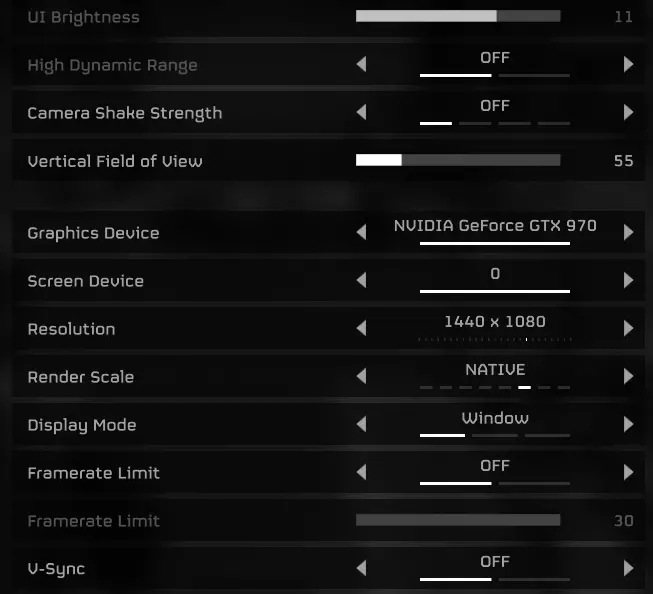
分辨率:暂时保持当前分辨率。 渲染缩放:暂时保持原生设置,在本指南中你可能需要切换至平衡模式,但不要低于该模式,因为低于平衡模式的视觉质量会对游戏体验造成过大影响。 不要使用游戏内帧率限制器,它的运行机制很奇怪,实际上会使电脑发热,具体原因不明,但我已测试过。 我使用全屏模式游玩,全屏模式下通常性能更好,体验也更流畅。 禁用鼠标平滑,如果开启后感觉操作异常。
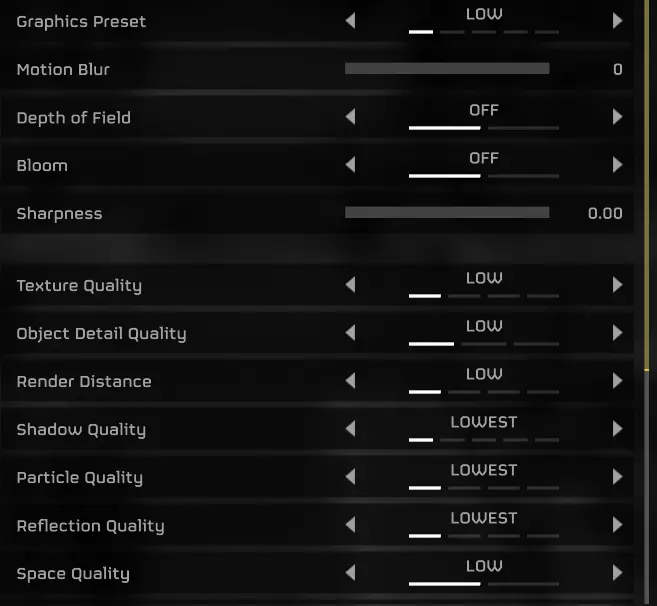
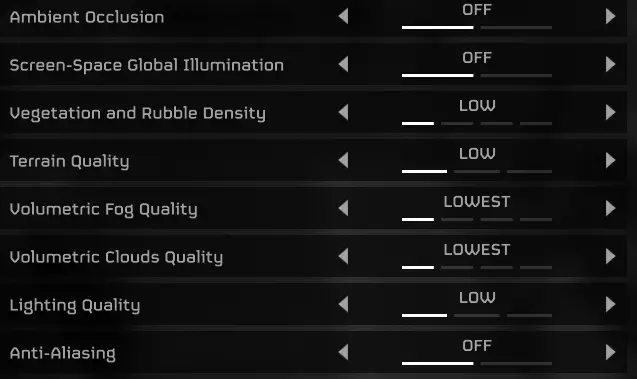
如我所说,目前我们会将所有设置保持在最低。 别忘了在游戏性选项卡中禁用窗口通知,我还没有进行测试,不过以防万一。 游戏内设置方面就是这些基础内容了,我没有更改任何HUD设置。 我还禁用了跨平台游玩以防万一,但你也可以保持开启。我会进行更多测试并及时更新。 如果你想进一步提升性能,可以在游戏配置文件中按照相关指南进行操作。 如果你的配置和我一样处于最低水平,我们距离稳定60帧不远了,关键在于榨干每一寸性能。 Windows设置
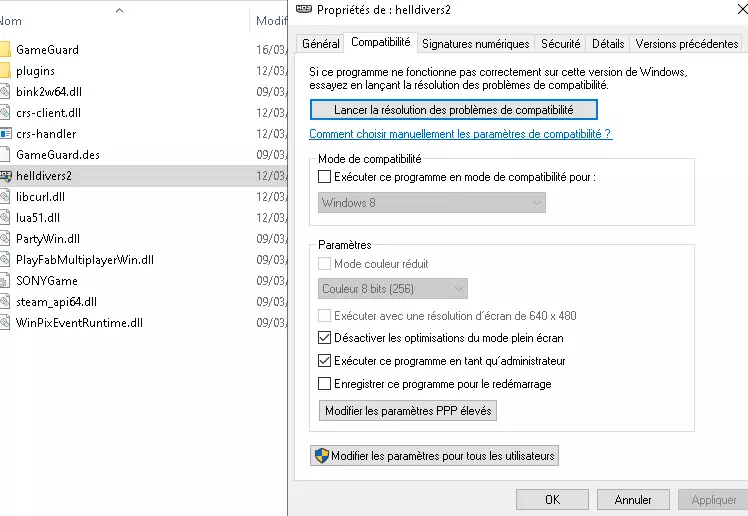
虽然没有得到证实,但或许能帮到你。在游戏目录中右键点击地狱潜者的属性,关闭全屏优化,以管理员身份运行程序,禁用Windows 8兼容性模式。我感觉这样多少有点帮助,你也可以试试。
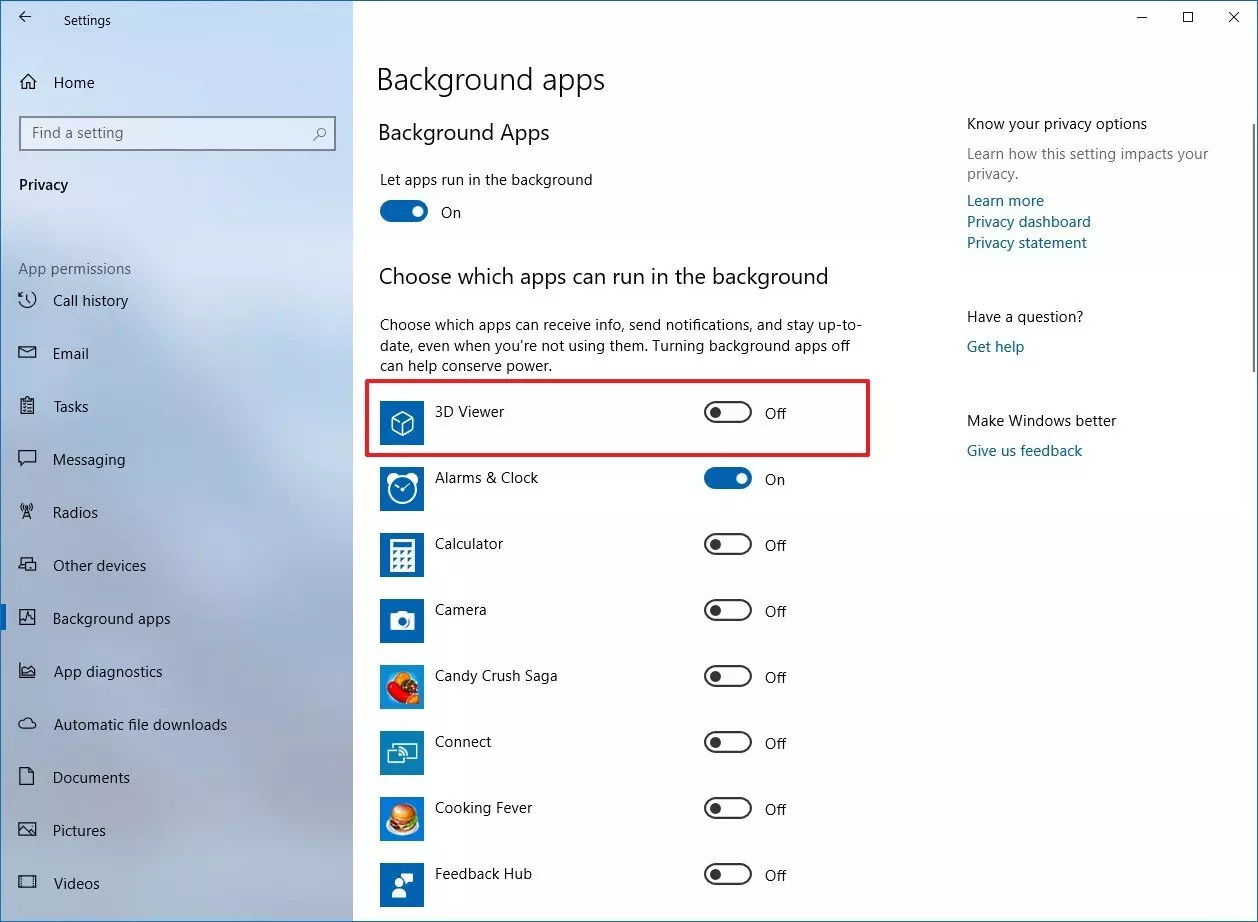
重要步骤:在Windows设置中禁用后台应用。我们需要在游戏过程中尽可能释放CPU使用率。 我的系统是法语的,所以我在网上找了一些随机截图,只需禁用后台应用即可,不用在意红色方框。 DirectX/Vulkan 两种选择:DirectX和Vulkan 对于AMD用户或高端电脑用户,我发现Vulkan能带来显著的性能提升,并增强稳定性/修复性能问题。对于像我一样的英伟达用户,DirectX 11能带来更好的性能。使用DirectX 11显著提升了我的帧率和稳定性。操作方法如下:在Steam库中右键点击【地狱潜者2】,选择属性,然后在启动选项中输入:--use-d3d11。首次使用Vulkan或DirectX 11启动游戏时,可能会出现长时间黑屏,请耐心等待。
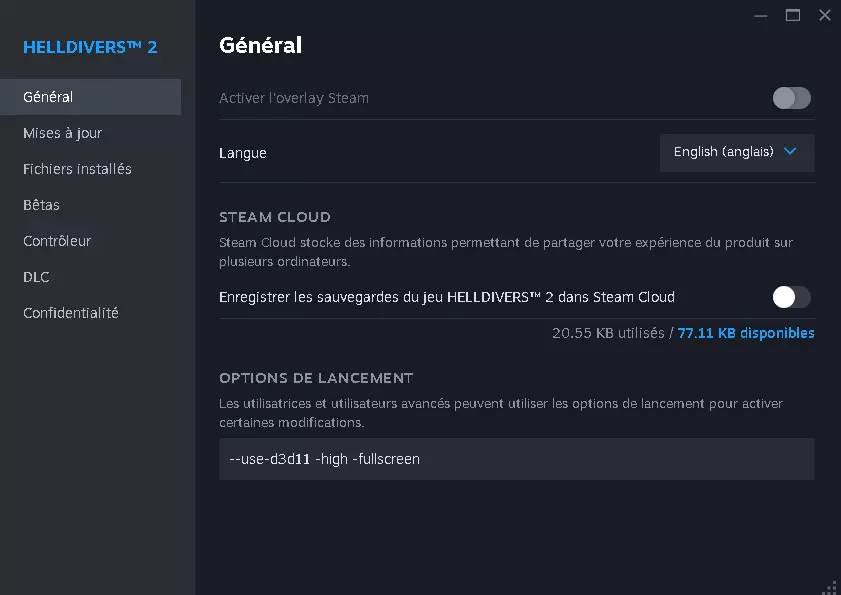
Don't mind i turned off cloud save, it's for other problem than performance and stability. Aparté, to improve your performance you should be aware of the issues you are facing. Download something like MSI AFTERBUNNER or rivatunner to see your in game fps, hardware temperature and usage. It will tell you what to work on while you play. Aparté 2 : Even if you are on nvdia graphics card you should try vulkan at least one time to see how it works on you, you can easily revert back. for me it didnt work well. NVDIA pannel settings I didn't notice much change from tweaking anything in here. i use it to limit my fps to 60 NVDIA NIS : https://www.reddit.com/r/Helldivers/comments/1axwnla/all_the_tips_i_found_to_improve_fps_on_nvidia_gpu/ great guide to how to activate itBasically NIS will allow you to play on a lower in game resolution, and try to make it look like it's still in 1080P, thus improving performance. There is a treshold, if you go lower than a certain in game resolution and you are on BALANCED mode, your game will look like crap. If it happens be sure to go back on NATIVE. In my in game testing, performance wise i noticed almost no difference between the two, NATIVE just looks better so i would just go for it, and maybe if you need that extra 1-2 stable FPS you should play on balanced. in 3D programs, find helldivers, be sure to limit your fps to 60, and performance mode on maximum performance ! Be sure to disable vsync, at the end of the guide if you still have issue you may want to try to turn it on via the nvdia pannel. Limiting your fps will just make your computer consume less power so produce less heat and make less noise. For example on ship i have like 110 fps but my computer fans start to heat up fast for nothing since i limited my screen to 60HZ since in game we won't achieve more than 100 FPS. Aparté : If you have heat issue on your hardware, check online how to setup more aggressive fan control, i put mine on max speed once my cpu reach 80degree celcius, 85% speed on 70degree celcius, aggressive fan control make your cpu stay on lower temperature, i find it better.i Be sure to give your pc a proper inside clean, if you havent changed thermal paste in years and if your cpu reach more than 85-90+ degree celcius in game, i would consider buying a good thermal paste like the artic or the grizzly cryonaut. i also disabled low latency mode. my nvdia pannel is in french so i can't give you a screenshot, but from my research it's better for your cpu, and if you have old hardware like me CPU is our issue. Process HACKER / Process LASSO First off i used process hacker to manually terminate everything that consumme CPU USAGE I find out Process LASSO do the same and works better, it gave me the last extra fps boost i need to achieve 60 FPS on helldive ( I wasnt very clear, but basically, process lasso lower the priority of unneeded programms to the lowest or to idle if you configure it, freeing cpu automatically) A Reddit thread on project lasso to improve your in game performance ( it also work for helldivers 2) https://www.reddit.com/r/Competitiveoverwatch/comments/113zmn2/process_lasso_massively_improved_my_gameplay/ https://www.reddit.com/r/macgaming/comments/gmpqj5/guide_double_your_fps_with_process_lasso/ Here is a little summary of what you can do and not do in project lasso to improve performance, it's my suggestion of what worked for me; Hyperthreading, i suggest to keep it on for now, you can give it a quicktry if it improve things for you it didnt for me. keep CPU 0 check, i didn't try it but during my monitoring of in game performance my CPU was never on 100% i didnt feel the need to test it. if it reach max usage for you you can always uncheck and try if it work better for you; Put helldivers 2 on high priority class and I/O Priority Put project lasso on bitsum hightest performance when you are gonna game. Activate Probalance Recap It's the end of the guide for now, i may update it with other small things that can improve performance but that's it for now, i shared with you the big steps of how you can improve your fps and your in game stability I sincerely hope it helped you to achieve 60 stable fps on helldive. Take care of your pc ! Small reminder of what you can do after following the guide if you still need some fps lower further your in game resolution try to find a balance to not have a too blurry game. ( I personnaly use 1440 1080 res because i like it and didnt need lower resolution and i like streched res, if you prefer 1920 1080 the nis will become handy to you, i tested to the lowest NIS res 960 540 on in game NATIVE, i find the FOV a bit clanky but it will surely help you and is still playable) native=>balanced Try to switch to windowed borderless Close discord and other apps while you are gaming. Go rock now ! You can contact me If you want further assistance / my nvdia control pannel settings or if you have any question for this guide. I will also respond to any comment on it Also, game need optimization that's a sure things, but meanwhile we need to work ourselve out, in game if you are like me you gpu usage will go crazy to 100% dont ask me why, if it persist while you are eradicting bots and bugs just restart your game !