换一换
换一换 


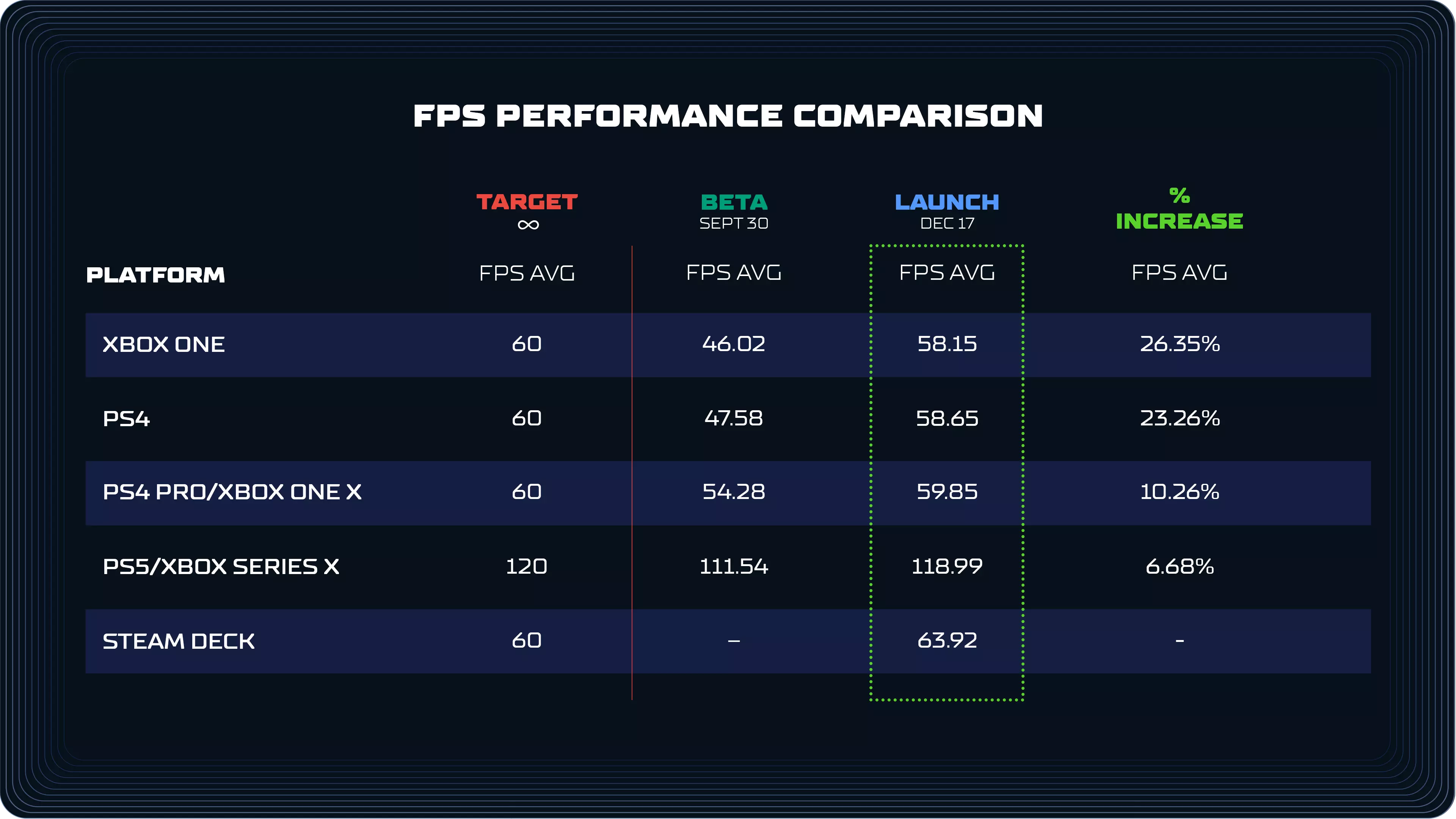
Hey everyone, Today we’re talking all about the performance improvements you can expect in SPLITGATE: Arena Reloaded. We’ve gathered several members of the team to talk about the performance optimizations we’ve made across the game since the beta release. Spoiler alert: Arena Reloaded has had a major performance overhaul. The stuff you feel moment to moment is better across the board: fewer frame spikes, less stutter, and more consistent framerate in real matches. You’ll see it in the numbers too. PC sees big improvements in hitching and stuttering, and even last gen consoles now run at 60 FPS. We’ve got a lot to discuss, but before getting into specifics, it’s important to set expectations. There was no single change that “fixed” performance. We did not flip a switch or add one magic system. Performance work is cumulative, and it’s the result of many disciplines working together with the singular goal to improve the player experience. It comes from giving engineers and artists the time to find friction, remove it, and repeat that process relentlessly. With that said, let’s meet the team that is going to be talking about some of the biggest changes that got us here: Ethan – Distinguished Engineer Sam – Principal Gameplay Engineer Nadir – Principal Technical Artist Wojciech – Graphics EngineerSmoothing Heavy Moments With Time Slicing Sam: Let’s talk about stuttering. Some of the worst stutters in an FPS show up when a lot happens all at once. Multiple players respawn. Weapons and attachments get created. Too much gets received by your game client at a time, all within the same frame. To reduce those spikes, we implemented time slicing across many systems, including our own systems and the engine’s underlying systems. Instead of forcing all work to happen immediately, time slicing spreads it across multiple frames when needed. Each system has a per-frame budget, and work is only deferred if that budget would be exceeded. In other words, it only kicks in if framerate is going to be impacted. A simple example is spawning. When a player spawns, we have to build their visuals, including character skin, weapon skin, and attachments. If a lot of players respawn at once, that can get expensive. With time slicing, those pieces get built across a few frames only when necessary, which keeps the game from dropping frames during those heavy moments.Weapon Rendering That Scales With Player Count Ethan: Another area of performance that adds up is weapon rendering. Weapons in Splitgate are made up of a lot of moving parts: the weapon itself, up to five attachments, and multiple components per attachment. Rendering and updating all of that across a full lobby gets expensive, especially on older hardware. To help, we added a system that calculates the most “significant” players in your view to let them show at full quality, while scaling back on what your game needs to calculate for players further away or off-camera. The exact number of players that can be at “high” significance depends on your view distance quality setting on PC. Some of the improvements we made with this system: Less significant players have their weapons and attachments swapped out with “static” versions that are made up of simpler meshes instead of a fully animated multi-component weapon. At a distance, this swap isn’t noticeable so your game ends up doing less work for minimal impact to visuals. On lower-end platforms the entire set of weapons and attachments are replaced with a single optimized static representation Animations update less often for players that are less significant We now limit how many players can cast dynamic shadows based on their significance The result is lower CPU and GPU cost in crowded fights, without sacrificing clarity for the players that matter in the moment.Reducing Hitching With Improved PSO Precaching Wojciech: Hitching is one of the most frustrating problems in any FPS. A big cause of hitching on modern hardware is shader compilation. A shader is basically a tiny program your GPU uses to draw a surface correctly. The first time your PC sees a new shader, your graphics driver has to turn it into a Pipeline State Object (PSO) that it can reuse quickly. That “first time” work can cause a noticeable stutter. This is also why stuttering often improves the more you play. Once those PSOs are cached for your specific GPU and driver version, the same content can render smoothly the next time you see it. Unreal has systems to precache PSOs in the background as assets load, so the game can do that work ahead of the moment you need it. We went through the game and found multiple places where that workflow was not happening correctly, both in our custom rendering and in a few engine paths. We fixed those gaps and improved our PSO data generation so more of that caching work happens earlier and more reliably. Precaching can be a little CPU heavy while it runs, but it is predictable and temporary. We opted to take a short, controlled cost up front over random stutters in the middle of a fight. Once everything is cached, that cost disappears, and the match stays smooth, especially for first time players on PC.Content Optimization Across Every Arena Nadir: When talking about performance, a lot of the impact comes from content. That includes maps, character and weapon skins, gun attachments, as well as the materials and effects that accompany them. Over the past several months, the tech art team has conducted full audits across our maps and assets and made improvements across the board. Here are some of the biggest areas: Materials: We reduced shader complexity by simplifying logic, adding primitive data inputs and quality switches so materials do less work, especially on lower settings. Textures: We standardized texture compression across the board and used lower resolution textures where appropriate on older platforms, which lowers memory pressure and reduces streaming stalls. Meshes: We optimized mesh density and merged or batched meshes where it made sense, which cuts down on draw calls and reduces how much work the CPU and GPU have to do each frame. Particles: We improved particle rendering with a LOD and budgeting system and moved complex particle logic from CPU to GPU, which reduces big spikes when effects get heavy. Lighting and reflections: We tuned light draw distances, shadow-casting behavior, and significantly reduced the number of unnecessary reflection captures across all maps, decreasing the amount of lights, shadows, and reflections the engine needs to evaluate each frame. Collision and navigation: We lowered the complexity of player and visibility collisions for faster Chaos scene queries and reduced the number of objects that update the navmesh, which lowers CPU cost during movement and combat. Maps: We calibrated custom map actors, adjusted draw distances, and optimized content for low-end platforms, which lowers worst case load in dense areas and keeps performance more consistent across arenas. This work is exactly what it sounds like. Lots of small changes. Lots of testing. Lots of iteration. But when all is said and done, it adds up fast. Below is a comparison of console performance during beta and launch.
PC 平台也获得了显著提升,但由于硬件配置差异较大,其性能提升难以清晰呈现。如果你正在 PC 上游玩,欢迎分享你所体验到的改进。 引擎与渲染优化 Wojciech:正如我们在开头所提到的,性能问题与性能提升是众多细微优化共同作用的结果。我们的团队付出了巨大努力,确保在游戏的各个方面都进行了优化。以下是我们所做的一些深度优化和平台改进: 我们优化了网格数据格式,使其内存占用减少约 20%,这降低了显存压力,并有助于资产更快、更稳定地加载。我们优化了水面和天空氛围的渲染方式,降低了在比赛中大部分场景可见这些效果时的GPU成本。 我们改进了遮挡查询系统,使游戏能更高效地跳过渲染不可见的物体,有助于在复杂竞技场中实现更高帧率。 我们调整并优化了虚拟纹理,以平滑渲染和流传输时间,减少在地图中移动时与纹理相关的卡顿。 在PC端,当游戏未处于焦点状态时,我们添加了30 FPS锁定,在切出游戏时降低不必要的GPU负载并节省电量。 我们针对特定平台进行了改进,在不影响性能的前提下提升了PS4 Pro和Xbox One X的视觉质量。我们现在比以往任何时候都更密切地跟踪不同版本的性能表现,包括帧时间一致性和卡顿检测。在PC端,你可以通过在设置中启用这些选项来查看部分额外的性能统计数据。 还有很多内容可以介绍,但为了保持这份概述的简洁性,我们就先说到这里。希望这能让你对我们为确保游戏在发售时拥有流畅体验所做的工作有一个初步了解。 展望未来 所有这些改动都极大地改善了游戏的手感。移动保持响应灵敏,传送门战斗保持清晰易读,即使所有事情同时发生,比赛也能保持流畅。 事实上,性能优化工作从未真正结束,但我们对《Apex英雄》“Reloaded”版本的表现感到非常满意。此次上线版本是《分裂之门》迄今为止最坚实的基础,这让我们能够在添加新内容和更新时不断改进游戏。我们迫不及待地想让大家在17日加入游戏,感受其中的变化。明天竞技场见!——1047团队