换一换
换一换 


了解HWGW管理器的构建方式、所需条件,并查看一个完整且功能正常的实现方案。除了行内注释外,本指南旨在帮助你构建、改进或启动自己的HWGW管理器。 简介 - 指南内容 在本指南中,你将找到启动和运行HWGW管理器所需的所有代码和说明。这包括所需的一次性脚本以及简单的数据/代码,为脚本运行提供必要的基础,即使你目前还没有自己的解决方案。 你还将在本指南中找到一些说明,以及代码本身的行内注释。 编写此代码是为了让你能够理解管理器,并根据自己的需求进行调整或扩展。如果你无法利用所提供的信息做到这一点,请告知我。免责声明: 这是我的第一个管理器脚本,也是我的第一个指南,而且我玩《网络黑客》才几个星期,并非几个月。 我也绝不是专业程序员,不过玩这个游戏并不需要专业程序员的水平。 我很少使用像“?:”运算这类“特殊”操作,而是用了一些常见的编程结构,这样能让大家更容易理解这个管理器的实际功能。 欢迎大家提出关于如何提高代码质量的想法。 我不是英语母语者,也没有用翻译工具检查过本指南的内容,所以可能会有一些奇怪的表达。如果发现,请告诉我,我会进行修正。 由于代码有过几次修改,变量名也有变动,所以使用截图中的部分内容时请务必小心。这些图片只是为了让你专注于当前情况,无需输入。请务必始终使用大段中的代码或粘贴代码。 什么是…… 根据你在《比特燃烧者》中的游玩时间和经验,你可能会立即产生一些疑问,所以让我们再回顾一下基础知识: 什么是HWGW? HWGW批处理是指将以下操作排队组合: - 一次入侵 - 一次削弱以抵消入侵的影响 - 一次增长以抵消入侵的影响 - 以及另一次削弱以抵消增长的影响 如果操作正确,这将不会改变目标服务器上的可用资金和安全等级。这反过来使我们的工作变得更加轻松,因为我们可以有效地重复执行相同的操作。想了解更多关于HWGW的信息,如果还没读过的话可以看看相关内容。 你说的集中式是什么意思? 管理器脚本的工作方式很像命令与控制(C2)服务器,在你的机器上以单线程运行。它充当管理器的角色,协调你希望其他服务器执行的任务。因此,管理仅在一台服务器上进行,而非所有服务器,这样可以减少内存消耗并实现更好的管理(无需与其他25台服务器通信)。 所有其他服务器将只使用一次性脚本。 一次性什么? 这些是一次性脚本,它们会等待设定的时间,启动入侵/增长/削弱操作,并与批次中的所有其他脚本同时完成。它们不包含无限循环。 这非常高效,因为只有当时需要的线程才会运行。无需终止循环或浪费不再需要的操作。 准备和刷钱是什么? 为了高效达成目标,你需要将金钱增长到最大值,并将安全等级降至最低。 让服务器进入这种状态称为准备(至少我是这么称呼的)。 刷钱是在准备充分的服务器上进行的,我们只需进行足够的黑客攻击,同时通过增长和削弱来补偿。 管理器会自动执行这两项操作,对需要的服务器进行准备,并对准备就绪的服务器进行刷钱。 内存使用 管理器当前在你的家用电脑上使用11.10GB内存。 如果包含开启/破解系统,内存使用会增加0.3GB。
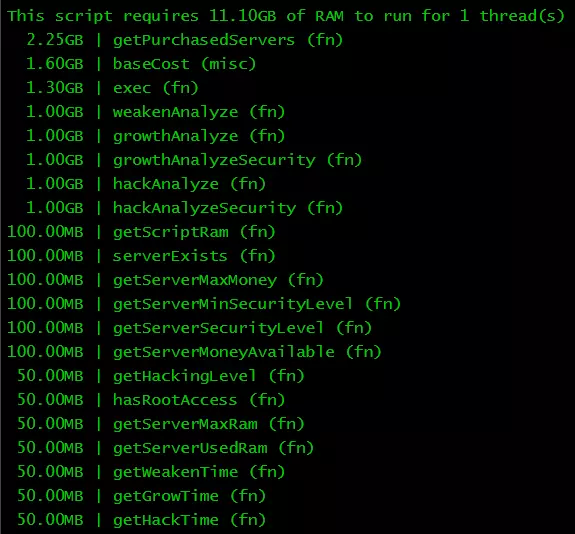
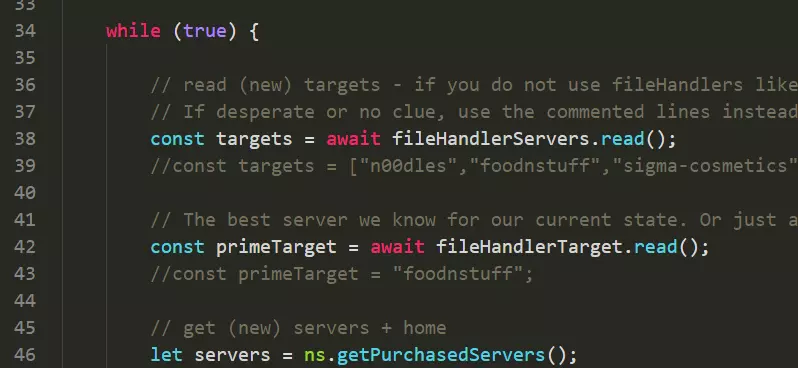
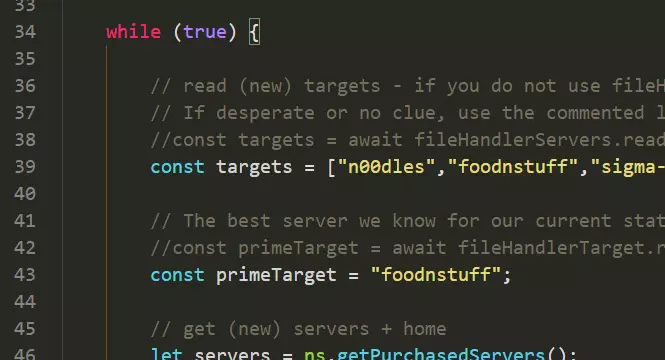
如果你愿意,可以轻松地从购买的服务器搜索中分离出2.25 GB的数据。你可以对其进行硬编码,或者使用每X分钟运行一次并将其保存到txt文件的外部脚本。你还可以将脚本再减少3 GB,并对weakenAnalyze、growthAnalyzeSecurity和hackAnalyzeSecurity进行硬编码,因为它们是静态的。 前提条件1:一次性脚本 这些是实际执行工作的脚本。它们需要位于你的家庭服务器的“shared”文件夹中。要创建它们,只需在终端中输入/粘贴代码片段上方的命令,然后在编辑器中输入代码并保存。 nano /shared/hack.js /** @param {NS} ns **/ export async function main(ns) { //按给定时间休眠 const sleep = ns.args[1] || 1; await ns.sleep(sleep); //然后进行入侵! await ns.hack(ns.### 前提条件2:收集目标服务器列表和/或最佳目标 目前,我假设你已有服务器爬虫或其他解决方案,能够扫描网络以寻找良好目标。当然,你也可以手动使用扫描分析来侦察目标,但最终应将其自动化。如果是自动化脚本,你应该使用文件处理器将服务器名称存储在txt文件中,或者直接在脚本中硬编码一个包含所有已知服务器的数组(无需根据root权限或黑客等级进行筛选)。 示例: const targets = ["n00dles","foodnstuff","sigma-cosmetics","joesguns","hong-fang-tea","harakiri-sushi","iron-gym","darkweb","home","zer0"]; // 以及你找到的所有其他服务器 单一最佳目标的处理方式相同。如果是游戏初期,你可能只想入侵一个服务器而非全部。管理器目前尚未实现选择最佳服务器的功能,但本指南中有一个专门的章节提供了可直接插入的相关函数。 当然,你也可以直接在管理器中硬编码最佳目标。示例: const primeTarget = "foodnstuff"; // 或其他优质服务器 关于primeTarget的注意事项: 如果为管理器指定了一个无法入侵的目标(因为无法获取root权限或不具备所需的入侵等级),将不会有任何反应。 管理器会直接忽略该目标,因为它无法被入侵。不会收到警告或导致崩溃,因此如果在此处硬编码服务器,请务必仔细检查。 我已在管理器脚本中包含了这些硬编码示例,只需切换哪些行应注释、哪些行不应注释即可。
无法翻译,已删除。
If you prefer the HWGW Manager chosing the best target, see the targeter section. Prerequisite 3: Opening target servers and script distribution The manager uses a list of servers (or a single server) that is already nuked. Also the one-shot files also need to be on the servers you want to farm. I have a seperate servercrawler script, which saves the servers in a txt file, takes care of all that. I recommend you to do the same, but this is for now out of scope. If you do not have this kind of thing, no problem, take this and insert it into the manager script: await ns.scp([ "/shared/weaken.js", "/shared/grow.js", "/shared/hack.js" ], server); if (!ns.hasRootAccess(server)) { let openPorts = 0; if (ns.fileExists("BruteSSH.exe")) { ns.brutessh(server); openPorts++; } if (ns.fileExists("FTPCrack.exe")) { ns.ftpcrack(server); openPorts++; } if (ns.fileExists("RelaySMTP.exe")) { ns.relaysmtp(server); openPorts++; } if (ns.fileExists("HTTPWorm.exe")) { ns.httpworm(server); openPorts++; } if (ns.fileExists("SQLInject.exe")) { ns.sqlinject(server); openPorts++; } if (ns.getServerNumPortsRequired(server) <= openPorts) { ns.nuke(server); } } this is one possible solution showcased in Suikoudans Scripting 101 guide This snippet needs to go below for (let target of targets) { // ...we stick with THE BEST one. Adjust the criteria to your liking. if (earlyGameCheck) target = primeTarget; and above //Is our given server even useable? if (!ns.serverExists(target) || !ns.hasRootAccess(target) || ns.getServerMaxMoney(target) < 1) continue; The HWGW Manager - Part 1 Alright, here it is, the manager itself. I tried to comment every part more or less helpfully, if something misses, just tell me. I do not explain the calculation in my code, so this will be in another chapter. If you do not like the steam guide format for the code, here is a pastebin: https://pastebin.com/ZedF1fLf Because of steam guide limitations i need to split the code in 2 parts. Be sure to double check if you got it together the correct way. And now on to the code (you can use whatever name and folder you like) nano kuposhwgwmanager.js /** @param {NS} ns **/ // Used for importing targets from other scripts import { FileHandler } from "/data/file-handler.js"; export async function main(ns) { //Logs are nice to know whats going on ns.disableLog('sleep'); ns.disableLog('getServerMaxRam'); ns.disableLog('getServerUsedRam'); ns.disableLog('getServerSecurityLevel'); ns.disableLog('getServerMinSecurityLevel'); ns.disableLog('getServerMaxMoney'); ns.disableLog('getServerMoneyAvailable'); ns.disableLog('getHackingLevel'); // If you do not want an open tail window with information what this script is doing on every start, you can remove/comment the tail line below. ns.tail(); // Used for importing targets from other scripts const FILEHANDLER_SERVERS = new FileHandler(ns, "/database/servers.txt"); const FILEHANDLER_TARGET = new FileHandler(ns, "/database/target.txt"); const RAM_PER_THREAD = ns.getScriptRam("/shared/weaken.js"); // So many weaken threads are needed to counter one hack/grow thread. let WEAKEN_PER_THREAD = ns.weakenAnalyze(1); let HW_THREADS = ns.hackAnalyzeSecurity(1) / WEAKEN_PER_THREAD; let GW_THREADS = ns.growthAnalyzeSecurity(1) / WEAKEN_PER_THREAD; const RESERVED_HOME_RAM = 50; //GB - change if you want to reserve more of you home ram const SLEEP_ITERATION = 1; // ms - reduce if you need to go even faster, or raise if you get lag spikes const PAUSE_ITERATION = 10 // seconds - Pause after the script did touch every server and every target - how often should it run again // This will be used to make sure that every batch goes through and is not blocked my "script already running with same arguments" let randomArgument = 1; while (true) { // read (new) targets - if you do not use fileHandlers like i do, just throw in an array of targets or a function or anything really. // If desperate or no clue, use the commented lines instead and change target to your highest/best target you currently have const TARGETS = await FILEHANDLER_SERVERS.read(); //const TARGETS = ["n00dles","foodnstuff","sigma-cosmetics","joesguns","hong-fang-tea","harakiri-sushi","iron-gym","darkweb","home","zer0","CSEC","nectar-net","max-hardware","neo-net","silver-helix","phantasy","omega-net","computek","netlink","johnson-ortho","the-hub","crush-fitness","avmnite-02h","catalyst","I.I.I.I","summit-uni","syscore","rothman-uni","zb-institute","lexo-corp","rho-construction","millenium-fitness","alpha-ent","aevum-police","aerocorp","snap-fitness","galactic-cyber","global-pharm","omnia","deltaone","unitalife","solaris","defcomm","icarus","univ-energy","zeus-med","taiyang-digital","zb-def","infocomm","nova-med","titan-labs","applied-energetics","microdyne","run4theh111z","stormtech","helios","vitalife","fulcrumtech","4sigma","kuai-gong",".","omnitek","b-and-a","powerhouse-fitness","nwo","clarkinc","blade","ecorp","megacorp","fulcrumassets","The-Cave"]; // The best server we know for our current state. Or just a random one you can tackle. const PRIME_TARGET = await FILEHANDLER_TARGET.read(); //const PRIME_TARGET = "foodnstuff"; // For this manager we only use home + purchased servers. Other servers have almost no RAM. let servers = ns.getPurchasedServers(); servers = servers.concat("home"); // If we are so early in the game that we can't even effectively farm ALL servers... const GOOD_HACK_LEVEL = 750; let earlyGameCheck = false; if (ns.getHackingLevel() < GOOD_HACK_LEVEL && ns.serverExists(PRIME_TARGET) && ns.hasRootAccess(PRIME_TARGET) && ns.getServerMaxMoney(PRIME_TARGET) > 1) earlyGameCheck = true; for (let target of TARGETS) { // ...we stick with THE BEST one. Adjust the criteria to your liking. if (earlyGameCheck) target = PRIME_TARGET; if (!ns.serverExists(target) || !ns.hasRootAccess(target) || ns.getServerMaxMoney(target) < 1) continue; const S_MAX_MONEY = ns.getServerMaxMoney(target); const S_MIN_SEC_LEVEL = ns.getServerMinSecurityLevel(target); let currentSecLevel = ns.getServerSecurityLevel(target); let availableMoney = Math.max(1, ns.getServerMoneyAvailable(target)); let growthCalculated = false; let requiredGrowThreads = 0; let batchDelay = 0; for (let server of servers) { if (!ns.serverExists(server) || !ns.hasRootAccess(server)) continue; //Calculate possible threads - If "home", we want some spare some RAM let threadsToUse = Math.floor((ns.getServerMaxRam(server) - ns.getServerUsedRam(server) - (server == "home" ? RESERVED_HOME_RAM : 0)) / RAM_PER_THREAD); if (threadsToUse < 1) continue; // Home multi-core support let S_CORES = 1; if (server == "home") { S_CORES = ns.getServer("home").cpuCores; HW_THREADS = ns.hackAnalyzeSecurity(1) / WEAKEN_PER_THREAD; GW_THREADS = ns.growthAnalyzeSecurity(1, target, S_CORES) / WEAKEN_PER_THREAD; } WEAKEN_PER_THREAD = ns.weakenAnalyze(1, S_CORES); // Weaken the server down to minimum sec level if (currentSecLevel > S_MIN_SEC_LEVEL) { const REDUCED_SEC_LEVEL = WEAKEN_PER_THREAD * threadsToUse; // Only use needed threads if (currentSecLevel - REDUCED_SEC_LEVEL < S_MIN_SEC_LEVEL) { threadsToUse = Math.ceil((currentSecLevel - S_MIN_SEC_LEVEL) / WEAKEN_PER_THREAD); currentSecLevel = S_MIN_SEC_LEVEL; } else currentSecLevel -= REDUCED_SEC_LEVEL; ns.exec("/shared/weaken.js", server, threadsToUse, target, 0, randomArgument++); } // Grow the server to the maximum money else if (availableMoney < S_MAX_MONEY && (requiredGrowThreads != 0 || !growthCalculated)) { if (!growthCalculated) { requiredGrowThreads = Math.ceil(ns.growthAnalyze(target, S_MAX_MONEY / availableMoney, S_CORES)); growthCalculated = true; } // Do not use more than needed threadsToUse = Math.min(requiredGrowThreads, threadsToUse) // Save still needed threads, if any, for this iteration requiredGrowThreads -= threadsToUse; // Factor in the raise in security level. currentSecLevel += ns.growthAnalyzeSecurity(threadsToUse, target, S_CORES); ns.exec("/shared/grow.js", server, threadsToUse, target, 0, randomArgument++); } // Fully prepped - Let's do batching else { //PASTE PART 2 HERE The HWGW Manager - Part 2 // else { // PART 1 SHOULD BE ABOVE THIS LINE const HACK_MONEY_PERCENTAGE = ns.hackAnalyze(target); if (HACK_MONEY_PERCENTAGE == 0) continue; // Thread calculation let hackThreads = Math.ceil(threadsToUse / 8); let growThreads, weakenThreads, weakenThreads2, goLower = false; while (true) { // Do not use more threads than needed for emptying a target if (HACK_MONEY_PERCENTAGE * hackThreads > 1) hackThreads = Math.ceil(1 / HACK_MONEY_PERCENTAGE); // Calculate grow threads and weaken threads for the hackThreads amount growThreads = Math.ceil(ns.growthAnalyze(target, 1 / (1 - Math.min(0.99, HACK_MONEY_PERCENTAGE * hackThreads)), S_CORES)); weakenThreads = Math.ceil(HW_THREADS * hackThreads); weakenThreads2 = Math.max(1, Math.ceil(GW_THREADS * growThreads)); // GW_THREADS could be 0 // How much percent of threads would this take? let threadUsage = (hackThreads + growThreads + weakenThreads + weakenThreads2) / threadsToUse; // If too much, reduce and calculate again, or stop if we cant go lower. if (threadUsage > 1) { if (hackThreads > 1) { hackThreads--; goLower = true; } else break; } // If we have enough free processes, lets raise hackThreads and calculate again else if (Math.floor((1 - threadUsage) * hackThreads) > 1) { hackThreads += Math.floor((1 - threadUsage) * hackThreads / 2); if (goLower) break; //This is to prevent a softlock going up and down 1 thread. } else // This is perfect. Get out with perfect thread amounts. break; await ns.sleep(1); } const THREAD_DELAY = 100; //ms ns.exec("/shared/weaken.js", server, weakenThreads, target, batchDelay, randomArgument); ns.exec("/shared/weaken.js", server, weakenThreads2, target, batchDelay + THREAD_DELAY * 2, randomArgument); ns.exec("/shared/grow.js", server, growThreads, target, batchDelay + THREAD_DELAY + ns.getWeakenTime(target) - ns.getGrowTime(target), randomArgument); ns.exec("/shared/hack.js", server, hackThreads, target, batchDelay - THREAD_DELAY + ns.getWeakenTime(target) - ns.getHackTime(target), randomArgument++); // If we would fire the next HWGW without this batchDelay, they might intersect batchDelay += 4 * THREAD_DELAY; } await ns.sleep(SLEEP_ITERATION); } await ns.sleep(SLEEP_ITERATION); } await ns.sleep(PAUSE_ITERATION * 1000); } } Again, i recommend to use the pastebin for easy copy pasting and better read with syntax highlighting, which I linked above part 1. Nice-to-have: best single target selection Since my target system is not particularly spectacular and I can well imagine that some do not have one at all, I am making mine available below. This code snippet can simply be inserted into the manager where a file is otherwise read out via the file manager. You can limit the best target to be hackable in x minutes via the maxminutes variable. old code, remove (should be L43-45): // The best server we know for our current state. Or just a random one you can tackle. const PRIME_TARGET = await FILEHANDLER_TARGET.read(); //const PRIME_TARGET = "foodnstuff"; new code, insert same place: let primescore = 0; let primetarget; for (let target of targets) { const maxminutes = 30; if (!ns.serverExists(target) || ns.getServerMaxMoney(target) == 0 || ns.getServerRequiredHackingLevel(target) > ns.getHackingLevel() || !ns.hasRootAccess(target) || ns.getWeakenTime(target) > 1000 * 60 * maxminutes) continue; const newscore = ns.getServerMaxMoney(target) / ns.getServerMinSecurityLevel(target); if (newscore > primescore) { primescore = newscore; primetarget = target; } await ns.sleep(1); } Nice-to-have: alias and service This is completely optional and probably only useful, if you adjust and expand the manager to your liking. With alias you can create a new, easier command for use. Type or copy the following command in your terminal: alias nanoman="nano kuposhwgwmanager.js"change the name 'nanoman' to whatever you like. If you changed the name or path of the manager script, make sure to also use the correct one in your alias. You can create another alias for (re)starting the manager script like that: alias startman="kill kuposhwgwmanager.js;run kuposhwgwmanager.js" also i recommend having a startup script, which starts all scripts you use. This can be as simple as that: nano start.js /** @param {NS} ns */ export async function main(ns) { while(true) { if(!ns.isRunning("kuposhwgwmanager.js","home")) ns.run("kuposhwgwmanager.js",1); await ns.sleep(60000); } } if you have more scripts, you can expand it like that: /** @param {NS} ns */ export async function main(ns) { sleepPause = 60; //seconds while (true) { if (!ns.isRunning("servercrawler.js", "home")) ns.run("servercrawler.js", 1); ns.run("/v1/targeter.js", 1); if (!ns.isRunning("purchase-server.js", "home") && ns.getServerMoneyAvailable("home") > 11000000) ns.run("purchase-server.js", 1); if(!ns.isRunning("kuposhwgwmanager.js","home")) ns.run("kuposhwgwmanager.js",1); if (!ns.isRunning("hacknetmanager.js", "home") && ns.getServerMoneyAvailable("home") > 25000000) ns.run("hacknetmanager.js", 1); await ns.sleep(sleepPause * 1000); } } With that you only need to use "run start.js" after a crash or a fresh start, you could even write alias for that too. Nice-to-have: Log-Tail (or how to disable the window opening on startup) If you are struggling to get this script to run or if you are expanding and adjusting the script it is always good to have the script log open. For this i do have this part in the script, you can find it right below export async function main(ns) { The log partin the manager script is this: //Logs are nice to know whats going on ns.disableLog('sleep'); ns.disableLog('getServerMaxRam'); ns.disableLog('getServerUsedRam'); ns.disableLog('getServerSecurityLevel'); ns.disableLog('getServerMinSecurityLevel'); ns.disableLog('getServerMaxMoney'); ns.disableLog('getServerMoneyAvailable'); ns.disableLog('getHackingLevel'); // If you do not want an open tail window with information what this script is doing on every start, you can remove/comment the tail line below. ns.tail(); If you are annoyed by it, you can simply comment the last line. You can also adjust what you want to get shown in your log by changing the disable logs above. Inspiration for this guide I started out by using the guide "Scripting 101" by Suikoudan. If you did not read that guide yet, i heavily recommend to do so. You will learn how to build your own servercrawler and also how to do the filemanager thing. Or at least get a good idea, how to do it yourself. The opening of the server is also from that guide. Details, Explanations, Calculations In this section I will give some additional information about selected parts of the script. If you miss something, feel free to ask for it in the comments. Targeting - when to use a target. Either a single, currently best target is used as a target, or all servers are used quasi parallel. For now, the manager only checks your hacking level and matches it with the "goodHackingLevel" number, which is 750. This could be done much better, but since I just made it up a few days ago, it will do for now. I hope to improve this check in the future so that the script switches between a single goal or all goals exactly when the best time is. Share your thoughts on how to improve it. Loops By default, the manager will make an infinite loop with a pause of 10 seconds. In each loop, it will select each target once. And for each target, the manager will enter the necessary tasks on all your available servers. Prepping. Because of the rotation, prepping is simple and is done by the manager. The script will take any server you have to reduce the security level to a minimum, but will not use more threads or servers than necessary. Similar to the security level, the money is also increased to the maximum on all available servers without using more threads or servers than necessary. The manager will also calculate the increase in security level, so the next of your servers will do it with another weakening. Restriction: storage cross-loop. Currently, the script only remembers the growth and security level of a server for one loop. After that, it recalculates the required threads and forgets the started scripts that have not yet completed. There will of course be improvements to address this in the future, but for now this will at worst waste a weakening/growth timeframe per unprepared target. Limitation: growing and weakening from the same server. The manager will not use the same server to grow and weaken while preparing the target server. So it may happen that only half of the server's memory is used for weakening and then the next server is selected for growing. I don't think this is a big problem because the server that is only half used is also considered for the next target and in the next loop (which happens after 10s by default). So there is no thread or excessive time wastage. HWGW Thread Distribution In the meantime, I was able to design a new algorithm for the calculation, which I think is very good. It initially takes 1/8 of the available threads, and then calculates exactly how many threads would be needed for weakening and growing. If this results in too many or too few threads, the whole process is recalculated with an adjusted value. The whole process continues until all threads are used optimally. Of course, it is ensured that no deadlock occurs. From my point of view, this process is also carried out very quickly, regardless of whether there are few or many threads. In this way, the memory still available on each available server is used ideally. Built-in fail-safes One goal of this script was to programme it safely and without crashes. To this end, all calculations are double-checked so you don't get annoying 0 or infinite thread warnings on exec or other crash causes. If you manage to crash the script in the default configuration or with small changes to the variables, please let me know so I can improve it. This is also why you will find a lot of Math.floor, Math.ceil, Math.min, Math.max and even more continue commands in it. When creating this manager, I preferred to play it safe and may have accepted a few percent performance loss to do so. Limitation: HWGW timing Although I have checked my timing of the batch several times, I have rarely received reports from users who saw the batch not arriving in the desired order (but as HGWW, which is still acceptable and not a big loss). If you find an error in my timing, please let me know. Otherwise, threadDelay and/or batchDelay can be used to try to achieve an optimal configuration. You can do this by editing the one-shot scripts to get an ns.tprint() with the appropriate values and check in the terminal how the prints arrive. I recommend this for debugging and improvement purposes only. If your server crawler always copies the files on the servers, not just when they are first discovered/cracked, you can simply edit and save the scripts on your home server and all future scripts on all target servers will be updated with a delay. This also applies if you have copied the bit in the chapter directly into the manager. FAQ I will post some questions asked in here for better visibility. If you have a question or feedback, you will surely not be the only one and I may just have done an error or failed to explain it clearly, so go ahead and leave all your feedback in the comments. Thank you! Changelog V1.0.0 June 25th 2022 Initial release of the guide V1.0.1 June 26th 2022 Added RAM Usage info V1.1.0 June 26th 2022 Improved thread distribution with a nice new algorithm (L125-150) V1.2.0 June 29th 2022 Multi-core support added. Added optional "best single targeting" code chapter. Minor code improvements. the end As I have said way too much in this guide, i am happy to get all kinds of feedback. - You would change a phrasing? - Got an improvement to the guide or the code? - You doubt things stated in this guide are correct? - The guide failed to explain something you need to understand for this script? - You just want to leave your experience for others? Just put it all in the comments so others know if this guide was actually helpful or just trash. Thanks for reading and i hope this will help you on your BitBurner journey. Apart from giving feedback i also encourage you to rate this guide, that would be very great!