换一换
换一换 




极其高效的股票交易工具,可通过创意工坊项目、本地模组和控制台脚本获取。(注:本指南正从描述CookiStocker 2.3过渡到CookiStocker 4.0。过渡完成后,此注释将被移除。) 这是什么? 这是一个完全自主的股票市场交易模组。启用后,它将自动买卖股票,甚至会根据需要购买经纪人。该模组的所有购买行为都经过调整,对您的银行账户影响极小,因此您通常甚至不会注意到它在运行。不过,在您的股票上方会直接显示几行统计数据,让您可以准确了解您的投资组合在市场中的动态。
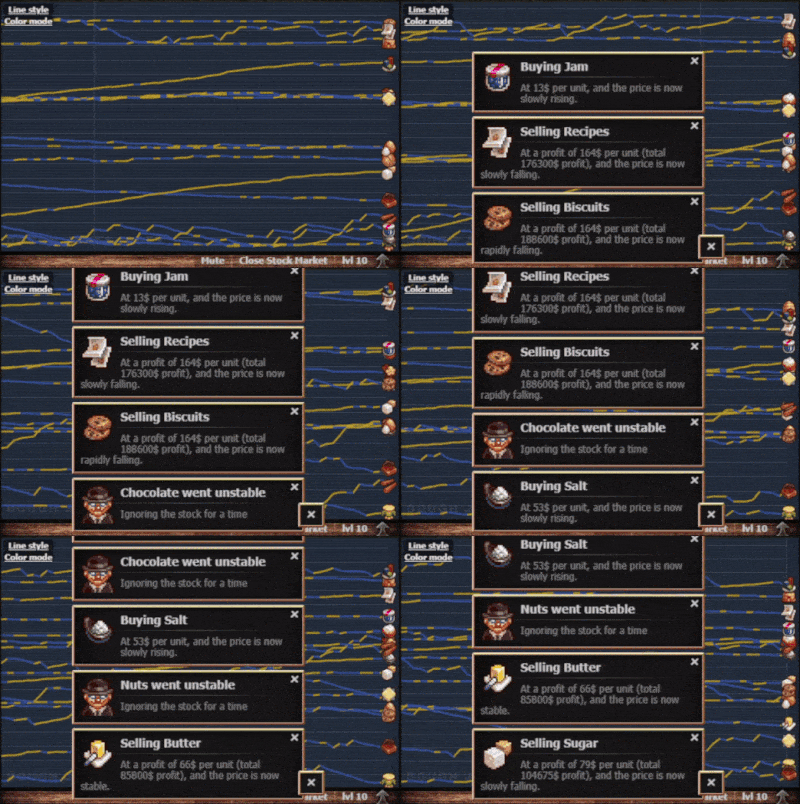
此视频片段的速度大约加快了5000倍。在通常较短的时间内,这款模组能轻松帮你解锁成就Liquid Assets(获得1000万秒元利润,即1000万美元)和Gaseous Assets(获得1年的秒元利润,即3153.6万美元),其中后者是《Cookie Clicker》目前最稀有的成就。当前版本的模组仅需持续运行一天就能达成Gaseous Assets。即便你没有按照下方“提高模组效率”部分所述升级建筑,每天仍能赚取数百万美元。无论如何,只要按照本指南操作,无需作弊,就能保证每日稳定获得股市利润。游戏进度越高级(即建筑等级越高),你的收益就会越大。 安装 注意:对于所有安装选项,你需要确保CCSE在CookieStocker之前加载。 选项1:在Steam创意工坊订阅该模组 这是获取当前版本模组并在有新版本发布时自动更新的最佳方式。选项2:安装模组 有两种安装方式,各有优势: 选项2a:通过网络云盘安装模组 - 下载CookiStocker 3.0 点击上述链接会进入包含模组文件的目录。安装模组时,只需将文件复制到本地模组目录中一个新建或已有的名为CookiStocker的文件夹内(路径示例:...Steam steamapps common Cookie Clicker resources app mods local CookiStocker)。重启游戏后,模组应已安装并运行。 这是两种安装方法中较简单的一种。其唯一缺点是该网络云盘账户未来可能会失效。选项2b:从Pastebin安装模组 此方法与前一种类似,只是相关文件直接从Pastebin获取。你可以找到以下文件的完整文本形式: - main.js - info.txt 对于每个文件,复制所有文本并粘贴到本地CookiStocker目录(...Steam/steamapps/common/Cookie Clicker/resources/app/mods/local/CookiStocker)中相应名称的文件里。与前一种方法相同,重启游戏后,模组应已安装并运行。 选项3:从控制台运行脚本 如果你不想安装模组,打开控制台,复制main.js的内容。从Pastebin获取文件,将其粘贴到控制台中,然后按Enter键。请注意,如果你选择此方法,每次重新启动游戏时,若想继续使用该模组,都需要重复此操作。 关于如何在Steam版游戏中打开控制台的说明可在此处找到。如果你运行的是Steam版《Cookie Clicker》,请务必遵循此方法,因为在文件开头简单地将变量DEV设置为1会产生禁用Steam成就的副作用。请注意,此更改需重启游戏后才能生效。 工作原理:CookiStocker 1.0版本使用了一种相当基础的交易算法,该算法仅基于模式变化。在Steam指南《终极股票市场指南》中可以找到关于股票市场运作的出色解释。另一个优质指南是《饼干点击器》维基的股票市场页面,其中包含相当多的技术细节。 《CookiStocker》3.1版本使用的算法不仅会考虑模式变化,还会兼顾模式不变时发生的短期变化。此版本还修复了多个漏洞。最后,它能智能处理边界条件:当股票价格低于2美元时买入,股票价格低于11美元时绝不卖出,并且对高价股票的卖出持谨慎态度。 《CookiStocker》3.1的内部运作在“交易算法”讨论中有更详细的介绍。选项 所有《Cookie Clicker》的选项都可通过标准选项页面访问。当前选项如下: • 自动交易:切换模组的启用与禁用状态。默认启用。 • 股票市场:开启或关闭整个股票市场功能。默认开启。 • 新成就:启用《Cookie Clicker》新增的成就。目前包括:将【气态资产】从隐藏成就转换为标准成就,新增标准成就【等离子资产】,以及新增隐藏成就【玻色-爱因斯坦凝聚态资产】。后两个成就所需的利润水平已根据【指数仓库】带来的额外收益能力进行了调整(详见下文)。获得这两个新成就中的任意一个后,每种股票的仓库总数将翻倍。默认状态为开启。 • 交易通知 开启或关闭每笔交易的通知。以下是你将看到的交易类型示例;你可以点击它们以显示更大的图片。默认状态为开启。
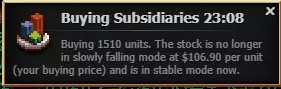
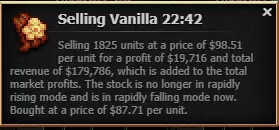
请注意,所有通知现在都带有时间戳,采用24小时制。这应该能让您更轻松地了解事件发生的时间。 买入和卖出通知均会显示股票的当前模式,如果股票是在模式转换时买入或卖出的,还会显示其之前的模式。模式以及股票市场内部运作的许多其他细节,在Steam指南【Ultimate Stock Market Guide】(v2.048版本更新中)中有深入解释。CookiStocker对模式的命名与该指南略有不同,但目前尚无“官方”名称。需要记住的最重要一点是,尽管“快速上涨”意味着相关股票在大多数情况下会快速上涨,但这并非总是如此(指南中也承认这一点),有时股价在该模式下可能会稳步下跌。其他所有模式也是如此。这就是为什么你可能会看到Cookie Stocker在“缓慢下跌”模式下买入股票,或者在“快速上涨”模式下卖出股票;如果你查看主股票市场显示中的股票图表,就会发现在这类情况下,股票的实际走势与模式名称所暗示的方向相反。Cookie Stocker早期版本的用户会注意到,股票交易的发生频率比以前高得多。幸运的是,游戏限制了一次显示的交易数量为5条,较早的交易会被堆叠。不过,如果这让你的屏幕过于混乱,你可以直接关闭通知并打开控制台(见下文),因为控制台包含了通知中的所有信息,而且内容要多得多。 CookieStocker现在对利润和收入进行了重要区分。主股市界面左上角显示的【利润】数字,实际上只是股市产生的总金额,无论是否安装此模组。当你购买股票时,股票的总购买价格会立即从这个数字中扣除,即使你实际上并未遭受任何损失。这就是为什么在游戏初期这个数字总是负数,也解释了CookieStocker开场信息“咔哒咔哒,你现在负债了”的原因。 在CookieStocker 2.0中,首次可以查看每笔股票交易的实际盈亏情况。利润的计算方式通常为股票卖出价格减去买入价格,再乘以卖出的单位(或股数)。如果这个数字为负,就称为亏损。收入是卖出股票所获得的总金额,始终为正数。主股票市场界面左上角显示的“利润”数字就是加上了这个收入数值。随着时间推移,当你的实际利润增长时,总收入和总利润往往会趋于一致。• 活动报告:切换活动报告(如下所示)。默认设置为开启。
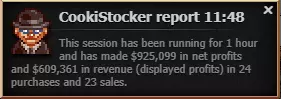
• Activity Report FrequencyControls the frequency of the activity reports described above, as well as the corresponding activity report if console announcements are turned. on. If the Activity Report option is turned off but console announcements are turned. on, then this interval will still control the frequency of the periodic activity summary shown on the console. See the thread New Changes and Additions to the Console Output for an example of this console output; the first part of the output shows an example of the console output that occurs after every tick, while the second part, which occurs about a third of the down with the line that begins "Running", shows an example of console periodic activity summary. For those people who want to closely monitor stock market activity, setting this value to one minute can be very instructive. Note that if you reduce Loop Frequency from its default (see below), Activity Report Frequency should be set to be the same as Loop Frequency. Default value for Activity Report Frequency - 60 minutes. • Fast NotificationsMakes the mod's notifications fade away quickly on their own. If you have 'Fast notes' option of the base game turned off, then the notifications will stay up until closed manually. Default - off • Console AnnouncementsShows more info about the algorithm's logic in the game console. See the Discussion thread New Changes and Additions to the Console Output for full details. Default - off • Loop FrequencyThis option controls the frequency at which the algorithm looks at the market. The market itself updates every 60 seconds, so it is set to 30 seconds (30000 in milliseconds) to make sure the logic triggers every update no matter when the mod initialized. However, if the option Force Loop Updates is turned on (see below), then CookiStocker will be running the stock market, typically at a faster tick rate, and the market's tick length will be set to the value of Loop Frequency. • Force Loop UpdatesWhen this option is turned on, CookiStocker runs the stock market at the frequency specified by Loop Frequency, as noted above. Normally, this is done to speed up the stock market. Doing so is a blatant cheat, however, and in future versions of CookiStocker, setting this option to "true" will disable Steam achievements. Increasing the Mod's Efficiency Before you launch, be sure to: • Check if you are running the latest version of the mod.The algorithm is constantly being improved, so using the most recent version will guarantee that all discovered bugs and suboptimal expressions are fixed and optimized. • Max out your brokers.Obviously, they will increase the efficiency of your trading. For the best results with this mod, it is recommended to have at least 100 brokers. Playing with fewer than 70 brokers can seriously cut into your profits. Keeping your brokers at the maximum limit you can afford is the easiest way for the advanced player to maximize stock market profits using this mod. • Leave enough spare cookies in the bank.The bot will try to buy as much stock as it can when it detects an opportunity, so make sure you have the cookies to fill up your warehouse. A good rule of thumb is that your bank should have at least a million seconds of CPU production before you enable CookiStocker. For those who are good at generating combos, a good time to enable CookiStocker is after your first major combo. Alternatively, if you can buy 100 brokers at once without diminishing your bank by more than a few percent, you should have plenty of cookies for stock market play. • Level up your offices.Warehouse space is very important if you do not want to wait hours to sell 100 shares of stock. If you want to get the best results, you should focus your lumps on getting cursors to level 12. Upgrading your cursors to level 20 also improves the productivity of clicking once the heavenly upgrades Aura Gloves and Luminous Gloves are acquired, but this does not directly impact the stock market. • Level up your bank.Increasing the bank level by one increases the resting value of all stocks by one and the bank ceiling of all stocks by three. (See the Steam Guide Ultimate Stock Market Guide for more details of the function and importance of these values.) Getting the bank level to level 10 should be high on your priority list, but not as high as raising your cursors to level 12 (or to level 20, as described in the previous section). Raising the bank level is the most powerful way of raising the earnings potential of the stock market, and the effects described above apply even when raising the bank level past level 10. Before going past level 10, however, it's best to level up the rest of your buildings, as described in the next section. • Level up the rest of your buildingsFinally, level the rest of your buildings as much as you are able to, up to level 10. For the stock market, the best strategy is to level up your buildings evenly rather than get each of them to level 10 before moving on to the next. This former strategy will give you the most building levels for your sugar lumps early on, and it will also ensure that your resources are spread out evenly among your stocks, thus reducing large fluctuations due to overconcentrating in just a few stocks. • Run your game at full speed.Although many people know that the game "runs" more slowly when it is closed, and that many features simply aren't updated then, few people know that the game runs slower any time it's not in focus. In other words, if you want to use your computer interactively for anything else other than playing Cookie Clicker, the game will slow down, even if it's running. This can severely affect stock market returns, cutting them by up to 90% or more. To eliminate this behavior (the only downside is that your computer will be slightly more loaded), follow the directions in the Steam Guide How to fix the game pauses when minimized, which fixes this problem completely. Note that this problem affects the game at all times when it doesn't have focus - not just when it's minimized. All of the previous steps can be done before you start running the mod. In contrast, the following, final step needs to be done only at the end of an ascension. • Sell all your stocks before ascending.In order for this strategy to be useful, you must have unlocked but not purchased the Chocolate Easter Egg. Typically, experienced players store this egg in their vault until the end of an ascension. By selling all your stocks, you increase the base value upon which the total number of cookies resulting from the purchase of the Chocolate Egg is based. This in turn increases your prestige level when you next ascend. The result is that taking the step of selling all your stocks gives you a permanent boost in your prestige level that persists across ascensions. Troubleshooting & FAQ Q: The mod is not doing anything; have I installed it correctly?A: That can be easily checked by checking the Mod Manager menu. If it does not show up there, then you did not install it properly. Also, be sure that the mod is enabled. Check that you have unarchived the folder properly; the directory should look like Steam steamapps common Cookie Clicker resources app mods workshop CookiStocker with main.js and info.txt in it. The version of the mod installed by Steam when you subscribe to the mod can be found in Steam steamapps common Cookie Clicker resources app mods workshop CookiStocker. Q: The mod is installed correctly, but it is still not doing anything.A: First, be sure that the CCSE mod is installed. If it is, and If the game shows you the following notification when it is launched, then this means the mod has initialized and is working.

问:为什么这个模组一直让我亏损?答:实际上并没有。股票市场界面左上角的“Profits”数字名称不幸有误,但由于这是Orteil在股票市场迷你游戏主体中实现的内容,我若修改会造成很多混乱。所谓的“Profits”实际上是“收入”。每当你花钱购买股票时,这笔投资会从这个“Profits”数字中扣除。因此,在开始通过卖出股票获利之前,每个人的数值都是负数。这就是为什么当你收到“CookiStocker已准备就绪”的通知时,副标题会显示“咔哒咔哒,你现在负债了”,就像上图所示。你可以在【Cookie Clicker】的【CookiStocker 2】模组主页面所链接的讨论帖中,查看所有相关内容的详细说明,其中包括即将推出的统计数据图片。每小时还会通过通知简要显示实际利润摘要。目前,你可以通过开启模组中的“控制台公告”选项来获取完整统计数据,具体操作方法可参考上文相关部分。 请注意,股市利润会像其他任何收入一样增加你当前的 prestige,但股市亏损不会减少你的 prestige(游戏中没有任何内容会减少 prestige)。由于你的饼干不会在重生后保留,而 prestige 会保留,因此股市收益的价值可能比乍看之下更高。问:我关闭游戏后,会记住已进行的购买吗? 答:目前不会;此功能将在《Cookie Clicker》3.0版本中推出。目前,交易开始几分钟内的结果可能不如模组完全运行后那么理想。 问:这个模组会与其他模组冲突吗? 答:尚未发现与任何热门模组存在冲突,预计未来也不会出现冲突情况。 问:“至高智慧”和“现实扭曲”龙光环对这个模组的性能有什么影响? 答:尽管“至高智慧”(“现实扭曲”的影响程度小得多)会使股票市场更加混乱(用Orteil的话说),但长期测试表明,这种额外的混乱不会对模组的性能产生任何可察觉的影响。关于这两种龙灵气对股市整体表现的具体影响,请参阅Steam指南《终极股市指南(v2.048开发中)》中的【Supreme Intellect & The New Meta(开发中)】部分,以及Cookie Clicker Wiki的股市页面中的【With Supreme Intellect】部分。 问:《Cookie Clicker》2.053版本与2.048版本的股市机制有区别吗?答:没有。 问:此模组会禁用Steam成就吗?答:不会。 如果仍遇到问题,请在下方留言。 如果模组运行正常,也欢迎留言分享你的成功。 更新日志请查看创意工坊页面讨论区中的【Changelog】主题帖。反馈 欢迎在评论区提出任何关于该模组的问题,我会尽力解答。 也欢迎分享你的成就和里程碑。 帮助我收集统计数据! CookiStocker的开发仍在继续!你可以在CookiStocker模组页面的讨论区了解所有新的开发动态并参与讨论。CookiStocker目前由z负责开发。 记得查看Gingerguy的其他脚本。

CookieWizord | 自动施法模组

CookieAscender | 自动飞升脚本