换一换
换一换 


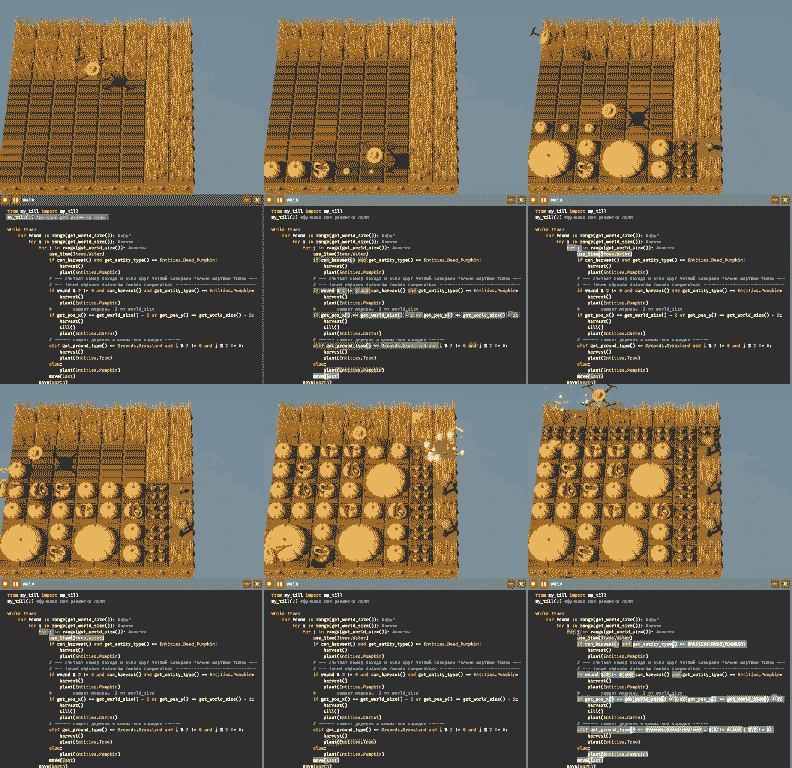
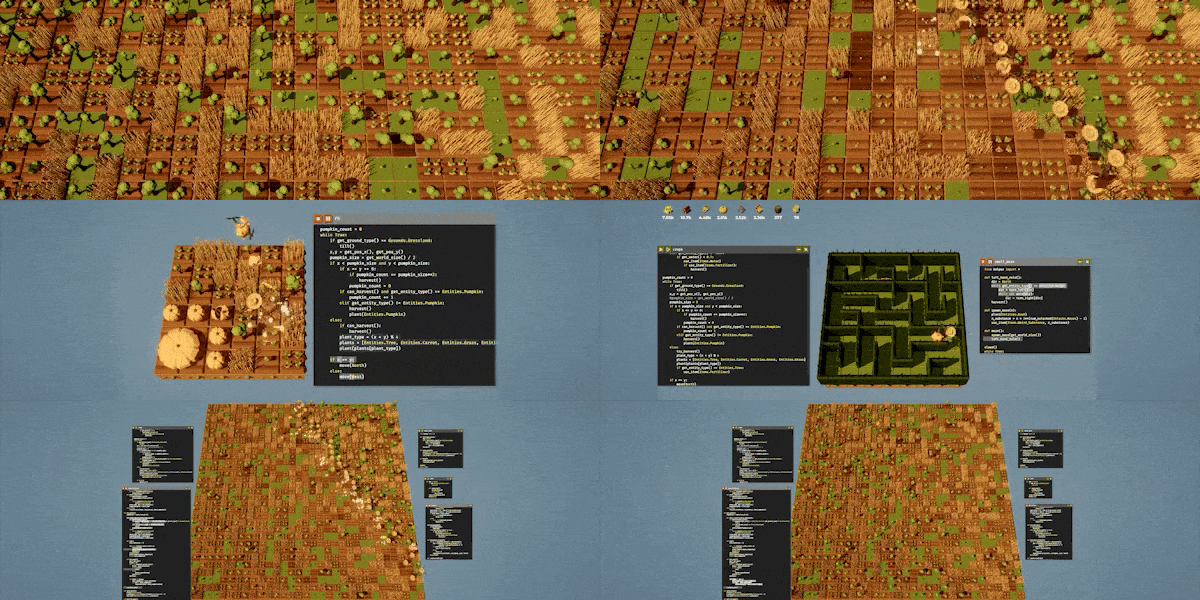
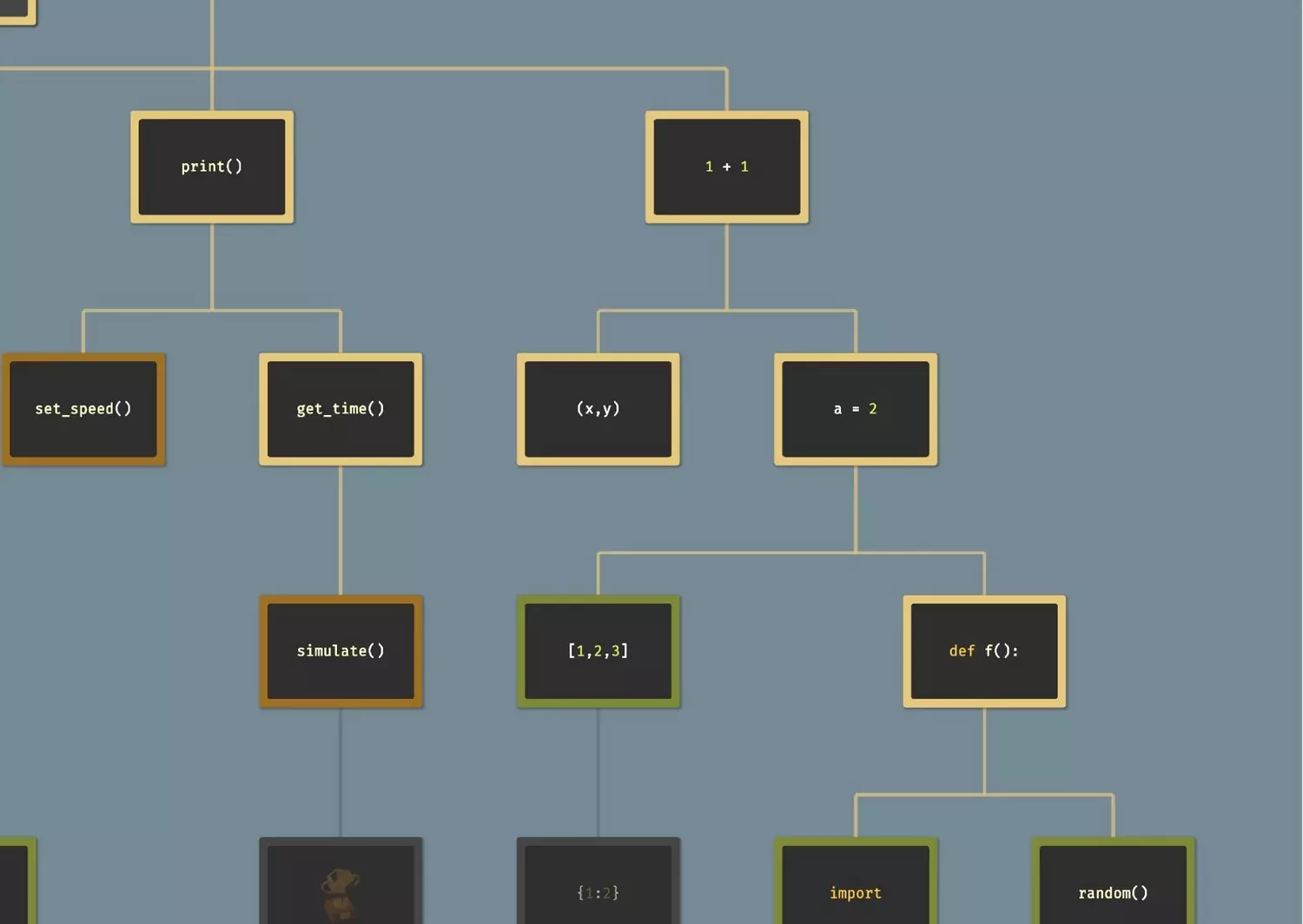
一个全自动南瓜农场,它能够耕地,在独立区块中种植南瓜(确保南瓜只按预期合并),检查枯萎的南瓜并进行替换,仅在区块完全合并后才进行收获,并且只需调整几个变量就能调整为任意布局。我将逐步讲解我让它正常运作的具体步骤。 简介 在本指南中,我会按照建造的实际步骤解释每个阶段,这样你就能一步步理解逻辑,不会感到困惑,最终明白所有部分是如何连接起来的。 你可以在指南末尾找到完整的最终代码,方便参考。 本指南的某些地方可能会显得过于详细——但这是有意为之。我想一步步展示我解决整个问题时的真实思考过程,供那些仍在熟悉编程的人,或者只是喜欢理解代码背后原理的人参考。 如果你只是想获取代码并让你的无人机快速运行,可以跳过所有解释,直接跳转到文末的【完整自动化代码】部分。 注意:本指南发布后,代码的某些部分已进行优化。更新后的版本使无人机的移动更流畅、更高效,但阅读起来也更复杂、更冗长。我决定在本指南中保留原始的、更简单的版本作为主要内容,并在文末附上优化版本。如果你更喜欢稍微高级但运行速度更快的设置,可以查看本指南末尾的【完整代码(优化版)】。 开始前提示:在向主代码添加新函数或功能之前,先在单独的窗口中测试会更安全——我每次都是这样做的。这能保持主代码的整洁,避免之后需要撤销混乱的操作。 另外,这一步是可选的,但我喜欢在所有自动化脚本的开头使用clear()——它会重置界面,让你每次运行程序时都能获得一个全新的开始。 ⚠️ 本指南使用以下解锁内容:debug、operators、senses、variables、functions。你需要这些才能继续使用我的代码。
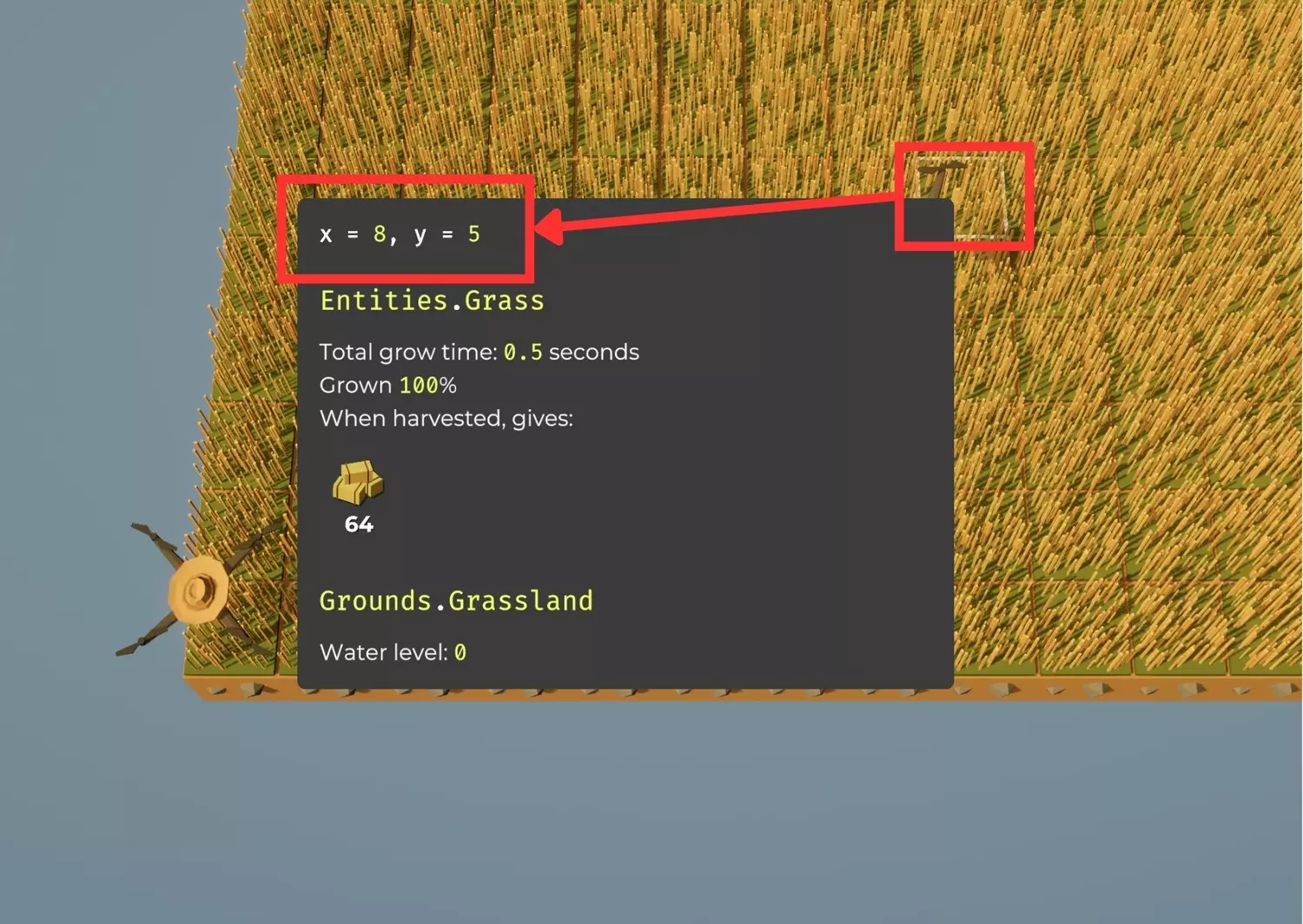
第一阶段——掌控移动 原因:我需要无人机前往精确坐标——这是其他一切功能的基础。 游戏中没有内置命令能让无人机移动到精确位置,只有基础的方向移动指令,比如向北移动或向东移动。因此,我必须自定义一个函数,用于计算无人机当前位置并逐步将其引导至目标坐标。 在此之前,了解游戏世界的运行机制至关重要: 每个场地单元格都有自己的(x,y)坐标。 原点(0,0)位于地图的左下角。 向东移动时x坐标增加,向北移动时y坐标增加。
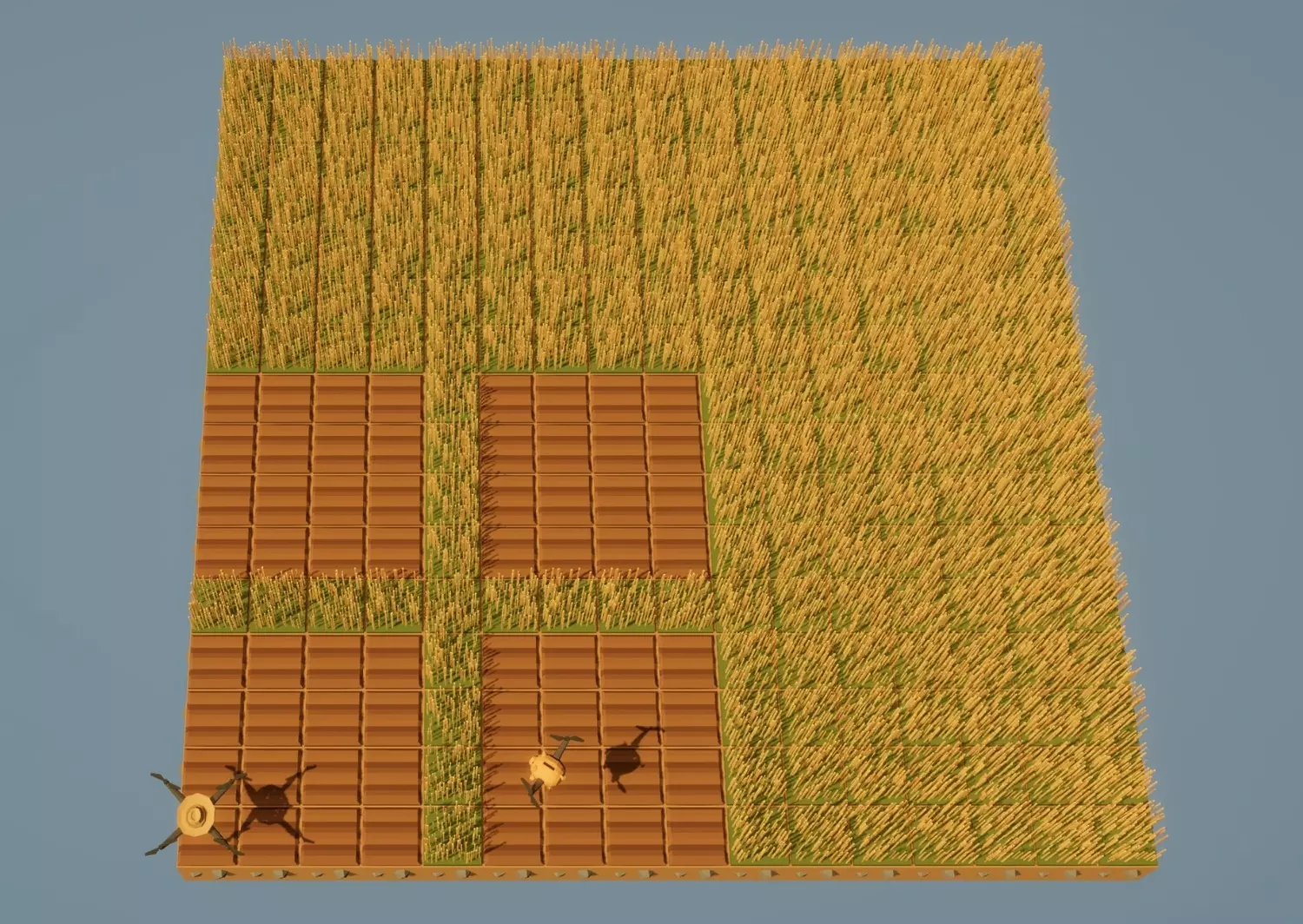
考虑到这一点,以下是我编写的用于将无人机精确移动到所需位置的函数: def go(x, y): xnow = get_pos_x() ynow = get_pos_y() while xnow > x: move(West) xnow -= 1 while xnow < x: move(East) xnow += 1 while ynow > y: move(South) ynow -= 1 while ynow < y: move(North) ynow += 1 其工作原理:将无人机从当前位置逐步移动到目标(x, y)坐标。 【重要性】:我在程序后续使用go(startcol, startrow)让无人机在每个主要阶段后返回起始点。这能保持一切的一致性,并防止无人机在复杂循环中偏离航线。第二阶段——理解网格(区块逻辑) 无需一次性耕种整个世界,处理更小、独立的区域会更高效且安全。 我将田地划分为区块:由1格草皮边界分隔的独立耕种区域。 这样可以防止大型南瓜跨区块边界合并,从而破坏布局。 由于游戏没有内置的区块大小系统,所有参数都由我自行定义。 我倾向于从实际重要的因素——南瓜大小——开始,再由此构建其余的计算。以下是我定义区域和区块计算的方法:(带下划线的部分需要手动修改) # 区块网格设置 ws = 获取世界大小() pumpksize = 4 # 每个区块内南瓜区域的大小 bordersize = 1 # 每个区块周围的草地边界 wide = 2 # 水平方向的区块数量 tall = 2 # 垂直方向的区块数量 # 完整区块大小(南瓜区域 + 边界) chnksize = pumpksize + bordersize # 区块总数 chnkqty = wide * tall # 农场总尺寸 farm_width = wide * chnksize # 总宽度(以单元格为单位) farm_height = tall * chnksize # 总高度(以单元格为单位) area = farm_width * farm_height # 农场总面积 工作原理: 1. 确定你希望每个南瓜区域的大小(pumpksize)。 2.添加边框(边框大小),使区块在视觉和功能上保持分离。 3. 设置你想要的区块横向和纵向数量(宽度、高度)。 其余参数——区块大小、农场总宽度、高度和面积——将自动计算。 通过这种方式规划可确保计算结果始终符合你预期的农场大小,且每个区块都能完美对齐地图网格。 有时直观查看比阅读说明更容易,因此这里提供几个示例设置。 示例1: 南瓜大小=4 边框大小=1 宽度=2 高度=2 起始点:(0,0)
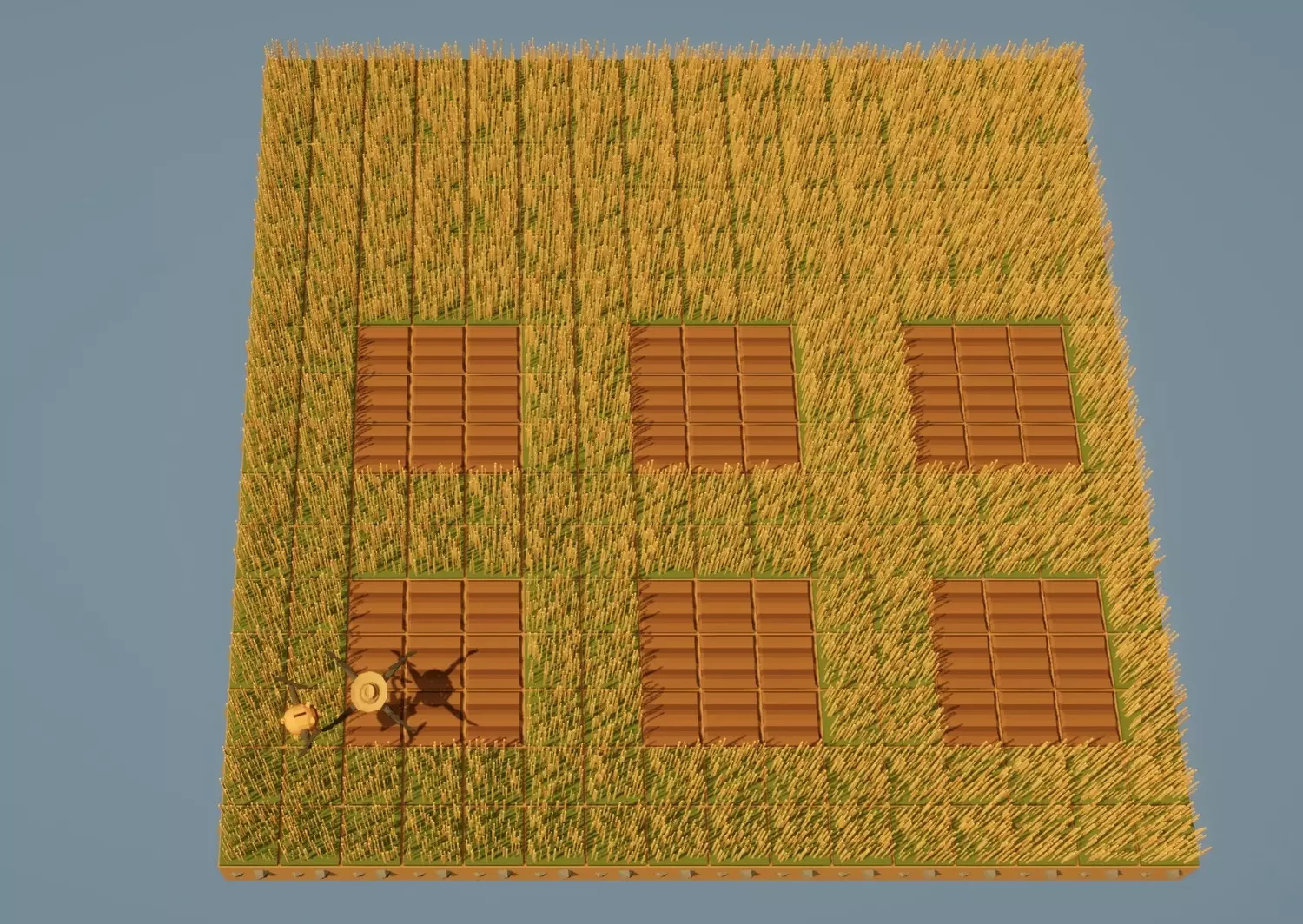
示例2: 南瓜大小=3 边框大小=2 宽度=3 高度=2 起始点:(3,3)
示例3:- 一个巨大的全视野南瓜 南瓜大小=ws - 将大小设为全视野 边框大小=0 - 将边框设为0 宽=1 高=1 将起始点设为(0,0):
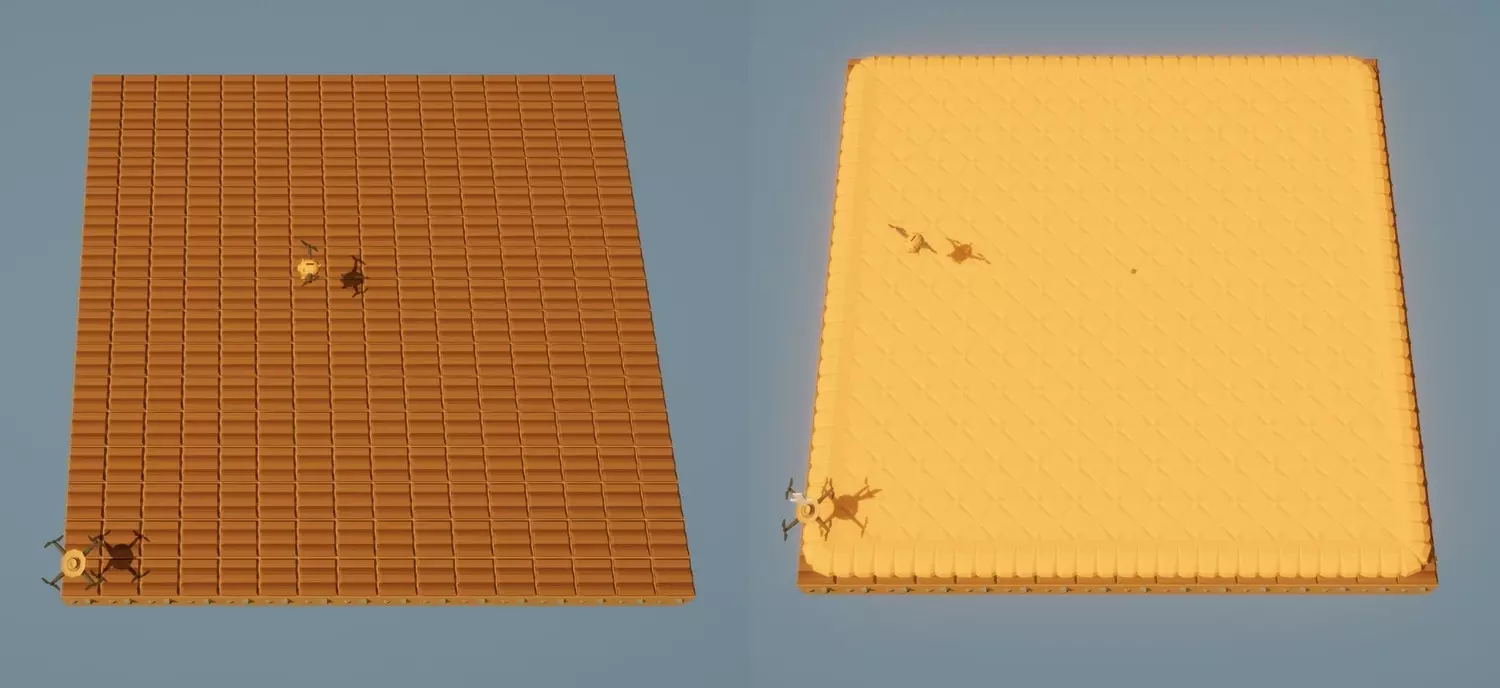
第三阶段——区块间移动 定义好网格后,下一步是教无人机如何在区块间移动。 完成一个区块后,无人机需要精确移动到下一个区块——可以是上方区块或右侧区块——且不能偏离对齐位置。 为保持移动灵活性,我们首先定义农场在世界网格中的起始位置。 这样你就可以将农场放置在地图上的任何位置,而不仅仅是原点(0,0)。 在网格定义中加入以下部分: startrow = 0 # 农场起始的Y坐标 startcol = 0 # 农场起始的X坐标 在耕种或播种整个农场之前,无人机必须知道如何在区块间移动。我们已经确定了农场的起点(起始列,起始行),现在需要创建两个辅助公式: 前往上方的下一个区块 前往我们田地的底部并开始下一个区块列 由于耕种方式的原因,无人机并非总是在同一位置结束一个区块——对于奇数和偶数南瓜尺寸,其结束位置有所不同。 因此,区块之间的移动需要具备一定的智能,以检查南瓜尺寸是奇数还是偶数。 1.前往上方的下一个区块:这里有两种情况: 奇数南瓜尺寸→无人机在右侧完成区块 >>因此它必须先走回左边缘,然后向上走 偶数南瓜尺寸→无人机已在靠近顶部的位置完成 >>因此只需直接攀爬边界 定义下一个区块向上(): 如果南瓜尺寸%2 == 1: #-----------------如果南瓜尺寸为奇数-------------------- 对于i在南瓜尺寸范围内: 移动(西) #在右侧完成>先向左返回 对于j在边界尺寸+1范围内: 移动(北) #跳过草地边界 否则: #-------------------------------如果南瓜尺寸为偶数------------------- 对于i在边界尺寸范围内: #只需越过边界 移动(北) 2.前往南瓜田底部,开始下一个区块列 若南瓜尺寸为奇数→“前往起始行→跨过边界” 若南瓜尺寸为偶数→“前往起始行→穿过区块” 定义函数:next_chunk_right() 全局变量:startrow 如果南瓜尺寸%2 == 1(即南瓜尺寸为奇数): ynow = 获取当前Y坐标() 当ynow不等于startrow时(垂直对齐至起始行): 向南移动 ynow = 获取当前Y坐标() 对于j在边界尺寸范围内循环: 向东移动(跨过边界至下一个区块) 否则(即南瓜尺寸为偶数): ynow = 获取当前Y坐标() 当ynow不等于= startrow: # 垂直重新对齐到起始行 move(South) ynow = get_pos_y() # 移动到下一个区块 for i in range(chnksize): move(East) 因此,无论耕作操作将无人机留在何处,导航系统都会将其带回网格中。 阶段4 — 田地耕作 既然无人机可以在区块之间移动,我们将使其在单个区块内使用蛇形模式进行耕作,该模式会根据南瓜大小的奇偶性进行调整。 每个区块都单独处理,因此无人机永远不会跨越边界。蛇形模式会覆盖每块土地:向右→向上→向左→向上→……直到区块耕作完成。 def till_right(): for left in range(pumpksize): if get_ground_type() != Grounds.Soil: till() move(East) def till_left(): for right in range(pumpksize): move(West) if get_ground_type() != Grounds.土壤: 翻耕() 然后将两个方向合并为一个适用于偶数行和奇数行的完整区块程序: 定义 翻耕完整区块(): 如果 南瓜尺寸 % 2 == 0: # ----------------- 如果南瓜尺寸为偶数 循环 c 从 0 到 (南瓜尺寸/2 - 1): 翻耕右侧() 向北移动() 翻耕左侧() 向北移动() 否则: # ---------------------------------- 如果南瓜尺寸为奇数 循环 c 从 0 到 ((南瓜尺寸-1)/2 - 1): 翻耕右侧() 向北移动() 翻耕左侧() 向北移动() 翻耕右侧() # << 最后的未匹配行(我们再次回到左边缘)
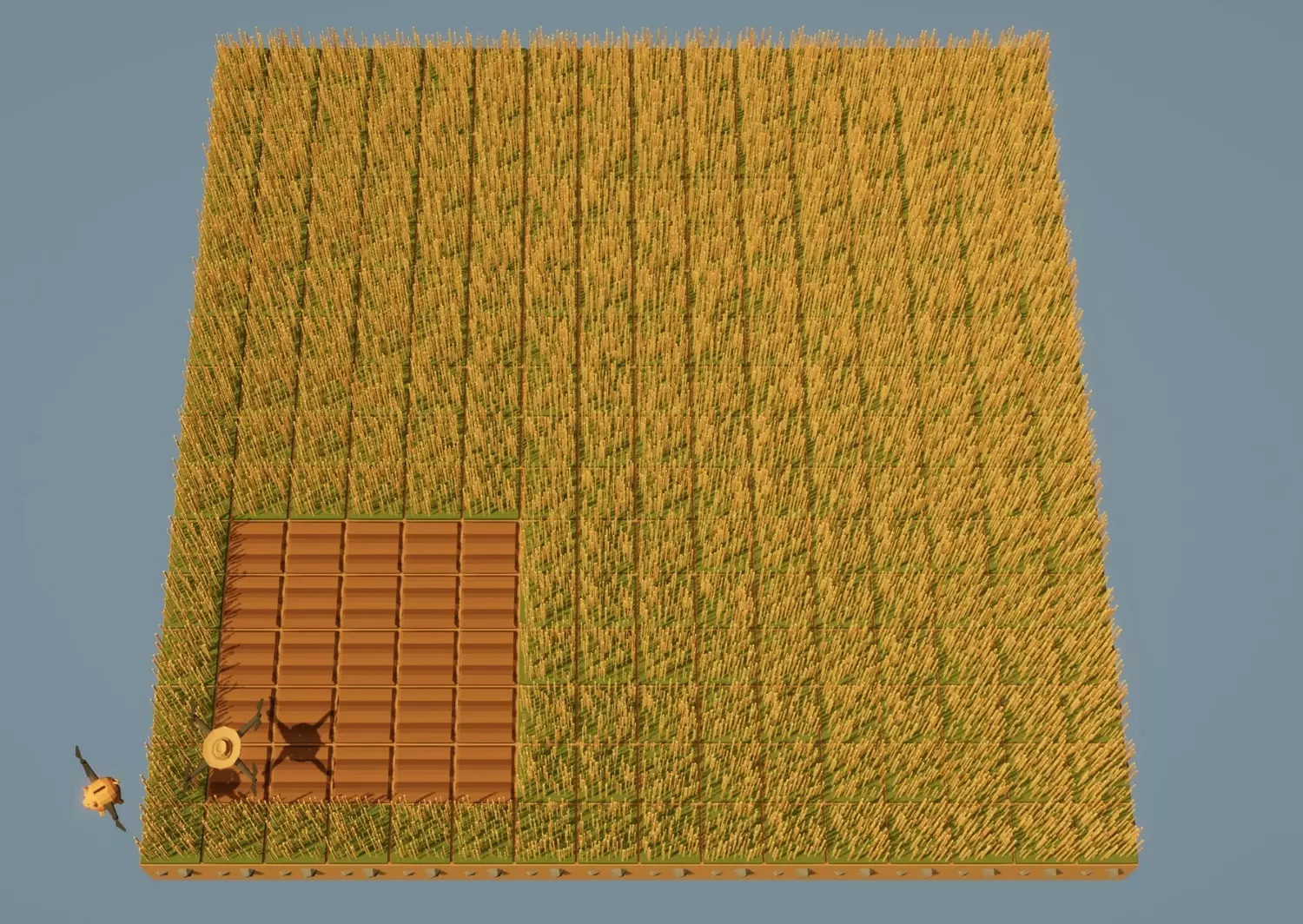
工作原理 1. 无人机从区块的左下角开始。 2. 它一直向右边缘耕种,向上移动一行,然后向左耕种。 3. 它重复这种蛇形模式,直到覆盖所有行。 【如果get_ground_type()不等于Grounds.Soil的检查可防止重新耕种已准备好的地块】 为什么最后的till_right()在带有奇数南瓜的循环之外? 循环会少完成一行,因为每次迭代结束时,无人机都位于新行的起始位置,准备耕种——但实际上还没有耕种最后那一行。 在循环外放置一个最终的till_right()可确保区块的最顶行也被耕种,从而完美完成整个模式。完成此阶段后,每块土地现在都可以自动准备种植——无重叠、无间隙,并且土壤行排列整齐。 随着一块土地的耕作逻辑准备就绪,下一步是将其扩展到整个农场区域。 每块土地将在受控循环中逐一处理,确保无人机在每个区域之间保持对齐。# 主体第一行,所有定义之后 清空() # 清理田地 前往(起始列, 起始行) # 耕地前将无人机固定在农场起始点 对于 行 在 范围(宽度)内: # 列(从左到右) 对于 列 在 范围(高度 - 1)内: # 列内的行(从下到上) 耕种完整区块() 移动到上一区块() 耕种完整区块() # 列中的最后一个区块 移动到右一区块()
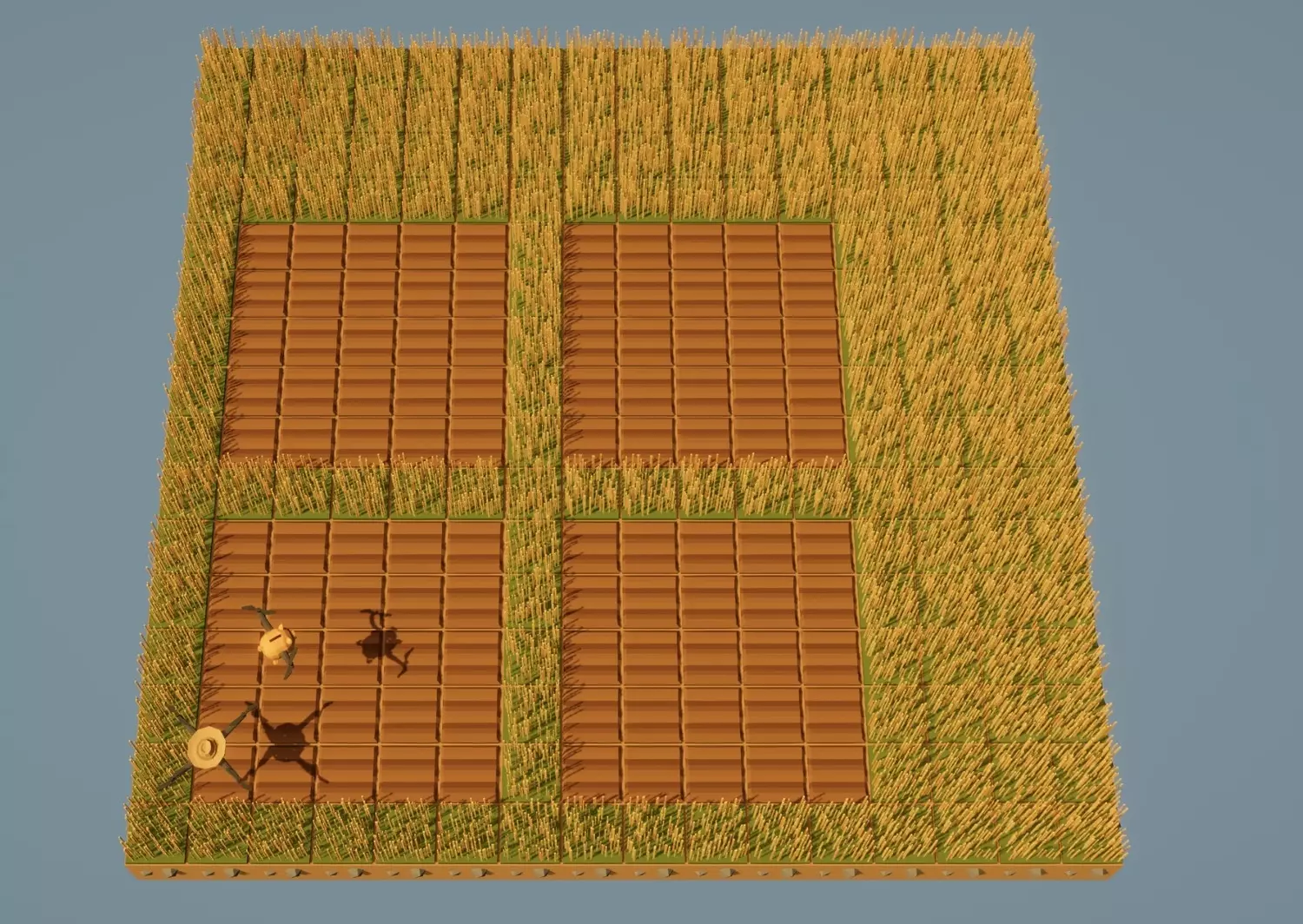
工作原理 1. 外层循环(for row in range(wide))用于水平遍历区块的列。 2. 内层循环(for col in range(tall - 1))用于在每列中向上移动,沿途耕种每个区块。 3. 每次垂直遍历后,无人机使用next_chunk_right()移动到下一列并重复该过程。 【为何最后一个till_full_chunk()在循环外】 内层循环仅运行到tall - 1,因为完成倒数第二个区块后,无人机已位于最后一个区块的下方。在循环外添加一个till_full_chunk()可以干净地处理最后一个区块,而不会尝试移动到网格顶部边缘之外。回到起点 当整个网格都已耕种完成后,使用之前定义的坐标将无人机送回农场的起始位置: go(startcol, startrow) 这样可以确保无人机始终准确地在农场开始的位置结束工作——无论农场在世界地图上的哪个位置。 我们的田地已经准备好,可以种植所有南瓜了! 第五阶段——种植网格 既然土壤已经准备就绪,我们可以复用耕种阶段完全相同的结构——只需将till()替换为pumk()即可。 由于区块已经对齐并由边界分隔,种植将遵循每个区块内相同的蛇形路径。 首先,创建一个小型辅助函数,这样你就不必每次都输入完整的作物实体名称: def pumk(): plant(Entities.南瓜) 然后制作左右种植功能(与耕作阶段方法相同): 定义种植右侧(): 循环 左侧 在 南瓜尺寸 范围内: 种植南瓜() 向东移动 定义种植左侧(): 循环 r 在 南瓜尺寸 范围内: 向西移动 种植南瓜() 现在将两个方向合并为一个完整区块程序: 定义种植完整区块(): 如果 南瓜尺寸 % 2 == 0: # ----------------- 如果南瓜尺寸为偶数 循环 c 在 南瓜尺寸/2 范围内: 种植右侧() 向北移动 种植左侧() 向北移动 否则: # ---------------------------------- 如果南瓜尺寸为奇数 循环 c 在 (南瓜尺寸-1)/2 范围内: 种植右侧() 向北移动 种植左侧() 向北移动 种植右侧() 工作原理 与耕作模式相同:右→上→左→上→右。 仅在可用区域(南瓜尺寸)内种植。对于奇数尺寸,最后一行在循环外处理,原因与耕地时相同——循环结束时无人机正等待在该行的起始位置,因此只需再执行一次操作即可完成该行。 接下来,将其应用于整个农场——结构与第四阶段相同。 这部分代码也放在主程序中(紧跟在耕地循环之后): for row in range(wide): for col in range(tall - 1): plant_full_chunk() next_chunk_up() plant_full_chunk() next_chunk_right() go(startcol, startrow) # 返回起始位置,确保下一阶段始终从同一地点开始。
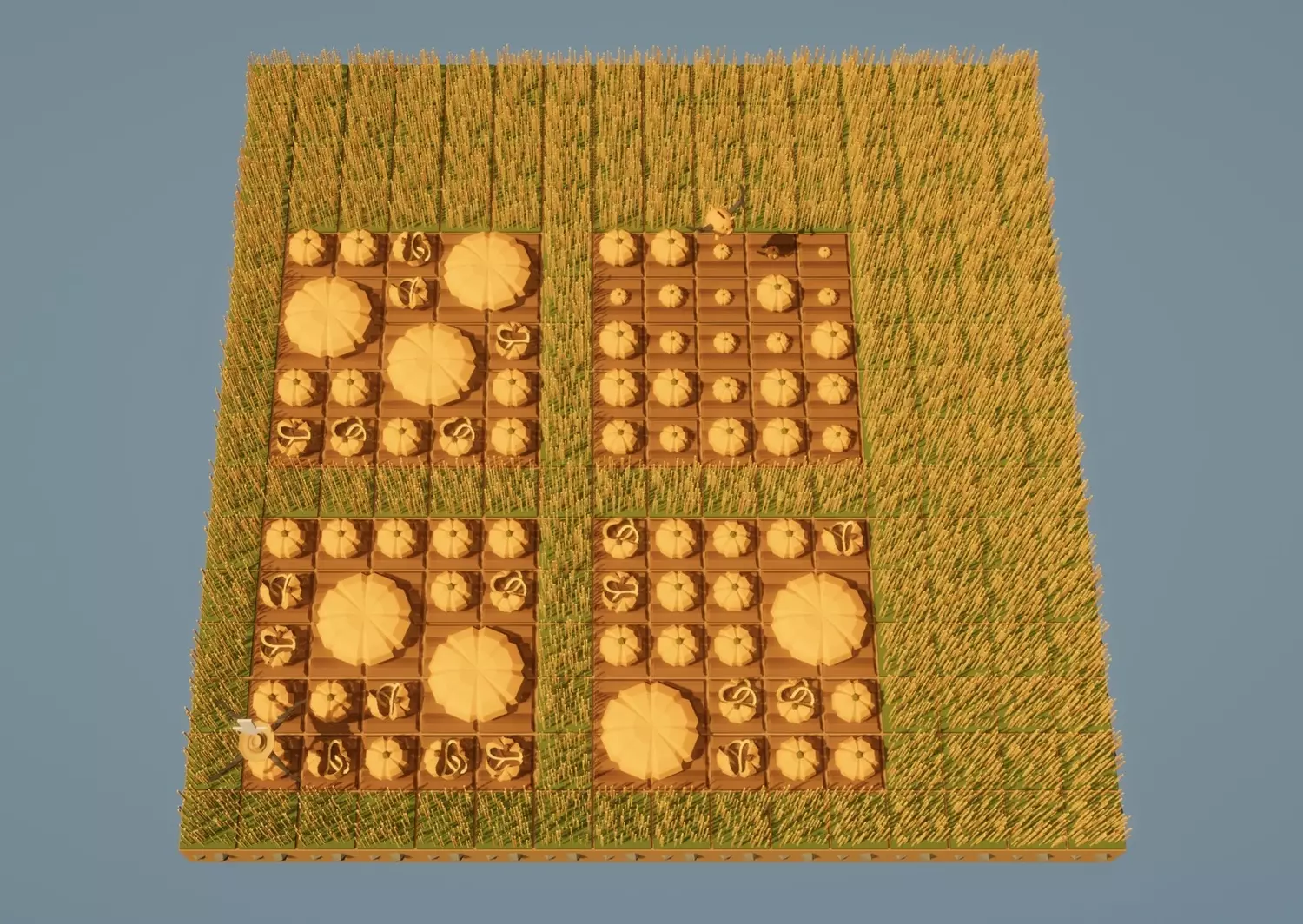
注意事项:由于我们复用了与耕作完全相同的循环结构,因此无需重新计算任何内容——种植操作只需嵌入到已构建的网格系统中即可。 阶段6——检查枯萎南瓜 现在田地已完成种植,下一步是保持南瓜存活且健康以进行合并。部分南瓜会枯萎,无人机需要自动检测并替换它们。 在编写新函数前,在脚本顶部(网格设置下方)添加一个变量:dead = 0。该计数器用于记录无人机扫描每个区块时发现的枯萎南瓜数量。 接下来,创建用于扫描区块内每个地块的函数。若发现枯萎南瓜,无人机将立即收获该南瓜并在原地重新种植新的南瓜。每个方向负责对区块进行一次水平扫描。 定义检查右侧函数(): 全局变量 已死亡数量 # 保持全局状态,否则计数器无法更新! 对于 r 在南瓜尺寸范围内循环: 状态 = 获取实体类型() 如果 状态 == 实体.枯萎南瓜: 收获() 种植南瓜() 已死亡数量 += 1 向东移动 定义检查左侧函数(): 全局变量 已死亡数量 # 保持全局状态! 对于 r 在南瓜尺寸范围内循环: 向西移动 状态 = 获取实体类型() 如果 状态 == 实体.枯萎南瓜: 收获() 种植南瓜() 已死亡数量 += 1 我们使用全局变量 已死亡数量,这样两个函数就能共用同一个计数器——用于追踪该区块中发现的枯萎南瓜数量。 然后,要扫描整个区块,需将两次扫描合并为“检查完整区块”函数: 定义检查完整区块函数(): 全局变量 已死亡数量 # 保持全局状态!dead = 0 如果南瓜尺寸 % 2 == 0: # ----------------- 如果南瓜尺寸为偶数 循环 c 从 0 到 (南瓜尺寸/2 - 1): check_right() move(北) check_left() move(北) 否则: # ---------------------------------- 如果南瓜尺寸为奇数 循环 c 从 0 到 ((南瓜尺寸-1)/2 - 1): check_right() move(北) check_left() move(北) check_right() #print(dead) - 用于检查计数器是否正常工作(调试时移除#) 如果 dead == 0: initiate()
工作原理 1. 无人机以蛇形模式在区块内移动,检查每个方块。 2. 若检测到【死亡南瓜实体】,会立即进行收割并重新种植。 3. 死亡计数器会记录已替换的数量。 如果未发现死亡南瓜(死亡数 == 0),则调用【初始化函数】——这是我们将在下一阶段制作的收割函数。 此阶段为农场赋予了初步的维护逻辑——无人机现在可以在继续收割前实时发现并修复问题。 第七阶段——收割与重新种植 当每个区块的南瓜都处于健康状态后,无人机就可以开始进行有趣的部分了——收割完全融合的南瓜,并启动下一个生长周期。此阶段与前一阶段直接衔接——只要check_full_chunk()报告区块状态完全正常(未发现枯萎南瓜),就会触发此阶段。 为实现这一功能,我们将使用两个辅助函数:initiate()和gostartchnk()。它们共同作用于重置区域、重新定位无人机,并开始下一轮种植。 【注意】这两个函数的定义必须放在check_full_chunk()定义之上!gostartchnk():将无人机移动到当前区块的左下角 定义gostartchnk():#将无人机移回左下角以便重新种植 如果南瓜尺寸除以2的余数为1:#-----------------如果南瓜尺寸为奇数 循环i从0到南瓜尺寸-1: 向西移动 否则:#-------------------------------如果南瓜尺寸为偶数 向南移动 循环j从0到南瓜尺寸-2: 向南移动 initiate():-收割整个区块并重新种植 定义initiate():#收割并重新种植 do_a_flip():#>>可选 调用gostartchnk() 调用harvest() 调用plant_full_chunk()
工作原理: 1. 当区块完全处于健康状态(所有南瓜已合并并准备好收获)时,initiate()函数会运行。 2. gostartchnk()函数将其移回区块起始(左下角)角落。 3. 收获合并后的南瓜。 4. 最后,运行plant_full_chunk()函数立即重新种植所有南瓜。 do_a_flip()函数的存在是因为有时如果你的无人机速度过快,或者你使用的区域过小(例如只有两个3x3的南瓜),无人机可能会在新的健康南瓜完全生长并与其他南瓜合并之前就开始收获。因此,翻转本质上是一个短暂的延迟,为最后一个南瓜多争取了一些时间。此外,这看起来就像无人机在跳一段小小的胜利舞蹈。翻转需要一点时间,所以如果你正在运行一个大型区域且不需要延迟,只需用#将其注释掉即可跳过。通过这种设置,每个区块现在都可以自行生长、合并、收获和重新种植——形成一个完整的循环,无限重复。恭喜,你已经拥有了一个自给自足的南瓜工厂。 阶段8——无限维护循环 此时,一切都已准备就绪: 我们可以在网格中移动, 耕种每个区块, 种植每个区块, 检查枯萎的南瓜, 以及在区块完全成熟时收获并重新种植。现在我们只需要让无人机永远循环执行这些操作。这就是主循环的作用: while True: for row in range(wide): for col in range(tall - 1): check_full_chunk() next_chunk_up() check_full_chunk() next_chunk_right() go(startcol, startrow) 其工作原理如下: - while True: 使程序进入无限循环——无人机永远不会停止维护农场。 - 每个循环中,它会像耕种和播种时一样遍历整个农场网格。 - 对于每个区块,它会调用check_full_chunk(): - 如果区块已成熟,就进行收获并重新种植; - 如果未成熟,就只修复任何枯萎的作物。 - 完成所有区块后,它会调用go(startcol, startrow)返回到农场的起始点重新对齐。为什么我们要在每个循环重新校准 即使逻辑无误,微小的差一错误也可能悄悄出现——尤其是在调整区块大小或添加新动作之后。 通过让无人机在每次完整扫描后返回原点,下一个循环就能始终完美对齐。 这为你带来的功能 全自动农场 基于区块的布局(无随机合并) 自我修复(枯萎的南瓜会被替换) 自我循环(健康的区块会被收割并重新种植) 可扩展性(只需修改最顶部的手动输入值) 现在你完全可以走开,让无人机自行工作。
Overview At this point, everything’s wired up — the system can run on its own forever. Let’s tie it all together and make it easy for anyone to follow and build their own version. 💡 How the final setup works The drone prepares the field — tills every chunk of soil according to your defined layout. Plants pumpkins — same snake pattern, no empty tiles left behind. Scans for dead crops — automatically replanting any dead pumpkins it finds. Harvests healthy chunks — once a chunk’s fully merged, it gets cleared and replanted. Repeats forever — while True keeps cycling through growth, harvest, and replanting endlessly. 📜 Full program structure Here’s the general layout — simple and modular: Grid and variable setup Function definitions (movement, chunk handling, tilling, planting, checking, harvesting, etc.) Main body 🧩 Final touches If you ever want to change your farm’s size, just edit wide, tall, or pumpksize. If you only want to use part of your world, adjust startrow and startcol. Watch your borders — if the grass separator’s missing, big merged pumpkins can spill into the next chunk and mess up the layout. 🎃 Outro Thanks for reading my guide!This was my first ever guide, and I genuinely hope it helped you get the hang of not just the code, but also the thinking behind every stage — how each little piece connects into one smooth loop. It might feel a bit overdetailed here and there — but that’s on purpose. I wanted to show my real thought process while figuring this whole thing out, step by step, for anyone who’s still getting comfortable with coding or just likes understanding the “why” behind the lines. If you notice anything that could be explained better, cleaned up, or made cooler — I’m all ears. Feedback means a lot, and I’d love to make the next one even more polished (and probably just as chaotic). The full final code is down below — copy it, tweak it, break it, rebuild it… make it yours. Happy farming, and may your pumpkins always merge perfectly! 🎃✨ Full automation code 1. Grid setup and definitions# ------ variable definition ------------------------------------------------------------ ws = get_world_size() dead = 0 # ------ values to input manually ------------------------------------------------------ pumpksize = 5 # size of the pumpkin area inside each chunk bordersize = 1 # grass border around each chunk wide = 2 # number of chunks horizontally tall = 2 # number of chunks vertically startrow = 1 #this indicates the row farm starts at (y) startcol = 1 #this indicates the column farm starts at (x) # ------ values calculated automatically ----------------------------------------------- chnksize = pumpksize + bordersize # full chunk size (pumpkin + border) chnkqty = wide * tall # total number of chunks farm_width = wide * chnksize # total width in cells farm_height = tall * chnksize # total height in cells area = farm_width * farm_height # total farm area 2. Formula definitions - Movement go(x,y) def go(x,y): hor = get_pos_x() ver = get_pos_y() while hor > x: move(West) hor -= 1 while hor < x: move(East) hor += 1 while ver > y: move(South) ver -= 1 while ver < y: move(North) ver += 1 gostartchnk() def gostartchnk(): if pumpksize % 2 == 1: # ----------------- if Pumpkin size is odd for i in range(pumpksize): move(West) else: # ------------------------------- if Pumpkin size is even move(South) for j in range(pumpksize-1): move(South) next_chunk_up(): def next_chunk_up(): if pumpksize % 2 == 1: # ----------------- if Pumpkin size is odd for i in range(pumpksize): move(West) for j in range(bordersize + 1): move(North) else: # ------------------------------- if Pumpkin size is even for i in range(bordersize): move(North) next_chunk_right() def next_chunk_right(): global startrow if pumpksize % 2 == 1: # ----------------- if Pumpkin size is odd ynow = get_pos_y() while ynow != startrow: move(South) ynow = get_pos_y() for j in range(bordersize): move(East) else: # ------------------------------- if Pumpkin size is even ynow = get_pos_y() while ynow != startrow: move(South) ynow = get_pos_y() for i in range(chnksize): move(East) 3. Formula definitions - Tilling stage till_right() def till_right(): for left in range(pumpksize): if get_ground_type() != Grounds.Soil: till() move(East) till_left() def till_left(): for r in range(pumpksize): move(West) if get_ground_type() != Grounds.Soil: till() till_full_chunk() def till_full_chunk(): if pumpksize % 2 == 0: # ----------------- if Pumpkin size is even for c in range(pumpksize/2): till_right() move(North) till_left() move(North) else: # ---------------------------------- if Pumpkin size is odd for c in range((pumpksize-1)/2): till_right() move(North) till_left() move(North) till_right() 4. Formula definitions - Planting stage def pumk() def pumk(): plant(Entities.Pumpkin) plant_right() def plant_right(): for left in range(pumpksize): pumk() move(East) plant_left() def plant_left(): for r in range(pumpksize): move(West) pumk() plant_full_chunk def plant_full_chunk(): if pumpksize % 2 == 0: # ----------------- if Pumpkin size is even for c in range(pumpksize/2): plant_right() move(North) plant_left() move(North) else: # ---------------------------------- if Pumpkin size is odd for c in range((pumpksize-1)/2): plant_right() move(North) plant_left() move(North) plant_right() 5. Formula definitions - Checking, harvesting, replanting check_right() def check_right(): global dead for r in range(pumpksize): status = get_entity_type() if status == Entities.Dead_Pumpkin: harvest() pumk() dead += 1 move(East) check_left() def check_left(): global dead for r in range(pumpksize): move(West) status = get_entity_type() if status == Entities.Dead_Pumpkin: harvest() pumk() dead += 1 initiate() def initiate(): #__Harvest and replant do_a_flip() # optional gostartchnk() harvest() plant_full_chunk() check_full_chunk def check_full_chunk(): global dead dead = 0 if pumpksize % 2 == 0: # ----------------- if Pumpkin size is even for c in range(pumpksize/2): check_right() move(North) check_left() move(North) else: # ---------------------------------- if Pumpkin size is odd for c in range((pumpksize-1)/2): check_right() move(North) check_left() move(North) check_right() #print(dead) - to check if the counter works properly if dead == 0: initiate() ____ MAIN BODY ____ clear() go(startcol, startrow) # come back to start tilling the grid for row in range(wide): for col in range(tall-1): till_full_chunk() next_chunk_up() till_full_chunk() next_chunk_right() go(startcol, startrow) # come back to start initial planting stage for row in range(wide): for col in range(tall-1): plant_full_chunk() next_chunk_up() plant_full_chunk() next_chunk_right() go(startcol, startrow) # come back to start infinite check and harvest stage while True: for row in range(wide): for col in range(tall - 1): check_full_chunk() next_chunk_up() check_full_chunk() next_chunk_right() go(startcol, startrow) Full Code (Optimized) ⚙️ About this versionThis code was optimized to fix an issue where the drone kept stepping out of the working field mostly while running its snake pattern to the right (you can clearly see that on GIFs) — which caused it to wrap around to the opposite side on full-field farms (pumpksize = ws, bordersize = 0). The new logic keeps all movement strictly inside the active area, cutting out unnecessary steps and making transitions between chunks smoother and faster — though the code itself is a bit more complex. 1. Grid setup and definitions - no changes 2. Formula definitions - Movement go(x,y) - no changes gostartchnk() Optimized: def gostartchnk(): if pumpksize % 2 == 1: for i in range(pumpksize-1): move(West) for j in range(pumpksize-1): move(South) next_chunk_up() Optimized: def next_chunk_up(): if pumpksize % 2 == 1: for i in range(pumpksize-1): move(West) for j in range(bordersize + 1): move(North) else: for i in range(bordersize+1): move(North) next_chunk_right() Optimized: def next_chunk_right(): global startrow if pumpksize % 2 == 1: ynow = get_pos_y() while ynow != startrow: move(South) ynow = get_pos_y() for j in range(bordersize+1): move(East) else: for i in range(chnksize): move(East) ynow = get_pos_y() while ynow != startrow: move(South) ynow = get_pos_y() 3. Formula definitions - Tilling stage till_right() Optimized: def till_right(): if get_ground_type() != Grounds.Soil: till() for left in range(pumpksize-1): move(East) if get_ground_type() != Grounds.Soil: till() till_left() Optimized: def till_left(): if get_ground_type() != Grounds.Soil: till() for r in range(pumpksize-1): move(West) if get_ground_type() != Grounds.Soil: till() till_full_chunk() Optimized: def till_full_chunk(): if pumpksize % 2 == 0: # ----------------- if Pumpkin size is even for c in range((pumpksize/2)-1): till_right() move(North) till_left() move(North) till_right() move(North) till_left() else: # ---------------------------------- if Pumpkin size is odd for c in range((pumpksize-1)/2): till_right() move(North) till_left() move(North) till_right() 4. Formula definitions - Planting stage pumk() - no changes def pumk(): plant(Entities.Pumpkin) plant_right() Optimized: def plant_right(): pumk() for left in range(pumpksize-1): move(East) pumk() plant_left() Optimized: def plant_left(): pumk() for r in range(pumpksize-1): move(West) pumk() plant_full_chunk() Optimized: def plant_full_chunk(): if pumpksize % 2 == 0: for c in range((pumpksize/2)-1): plant_right() move(North) plant_left() move(North) plant_right() move(North) plant_left() else: for c in range((pumpksize-1)/2): plant_right() move(North) plant_left() move(North) plant_right() 5. Formula definitions - Checking, harvesting, replanting check_right() Optimized: def check_right(): global dead for r in range(pumpksize-1): status = get_entity_type() if status == Entities.Dead_Pumpkin: harvest() pumk() dead += 1 move(East) status = get_entity_type() if status == Entities.Dead_Pumpkin: harvest() pumk() dead += 1 check_left() Optimized: def check_left(): global dead for r in range(pumpksize-1): status = get_entity_type() if status == Entities.Dead_Pumpkin: harvest() pumk() dead += 1 move(West) status = get_entity_type() if status == Entities.Dead_Pumpkin: harvest() pumk() dead += 1 initiate() - no changes def initiate(): do_a_flip() gostartchnk() harvest() plant_full_chunk() check_full_chunk() Optimized: def check_full_chunk(): global dead dead = 0 if pumpksize % 2 == 0: # ----------------- if Pumpkin size is even for r in range((pumpksize/2)-1): check_right() move(North) check_left() move(North) check_right() move(North) check_left() else: # ---------------------------------- if Pumpkin size is odd for c in range((pumpksize-1)/2): check_right() move(North) check_left() move(North) check_right() #print(dead) - to check if the counter works properly if dead == 0: initiate() ____ MAIN BODY ____ clear() go(startcol, startrow) # come back to start Tilling the grid Optimized: for row in range(wide-1): for col in range(tall-1): till_full_chunk() next_chunk_up() till_full_chunk() next_chunk_right() for col in range(tall-1): till_full_chunk() next_chunk_up() till_full_chunk() go(startcol, startrow) Initial planting stage Optimized: for row in range(wide-1): for col in range(tall-1): plant_full_chunk() next_chunk_up() plant_full_chunk() next_chunk_right() for col in range(tall-1): plant_full_chunk() next_chunk_up() plant_full_chunk() go(startcol, startrow) # come back to start Infinite check and harvest stage Optimized: while True: for row in range(wide-1): for col in range(tall-1): check_full_chunk() next_chunk_up() check_full_chunk() next_chunk_right() for col in range(tall-1): check_full_chunk() next_chunk_up() check_full_chunk() go(startcol, startrow)