换一换
换一换 




Deck-editing guide with card list and advanced guides for editing stats, sigils, items, totems. Also "Weird stuff" in the save file and tips on game strategy. Just finished the beta test of Kaycee, in the process of updating this guide for the release version. Spoilers! Intro This is a quick guide to editing the cards in your deck in order to make the early part of the game easier. You can also use it to customize your deck for fun. I started writing this with v1.08 of Inscryption running on a Win10 computer and have been periodically updating through Kaycee's Mod. There are also sections for editing sigils, stats, items and totems, my notes on Kaycee mod, "Weird and Worrying" stuff I found in the save file, and my thoughts on game strategy. If you are just looking for a way to avoid losing a key battle, you might try starting with my "How to escape any battle without losing" guide. There are good hints on winning with sigils in Kaycee's mod and the egg deck in my other guides of those names. If you are just looking for a list of all the cards in the game, then read my egg deck guide. Finally if you need a break from it all (this is just a game and supposed to be fun, right?) check out my "You know you're playing Inscryption too much when..." guide. There are unmarked spoilers from this point on! Read at your own risk Disclaimer: I recommend doing this only at the very beginning of the game (right after the "Another Challenger, it has been ages..." battle in the cabin), because once your cards acquire added sigils and buffs then changing the order of the cards in your deck list could cause unusual problems. Editing other parts of the save file could cause something weird to happen or possibly crash the game. If you've already won the game, editing the game might reset your progress. Editing a save game file in any way could cause your game to crash, just because it worked for me on the pre-Kaycee Mod versions of Inscryption doesn't mean that it will work for everybody on all versions. Future updates to the game could cause serious problems. Finally, make a backup copy of the save file before you do anything! Seriously. Even if you don't do any editing, it's a good idea to make a backup copy of the save game file before major events in the game. This way you can restore the game to an earlier point, such as before a boss battle or after a new map. CAVEAT: I was a beta tester on Kaycee's mod (100+ hours), I wrote most of this guide before starting the beta. There were a few changes to the save file format as a result of the mod, the main one being that two separate game states are simultaneously in the file (your status in Kaycee's mod and in the base game). I haven't gone through the whole guide to double-check everything that worked before the mod will work afterwards, but I found that the basic principles were the same. I've notated differences where I found them. If you've won the game already, then you can go back to the beginning at any time. Otherwise you can just lose card battles until you get sent to the opening card battle/demonstration. Finish that battle, then the game will save. This will give you a clean file to edit. If you're not sure you want to do this, then make a backup copy of your current save file before you go back to the start. This way you can always replace the current save with one where you had more progress. It's probably a good idea to keep a copy of the save file before you do any card editing. If something breaks in a very subtle way, you'll have a means of going back to before you did any editing. Whatever you do, make a backup of the save file before you edit it. Finding the save file Go to the directory where your Inscription save files area. If you installed to your C-drive it's probably: C: Program Files (x86) Steam steamapps common Inscryption If you have played previously, "SaveFile.gwsave" and "SaveFile-Backup.gwsave" will be here. If there are no files of this name in the directory, then when you continue your game it will make a "SaveFile.gwsave" file. Editing the save file to add cards to your deck First make a backup of the "SaveFile.gwsave" file. Open it with your favorite text editor. In Windows right-click it and select "open with..." to use a text editor like Notepad. You can check the box so that Windows always uses Notepad. (if you do alot of experimenting this will make things much easier) Once the save file is opened, search for "playerDeck" (with most windows programs you can open the find window with Ctrl+F). The first occurrence should appear a few lines under "currentRun", be sure that you are going to edit the current deck.
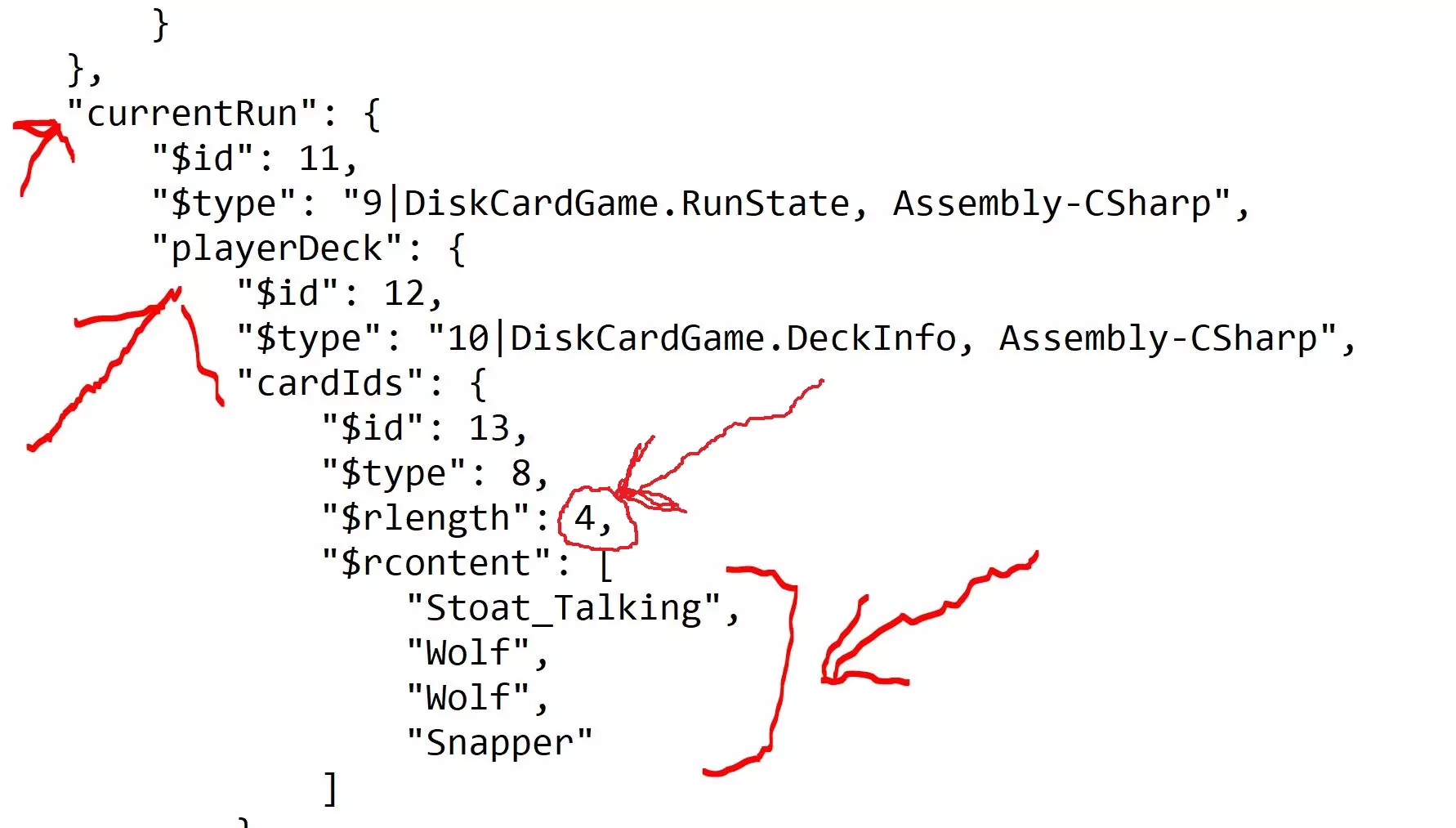
Many of the information records in the save file, such as the "playerDeck" record, are organized with four tags in this order: "$id" -- this is an accession number for the record "$type" -- this gives what type of record it is. It is usually just a number, but when a particular type appears in the savefile for the first time, there is additional text generated by the program when it makes the savefile. "$rlength" -- this is the number of items in the $rcontent field right below it. If this number is mis-matched to the actual number of items, then your items will either be truncated down to the $rlength number or the game will crash. In our case this will be the number of cards in our deck. "$rcontent"" -- this is usually a list in square brackets of either numbers or names in quotes. In our case these will be card names. Sometimes the records are nested but usually somewhere there will be this structure. After the "$rcontent" tag you should recognize the names of various cards below it, like "Wolf", "Stoat_Talking", etc. Add a comma at the end of the last item, and for fun try adding these cards and the end of the list (but you can add whichever you feel like, see the card list below for inspiration): "Ouroboros", "Geck", "FieldMouse" I'd encourage you to experiment, but these three are a good start to make the early parts of the game easier. If you want my reasoning it's in the next section. IMPORTANT: Go up to the line that starts with "$rlength": and has a number at the end. This is the number of cards in your deck. After you are done adding (or removing) cards, make sure this number is the number of cards in your deck. Finally save the file. If you set the ".gwsave" file extension to always open with Notepad, then you can just save and exit. Otherwise with Notepad you need to "Save As..." and then change the file type pull-down to "All Files" and be sure you type out the full filename with the extension: "SaveFile.gwsave" Once you click "Continue your journey" in the main menu, it will load your deck. Why add these three cards to boost your deck? If you want to start with a boosted deck, this is a good start. Every chance you get, you should try to play the Ouroboros and then sacrifice it to return it to your hand, even if it means prolonging a game that you are obviously going to win. The Geck and Field Mouse make a good combination when you reach the sacrifice stones so that you can burn the Field Mouse's sigil onto the Geck. You now have a zero cost creature that makes a copy of itself every time it hits the board. So every space on the board will have, at the very least, eternally renewing roadblocks that can do a total of 4 damage a turn. For added fun you can pump the Geck's attack value each time you reach a campfire. ** Enjoy the Field Mouse sigil while you can, there is talk in the Kaycee beta mod about nerfing it some way** Final Thoughts Good luck and enjoy! I hope this helps you get through the first parts of the game. There are more sections (spoilers!) to this guide including a card list (this gives the correct names for the cards), some fun card combos to try, and a set of pro tips. There is also a section just for the people who finished the game. If you haven't finished the game yet, pay no attention to the spoiler text below. everything you know is a lie Fun card combos (spoilers!) There are unmarked spoilers below and in the next sections, you have been warned :-) If you want a hand that is pretty much a first-turn kill combo, try the following. Reduce your deck to just these cards (remember to change the "$rlength" value!) There may be issues in game events triggering if you remove the talking cards, or have a deck that is less than 3 cards. Some of these combos require bones to be activated. And there is at least one area where a small deck will never work. These assume that you cast and sac the starting hand squirrel first. Presented "for amusement purposes only": Combo #1: "It's Gritty!**" Cat Goat Urayuli Combo #2: "Fat and little" Goat Grizzly Opossum Combo #3: "I didn't know that card did that!" Cat JerseyDevil (called "Child 13" on the card)* Wolf Combo #4: "Wait, is that even legal?" Mothman_Stage3 Combo #5: "This card is overpowered!" Cat MantisGod x2 Combo #6: "This card is lovingly broken" Black Goat Ouroboros*** * = Need to time the sacrifices of the JerseyDevil right, it flips between a 0/1 and a 2/1 flyer ** = You can add the flying sigil to the Urayuli to make Gritty a "Flyer" (groan!) *** = See earlier section about pumping this card up Partial card list (more unmarked spoilers!) Here is a partial list of cards (spoilers!) for the purpose of experimentation: Adder Alpha Amalgam Amoeba Ant AntQueen BaitBucket Bat Bee Beehive Bloodhound Boulder Bullfrog CagedWolf Cat Cockroach Coyote DefaultTail Elk ElkCub FieldMouse FrozenOpossum Geck Goat GoldNugget Grizzly JerseyDevil Kingfisher Maggots Magpie Mantis MantisGod Mole MoleMan Moose Mothman_Stage1 Mule Opossum Otter Ouroboros PackRat PeltGolden PeltHare PeltWolf Porcupine Pronghorn Rabbit Rattler Raven RavenEgg RingWorm Shark Skink SkinkTail Skunk Smoke Smoke_Improved Smoke_NoBones Snapper Snelk Sparrow SquidBell SquidCards SquidMirror Squirrel Stinkbug_Talking Stoat_Talking Stump Tail_Furry Tail_Insect Trap TrapFrog Tree Tree_SnowCovered Urayuli Vulture Warren Wolf WolfCub Wolf_Talking Pro tips (editing sigils, custom cards... a work in progress. Even more spoilers) You can also edit stats and added sigils. There are two approaches. Editing a card that has already been boosted by in-game added sigils or campfire buffs is much easier than trying to customize a card from scratch (the second approach is the next section). This is because the game has already made custom data fields for the card buffs, and all you have to do is change the values to what you want. Editing a save file that has already had some progress can break your game in subtle ways, so always make a backup!
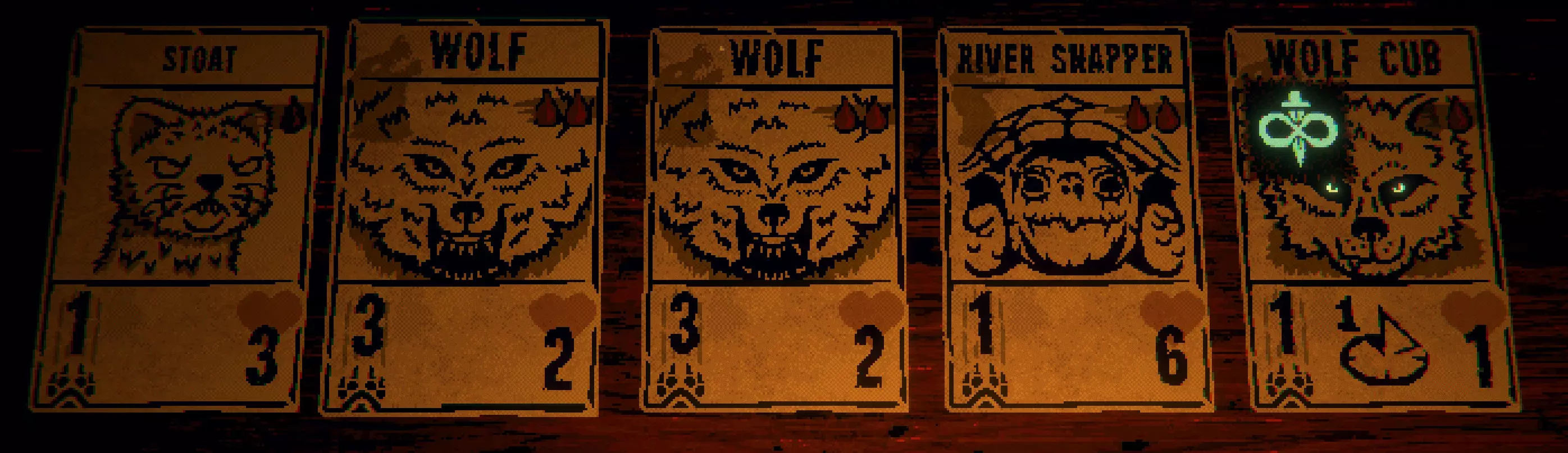
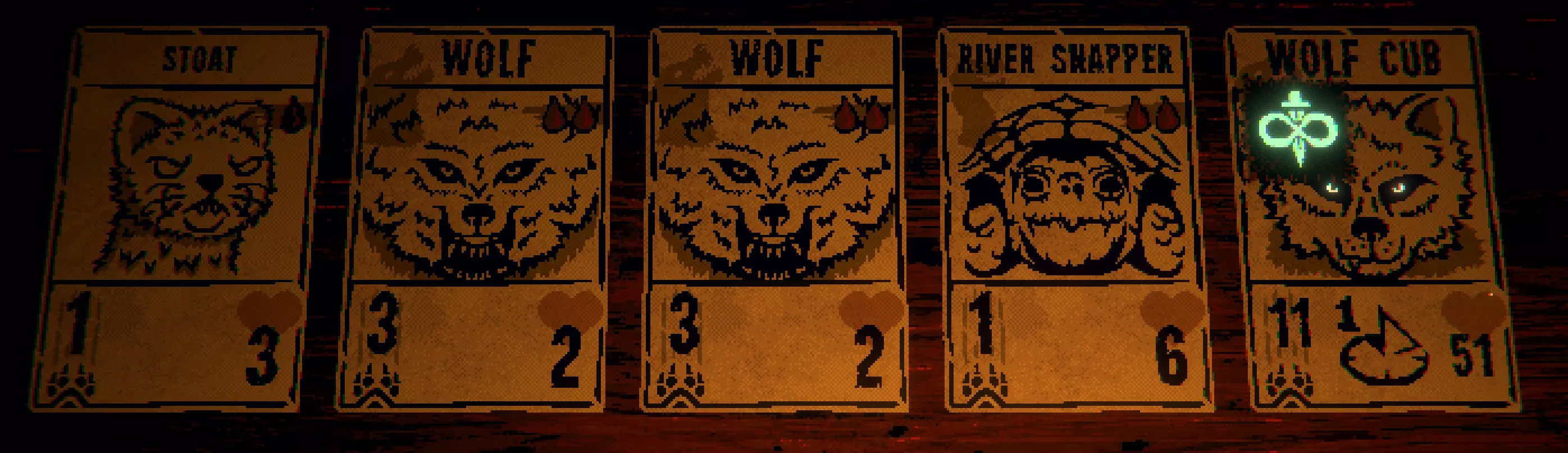
记录下你为哪张卡牌添加了增益或印记(在我的卡组中,我在石碑上献祭了一只猫,将其印记添加到了幼狼身上)。我尚未尝试编辑会说话的卡牌,并且不太愿意尝试,因为这可能会以不易察觉的方式破坏游戏。像之前一样,前往存档文件的playerDeck/currentRun部分,并记录下你卡组中的卡牌。
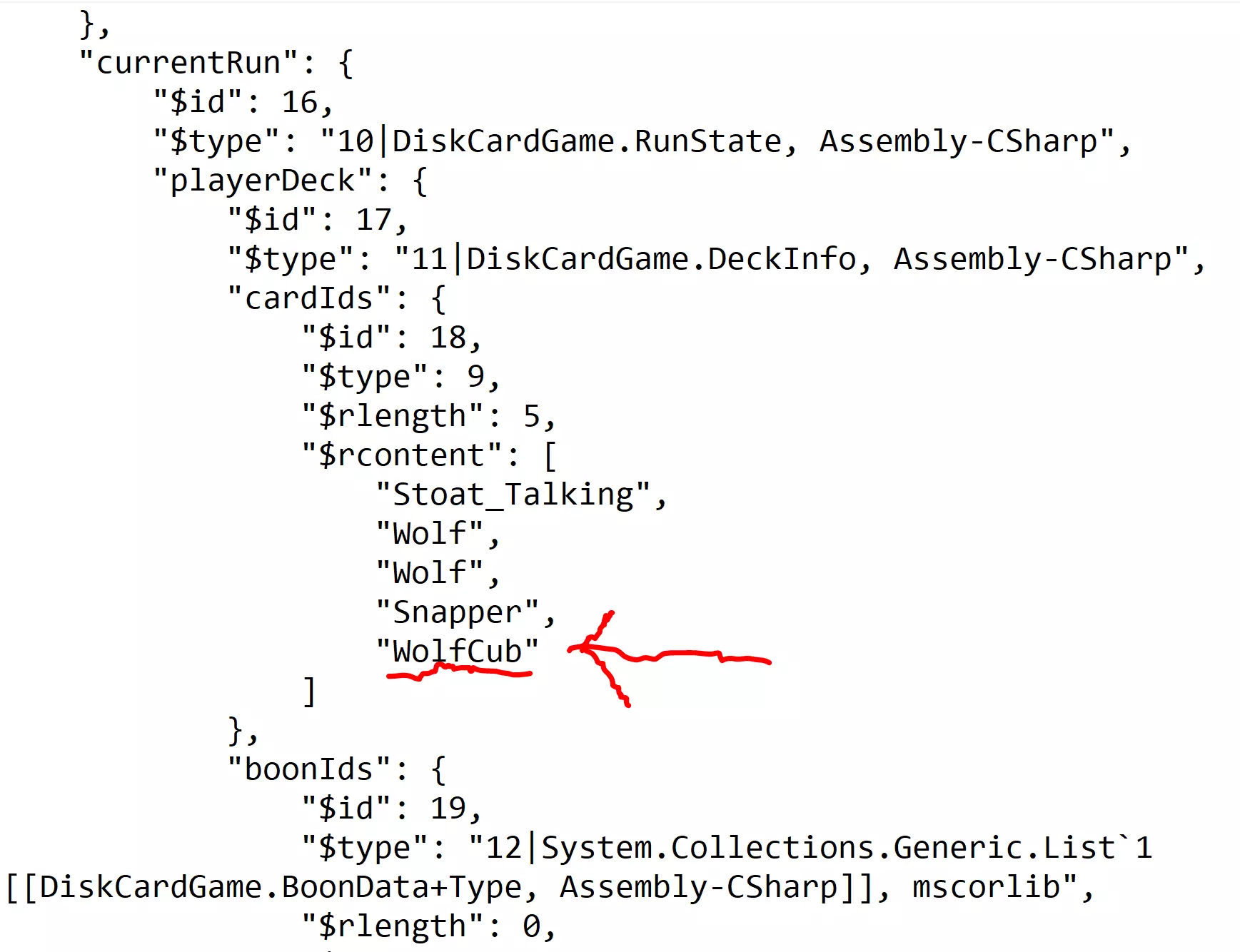
然后向下滚动,跳过Boon Id's标签(正如其名,编辑该标签的方法见下文),直到找到“cardIdModInfos”。这里记录了你牌组中每张卡牌的增益效果和已添加的印记。继续向下滚动,你会看到“$rlength”和“$rcontent”字段,它们分别记录了你手牌中的卡牌数量(5张)和按顺序排列的每张卡牌列表。
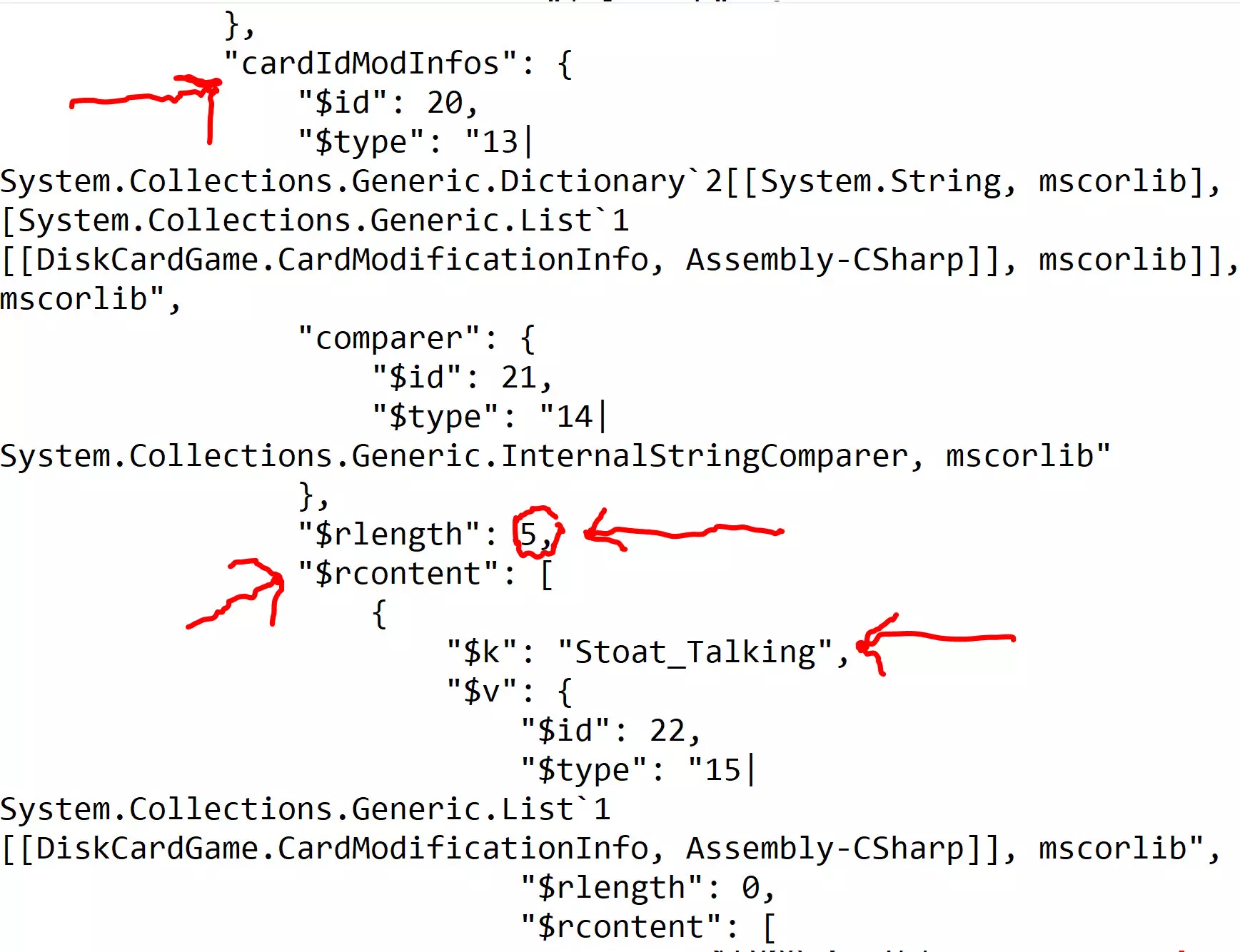
在$rcontent字段中,你需要识别“$k”标签后的卡牌名称。如果某种卡牌有多个,其名称后会列出一个数字。“$v”标签包含多个字段,大多数卡牌的“$rlength”为零,“$rcontent”标签的括号为空,这表示该卡牌未被修改。对话卡牌略有不同,因此现在我先跳过它们。
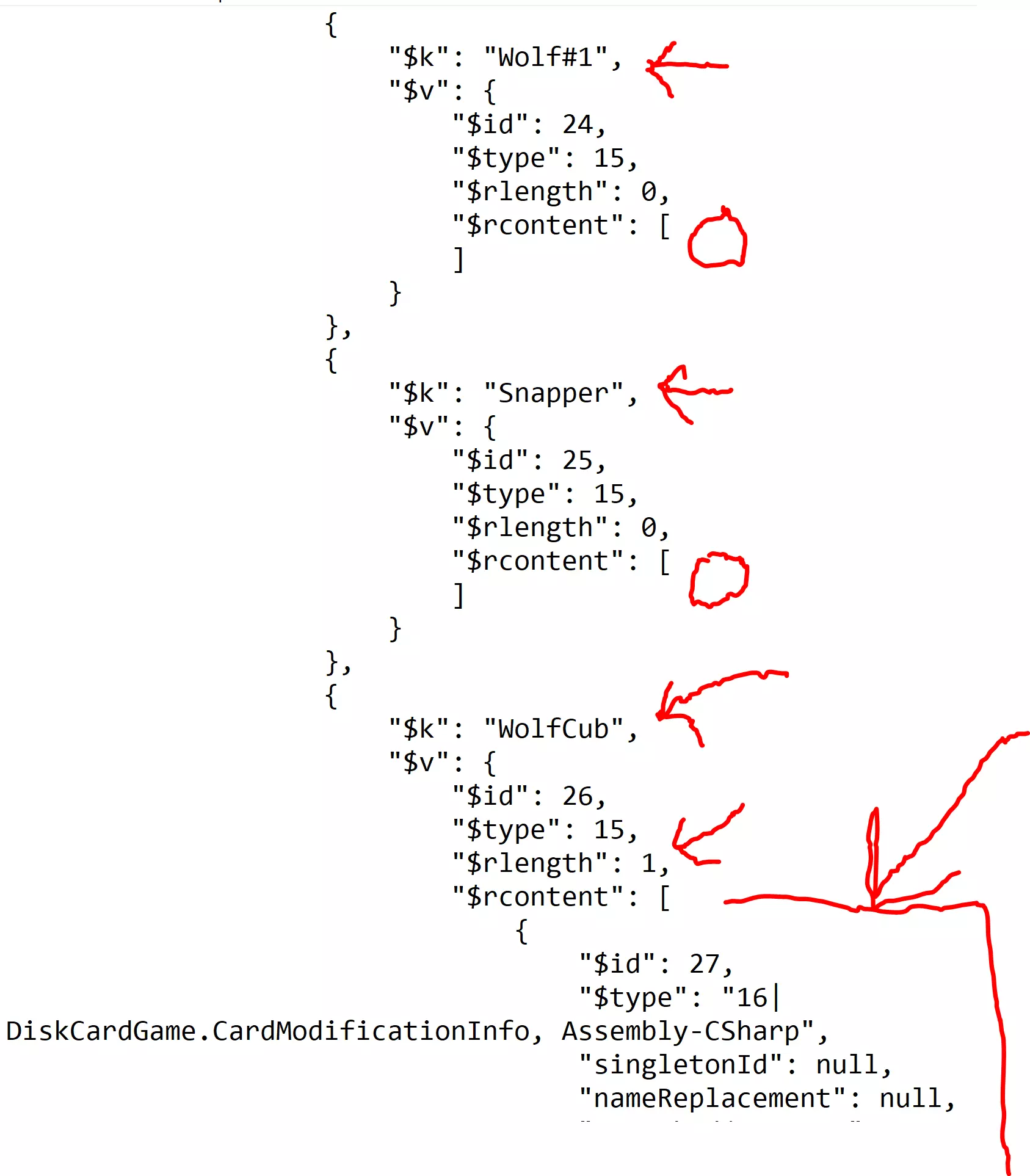
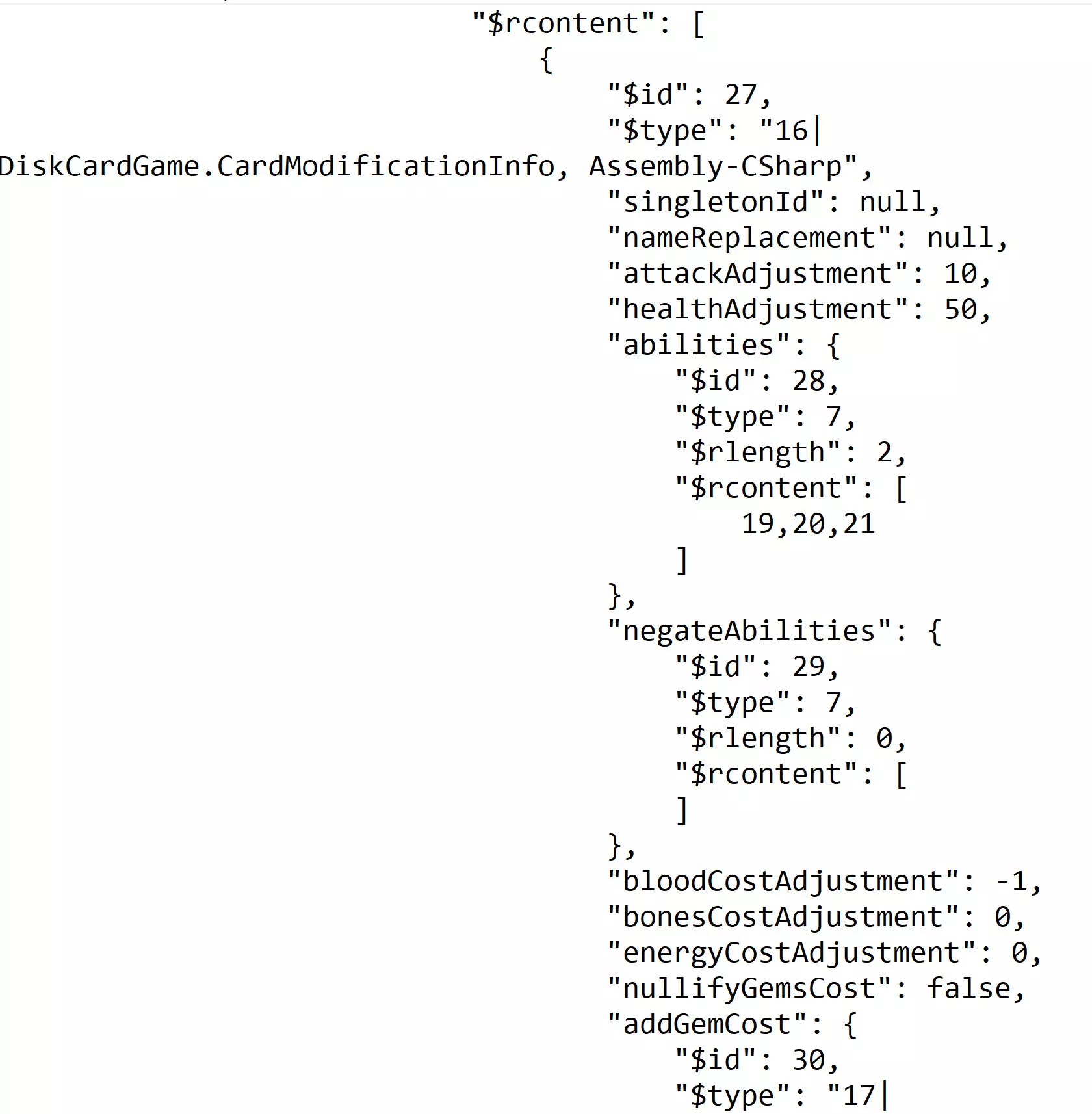
在我的套牌中,幼狼的【$rlength】为1,【$rcontent】的括号内包含诸多内容。有五个值得关注的字段(实际上所有字段都很有趣,但本指南将演示以下这些): 【attackAdjustment】 【healthAdjustment】 【abilities】 【bloodCostAdjustment】 【bonesCostAdjustment】
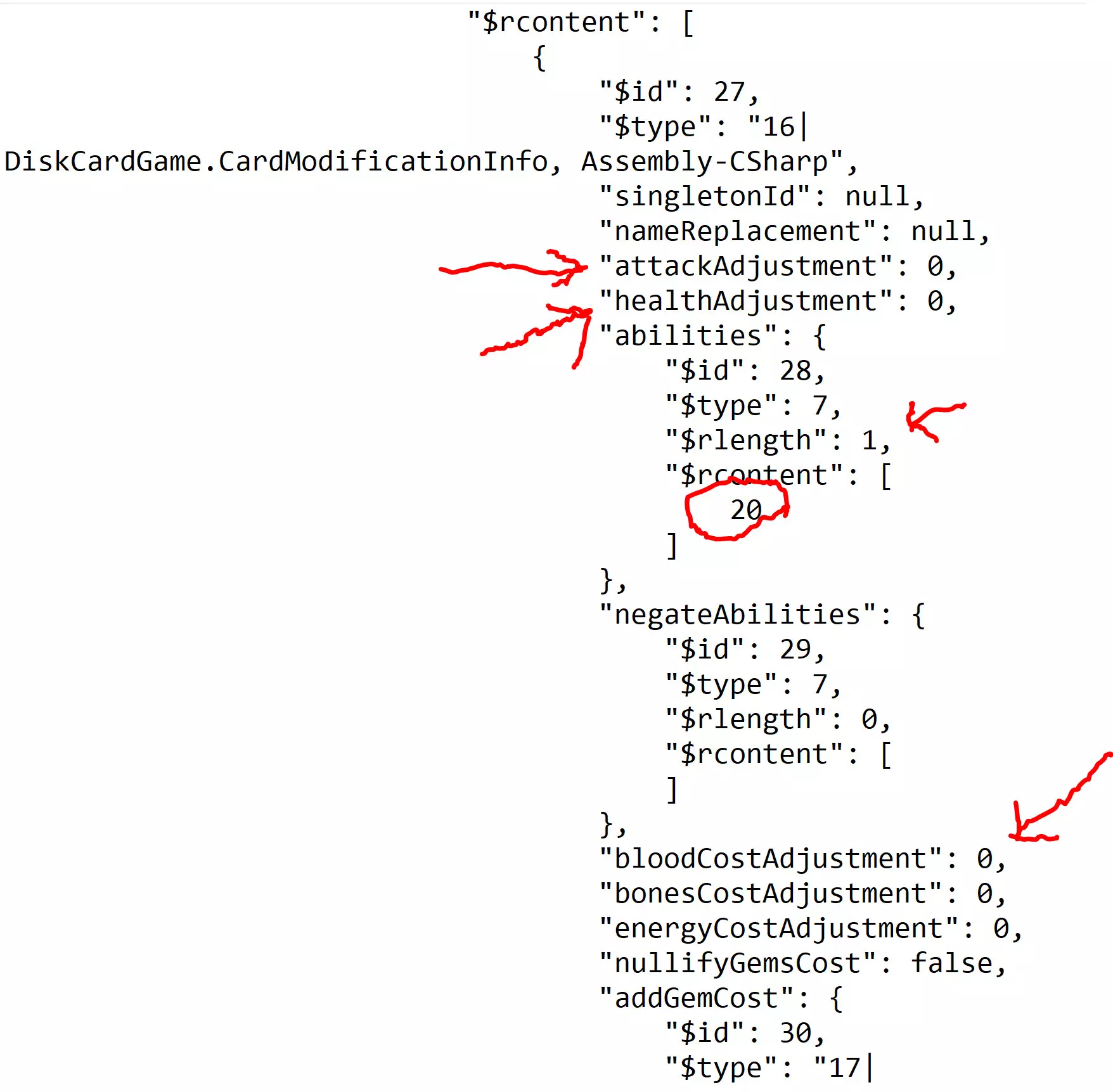
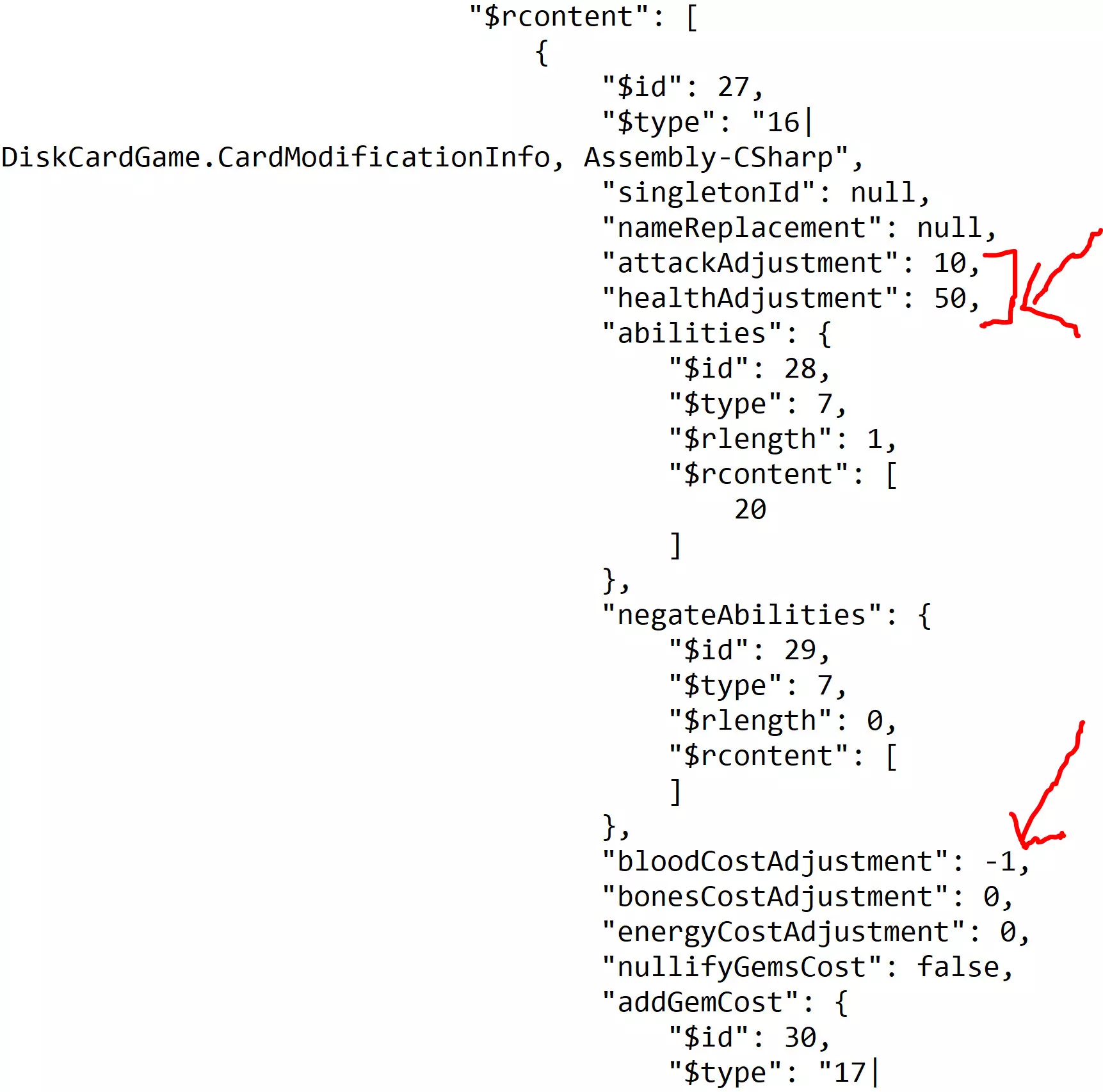
“能力”部分涉及下方添加的【纹章】。其余数值均为零,因为我刚在献祭石给幼狼添加了一个纹章,还没有强化这张卡牌。一张普通的幼狼卡牌,其攻击力/生命值/血液消耗分别为1/1/1。是不是很普通?让我们在attackAdjustment(攻击力调整)后输入“10”,这样它的攻击力就变成1+10=11了。既然都这么做了,不如在healthAdjustment(生命值调整)后输入“50”?现在我们就有了一只像坦克一样耐打的幼狼。不过,还没完呢!如果我有需要骨头的卡牌,就可以编辑“bonesCostAdjustment”(骨头消耗调整)字段。幼狼需要消耗1点血液来使用,既然都做到这一步了,我不太想花整整1点血液来使用它,所以我要在“bloodCostAdjustment”(血液消耗调整)处输入“-1”。
现在我有一只过于强力的幼狼,它长大后能保留我添加的增益效果。不过你肯定想继续强化它,对吧?在“abilities”标签下,还有一个“$rlength”标签,其值为1。“$rcontent”后的括号里是数字20,这表示幼狼添加了编号为20的能力印记。这个印记对应无限牺牲能力(查阅规则手册会发现它在列表中是第20号,能力编号范围为1-34)。为了好玩,我们可以把“$rlength”改为3,“$rcontent”改为19,20,21,这样它就能同时获得编号19(飞行)和21(排斥)的能力了。
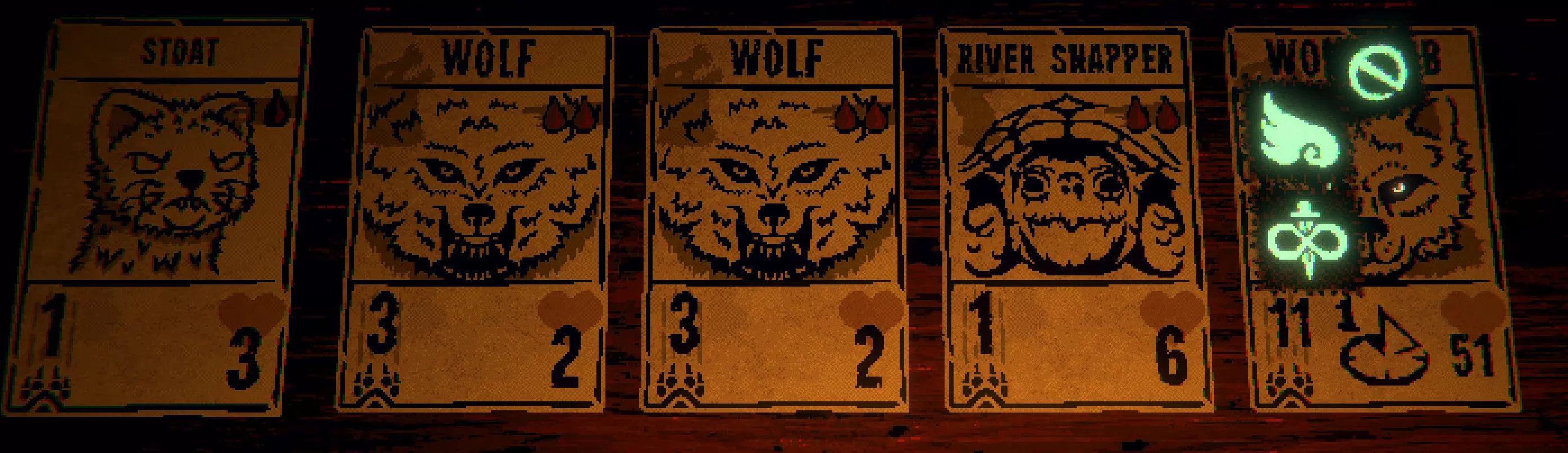
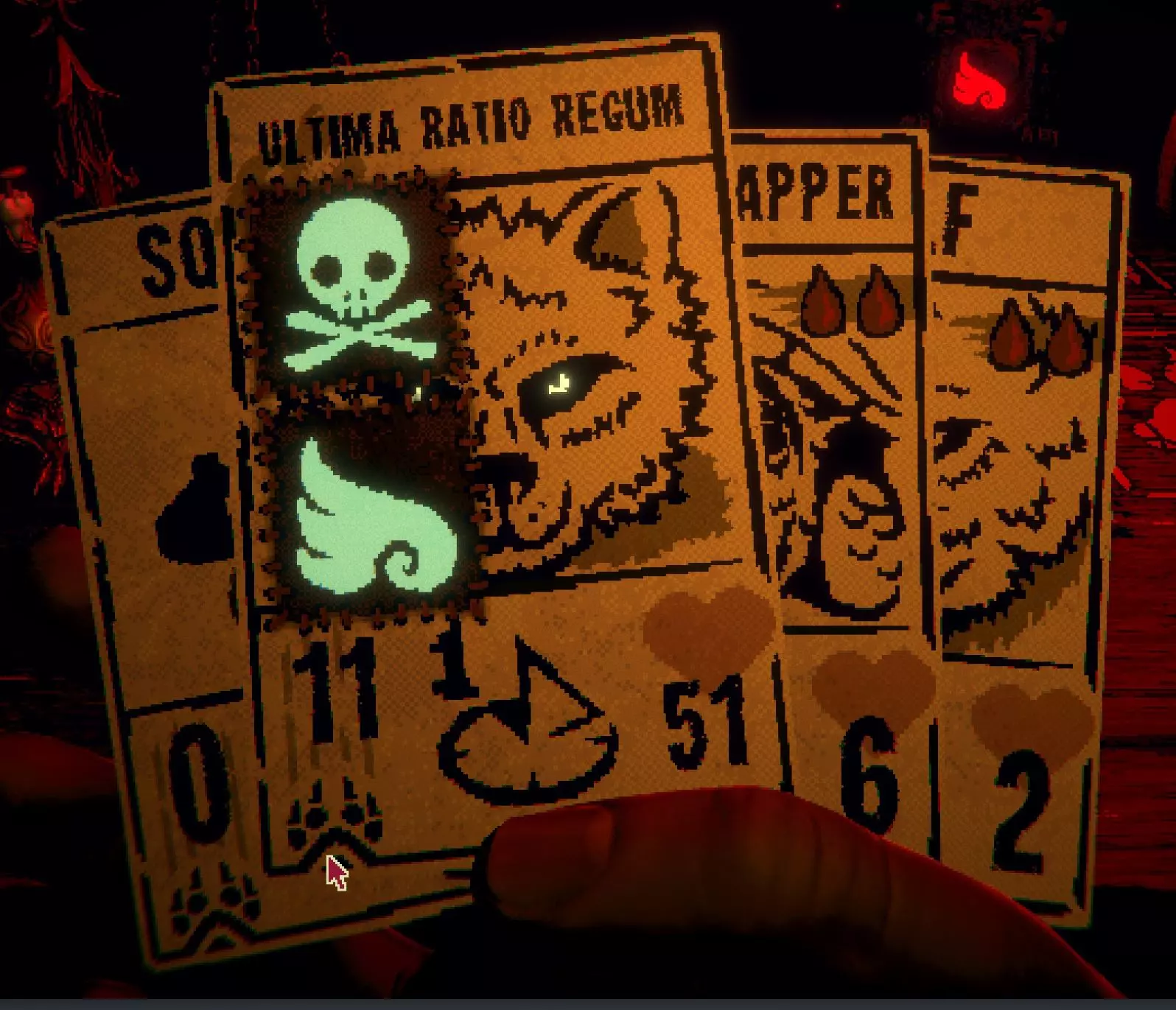
BWUHA-HA-HA-HA-HA!! 不过等等,还有更多内容。这次我们只用【飞毛腿】和【死亡之触】纹章来制作一只幼狼,按照上述方法强化它,然后进入【nameReplacement】标签。我们可以用任何想要的内容替换“null”一词,只要用引号将新名称括起来就行。我们可以叫它“Y.T.的狗”(去读《雪崩》),但我觉得“Ultima Ratio Regum”听起来酷多了(不确定的话可以去查一下,这也是《雪崩》里的一个物品)。
(再次响起邪恶的巴尔坦笑声) 哈哈哈! 最后一点:我检查了大部分印记,但能力27【囤积者】在我尝试时无法生效。输入大于34的数字有时会生成游戏其他章节的印记。 进阶技巧2:通过剪切和粘贴代码编辑卡牌 这是一种简单(但可能破坏游戏平衡)的编辑任何卡牌的方法,即使该卡牌尚未获得强化。我对这种方法的测试不如第一种多,但对我来说是有效的。强烈建议先备份存档。 按照上述方法打开存档文件(我通常在教程结束后立即保存一个存档),并像之前一样导航至currentRun/playerDeck/cardIdModInfos部分。向下滚动,找到你想要添加修改的卡牌(同样,我建议不要编辑会说话的卡牌)。你应该会看到如下形式的代码:
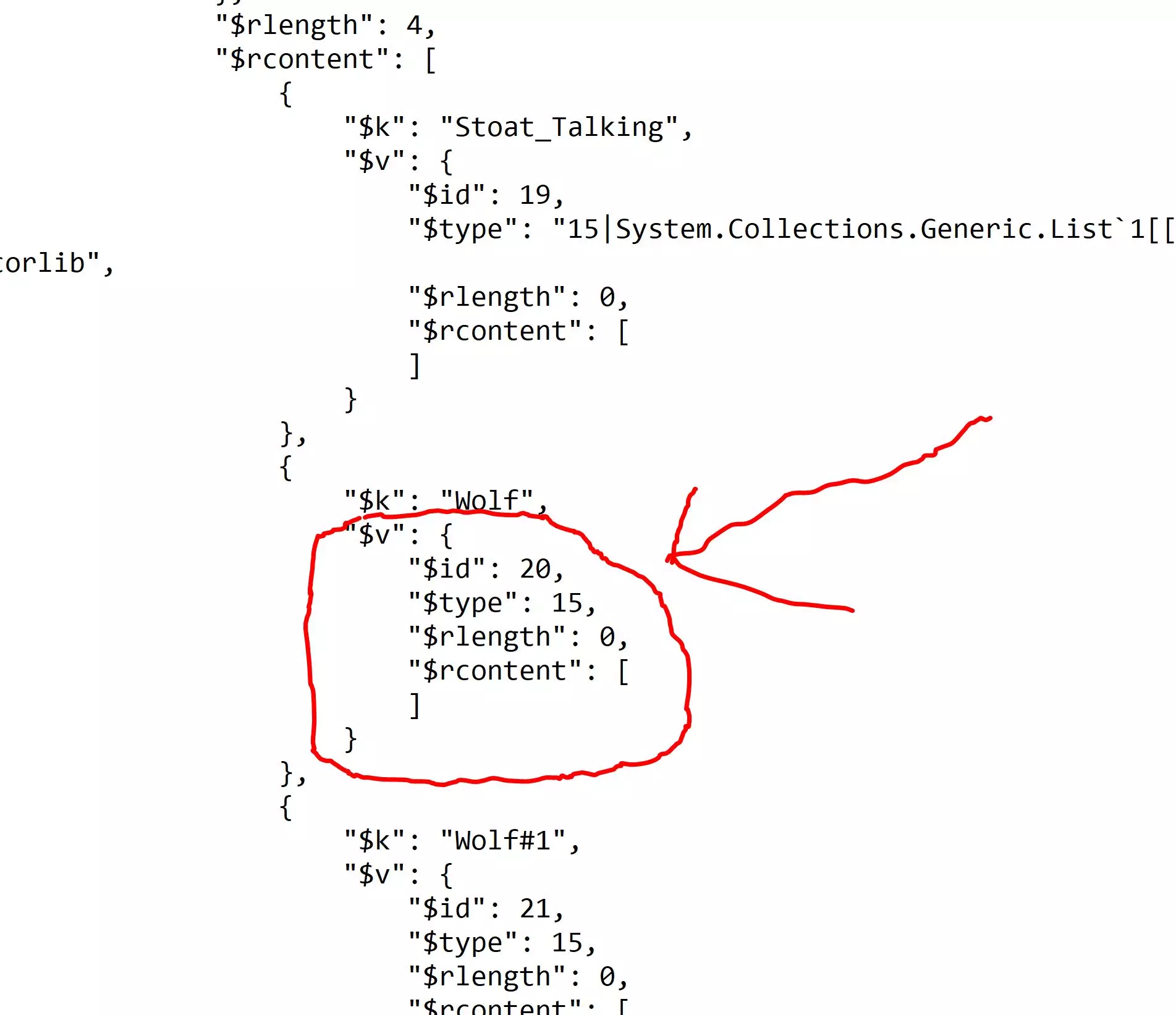
我们将把“$v”记录替换为用于编辑印记和属性的记录。为此,请删除上方红色标记区域,并将其替换为以下代码。你需要替换上方红框中的两个花括号,但保留后面带有逗号的那个花括号。如果删除了错误的括号或逗号,可能会导致游戏崩溃: "$v": { "$id": 22, "$type": 15, "$rlength": 1, "$rcontent": [ { "$id": 27, "$type": "16|DiskCardGame.卡牌修改信息,Assembly-CSharp,单例ID:空,名称替换:在此插入名称,攻击调整:0,生命值调整:0,技能:{ID:28,类型:7,长度:0,内容:[]},无效化技能:{ID:29,类型:7,长度:0,内容:[]},血液费用调整:0,骨骼费用调整:0,能量费用调整:0,无效化宝石费用:否,添加宝石费用:{ID:30,类型:17|System.Collections.Generic.List`1[[DiskCardGame.无法识别内容,已删除。现在你可以按照上述内容进行编辑。游戏代码很智能,即使粘贴的“$id”序号不连续,游戏似乎也会在每次保存时重置它们。游戏的第二部分和第三部分有很多专用字段。血液费用上限似乎为4,骨头费用上限不确定,因此请记住未修改卡片的血液/骨头费用,以防你想增加其费用(但为什么要这么做呢?)。如果你将任何最终数值设为负数,在抽到此卡时游戏可能会崩溃。不确定是否可以混合血液、骨头、宝石、能量的施法费用,似乎代码中最后一个才是游戏实际要求你使用的费用?为安全起见,我建议完全删除现有费用并重新添加不同的费用(但你为什么要这么做呢?)。【negateAbilities】会清除卡片上已有的该类型印记,如果你不喜欢某个已有的能力(比如迅捷),可以将迅捷能力添加到【negateAbilities】字段中,就像添加实际能力一样(记得修改【$rlength】!)。如果大家对本指南有足够兴趣,我可能会添加其他需要编辑的内容。 专业提示3:添加自定义死亡卡牌 要将自定义死亡卡牌添加到初始牌组中虽然有些棘手,但我发现是可以做到的。我不知道当死亡卡牌开始出现时,这是否会导致游戏崩溃,所以一定要先备份存档。 像之前一样找到currentRun/playerDeck,添加"!DEATHCARD_BASE"作为卡牌名称,记得修改"$rlength"并添加适当的逗号。为了后续操作方便,最简单的方法是将其添加到牌组的末尾。记录下"!DEATHCARD_BASE"之前牌组中最后一张卡牌的名称。在我的牌组中,这张卡牌是Snapper。
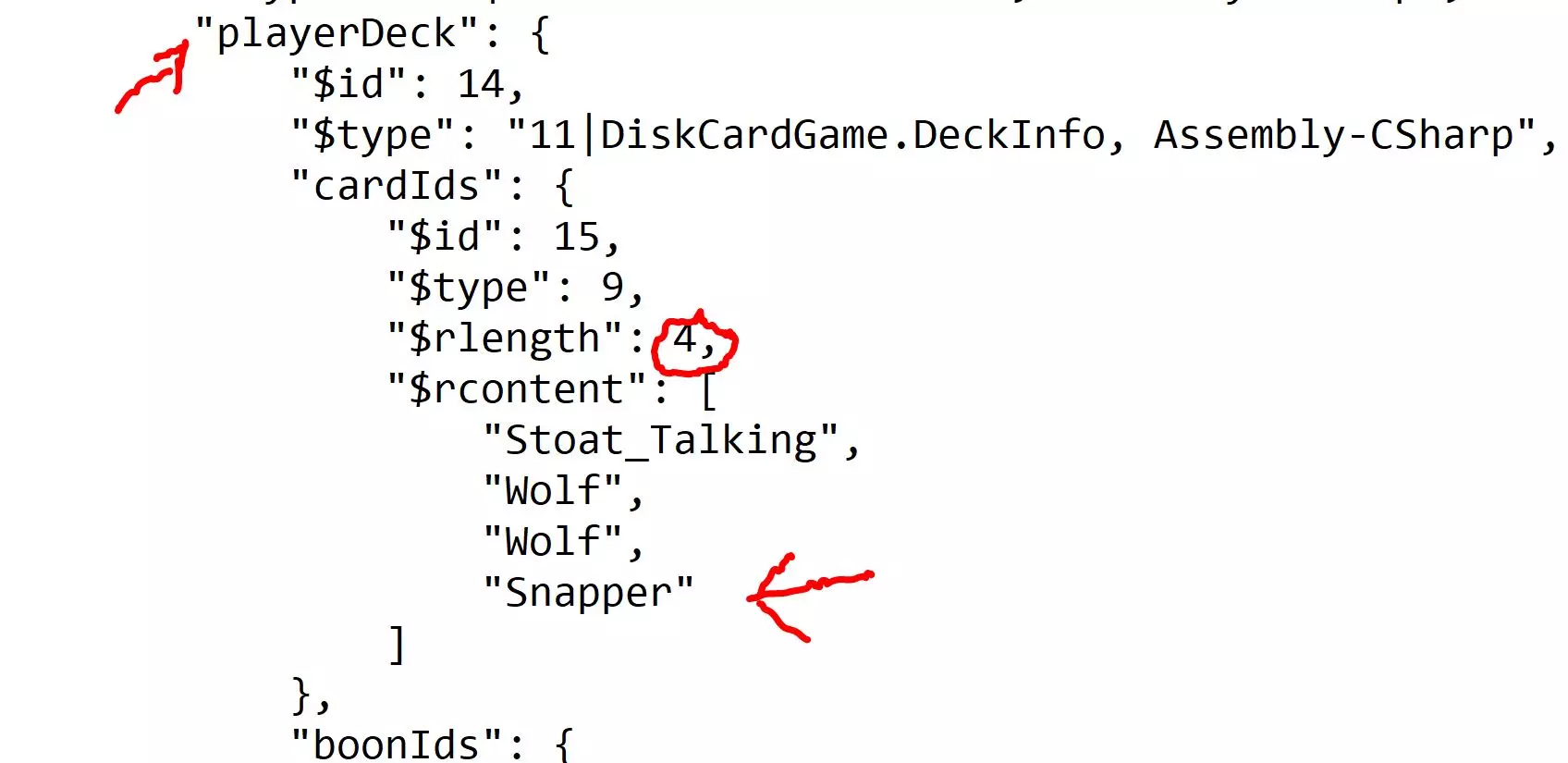
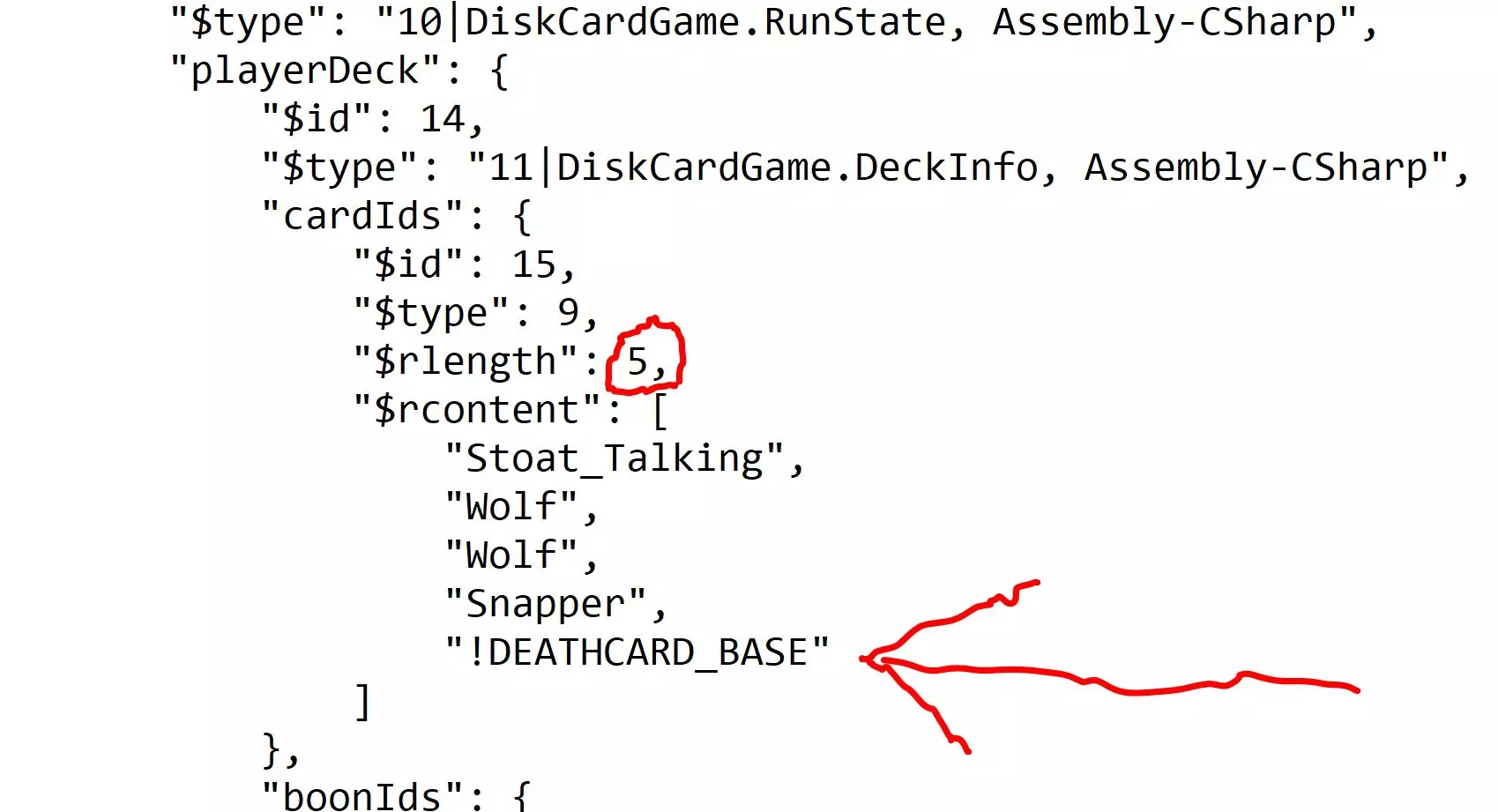
然后找到“cardIdModInfos”记录,将“$rlength”标签更改为你当前卡组中的卡牌数量。继续向下滚动到“$rcontent”记录(这是你之前学习修改印记和属性时修改过的部分),并滚动到卡组末尾。找到卡组中最后一张卡牌(Snapper)的记录。该记录将以“$rcontent”结束,后面跟着一对方括号“[]”(如果这张卡牌没有任何模组,括号将为空),一个花括号“}”结束“$v”字段,以及第二个花括号“}”结束Snapper的记录。
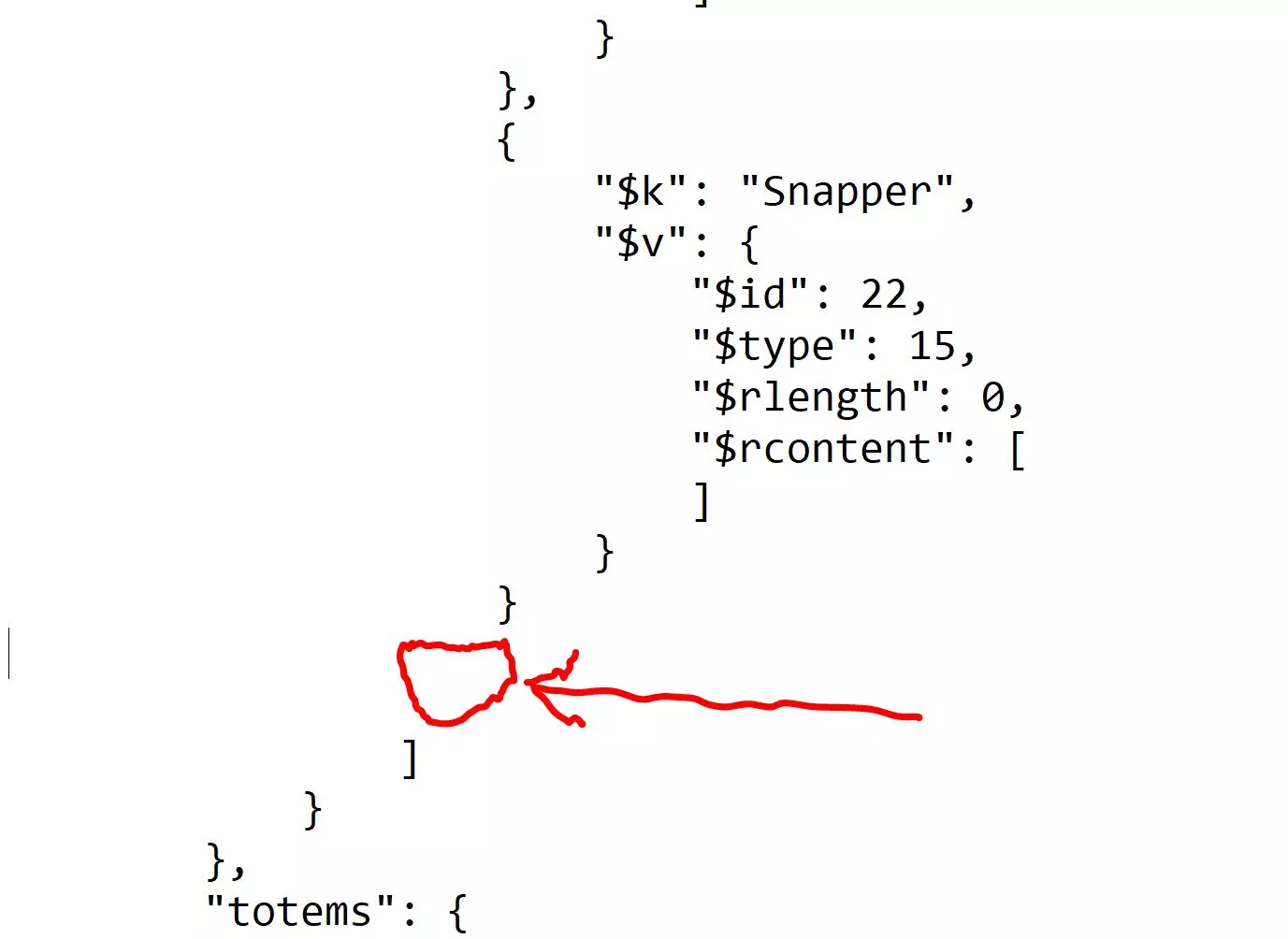
We are going to be inserting code right after this second end-brace (marked below) and before the other end braces associated with the "cardIdModInfos" record. It is very important to insert this code describing your death card in the proper place in your deck (this is why I add it to the end). You want to add a comma right after the second curly end brace, above. The cut and paste this into the marked area (this procedure is very similar to the add-a-mod part of the guide, above). { "$k": "!DEATHCARD_BASE", "$v": { "$id": 119, "$type": 15, "$rlength": 1, "$rcontent": [ { "$id": 120, "$type": 16, "singletonId": null, "nameReplacement": "INSERT NAME HERE", "attackAdjustment": 0, "healthAdjustment": 0, "abilities": { "$id": 121, "$type": 7, "$rlength": 0, "$rcontent": [ ] }, "negateAbilities": { "$id": 122, "$type": 7, "$rlength": 0, "$rcontent": [ ] }, "bloodCostAdjustment": 0, "bonesCostAdjustment": 0, "energyCostAdjustment": 0, "nullifyGemsCost": false, "addGemCost": { "$id": 123, "$type": 17, "$rlength": 0, "$rcontent": [ ] }, "gemify": false, "specialAbilities": { "$id": 124, "$type": 18, "$rlength": 0, "$rcontent": [ ] }, "statIcon": 0, "fromCardMerge": false, "fromDuplicateMerge": false, "fromTotem": false, "fromLatch": false, "fromOverclock": false, "sideDeckMod": false, "nonCopyable": false, "transformerBeastCardId": null, "deathCardInfo": { "$id": 125, "$type": "19|DiskCardGame.DeathCardInfo, Assembly-CSharp", "headType": 1, "mouthIndex": 1, "eyesIndex": 1, "lostEye": false }, "bountyHunterInfo": null, "buildACardPortraitInfo": null, "decalIds": { "$id": 126, "$type": 9, "$rlength": 0, "$rcontent": [ ] } }, ] } }, This gives a zero-ability death card with no sigils, you can modify the appropriate fields as above. If you want to name you card, first change the "nameReplacement" field in the above code to what you want, in quotes. Then search down in the save file for "deathcardName" and change the field from null to the name. Also within this added code is a description of the death card portrait: "deathCardInfo": { "$id": 31, "$type": "19|DiskCardGame.DeathCardInfo, Assembly-CSharp", "headType": 1, "mouthIndex": 1, "eyesIndex": 1, "lostEye": false }, I haven't tried much editing of these four tags, no idea what the possible values are but I've tried low integers. You know you've been playing Inscryption too much when... #5: You go into a restaurant and order, "Fresh fish, easy choose," (This and many more are in my other guide, check it out!) Unique and custom cards (yet more spoilers) The death cards are represented as "!DEATHCARD_BASE". This will look for added info in the file such as its cost, stats and sigils. Unless you are experienced at editing save files (see above), you probably want to pass on editing this and I'm not sure how easy it would be to add it to your starting hand. There is also "!GIANTCARD_MOON" which will crash your deck as you can't play it (but it looks fun to see what happens, you did remember to make a backup, right?). The !STATIC!GLITCH card is just like it sounds, a picture of static until it is drawn. It could be a fun one to add to your hand, but the concept gets tiring fast. You can also hack your deck for the other parts of the game, or mix and match cards from one part to another. Sometimes it works, but again this is beyond the scope of this guide. If you take cards from a later part of the game and put them into an Act 1 deck, be sure to edit the casting cost as necessary else you won't be able to cast them. Editing boons, totems, consumables and such (more spoilers!) Editing Boons: Go to currentRun / playerDeck as above, and right after the cardIDs in the deck you should see a "boonIDs" tag. If it look like this, then you will need to cut and paste some code: "boonIds": null, When Boons are active, then there is a full record like this: "boonIds": { "$id": 151, "$type": "12|System.Collections.Generic.List`1[[DiskCardGame.BoonData+Type, Assembly-CSharp]], mscorlib", "$rlength": 3, "$rcontent": [ 7, 2, 1 ] }, If your save has just "null" after "boonIDs", then cut and paste everything in the curly braces so that it now looks like the code above. Set the "$rlength" tag to however many boons you want to have (three in my example above). In the square brackets after "$rcontent" add the numbers of the boons you want. The numbering follows the rulebook numbers, so 1 is Ambidextrous Deal (draw two cards), 2 is Magpie's Eye, etc. I haven't tried entering numbers higher than 7. Totems: There are three records of note: "totems", "totemTops", "totemBottoms" totemBottoms is just the abilities like Flyer, Bifructated Strike, etc. and follows the numbering in the rule book (see above in adding sigils for more description). totemTops lists the tribe and follows this numbering: 6: insect 5: lizard 4: deer 3: wolf/lupine 2: bird/avian 1: squirrel To give yourself a complete totem you need to add a record to the "$rcontent" tag. As far as I can tell you can only give yourself one complete totem at a time. Be sure "$rlength" is 1. Then add the following to the "totems" record: "totems": { "$id": 45, "$type": "19|System.Collections.Generic.List`1[[DiskCardGame.TotemDefinition, Assembly-CSharp]], mscorlib", "$rlength": 1, "$rcontent": [ { "$id": 46, "$type": "20|DiskCardGame.TotemDefinition, Assembly-CSharp", "tribe": 1, "ability": 9 } ] }, This gives you a totem of tribe 1 (squirrel) that gives them ability 9 (fecundity, or "makes a copy in your hand once it's played"). Now you have squirrels that make a copy of themselves every time they are played! As far as I can tell, any combo of tribe and ability is possible. Consumable items: There are 11 types of consumables in the original game: "SquirrelBottle", "Pliers", "BirdLegFan", "GoatBottle", "TerrainBottle", "PiggyBank", "Hourglass", "Scissors", "SpecialDagger", "FrozenOpossumBottle", "GooBottle" As far as I can tell they need to be spelled out in the "consumables" record after the totems. Add these just like cards (e.g. if you want three Scissors then this is how the record should read: "consumables": { "$id": 49, "$type": 9, "$rlength": 3, "$rcontent": [ "Scissors", "Scissors", "Scissors" ] }, If you give yourself more than three items at a time, it will probably crash the game. Getting the items from the oil painting: The wall oil painting can be edited by looking for this code (it might appear twice, the first instance should be in the current run record) "oilPaintingState": { "$id": 226, "$type": 22, "isAscension": true, "puzzleSolution": { "$id": 227, "$type": 8, "$rlength": 4, "$rcontent": [ null, null, null, null ] }, "puzzleSolved": false, "rewardIndex": 0, "rewardTaken": false } (I have the Kaycee mod beta, you probably won't have the "IsAscension" tag if you aren't in beta). The puzzleSolution / $rcontent record holds a list of card names, going from left to right across the game board. Type in whichever cards you want or type 'null' (without quotes) for an empty space. Can just put a "Squirrel" on one slot to make it easy. Or even just change "puzzleSolved" to true and "rewardTaken" to false. You can adjust the reward index to get different rewards starting with 0 (if this goes too high you might crash the game, I haven't experimented). Weird and worrying stuff in the save file (spoilers!) (work in progress, if there's interest I might add more) Disclaimer: Editing these part of the save file could very well crash your game. Make a backup before you do any editing. There's a field for "eyeState" which starts as zero. If you set it to 1 you get the "bloody vision" view. Set it to 2 and you can see the magic invisible paint markings. Another field is "riggedDraws". This appears in both the act 1 and 3 sections of the save file. It seems like if there is a list of cards in this record, then you will draw these in your next battle (assuming you have these cards in your deck). For example, right after I picked up the Stunted Wolf card this is how the record looked: "riggedDraws": { "$id": 249, "$type": 9, "$rlength": 2, "$rcontent": [ "Wolf_Talking", "Stoat_Talking" ] }, This looks like it means the talking Wolf and Stoat will be drawn, which leads into a game event of the two cards talking to each other. Maybe you can make sure that you get a particular card with a draw by editing the above code? (but the rigged draw seems only to work for one battle then has to be re-edited) It's easier to give yourself the Magpie boon in the above section of the guide. An unstated assumption of the game is that the draw is always random, but there are when Adam Smith's invisible hand rigs the draw. "playerLives" and "maxPlayerLives" seem to be just as implied, but the time I edited it I crashed the game. Maybe if you are down a life, you can edit this to restore it? But pushing your maximum above three doesn't seem to work. I haven't tried setting the max down to one, but one of the challenges in the Kaycee mod gives you only one candle. "currency" gives the number of excess teeth you have, and "skullTeeth" is the number free for the taking. "survivorsDead" is the campfire state. Zero is normal. If all the survivors are dead (equals 1) then later in the game you can warm up a card and get extra dibs without fear of the survivors eating your card. If you are not aware that the campfire survivors could be killed off, here is how to do it in-game. Later on you have a chance to repeatedly buff a card at the fire, with the risk that each time the survivors might eat it. Use a RingWorm or Adder for the fire and keep buffing until the survivors eat it (BURP!). The rest of the times you go to a campfire there will be no one there. I am not sure how "difficultyModifier" is implemented, each encounter seems to have a difficulty value of its own. I've edited a save to get three of the special daggers. Entered a battle, let myself take damage to arrange to get to exactly -4 health on the scale. Then used the first dagger (plop!), then the second (plunk!)...then the third (thunk!).... Where exactly did the third eye come out of?? ...and how in the world did I see the second eye hit the scale, let alone the third eye?? There's a tag near the end of the save file called "ouroborosDeaths". Enough said...(wink-wink!) There's a whole lot of possibilities for map editing, maybe this will be the next guide? BTW I've been talking about editing Act 1 in this guide, but there's plenty that can be done with the later acts.
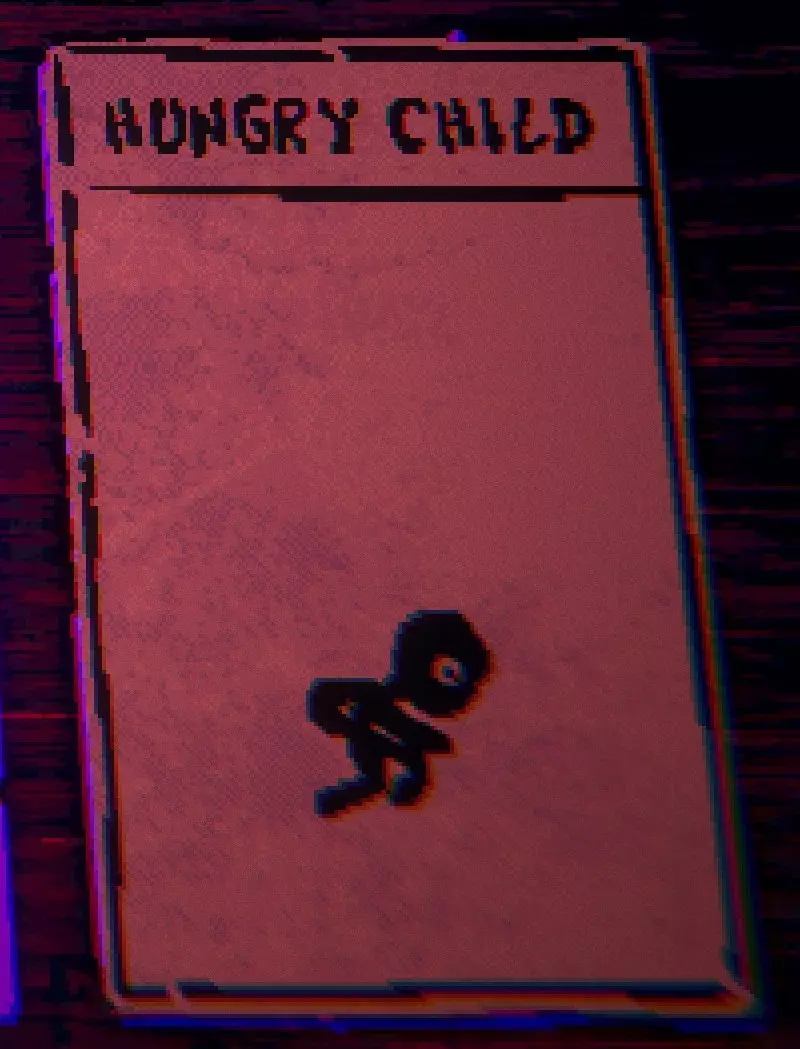
如果你在一场战斗中献祭黑猫九次,据说它会变成一只巨大的不死猫(我从没试过)。另外,如果你献祭一次泽西恶魔卡牌(卡牌上名为“13号孩子”),它会变成一只2/1的飞行生物。我当时正在强化衔尾蛇,场上还有松鼠/不死图腾。我重复进行这样的循环:打出一个混种生物(因图腾获得不死印记)和一只松鼠(不死),施放衔尾蛇,然后献祭泽西恶魔来获得第二滴血(混种生物和松鼠回到我的手牌)。我会重复这个过程并施放衔尾蛇(再次献祭泽西恶魔)。我没数献祭了多少次,但在某个时候,这张卡牌变成了【饥饿的孩子】,没有任何属性值或施放费用。
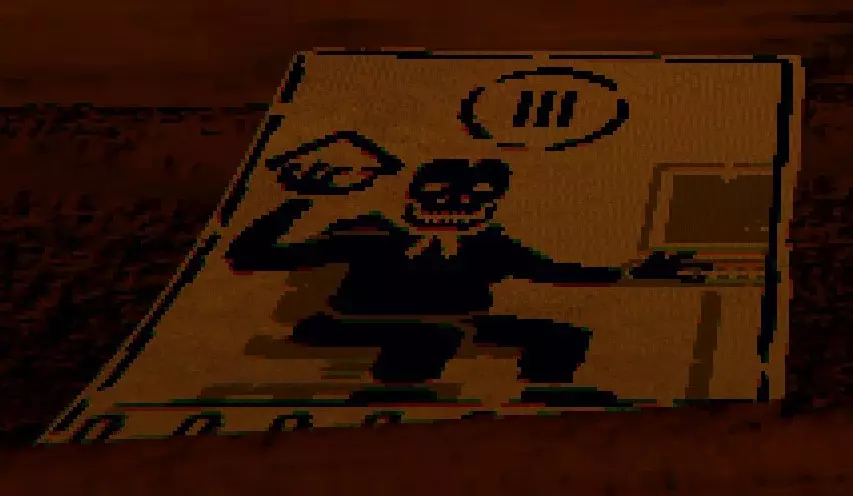
如果你多次击败莱西却没有获得胶片,那么在人偶桌附近会出现一个奇怪的闪烁物体。它会像游戏初期被灰熊连续攻击时那样,以一种故障般的切屏效果消失。之后,这张卡牌会出现在人偶桌下方。当我试图靠近并捡起它时,它也消失了。这张卡牌看起来像是坐在电脑前的卢克拿着一张魔力石,我猜它的能量消耗是3点。我很好奇这到底是怎么回事。 如果你还没发现的话,可以往卡组里添加【Mothman_Stage3】(一只完全成长的怪异幼虫)。或者试着添加【Starvation】卡牌来取乐。 你也可以往手牌里添加【Squirrel】(但你为什么要这么做呢?)、【Bee】或【Rabbit】。 还有,【Stoat】和【Stoat_Talking】是不同的。虽然你可以将“骡”置入手中,但它似乎不会获得额外卡牌,只是一个0血、0/5的移动路障。我本想尝试第一回合的连招:1.打出骡,献祭骡,打出白鼬,3.使用骡提供的卡牌和松鼠尝试一回合击杀。 在存档文件中地图节点信息之后、“pastRuns”部分之前,有三个带有数字的标签:“playerAvatarHead”“playerAvatarArms”“playerAvatarBody”。这是你的小雕像外观。如果你不喜欢它的样子,可以更改数字。我认为0到7的所有数值都应该有效,但我没有进行太多实验。 长 elk(存档文件中为“Snelk”)是一张还不错的卡牌,但更好的是获取它的印记。河鲷(“鲷鱼”)是一个强度较低的巨兽,但在献祭石处获得长 elk 的印记后会大幅增强。此外,你还会得到一个“长鲷鱼”(呃)! 当桶上牛头骨的眼睛亮起时,“bonelordPuzzleActive”为 true。要点亮它们,需多次拍打头骨的鼻子(九次?十三次?)。这似乎是在游戏地图上开启骨 lord 试炼的方法,且我认为需要在地图展开前完成。 凯茜模组(测试版) 自从发布以来,我每天都在玩这个模组,这些是我想到的一些笔记。存档文件的总体结构似乎与原版游戏相同,只是在末尾多了一个“ascensionActive\": true”标签。地图和之前一样是一系列相互连接的节点,许多记录和标签如【当前回合】/【玩家卡组】看起来也类似。不过我强烈建议你将原版游戏的存档与下载模组后的存档分开保存,以避免出现崩溃问题。 你的“普通”卡组和进度保存在存档文件开头的【当前回合】/【玩家卡组】等记录中,如上文所述,但在这之后新增了一整个名为【进阶数据】的部分。大型记录的结构类似,同样包含【对话数据】和【进度数据】等大型记录及其各种子记录。印记和其他带编号的能力已被重新调整,规则手册对这些能力采用了不同的编号方式(包含了新能力以及其他能力,例如第三幕的闹钟印记)。添加自定义印记可能需要使用与原版游戏不同的编号。v0.22版本中新增了一种消耗品【BleachPot】。
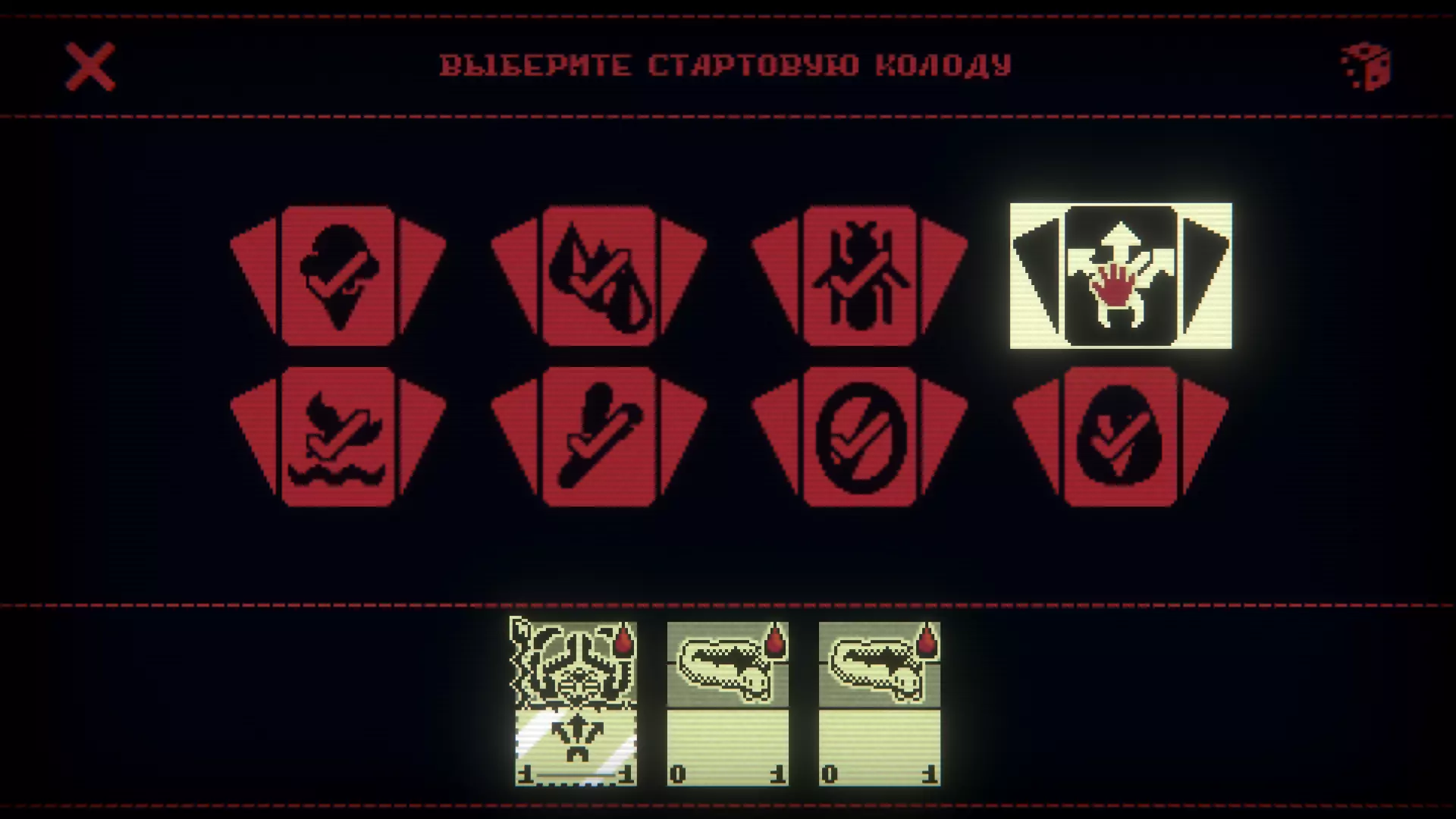
这是能移除刻印的魔法画笔。为了获得额外乐趣,可以用这件物品对着月亮使用……继续向下滚动,你最终会在“ascensionData”大记录中找到“currentRun”/“playerDeck”记录。有一个有趣的记录似乎并未出现在原版游戏的存档文件中,它位于文件末尾附近:“currentStarterDeck”: “Vanilla”,“conqueredStarterDecks”: {“$id”: 225,“$type”: 8,“$rlength”: 1,“$rcontent”: [“Vanilla”]}最基础的初始卡组名为【Vanilla】。随着你赢得挑战,你会解锁其他套牌,比如【骨头】、【蚂蚁】和【螳螂神】。 卡牌大剧透: 你可能会解锁一张名称和属性与普通卡牌相同的卡牌,只是卡牌名称末尾带有一个“?”(如下方 Boss 稀有宝箱中的卡牌所示)。
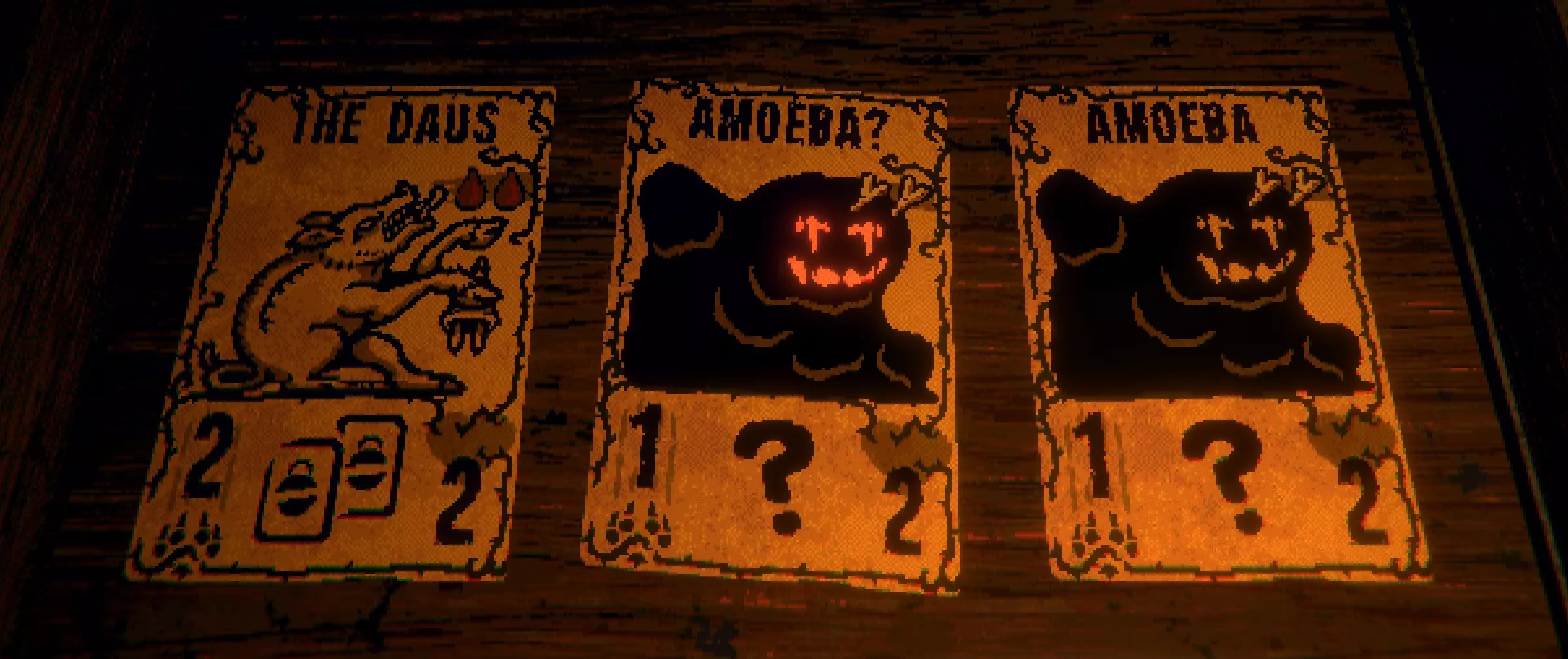
这似乎是一个分身怪(它会以“伊奇拉克”的名称出现在你的牌组的【$rcontent】分类下)。当你查看牌组或抽牌时,它会复制你牌组中另一张卡牌的属性(生命值、印记等)。因此,当你打出一张卡牌时,你永远无法确定自己实际上打出的是不是伊奇拉克。当你真的打出它时,准备好迎接一些“惊喜”吧……
顺便一提,伊吉拉特(Ijirait,复数形式)似乎是一个真实的因纽特传说(至少根据维基百科记载):“无论他们变成什么形态,眼睛始终是红色的。他们的真实形态与人类相似,但眼睛和嘴巴是侧向的。”(这解释了卡牌艺术设计的原因,以及在击败首领后从宝箱中看到该卡牌时的提示) 如果你的牌组中有两张伊吉拉特,当抽到其中一张时,它可能会变成另一张伊吉拉克的形态!这样你就会得到一张4/1的具有排斥效果且无施放费用的卡牌。 地图由一系列相互连接的节点组成,与普通游戏类似,但地图顺序有所不同。此记录出现在地图数据之后,似乎对其进行控制: "regionTier": 2, "regionOrder": { "$id": 397, "$type": 16, "$plength": 3, "$pcontent": [ 2, 0, 1 ] } 正常的地图顺序为0、1、2,对应林地、湿地、雪线。我上述的顺序在当前的模组游戏中为雪线、林地、湿地。存档文件中保存普通(非模组)数据的早期部分也有此记录,但"$pcontent"的顺序是常规的0、1、2。 此记录之后是标签"currentOuroborosDeaths"(见前文关于抽取此卡牌的部分)和"numRunsSinceReachedFirstBoss"。【布谷鸟卡牌剧透】:在看似随机的间隔下,本应出现在对手棋盘上的破碎蛋不会破碎,而是变成一个完整可用的渡鸦蛋。我在莱斯希拥有鸟类/臭味图腾时,将布谷鸟卡牌放在空位对面使用时触发了这个效果。我推测这其中存在关联,即布谷鸟被图腾“削弱”,无法像往常一样打破蛋,因此渡鸦蛋取代了通常的破碎蛋出现在棋盘上。