换一换
换一换 




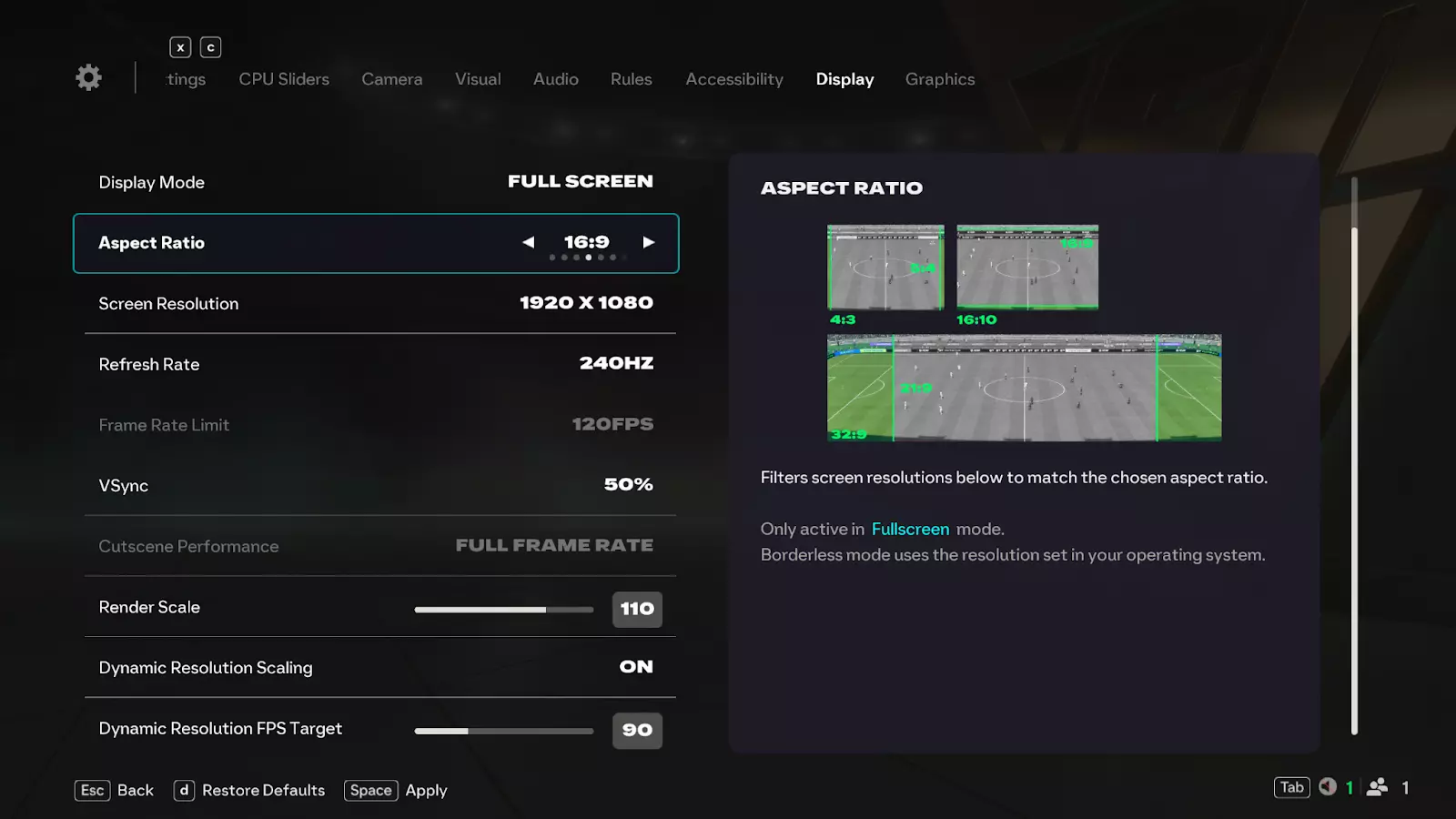
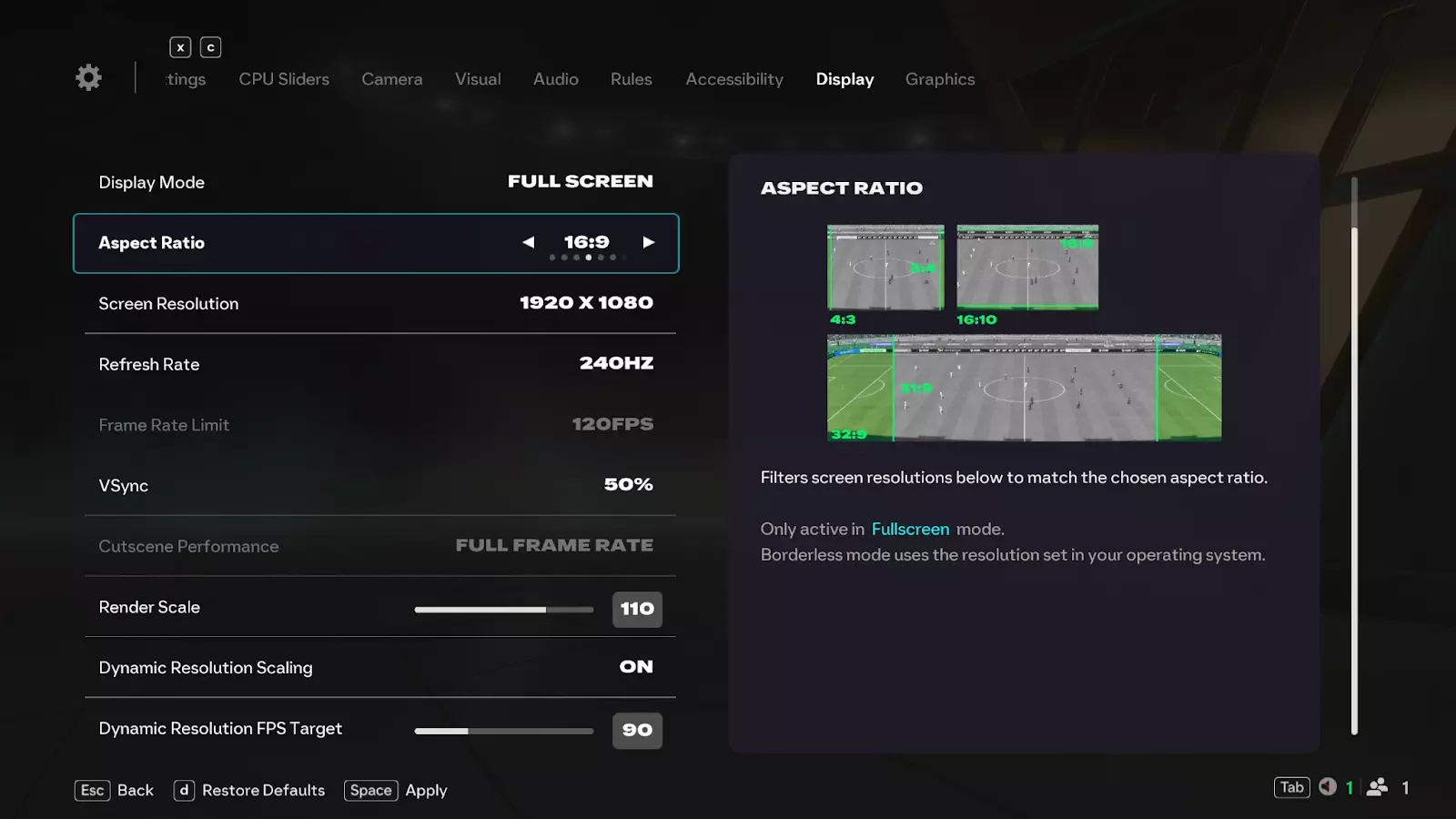
Hey everyone! In the PC Deep Dive Pitch Notes we’re diving into all the ways we’ve improved the PC experience for EA SPORTS FC 26. Thanks to your feedback, we’ve made foundational changes that give you more control, smoother performance, and clearer settings across the board. Here’s what we’ll cover: Controller Support Enhancements Expanded Display Settings Improved Graphics Settings Usability Display Settings Guide Graphics Settings Guide PC Requirements EA Javelin Anticheat Controller Support Enhancements We know many of you play on PC with controllers, and this year we’ve added more immersive support. DualShock®4 Support: Full vibration support when playing on PC with a USB connection. DualSense™ Controller Support: Includes haptics and adaptive triggers for a more immersive experience with a USB connection (basic vibration support over Bluetooth). Expanded Display Settings We’ve added more flexibility so you can fine tune FC 26 to match your setup and preferences. Active Monitor Selection: Choose which monitor you want to run the game on directly from in-game settings. Aspect Ratio Filter: Quickly find supported resolutions based on your display’s aspect ratio. More Frame Rate Limit Options: Frame rate limits now extend beyond 120 FPS, with support for 144, 165, and 240 FPS. More VSync Options: Sync your frame rate to a fraction of your monitor’s refresh rate (½, ⅓, ¼). Render Scale: Adjust resolution relative to your render setting, especially useful for windowed or borderless modes. Dynamic Resolution FPS Target: Set a performance target to trigger dynamic resolution scaling automatically. Improved Graphics Settings Usability We’ve worked to make PC graphics settings easier to understand and quicker to configure. Informative Settings Descriptions: Every graphics setting now includes descriptions and impact details on CPU, GPU, and VRAM usage. Graphics Quality Presets: Switch between predefined options like Low, Medium, High, Ultra, and Auto to adjust quality settings (restart required to take effect). Display Settings Guide Here’s a breakdown of key display settings, grouped for easier navigation. Screen Setup Active Monitor (NEW): Choose which monitor displays the game in Borderless or Full Screen. Display Mode: Borderless: Fills your screen without borders (cannot be resized). Fullscreen: Uses your entire screen. Windowed: Runs in a resizable, movable window. Aspect Ratio (NEW): Filters resolutions by chosen aspect ratio (Fullscreen only). Screen Resolution: Sets display resolution. Higher = sharper image, but lower performance (Fullscreen only). Borderless uses OS resolution. Tip: use Render Scale to adjust in Borderless. Frame Rate & Refresh Refresh Rate: Controls how often your monitor refreshes (Fullscreen only). Frame Rate Limit: Caps FPS when VSync is off. VSync: Syncs FPS to your monitor to prevent tearing. Off: No sync. On: Matches refresh rate. 50%, 33%, 25%: Syncs FPS to a fraction of refresh rate. [Example: On a 240Hz monitor → 120 FPS (50%), 80 FPS (33%), 60 FPS (25%). Cutscene Performance: Controls FPS in cutscenes, menus, replays, and set-piece cameras. Half Frame Rate: 50% of refresh rate or frame limit. Full Frame Rate: Matches your frame rate limit. Disabled when VSync is fractional. Scaling Tools Render Scale (NEW): Adjusts render resolution relative to screen resolution. Below 100% = better performance, less sharp Above 100% = sharper visuals, heavier GPU load. Dynamic Resolution Scaling (DRS): Lowers resolution dynamically to maintain FPS (GPU-limited only). Dynamic Resolution FPS Target: Set the FPS you want DRS to maintain. Example: Target 90 FPS → resolution scales in real time to stay near 90 FPS.
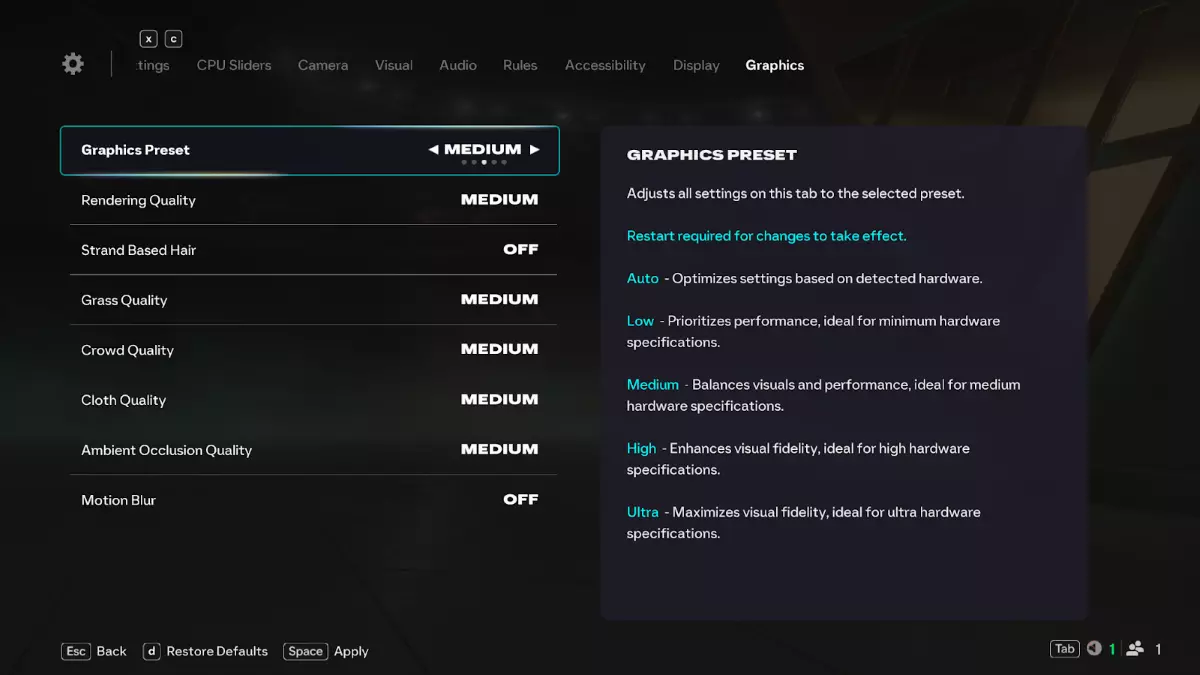
图形设置指南 更改图形设置后需要重启游戏才能生效。 图形预设(新增) 自动:针对您的硬件进行优化。 低:最适合最低配置的电脑。 中:视觉效果和性能的平衡。 高:为性能较强的电脑提供更高的画质。 超高:为顶级硬件提供最大细节。 画质设置 渲染质量:控制球员、体育场和物体的细节与光照。 CPU:高占用 GPU:高占用 VRAM:高占用 基于发丝的毛发:模拟单独的发丝。 CPU:中等占用 GPU:高占用 VRAM:低占用 布料质量:决定球衣的外观和物理效果。 CPU:高占用 GPU:中等占用 VRAM:低占用 环境光遮蔽质量:通过阴影增加深度和真实感。CPU:高占用 GPU:高占用 VRAM:中等占用 球场设置 草皮质量:控制球场细节。 CPU:低占用 GPU:中等占用 VRAM:低占用 观众质量:控制观众细节和动画。 CPU:中等占用 GPU:中等占用 VRAM:中等占用 画面特效 动态模糊:快速移动的物体产生轻微模糊效果。 CPU:低占用 GPU:低占用 VRAM:低占用
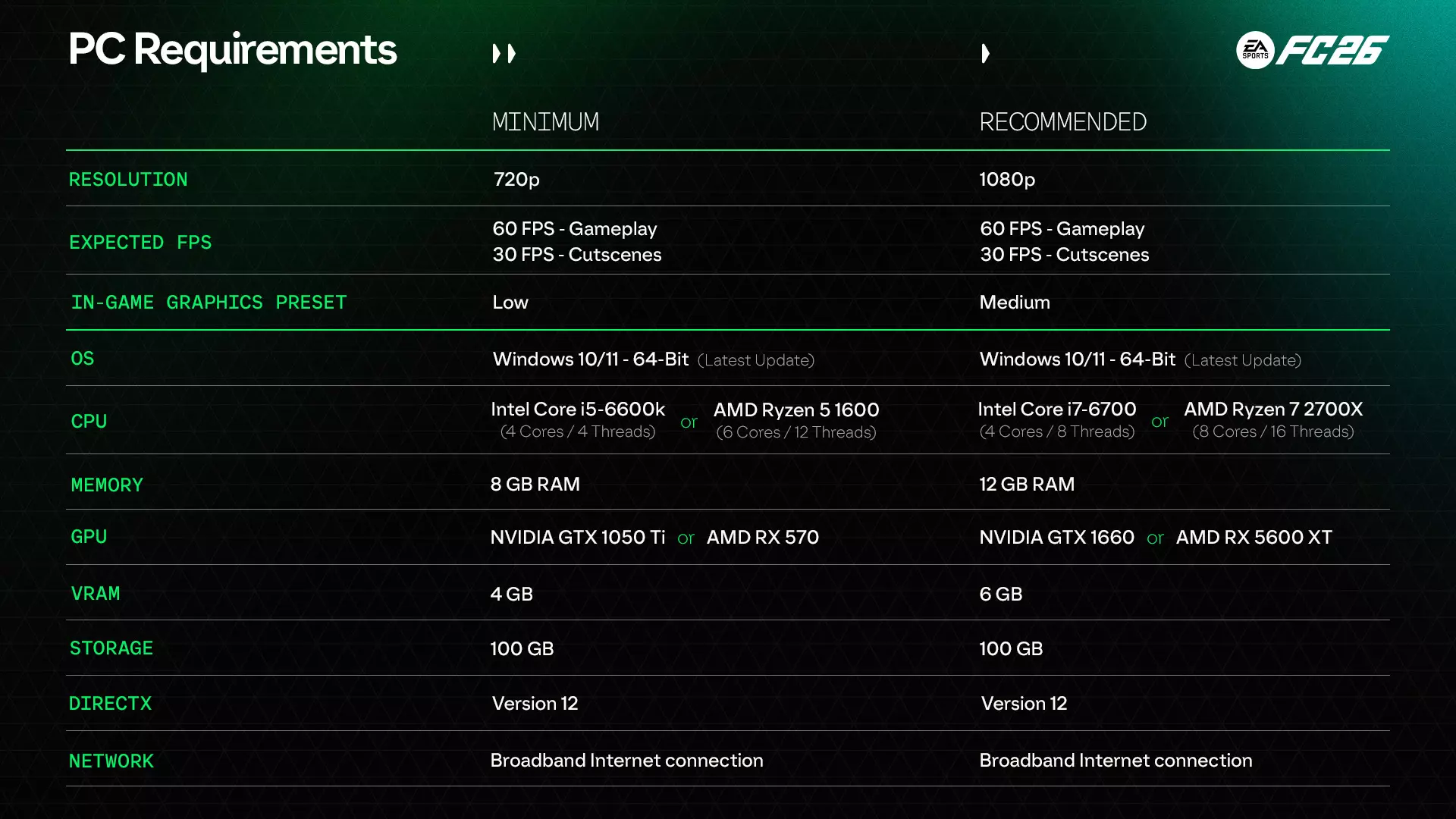
PC配置要求 以下是《EA SPORTS FC 26》的最低及推荐PC配置,供你准备相应的设备: 最低配置(720p,60 FPS游戏体验,低画质预设) 操作系统:Windows 10/11(64位,最新更新) 处理器:Intel Core i5-6600k 或 AMD Ryzen 5 1600 内存:8 GB RAM 显卡:NVIDIA GTX 1050 Ti 或 AMD RX 570(4 GB 显存) 存储空间:100 GB DirectX:12版本 网络:宽带互联网连接 推荐配置(1080p,60 FPS游戏体验,中画质预设) 操作系统:Windows 10/11(64位,最新更新) 处理器:Intel Core i7-6700 或 AMD Ryzen 7 2700X 内存:12 GB RAM 显卡:NVIDIA GTX 1660 或 AMD RX 5600 XT(6 GB 显存) 存储空间:100 GB DirectX:12版本 网络:宽带互联网连接
EA Javelin 反作弊系统 您已向我们反馈在PC端打击作弊行为的重要性,而这也一直是我们的首要任务之一,我们将持续开发和改进解决方案以保护公平游戏环境。 对于PC版《EA SPORTS FC 26》,我们将继续通过EA Javelin反作弊系统来保护公平游戏。 EA Javelin反作弊系统的作用 EA Javelin反作弊系统旨在尽可能预防、识别并处理不良游戏体验。它从《EA SPORTS FC 26》发售首日起就会启动,并在您游玩时始终在后台运行。 《EA SPORTS FC 26》的新变化 1. 改进的检测方法:EA Javelin反作弊系统现在包含新的检测类别,能更好地识别不公平游戏行为。《EA SPORTS FC 26》更新内容: 1. 改进公平竞赛控制:FC 26 新增了更多控制措施,以确保在你游玩时 EA Javelin 反作弊系统正常运行且未被篡改,从而防止各种形式的不公平游戏行为。 2. 内核级保护: 部分作弊程序在计算机操作系统的最深层级运行,这使得传统检测方法几乎无法发现它们。EA Javelin 反作弊系统在 kernel 级运行,因此能够有效识别并阻止这些作弊程序。对于 FC 玩家而言,这意味着: - EA Javelin 反作弊系统仅在你的电脑上运行 EA SPORTS FC 26 时启动。