



水质模组指令指南
这是《水质模组》的官方指令指南。 请将您的问题发送至Discord,在那里您更有可能从其他玩家或我这里获得回复。 https://discord.gg/GrPK8cB ### 介绍 指令主要用于调整《水质模组》的设置。要输入指令,请打开聊天菜单(按Enter键);您会看到一个文本框弹出,如下图所示(图1)。此外,还有一个用于客户端设置的用户界面(UI),相关信息请参见“客户端设置”部分。 指令的基本结构与《我的世界》等其他视频游戏类似,指令以正斜杠“/”为前缀,使用空格作为分隔符。需要说明的一点是,指令示例中的括号并非必需,系统会自动过滤掉它们。
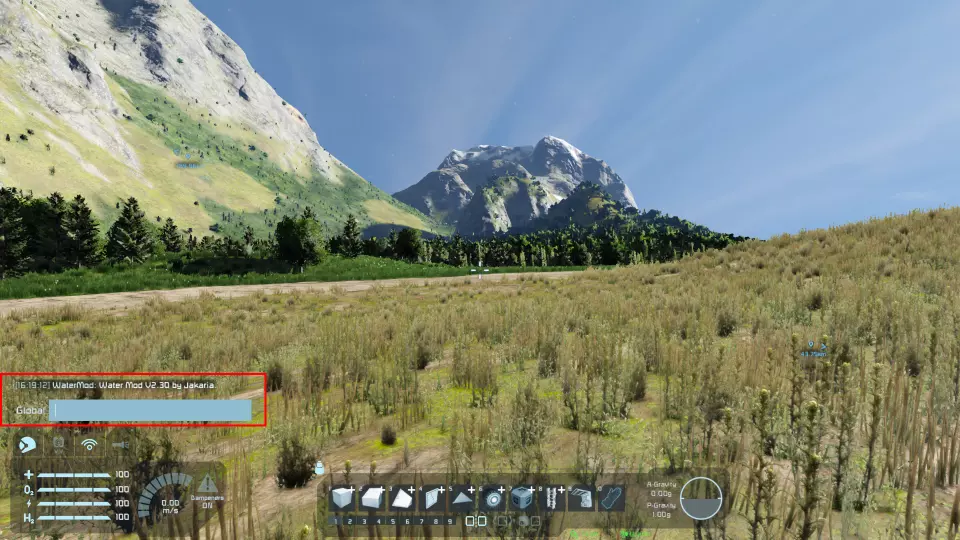
图1:命令框 此处用于运行所有文本命令,您可能运行的第一个命令是 **/wcreate**。该命令会在距离镜头最近的行星上生成水,若镜头不在行星引力范围内则无法生效。关于水面的进一步调整(半径、波浪高度等)将在服务器设置部分进行。 客户端设置 以下命令仅在客户端运行,不会对服务器相关内容产生影响。这些设置用于优化性能、调试以及为水 mod 配置最佳用户体验。 客户端设置提供 UI 界面!打开聊天菜单时按 F2 即可使用。
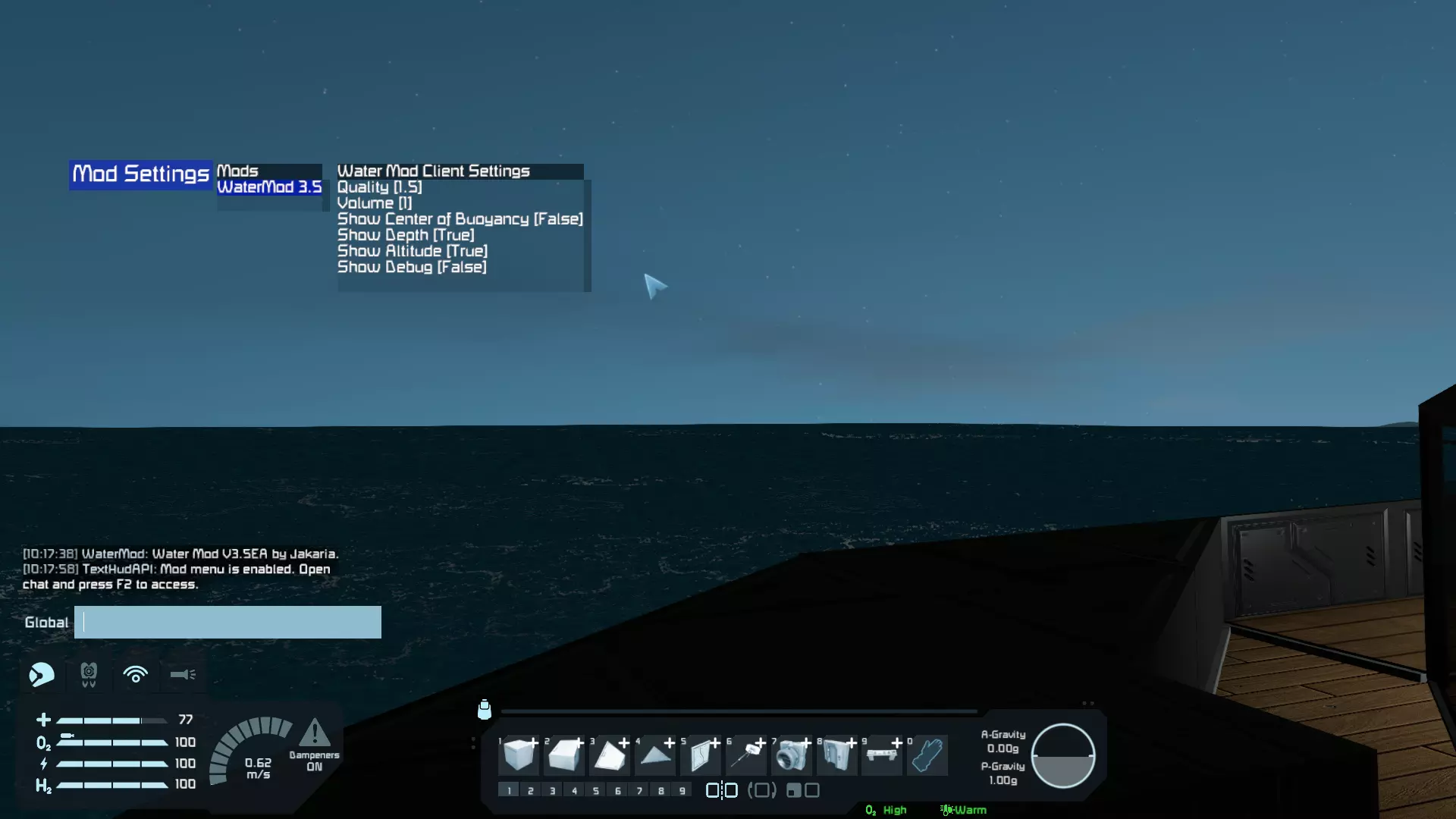
/wquality [0.4-1.5]This command determines how detailed the Water Mod will look, and will overall determine how good performance you will get. It affects the Level of Detail in the water surface and a higher number will make the detail increased at a cost of performance. /wcobThis command is used by builders to help determine whether their build is balanced or not. It renders a red dot at the center of buoyancy of the ship, like center of mass. Basically, if the center of buoyancy is above the center of mass, the ship is passively balanced and will not tip over. Additionally, having the center of buoyancy closer to the center of mass will improve the stability of the ship overall. /wdepthThis command is to be used in conjunction with Text Hud API. Default enabled, it renders text on the screen that represents how deep the camera is below the surface of water. It will not render if the camera is above water. /waltitude [0.0]Like /wdepth, this command requires Text Hud API to function. It operates differently in that it renders the altitude you are above the surface of water. It's a great feature to use if you struggle to tell the distance from the surface. The command takes one parameter which is used to set the maximum altitude. Setting the altitude to 0 will disable the altimeter. /wversionThis command repeats the welcome message of the Water Mod, telling the version. /wsilentThis command toggles the "Water Mod Vx.x by Jakaria" message shown when loading into the world. /wvolume [0.0-1.0]This command is pretty self-explanatory, it changes the volume of water related sounds like splashing and ambience. /wdebugThis command's rarely ever used; it just enables debug mode for when I need to use it. /wsettingsThis command prints all the settings a planet currently has in a somewhat readable format. I'm not sure why people needed it, but it's here. /wfogThis command only works in creative and for admins, it's specifically for building scenarios underwater. The command toggles fog and as such, it's really useful for the previously mentioned reason. /wexportThis command is used by planet modders to export all the settings. If you want more information on this, join the Discord Server[discord.gg] and see the pins in #water-api[discord.com]. /wdiscordOpens the Water Mod discord link in the steam overlay. https://discord.gg/GrPK8cB Server Settings These commands will affect the entire server and may require administrator permissions to run. Physics and visuals will be affected by these commands. To get the value of the setting, leave the parameter empty and it will return it. /wcreateThe first command you'll likely ever run, this command creates water at the closest planet relative to the camera. If the camera is not in a field of gravity, it won't be able to detect the planet and will fail. /wradius [0.1-2.0]This command is used to set the radius/depth of the water. While you may be inclined to increment by a huge value, it's not a good idea. The radius is a ratio to the minimum altitude of voxel on the planet, meaning that 1.0 is the smallest value before you have to dig to reach it. I highly suggest incrementing by very small values (hundredth places) /wrradiusGets the approximate radius that is relative to the camera, helps you not have to guess radius. /wwaveheight [Height]This command is used in conjunction with the latter wave commands; this one in particular sets the height of the waves using meters as a unit. Keep in mind that waves go both negative and positive, meaning that setting the wave height to 2 meters will cause the waves to go both up 2 and down 2 meters. /wwavespeed [0.0-1.0]This command is used in conjunction with the other wave commands; this one sets how fast the waves move in no particular unit. The smaller the value, the faster the waves. /wwavescale [Height]This command is used in conjunction with the prior wave commands; this one sets the frequency of the waves. The larger the value, the smaller the waves. /wremove This command removes any water at the planet closest to the camera. /wresetThis command resets most values to default in-case a user messed up customizing the settings, it changes everything but radius. /wbuoyancy [0.0-10.0]This command is a multiplier for the closest water. Setting the value to zero disables buoyancy completely. /wbirdThis command toggles whether or not seagulls exist at the planet. Seagulls only exist for immersion. /wfishThis command toggles whether or not fish exist at the planet. Fish only exist for immersion. /wtexture [Texture]This command sets the surface texture of the water using a TransparentMaterial's Subtype ID. The default water textures are JWater, JWaterFull, JWaterDark, JWaterLight, JCheese, JLava, and JDebug. If you want information on how to create custom textures, join the Discord Server[discord.gg] and see the pins in #water-api[discord.com]. /wtexturesLists all available textures. /wcrush [Damage]This command sets the amount of damage that is done to grids or players when they are below their crush depth. Crush depth is determined dynamically by the hydrostatic pressure around the block and the maximum pressure the block can take. /wpdragThis command toggles player drag. It's mostly obsolete. /wtransparentThis command is used to toggle whether the surface of water is rendered as transparent. It can improve performance at the cost of graphical fidelity. /wlitThis command is used to toggle whether the surface of water is lit. Disabling lighting on the surface can make it appear emissive like lava. /wrate [Multiplier]This command sets the multiplier rate at which ice is collected underwater. Collectors can collect ice underwater. /wcolor [Red] [Green] [Blue]This command sets the color of the underwater fog. The values inputted should be between the ranges 0 and 1. To convert a value that is out of 255, just divide it by 255. /wtideheight [Height]This command is used to set the height of tide. Google what tide is if you don't know. /wtidespeed [Speed]This command is used to set how frequently tide changes. There isn't really an unit. /wfoamThis command toggles whether sea foam is rendered. It can improve performance but at the cost of lesser visuals. /wmaterialsLists all available physics material types (Lava, Water, etc..) /wmaterial [Material]Sets the physics material of the closest water. /wcurrentspeedThe speed of the water current in m/s. /wcurrentscaleThe size of the current noise generator, smaller numbers makes it less frequent. You can preview the currents with /wdebug. Complete Command List Use player chat box to input commands, default key is 'Enter.' - /wquality [0.4-1.5] The render quality of water - /wcreate Creates water at your closest planet - /wradius [0.1-2.0] Radius of the water at your closest planet, increment in small values (<1 is below surface) - /wwaveheight [∞] The wave height of water at your closest planet in meters - /wwavespeed [0.0-1.0] The wave speed of water at your closest planet - /wremove Removes water from your closest planet - /wcob Toggles rendering of center of buoyancy - /wdepth Toggles rendering of depth. - /wversion Tells the version number of the mod - /wreset Resets all settings of water at your closest planet - /wbuoyancy [0.0-10.0] Sets the buoyancy multiplier at your closest planet - /wexport Exports data for planet modders. - /wbird Toggles birds at your closest planet - /wfish Toggles fish at your closest planet - /wfog Toggles rendering fog for building underwater scenarios - /wvolume [0.0-1.0] Sets the volume of all sounds in the water mod - /wdebug Toggles debug mode - /wtexture [Material] Sets the material of the water (TransparentMaterial SubtypeId) - /wwavescale [Scale] Sets the horizontal frequency of waves - /wcrush [Depth] Sets the amount of damage that occurs when pressure is too great - /wpdrag Toggles player drag - /wtransparent Toggles water transparency - /wlit Toggles lighting on the surface - /wrate [Multiplier] The rate at which ice is collected underwater - /wcolor [r] [g] [b] The color of the underwater fog - /wtideheight [Height] The height of tide - /wtidespeed [Speed] How frequently the tide changes - /wsettings Prints the settings of the nearest water in a readable format - /wfoam Toggles sea foam - /waltitude Toggles whether altitude is shown on the hud when in a cockpit - /whelp Opens steam help guide
2026-02-13 11:30:32 发布在  Space Engineers
说点好听的...
收藏
0
0