换一换
换一换 



Winwing Ursa Minor Fighter摇杆的配置,部分按键使用JoyToKey进行设置。 简介 我为Ursa Minor制作了一份配置,但由于游戏不支持超过32个按键的控制器(Ursa Minor有44个按键),因此我不得不通过JoyToKey的少量映射来完成3个按键的配置。 摇杆布局
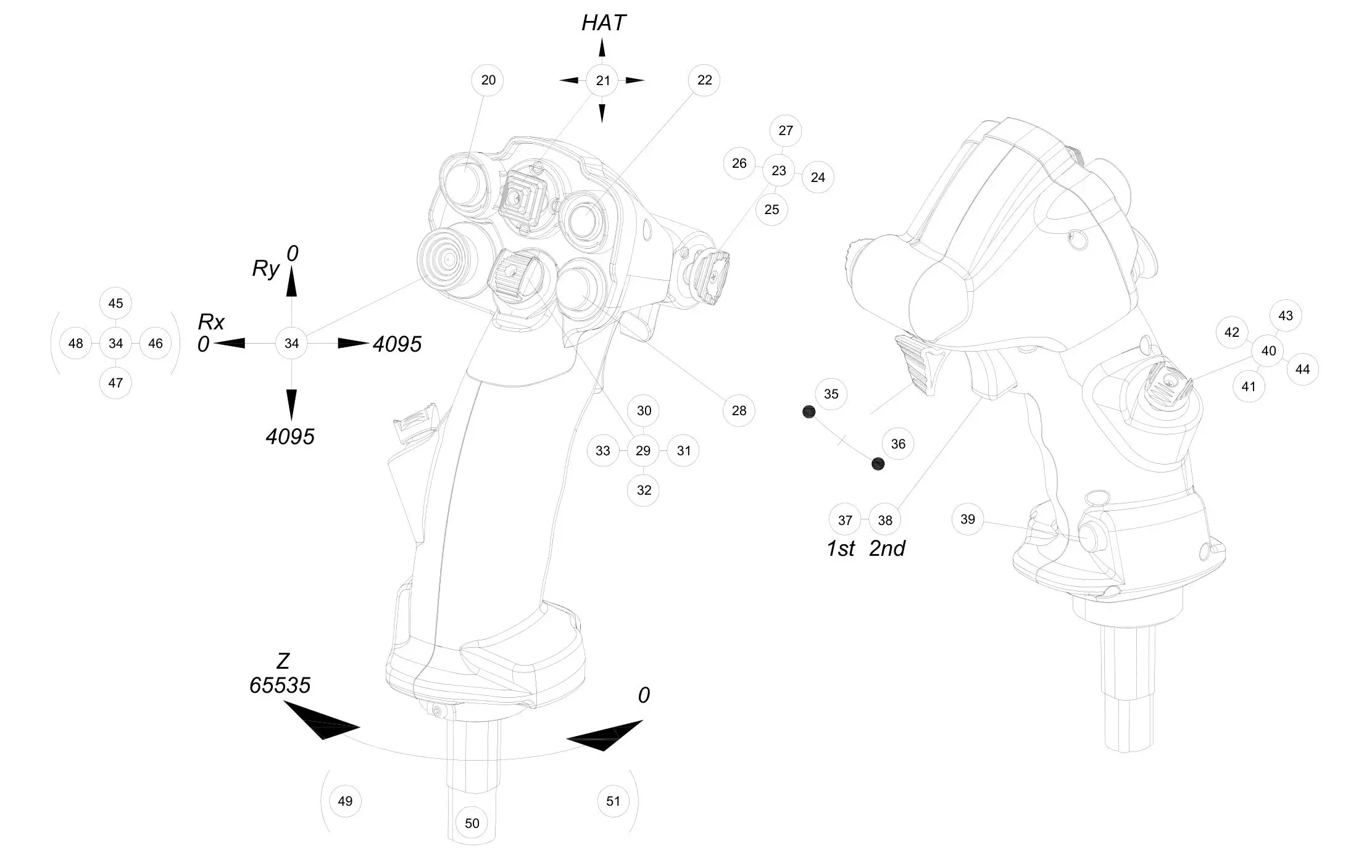
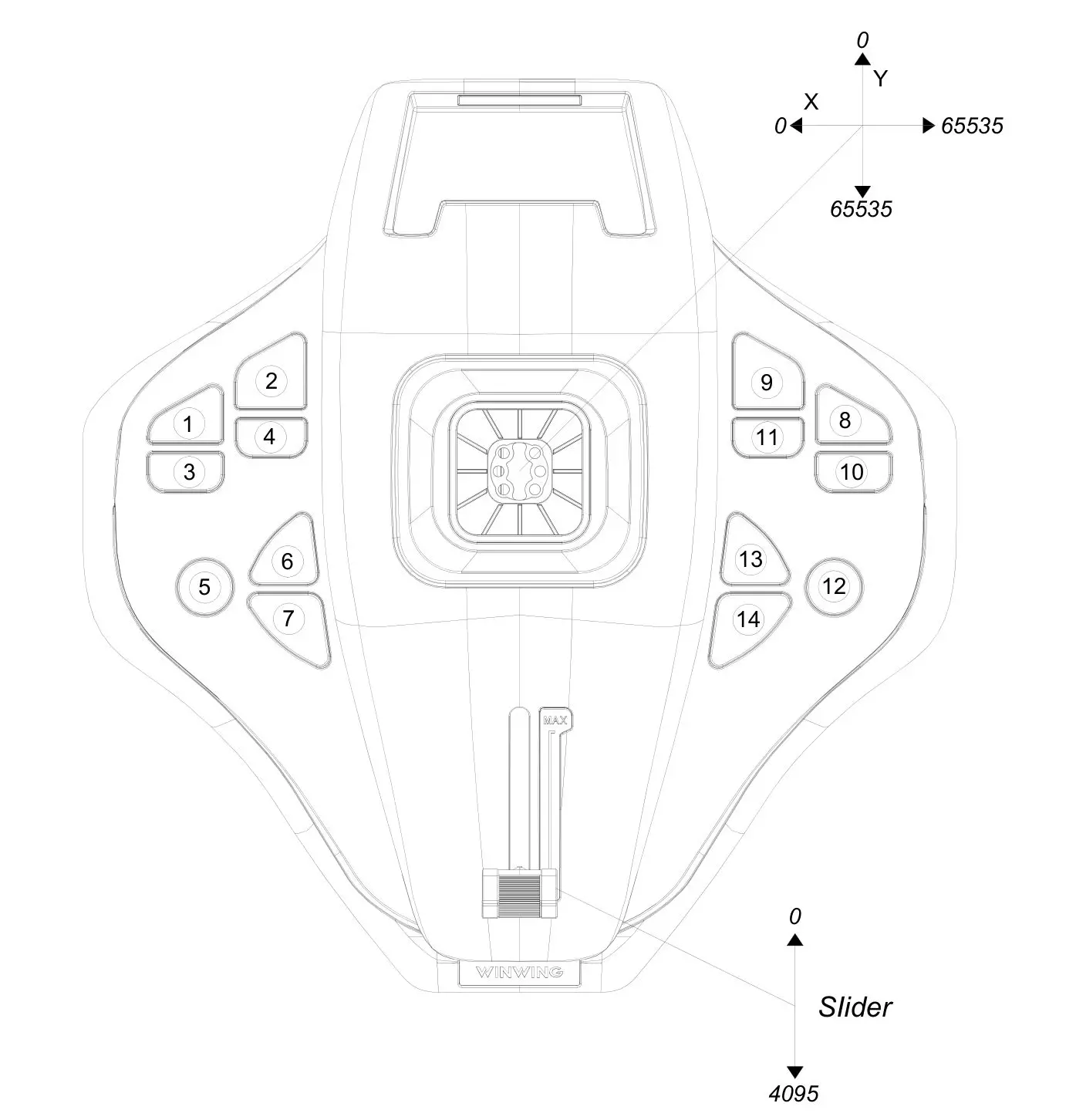
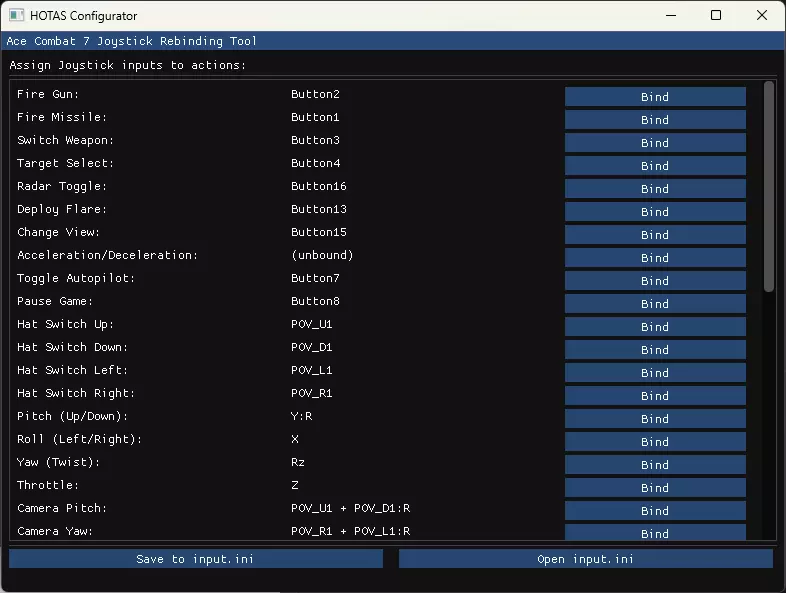
Function Mapping Key mapping Roll / Pitch / Yawn Joystick X / Y / Z axes Throttle Joystick slider Change view Left Hat (Ry / Rx axes) Fire machine gun Button 37 Left-Ctrl Fire missile/weapon Button 35 Space Target Button 20 Speed Button 22 Change weapon Button 39 C Switch radar map Button 7 Fire Flare Button 28 Change view Button 5 Autopilot Button 6 Pause Button 2 Install AC7 configuration Edit the file C: Users <username> AppData Local BANDAI NAMCO Entertainment ACE COMBAT 7 Config Input.ini and replace its content by the code below: [JoystickSetting] EnableJoystick=True EnableDeviceJoystick=True EnableDeviceFlight=True EnableDevice1stPerson=True [JoystickMappingFormat] HelpComment=" ObjectFormat" HelpComment=" X, Y, Z, Rx, Ry, Rz, Slider[1-2], POV_[U, D, L, R][1-4], Button[1-32]" HelpComment= HelpComment=" ValueFormat" HelpComment=" Object, Object:[P, N, R, C]...[P, N, R, C]" HelpComment=" P:PositiveValue / N:NegativeValue / R:ReverseSign / C:ConvertRange(+1.0~-1.0 -> 0.0~1.0)" HelpComment= HelpComment=" MappingFormat" HelpComment=" Value, Value1 [&, !, +, >, <] Value2" HelpComment=" &:IfValue2!=0 / !:IfValue2==0 / +:AddValue / >:SelectLarger / <:SelectSmaller" HelpComment= HelpComment=" Example" HelpComment=" Flight_Pitch=Y:R ! Button10" HelpComment=" Flight_HatSwitchRight=POV_R1" [Joystick-BC2A4098-0000-0000-0000-504944564944] ProductName=WINWING URSA MINOR FIGHTER FLIGHT STICK R Flight_Gun= Flight_Missile= Flight_Weapon= Flight_Target=Button20 Flight_Radar=Button7 Flight_Flare=Button28 Flight_View=Button5 Flight_AccelerationDeceleration=Button22 Flight_AutoPilot=Button6 Flight_Pause=Button2 Flight_HatSwitchUp=POV_U1 Flight_HatSwitchDown=POV_D1 Flight_HatSwitchLeft=POV_L1 Flight_HatSwitchRight=POV_R1 Flight_Pitch=Y:R Flight_Roll=X Flight_Yaw=Z Flight_Throttle=Slider1 Flight_CameraPitch=Ry Flight_CameraYaw=Rx UI_B= UI_A= UI_X= UI_Y= UI_LB= UI_RB= UI_LT= UI_RT= UI_LeftStickPress= UI_RightStickPress= UI_DPadUp= UI_DPadDown= UI_DPadLeft= UI_DPadRight= UI_LeftStickUp= UI_LeftStickDown= UI_LeftStickLeft= UI_LeftStickRight= UI_RightStickUp= UI_RightStickDown= UI_RightStickLeft= UI_RightStickRight= UI_Menu= Install JoyToKey configuration Create a file named ac7_ursa-minor.cfg file in the Joy2key configuration folder. You can access it with the File > Open config data folder in Explorer function in JoyToKey. Its content is: [General] FileVersion=70 NumberOfJoysticks=2 NumberOfButtons=44 DisplayMode=2 UseDiagonalInput=0 UseDiagonalInput2=0 UsePOV8Way=0 RepeatSameKeyInSequence=0 Threshold=20 Threshold2=20 KeySendMode=0 SoundFile= ImageFile= VibrationSpeed1=0 VibrationSpeed2=0 VibrationDuration=0 [Joystick 1] DefaultDisplayName= DefaultTemplateId= Button35=1, 20:00:00:00, 0.000, 0, 0 Button37=1, A2:00:00:00, 0.000, 0, 0 Button39=1, 43:00:00:00, 0.000, 0, 0