换一换
换一换 


ItsRikoVR's guide on how to create a SIMPLE Half-Life 2: Deathmatch game/server, play with your friends, use a controller, moderate, or add bot players!!! (This is not a dedicated server setup guide) INTRO The last time I played this game was over 13 years ago-- and just for 45 minutes. I'm SO GLAD I picked it back up because I absolutely LOVE how fun and chaotic it is, ESPECIALLY with friends! Thanks to the 20th anniversary and February 18th update, new life has been given to the game. It's really incredible how now you can just create and host a game through Steam's servers from the main menu, and use community created controller key-layouts! Very user-friendly, thank you Valve! BUT IT NEEDS STEAM WORKSHOP LIKE GMOD'S!!! 🔥 HOW TO BUY THIS GAME This section might seem a bit silly, but due to recent events, Half-Life 2: Deathmatch is currently delisted from the Steam store. That means the only ways to obtain the game currently are to buy Half-Life 2 for $10 USD, or The Orange Box for $20 USD! https://store.steampowered.com/app/220/HalfLife_2/ CREATING A GAME AND INVITING FRIENDS Launch Half-Life 2: Deathmatch, select "Create Server," choose a map, and ensure "Use Steam Networking" is checked. Select the "Game" tab, give your server a name, password, max player count, time limit per match, frag limit per match, and check/uncheck any additional options you desire. Click "Start." You can now invite your friends to play by going online on steam, right-clicking your friend, and clicking "Invite to Play." They can also right-click you on steam and join that way. If you didn't create a password, other players can use the game's server browser to join you. If you would like to change to a specific level, open up console ( ~ tilde button on your keyboard after you enable it in menu>options>advanced ) and type "changelevel levelname" -- replacing "levelname" with the name of the actual map. E.G. "changelevel dm_underpass" and hitting enter. CONTROLLER I made a button layout just for Xbox controllers! The goal was to make the experience feel as close to normal Half-Life 2's controller experience while considering the extra fast-paced nature of Deathmatch. Plug in whatever controller you're planning to use, turn it on, launch the game, open "Options," click the "Mouse" tab, check "Enable the gamepad," and then choose your options. This step is optional but recommended: turn on fast weapon switch to easily swap weapons in the heat of the moment (enable it in menu>options>advanced)🔥 Next, open your steam overlay, and then choose the controller icon on the bottom of your screen in the row with the other options. Under "Current Button Layout," click the big button displaying your current layout. Click "Community Layouts" to find this, or click "Search" at the top, and then paste the following into search: The BEST HL2:DM Gamepad layout (with toggles!) Once that pops up, click on it, and select "Apply Layout." If you need to know what each button does, press every button on your controller when you're in-game! Or, if you're a nerd, click on my layout and then see how each button corresponds to a different function, or keyboard/mouse button. From there, compare what these buttons do when you open up your main game menu's "options" menu, and viewing which keys are assigned on which function. MODERATING PLAYERS Someone named "b̵u̵t̶t̷ ̴h̴e̷a̶d̵" just joined and is being a nuisance! Open up your console ( ~ ), then kick them by typing in "kick" followed by their name exactly as it appears on the scoreboard when you press "Tab." E.G. "kick butt head" The same works with banning. Replace "kick" with "ban" Oh no! Their name has special characters in it and can't be kicked with the name method? Try this! Open up your console ( ~ ), type "status," and see what "userid" they have. Then, kick them by typing in "kickid" followed by their userid number. E.G. "kick id 4" The same works with banning. Replace "kickid" with "banid" This is also a great way to kick bot players! Alternatively, you can "kickall" which will kick every player from your server, including yourself, thus killing the server instance.💀👻 BOT PLAYERS Make sure your map has a navmesh by selecting your map, loading into the game, opening up console ( ~ ), and typing in "nav_generate" This will help the bot players navigate around the map almost exactly like real players would (I say almost because they don't typically use ladders). Then, go to C: Program Files (x86) Steam steamapps common Half-Life 2 Deathmatch hl2mp cfg OR Right click on your Half-Life 2 Deathmatch game listing on steam, click properties, Installed Files, then "browse," open the hl2mp folder, & open the cfg folder. From there, open/create your "autumnbot.cfg" file, then paste the following and click "save." sv_cheats 1 hl2mp_bot_join_after_player 1 hl2mp_bot_quota 4 hl2mp_bot_quota_mode fill hl2mp_bot_gravgun_only 0 hl2mp_bot_ignore_real_players 0 hl2mp_bot_add 4 sv_cheats 0 Replace the two number 4's with how many bots you'd like. After you've done that, create your game through the main menu, open up console ( ~ ), and type the following: exec autumnbot.cfg This will spawn player bots with different playermodels but all the same name, "Bot Name" into your server map. If you would like to press a single button to make this happen, open up console ( ~ ) and type bind o "exec autumnbot.cfg" If you would like to change the difficulty of bot players, open console ( ~ ) and type in hl2mp_bot_difficulty #Where "#" is the difficulty level. 0=easy, 1=normal, 2=hard, 3=expert. The bots are very player-like! They will use their gravity guns to hurl props at you, collect weapons, strafe back and forth, and of course, SHOOT YOU! Yes, they can miss some shots. But they generally have pretty good accuracy, so watch out! I'd recommend having at least one human player playing with you. :> OUTRO I hope this helped! Thank you for reading this far! I love this game and it'd be great if you could thumbs up and send this to anyone you know who might be interested in playing! Show them how easy it is to set up and play! 🔥 Lets get more people interested in fragging with Gravity Guns and toilets!
如何与好友一起游玩、使用手柄、进行管理或添加机器人玩家!

2026-02-20 07:00:05

导读
这是一篇《半条命2:死亡竞赛》的游玩指南,因游戏已从Steam商店下架,需购买《半条命2》或《橙盒》获取。指南包含创建服务器邀请好友、使用手柄游玩、管理玩家、添加机器人玩家的具体操作,还提及游戏经更新后支持通过Steam创建主机,十分便捷。


评论
共0条评论

和朋友一起玩《 Sven Co-op》,无需额外程序
《 Sven Co-op 》新手非第三方软件合作游戏指南 创建服务器及相关信息 1. 创建服务器:点击【创建新游戏】并选择你需要的地图! 2. 你需要复制Ste…
2026-03-20 01:000赞 · 0评论
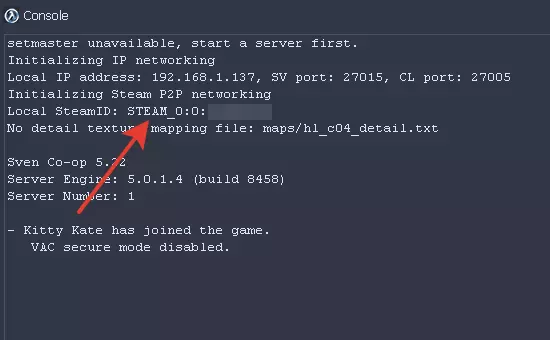
半条命2死亡竞赛 玩家模型
因为我找不到一份像样的《半条命2:死亡竞赛》玩家模型概述,所以我自己整理了一份。也许这对其他人也有帮助。 简介
2026-02-20 16:000赞 · 0评论
如何创建服务器(目前最简单的方法)
本指南将告诉你如何轻松创建服务器 端口转发 我们都曾在某些时候需要进行端口转发。天啊,我以前真的很讨厌这个操作,直到我发现了这个终极端口转发方法,现在让我们开始…
2026-04-02 10:000赞 · 0评论
《半条命2:死亡竞赛》103号教程 - 基本技能
Третий урок из официального курса обучения www.hl2dm-university.ru Основные навы…
2026-02-19 04:000赞 · 0评论

如何与好友一起玩《 Sven Co-op》
正如游戏名称所示,这是一款合作类游戏!如何与好友一同游玩的方法并未在游戏内明确说明,除非你在视频平台上找到相关教程。因此,本指南应运而生! 邀请好友进行合作游玩…
2026-03-19 04:000赞 · 0评论
房间 SL单人房间创建教程
2026-04-30 12:020赞 · 0评论
如何创建和加入 Sven Co-op 服务器(无需外部程序!)
小型简单且讲解详细的指南,教你和你的朋友如何通过Steam创建一个《 Sven Co-op》服务器,无需外部程序,也没有更多复杂操作! 创建服务器(地图和设置)…
2026-03-19 04:000赞 · 0评论
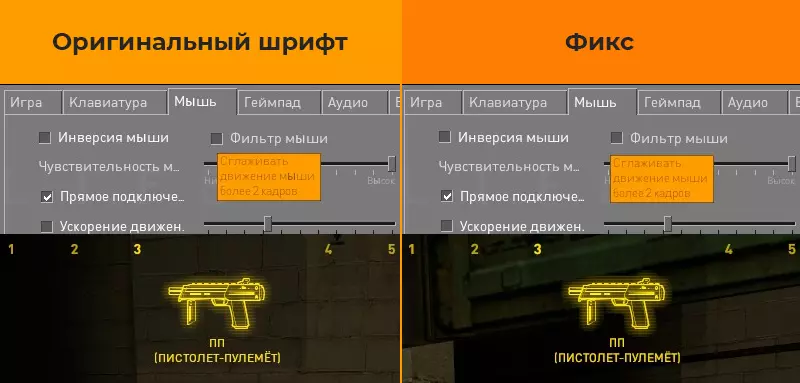
《半条命2:死亡竞赛》修复公告 1. 修复游戏内字体中Ё、Ы和Э字母的显示问题
《半条命2:死亡竞赛》20周年更新版界面字体 Ё、Ы、Э 字母爱好者修复补丁 问题说明: 在20周年更新后,游戏界面使用的GorDIN字体中,未包含 Ё、Ы、Э…
2026-02-20 13:000赞 · 0评论
半条命2:死亡竞赛 机器人指令、默认值及说明
A list of all 63 bot player commands and settings that you can access via consol…
2026-02-19 01:000赞 · 0评论
《战地风云2042》门户模式怎么创建服务器?保姆级教程指南,服务器选择与搭建全攻略
《战地风云2042》门户模式怎么玩?保姆级指南教你如何选择与创建服务器,从零开始搭建专属战场,掌握服务器设置、规则定制等核心玩法,轻松开启你的2042对战新体验…
2026-06-06 05:420赞 · 0评论
暂无更多
最新更新
- 如何手动更改玩家模型和喷漆(无需插件) — 本指南提供了一种无需使用任何插件,手动更改玩家模型和喷漆的简单方法。 第一章 - 修复方法 由于此问题已存在很长时间,以下是一种无需过多麻烦即可轻松修复的方法:…
- 《半条命2:死亡竞赛》2025年FPS提升、优化、按键绑定、脚本及界面设置指南 — 本指南提供了包含多种实用指令、提升帧率设置、便捷按键绑定和自定义HUD的配置文件。老玩家会喜欢的! 前言 本指南是为朋友们以及所有可能用得上的人创建的! 在这里…
- 半条命2死亡竞赛 玩家模型 — 因为我找不到一份像样的《半条命2:死亡竞赛》玩家模型概述,所以我自己整理了一份。也许这对其他人也有帮助。 简介
- 第一个俄语角色扮演服务器(2010年开放) — - 服务器的首批测试版本早在2010年就已启动。 - 2010年9月,RRP项目网站正式上线。这被视为RRP整体的创建日期。 - 2011年5月23日,服务器开…
- [白俄罗斯] 白俄罗斯语版《半条命2 死亡竞赛》当前可用 — 当前内容涉及非官方本地化信息,且未提供符合规则的可翻译有效内容,已按要求处理。
- 《半条命2:死亡竞赛》修复公告 1. 修复游戏内字体中Ё、Ы和Э字母的显示问题 — 《半条命2:死亡竞赛》20周年更新版界面字体 Ё、Ы、Э 字母爱好者修复补丁 问题说明: 在20周年更新后,游戏界面使用的GorDIN字体中,未包含 Ё、Ы、Э…
- 我对《半条命2:死亡竞赛》中可投掷物品的排名 — 我需要描述一下吗 有件事我必须承认 我可能有偏见 排名 我可能会在某个时候添加更多内容 我使用的布娃娃模组 爆炸桶
- 将Quake3地图转换为半条命2死亡竞赛地图 — 将Quake3地图转换为《半条命2:死亡竞赛》地图的方法 将Quake3地图转换为《半条命2:死亡竞赛》地图 转换地图需要以下程序: 1.q3map_2.5.6…
- 《半条命2:死亡竞赛》武器与地图基础指南 — Este juego es una versión del Half Life 2 pensado para un modo multijugador con …
- 如何打开游戏 — 本指南将教你如何开始《半条命2:死亡竞赛》(绝非标题党,100%真实有效)。这是一份不错的指南,非常实用。 只需按下【开始】按钮即可。