换一换
换一换 




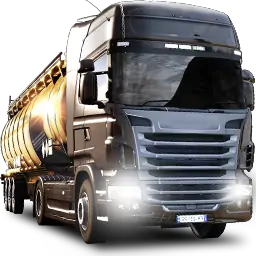
最佳欧洲卡车模拟2真实感设置(2025更新)——本指南涵盖力反馈调校(G29、图马思特、法拓士)、真实物理设置、无模组配置、TruckersMP模拟规则、画面优化以及生涯模式设置。专为沉浸式模拟风格卡车驾驶打造。已针对1.55+版本更新。 如果你正在寻找真实的欧洲卡车模拟2(ETS2)设置,那么本指南正是为你准备的。无论你使用键盘、手柄、罗技G29,还是带有H型换挡器和踏板的完整模拟驾驶设备,这里的所有内容都旨在为你提供尽可能沉浸式的卡车驾驶体验。 本指南适用于希望获得流畅操控、真实物理效果和扎实游戏体验的新玩家和欧洲卡车模拟2老玩家。它适用于单人模式和 TruckersMP 多人模式,其设置经过了真实司机和欧洲卡车模拟2社区的测试。你将在其中找到:无模组真实感设置——物理效果、视角、用户界面和游戏沉浸感(无街机元素);力反馈与方向盘配置——罗技G29、图马思特、法拓士的设置(G HUB设置、刹车曲线、死区);图形优化(低端与高端设备)——如何在有无模组的情况下获得清晰、沉浸式的视觉效果;启动选项(Steam + TMP)——用于增强真实感和提升操控性的命令行调整;高级真实感调整——悬挂、传动系统、刹车物理、力反馈调校;推荐模组(可选)——物理、音效、天气和光照包,以获得完全沉浸感;卡车构建模板——2016年及以后现代卡车、车队卡车和经典运输卡车的角色扮演设置;TruckersMP多人真实模式——如何下载、设置和游玩。模拟1设置 开发者控制台指南——启用控制台命令、调试相机、任务控制和真实感调整 生涯模式进度——建立你的货运帝国,管理资金,雇佣司机,以正确的方式发展 额外内容:最佳沉浸感DLC(可选)——哪些地图和货物包真正增加真实感 基于真实反馈打造——依据数千小时的模拟体验、Reddit用户意见和卡车司机测试过的配置 无论你是独自完成合同任务还是作为虚拟运输公司车队的一员进行运输,本指南都能帮助你以更真实的方式驾驶,没有多余内容,没有街机风格的不实体验。(指南由Axiata编写——Steam创作者,非电信公司) 简介——为何追求真实感? mods确实很棒——我自己在单人模式中有时也会使用它们。但事实是,它们并不总是稳定的,而且说实话,如果你只是想要每次启动游戏都能正常运行的设置,这些其实并不需要。《欧洲卡车模拟2》本身已经具备足够的真实感,能给你那种扎实、沉浸式的卡车驾驶体验。 本指南适用于 solo 玩家和 TruckersMP 玩家,他们希望保持游戏体验的简洁和沉浸感,专注于正统模拟驾驶风格,无需处理模组崩溃或等待更新适配的问题。
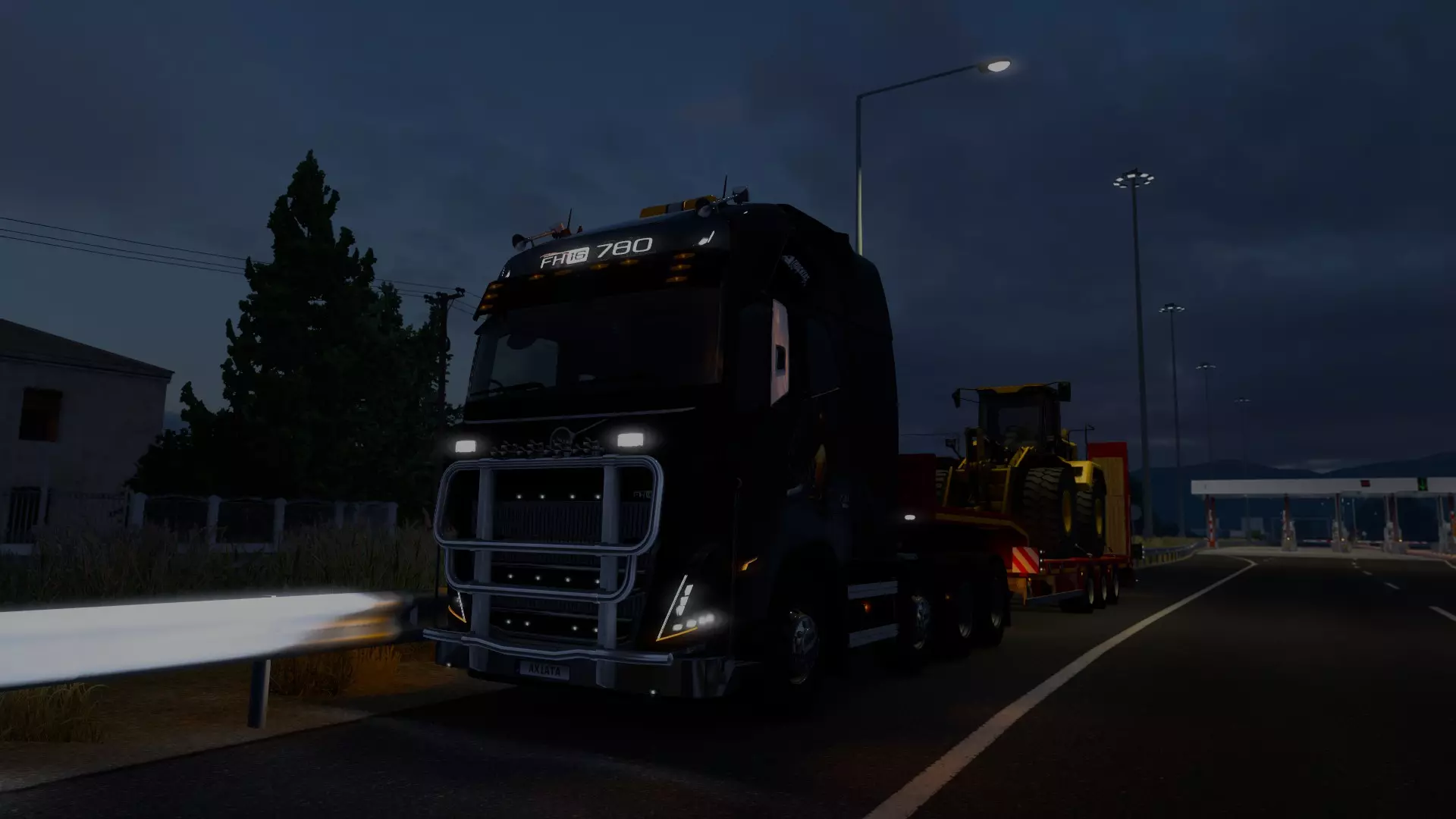

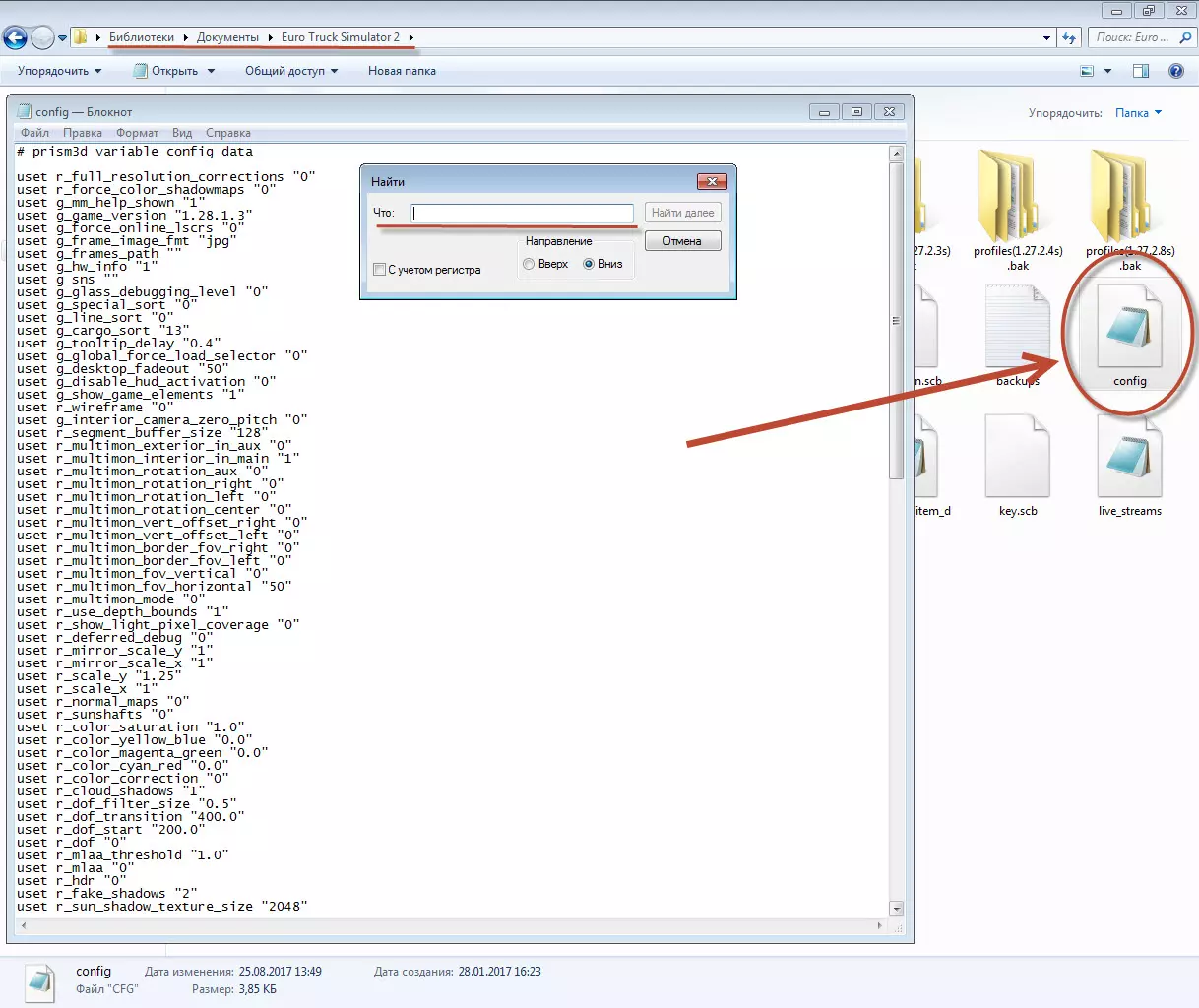
Best DLCs for Immersion (Optional) These DLC's are completely optional, but! IF you want to get the most out of ETS2 without buying every single expansion? Here’s a list of the most useful and immersive DLCs that improve realism, map variety, and cab life. Whether you're playing single-player or TruckersMP. Map Expansions:These expand your world with real highways, cities, industries, and border crossings. Here’s what’s worth buying - in the best order for new and returning players. West Balkans – Dense, narrow roads and the best visual quality. Top pick for realism. Iberia – Long highway hauls, big delivery zones, and clean scenery. Road to the Black Sea – Adds Romania, Bulgaria, and Turkey. Diverse terrain. Beyond the Baltic Sea – Eastern Europe focus with authentic truck stops. Going East! – Expands Poland, Slovakia, and Hungary. Older but still solid. Greece – Coastal cities, island ferries, and mountain drives.Tip: Buy DLCs that connect together (Going East → Baltic → Balkans) for smoother route planning. See below. Connected route: Base Game → Going East → Road to the Black Sea → West Balkans → Greece Optional add-ons: Beyond the Baltic Sea (north), Iberia (west, via France), Nordic Horizons (upcoming north) Upcoming Map DLCs:These upcoming expansions that will add depth and variety to the game, They're not required, but they’re worth wishlist-ing if you land mass to cover while your trucking. Heart of Russia – Explore central Russia including Moscow, Volga and Oka rivers, old towns, and deep forests. Long haul heaven. (Coming soon) Iceland – Drive the scenic Ring Road (Hringvegur) through volcanic fields, glaciers, and raw nature. Sparse, dramatic, and very unique. (TBA) Coaches DLC – Swap your truck for licensed passenger buses like the Volvo 9700 DD or Scania Touring. Scheduled routes, passenger stops, and city-to-city gameplay. Best for experienced drivers. (TBA) Nordic Horizons – Major rework of Scandinavia with improved road quality, snow mechanics, seasonal effects, and new cities. A must-have for realism lovers. (Early 2026) Industry & Cargo Packs:These add realism by hauling actual heavy-duty loads and industry-specific cargo. Heavy Cargo Pack – Construction equipment, transformers, etc. High Power Cargo Pack – Large loads with upgraded trailers. Special Transport DLC – Oversized cargo, pilot cars, and custom routes (SP only). Cabin & Truck Life Enhancers:These make your cab feel alive - great for immersion. Cabin Accessories DLC – Add GPS, snacks, laptop, phone, hanging items, etc. Interior Packs (Renault, DAF, Scania, etc.) – More cabin details per brand. Wheel Tuning Pack – Custom tires, hubs, and rim styles. Want to preview before you buy? Check out this Cabin Accessories DLC showcase and see it in action inside the cab. Cosmetic Packs (Optional but Fun):These don’t affect gameplay but offer solid visual upgrades. Paint Jobs Packs – National, racing, and custom liveries. Tuning Packs (Scania / Volvo / DAF) – Add bumpers, lights, and custom grills. What Works in TruckersMP: All map DLCs are supported in multiplayer. Cabin Accessories and tuning parts are mostly visible (some only to you). Special Transport is single-player only, but great for immersive missions. DLC's Supported by TruckersMP (Official): https://truckersmp.com/knowledge-base/article/103 Start with map and cargo DLCs first - they give the biggest boost to realism. Everything else builds on that foundation. Graphics Setup (Low-End & High-End) You don’t need to crank every setting to max to get a realistic experience in ETS2. The key is focusing on settings that add to immersion without sacrificing performance or making the game look too “gamey.” Here are two recommended setups based on your PC specs. For High-End PCs (Ultra but Realistic) If your rig can handle it, feel free to push most settings to ultra but keep them balanced so the game feels natural and clean. This will give you crisp visuals without going overboard. list] Fullscreen Mode: Enabled Brightness: 50% Resolution: Native (1920x1080 or 1440p+) Refresh Rate: 144Hz+ Vertical Synchronization: Disabled FPS Limit: 144–240 FPS Limit in Background: 30 or 60 Scaling: 400% Anti-Aliasing: SMAA + TAA TAA Tuning: Adaptive Clarity TAA Luma Sharpening: 1.00 Texture Quality: High or Ultra Anisotropic Filtering: Max (16x) Normal Maps: Enabled Reflection Scaling: 100% Reflection Detail: High Mirror Quality: Ultra Mirror Resolution: Ultra Mirror Distance: Ultra Shadow Quality: Ultra Far Shadows: Enabled Interior Shadows: Enabled SSAO: High Light Visibility Ranges: High Traffic Headlights: Enabled Secondary Vehicle Lights: Enabled Depth of Field: Disabled Sunshafts: Enabled Vegetation Detail: Ultra Grass Density: High Weather Quality: Ultra Pedestrians: Enabled This setup gives you a beautiful, clean view that feels like you’re truly sitting inside a cab, not watching a flashy cinematic. For Low-End PCs (Budget but Still Immersive) If your system struggles a bit, you can still achieve a solid immersive experience by lowering a few settings. This will help keep your frame rate smooth without sacrificing too much visual quality. Fullscreen Mode: Enabled Brightness: 50% Resolution: 1920x1080 (16:9) Refresh Rate: 144Hz Vertical Synchronization: Disabled FPS Limit: 400 FPS Limit in Background: 400 Scaling: 100% Anti-Aliasing: SMAA + TAA TAA Tuning: Adaptive Clarity TAA Luma Sharpening: 1.00 Texture Quality: Low Anisotropic Filtering: 0x Normal Maps: Enabled Reflection Scaling: 50% Reflection Detail: Low Mirror Quality: Medium Mirror Resolution: Medium Mirror Distance: Ultra Shadow Quality: Very Low Far Shadows: Enabled Interior Shadows: Enabled SSAO: Disabled Light Visibility Ranges: High Traffic Headlights: Enabled Secondary Vehicle Lights: Enabled Depth of Field: Disabled Sunshafts: Disabled Vegetation Detail: Low Grass Density: Disabled Weather Quality: Low Pedestrians: Disabled While it won’t look as sharp or detailed as the high-end setup, this configuration will keep ETS2 running smooth and maintain that immersive trucker vibe you want. IF YOU HAVE A BETTER LOW END CONFIG, PLEASE COMMENT AND ILL ADD IN Optional: Additional Visual Tweaks For those comfortable with fine-tuning beyond the in-game menus, ETS2 allows some advanced tweaks by editing configuration files. These can adjust shadow sharpness, ambient occlusion strength, or texture detail more precisely. However, this is only recommended if you know what you’re doing and have backed up your files. Most players will get great results sticking to the in-game settings outlined above. Config file location: Documents Euro Truck Simulator 2 config.cfg Only replace these lines in the file, don't touch anything else unless you know what you are doing. Copy-paste these lines into your config.cfg: uset r_scale_x "2" uset r_scale_y "2" uset r_mode_refresh "120" uset r_mode_width "1920" uset r_mode_height "1080" uset r_device "dx11" uset r_deferred "1" uset r_sunshafts "1" uset r_color_correction "1" uset r_light_flares "1" uset r_cloud_shadows "1" uset r_ssao "2" uset r_hdr "1" uset r_fake_shadows "2" uset r_sun_shadow_texture_size "4096" uset r_sun_shadow_quality "2" uset r_mirror_scale_x "1" uset r_mirror_scale_y "1" uset r_mirror_view_distance "400" uset r_deferred_mirrors "1" uset r_aa "1" uset r_taa_tuning "1" uset r_taa_luma_sharpen "1" uset r_dof "0" uset r_color_saturation "1.0" uset g_bloom "1.0" uset g_rain_reflection "1" uset g_rain_reflect_traffic "1" uset g_rain_reflect_actor "1" uset g_rain_reflect_hookups "1" uset g_rain_reflect_cache "1" uset g_water_reflect_actor "1" uset g_reflection_scale "1" uset g_reflection "1" uset g_grass_density "1" uset g_veg_detail "1" uset r_vsync "1" uset t_limit_fps "0" uset g_ignore_low_fps "1" Note: If FPS ever dips below 60, reduce: - uset r_scale_x / r_scale_y to 1.5 - or r_sun_shadow_texture_size to 2048 Don’t touch in-game graphics settings after this unless you plan to re-edit the config file. ETS2 resets some values when you apply changes via UI.
G HUB中的方向盘设置 如果您使用的是罗技方向盘,请先在G HUB中正确设置——否则《欧洲卡车模拟2》将无法提供正常的力反馈。以下是我测试后一直使用的设置,感觉稳固且响应灵敏,不会过于僵硬或飘忽。 灵敏度:50(中性,保持方向盘响应自然) 操作角度:900°(必须与游戏内设置匹配——卡车转弯幅度大) 中心弹簧强度:50(可选,增加一点回正力) 非力反馈游戏中的中心弹簧:关闭(取消勾选此项)
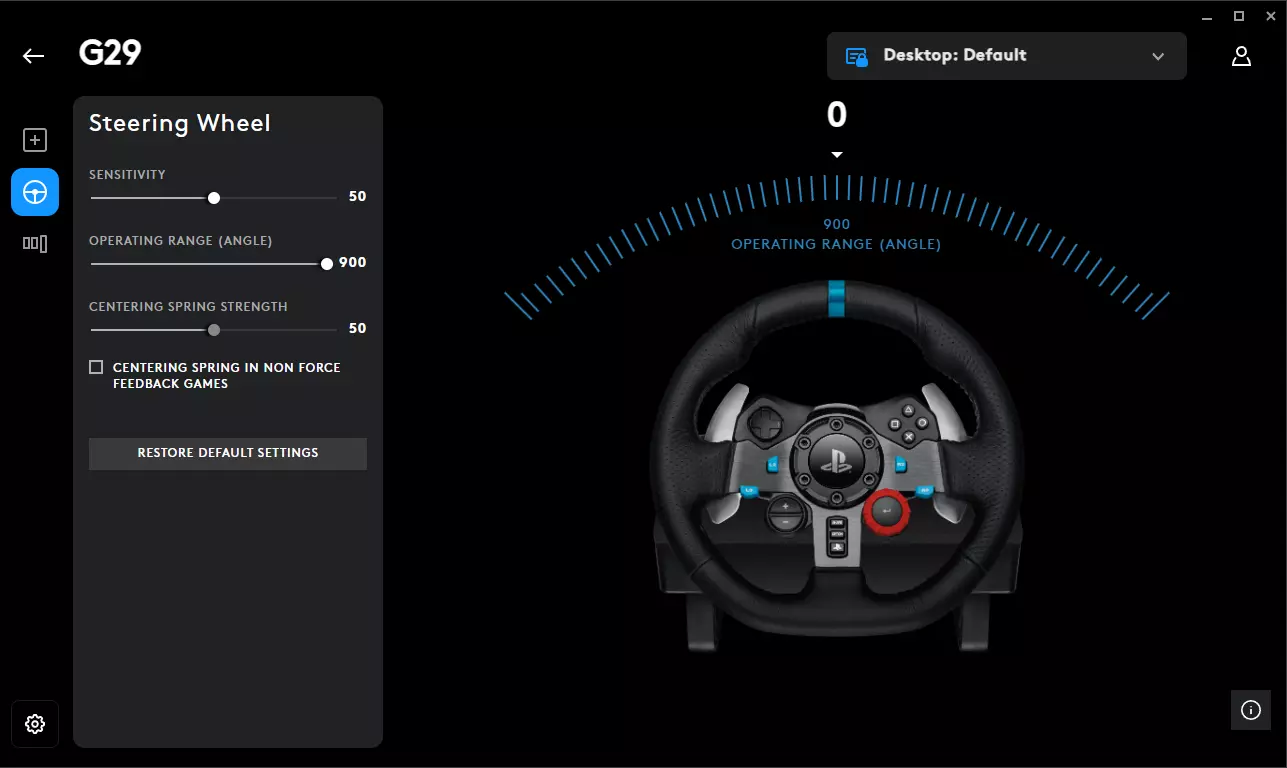
900° is key, that’s the closest to how actual truck steering works. Your wheel should turn as much in-game as it does in real life. Tip: If you want more resistance or “weight,” bump the spring strength to around 60. If you want looser, drop it to 40. I usually stick with 50 feels right for long drives. I personally dont use centering spring settings, i let the game handle it and turn it off in GHUB. Also make sure there are no conflicting keybinds or pedal inputs in G HUB that override the game ETS2 handles everything better when it’s in full control. If you're using Thrustmaster, Fanatec, or anything else, the idea stays the same: - Match 900° steering angle (or your wheel’s max) - Turn off any extra auto-centering features (FFB handles that) - Keep damping low heavy vehicle, but not unrealistic steering Once you’ve dialed this in and It will match with the in-game Force Feedback setup, the steering starts to feel like it actually belongs to a 40-ton truck. Advanced Realism Tweaks (braking, steering, deadzone, FFB) If your truck feels way too twitchy, brakes grab too fast, or the wheel just doesn’t feel right this section is for you. The controls.sii file in ETS2 can be edited to make the game feel smoother and more realistic, especially if you use a wheel and pedals (but it helps for keyboards too). Here's what to tweak. Fix the Brakes & Make Them ProgressiveBy default, braking is super sensitive. Even a small press on the pedal stops you like you hit a wall. That’s because the brake input is linear. To make it feel more real like a real truck where you ease into braking you can add a curve. Open your `controls.sii` and find the line starting with `mix abackward`. Replace it with this: mix abackward `pow(normalize(sel(c_jzbrake, sel(c_jibrake, -j_brake?0, j_brake?0), sel(c_jibrake, j_brake?1 * -0.5 + 0.5, j_brake?-1 * 0.5 + 0.5)), c_brake_dz), 2.5)` This line adds a curve to your brake pedal. That `2.5` at the end is the curve amount: 1.0 = No curve (default) 2.0 = Smooth start, firm stop 3.0 = More progressive Tweak that number based on how it feels. I personally like 2.5–3.0. Smoother Steering & Not So TwitchyIf your wheel feels way too sensitive, especially at highway speeds, try this. In the same `controls.sii`, find: constant c_steer_func 0.000000 Change it to: constant c_steer_func 3.000000 This adds a nice curve to your steering. Makes it gentle around the center and more responsive as you turn further. You can test with `2.0`, `3.0`, or even `4.0`. Clean Up the DeadzonesSometimes your pedals or wheel feel "lazy" or unresponsive at the start, that's the deadzone. Drop it down so your inputs are snappy but not jittery. Change these: constant c_brake_dz 0.01 constant c_throt_dz 0.01 constant c_clutch_dz 0.01 constant c_steer_dz 0.00 Speed-Based Steering Sensitivity (Optional)This one adjusts steering based on your speed. Less sensitive when you're driving fast, more responsive at low speeds, kind of like how real trucks behave. constant c_rsteersens 0.3 constant c_asteersens 4.0 If your steering still feels too sharp at high speeds, this should help a lot. Better Force Feedback (For Wheels)If your force feedback feels numb or chaotic, use this setup. Works well for Logitech G29, Thrustmaster, and Fanatec wheels. constant c_ff_gain 5.000000 constant c_ff_surface 0.200000 constant c_ff_bumps 0.800000 constant c_ff_engine 0.100000 constant c_ff_collis 0.720000 constant c_ff_gearbox 0.320000 You can tweak the gain up/down if your wheel feels too heavy or too light. I usually float between 4.5 to 5.5 depending on the truck. How to Do All ThisFind your `controls.sii` file in: Documents/Euro Truck Simulator 2/profiles/[[b]your_profile_id[/b]]/controls.sii Make a backup of it before editing! (VERY IMPORTANT) Open it in Notepad or Notepad++ (i use my IDE VS code) Edit the values above Save and set the file to Read-Only if you don’t want the game to reset your changes Restart the game fully Realistic Steering Setup (Force Feedback) First off if you’re using a keyboard or gamepad, don’t overthink it. Just set your gearbox to Sequential, and make sure your Gameplay Settings match what’s listed in the realism section above. That’s more than enough. Keyboard doesn’t give you analog control, so fine-tuning physics won’t matter much. Now, if you’re on a wheel — especially something like the Logitech G29, T300, or similar this section is for you. I use a G29 myself, and this setup is meant to feel grounded, like you’re actually driving a heavy vehicle. No overdone shaking or twitchy turning, just solid road feedback and weight. Steering ConfigurationSteering Sensitivity: 0.50 Steering Non-Linearity: 0.00 Steering Animation Range: 900° (match this to your wheel’s rotation in Logitech G HUB or your wheel software) This gives you a 1:1 feel when you turn your wheel, it matches in-game exactly. No twitchiness, no arcade-style flicks. Force Feedback Setup This is where the realism kicks in. These are the settings I run, tweak to your liking, but this gives you a heavy, real-world feel without overdoing it. Force Feedback: Enabled Overall Gain: 100% (sometimes I bump to 110 or 120 depending on mood or road type) Centering at High Speed: 100% Centering at Low Speed: 42% Internal Friction: 10% Engine Resonance: 20% Terrain Surface: 80% Bumps: 72% Collisions: 32% Gearbox Grind: 32% Understeer Slip: 32% Assisted Steering: 0% Terrain Surface Vibration: 100% Bumps Vibration: 100% Collisions Vibration: 100% This config gives you the feeling of weight. You’ll feel the road surface change, dips, trailer resistance, and that subtle tug when turning too sharp with a loaded trailer. The engine rumble is there but not annoying. Gearbox grind makes you think twice before sloppy shifts, especially if you’re using an H-shifter like me. This isn’t “cinematic” it’s meant to feel like a 40-ton machine fighting back a bit when you push it. If you want to actually *feel* like you're trucking, not just playing a game, this is a solid base to start from. Wheel users - dial in these settings, take a heavy trailer, and go climb a mountain. You'll know why it matters.
Modern Truck Setup (2016+) If you’re driving newer trucks in ETS2 (especially Volvo FH, Scania S/R NG, DAF XG+, MAN TGX Euro 6), their real-world counterparts are completely different from older models. These trucks come standard with auto transmissions, advanced safety systems, and stiffer physics. Here's how to adjust your game settings to reflect that. Transmission Settings – Realistic for Modern TrucksVolvo FH (I-Shift) Real-life: All automatic with I-Shift system Game: Use Adaptive Automatic or Sequential Override Best Setup in game (I.M.O): Transmission Type: Adaptive Auto, Smart Sequential: Enabled Scania S / R NG (2016+) Real-life: Opticruise automatic is standard; manual is rare Game: Use Auto or Sequential if paddles Tip: Use retarder manually for hills, as Scania does IRL DAF XG / XF (2021+) Real-life: TraXon automated only, no manual offered in EU Game: Use Adaptive Auto, map engine brake for realism MAN TGX Euro 6 / New Gen Real-life: TipMatic transmission, fully auto Game: Stick to full auto with manual override if preferred Advanced Truck Tech – Simulate Modern FeaturesModern trucks are packed with safety assists to abide the EU law. ETS2 doesn’t simulate all of them, but below i have table on how to approximate them, i am not completely sure on if this replicates it but if you have suggestions, i am always open for it (Please Comment): (I didn't verify this with a real trucker who drives those trucks, but if you drive please let me know if i need to make changes or add anything) FeatureReal TruckETS2 SettingMy Personal Recommendation ABSStandardAutoLeave Enabled Adaptive CruiseCommon (Volvo, MAN, DAF)Adaptive Cruise ControlEnable for realism Lane Keep AssistOptionalLane Assistant ModeDisable (in-game version is clunky, it kind of helps if you are eating or drinking something while driving but for long drives it becomes annoying) Rain Sensor / Auto LightsStandardEnable in gameplayOptional for immersion Smart Cruise HoldAvailable in many modelsSmart Cruise ControlEnable if using automatic Physics Tweaks for New Trucks – Why They Feel DifferentModern European trucks are required by law to include advanced safety systems like Electronic Brake Systems (EBS), Electronic Stability Control (ESC), and improved cab suspension. This makes new trucks feel tighter, more stable, and more "assisted" compared to older models. These laws started ramping up post-2012, and by 2016–2018, most new trucks were being delivered with: Advanced suspension geometry for cab comfort and reduced sway ABS and EBS as legal requirements Load-sensing brakes and electronic retarder integration Stronger cab mounts with reduced flex on rough terrain To simulate this in ETS2, tweak your physics settings like this: Cabin Suspension Stiffness: 30–35% – Modern cabs are better damped and don’t bounce around like old rigs. Truck Stability: 20–25% – Reflects lower center of gravity and automatic stability control systems (ESC). Trailer Stability: 0% – Most modern trailers are designed to resist rollovers without needing fake stability assists. Braking Intensity: 60–70% – This simulates real-world EBS (electronic brake force distribution) which gives trucks better stopping power even when loaded. Retarder Strength: Slightly increased – New trucks rely heavily on retarder for downhill braking and engine braking. Manual use is realistic. Driveshaft Torque: 100% – Keeps the full torque feedback from engine to wheels. Important for uphill realism and load handling. Modern Truck Safety & Assistance Systems (Personal Favorite) Most realism guides disable everything, but modern European trucks come standard with: - Adaptive Cruise Control (ACC) → keep enabled, reduce following distance for realism - Lane Assist → in real trucks: subtle vibration/alert, not auto-steering - Rain Sensor / Auto Lights → standard in modern cabs, should be on - High Beam Assist → toggleable, realistic on highways These settings give you the right balance: modern trucks should feel firm, confident, and safe — but still heavy and deliberate. If your truck feels like a race car, dial it back. NOTE: This section is aimed at newer trucks released after 2016. If you're using older models (pre-Euro 6), refer to the section 3 & 6 .
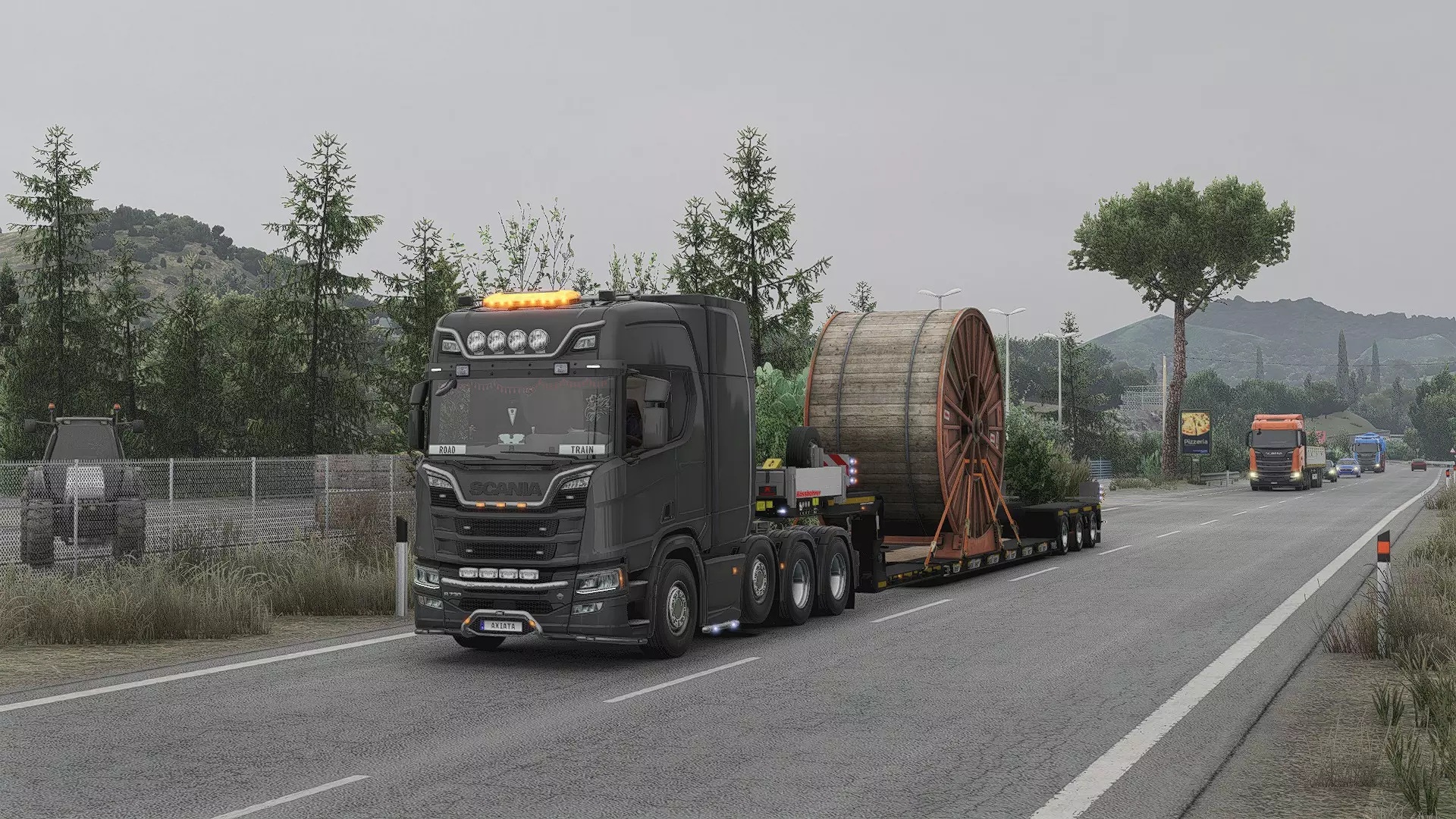
游戏性设置(经典卡车) 这些设置旨在《欧洲卡车模拟2》中提供最真实的卡车驾驶体验。没有捷径,没有街机式操控——只有纯粹的重量、动量和控制感。非常适合使用方向盘和踏板的玩家,或任何想体验驾驶40吨钢铁巨兽责任感的人。 物理与卡车行为 卡车稳定性:0% 挂车稳定性:0% 驾驶室悬挂硬度:20% 悬挂硬度:25% 制动强度:60% 路面不平模拟:130% 空气制动模拟:启用 真实燃油消耗:启用 传动轴扭矩:100% 驾驶室配件物理效果:启用 此设置让卡车感觉沉重且真实。你需要预判弯道,控制刹车区域,并接受迟刹车或转向过度会带来真实后果。 驾驶模拟设置 疲劳模拟:启用 交通违规:启用 发动机与电力自动启动:禁用 减速器自动使用:禁用(手动使用) 发动机制动自动使用:禁用 驻车制动自动启用:禁用 卡车速度限制器:启用(限速90公里/小时,欧盟标准) 车道辅助模式:禁用 自适应巡航控制:禁用 智能巡航控制:禁用 雨量传感器/自动大灯/自动远光灯:禁用 无辅助功能。你需要自行启动、停止并管理所有操作。手动使用发动机制动和减速器,并规划你的休息时间。世界设置 随机道路事件:0% 绕行路线:0% 降雨概率:10–20%(根据你想要的天气真实度进行调整) 时区:禁用(除非你正在进行跨国长途运输) 显示障碍物:启用 此设置会移除脚本化的干扰,同时保持天气动态变化且合理。你可以根据自己的游戏风格调整随机事件和绕行路线的滑块——我个人因为偏好使用上述配置。 变速箱 变速箱类型:H型换挡(若有)或序列式 自适应自动变速箱:禁用 智能序列换挡:禁用 手动换挡是关键。如果使用换挡拨片,请坚持使用序列式。如果你想要真正的真实感,请避免使用自动变速箱。拖车与停车 高级拖车连接:启用 拖车电缆:玩家拖车 巡航控制网格步长:5公里/小时 停车难度:始终选择 高级连接意味着你需要精确对齐。没有自动挂钩或简易对齐功能。 摄像头(可选真实度) 转向摄像头旋转:启用 转向旋转系数:100% 物理摄像头移动:启用 自动摄像头居中延迟:禁用 内部地平线锁定系数:100% 如果想感受驾驶室运动并获得更好的空间感,请开启这些设置。如果感到头晕,请禁用。 最终说明 这是《欧洲卡车模拟2》在不使用模组的情况下最接近真实卡车驾驶的设置。部分系统(如气压、负载重量、交通违规)仍经过简化,需要更好的模拟优化。但通过这些设置,你将能像专业司机一样思考和驾驶。你需要做到: 提前刹车并规划停车。 正确降挡——这很重要。 在坡道、弯道和不平整路面上感受车身晃动。 为超速或注意力不集中等失误付出代价。 如果使用键盘操作,可考虑调低刹车和稳定性设置。否则,本游戏旨在提供真实、沉浸式的驾驶体验。
Realistic Sound Setup Euro Truck Simulator 2 gives you a surprising amount of control over audio. Setting these up properly can transform immersion inside the cab. Below is a breakdown of every option and how to tune them for realism. Core Volume Sliders- Master Volume → Overall game volume. Keep high and control final output with your OS or headset. - Engine Volume → 80–100%. The truck should dominate the soundscape. - Exhaust Volume → 60–80%. Brings out rumble and downshifts without overwhelming. - Truck Turbo Volume → 70–80%. Essential for realism when hauling heavy loads uphill. - Truck Noise → 70%. Covers suspension creaks, wheel noise, and vibration. - Interior Volume → 70–80%. Adds cab ambience (wind, rattles, road hum). - Radio Volume → 30–40%. Should be background noise, not overpowering. If you want custom sound for your engine, follow this guide: https://steamcommunity.com/sharedfiles/filedetails/?id=3543889240 Additional Audio Controls- Voice Navigation → 50–60%. Clear but not louder than your engine. - CB Radio → 40–50%. For realism, keep quieter than navigation. - User Interface Sounds → 30–40%. Prevents GPS beeps and menus from breaking immersion. - Backup Beeper → Toggle on if you roleplay modern EU fleet trucks. - Open Window Noise → Enable. Changes sound balance realistically when rolling down windows. - Reverb Effects → On. Adds depth in tunnels, industrial depots, and enclosed spaces. Radio & Custom Streams (Geo-Optimized)ETS2 supports in-game radio via HTTP/MP3 or MMS streams. This is perfect for realism since EU truckers often keep a local station running. Popular examples: - TruckersFM → Dedicated to ETS2/ATS players, 24/7 community radio. - BBC Radio 2 (UK) → Real long-haul vibe, perfect for UK–EU routes. - Deutschlandfunk (Germany) → News & music, suits central EU driving. - NRJ France → Contemporary hits, fits well with French DLC routes. - Radio Veronica (Netherlands) → Classic hits, great for Benelux trucking. To add them, edit live_streams.sii in your Documents/Euro Truck Simulator 2 folder. Copy a working URL from a station and restart the game. Example template: stream_data[]: "http://radio.truckers.fm/;stream.mp3|TruckersFM|English|256" stream_data[]: "http://stream.live.vc.bbcmedia.co.uk/bbc_radio_two|BBC Radio 2|English|192" stream_data[]: "http://st01.dlf.de/dlf/01/128/mp3/stream.mp3|Deutschlandfunk|German|128" stream_data[]: "http://cdn.nrjaudio.fm/audio1/fr/30001/mp3_128.mp3|NRJ France|French|128" stream_data[]: "http://playerservices.streamtheworld.com/api/livestream-redirect/RADIOVERONICA.mp3|Radio Veronica|Dutch|128" Recommended Realism Mods- Sound Fixes Pack → Overhauls AI traffic, tire noise, wind, suspension, and ambience. - Kriechbaum / EVR Engine Packs → Each truck brand sounds unique (Scania V8 vs Volvo, etc.). - Environmental Sound Mods → Realistic rain, thunder, wind, and city ambience. Why Sound MattersPhysics makes the truck drive realistically, but audio makes it feel real. - Distinguish brands by engine note. - Hear traffic pass with windows open. - Notice the turbo spool when climbing hills. - Listen to thunder roll across the map. Set up correctly, sound makes the cab come alive in a way graphics and physics alone can’t. Cab Life & Driver Immersion (Optional) Euro Truck Simulator 2 isn’t only about driving physics. Realism also comes from how you live inside the cab. Adding immersion details like cabin accessories, radio stations, fatigue management, and realistic driver habits makes ETS2 feel like a true trucking simulator, not just a game. Cabin Accessories & InteriorsUse the official Cabin Accessories DLC to bring life into your cab with GPS units, snacks, laptops, and phones. For deeper ETS2 immersion, SiSL’s Mega Pack adds curtains, CB radios, dash cams, and hanging air fresheners. Interior Packs (DAF, Volvo, Scania, MAN) provide brand-accurate dashboards and gauges, making each truck feel unique. Radio & EntertainmentIn real trucking, the radio never stops. ETS2 supports custom radio streams through live_streams.sii. Popular picks: TruckersFM – 24/7 community radio for ETS2/ATS BBC Radio 2 (UK) – perfect for UK–EU long hauls Deutschlandfunk (Germany) – central EU news and music NRJ France – French pop hits for western routes Radio Veronica (Netherlands) – Dutch classics, great for Benelux trucking Match radio stations to your ETS2 map DLC region for maximum realism. Rest & Fatigue SimulationEnable Fatigue Simulation in settings. Plan your ETS2 jobs with realistic rest stops at truck stops and service areas. Roleplay like a European trucker: drive 9–10 hours, then rest. Makes ETS2 long hauls and career mode feel authentic. Cab Physics & EnvironmentTurn on Cabin Accessories Physics so items sway and rattle while driving. Keep Rain Probability around 15–20% for natural weather. With sound mods, thunder, wipers, and wind create realistic ETS2 cab conditions. Driver Habits for RealismOpen windows in cities to hear traffic noise. Shut off the engine at depots and fuel stations. Use indicators, hazards, retarder, and engine brake properly in TruckersMP Simulation 1. Respect EU speed limits: 80–90 km/h on highways, 50 km/h in cities. Feels more realistic than racing at 120. Why It MattersWheel setups and physics make trucks drive realistically, but cab life makes them feel realistic. ETS2 immersion is about living in the cab, not just hauling freight. Add these habits, and Euro Truck Simulator 2 becomes a grounded, believable trucking experience. Essential Realism Mods (Optional) Even though this guide is focused on playing without mods, I know some of you want that extra immersion. If you're one of those players, here are some mods I personally use and recommend & all are focused on realism. Note: I'm not linking them here. Just search the exact names on the Steam Workshop. These are the mods I personally use: https://steamcommunity.com/sharedfiles/filedetails/?id=3542994168 Physics & HandlingRealistic Truck Physics Mod v9.0.8 (by Frkn64) – Improves suspension, braking feel, and weight distribution for a more authentic Euro Truck Simulator 2 realistic experience. Air Ride A3 v1.2 – Adds soft suspension behavior, especially noticeable on highways, enhancing immersion without cheats. Sound ModsSound Fixes Pack v25.28.2 – ETS2 – Reworks ambient and traffic sounds, including weather effects, to boost immersion. Realistic Truck-Effect-Sounds V1.1 by Max2712 – Adds mechanical clunks, rumbles, and vibrations, making engine and truck sounds more lifelike. Volvo & Renault Open Pipe Sound by ilzy – Clean, deep engine sounds that bring authentic truck audio to Euro Truck Simulator 2. Visual ImmersionRealistic Vehicle Lights Mod v7.4 (by Frkn64) – More natural light spread for indicators and brake lights, improving night driving realism. Real European Companies Reloaded [DX11] – Replaces generic logos with real company brands to enrich the game environment. Real European Gas Stations Reloaded – Substitutes fictional gas stations with real-world counterparts for added immersion. Realistic Mirror FOV (ETS2) – Fixes side mirror angles to match actual truck views for better spatial awareness. AI Traffic & EnvironmentReal Traffic Density ETS2 – Smarter, denser traffic patterns that adapt realistically to time of day and location. Realistic Train Lengths – Eliminates unrealistic short trains, making rail traffic feel much more legit. AI Traffic Cars from ATS – Adds vehicle variety from American Truck Simulator, increasing road diversity in ETS2. Better German Police Car – Cosmetic enhancement that improves the authenticity of police vehicles on the road. Accessories & Cabin ImmersionTruck Accessory Pack – Subtle add-ons like lights, bars, and mirrors without being over the top. Expanded FH Customisation – Adds more tuning options specifically for the Volvo FH16 2012 model. Animated Steering Wheel – Driver’s hands follow the wheel movements, great for players who use immersion cams. These mods are great for single-player realism and immersive Euro Truck Simulator 2 gameplay. For TruckersMP, you’re restricted to vanilla, so focus on disciplined, realistic driving behavior instead. Realistic Cargo Weight Limits (Optional) No one hauls 60 t with a base-spec 4×2. Let’s use numbers that don’t break immersion. Quick rules 4×2 tractor + 3-axle trailer → 40 t gross (about 20 t payload) 6×2 or 6×4 → 44 t gross (24–26 t payload) where it’s legal 8×4 heavy haul → 50–60 t payload with permits and pilot cars Nordic HCT sets → 60–76 t gross on approved Finnish/Swedish roads Why the cap mattersEU law (96/53/EC) fixes a five-axle artic at 40 t. Some countries (DE, NL, UK) only allow 44 t for intermodal/container traffic. Anything heavier needs “abnormal” paperwork, escorts, 60 km/h top speed. UK STGO permits allow 80–150 t moves, but only with escorts, pilot cars, and low-speed limits (not in ETS2 base game). What about doubles?Non-Nordic doubles exist but are limited to specific countries and approved routes. Finland/Sweden allow HCT sets up to 76 t gross on certain roads. A 4×2 can physically pull doubles, but not legally or safely at full weight — in real ops, it’s 6×2/6×4 minimum. Match weight to horsepower Gross (t)Min hpGearbox ≤ 24360Plain 12-speed 25–4446012-speed + retarder 45–60550–65016-speed or 12-speed with crawler 60–80650–770Heavy-haul box, hub reduction Simple math: aim for 10 hp per tonne. Feels right every time. EU law also requires retarders above 44 t in-game, fit one once you’re hauling 30 t+. TruckersMP etiquette Stick to 44 t max on Simulation servers unless it’s a planned convoy. Right lane on hills if you’re the heavy one – don’t block the 20 t reefers. Oversize? Flash beacons, shout in chat, keep gaps big. How to use this in ETS2 Pick a cargo weight that fits the list. Grab an engine that beats the “Min hp” line. Retarder on for anything over 30 t – your brake pads will thank you. Running SCS Special Transport (55–70 t)? Take an 8×4 FH16 750, lock to 60 km/h, follow the escorts. Source: EU Directive 96/53/EC, UK STGO tables, Nordic HCT regs.
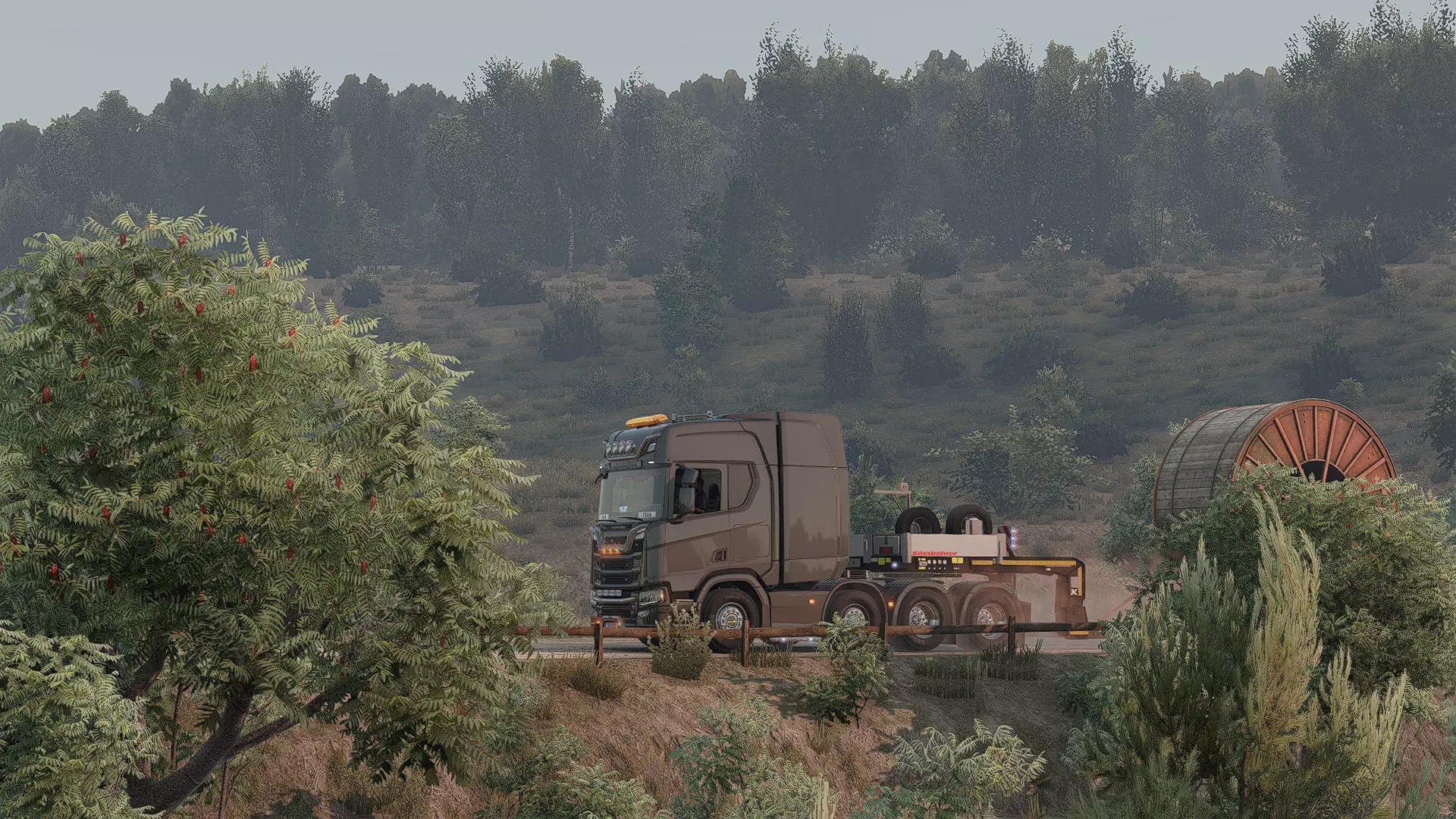
卡车建造模板(适合角色扮演) 本节为你提供针对不同玩法的预建写实卡车配置——无论你是进行生涯式角色扮演、重型货物运输任务,还是打造整洁的虚拟运输公司车队。 这些配置不只是为了外观——它们反映了卡车在欧洲的实际使用方式,为你的模拟体验增添深度。 1. 车队卡车——公司司机风格 此配置模拟大型物流公司(如DHL、DB Schenker、UPS等)使用的卡车。整洁、基础、高效。底盘:4x2或6x2中提升桥(符合燃油经济性和重量标准) 发动机:430–500马力(标准欧6车队规格) 变速箱:自动或智能序列式 涂装:公司风格或纯白/蓝色 配件:基础配置 - 遮阳板、前牌照、低轮廓车灯 内饰:标准配置 - GPS、冰箱,可能还有手机或行车记录仪 此配置适用于TruckersMP、任务角色扮演或真实虚拟车队驾驶。这些卡车在现实中随处可见。 2. 个体经营 - 平衡型长途运输者 为拥有自己卡车的 solo 司机打造的真实配置。兼具一定风格和强劲动力,同时仍适合日常运输任务。底盘:6x2或6x4 发动机:500–540马力 变速箱:序列式或H型手动挡(推荐手动) 涂装:自定义或国家特色色(英国、法国、波兰) 配件:车顶行李架、灯条、车轮改装、简约轮眉 内饰:咖啡杯、零食袋、手机支架、司机GPS 非常适合单人模式下执行长途运输任务。此配置既可以展现个性,又保持了务实风格。 3.重型运输/特种运输 专为运输超大型或重型设备打造的拟真配置。搭配DLC货物包或模组化重型运输任务时表现出色。底盘:8x4或6x4重型 发动机:600+马力(斯堪尼亚V8、沃尔沃750、曼恩D38) 变速箱:H型换挡或手动序列式 涂装:实用型/领航型/黄色警示色 配件:防撞栏、警示灯、长底盘挡泥板 内饰:行程监控器、超宽负载标识、副驾GPS 非常适合使用特种运输DLC或超大型模组包。驾驶时需谨慎——大转弯、提前刹车。 4. 周末展示型——角色扮演/车队活动 这是用于展示的车型。现实中的个体司机有时会为车队、聚会或纯粹为了自豪感打造展示用卡车。底盘:4x2或6x4 发动机:500–540马力 变速箱:任意 涂装:自定义皮肤或高光泽金属漆 配件:全镀铬、底盘灯、LED爆闪灯 内饰:满载毛绒玩具、窗帘、电视、CB收音机 用于TruckersMP车队、截图或Twitch直播。不实用,但很有趣。 TruckersMP——如何下载与设置 想要实时与其他人在路上驾驶吗?TruckersMP是欧洲卡车模拟2的首选多人模组。它拥有具有真实规则的服务器、车队、虚拟运输公司等。所需条件: - Steam上的《欧洲卡车模拟2》合法副本 - 《欧洲卡车模拟2》至少2小时游戏时间(Steam会验证此数据) - 免费的TruckersMP账户(使用Steam登录创建) 设置步骤: 1. 前往相关网站 2. 点击“注册”并使用Steam账户登录 3. 下载启动器(右上角的“Download Client”) 4. 运行安装程序并选择《欧洲卡车模拟2》的安装路径(通常会自动检测) 5. 启动TruckersMP启动器,选择《欧洲卡车模拟2》(多人模式) 6. 登录后,选择服务器(Simulation 1服务器适合追求真实体验的玩家),然后开始驾驶! 提示:请始终通过TruckersMP启动器启动游戏,而非Steam。
开始游戏前需要记住的事项: - 仅在模组服务器中关闭速度限制器(若追求真实感请保持开启,因为部分欧盟国家法律规定需始终保持低于90公里/小时的速度限制) - 遵守游戏内交通规则,否则可能被踢出或封禁 - 不要干扰交通或其他玩家,若违反迟早会被封禁 - 紧急情况下使用【/fix】修复卡车(使用次数有限) - 将CB无线电设置为19频道进行一般语音聊天 真实感说明:TruckersMP在模拟1服务器中强制要求真实驾驶。如果在弯道超车、在城市超速或发生碰撞,将会受到管理员处理。 想要完全真实的体验?请选择模拟1服务器,禁用辅助功能,并像对待工作一样认真驾驶。官方客户端下载 TruckersMP知识库 - 设置指南、规则和帮助文章 TruckersMP论坛 - 社区讨论、支持和更新 支持的模组(论坛主题) - 多人游戏中允许使用的模组列表 支持的DLC(Steam购买指南) - 可与TruckersMP配合使用的DLC 启动选项(Steam和TruckersMP启动器) 根据你启动欧洲卡车模拟2的方式,使用以下方法为游戏应用一些自定义启动选项。 对于TruckersMP启动器用户(多人游戏) Steam启动选项不适用于你,因为当你使用TruckersMP启动器时,它会绕过Steam。以下是手动添加的方法: 打开TruckersMP启动器 点击设置(⚙️)图标(左下角) 在控制台选项(高级)下,粘贴你的启动参数(空格分隔) 点击保存 从启动器启动欧洲卡车模拟2多人模式
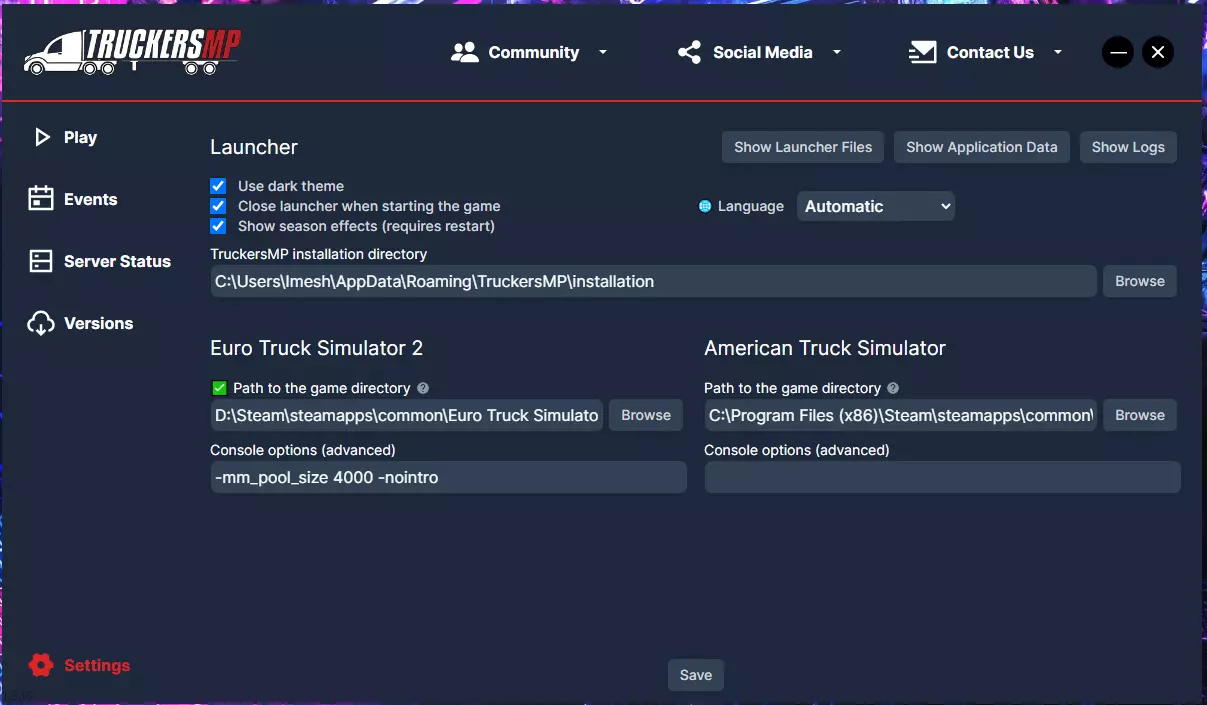
-64bit -nointro -unlimitedlog -rdevice dx11 -mm_pool_size 4000 此命令可跳过启动画面、移除日志大小限制、启用DirectX 11并改进内存处理。推荐启动选项(TruckersMP): -64bit // 强制使用64位版本 -nointro // 跳过SCS开场动画 -unlimitedlog // 允许完整游戏日志(有助于技术支持) -rdevice dx11 // 强制DirectX 11渲染 -mm_pool_size 4000 // 分配更多内存以实现更流畅的加载 Steam启动器用户(单人模式): 如果不使用TruckersMP,直接从Steam启动《欧洲卡车模拟2》,按以下方式设置启动选项: 1. 打开Steam库 2. 右键点击《欧洲卡车模拟2》 3. 选择属性 4. 在常规选项卡中,找到启动选项字段 5. 在其中粘贴所需的启动选项
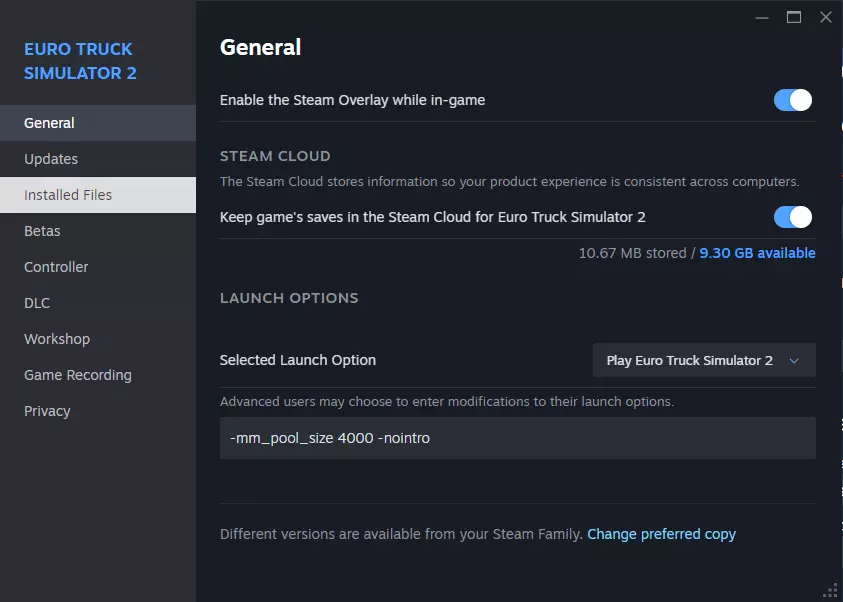
示例: -64bit -nointro -unlimitedlog 额外单人游戏选项: -force_mods // 绕过模组管理器,自动加载模组(使用时需谨慎) -noworkshop // 禁用Steam创意工坊访问 -edit europe // 启动地图编辑器 仅使用你实际需要的开关,高级选项可能会影响游戏稳定性或模组加载行为。 个人提示: 始终用空格分隔每个参数。除非你知道作用,否则不要混合使用实验性标志。 如何在《欧洲卡车模拟2》中开启控制台命令(开发者控制台指南) 如果你想在城市间传送、用自由摄像机模式飞行或调整游戏以获得真实感?你需要先启用《欧洲卡车模拟2》开发者控制台。以下是如何开启《欧洲卡车模拟2》控制台的方法——快速、简单,且在2025年仍然有效。 分步说明: 1. 关闭游戏。(如果你正在运行游戏,这一点很重要) 2. 打开你的文档文件夹: 路径:C: Users YourName Documents Euro Truck Simulator 2

找到名为config.cfg的文件 使用记事本打开该文件(我使用的是VS Code) 向下滚动或使用Ctrl + F查找以下两行: uset g_developer "0" uset g_console "0" 将这两行修改为: uset g_developer "1"
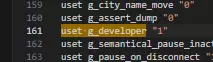
莞罎 g_console "1"
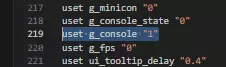
保存文件并关闭记事本。 重新启动《欧洲卡车模拟2》。 在游戏中,按下~键(ESC键正下方)以打开控制台。
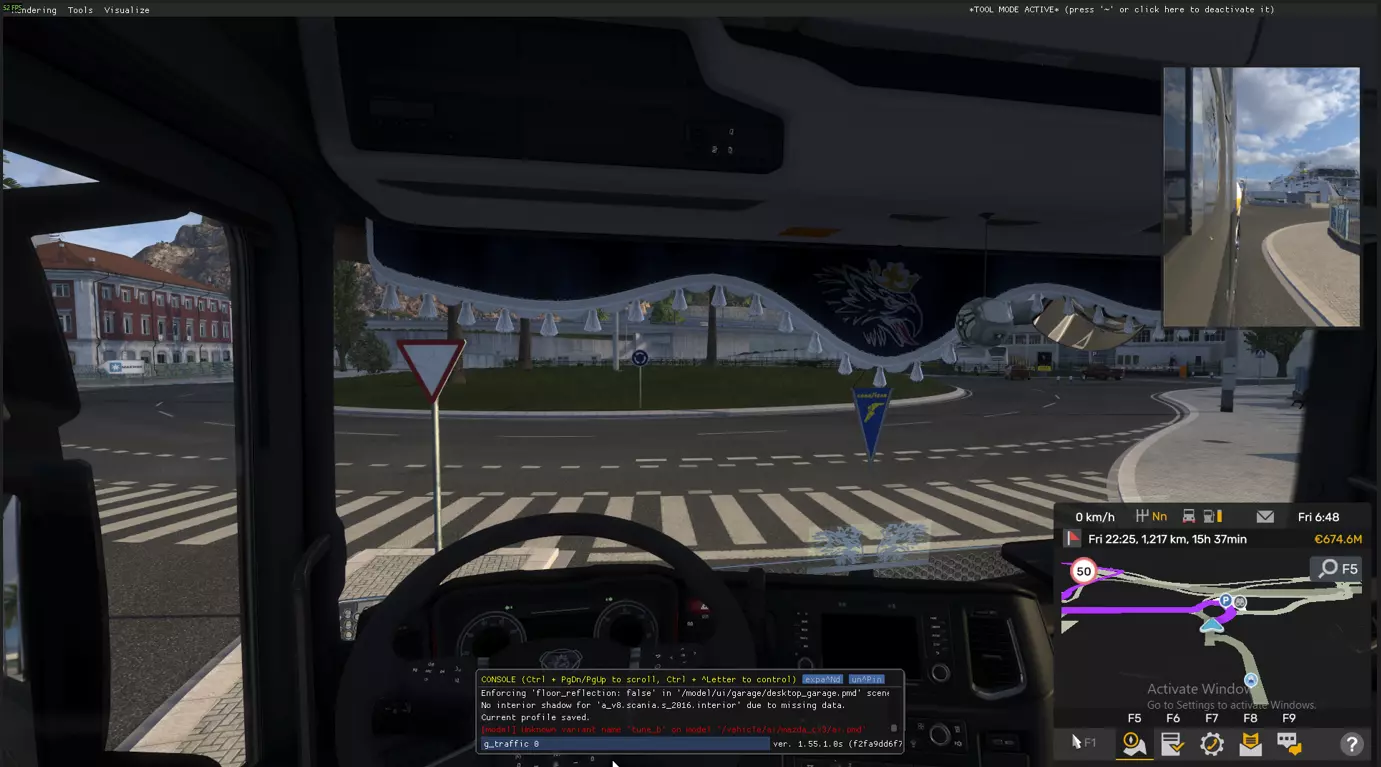
Common Uses of the Console Teleport: goto paris – Instantly fly your camera to Paris. Set time: g_set_time 14 – Changes time to 2 PM. Remove traffic: g_traffic 0 Disable police fines: g_police 0 Free camera speed: g_flyspeed 100 To activate free camera, press 0 (not numpad), then use numpad keys (8, 4, 5, 6) and mouse to move. To teleport your truck, move the camera and press F9. Below Is a Full List of Console Commands You Can Actually Use in ETS2So now that you’ve got the console working, you’re probably wondering, what else can I actually do with it? Here’s a full list of working console commands in Euro Truck Simulator 2, tested on the latest version (1.55+). Use these if you want to debug, explore, mess with time, or get better screenshots. Teleport & Free CameraWhat It DoesCommandMove camera to a citygoto berlinEnter free camera modePress 0 (top row zero)Drop your truck at cameraPress F9 (on a road)Change fly speedg_flyspeed 100Slow down game speedwarp 0.7 Tip: You can use goto + F9 to quickly move your truck across the map without driving. Traffic, Police & Time ControlWhat It DoesCommandRemove all trafficg_traffic 0Bring traffic backg_traffic 1Turn off police finesg_police 0Turn police back ong_police 1Set time of dayg_set_time 14 Want peace and quiet to test a truck? Run g_traffic 0 and g_police 0 for a clean drive. UI, FPS, Screenshot ToolsWhat It DoesCommandHide all HUD elementsg_hud 0Bring HUD backg_hud 1Show FPS counterg_fps 1Enable debug overlayg_minicon 1Take a screenshotscreenshot Clean shots = perfect for guides, thumbnails, or pretending you drive for Scania IRL. Gameplay Tweaks & Tech InfoWhat It DoesCommandAdjust brake powerg_brake_intensity 0.5Change steering curvec_steer_func 3.0Toggle fullscreenr_fullscreen 1Show GPU infovid_memShow GPU drivervid_verShow system infosys_infoQuit game instantlyquit Commands That Don't Work (Ignore the Internet Lies)Let’s clear the air, these commands you’ve probably seen on forums or YouTube do not work in vanilla ETS2: delivery_finish g_teleport teleport x y z /tp or /goto (those are for TruckersMP only) They’re either from mods, cracked builds, or old dev tool leaks. Build a Trucking Empire the Smart Way (Career Mode) This section covers a strategic money-making path for Euro Truck Simulator 2 for Single Player Career Mode, this is written in a business man mindset, keep the cash flowing, not saving until you are high level Phase 1: Build Capital, No Expenses (Level 1-5)Only run Quick Jobs - no need to buy a truck yet. The company (game) provides the truck, fuel, repairs, tolls. Your goal here is pure profit, no expenses. Focus on: On-time deliveries with zero damage Building XP to unlock better-paying jobs Upgrade your skills in this order: Long Distance (unlocks better-paying routes) High Value Cargo Fragile Cargo Pick jobs based on € per km, not just total payout. Often, shorter routes are more profitable with less risk. Avoid accidents or damage - repair bills will eat your profits. Don’t spend. Stack cash. You're an employee now - your goal is to get out and start your own operation with enough leverage to stay ahead. Phase 2: Asset Acquisition - First Truck (Level 5-10)Once you reach around €20-30k and level 5, take a €100,000 loan. Buy a used truck through the Used Truck Dealer. Prioritize: Low mileage No major engine/transmission issues MAN TGX, Renault Premium, Iveco - reliable budget picks Why used? Low capital cost, full Freight Market access, more routes. Avoid buying new trucks early - waste of startup capital. Focus on engine upgrades, not cosmetics. From now, your truck is an income-generating asset. Stick to Freight Market jobs - higher pay than Quick Jobs. Sleep and maintain your truck as needed to avoid breakdowns. Pick medium distance loads (10,000 - 20,000 € range) for good € per km. Avoid long hauls with heavy tolls or risky routes early on. Phase 3: Maximize Personal Profit (Level 10-15)Keep working jobs yourself. You’re more efficient than any AI driver. Hold expansion. Focus on: Clearing most of your loan Saving at least €100-150k Upgrading your truck (Volvo FH16 or Scania R recommended) Pick up Cargo DLCs if you can. They unlock higher-value loads (heavy machinery, ADR, etc). Start mastering ferry routes to cut fuel and toll costs. Example: Valencia > Ashdod via Palermo, Naples, Bari, Thessaloniki Use job filters to find the best paying route per km, not just by total. Think like a business owner: expand only when your current asset is operating at peak capacity. Phase 4: Controlled Expansion - First Driver & Garage UpgradeOnce you’ve upgraded your truck and you’re sitting on solid savings, scale. Take a €400,000 loan only if: You can afford a Garage Upgrade (home base to 3 slots) Buy a second (used) truck Hire your first driver Assign your driver a basic truck. No top-tier gear yet. Monitor Driver Manager: Long Distance should be their first skill After level 2, switch to Balanced mode Expect a slow ramp-up. Bots usually take 2-3 in-game days to become profitable. Eventually, your drivers will earn thousands daily (30k/day+ at peak). Phase 5: Scale the Business (Level 15+)What you should now have: A top-tier personal truck One or more income-generating AI drivers Some debt, but manageable repayment Next steps: Expand to 5 trucks per garage before buying new garages Buy more used trucks for new hires Consider trailers for yourself and AI for better rates Use ferry exploit and resting while in AI truck to earn passive cash Keep skill diversity among drivers - ADR, Just-in-Time, etc. Every truck must earn its keep. If a driver underperforms, reassign or replace them. Final Advice: Think Like a BusinessYour truck is an asset. Your drivers are investments. Loans are tools. Cash flow is king - always have a buffer for fuel, repairs, tolls. Don’t overspend early on visual mods or luxury items. Focus on skills that boost profit: Long Distance > High Value > Fragile > ADR. Use quick saves before risky maneuvers or long trips. Try Real Economy mods for more challenge if things get too easy. Play it smart. Scale slow. Profit consistently. That’s how you build a trucking empire. If You Have Your Own MethodYour own strategy that’s working for you - or want to add something? Drop a comment. If it’s solid, I’ll update the guide with it. Wrap-Up – Keep It Grounded If you’ve made it this far, you’re clearly not here for arcade vibes you want that grounded, weighty feel of actually hauling tons across Europe. That’s what this entire setup is built around. It’s not about chasing ultra graphics or piling on mods. It’s about building discipline driving smart, braking early, shifting properly, and respecting the road. You’ll miss gear changes, you’ll oversteer once or twice, and yeah you’ll probably forget to rest and get hit with a fine. That’s the point. ETS2 doesn’t simulate everything perfectly (air pressure system is still not quite there, and traffic fines can feel a bit off), but with the right settings, you’ll get as close as possible to a realistic trucking experience without needing third-party mods or plugins. Whether you’re on keyboard, controller, or a full wheel setup, the rule stays the same: Keep it grounded. Drive like your load matters. You’re not just playing a game - you’re clocking in. Respect the weight.
搜索标签:欧洲卡车模拟2真实设置,罗技G29欧洲卡车模拟2设置,TruckersMP指南,欧洲卡车模拟2力反馈修复,欧洲卡车模拟2物理 常见问题 这个真实设置在TruckersMP中有效吗? 是的。所有设置、物理调整和配置在TruckersMP模拟服务器中都有效。只需避免使用 mods,因为TMP会阻止大多数mod。 我可以将本指南用于美国卡车模拟吗? 是的。大多数物理、方向盘配置和图形调整也适用于美国卡车模拟。DLC顺序会有所不同,但真实感设置是通用的。 罗技G29在欧洲卡车模拟2中的最佳力反馈设置是什么? 设置900°转向,灵敏度50,非线性0,并使用本指南中列出的力反馈设置(总增益100%,地形80%,颠簸72%)。这能提供沉重、真实的卡车手感,不会有街机式的灵敏反应。每辆卡车配置的实际最大载货重量是多少? - 4×2 → 总重40吨(约20吨有效载荷) - 6×2或6×4 → 总重44吨(约24-26吨有效载荷) - 8×4 → 50-60吨有效载荷(需特殊许可) - 北欧重型组合运输 → 总重60-76吨(仅限斯堪的纳维亚地区) 控制台命令在 TruckersMP 中有效吗? 无效。开发者控制台命令仅在单人模式中有效。TMP 会屏蔽传送和时间命令。 哪些DLC真正增加了真实感? 地图推荐:西巴尔干、伊比利亚、黑海之路、波罗的海彼岸。 驾驶室生活:驾驶室配件+方向盘调校。 重型运输:特种运输、重型货物。 使用键盘或手柄的玩家可以使用本指南吗? 可以。重点关注游戏玩法真实度设置(燃油、疲劳、关闭辅助功能)。你不会获得力反馈的真实感,但刹车/物理配置仍然适用。 现代卡车和经典卡车在这种设置中有什么区别? 现代卡车(2016年后)使用自动变速箱、更紧凑的物理效果和高级辅助系统。经典卡车感觉更松散、更重,最适合手动变速箱。 这个指南中的所有调整会降低帧率吗? 不会。图形配置针对低端和高端电脑都进行了优化。根据你的电脑配置选择合适的设置,以平衡帧率和真实感。 这个设置对新手友好还是只适合硬核模拟玩家? 两者都适合。新手可以使用无模组配置和自动变速箱。模拟老手可以调整方向盘设置、控制台参数和全手动卡车。引擎声音模组 图形模组次世代 学习赚钱 搜索标签:ETS2沉浸感,ETS2驾驶室配件,欧洲卡车模拟2真实设置,TruckersMP沉浸感,ETS2疲劳模拟

作者:Axiata(Steam指南创作者)