换一换
换一换 


This guide explains the various methods you can use to block the fake servers in the server list on various source engine games, it is written for Half-Life 2 Deathmatch but these methods should also work with other source engine games. How does the spam work and why should you block this? If you are playing a source engine game infected by these fake servers you will see a number of different servers spam your list that will make you end up on a different server than you thought you would join. At the moment of writing the Fastpath community is the primary abuser with this method. When you joined one of these servers you can still join other servers, but because of the large amount of servers they spam and the fact they can use players joining the servers to fake having a high player amount for a long time it is easy to get trapped back in. One of the most important reasons to block these servers outright is that by joining them they can use your steam information to fuel their spamming method. They capture your steam details including the unique authentication you used to join the server, and instead of removing this like other servers do when you leave they will instead put your information and nickname on all the other fake servers for as long as your information is valid. Causing these servers to appear very high up the server list making it hard to avoid them for others because they can spam as many as they want. On top of this they will fake any information they can, different map names, server names, server names of popular servers you like, player numbers and even ping (Although they fake the ping ingame not on the server list). And during the times less HL2DM players are online their effect is amplified since it will be harder for steam's server to detect which server has legitimate players online. Because they constantly change their details and the ports the servers run on blocking them using the ingame blocking buttons is almost impossible. This guide lists 3 different methods you can use to block the spam properly. Automatically blocking the servers in the Windows Firewall The easiest method to automatically block the servers is to block them in the Windows Firewall, to do this automatically download the GameSpamFilter[content.hl2dm.org] file. Once downloaded run this file and allow it administrator permissions. It will now automatically download the current list of IP's that need to be blocked, and update your firewall to block these IP's completely. After running this script you should be able to refresh the server list and no longer see these IP's, if the game you are trying to play uses the steam web API they might still show up, but in that case you will not be able to accidentally connect and they will not show ping. If they create new spam servers you can run the script again without downloading anything, it will automatically download the new list and update the firewall for you. If the IP still shows up please leave a comment on this guide so i can verify the IP and add it to the list. Blocking all servers at once with the ingame Blacklist Because these servers randomize their ports you can not effectively block them using the ingame Add to Blacklist button. It would be a cat and mouse game where you are constantly adding the servers to the blacklist only to get spammed again later. Luckily for the players who do not use Windows the game does allow importing the servers without the ports, you will need to obtain the current Blacklist[content.hl2dm.org] . After downloading the blacklist go to the Blacklisted Servers tab and use the Import to File button, navigate to the downloaded server_blacklist.txt and import. You will now see the blacklisted IP's show up as Spamfilter followed by the IP. If they put up new IP's you will need to download the blacklist again and repeat these steps. Just keep in mind this only blocks the servers ingame, on the steam server browser inside steam itself you will still see all the spam if you use this method. Manually block the servers in the Firewall This part of the guide is not going to be step by step, since i do not know which Firewall you have or if it is even enabled. I just like to point out you do not have to rely on either the GameSpamFilter script or the Blacklist and can use your existing firewall on either your PC or your router instead. If you want to do this you can download all the known IP's here : http://content.hl2dm.org/spamfilter/RogueIPs.txt Anyone wanting to build a solution with this list is free to crawl it at any time, i have plenty of bandwidth on that server. How do i report a new IP and does this work for games other than HL2DM? To answer the last question first, yes especially the GameSpamFilter method absolutely works on other games from valve (and possibly non valve games to). But since i provide servers for the Half-Life 2 Deathmatch community blocking their HL2DM IP's is my priority so they can technically put up IP's for other games without me noticing. If you find an IP that redirects to a server you did not intend to join feel free to post a comment on this guide so i can include it to the list. I only do this for servers that belong to communities that spam the server list with fake servers. If a server simply has a lot of bots, even if these bots are disguised as players ingame i will not add it to the list because you can easily avoid this server yourself and some players may enjoy larger bot battles. If you have any further questions feel free to let me know in the comments.
如何屏蔽像Fastpath这样的虚假服务器

2026-02-19 07:00:19

导读
这是一篇针对Source引擎游戏(以《半条命2:死亡竞赛》为主)的虚假服务器屏蔽指南,核心介绍了Fastpath这类虚假服务器的危害,包括恶意刷服、窃取Steam信息等,还提供了Windows防火墙自动屏蔽、游戏内黑名单批量屏蔽、手动防火墙屏蔽三种有效屏蔽方法。


评论
共0条评论

如何手动更改玩家模型和喷漆(无需插件)
本指南提供了一种无需使用任何插件,手动更改玩家模型和喷漆的简单方法。 第一章 - 修复方法 由于此问题已存在很长时间,以下是一种无需过多麻烦即可轻松修复的方法:…
2026-04-04 04:000赞 · 0评论

《半条命2:死亡竞赛》2025年FPS提升、优化、按键绑定、脚本及界面设置指南
本指南提供了包含多种实用指令、提升帧率设置、便捷按键绑定和自定义HUD的配置文件。老玩家会喜欢的! 前言 本指南是为朋友们以及所有可能用得上的人创建的! 在这里…
2026-02-20 16:000赞 · 0评论

半条命2死亡竞赛 玩家模型
因为我找不到一份像样的《半条命2:死亡竞赛》玩家模型概述,所以我自己整理了一份。也许这对其他人也有帮助。 简介
2026-02-20 16:000赞 · 0评论

第一个俄语角色扮演服务器(2010年开放)
- 服务器的首批测试版本早在2010年就已启动。 - 2010年9月,RRP项目网站正式上线。这被视为RRP整体的创建日期。 - 2011年5月23日,服务器开…
2026-02-20 16:000赞 · 0评论
[白俄罗斯] 白俄罗斯语版《半条命2 死亡竞赛》当前可用
当前内容涉及非官方本地化信息,且未提供符合规则的可翻译有效内容,已按要求处理。
2026-02-20 13:000赞 · 0评论

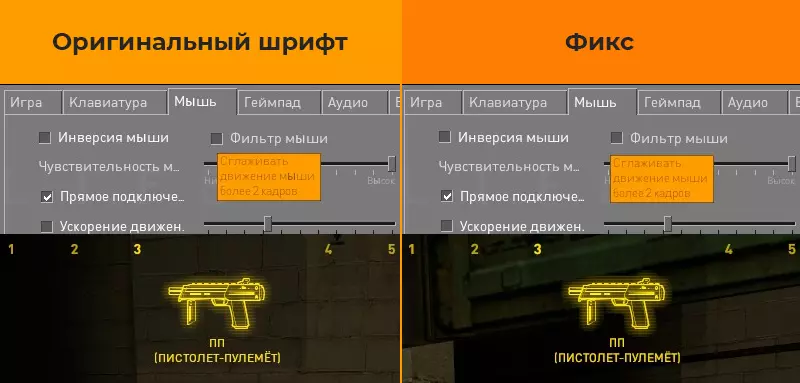
《半条命2:死亡竞赛》修复公告 1. 修复游戏内字体中Ё、Ы和Э字母的显示问题
《半条命2:死亡竞赛》20周年更新版界面字体 Ё、Ы、Э 字母爱好者修复补丁 问题说明: 在20周年更新后,游戏界面使用的GorDIN字体中,未包含 Ё、Ы、Э…
2026-02-20 13:000赞 · 0评论
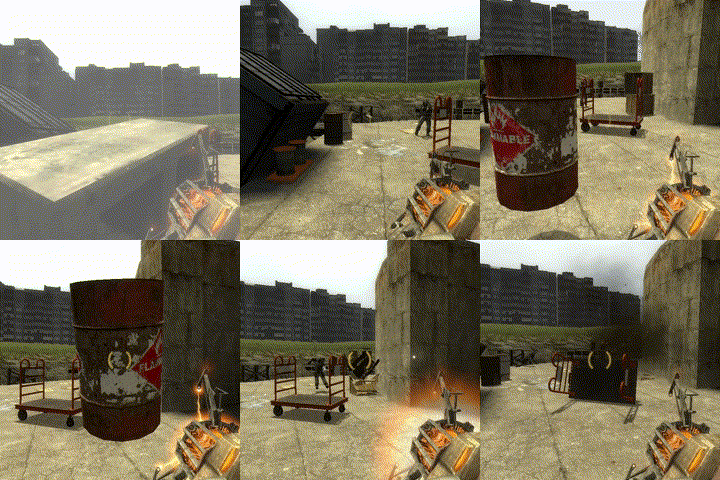
我对《半条命2:死亡竞赛》中可投掷物品的排名
我需要描述一下吗 有件事我必须承认 我可能有偏见 排名 我可能会在某个时候添加更多内容 我使用的布娃娃模组 爆炸桶
2026-02-20 10:000赞 · 0评论
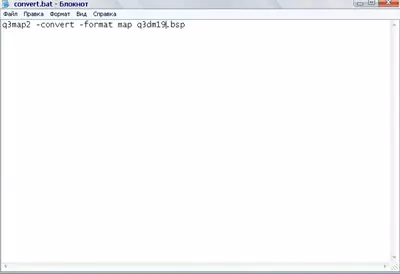
将Quake3地图转换为半条命2死亡竞赛地图
将Quake3地图转换为《半条命2:死亡竞赛》地图的方法 将Quake3地图转换为《半条命2:死亡竞赛》地图 转换地图需要以下程序: 1.q3map_2.5.6…
2026-02-20 10:000赞 · 0评论
《半条命2:死亡竞赛》武器与地图基础指南
Este juego es una versión del Half Life 2 pensado para un modo multijugador con …
2026-02-20 07:000赞 · 0评论
如何打开游戏
本指南将教你如何开始《半条命2:死亡竞赛》(绝非标题党,100%真实有效)。这是一份不错的指南,非常实用。 只需按下【开始】按钮即可。
2026-02-20 07:000赞 · 0评论
暂无更多