换一换
换一换 




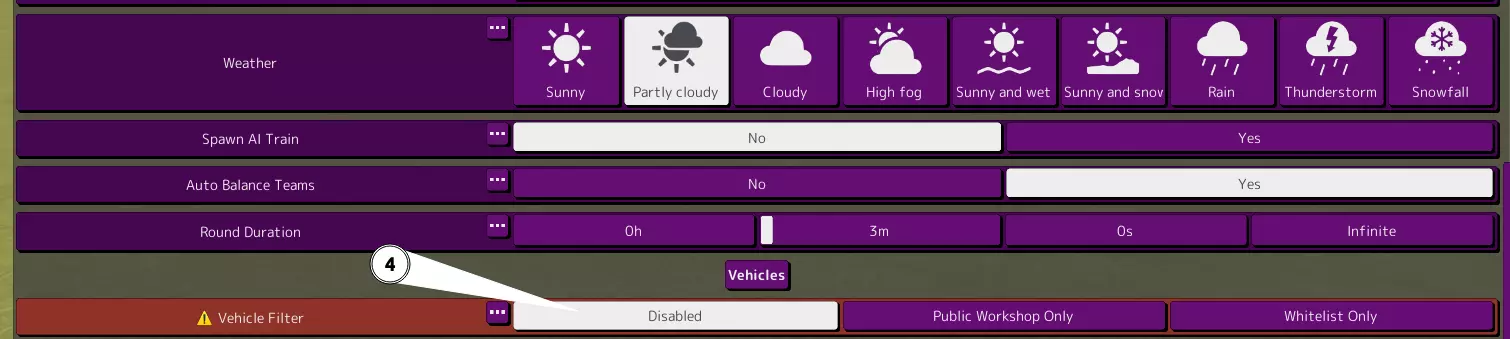
关于操控、建造、砖块功能、部分技术内容等方面的提示。内容并不全面。 适用于1.9版本 这类似Discord提示频道的Steam版本 如果你是新手,只需阅读操控、设置和编辑器部分,其余大多为信息类内容 1.8版本生成bug解决方法(可能已失效) 1. 将你喜爱的创意工坊作品保存到本地。 在编辑器中打开 > 文件 > 另存为 (你需要离开仅创意工坊服务器并进入单人游戏才能执行此操作。) 2. 前往天气或回合时长下方的比赛设置,将载具筛选器设为禁用。 (无需担心会增加遇到捣乱玩家的风险。)创意工坊中已有碰撞物和闪光弹,他们会在方便时发布内容。 如果你不是主机且遇到此bug,请让主机执行此操作。 现在你可以使用本地保存的创作来生成它们。
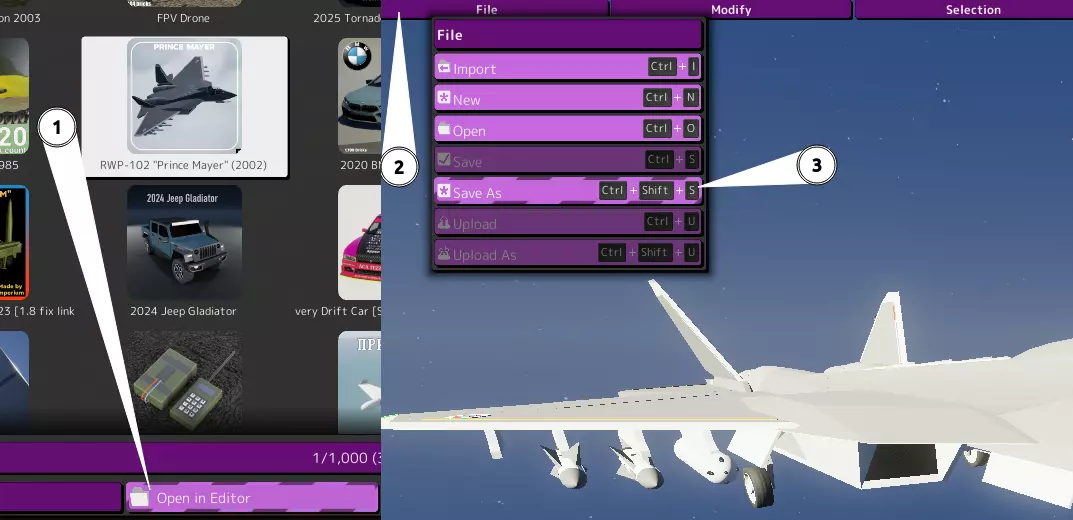
如果你不想保存内容且本地功能已开启,可以在编辑器中打开创意工坊项目并从中生成内容。 控制 绑定指的是按钮/控制键 暂停菜单为ESC 生成、编辑、删除、恢复、切换载具和座位 - 恢复/重生的默认绑定键是退格键。按住该键将在车库重生。 - 生成载具和编辑器的默认绑定键是O。轻按将打开生成菜单,按住将进入编辑器。在载具中(无论是乘客还是司机),按住O将在编辑器中打开当前乘坐的载具。 - 切换载具的默认键是F2。按住可切换到上一个载具。 - 切换座位的默认键是F1。按住将切换到上一个座位而非下一个。 - 你可以在生成菜单中双击载具,作为快速替换生成的选项。 - 作为主机,有一个用于移除空载具的绑定键。按住按键以移除所有载具。 相机-默认绑定F键启用自由视角。按住该绑定键可循环切换自由视角模式。 - 自由视角模式下,E和Q键用于上下移动。 - 载具视角切换默认绑定C键。按住C键将返回第三人称视角,再次按住则切换回上次选择的视角。 - 载具第一人称视角默认绑定C键。 - 设有移动相机绑定键。此键可用于旋转相机以及操作开关和其他可交互物体。 - 投射物相机默认绑定P键。 假人-生成假人默认绑定B键。 - 切换假人默认绑定F3键。按住F3键可选择上一个假人。 - 设有复活和清除假人绑定键。轻按复活假人,按住则清除假人。 HUD和聊天-聊天默认绑定J键。 - 设有聊天频道切换绑定键。使用它可在全局、队伍和管理员频道之间切换。 - 在聊天时按住Tab键,可使用WASD键导航HUD。 - 地图的默认按键为M。滚动鼠标滚轮可缩放,按住右键可移动地图。 载具方面,你应该查看输入映射中的载具类别,这些按键会经常用到。 - 加档和减档用于切换档位。 - 有一个固定载具的按键。轻触可固定座位,长按可固定载具生成的所有部件。 建议重绑定:将辅助键重绑定为E和Q。将载具退出键重绑定到任何带加速键的组合(例如Shift+R)。 - 在游戏设置中,关闭自动变速箱和自动反打方向盘。不过,如果你愿意也可以保持自动模式,只需注意有些载具需要手动控制。 - 如果动作键在小键盘上,将其重绑定到数字行。操作1和/或操作2应设为鼠标按键。 杂项: - 游戏内设有物品栏。 - 可以切换开火动作,该功能名为【下一个开火动作】。 设置: - 关闭景深效果以看清摄像头准星。 - 在比赛设置中禁用【允许其他玩家移除载具】选项,可以防止他人保存载具。 - 务必设置砖块数量限制和尺寸限制,除非你不在意服务器崩溃。强烈建议设置为1000块(最多1900块)。 - 遵循比赛设置建议。需要禁用【载具筛选器】才能从本地生成载具。 - 如果载具行驶速度很慢或转向异常,请检查以下设置:ESC>选项>游戏玩法。

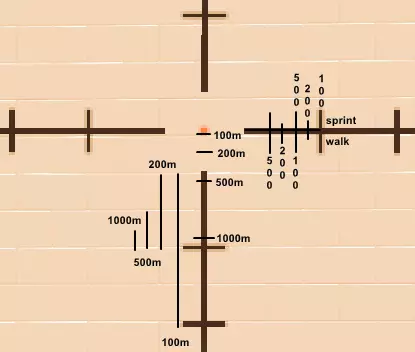
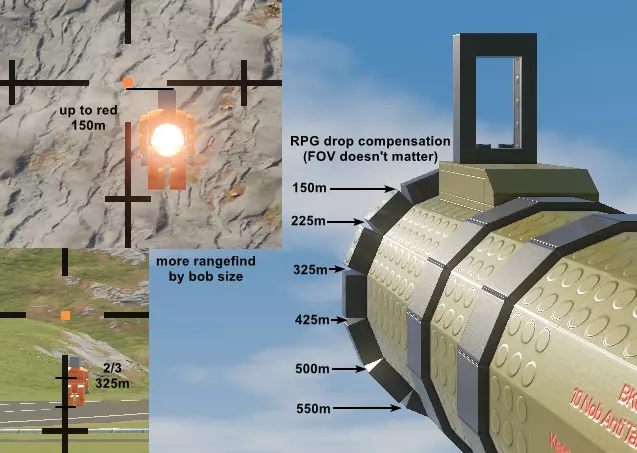
通用提示 始终在卸载游戏或切换至测试版前备份你的载具文件夹。 不要将座位直接放置在炮塔上。这很容易导致载具的旋转和位置在其他玩家的客户端上不同步。 在导弹和炸弹上使用遥控模块,以确保它们在多人游戏中的位置同步。 如果你使用了模组且关闭了【允许不同模组】选项,除非是与朋友之间分享,否则请在描述中链接你的模组。 玩家必须拥有与你相同的模组才能看到相同的内容。不建议在无模组或模组不匹配的服务器中生成带有模组模块的载具。主机必须拥有相应模组才能使其正常工作。 过多的玩家可能会导致低帧率和高延迟。主机的帧率可能会比其他玩家低,这仅仅是因为玩家数量的关系。 地图可以实时显示载具和更新内容。在PVP模式中查看地图在部分服务器可能会被视为作弊行为。 你可以通过射击一次武器,然后查看左下角的弹药计数器(再进行简单计算),来了解武器的弹容量。 枪械的标准弹药类型通常被人们称为AP(即穿甲弹)。 固定物体可以减少复杂建造物带来的延迟,这对建筑结构很有用。 你可以在载具中放置假人,以将其从【移除空载具】功能中“过滤”掉。 由重型砖块构成的大型物体通常明显较为脆弱,这是因为碰撞伤害的增加幅度远大于大型砖块所能提供的连接强度。每个摄像头都有不同的最大缩放倍率。目标标记摄像头的缩放倍率最高,1/3摄像头的最低。 服务器列表上限为50个。如果看不到某些服务器,可以尝试更改筛选条件来查找。 直接驾驶带有弹药的载具出生,比自行购买弹药更划算。 你可以使用分离座椅进行“跳跃”,方法是在抛出座椅后立即进入。 狙击枪和火箭筒具备测距和下坠补偿功能(忽略 sprint walk)。
载具编辑器 在编辑器的右上角,你会看到编辑器设置。查看作品时可以切换不同的视图模式,这些模式的作用都比较直观。物理视图会显示质心。 在物理视图中,流体动力学砖块上的白色箭头意义不大,但红色箭头表示升力方向。 大多数砖块在材质下方都有流体动力学表面选项。 当开启物理视图并只选中流体动力学砖块时,理论上可以看到作品的升力中心。 你可以右键点击砖块的数值和其他属性进行复制、粘贴等操作。 默认情况下,L键用于选择相连部分。 默认情况下,CTRL+L键用于选择递归相连部分。 默认情况下,H键用于隐藏砖块。 修改选项卡中有“全部取消隐藏”的绑定功能。查看顶部的修改、选择和工具选项卡,了解编辑器的其他各种功能及其快捷键。你也可以点击这些选项卡。 正确的镜像操作要求车辆在Y轴上居中(坐标为0)。 CTRL+M是默认的镜像选择快捷键。 CTRL+SHIFT+C是默认的镜像复制快捷键。 右下角有镜像模式,切换这些模式也会影响其他镜像功能。 材料有相关数据,将鼠标悬停在材料上即可查看这些数据。 G是默认的移动快捷键,再次点击G可进入移动设置。 在移动设置中,你可以关闭吸附功能,这非常有用。你可能还需要将网格吸附距离设为0米。 你也可以在移动设置中通过输入数字来更改旋转角度和位置。对于可缩放物体,你可以通过点击尺寸滑块旁边的按钮来开启厘米缩放功能。 你可以在图形设置中关闭阴影,以便更清晰地查看你的创作。 当选中一个积木时,从面板中取出另一个积木会复制选中积木的旋转角度和位置。 建造技巧 使用公制单位!进入用户界面并切换为公制。强烈建议这样做,因为连接网格采用的是公制单位。 如何追踪
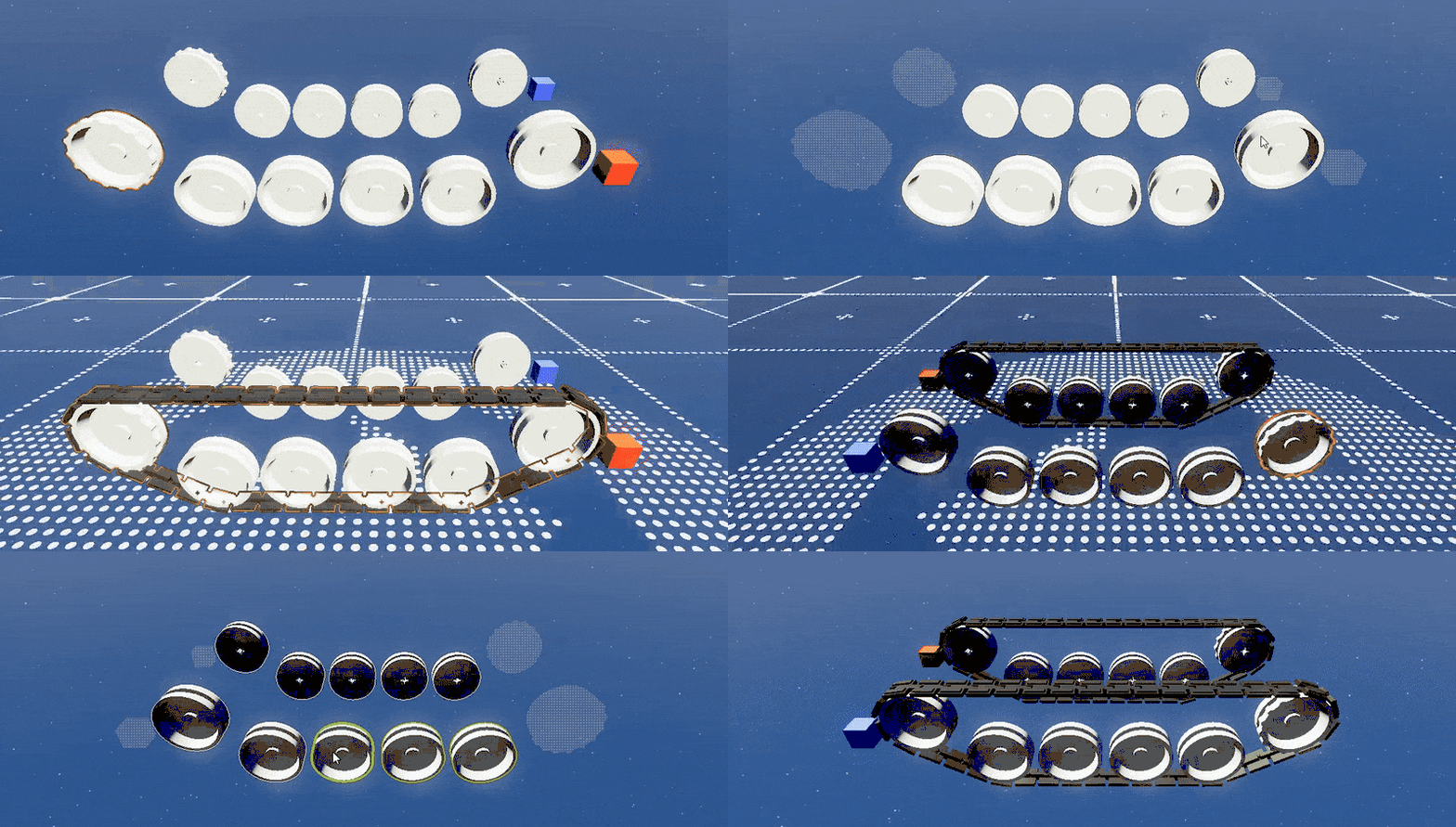
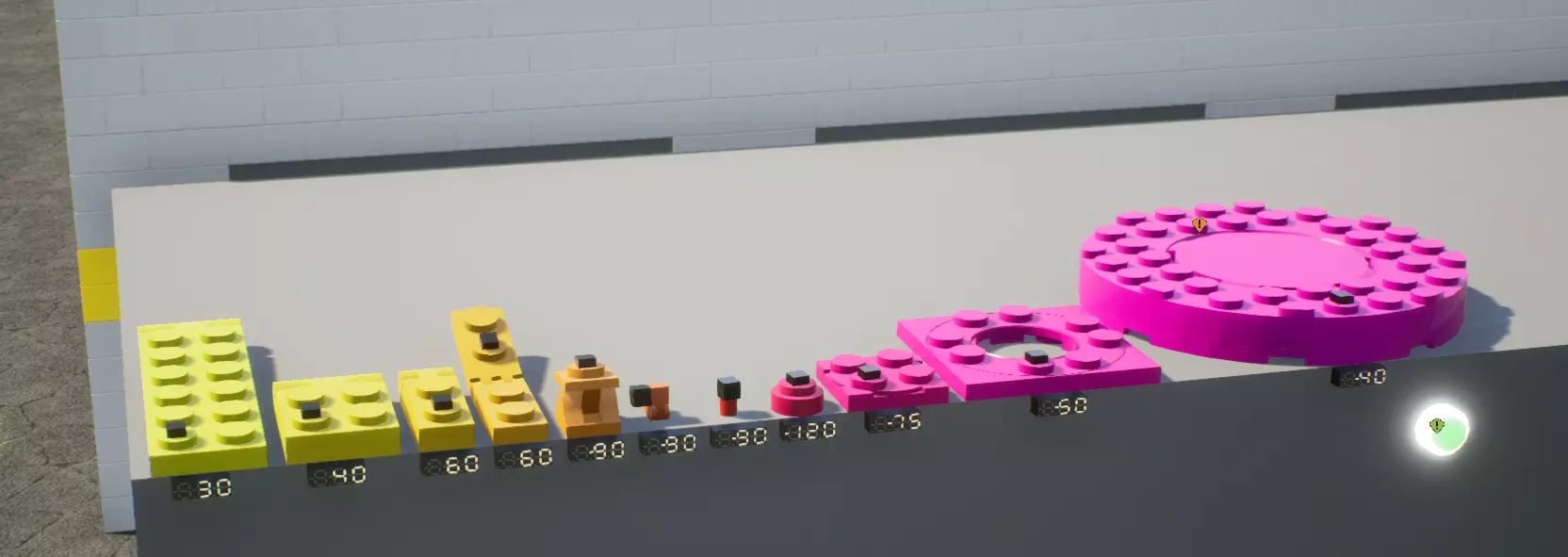
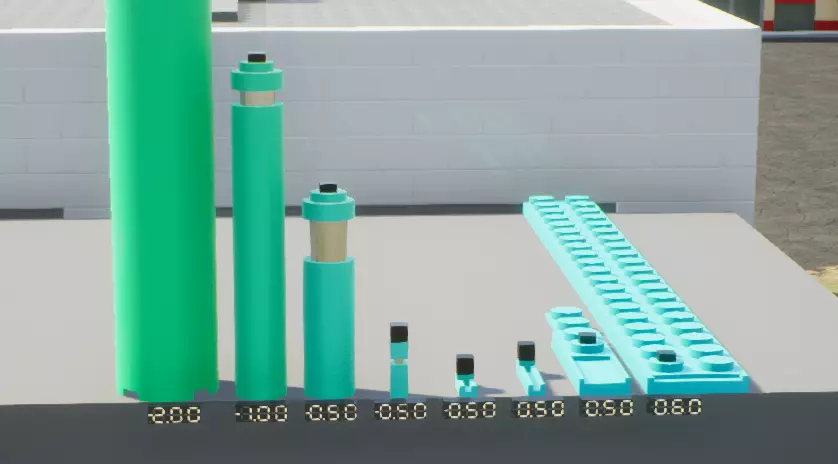
You should always bind the passenger seat to things the passenger seat will control (even if it's in Output Channel). No need to do it for logic though (unless it's a control switch), just functional bricks like actuators and guns. Tank steering is enabled in the engine, and the option to invert it is in the wheels. (I don't know why) You can enable connections on the blank side of sign or display bricks. Brick connection points connect within 0.04m of each other, and if they're facing opposite to each other. On angles however, this range can reduce to 0.03m because of the game's math. On straight angles, it's suggested to move bricks up to 0.039m instead of 0.04m (floating point inaccuracies sometimes disconnect it at 0.04). Brick connections also connect under 1 degree, but reduces at angles as well. Suggested to do 0.99 degrees at most on straight angles (same inaccuracy stuff). Center of mass matters for all vehicles, including ground vehicles and boats. Having center of mass near the front of a car or tank is usually better for steering, but may be undesirable for something like a dragster. Definitely experiment with center of mass. (com = center of mass. col = center of lift) For planes, having COL behind COM will make the plane dip depending on how far back it is. Having it far behind also generally decreases how well it can turn. Closer to COM will make it turn better, and ahead of COM will start to make it turn up. You can clip and stack bricks inside of each other. If they are loose they may have collisions. 0.039m and lower thickness of bricks will connect to stacks of themselves. Things detached by detonator inside of other bricks will not have collision with those other bricks. (unless it passes out and then tries to go back inside) Couplings can be made static in coupling mode (same as static actuator mode.) This means they will be like normal bricks. Useful for easily connecting angled bricks. Each brick has a rotational and movement origin. Certain bricks like the half-cylinder can easily be utilized for seamless plates, but any brick can. Weight and cost is calculated by material. For scaleables it's material and surface area. Brushed aluminum can be pitch black, and so can tungsten and copper. 100kg is the limit for carrying creations, you also can't carry stuff with non-static actuators (same with couplings). You can always carry a single brick no matter the weight. You can use winches to move stuff that is too heavy to carry normally or has moving actuators. If you want a blank display set the number color to black. If a light is too bright it and it's directional, it may not appear to shine on surfaces. (depends on angle and certain values which are not currently known for this guide) Negative size thrusters don't use any fuel, but cannot be spawned with weight limit enabled. Because sensors, switches, and math bricks are scaleable, you could use your logic as armor. It is not cheap for conquest.(The logic might be unreadable. Probably only switch out important logic bricks, or in a way that it remains accessible.) You can use logic bricks for cosmetic parts as well, like the fins of a missile. You can enable connections on the blank side of more bricks. Such as remote control bricks, thrusters, switches, and sensors. You can simulate barrel heat by using a light brick with glow material. You can change the alpha of the color to make it less dark, while keeping the color red. Example to look at: https://steamcommunity.com/sharedfiles/filedetails/?id=3527571973 You can place a light at editor origin to help with building. Not very necessary, but is neat. https://steamcommunity.com/sharedfiles/filedetails/?id=3335880128 True Wheel Weight Wheels are heavier than displayed. All wheels in tests are 1.1m in diameter, and 1m in width (by hexediting) Tests are in the editor palette's order. 1s means one third (10cm), x means stud (30cm) Wheel IdentifierPlasticChromeTungstenGoldWheel 2s 2x 2x~478.8kg~478.8kgWheel (Spokes) 2s 3x 3x~778.4kg~778.4kgWheel (All Weather) 1x 2x1s 2x1s~496.6kg~496.6kgWheel 1x 3x1s 3x1s~675kg~675kgWheel (Grabber MT) 1x1s 3x 3x~470.2kg~470.2kgWheel (Spokes) 1x1s 3x 3x~460kg~460kgWheel (Truck Tire) 1x1s 3x 3x~454.5kg~454.5kgWheel (Drag) 2x 4x 4x~427.1kg~427.1kgWheel (Keksreifen) 2x 4x 4x~431kg~431kgWheel (Mammoth) 2x 5x 5x~508.6kg~508.6kgWheel (Bohemoth) 4x 10x 10x~479.4kg~479.4kgIdler Wheel 1x 3x 3x~576.2kg~2750kg~5308.9kg~5308.9kgSprocket Wheel 1x 3x 3x~576.2kg~2750kg~5308.9kg~5308.9kgTrain Wheel 2s 2x 2x~2611.2kg~2611.2kgTrain Wheel 2s 3x 3x~3249.5kg~3249.5kgTrain Wheel 2s 4x 4x~3854.2kg~3854.2kgOnly tank wheels and wheel hubs are affected by material. Tire thickness or pressure doesn't affect weight. Gold is probably a little heavier than tungsten, just too small of a difference for tests to pick up. Wheel hubs are also heavier than displayed. Wheel HubPlasticChromeTungstenGold1s Hub (High Accuracy)2kg9.516kg~18.385kg~18.421kg1x Hub (Good Accuracy)~23.696kg~112.7kg~217.7kg~218.15kgTungsten tank wheels are the densest bricks. 4x train wheels of any material are the next heaviest. creation used for calculation Look at this guide for stats and information on guns.https://steamcommunity.com/sharedfiles/filedetails/?id=3473444419 Aviation Fluid Dynamics Fluid dynamics are affected by fps. Planes generally do not have fun at very low fps. Fluid dynamics are stronger under water. At low fps aerodynamic things can start to shake violently. This may happen because of center of mass being far behind center of lift, high speed, and light weight. Aircraft can accelerate for a very long time if there's basically no drag. Fake drag can be done by having some angles of attack in both directions. If the prop is fluid dynamic bricks, you can stack the bricks for higher force, and make the engine have lower gear for higher top speed. Stock props work in space, and work more like thrusters that simply require rotation. Center of lift doesn't change with speed, however you generally turn faster at higher speeds because there is more stress. In Physics view, the white arrows on fluid dynamic bricks don't mean much, but the red means the direction of lift. Most bricks have a fluid dynamic surface option below material. You can (technically) see the center of lift of a creation by selecting only the fluid dynamic bricks while having Physics view on. There is wind in the game, though it's not noticeable unless it's stormy. Helicopter Engines Weight doesn't affect heli engines at all. It may not be able to lift a separate creation, but you can increase force by having more turbine stack (or probably being bigger). Heli engines always go up at the same speed. Start time of heli engine is always the same, unless external force is applied. Stacking heli engines will increase roll and pitch acceleration and acceleration of rotor spin. Stacking heli engines gives more power when spinning slower compared to 1 heli engine. Losing a heli blade will result in the rotor spinning lower. Depends on percentage remaining. Stacking heli blades does not do anything. Heli engine turn rate accelerates faster at low fps. Thrusters Thrusters that fire for one frame, fire longer at low fps. However, below 10 fps the power of a thruster decreases. (credit to Kira for correction) Thruster 1s x 1s x 1s (100%): 3kN Thruster 1x1x1 (100%): 5kN Thruster 1x1x3 (100%): 5kN Thruster 2x2x4 (100%): 20kN Thruster 1s x 1s x 1s (100%): $0.23/N [BEST VALUE] Thruster 1x1x1 (100%): $0.40/N Thruster 1x1x3 (100%): $0.72/N [WORST VALUE] Thruster 2x2x4 (100%): $0.39/N from Naautilus Actuators Actuators and Pistons ROTATION ACTUATOR SPEEDS key: yaw actuators have brick connections and axis of rotation parallel pitch actuators have brick connections and axis of rotation perpendicular s is third x is x 1s1s1s yaw 90 : 1 1x1x1s yaw 120 : 1 2x2x1s yaw 75 : 1 4x4x1s yaw 50 : 1 8x8x1x yaw 40 : 1 2x1x1s yaw 60 : 1 1s1s1s pitch 90 : 1 1x1x1x pitch 90 : 1 2x2x2x pitch 40 : 1 2x1x1s pitch 60 : 1 2x1x1s pitch 60 : 1 2x2x1s pitch 40 : 1 6x2x1s pitch 30 : 1 PISTON ACTUATOR SPEEDS key: s is third x is x 1s1s2s piston 0.5m/s : 1 1x1x3x piston 0.5m/s : 1 1x1x6x piston 1m/s : 1 2x2x15x piston 2m/s : 1 1x1s1s slider 0.5m/s : 1 2x1s1s slider 0.5m/s : 1 4x1x1s slider 0.5m/s : 1 20x2x1s slider 0.6m/s : 1 Actuator Speeds Images by Litchytsu
https://steamcommunity.com/sharedfiles/filedetails/?id=2144878965 Law of Adjacent Actuators Actuators will collide with other actuators, and objects they're not attached to. Actuators will not collide with what they're attached to. (ex. yaw part of turret will phase through hull, but pitch will not phase through hull, and the whole turret will not phase through another turret) Actuator Adjacency/Phasing described by Kira: "0 actuators between two bricks: no problem 1 actuator between two bricks: no problem 2 or more actuators between two bricks: if they clip you will be in a world of pain" Making one part of an actuator lighter than the other will make it stiffer. Making it heavier will make the lighter part stiffer as well. This doesn't mean just making a gold actuator, this means if the object the actuator is attached to it heavy, then the actuator will be stiff. Actuators and pistons are affected by fps. They are usually more loose. There is also a 1 frame delay. Actuators and pistons do not have true force, only things like engines spinning stuff, thrusters, heli engines, and force generators produce force. They can 'contain' true force though, like a physics driven piston or spring moved by thruster. Piston max and min limits are a bit strange but necessary for certain things. Instead of how it is for rotational actuators, the values you set will subtract from the highest limit. The signs are also flipped because of this. (If you're hex-editing a piston don't worry about this.) (ex. -0.05 extension limit will make max limit 0.15m) Piston and sliding piston tops can connect at any point on the piston bottoms. Axles Axles can be used for two axis adjacent rotation. Basically, you can make a sponson without it needing space, or a swash plate of a heli rotor. Axles can move in three different ways. Suspension, driving, and steering. Axle steering isn't loose at all. Usually good suspension tune is having damping be 2 times stiffness, and stiffness is practically up to preference. Suspension is weaker at low fps. Suspension strength is also affected by wheel weight. Pistons can interact with wheels on axles for custom suspension. Logic Sensors read in meters, deg/s, and seconds. Add math bricks or switches can be used for driving while in Operation mode and outside of it. You can use switches to control engine rpm. Like making a quieter electric engine. Math bricks have frame delay that adds up. It's also dependent on update orders, so it's not straightforward. Physics and Netcode Stuff Brick Rigs uses Unreal engine 4, which uses Physx physics engine. FPS is TPS. Graphics and physics frames are basically the same. Things move per frame, and when there is less frames they will move more per frame (instead of the game time slowing down like Stormworks or Minecraft). Vehicles lag when going high speeds. For example, a 140 brick truck can lag a server to 40 or 50 fps when going 300 billion kph. This effect is much greater on higher brick creations. You can Right-click the FPS setting to copy it. You can also paste in a setting and literally go lower than 30 FPS. Having V-Sync on causing FPS to jump around a little, which has a minor effect on physics. It also causes autocannons to not be perfectly timed. It doesn't matter much in servers since there will be some lag eventually. High brick flying things are usually laggy (especially a lot of fluid dynamic bricks), at least on other's ends. Wheels have a kind of elliptical sphere hitbox. It's size depends on tire pressure. Actuators sync. (usually) Collision is calculated by weight and a rapid change in velocity. If you want to make a very very large spaceship for example that doesn't collapse to it's own bricks, you should make it as light as possible. Connection strength cannot scale up enough to match collision damage scaling with size. A lot of bricks falling apart at the same time is laggy because of collisions, especially when they're inside each other. Bigger bricks cause more lag when colliding with things in most cases. Having a lot of connections increases spawn lag. Pinning huge things and/or having no connections will significantly reduce lag, but it can still be laggy for graphics. Too many lights can lag the game. There is brick and face culling. The math of positional sync is dependent on weight. The part attached to the seat should be at least 50% of the entire weight of the creation to be stable. Basically, do not put seats on turrets. Detonators are server-side. Sensors, switches, and math bricks are not synced, but the outputs of a seat can be seen by others, which is how logic is sort of synced. Difference in FPS can affect things like memcells. Pressing a switch with the input type None is iffy sometimes. Trains basically don't work in multiplayer unless you go really slow or there's no lag. Trains and snake creations can be pretty laggy in multiplayer because they can easily spaz out on other's ends (and their computers process all of the collision chaos happening on their end). Really heavy ground vehicles cause lag on other's ends. A single small brick can be 2 million kg and make your computer go 1 fps. (Something to do with the game's math idk) Experimental Version N/A Thanks for Reading Made for 1.9 I will consider crediting anyone I know who asks (possibly learned from). Credited people can request for anyone specific to be credited. You can ask for credit to be placed next to tips. You can use information from this guide for your own guides. Please suggest or correct information for this guide in the comments, and you can also be credited if you want. Also please ask questions, and suggest stuff that may help with curse of knowledge bias stuff. CreditsLitchytsu Ookron Varisha ChockkyDragoness Naautilus Jackfastcool KoT Conspicuous Inscrutable Randomly Gamer grapyl STRemontator dvornik_miheich Kira