换一换
换一换 


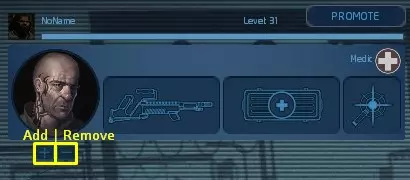
你将学习: 如何添加/移除机器人 机器人装备相关信息 机器人语音指令/热键 机器人对周围事件的反应方式 机器人控制台指令 其他非必要信息 简介——杰拉尔德·布鲁克斯 实际指南发布于2018年5月10日 我撰写本指南是为了新手以及想要了解更多关于机器人的玩家。我不敢说自己的知识是绝对全面的,我只是分享已知的信息。在开始之前,我想先说明机器人的作用。机器人并没有超级算法来完成你所有的工作。它们只能作为辅助工具,听从你的指令。它们无法用自身的技能取代真人玩家,或许能模拟出会听从你指挥的普通玩家,但无法替代专业玩家。《异形丛生:重装上阵》的游戏内容之一是指挥系统,指挥官需要根据自身战术运用资源并做出决策,而机器人则是听从你命令的优秀士兵模拟单位。大多数机器人在防御方面比进攻更擅长。它们拓展了游戏内容,带来了微操作的新维度。如果你无法控制除自己操控的陆战队员之外的其他单位,或者不擅长微操作,不建议使用机器人,因为这会让你遇到很多麻烦。添加/移除机器人的主要方法 机器人可在单人游戏或多人游戏中添加(训练模式默认添加机器人): 选择游戏类型:“训练”“单人游戏”或“在线游玩”→“创建游戏”或“寻找公开游戏”。 通过多人游戏大厅的图形界面: 点击“添加”按钮添加机器人,点击“移除”按钮移除所有角色并取消选择玩家。若未选择角色,添加机器人将采用替代方式进行。
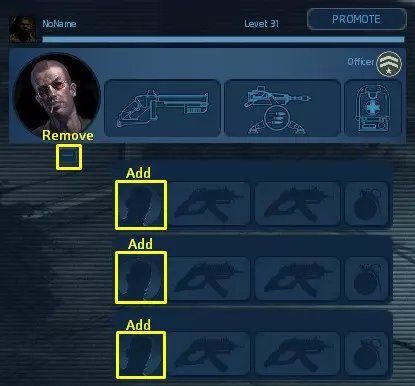
在单人游戏大厅中通过图形用户界面(GUI)操作: 添加机器人到单人游戏的方法:点击角色图标以选择机器人;点击【移除】按钮可移除所有角色并取消选择玩家。若未选择角色,添加机器人将采用另一种方式进行。
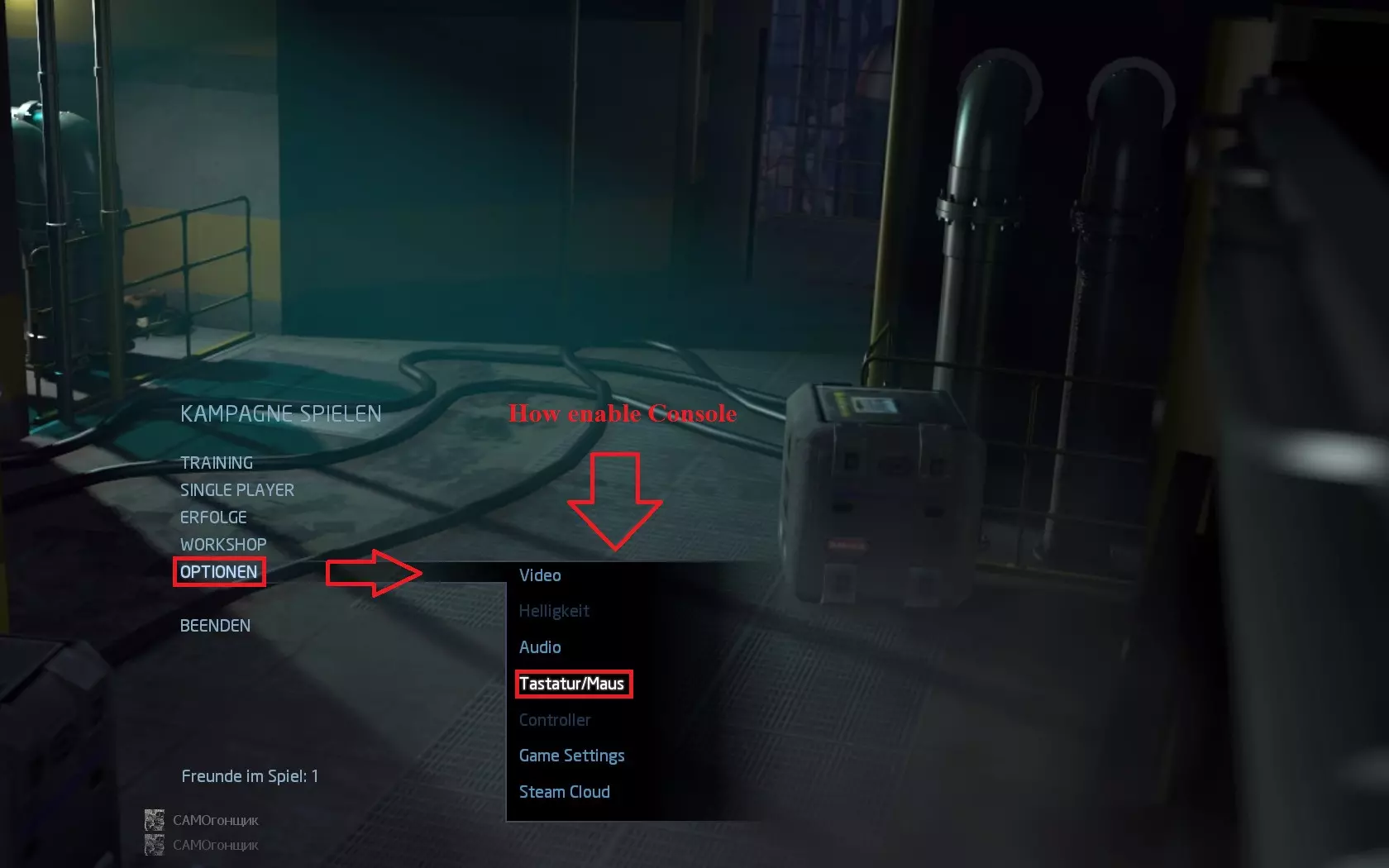
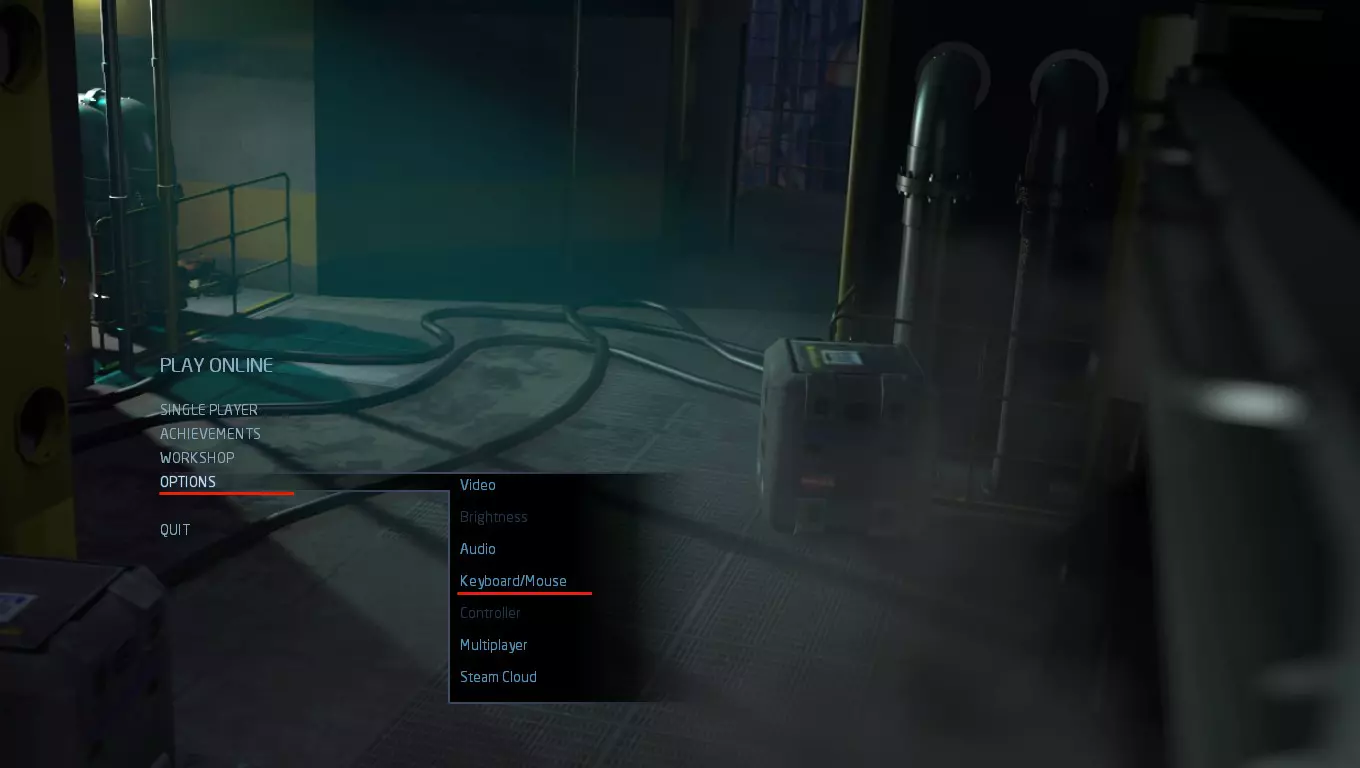
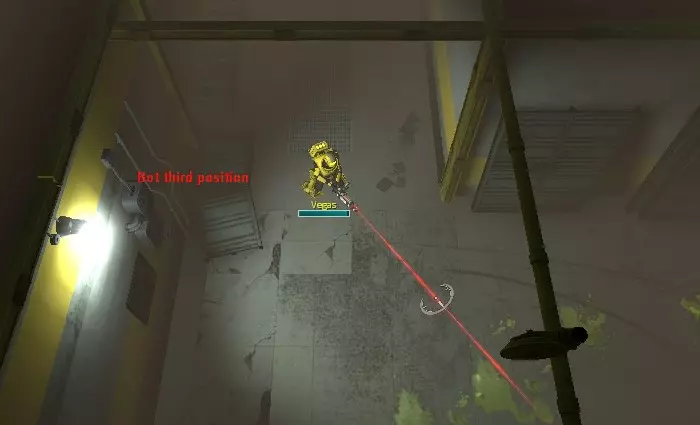
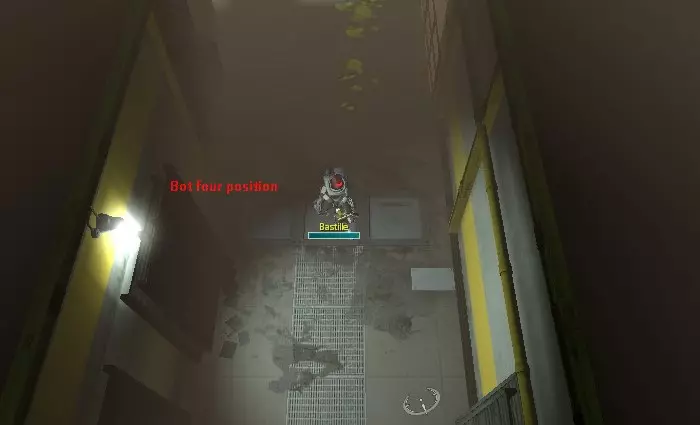
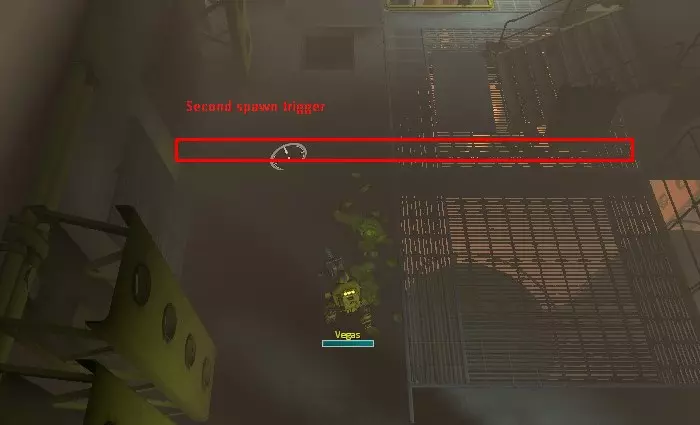
By console: *”𝖨𝖿 𝗒𝗈𝗎 𝗁𝖺𝗏𝖾𝗇’𝗍 𝖼𝗈𝗇𝗌𝗈𝗅𝖾, 𝗀𝗈 𝗍𝗈 𝗍𝗁𝖾 𝗆𝖺𝗂𝗇 𝗆𝖾𝗇𝗎 → 𝗈𝗉𝗍𝗂𝗈𝗇𝗌 → 𝗄𝖾𝗒𝖻𝗈𝖺𝗋𝖽/𝗆𝗈𝗎𝗌𝖾 → 𝖺𝖼𝗍𝗂𝗏𝖺𝗍𝖾 𝖼𝗁𝖾𝖼𝗄𝖻𝗈𝗑 𝗇𝖾𝖺𝗋 “𝖾𝗇𝖺𝖻𝗅𝖾 𝖽𝖾𝗏𝖾𝗅𝗈𝗉𝖾𝗋 𝖼𝗈𝗇𝗌𝗈𝗅𝖾”” In single player or if server have activated sv_cheats set to 1. rd_add_bots 1(default) - “If the game was started with free slots auto-fill all available slots with bots. In single player or pvp game autofill game work only if command entered before the game started if you start a game without activated command and then input command nothing will happen before you restart the game.”In multiplayer games(including pvp):rd_botadd “Character ID” - where Character ID: Sarge Wildcat Faith Crash Jaeger Wolfe Bastille Vegas* “𝖤𝗑𝖺𝗆𝗉𝗅𝖾: “rd_botadd 1“” * “𝖨𝖿 𝗒𝗈𝗎 𝗁𝖺𝗏𝖾𝗇'𝗍 𝗌𝖾𝗅𝖾𝖼𝗍𝖾𝖽 𝗒𝗈𝗎𝗋 𝖼𝗁𝖺𝗋𝖺𝖼𝗍𝖾𝗋, 𝖺𝖽𝖽𝗂𝗇𝗀 𝖻𝗈𝗍 𝗐𝗂𝗅𝗅 𝖺𝗅𝗍𝖾𝗋𝗇𝖺𝗍𝗂𝗏𝖾 𝗐𝖺𝗒 𝗍𝗈 𝖽𝗈 𝗍𝗁𝗂𝗌.” *"𝖨𝗇 𝗉𝗏𝗉 𝗆𝗈𝖽𝖾, 𝗒𝗈𝗎 𝖼𝖺𝗇 𝖺𝖽𝖽 𝗌𝖺𝗆𝖾 𝖻𝗈𝗍 𝖼𝗁𝖺𝗋𝖺𝖼𝗍𝖾𝗋 𝗆𝖺𝗇𝗒 𝗍𝗂𝗆𝖾𝗌.𝖤𝗑𝖺𝗆𝗉𝗅𝖾 𝖺𝖽𝖽 𝖲𝖺𝗋𝗀𝖾 𝟥 𝗍𝗂𝗆𝖾." cl_selectm {Character ID} {Slot} alternative way instead use "rd_botadd" where Character ID = (Character ID - 1) "𝖤𝗑𝖺𝗆𝗉𝗅𝖾, 𝖲𝖺𝗋𝗀𝖾 𝗐𝗂𝗅𝗅 𝖻𝖾 𝟢, 𝖶𝗂𝗅𝖽𝖼𝖺𝗍 𝟣" and slot is number of the free slot, started from 0 *"𝖶𝗂𝗅𝗅 𝗍𝗁𝗋𝗈𝗐 𝖺𝗇 𝖾𝗋𝗋𝗈𝗋 𝗂𝖿 𝗍𝗁𝖾 𝗌𝗅𝗈𝗍 𝗂𝗌 𝗈𝖼𝖼𝗎𝗉𝗂𝖾𝖽" * “𝖨𝖿 𝗒𝗈𝗎 𝗁𝖺𝗏𝖾𝗇'𝗍 𝗌𝖾𝗅𝖾𝖼𝗍𝖾𝖽 𝗒𝗈𝗎𝗋 𝖼𝗁𝖺𝗋𝖺𝖼𝗍𝖾𝗋, 𝖺𝖽𝖽𝗂𝗇𝗀 𝖻𝗈𝗍 𝗍𝗈 𝗌𝗅𝗈𝗍 𝟢 𝗐𝗂𝗅𝗅 𝖺𝗅𝗍𝖾𝗋𝗇𝖺𝗍𝗂𝗏𝖾 𝗐𝖺𝗒 𝗍𝗈 𝖽𝗈 𝗍𝗁𝗂𝗌.” cl_dselectm {Character ID} "deselect character from lobby or PVP game by Character ID where Character ID = (Character ID - 1)" rd_bot_kick – remove all bots and deselect player(your character) from lobby or started pvp game (not work if game has been started in non pvp mode). Ammunition for bots *”𝖨𝗇 𝗍𝗁𝗂𝗌 𝗉𝖺𝗋𝗍 𝖨 𝗁𝗂𝗀𝗁𝗅𝗂𝗀𝗁𝗍 𝗍𝗁𝖾 𝖻𝖺𝗌𝗂𝖼 𝖿𝖾𝖺𝗍𝗎𝗋𝖾𝗌 (𝗂𝗇 𝗆𝗒 𝗈𝗉𝗂𝗇𝗂𝗈𝗇) 𝗈𝖿 𝗐𝖾𝖺𝗉𝗈𝗇𝗌, 𝖺𝗇𝖽 𝖨 𝗀𝗂𝗏𝖾 𝗍𝗁𝖾 𝗋𝖾𝗌𝗎𝗅𝗍𝗌 𝗈𝖿 𝖻𝗈𝗍𝗌 𝗎𝗌𝗂𝗇𝗀 𝗐𝖾𝖺𝗉𝗈𝗇𝗌 𝗂𝖿 𝗒𝗈𝗎 𝖽𝗈𝗇’𝗍 𝖺𝗀𝗋𝖾𝖾 𝗐𝗂𝗍𝗁 𝗂𝗍 𝗒𝗈𝗎 𝖼𝖺𝗇 𝗌𝗄𝗂𝗉 𝗍𝗁𝗂𝗌 𝗉𝖺𝗋𝗍.” I will divide weapons too the five categories: 1 – "Fast attack speed, low damage" – good for stopping enemies 2 – "High damage, low attack speed" – good for make damage for several targets 3 – "Good attack speed, high damage" – not all weapon from this category are good; some weapons have too huge ammo consumption or low ammo capacity 4 – "Support weapons" 5 – "Items that can be placed" 1: ▪(Prototype/Assault/Combat) Rifle: - with increasing difficulty becomes weaker against attacking several enemies simulation ▪Pistols: - with increasing difficulty becomes weaker against attacking several enemies simulation ▪Flamer: + can attack 1-6 enemies simultaneously, normal decrease of movement and turning enemies speed, weapon range reach middle distance, burn time 5 seconds - bot start fire only in close range, with difficulty rise ammo consumption ▪Autogun: +level can contains additional autogun ammo, class bonuses 2: ▪Marksman rifle: – low attack speed, can be easily surrounded on high difficulties + penetrate single target ▪Rail rifle: – low attack speed, can be easily surrounded on high difficulties + penetrate multiple target ▪Shotgun: – low attack speed, low ammo capacity can be easily surrounded on high difficulties, bot start attack at the middle range that decreases damage and waste bullets +spread attack 3: ▪PDW: – high consumption of bullets +good at any difficulty but you will need a fantastic amount of ammo box ▪Grenade launcher: – low ammo capacity, good friendly fire + great radius (can be useful only at speed-run's at Normal/Hard difficulty), at the low difficulty’s (Easy, Normal) can be useful as protection bot from surrounding ▪Desert Eagle:– bad weapon accuracy, can be easily surrounded on high difficulties ▪Vindicator: + spread attack, class bonuses, best weapon for officer(bot) ▪Minigun: +level can contains additional autogun ammo, class bonuses, good accuracy -weapon spin time ▪Devastator: +spread attack -cant use additional autogun ammo, consume too many bullets, bot start attack at the middle range that decreases damage and waste bullets 4: ▪Tesla: + can attack 1- 2 enemies simultaneously, good decrease of movement and turning enemies speed, stun time 6 seconds – close range, can be easily surrounded if stay alone ▪Medical gun/ Medical AMP gun: +Heal 5: ▪Ammo Box, Healing Beacon & All Turrets *"𝖠𝗌 𝗍𝗁𝖾 𝖾𝖺𝗌𝗂𝖾𝗌𝗍 𝖽𝗂𝖿𝖿𝗂𝖼𝗎𝗅𝗍𝗒 𝗆𝗈𝗋𝖾 𝗏𝖺𝗅𝗎𝖺𝖻𝗅𝖾 𝖿𝖺𝗌𝗍 𝗐𝖾𝖺𝗉𝗈𝗇𝗌 𝖺𝗇𝖽 𝖺𝗇 𝖺𝗌 𝗁𝖺𝗋𝖽𝖾𝗋 𝗀𝖺𝗆𝖾 𝗆𝗈𝗋𝖾 𝗏𝖺𝗅𝗎𝖺𝖻𝗅𝖾 𝗁𝗂𝗀𝗁 𝖽𝖺𝗆𝖺𝗀𝖾 𝗐𝖾𝖺𝗉𝗈𝗇𝗌 𝗐𝗂𝗍𝗁 𝗇𝗈𝗋𝗆𝖺𝗅 𝖺𝗍𝗍𝖺𝖼𝗄 𝗌𝗉𝖾𝖾𝖽. 𝖸𝗈𝗎 𝖿𝗋𝖾𝖾 𝗍𝗈 𝗆𝖺𝗄𝖾 𝖼𝗈𝗆𝖻𝗂𝗇𝖺𝗍𝗂𝗈𝗇 𝖺𝗍 𝗒𝗈𝗎𝗋 𝗉𝖺𝗋𝗍𝗒 𝖺𝗌 𝗒𝗈𝗎𝗋 𝗐𝗂𝗌𝗁. 𝖲𝗈𝗆𝖾𝗍𝗂𝗆𝖾𝗌 𝗒𝗈𝗎 𝖼𝖺𝗇 𝗎𝗌𝖾 𝖿𝖺𝗌𝗍 𝖺𝗇𝖽 𝗌𝗅𝗈𝗐 𝗐𝖾𝖺𝗉𝗈𝗇𝗌, 𝗌𝗈𝗆𝖾𝗍𝗂𝗆𝖾𝗌 𝗈𝗇𝗅𝗒 𝖿𝖺𝗌𝗍 𝗈𝗋 𝖿𝗂𝗇𝖽 𝗇𝖾𝗐 𝖼𝗈𝗆𝖻𝗂𝗇𝖺𝗍𝗂𝗈𝗇 𝗂𝗇 𝗒𝗈𝗎𝗋 𝖻𝗈𝗍𝗌 𝗉𝖺𝗋𝗍𝗒." 𝐄𝐪𝐮𝐢𝐩𝐦𝐞𝐧𝐭: Instant remote activation: Bot self defense equipment: Electric shield & Hornet barrage; Support: Adrenaline; Other: Healing kit & Night-vision googles;Activated in selected location on the screen: Gas grenades, Smart bomb, Freeze grenades, Grenades, Incendiary Mines, Mines, Tesla coils, Damage amplifier, Flare, Welder(Activate on selected door), Swarm Bait & T75 Explosives. Passive: Shield & Power fist; Nonworking: Flashlight, Fire Extinguisher, Assault jets & Blink pack. 𝐑𝐞𝐜𝐨𝐦𝐦𝐞𝐧𝐝𝐞𝐝 𝐜𝐥𝐚𝐬𝐬 𝐚𝐦𝐦𝐮𝐧𝐢𝐭𝐢𝐨𝐧: Officer: Vindicator, Ammo Box & Incendiary Mines or non passive equipment; Special weapon: (Autogun/Minigun/Devastator), Ammo Box & any non passive equipment; Medic: Any weapon, healing stuff & bot self defense equipment; Tech: Any weapon, Ammo box & non passive equipment. Test simulation "𝖢𝗎𝗋𝗋𝖾𝗇𝗍 𝗍𝖾𝗌𝗍 𝗐𝖺𝗌 𝗆𝖺𝖽𝖾 𝗐𝗂𝗍𝗁 𝗍𝗐𝗈 𝗆𝖺𝗋𝗂𝗇𝖾𝗌." *”𝖸𝗈𝗎 𝖼𝖺𝗇 𝗌𝗄𝗂𝗉 𝗍𝗁𝗂𝗌 𝗉𝖺𝗋𝗍, 𝗍𝗁𝗂𝗌 𝗂𝗌 𝗍𝗁𝖾 𝖺𝗉𝗉𝗋𝗈𝗑𝗂𝗆𝖺𝗍𝖾 𝗌𝗂𝗆𝗎𝗅𝖺𝗍𝗂𝗈𝗇 𝖿𝗈𝗋 𝗍𝗁𝖾 𝗈𝗇𝖾 𝗆𝖺𝗉 𝗐𝗂𝗍𝗁 𝗌𝗂𝗆𝗂𝗅𝖺𝗋 𝗌𝗉𝖺𝗐𝗇 𝖺𝗍 𝖽𝗂𝖿𝖿𝖾𝗋𝖾𝗇𝗍 𝖽𝗂𝖿𝖿𝗂𝖼𝗎𝗅𝗍𝗂𝖾𝗌, 𝗍𝖺𝗄𝖾𝗇 𝗏𝖺𝗅𝗎𝖾𝗌 𝖼𝖺𝗇 𝖻𝖾 𝖽𝗂𝖿𝖿𝖾𝗋𝖾𝗇𝗍 𝗍𝗈 𝗍𝗁𝖾 𝖽𝗂𝖿𝖿𝖾𝗋𝖾𝗇𝗍 𝗆𝖺𝗉.” *"𝖳𝗁𝗂𝗌 𝗂𝗇𝖿𝗈𝗋𝗆𝖺𝗍𝗂𝗈𝗇 𝗂𝗌 𝖿𝗈𝗋 𝗂𝗇𝖿𝗈𝗋𝗆𝖺𝗍𝗂𝗈𝗇𝖺𝗅 𝗉𝗎𝗋𝗉𝗈𝗌𝖾𝗌 𝗈𝗇𝗅𝗒. 𝖠𝗅𝗅 𝗏𝖺𝗅𝗎𝖾𝗌 𝗍𝖺𝗄𝖾𝗇 𝖻𝗒 𝗍𝗁𝖾 𝗌𝗍𝖺𝗍𝗂𝖼 𝖽𝖾𝖿𝖾𝗇𝗌𝖾 𝗂𝖿 𝗒𝗈𝗎 𝗐𝗂𝗅𝗅 𝗍𝗋𝗒 𝗍𝗁𝗂𝗌 𝗂𝗇 𝗍𝗁𝖾 𝖿𝖺𝗌𝗍 𝗀𝖺𝗆𝖾 𝗐𝗂𝗍𝗁𝗈𝗎𝗍 𝗌𝗍𝗈𝗉𝗉𝗂𝗇𝗀 𝗂𝗇 𝖽𝗂𝗋𝖾𝖼𝗍𝖾𝖽 𝗉𝗈𝗌𝗂𝗍𝗂𝗈𝗇’𝗌 𝗏𝖺𝗅𝗎𝖾 𝗐𝗂𝗅𝗅 𝖻𝖾 𝖽𝗂𝖿𝖿𝖾𝗋𝖾𝗇𝗍 𝗅𝗂𝗄𝖾 𝗂𝖿 𝗒𝗈𝗎 𝗍𝗋𝗒 𝗍𝗁𝗂𝗌 𝗈𝗇 𝖺 𝖽𝗂𝖿𝖿𝖾𝗋𝖾𝗇𝗍 𝗆𝖺𝗉, 𝖼𝗎𝗋𝗋𝖾𝗇𝗍 𝖽𝖺𝗍𝖺 𝖺𝖼𝗍𝗎𝖺𝗅 𝗈𝗇𝗅𝗒 𝖿𝗈𝗋 𝗍𝗁𝗂𝗌 𝗉𝗈𝗌𝗂𝗍𝗂𝗈𝗇’𝗌 𝖺𝗍 𝗍𝗁𝗂𝗌 𝗆𝖺𝗉." Campaign:"Jacob's Rest" Map: "Cargo Elevator" Sequence:Bot move to the first position. 1 spawn – count kill end at 14 enemies, attackers move singly sometimes by 2 sides; some enemies came under the platform. 2 spawn – count kill end at 30 enemies, attackers move singly; some enemies came under the platform. Bot move to the second position, at the way activated 3-rd spawn. When bot reach position after few seconds came 3-rd spawn. 3 spawn – count kill end at 44 enemies, attackers move a small cluster Bot move to the third position, at the way activated 4 spawn. 4 spawn – count kill end at 55 enemies, attackers move from 2 sides Bot move to the third position, at this point player, lure enemies when bot stands alone and wait for enemies.



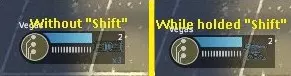
以下表格是经过多次测试得出的结果,用于比较不同难度下机器人瞄准目标时的弹药消耗量以及它们能够击杀的敌人数量。所有数据均为通过5次测试得出的大致击杀数量,误差范围在±6之间。所有测试均由Vegas在无武器伤害加成的情况下进行,对于特定武器,我使用了创意工坊插件。本次测试有医疗兵提供支援,因为在疯狂难度下,许多武器无法像机器人接近并击杀目标那样快速消灭敌人。当机器人的生命值低于3%时,医疗兵会前来支援,所有这些支援将标记为【生成次数】和“m”(如果生成次数为0,则表示机器人在耗尽所有子弹前存活下来)。本测试并非旨在比较武器的伤害或展示玩家应优先使用何种武器,而是为了体现武器在静态机器人防御中的实用性。测试在相同位置、相同敌人刷新点进行,并设有惩罚机制——当机器人刷新在平台下方时,它们会因尝试攻击而消耗弹药,这在某些地图中属于正常情况。武器击杀数近似值 武器 普通难度 困难难度 疯狂难度 PDW 37.2 29.4 26.8 双持手枪 69.6 55.2 (3米)41 (原型/突击/战斗)步枪 56 46 (1-3米)34 Eagle 45.6 44.6 (3米)44.2 火焰喷射器 66.4 47.2 29.4 霰弹枪 26.8 26.4 25.4 精准步枪 62.4 63 (3米-0)57.6 轨道步枪 58 58.8 55.4 毁灭者 47.6 43.4 38.2 自动枪 54.6 48.4 36.8 迷你炮 76.2 57.4 47.4 维护者 57.2 52.2 45 医疗冲锋枪 38.6 32.8 26.6 重型步枪 78.8 66.6 (3米-0)50.4 语音指令/热键 作为大厅中的队长,你操控1号角色。若要切换至2-8号 bots,可根据使用的 bots 数量按下F2-F8;若要返回1号角色,按下F1。切换 bot 后,系统会自动命令你之前操控的角色(bot)“坚守阵地”。如果有人加入游戏并接管了机器人,你将失去切换到该机器人角色的能力。如果你是加入游戏的玩家,可以在 spectator 模式下按 F1-F8 选择机器人(如果玩家要与其他机器人切换,则按 F1),然后按鼠标左键控制它。如果你想将机器人归还给原所有者,或者你到达了可以正常到达的游戏位置但被困住或无法返回,请按“Esc”键→“Take a break”。 要远程使用机器人装备,你可以按 2-8(每个机器人都有其激活编号)。物品会从主武器到装备槽填充当前激活的槽位(当前情况下弹药箱是第一个)。要切换到下一个物品,请按住“Shift”键(你会看到弹药箱变为炮塔)。如果你拥有3个物品,在消耗掉其中两个物品栏的物品之前,无法切换到装备物品。如果你拥有未激活的物品和装备,主动物品栏将为空。

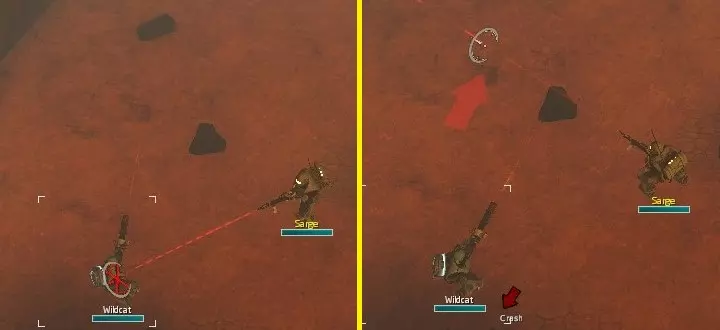
要命令所有机器人保持位置,请按【X】键(默认),或者按【Z】键(默认)后用鼠标选择“保持位置”指令。所有机器人将立即停在当前位置。 如需添加“命令陆战队员保持位置”指令,请按【Esc】键(游戏中或大厅内均可)→【选项】→【键盘/鼠标】→【小队(团队)命令陆战队员保持位置】→绑定您的按键(下文以“C”为例)。

现在用准星选择屏幕上的陆战队员(机器人),按下“C”键,你会看到陆战队员(机器人)身上出现框选。接下来选择你想让他移动到的位置,按住“C”键会出现红色箭头,这表示陆战队员将要面朝的方向,你无法旋转该箭头。如果你只有一个机器人,按下“C”键会命令机器人原地待命,无需选择机器人。
要命令所有机器人跟随你,按【V】键(默认),或者按【Z】键(默认)后用鼠标选择“跟随”指令。 要命令技术型机器人破解终端,请靠近终端并按【E】键(默认)。 行为 机器人的视野范围有限,这会导致其在驻守位置时存在视野盲区。
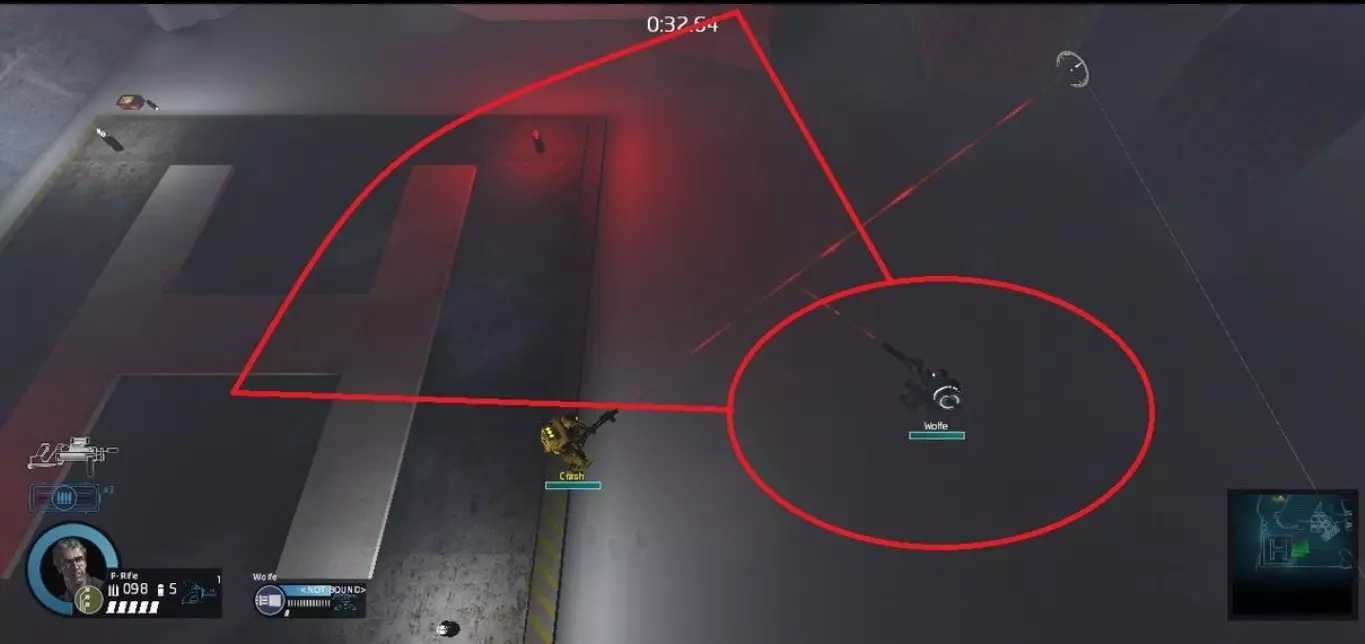
*”𝖳𝗁𝖺𝗍'𝗌 𝖼𝗋𝖾𝖺𝗍𝖾𝖽 𝗌𝗈𝗆𝖾 𝗉𝗋𝗈𝖻𝗅𝖾𝗆𝗌 𝗈𝗇 𝗉𝗏𝗉, 𝗐𝗁𝖾𝗇 𝗒𝗈𝗎 𝖺𝗋𝖾 𝗅𝖾𝖺𝗏𝗂𝗇𝗀 𝗍𝗁𝖾 𝗋𝖺𝗇𝗀𝖾 𝗈𝖿 𝗏𝗂𝖾𝗐 𝖻𝗈𝗍 𝗐𝗂𝗅𝗅 𝗌𝗍𝗈𝗉 𝖺𝗍𝗍𝖺𝖼𝗄’𝗌 𝗒𝗈𝗎.” Bots haven’t perfected accuracy at long range, an angle of attack depending on a distance to the target and time they see the target. Accuracy increases at long range to 100% in 1-2 seconds or if target comes closer, for each new attacked target accuracy drops to default distance value. Bot who wear Medical Gun automatically try to heal every character whose health decease lesser than 60%, even if this character on the other side of the map. To stop them use the command “Hold position” or “Order marine hold position”. Healing is the top priority then attack, and this can create trouble in a situation when he surrounded by enemies and start healing himself, for solving this problem better remote activate Electric shield or Hornet barrage. Bot moving to heal if execute command "Follow" or "Marine hold position". If the bot hasn’t full health and his movement passes nearby deployed healing beacon, movement trajectory will be changed, targeting position at the beacon for restore health before the field will not disappear, after that bot return to the order "Follow". Working only if bot executes “Follow” order. Sometimes they(bots) can try to run away or stuck face an enemy without an attack it. Usually, it happens when the bot was having a problem with nodes(the way is blocked by enemy's or automatically selected location near player cant be reached). For save them command them to hold position and move to the other map area for giving command follow you(sadly, but if they can’t move to exit point you will need to control every one of them by yourself or try “Order marine hold position”). When you command “Order marine hold position” or bot movement node locates on target that can be destroyed, bot try to crash object with a melee attack. If bot can’t create node sequence to reach location near the player, he will be teleported near player after few seconds. On pvp mode bot create “Follow” nodes near the area of closest player to hunt down him, but still depend on the point of view and can’t miss player coming from behind. When bot sees the player he takes command “Hold” before he lost a player from point of view. Ammo box protection(sometimes can glitch and they will grub any ammo box that they see).When you deploy ammo or reach ammo box location, bots will not collect any ammo, before your equipped weapon ammo capacity lower then they have. An example you have 3 clip of assault rifle they have 4, they will not grab more ammo, before you have 5 clips. Console commands *”𝖨𝖿 𝗒𝗈𝗎 𝗁𝖺𝗏𝖾𝗇’𝗍 𝖼𝗈𝗇𝗌𝗈𝗅𝖾, 𝗀𝗈 𝗍𝗈 𝗍𝗁𝖾 𝗆𝖺𝗂𝗇 𝗆𝖾𝗇𝗎 → 𝗈𝗉𝗍𝗂𝗈𝗇𝗌 → 𝗄𝖾𝗒𝖻𝗈𝖺𝗋𝖽/𝗆𝗈𝗎𝗌𝖾 → 𝖺𝖼𝗍𝗂𝗏𝖺𝗍𝖾 𝖼𝗁𝖾𝖼𝗄𝖻𝗈𝗑 𝗇𝖾𝖺𝗋 “𝖾𝗇𝖺𝖻𝗅𝖾 𝖽𝖾𝗏𝖾𝗅𝗈𝗉𝖾𝗋 𝖼𝗈𝗇𝗌𝗈𝗅𝖾”” Command enable in “Single player”/"Training" or “on server sv_cheats set to 1”: rd_bot_strong 1(default) - “If 1, bots take only 25%” rd_follow_hint_max_search_range 300(default) - “A range around leader used to search for a node to move bot” rd_marine_take_damage_from_ai_grenade 1(default) - “Players take damage from bots' grenade launchers” rd_pvp_marine_take_damage_from_bots 1(default) - “If 0 players will not take damage from bots in PvP” asw_follow_threshold 40(default) - “Marines in diamond formation will move after leader has moved this much”*"𝖮𝗍𝗁𝖾𝗋 𝖿𝗈𝗅𝗅𝗈𝗐𝗂𝗇𝖿 𝗌𝗒𝗌𝗍𝖾𝗆 𝗆𝗎𝖼𝗁 𝗅𝗈𝗇𝗀𝖾𝗋 𝗍𝗁𝖺𝗇 𝖺𝗌𝗐_𝖿𝗈𝗅𝗅𝗈𝗐_𝗁𝗂𝗇𝗍_𝗆𝖺𝗑_𝗋𝖺𝗇𝗀𝖾" rd_stuck_bot_teleport_max_range 400(default) - "Teleport stuck bots to a node within this range of the squad leader. -1 for unlimited." rd_stuck_bot_teleport_required_failures 16(default) - "Teleport stuck bots only after they've failed this many move attempts in the same number of seconds" rd_stuck_bot_teleport_to_marine 0(default) - "Teleport stuck bots directly to a marine instead of to the nearest node" Commands availible in multiplayer games:asw_follow_hint_max_range 300(default) - “If bot is this far from leader it starts to move closer” (not work in pvp) rd_bots_ignore_bombs 1(default) - “If 0 AI marines will try to find safe place when they see mortar's or boomer's bomb’s are dropped near them” asw_follow_use_hints 2(default) - ”0 = follow formation, 1 = use hints when in combat, 2 = always use hints” *”𝖤𝗑𝗉𝗅𝖺𝗇𝖺𝗍𝗂𝗈𝗇: 𝖳𝖺𝗋𝗀𝖾𝗍 𝗈𝖿 𝗍𝗁𝗂𝗌 𝖼𝗈𝗆𝗆𝖺𝗇𝖽 𝗂𝗌 "𝖺𝗌𝗐_𝖿𝗈𝗅𝗅𝗈𝗐_𝗁𝗂𝗇𝗍_𝗆𝖺𝗑_𝗋𝖺𝗇𝗀𝖾" 𝗈𝗋 "𝖺𝗌𝗐_𝖿𝗈𝗅𝗅𝗈𝗐_𝗍𝗁𝗋𝖾𝗌𝗁𝗈𝗅𝖽". 𝖤𝗑𝖺𝗆𝗉𝗅𝖾: 𝟢 - 𝖿𝗈𝗅𝗅𝗈𝗐 𝖾𝗏𝖾𝗋𝗒 𝗍𝗂𝗆𝖾 𝗇𝖾𝖺𝗋 𝗍𝗁𝖾 𝗉𝗅𝖺𝗒𝖾𝗋(𝗂𝗀𝗇𝗈𝗋𝖾 "𝖺𝗌𝗐_𝖿𝗈𝗅𝗅𝗈𝗐_𝗁𝗂𝗇𝗍_𝗆𝖺𝗑_𝗋𝖺𝗇𝗀𝖾" 𝗈𝗋 "𝖺𝗌𝗐_𝖿𝗈𝗅𝗅𝗈𝗐_𝗍𝗁𝗋𝖾𝗌𝗁𝗈𝗅𝖽"), 𝟣 – 𝗐𝗂𝗅𝗅 𝗐𝖺𝗂𝗍 𝖿𝗈𝗋 𝖺 𝗉𝗅𝖺𝗒𝖾𝗋 𝗆𝗈𝗏𝖾 𝖺𝗍 𝖺 𝖽𝗂𝗌𝗍𝖺𝗇𝖼𝖾 𝗐𝗁𝖾𝗇 𝖼𝗈𝗆𝖻𝖺𝗍 𝗌𝗍𝖺𝗋𝗍𝖾𝖽, 𝖺𝖿𝗍𝖾𝗋 𝗋𝖾𝖺𝖼𝗁 𝖽𝗂𝗌𝗍𝖺𝗇𝖼𝖾 𝗌𝗍𝖺𝗋𝗍 𝖿𝗈𝗅𝗅𝗈𝗐. 𝟤 – 𝗐𝗂𝗅𝗅 𝖺𝗅𝗐𝖺𝗒𝗌 𝖿𝗈𝗅𝗅𝗈𝗐 𝗍𝗈 𝗍𝗁𝖾 𝗉𝗅𝖺𝗒𝖾𝗋 𝗐𝗁𝖾𝗇 𝗉𝗅𝖺𝗒𝖾𝗋 𝗋𝖾𝖺𝖼𝗁 𝗆𝖺𝗑 𝖽𝗂𝗌𝗍𝖺𝗇𝖼𝖾. rd_stuck_bot_teleport 1(default) - "Teleport stuck bots" *"𝖠𝗅𝗅 𝗆𝗎𝗅𝗍𝗂𝗉𝗅𝖺𝗒𝖾𝗋 𝖼𝗈𝗆𝗆𝖺𝗇𝖽 𝗐𝗈𝗋𝗄 𝗂𝗇 𝗌𝗂𝗇𝗀𝗅𝖾 𝗉𝗅𝖺𝗒𝖾𝗋 𝗈𝗋 𝗂𝖿 𝗌𝖾𝗋𝗏𝖾𝗋 𝖾𝗇𝖺𝖻𝗅𝖾 𝗌𝗏_𝖼𝗁𝖾𝖺𝗍𝗌 𝖻𝗎𝗍 𝗇𝗈 𝗈𝗇𝖾 𝖼𝗈𝗆𝗆𝖺𝗇𝖽 𝖿𝗋𝗈𝗆 𝗍𝗁𝖾 𝗌𝗂𝗇𝗀𝗅𝖾 𝗉𝗅𝖺𝗒𝖾𝗋 𝗇𝗈𝗍 𝗐𝗈𝗋𝗄 𝗂𝗇 𝗆𝗎𝗅𝗍𝗂𝗉𝗅𝖺𝗒𝖾𝗋 𝖻𝖾𝖿𝗈𝗋𝖾 𝗌𝖾𝗋𝗏𝖾𝗋 𝗁𝖺𝗏𝖾 𝗇𝗈𝗍 𝖺𝖼𝗍𝗂𝗏𝖺𝗍𝖾𝖽 𝗌𝗏_𝖼𝗁𝖾𝖺𝗍𝗌" FYI Bots take lesser damage than a player. If you catch parasite with your face, you can swap your infested character for saving some Medical Gun charges. Bots can’t blow up red barrels. Yellow barrels still can be blowing up with bot melee attack or shooting. If you activate challenge where you can be revived, bots would revive you when you fall. All weapon’s wearable by bots cannot do friendly fire damage, except Grenade launcher. Players that join the lobby can create bots, but command them can only bot Leader. Only for leader(of the bots): Bots basic movement speed increased by +30 when they locate on your screen from their primary stat (*“𝖮𝗍𝗁𝖾𝗋 𝗐𝗈𝗋𝖽’𝗌, 𝗐𝗁𝖾𝗇 𝗒𝗈𝗎 𝗌𝖾𝖾 𝖺𝗅𝗅 𝖻𝗈𝗍𝗌 𝗐𝗁𝗂𝖼𝗁 𝗁𝖺𝗏𝖾𝗇'𝗍 𝗌𝗉𝖾𝖾𝖽 𝖻𝗈𝗇𝗎𝗌 𝗌𝗄𝗂𝗅𝗅𝗌 𝗐𝗂𝗅𝗅 𝗋𝗎𝗇𝗇𝗂𝗇𝗀 𝗅𝗂𝗄𝖾 𝖥𝖺𝗂𝗍𝗁”). When they at long distance that you cant see them, their movement speed increase to 380(movement skill does not affect for this increment). If the game has more players than 1, at the start of mission bots will have ties to the different player before taking the first command to follow the leader. If non leader player have ties with tech, before tech will be untied he can command hack to the tech. Bots cant use alternative weapon fire. You can add bot only equipment that’s available on your level. With bots, you can complete Outstanding and Speedrun achievements. The primary tactic for playing with bots at Insane/Brutal(non Onslaught) is placing marines for position’s and lure enemies for bots(If spawn is not unlimited). If spawn is infinite you must move slow for the target point; every fast moving at not cleared area can be fatal to all squad. Don’t forget change equipment or marine if you stuck in the mission.*"𝖣𝗈𝗇’𝗍 𝖿𝗈𝗋𝗀𝖾𝗍 𝗍𝗁𝖺𝗍 𝗌𝗉𝖺𝗐𝗇 𝖺𝗍 𝖽𝗂𝖿𝖿𝖾𝗋𝖾𝗇𝗍 𝗆𝖺𝗉𝗌 𝖽𝖾𝗉𝖾𝗇𝖽𝗌 𝗈𝗇 𝗍𝗁𝖾 𝗇𝗎𝗆𝖻𝖾𝗋 𝗈𝖿 𝗉𝗅𝖺𝗒𝖾𝗋𝗌 𝗂𝗇 𝗅𝗈𝖻𝖻𝗒, 𝗂𝖿 𝗒𝗈𝗎 𝗐𝖺𝗇𝗍 𝗍𝗈 𝖿𝗂𝗇𝖽 𝖺𝗇 𝖾𝖺𝗌𝗒 𝗐𝖺𝗒 𝗍𝗈 𝗐𝗂𝗇 𝖻𝗋𝗎𝗍𝖺𝗅 𝗀𝖺𝗆𝖾 𝖼𝗋𝖾𝖺𝗍𝖾 𝖺 𝗀𝖺𝗆𝖾 𝖿𝗈𝗋 𝟦 𝗉𝗅𝖺𝗒𝖾𝗋 𝗆𝖺𝗑𝗂𝗆𝗎𝗆." For speedruns main bots equipment is weapons that have fast attack speed or splash damage, self-protection items for medics and non-passive for other marines. If you play with the friend and he at low level you always can create for him a bot with the weapon that he won't, and start the game without friend selected character. That will give him a chance take your bot after the game has been started. P.S. This is my first guide; he was writhed to the particular date that we reached soon. Hope you learn anything new. If you think that I must try to write one more, give me know(I will try, but I don't promise that guide takes a lot of time).I Like play with bots. 15.04.2018 𝓣𝓱𝓪𝓷𝓴'𝓼 𝓯𝓸𝓻 𝓽𝓱𝓮 𝓻𝓮𝓪𝓭𝓲𝓷𝓰. 𝓗𝓪𝓿𝓮 𝓪 𝓷𝓲𝓬𝓮 𝓭𝓪𝔂!