换一换
换一换 




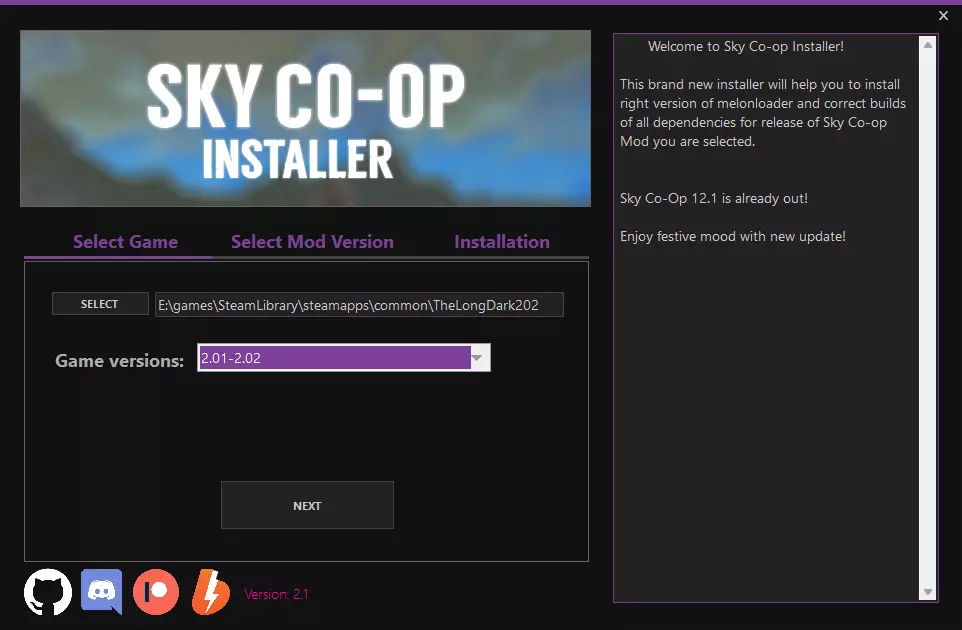
本指南将为你介绍模组本身以及安装方法。 漫漫长夜合作模式(Sky Co-op) 漫漫长夜合作模式是一款多人模组,让你可以与朋友或其他玩家一起生存。 目前,该模组仅支持游戏2.01-2.02版本。游戏版本可以降级,相关内容请查看常见问题部分。 安装模组 首先,下载模组安装程序。 打开安装程序,点击【选择】按钮,然后在游戏文件夹中找到【TLD.exe】文件。
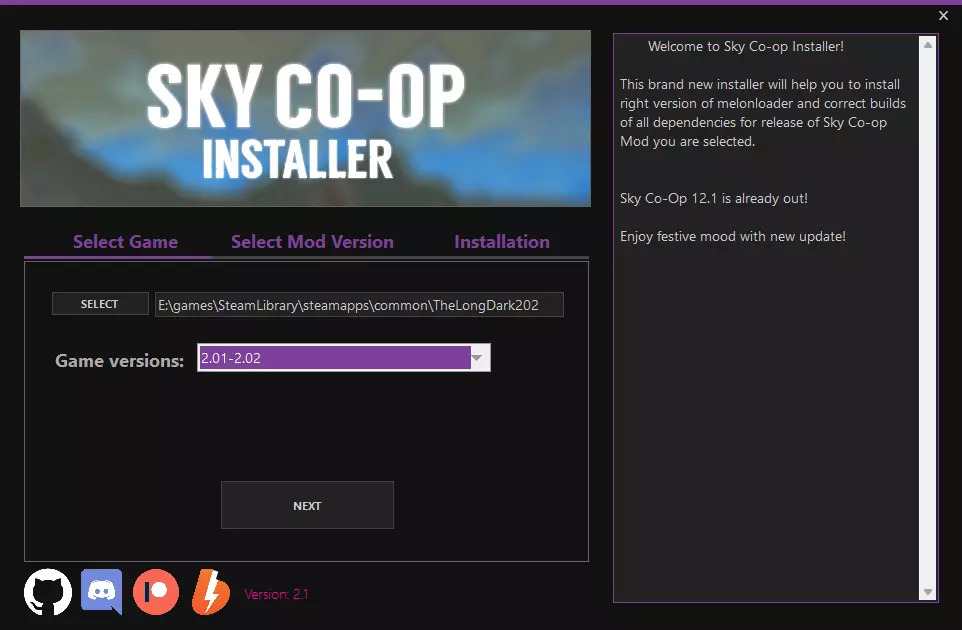
点击【下一步】,然后点击【安装】
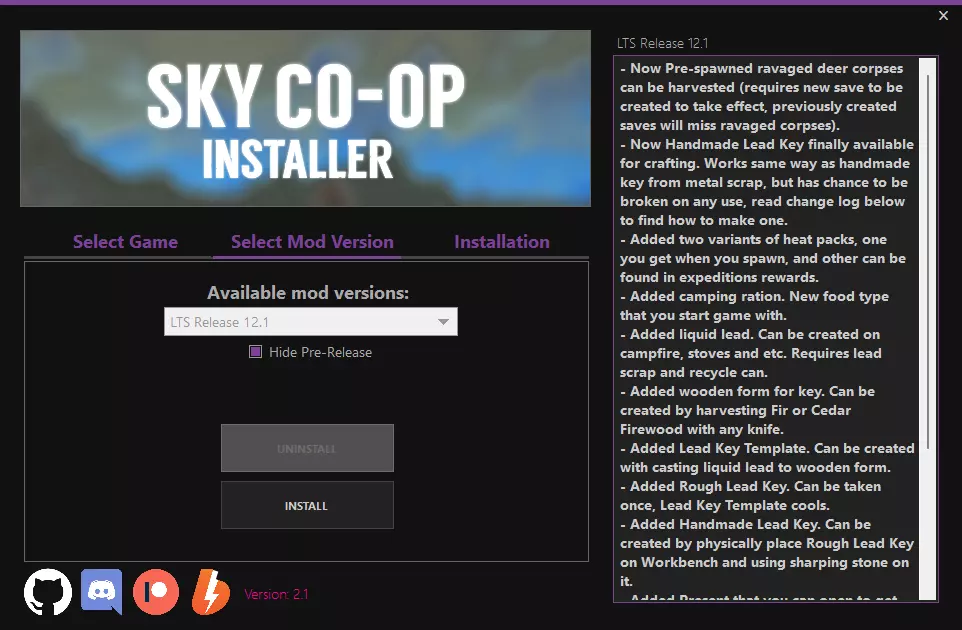
Congratulations! The mod is installed, you can start the game. Mechanics of the mod Melee WeaponsAlmost all the tools in the game can be picked up and used on animals or players. To do this, select it in the inventory and click USE. PVPPlayers can damage each other. Melee weapons can be sharp, then they cause bleeding when hit, or blunt, then it will be dislocated. Ranged weapons just cause bleeding and cause tremendous damage. The damage received can be reduced by wearing a bulletproof vest or a bowler hat. There are safe zones on the island in important locations where PVP is disabled. Video: https://youtu.be/FR2ACW5o3FM Treating other playersBy pressing LMB you can inspect another player. You will see his health, current illnesses and buffs. You can also cure them. If you do this, the other player gets a treatment buff, and you get a new First Aid skill. Video: https://youtu.be/5i8EiO-YKpU DeathIf you die, you can be reborn by appearing at the same location. A backpack with your belongings appears at the place of death, it can be opened by any player. Skills will reset, books that have already been read can be read again to restore them. Transfer of itemsYou can transfer an item to another player by selecting it in the inventory and pressing G while you are looking directly at the one who needs to transfer this item. In-game communicationThe mod has a text chat that opens on ENTER. However, its scope is limited. In order to send a message to the whole island, you can use a walkie-talkie by picking it up. While the walkie-talkie is in hand, all messages will be sent to the global chat. You can also use the walkie-talkie for voice communication, but this only works on servers in STEAM P2P mode. It turns on at V, and with the mouse wheel you can switch frequencies. You can leave notes behind, they are made using charcoal by pressing PCM and selecting the WRITE A NOTE button. Pressing T opens the emotion menu, to select a specific one, hover over it and press LMB. Other players will see it. Video: https://youtu.be/DAE5q5ACvW8 Harvestable respawnAll collected items like timofeevka, rosehip bushes, birch and maple will be restored three days after their assembly. Locking buildingsIn order to lock any door, you need a key. Instructions for receiving: In a forge heated to 150 degrees, select a new IRON BLANK item, you will need one scrap metal and one jar to craft it. There are 6 pieces of them being crafted at once. We put the Iron Blank on the workbench by dragging with PCM. When you press LMB on Iron Blank, a menu with actions opens on the workbench. Select the SAWING action with a hacksaw in the inventory. We repeat this again. Select the GRINDING action with the grindstone in the inventory. You will be prompted to create a unique password for your key. After that, choose a name for the key that will be visible in the inventory.Use the key made on the house that can be repeated in the game (for example, on a blue trailer or on one of the houses by the Mysterious Lake) by pressing PCM. Only one door can be locked with one key. If the house is locked, you can press LMB where you can use the key on the door to try to open it. If you do not have a key, you can try knocking on the door using the KNOCK action. The other player will see a notification about this from the top of the screen and will be able to open it to you by pressing PCM on the door and selecting the action INVITE {PLAYER}. You can use lockpicks to break into buildings. Instruction manual: You put scrap metal on the workbench. Click on it, select the action SAWING with a hacksaw in the inventory.To break into the door menu that opens, press LOCKPICK. The chance of discovery is extremely small, but it is there. Video in Russian: https://youtu.be/pTsk_R8Aw_Y Other changesClaustrophobia is disabled due to problems with it. Parasites have been replaced by poisoning. The "Master Beastmaster" icon now makes traps not 10% more effective, but 100%. It is unclear why this number is exaggerated in the description of the badge. Mechanics for public server onlyFalling planesEvery 3-6 hours, the plane crashes somewhere on the island. The crash site is visible from afar due to the smoke that rises from the plane. You will find a lot of good loot on site, usually of a certain theme. The plane disappears 5 hours after the crash. ExpeditionsThese are small quests during which you can get loot that will be highlighted in blue. You can call the expedition by clicking PCM holding a walkie-talkie in your hands. In the action menu that opens, select START EXPEDITION. The expedition falls on a random location next to you. Clicking on the TAB on the right will display the current tasks and the time to complete these tasks. Time is added from completing most tasks. If several tasks are marked in white at once, then they can be performed in any order. You can invite another player to your expedition by clicking on PCM with a walkie-talkie in his hands. He will receive an invitation that can be accepted through the walkie-talkie action menu. Two different people cannot get the same expedition. You cannot cancel the expedition until the time runs out. The more people participate in the expedition, the greater the chance of the appearance of ordinary and rare items. You can share your opinion about the expedition you just completed by pressing F3. FAQ How to play online?If you have a Steam license, go to MULTIPLAYER in the main menu, and create a server. After that, you can invite your friends from Steam. If you have a different version of the game (or you want to play on the Steam version with those who do not have it), you will need to use LAN network emulators, or open ports. There are guides on this on the Internet. How many players can play on the same server?From 2 to 32. You can select the number of slots when starting the server. How does time work?There are two timelines, local and global. Global flows by itself, regardless of the player's actions, it affects the game time of the day. One game minute is 5 seconds of real time. Local time works exactly the same as in a single-player game, that is, if you break objects or fix clothes, your calories and energy decrease, but global time goes on regardless. Can players be in different locations?Yes, they can, different locations, regions, buildings. If I throw an item, will another player be able to pick it up?Yes! Are the items that the game has created the same for everyone?Yes. If someone picks up an item, you won't be able to pick up the same item again. (If you want items to be duplicated for each player, the host must register the command !dupes in the game chat to enable item duplication mode for each player). Is [mechanics] synchronized?In the vast majority of cases, yes. Some things, like spray cans, are still in development. Can I play challenges?No, they are temporarily disabled. Can I play WINTERMUTE (story mode)?No. There are no plans to support the story mode at all. Does the mod work on Xbox One or Switch?Not. How can I be resurrected if I'm dead?You can resurrect by pressing the respawn button, you will rejoice in a random place in the region where you were before you died, your belongings will lie in a backpack named after you at the place of your death. Is multiplayer compatible with other mods?It depends on the fashion. If the mod is cosmetic and works only on the client side, there will be no problems with it. If it adds new features or items, the job is not guaranteed, and all players should have the same modpack. If he changes something in the behavior of animals or the weather, or admires another sensitive part of the game, then most likely it will not work, or it will lead to out of sync. The public server only works with the mod pack from the installer. Be sure to check if the version of the mod you are going to install is compatible with the version of the game 2.01 / 2.02. Can I use single-player saves?No. If the save was created before installing the mod, you will not be able to select it, you will see an error when starting the server. Can I use saving from old versions of the mod?In most cases, yes, but after large-scale updates, such as changing the saving algorithm, the saves may not be available and when you select it, you will see an error. Can I give an item to another player?You must be next to another player, open the inventory, select any item, and press G on the keyboard. Or just put an item on the ground, any player will be able to pick up this item. Can I damage another player?Yes, both firearms and melee weapons. How do saves work?Abandoned items and items in containers are saved instantly, but items in the inventory and player states are saved only after sleep. How can I roll back to the previous version of the game?If you have a Steam version of the game, right-click on The Long Dark in your STEAM LIBRARY, then click Properties, and then click Beta version, there you need to enter the password to unlock the branch of the desired version. Log in to https://www.thelongdark.com/time-capsule/. You will need to click on the desired version and copy the password, paste it into Steam, then select a branch and start downloading. If you have the EGS version of the game, rollback is NOT POSSIBLE. Are there plans to update the mod to new versions?Not at the moment. This will require a rewrite of most of the code, constant support, and a quick response to game updates. This is not feasible at the moment, so we are still waiting for news from Hinterland about an API that should at least solve some of these problems. How do I teleport to a friend?There is no way right now, if you have problems navigating the area, use location maps from the Internet. Troubleshooting I see this error window when starting the gameThis is not a fashion problem, and not even a Melonloader problem, you are missing Visual C++ redists[support.microsoft.com].
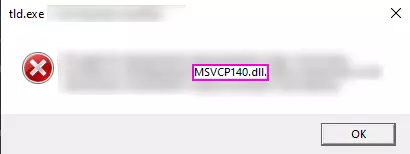
Melonloader无法加载。确保游戏路径中没有名称包含非英文字母/符号的文件夹。将此类文件夹重命名为仅包含英文字符的名称。如果游戏路径中没有此类文件夹但问题仍然存在,请阅读下方第5段。 如果在启动模组前收到任何错误。这很可能是Melonloader自身的问题,请在他们的Discord服务器寻求帮助。但不要忘记向他们提供日志,而不仅仅是错误窗口的截图。游戏连接服务器需要很长时间。请确保客户端与主机之间连接稳定,如有防火墙和杀毒软件请关闭,如果关闭防火墙和杀毒软件后问题仍未解决,请重新安装局域网模拟器(如Radmin或Hamachi)。 我遇到了一个bug,该如何寻求帮助?为了更好地追踪bug并安排修复工作,我们决定现在通过GitHub接收bug报告。但为避免发布重复报告,我们要求至少在报告的标题部分使用英文,这样大多数用户就能了解他们想要报告的问题是否已为人所知。快速查看已报告问题的标题,若未找到你的问题,请点击“新建问题”,并通过我们准备的便捷表单填写信息。你还需要一个GitHub账号,创建账号并不困难,且便于你追踪问题的解决状态。